
OCR
In ODF 2, there are two levels of API you can use to interact with the OCR service. The high-level API is a couple of Bot Tasks to submit documents and receive OCR results. It is the primary solution in most cases. When it is not enough, the low-level API is a service used to make calls directly to OCR.
High-level API
Submit documents for recognition
To use the OCR service, implement the SubmitDocumentToOcrTask interface.
SubmitDocumentToOcrTask
public interface SubmitDocumentToOcrTask extends OdfSingleResultTask {

    @Override
    default Class<? extends OdfSingleResultTaskRunner<?>> getRunnerClass() {
        return SubmitDocumentToOcrTaskRunner.class;
    }

    String getDocumentUrl(UUID transactionId);

    OcrConfiguration getOcrConfiguration();

    OcrService getOcrService();

}
To submit a document, the framework needs to know the three things:
- URL of the document to be processed
- processing configuration
- exact
OcrServiceto be used
For that reason, the task interface has three methods to be correctly implemented.
In most cases, the document URL is stored in the Use Case-specific data model. Thus, the getDocumentUrl() method implementation must deal with getting it out of the corresponding entity.
@Override
public String getDocumentUrl(UUID transactionId) {
  return ourDocumentRepository.find(transactionId).getUrl();
}
The OCR configuration is a bunch of mostly self-explanatory flags stored in the com.workfusion.odf2.core.webharvest.service.OcrConfiguration class. The corresponding task method must return an instance of the object configured for specific needs:
@Override
public OcrConfiguration getOcrConfiguration() {
  final OcrConfiguration configuration = new OcrConfiguration(OcrType.TOD);
  configuration.setLanguage("French");
  return configuration;
}
As for OcrService, there are two versions of OCR SDK you can use in production. Inject a service for the desired version and return it from the corresponding method:
// in constructor
@Inject
public SubmitToOcrExampleTask(@OcrSdk12 OcrService ocrService) { // or @OcrSdk11, as required
  this.ocrService = ocrService;
}

// and later
@Override
public OcrService getOcrService() {
  return ocrService;
}
The resulting task looks like this
package com.workfusion.odf2.regression.task;

import java.util.UUID;
import javax.inject.Inject;
import org.slf4j.Logger;
import com.workfusion.odf2.compiler.BotTask;
import com.workfusion.odf2.core.cdi.Requires;
import com.workfusion.odf2.regression.bundle.RepositoryModule;
import com.workfusion.odf2.regression.bundle.repository.InputPictureRepository;
import com.workfusion.odf2.service.ControlTowerServicesModule;
import com.workfusion.odf2.service.ocr.OcrConfiguration;
import com.workfusion.odf2.service.ocr.OcrSdk12;
import com.workfusion.odf2.service.ocr.OcrService;
import com.workfusion.odf2.service.ocr.OcrType;
import com.workfusion.odf2.transaction.task.ocr.SubmitDocumentToOcrTask;

@BotTask
@Requires({RepositoryModule.class, ControlTowerServicesModule.class})
public class SubmitPictureOcrTask implements SubmitDocumentToOcrTask {

    private final InputPictureRepository inputPictureRepository;
    private final OcrService ocrService;
    private final Logger logger;

    @Inject
    public SubmitPictureOcrTask(InputPictureRepository inputPictureRepository, @OcrSdk12 OcrService ocrService, Logger logger) {
        this.inputPictureRepository = inputPictureRepository;
        this.ocrService = ocrService;
        this.logger = logger;
    }

    @Override
    public String getDocumentUrl(UUID transactionId) {
        String documentUrl = inputPictureRepository.findByTransactionId(transactionId).get(0).getOriginalDocumentLink();
        logger.info("Document submitted for OCR: {}", documentUrl);
        return documentUrl;
    }

    @Override
    public OcrConfiguration getOcrConfiguration() {
        return new OcrConfiguration(OcrType.STANDARD);
    }

    @Override
    public OcrService getOcrService() {
        return ocrService;
    }
}
Receive results
As soon as a document is submitted to OCR, some time passes before it is processed. To get the resulting document, implement RetrievePictureOcrResultTask that deals with waiting for the processing under the hood. Write the code related to the received document and provide the framework with correct OcrService as in the SubmitPictureOcrTask implementation.
The resulting task looks like this
package com.workfusion.odf2.regression.task;

import java.util.UUID;
import javax.inject.Inject;
import com.fasterxml.jackson.core.JsonProcessingException;
import com.fasterxml.jackson.databind.ObjectMapper;
import org.slf4j.Logger;
import com.workfusion.odf2.compiler.BotTask;
import com.workfusion.odf2.core.cdi.Requires;
import com.workfusion.odf2.regression.bundle.RepositoryModule;
import com.workfusion.odf2.regression.bundle.model.InputPicture;
import com.workfusion.odf2.regression.bundle.repository.InputPictureRepository;
import com.workfusion.odf2.service.ControlTowerServicesModule;
import com.workfusion.odf2.service.ocr.OcrResult;
import com.workfusion.odf2.service.ocr.OcrSdk12;
import com.workfusion.odf2.service.ocr.OcrService;
import com.workfusion.odf2.transaction.TransactionResult;
import com.workfusion.odf2.transaction.task.ocr.ReceiveOcrResultTask;

@BotTask
@Requires({RepositoryModule.class, ControlTowerServicesModule.class})
public class RetrievePictureOcrResultTask implements ReceiveOcrResultTask {

    private final OcrService ocrService;
    private final InputPictureRepository inputPictureRepository;
    private final Logger logger;

    @Inject
    public RetrievePictureOcrResultTask(@OcrSdk12 OcrService ocrService, InputPictureRepository inputPictureRepository, Logger logger) {
        this.ocrService = ocrService;
        this.inputPictureRepository = inputPictureRepository;
        this.logger = logger;
    }

    @Override
    public OcrService getOcrService() {
        return ocrService;
    }

    @Override
    public void doWithResult(OcrResult ocrResult, UUID transactionId, TransactionResult result) {
        result.withColumn("meta_info_json", toJson(ocrResult.getOcrMetaInfo()));
        result.withColumn("document_xml_link", ocrResult.getDocumentXmlLink());
        result.withColumn("pages", String.valueOf(ocrResult.getPages()));

        InputPicture inputPicture = inputPictureRepository.findByTransactionId(transactionId).get(0);
        inputPicture.setOcrResultUrl(ocrResult.getDocumentXmlLink());
        inputPictureRepository.update(inputPicture);
        logger.info("Input picture {} OCR results are saved.", inputPicture.getName());
    }

    private static String toJson(Object obj) {
        try {
            return new ObjectMapper().writeValueAsString(obj);
        } catch (JsonProcessingException e) {
            throw new IllegalStateException(e);
        }
    }

}
Compose OCR in Business Process
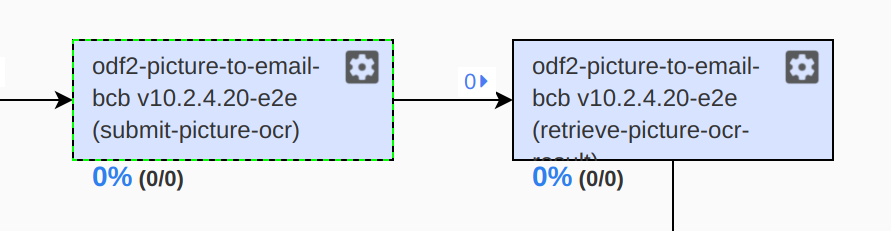
Once you deploy your ODF 2 project into Control Tower which contains the above ODF Bot Tasks, you can drag-and-drop and connect them as follows:
Low-level API
If the functionality of out-of-the-box tasks is not enough, you can inject the com.workfusion.odf2.core.webharvest.service.ocr.OcrService
and com.workfusion.odf.ocr.client.OcrClient classes.
OcrService encapsulates the logic of interacting with OCR and S3 endpoints, storing input and output documents, OCR result parsing, and so on.
OcrClient is an HTTP client for the OCR endpoint. You can use it to implement your services of any desired complexity.
OCR cache
The ODF 2 framework provides the ability to cache OCR results. It helps to speed up a Business Process when dealing with repetitive documents as OCR itself is quite a time-consuming operation. Also, it helps to save your OCR license since retrieving documents from the cache does not require sending anything to the actual OCR server.
The OCR cache is available from the high-level API perspective and is enabled by default. To start using it, no additional actions are required.
When you inject OcrService to a Bot Task, the OcrService implementation already comes with all the required functionality.
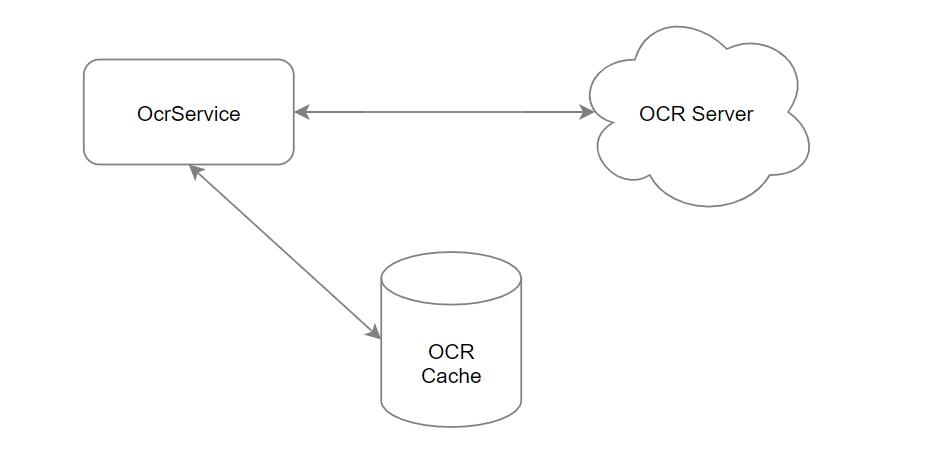
To illustrate how it works, let’s imagine you send a document to OCR for the first time. In this case, OcrService does the following:
- generates a cache key based on the document content and the specified
OcrConfiguration - sends the document to the OCR server
- retrieves OCR results and puts them into the
uc_<uc_code>_ocr_cache_v<version>Data Store
When the same document with the same configuration is sent to OCR for the second time, OcrService does the following:
- generates a cache key based on the document content and the specified
OcrConfiguration - looks for the generated cache key inside the
uc_<uc_code>_ocr_cache_v<version>Data Store and returns the associated result from the Data Store
note
All the binary files are stored on the S3 server. The uc_<uc_code>_ocr_cache_v<version> Data Store contains document links and meta information only.
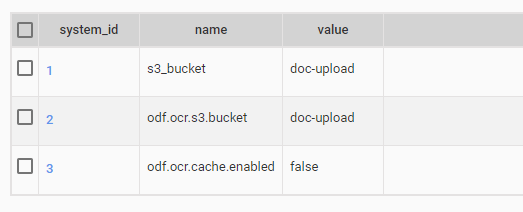
If, for some reason, you switch the OCR cache off, use a special flag for this. Navigate to the uc_<uc_code>_config_v<version> Data Store and make sure the odf.ocr.cache.enabled option is set to false. Then, all upcoming requests from OcrService go directly to the OCR server without any caching logic.
To clean one or multiple cache entries, open uc_<uc_code>_ocr_cache_v<version> the Data Store and clean related records. It is a safe operation, and no data is lost as it contains document links and meta information.
If you require to operate cache entities programmatically, use the com.workfusion.odf2.core.webharvest.service.ocr.OcrCache interface. Once it is injected into a Bot Task, it provides the following methods:
boolean contains(String key)returnstrueif the cache contains an entry associated with the providedkey, otherwise—false.Optional<OcrResult> get(String key)returns theOcrResultvalue associated with the providedkeyin the cache orOptional.empty()if there is no cached value for the key.void put(String key, OcrResult ocrResult)associates theOcrResultvalue with thekeyin the cache. If the cache previously contained a value associated with the key, the old value is replaced by a new one.void invalidate(String key)discards any cached value for the providedkey.void invalidateAll()discards all entries in the cache.long size()returns the number of cache entries.