
Business Process integration testing
Spoke is a tool for end-to-end Business Process testing. It provides fluent APIs for a developer to achieve typical testing goals. The framework is built on the JUnit 5 + AssertJ ecosystem, but the core module does not depend on it and can be used as a pure Java library.
Create integration tests with Spoke
The core idea of Spoke is test execution on the real Control Tower environment so that test results become reliable. First, let's understand the general sequence of test steps. To test a typical Business Process, high-level steps look as follows.
- Publish the Asset Bundle to Control Tower.
- Run a freshly created Business Process, providing the input data if required.
- Wait for the Business Process to finish execution.
- Download the output data and make sure it conforms to your expectations.
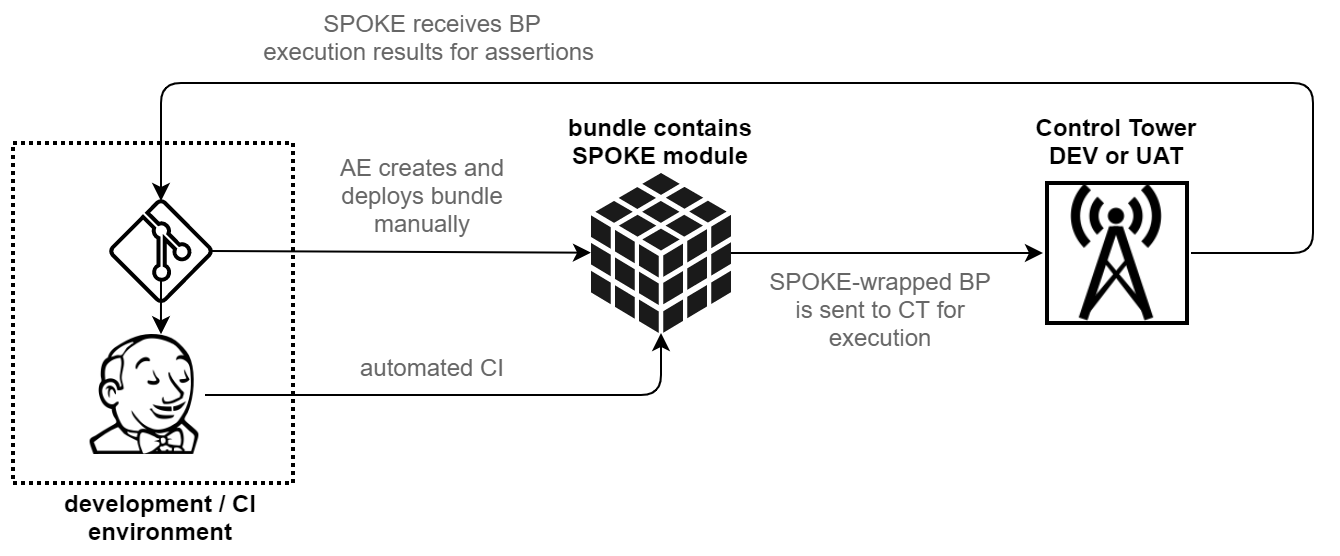
Created with Spoke, the sequence looks like this:
package org.spoketry.spoke;

import java.io.File;
import java.time.Duration;
import org.assertj.core.api.Assertions;
import org.junit.jupiter.api.Test;
import com.workfusion.spoke.configuration.Configuration;
import com.workfusion.spoke.Await;
import com.workfusion.spoke.ControlTower;
import com.workfusion.spoke.InputData;
import com.workfusion.spoke.bp.BusinessProcessResult;
import com.workfusion.spoke.bundle.AssetBundle;

public class AppTest {

    @Test
    void shouldRunBPAndFetchTheResults() {
        // given
        final ControlTower controlTower = ControlTower
                .createConfigured(Configuration.fromFile("control-tower.properties"));        // configuring our Control Tower URL and credentials
                                                                                              // note that path to file is relative to the root of the test module
        // when
        final BusinessProcessResult result = controlTower
                .importAssetBundle(AssetBundle.fromFile("my-package.zip"))                    // 1. publishing bundle
                .getBusinessProcessByZipName("my-bp.zip")                                     // 2. choosing business process - this is BP artifact name which
                                                                                              //    exists in 'business-process' folder of my-package.zip bundle
                .run(new InputData(new File("input.csv")))                                    // 3. running business process with input data
                                                                                              //    note that path to file is relative to the root of the test module
                .waitFor(Await.atMost(Duration.ofMinutes(5)))                                 // 4. waiting...
                .untilFinished();                                                             //    for business process to finish execution

        // then
        Assertions.assertThat(result.expectSuccessful()
                .getOutputDataAsString())
                .contains("something that should be here");                                   // 5. Asserting output data
    }

}
This basic test case takes some time to run depending on the Bundle size, network connection, and Control Tower performance, but it is already doing the job. Let's look at this scenario in detail.
Configuration
Configure Control Tower connection
com.workfusion.spoke.ControlTower is an entry point to the Spoke framework. This class encapsulates all the network interactions with the Control Tower instance. There are several ways to create it with the help of different static factory methods, depending on how you store your configuration.
The configuration for the Control Tower connection consists of four properties:
apiRootis based on the Control Tower instance URL, typically looking like "https://yourserver.com/workfusion/api"authenticationEndpointis, for example, "https://yourserver.com/workfusion/api/dologin"usernameandpasswordare credentials to be used for all Control Tower interactions
The easiest (and the least flexible) way to provide it is the ControlTower.create() method that takes all the four properties as arguments. This method is designed only for quick proof-of-concept implementations and should not be used outside of this context.
note
Mind not to keep credentials in the source code. Do not store credentials to production instances in code repositories.
Now, the right way to configure the ControlTower object is to use the ControlTower.createConfigured() method, which takes what static methods of the com.workfusion.spoke.configuration.Configuration class are returning as an argument.
For example, you can do:
ControlTower.createConfigured(Configuration.fromFile("filename.properties")); // load configuration from file by absolute path

ControlTower.createConfigured(Configuration.fromResource("/classpath-resource.properties")); // load configuration from classpath resource

ControlTower.createConfigured(Configuration.fromFileSpecifiedIn("SYSTEM_PROPERTY_NAME")); // load configuration from file,
                                                                                          // to which absolute path is specified in system property

ControlTower.createConfigured(Configuration.fromFileSpecifiedInSystemProperty()); // same as previous; uses default system property named 'spoke.configuration'
Most of these methods are self-describing. In the end, each of them expects to find a property file that should contain the configuration. This file contains the four already discussed keys:
apiRoot=
authenticationEndpoint=
username=
password=
The example of configuration to execute tests on TESLA Control Tower:
apiRoot=https://tesla.workfusion.com/workfusion/api
authenticationEndpoint=https://tesla.workfusion.com/workfusion/api/dologin
username=API_USER
password=API_PASSWORD
important
The ability to load a file specified in the system property is most useful when tests are designed to run on a continuous integration server (for example, Jenkins), which is responsible for securely storing and providing configuration files.
A CI build can use a command like mvn clean deploy -Dspoke.configuration=path/to/property/file to provide the path to the managed configuration file. You can do the same locally, possibly with a different instance and/or credentials.
Regardless of the method used, you can override each configuration property through the system properties. For example, mvn deploy -Dspoke.apiRoot=new_value overrides apiRoot configured by other means.
Configure multiple servers
In some cases, it can be useful to store configurations for different servers in a single file. For example, if you have two environments named "alpha" and "beta", create a file looking like this:
alpha.apiRoot=...
alpha.authenticationEndpoint=...
alpha.username=...
alpha.password=...

beta.apiRoot=...
beta.authenticationEndpoint=...
beta.username=...
beta.password=...
To specify which environment Control Tower should use, configure it in the following way:
ControlTower.createConfigured(Configuration.fromFile("filename.properties").withPrefix("alpha")); // will use keys with prefix 'alpha.', ignoring all others
All the methods from the com.workfusion.spoke.configuration.Configuration class can be followed by withPrefix(). You can override the prefixed keys by the system properties like usual: mvn deploy -Dspoke.alpha.apiRoot=new_value.
Upload Business Process Bundles
Having configured the Control Tower instance, you can upload your Bundle. As shown above, it is done like this: controlTower.importAssetBundle(AssetBundle.fromFile("name.zip")).
This method uploads the Bundle to the Control Tower server and waits until its import is completed. Any errors in this process result in a runtime exception, effectively failing a test.
Each upload creates separate Business Processes that do not interact with other instances of the same Business Process in any way.
Run Business Processes
When the Bundle is imported, API returns the instance of the com.workfusion.spoke.ImportedAssetBundle class. You can use it to select a specific Business Process to run. Currently, you can select a Business Process by its zip name using
com.workfusion.spoke.ImportedAssetBundle.getBusinessProcessByZipName().
Anyway, you will receive the instance of com.workfusion.spoke.bp.BusinessProcess, which contains a set of run() methods with different combinations of parameters. Calling run() without parameters starts Business Process execution without input data.
To pass input data for Business Process execution, create the com.workfusion.spoke.InputData object. You can:
- call
new InputData(new File("name.csv"))ornew InputData(Paths.get("name.csv"))if you have a CSV file at hand - call
InputData.of("header", "value1", "value2", .. "valueN")to create simple input data with one column and any number of records on the fly
There is a version of run() that takes both the input data and the com.workfusion.spoke.Await instance that you can use to specify the maximum time to wait for the input data to upload. The example for working with Await can be found at line 11 of the Basic test case example.
Setting expectations
After the BusinessProcess.run() method starts execution, it returns the BusinessProcessRun instance that can be used to interact with the
execution process. For example, you can call BusinessProcessRun.stop(), which is useful in the try-finally statement.
Most often, though, you have to wait for execution to reach some expected state. To do this, specify how long you are willing to wait and what state you are waiting for.
Line 11 from the Basic test case example, BusinessProcessRun.waitFor(Await.atMost(Duration.ofMinutes(5)), defines your maximum wait time as 5 minutes and returns the BusinessProcessExpectations instance that contains methods to set the expected state.
Expectations for Business Process
BusinessProcessExpectations.untilFinished() is a method that blocks until Business Process execution ends, or the maximum wait time specified earlier is overdue (or execution fails with some error, in which case an exception is raised). You can use the returned BusinessProcessResult object to check if the execution was successful and to access the Business Process output.
Expectations for single step
BusinessProcessExpectations.untilStep("step name") returns the StepExpectations object that can be used to wait for the state of a specific Business Process step. For example, StepExpectations.hasPendingSubmissions() waits until the specified number of records reaches this step.
Perform tests with multi BP Asset Bundle
In ODF 2, the implementation is based on four Business Processes by default. Mocking steps in different Business Processes, running them one by one, and writing separate expectations for each of them becomes a normal situation.
See a Spoke test example for a multi BP Asset Bundle below:
import java.time.Duration;

import org.junit.jupiter.api.DisplayName;
import org.junit.jupiter.api.Test;

import com.workfusion.odf2.demo.DemoOdfModule;
import com.workfusion.odf2.spoke.MockOdfStep;
import com.workfusion.spoke.Await;
import com.workfusion.spoke.ControlTower;
import com.workfusion.spoke.ImportedAssetBundle;
import com.workfusion.spoke.bp.BusinessProcessSuccessfulResult;
import com.workfusion.spoke.bundle.AssetBundle;
import com.workfusion.spoke.configuration.Configuration;
import com.workfusion.spoke.junit.mdc.TestNameToMDC;
import com.workfusion.spoke.mock.MockStep;

import static org.assertj.core.api.Assertions.assertThat;

@TestNameToMDC
public class MultiBpTest {

    private static final Await DEFAULT_DURATION = Await.atMost(Duration.ofMinutes(5)).checkingEvery(Duration.ofSeconds(15));

    @Test
    @DisplayName("Should run all bp for test")
    public void shouldRunAllBpForTest() {
        final ControlTower controlTower = ControlTower.createConfigured(Configuration.fromFileSpecifiedInSystemProperty()
                .orElse(Configuration.fromFileInUserHome("spoke-it.properties")));

        final AssetBundle assetBundle = AssetBundle.fromFile("../odf2-demo-bundle/target/odf2-demo-bundle-1.0.zip")
                .withBusinessProcess("[ODF2+Demo]+Data+Intake+03-3-2021.zip",
                        MockStep.named("odf2-demo-bcb v1.0 (email-monitor)")
                                .fromString(MockOdfStep.withCodeFromResource("/EmailProviderTask.groovy")
                                        .withModules(DemoOdfModule.class)
                                        .build()))
                .withBusinessProcess("[ODF2+Demo]+Data+Processing+03-3-2021.zip",
                        MockStep.named("odf2-demo-bcb v1.0 (email-converter)")
                                .fromString(MockOdfStep.withCodeFromResource("/EmailToInvoiceConverterTask.groovy")
                                        .withModules(DemoOdfModule.class)
                                        .build()));

        final ImportedAssetBundle importedAssetBundle = controlTower.importAssetBundle(assetBundle);

        final BusinessProcessSuccessfulResult intakeResult = importedAssetBundle
                .getBusinessProcessByZipName("[ODF2+Demo]+Data+Intake+03-3-2021.zip")
                .run()
                .waitFor(DEFAULT_DURATION).untilFinished()
                .expectSuccessful();

        assertThat(intakeResult.getCompletedSubmissions()).isEqualTo(3);

        final BusinessProcessSuccessfulResult processingResult = importedAssetBundle
                .getBusinessProcessByZipName("[ODF2+Demo]+Data+Processing+03-3-2021.zip")
                .run()
                .waitFor(DEFAULT_DURATION).untilFinished()
                .expectSuccessful();

        assertThat(processingResult.getCompletedSubmissions()).isEqualTo(3);
    }
}
Bundle modifications to straight-through test Business Process execution
As it happens, the behavior of real-life Business Processes depends not only on input data but also on configuration through ETL steps and human input through Manual Tasks. It is impossible to fully automate a test case if a Business Process waits for human input.
For such cases, provide some options to modify a Business Process before uploading it to Control Tower. All modifications are done using the com.workfusion.spoke.bundle.AssetBundle.with() method.
Any modification does not change your original bundle file. Spoke creates a temporary copy of your Bundle and deletes it afterward.
Replace machine and manual steps
A typical way of dealing with manual or long-running machine tasks is to replace those with the so-called mocks–Bot Tasks that imitate the desired behavior to test other parts of the Business Process. Let's look at the step mocking example below:
final BusinessProcessResult result = controlTower
            .importAssetBundle(AssetBundle.fromFile("my-package.zip")                                 // 1. publishing bundle modified with...
                .with(MockStep.named("some manual task").fromString("bot task to run instead")))      //    mock step replacing an existing one
            .getBusinessProcessByZipName("my-bp.zip")                                                 // 2. running business process...
            .run(new InputData(new File("input.csv")))                                                      with input data
            .waitFor(Await.atMost(Duration.ofMinutes(5)))                                             // 3. waiting...
            .untilFinished();                                                                         //    for business process to finish execution
Here, instead of importBundle(), the businessProcess() method is used. It provides API modification. The with() method can be used several times to apply all the desired changes. In this case, the com.workfusion.spoke.mock.MockStep instance replaces some hypothetical step named "some manual task" with a bot step provided as a string.
Explore the MockStep class to find useful methods to load Bot Task code from different locations, or build it using simple com.workfusion.spoke.mock.MockStep.BotTaskBuilder.
Configure ETL steps
Similar to the previous example, you can use the com.workfusion.spoke.mock.MockEtlStep class to change an ETL step in your Business Process the same way as it changes when you select its options through the Control Tower UI. The following example of mocking an ETL step is pretty self-explanatory:
final BusinessProcessResult result = controlTower
            .importAssetBundle(AssetBundle.fromFile("my-package.zip")            // 1. publishing bundle modified with...
                .with(MockEtlStep.named("Settings")                              //    mock ETL step with desired answers
                        .withAnswer("setting_a", "some option")
                        .withAnswer("setting_b", "some other option")))
            .getBusinessProcessByZipName("my-bp.zip")                            // 2. running business process...
            .run(new InputData(new File("input.csv")))                                 with input data
            .waitFor(Await.atMost(Duration.ofMinutes(5)))                        // 3. waiting...
            .untilFinished();                                                    //    for business process to finish execution
Mock ODF 2 tasks
Spoke works with ODF 2-based Business Processes out-of-the-box, without any additional arrangements. However, mocking ODF 2 tasks can be a bit difficult. To help, ODF 2 offers a Spoke extension you can add to your project as a Maven dependency.
<dependency>
    <groupId>com.workfusion.odf2</groupId>
    <artifactId>odf2-spoke</artifactId>
    <version>${odf2.version}</version>
    <scope>test</scope>
</dependency>
The procedure of replacing any step in a Business Process with the ODF 2 task is similar to standard mocking.
controlTower.importAssetBundle(AssetBundle.fromFile("my-package.zip")
    with(MockStep.named("step-name").fromString(
        MockOdfStep.withCodeFromResource("/MockBotTask.groovy")
        .withModules(com.some.package.RequiredModule.class)
        .build()); // mock ODF2 step replacing an existing one
In this example, a step named "step-name" is replaced with some string content. The string content is built with the help of the com.workfusion.odf2.spoke.MockOdfStep helper class. It creates a step XML from some file named /MockBotTask.groovy located in the test resource root: src/test/resources.
The file from which the mock step is generated must contain a task written using ODF 2. It can look like any production ODF 2 task, with a couple of notable differences.
- A mock ODF 2 task must be written in Groovy, not in Java. Therefore, the example shows it as a Groovy file. This is because the task code is put directly into the Bot Task XML
<script>part, which expects Groovy code. There are no ways to bypass this limitation. - The file with the mock task can contain additional classes to be used by the task class. The Groovy filename must be equal to the name of the task class run by ODF 2.
- The
@Requiredannotation on the task class isn't processed. To add modules to the ODF 2 context for mock tasks, you can use the.withModules()method of theMockOdfStepclass, as shown in the example.
Let's assume that /MockBotTask.groovy contains the following code:
class MockBotTask implements InputProviderTask<Invoice> {

    private final InvoiceRepository invoiceRepository;

    @Inject
    SomeTask(InvoiceRepository invoiceRepository) {
        this.invoiceRepository = invoiceRepository
    }

    @Override
    Collection<Invoice> queryInputEntities() {
        return [ new Invoice() ]
    }

    @Override
    void saveInputEntity(Invoice input) {
        invoiceRepository.create(input)
    }
}
The Bot Task XML generated by the example code looks as follows:
<?xml version="1.0" encoding="UTF-8"?>
<config xmlns="http://web-harvest.sourceforge.net/schema/1.0/config" scriptlang="groovy">

    <script><![CDATA[
        import com.workfusion.odf2.core.Odf

        class MockBotTask implements InputProviderTask<Invoice> {

            private final InvoiceRepository invoiceRepository;

            @Inject
            SomeTask(InvoiceRepository invoiceRepository) {
                this.invoiceRepository = invoiceRepository
            }

            @Override
            Collection<Invoice> queryInputEntities() {
                return [new Invoice()]
            }

            @Override
            void saveInputEntity(Invoice input) {
                invoiceRepository.create(input)
            }
        }


        def odf = Odf.builder().withBinding(binding).withModules(com.some.package.RequiredModule.class).build()

        result = odf.runTask(MockBotTask)

        rows = result.getRows()
        columns = result.getColumns()
        ]]></script>

    <case>
        <if condition="${result.isPresent()}">
            <export include-original-data="false">
                <multi-column list="${rows}" split-results="${rows.size() > 1}">
                    <loop item="columnName">
                        <list>
                            <script return="columns"/>
                        </list>
                        <body>
                            <put-to-column-getter name="${columnName}" property="${columnName}"/>
                        </body>
                    </loop>
                </multi-column>
            </export>
        </if>
    </case>
</config>
It is almost the same XML as the ODF 2 compiler generates for a task like this. Though, it includes the task code itself. You can write such an XML yourself, but MockOdfStep makes it easier.
Assert results
After Business Process execution finishes with some result, assert its correctness according to your test case. You can do it using any available Java unit testing library; Spoke uses AssertJ and provides the AssertJ-compatible API for assertions on result objects.
First of all, com.workfusion.spoke.bp.BusinessProcessResult has the expectSuccessfull() and expectUnsuccessfull() methods that check validity of the corresponding expectations and return, respectively, instances of com.workfusion.spoke.bp.BusinessProcessSuccessfulResult and com.workfusion.spoke.bp.BusinessProcessUnsuccessfulResult. These classes can be used to access execution results and output data. You can access the output data as a file, a string or a com.workfusion.spoke.csv.CsvData instance. CsvData allows you to work with this data as a table (using the Table class from the Google Guava library). The com.workfusion.spoke.assertj.SpokeAssertions.assertThat() method is used to write fluent assertions on it.
For step expectations, use com.workfusion.spoke.bp.StepOutcome to access relevant data, including input data for a step. To assert it fluently, apply com.workfusion.spoke.assertj.SpokeAssertions.assertThat().
Start using Spoke with existing project
note
Find the latest Spoke JARs in the ODF public Nexus: https://repository.workfusion.com/service/local/repositories/releases/content/com/workfusion/spoke/.
Spoke is a part of the Open Development Framework. We recommend generating a project from the latest ODF 10.1 archetype and looking at the <project-name>-e2e-tests module. It provides you with a ready-to-use example of integrating Spoke into your builds.
If you already have a Maven project for your Bundle, the best way to add Spoke tests is to create a separate Maven module.
Right-click the project in the navigator > New > Other > Maven > Maven Module > give it a name > click the Next button > select All Catalogs in Catalog > use the maven-archetype-quickstart archetype > Next > specify Group Id, Version and Package > click Finish.
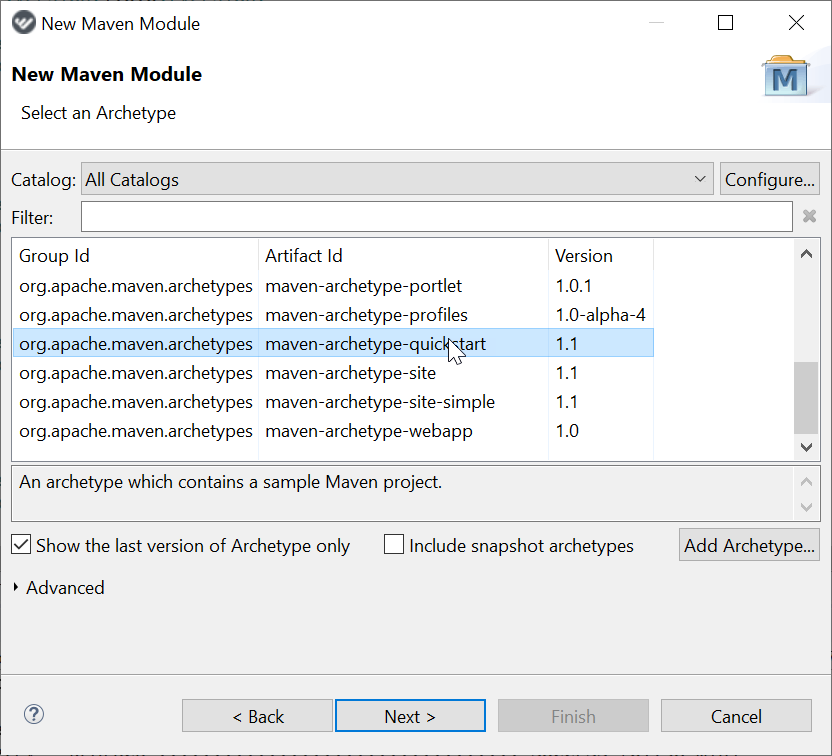
If the root pom uses com.workfusion.odf:odf of the latest version as a parent, versions of all the required dependencies are already managed. If not, your test module can import ODF BOM into your pom.xml.
Import ODF BOM as follows:
<dependencyManagement>
    <dependencies>
        <dependency>
            <groupId>com.workfusion.odf</groupId>
            <artifactId>odf</artifactId>
            <version>10.1.whatever</version>
            <scope>import</scope>
            <type>pom</type>
        </dependency>
    </dependencies>
</dependencyManagement>
Declare your dependencies.
<dependencies>
    <dependency>
        <groupId>com.workfusion.spoke</groupId>
        <artifactId>spoke-api</artifactId>
        <version>...</version>
        <scope>test</scope>
    </dependency>
    <dependency>
        <!-- if you are using AssertJ -->
        <groupId>com.workfusion.spoke</groupId>
        <artifactId>spoke-assertj</artifactId>
        <version>...</version>
        <scope>test</scope>
    </dependency>
    <dependency>
        <!-- if you are using AssertJ -->
        <groupId>org.assertj</groupId>
        <artifactId>assertj-core</artifactId>
        <scope>test</scope>
    </dependency>
    <dependency>
        <!-- if you are using Junit 5 -->
        <groupId>org.junit.jupiter</groupId>
        <artifactId>junit-jupiter-api</artifactId>
        <scope>test</scope>
    </dependency>
    <dependency>
        <!-- if you are using Junit 5 -->
        <groupId>org.junit.jupiter</groupId>
        <artifactId>junit-jupiter-engine</artifactId>
        <scope>test</scope>
    </dependency>
    <dependency>
        <!-- if you are using Junit 5 -->
        <groupId>org.junit.jupiter</groupId>
        <artifactId>junit-jupiter-params</artifactId>
        <scope>test</scope>
    </dependency>
</dependencies>
To ensure that the test module is built after the Bundle, it should depend on the module that is responsible for assembly. Add this into the test module pom:
<dependency>
    <groupId>your.group.id</groupId>
    <artifactId>your-package</artifactId>
    <version>your.version</version>
    <type>pom</type> <!-- if assembly module declares it's packaging as 'pom' -->
</dependency>
Place test classes into the
src/test/javadirectory as usual. In your tests, specify your Bundle by the path relative to the root of the test module, for example:controlTower(new File("../your-package/target/your-package-0.1-SNAPSHOT.zip"))
Configured like this, your tests will always run during the Maven build.
Full test examples
Test with mocks of Manual and Bot Tasks
Expand to view the example
package com.workfusion.spoke.sandbox.quickstart;

import java.io.File;
import java.io.IOException;
import java.net.URL;
import java.time.Duration;

import org.apache.commons.lang3.StringUtils;
import org.junit.jupiter.api.DisplayName;
import org.junit.jupiter.api.Test;

import com.workfusion.spoke.Await;
import com.workfusion.spoke.ControlTower;
import com.workfusion.spoke.assertj.SpokeAssertions;
import com.workfusion.spoke.bp.BusinessProcessResult;
import com.workfusion.spoke.bp.BusinessProcessRun;
import com.workfusion.spoke.bp.Conditions;
import com.workfusion.spoke.bp.StepOutcome;
import com.workfusion.spoke.csv.CsvData;
import com.workfusion.spoke.mock.MockEtlStep;
import com.workfusion.spoke.mock.MockStep;

import static org.assertj.core.api.Assertions.assertThat;

import static com.workfusion.spoke.configuration.Configuration.fromFile;

public class UsageExamplesTest {

    /**
     * Change this variable to point to configuration file on your machine
     * <p>
     * Content of this file should be like following:
     * <p>
     * apiRoot=https://[your-wf-server]/workfusion/api
     * authenticationEndpoint=https://[your-wf-server]/workfusion/api/dologin
     * username=[your username]
     * password=[your password]
     */
    private static final String CONFIGURATION_FILE = "your/path/to/spoke.properties";

    @Test
    @DisplayName("should run business process with mock manual step")
    void shouldRunBpWithMockManualStep() throws IOException {
        // given
        final ControlTower controlTower = ControlTower.createConfigured(fromFile(CONFIGURATION_FILE));

        final BusinessProcessRun run = controlTower
                .businessProcess(getResource("/simple-package-with-mt-0.0.113-3.zip"))
                .with(MockStep.named("double-input-string")
                        .botTaskBuilder()
                        .script("output = \"${input}${input}\"")
                        .exportSingleColumn("double_input_string", "${output}"))
                .publish()
                .run();

        try {

            // when
            final BusinessProcessResult result = run
                    .waitFor(Await.atMost(Duration.ofMinutes(5)).checkingEvery(Duration.ofSeconds(10)))
                    .untilFinished();

            // then
            assertThat(result.isSuccessful()).isTrue();

            final CsvData output = result.getOutputDataAsCSV();

            SpokeAssertions.assertThat(output)
                    .isNotEmpty()
                    .containsColumns("input", "double_input_string")
                    .allRowsSatisfy(row -> assertThat(row.get("double_input_string")).isEqualTo(row.get("input") + row.get("input")));

        } finally {
            run.stop();
        }
    }

    @Test
    @DisplayName("should run business process with mock manual and machine steps")
    void shouldRunBpWithMockManualAndMachineSteps() throws IOException {
        // given
        final ControlTower controlTower = ControlTower.createConfigured(fromFile(CONFIGURATION_FILE));

        final BusinessProcessRun run = controlTower
                .businessProcess(getResource("/simple-package-with-mt-0.0.113-3.zip"))
                .with(MockStep.named("first bot task")
                        .botTaskBuilder()
                        .script("inputList = [[input:'x'], [input:'y'], [input:'z']]")
                        .excludeOriginalData()
                        .export("<multi-column list=\"${inputList}\" split-results=\"true\">\n" +
                                "<put-to-column-getter name=\"input\" property=\"input\"></put-to-column-getter>\n" +
                                "</multi-column>"))
                .with(MockStep.named("double-input-string")
                        .botTaskBuilder()
                        .script("output = \"${input}${input}\"")
                        .exportSingleColumn("double_input_string", "${output}"))
                .publish()
                .run();

        try {

            // when
            final BusinessProcessResult result = run
                    .waitFor(Await.atMost(Duration.ofMinutes(5)).checkingEvery(Duration.ofSeconds(10)))
                    .untilFinished();

            // then
            assertThat(result.isSuccessful()).isTrue();

            final CsvData resultData = result.getOutputDataAsCSV();

            SpokeAssertions.assertThat(resultData)
                    .isNotEmpty()
                    .containsColumns("input", "double_input_string")
                    .hasSize(3)
                    .containsRowValue("input", "x")
                    .containsRowValue("input", "y")
                    .containsRowValue("input", "z")
                    .allRowsSatisfy(row -> assertThat(row.get("double_input_string")).isEqualTo(row.get("input") + row.get("input")));

        } finally {
            run.stop();
        }
    }

    @Test
    @DisplayName("should wait until manual task receives expected number of records")
    void shouldWaitForManualTask() {
        // given
        final ControlTower controlTower = ControlTower.createConfigured(fromFile(CONFIGURATION_FILE));

        final BusinessProcessRun run = controlTower
                .businessProcess(getResource("/simple-package-with-mt-0.0.113-3.zip"))
                .publish()
                .run();

        try {

            // when
            final StepOutcome result = run
                    .waitFor(Await.atMost(Duration.ofMinutes(5)).checkingEvery(Duration.ofSeconds(10)))
                    .untilStep("double-input-string").hasPendingSubmissions(Conditions.atLeast(3));

            // then
            SpokeAssertions.assertThat(result)
                    .isSuccessful()
                    .inputDataCsv()
                    .isNotEmpty()
                    .containsColumnsExactly("input")
                    .hasSize(3)
                    .containsRowValue("input", "a")
                    .containsRowValue("input", "b")
                    .containsRowValue("input", "c");

        } finally {
            run.stop();
        }
    }

    @Test
    @DisplayName("should run business process with mock ETL step")
    void shouldRunBpWithMockEtlStep() throws IOException {
        // given
        final ControlTower controlTower = ControlTower.createConfigured(fromFile(CONFIGURATION_FILE));

        final BusinessProcessRun run = controlTower
                .businessProcess(getResource("/test-bp-with-etl.zip"))
                .with(MockEtlStep.named("Provider settings")
                        .withAnswer("selected_service", "GOOGLE NEWS")
                        .withAnswer("selected_parser", "DIFFBOT"))
                .publish()
                .run();

        try {

            // when
            final BusinessProcessResult result = run
                    .waitFor(Await.atMost(Duration.ofMinutes(5)))
                    .untilFinished();

            //then
            assertThat(result.isSuccessful()).isTrue();

            final CsvData resultData = result.getOutputDataAsCSV();

            SpokeAssertions.assertThat(resultData)
                    .isNotEmpty()
                    .containsColumns("service", "parser")
                    .hasSize(1)
                    .containsRowValue("service", "GOOGLE NEWS was selected")
                    .containsRowValue("parser", "DIFFBOT was selected");

        } finally {
            run.stop();
        }
    }

    private File getResource(String path) {
        final URL resource = getClass().getResource(path);
        assertThat(resource).isNotNull();
        return new File(resource.getFile());
    }

}
Negative News Use Case test scenario
Expand to view the example
package com.workfusion.spoke.sandbox.nn;

import java.io.File;
import java.time.Duration;

import org.assertj.core.api.Assertions;
import org.junit.jupiter.api.Disabled;
import org.junit.jupiter.api.DisplayName;
import org.junit.jupiter.api.Test;

import com.workfusion.spoke.Await;
import com.workfusion.spoke.ControlTower;
import com.workfusion.spoke.InputData;
import com.workfusion.spoke.bp.BusinessProcessResult;
import com.workfusion.spoke.bp.BusinessProcessRun;
import com.workfusion.spoke.bp.Conditions;
import com.workfusion.spoke.bp.StepOutcome;
import com.workfusion.spoke.mock.MockEtlStep;
import com.workfusion.spoke.mock.MockStep;

import static com.workfusion.spoke.assertj.SpokeAssertions.assertThat;
import static com.workfusion.spoke.configuration.Configuration.fromFile;

public class NegativeNewsTest {

    /**
     * Change this variable to point to configuration file on your machine
     * <p>
     * Content of this file should be like following:
     * <p>
     * apiRoot=https://[your-wf-server]/workfusion/api
     * authenticationEndpoint=https://[your-wf-server]/workfusion/api/dologin
     * username=[your username]
     * password=[your password]
     */
    private static final String CONFIGURATION_FILE = "your/path/to/spoke.properties";

    /**
     * Change this variable to point to models bundle on your machine
     */
    private static final String MODELS_BUNDLE = "your/path/to/negativenews-package-10.1.8-models.zip";

    /**
     * Change this variable to point to use case bundle on your machine
     */
    private static final String USE_CASE_BUNDLE = "your/path/to/negativenews-package-10.1.zip";

    @Test
    @DisplayName("should upload models")
    @Disabled("Run this test if you need to deploy models to your instance. It should not be done every time.")
    void shouldUploadMlPackage() {
        ControlTower.createConfigured(fromFile(CONFIGURATION_FILE))
                .businessProcess(new File(MODELS_BUNDLE))
                .publish();

        // This test will fail at the end, because Spoke would not be able to receive business process UUID. Don't worry about that.
    }

    @Test
    @DisplayName("should search for news and receive found items on manual task")
    void shouldSearchForNewsAndReceiveFoundItemsOnManualTask() {
        // given
        final int articlesToSearch = 1;

        final BusinessProcessRun runningProcess = ControlTower.createConfigured(fromFile(CONFIGURATION_FILE))
                .businessProcess(new File(USE_CASE_BUNDLE))
                .with(MockEtlStep.named("Select Negative News Provider")
                        .withAnswer("selected_service", "GOOGLE NEWS")
                        .withAnswer("selected_parser", "MERCURY"))
                .with(MockEtlStep.named("Google Search Settings")
                        .withAnswer("google_date_from", "")
                        .withAnswer("google_date_to", "")
                        .withAnswer("google_articles", String.valueOf(articlesToSearch))
                        .withAnswer("google_domain", ".com")
                        .withAnswer("google_keywords", "FRAUD, MONEY LAUNDERING, LAUNDERING"))
                .publish()
                .run(InputData.of("search_request", "Banco Santander INDUSTRIAL AND PROVIDENT SOCIETY"));

        try {
            // when
            final StepOutcome outcome = runningProcess
                    .waitFor(Await.atMost(Duration.ofMinutes(15)))
                    .untilStep("Negative News Review").hasPendingSubmissions(Conditions.exactly(articlesToSearch));

            //then
            assertThat(outcome).isSuccessful();

        } finally {
            runningProcess.stop();
        }
    }

    @Test
    @DisplayName("should generate report for found news")
    void shouldGenerateReportForFoundNews() {
        // given
        final String articleToFind = "https://www.cnbc.com/2019/10/14/cum-ex-german-tax-case-could-ripple-through-the-finance-industry.html";


        final BusinessProcessRun runningProcess = ControlTower.createConfigured(fromFile(CONFIGURATION_FILE))
                .businessProcess(new File(USE_CASE_BUNDLE))
                .with(MockEtlStep.named("Select Negative News Provider")
                        .withAnswer("selected_service", "GOOGLE NEWS")
                        .withAnswer("selected_parser", "MERCURY"))
                .with(MockStep.named("Negative news input v10.1 (Search news articles in Google News)")
                        .botTaskBuilder()
                        .script("import com.workfusion.gorilla.negativenews.app.InputAmlApp;\n" +
                                "import com.workfusion.gorilla.negativenews.google.GoogleNewsSearchIntakeProcessor;\n" +
                                "InputAmlApp aml = new InputAmlApp(binding, ['googleLink': '" + articleToFind + " ']);\n" +
                                "def transaction = aml.processTransaction(GoogleNewsSearchIntakeProcessor.class, _sys_transaction_id.toString())")
                        .exportSingleColumn("google_articles", "1"))
                .with(MockStep.named("Negative News Review").botTaskBuilder())
                .publish()
                .run(InputData.of("search_request", "Banco Santander INDUSTRIAL AND PROVIDENT SOCIETY"));

        try {
            // when
            final BusinessProcessResult result = runningProcess
                    .waitFor(Await.atMost(Duration.ofMinutes(15)))
                    .untilFinished();

            //then
            Assertions.assertThat(result.isSuccessful()).isTrue();

        } finally {
            runningProcess.stop();
        }
    }

}