
Manage Custom Attributes
Custom Attributes are intended to set parameters specific to a particular run of Business Process or Task. Using Custom Attributes, you do not need to create a new Campaign for a Task or BP to set new parameters.
For example, you can define the following Custom Attributes for two runs of the same BP:
- the first run: node_id="10067", capabilities="MAC", host="192.168.101.100"
- the second run: node_id="10068", capabilities="WINDOWS", host="127.0.0.1"
Otherwise, if you need to set common values used in different processes, use Global Variables.
Create Field Scheme
- Go to System settings > Field Schemes.
- Click on Create Field Scheme.
- Enter Name and Description.
- Click on Add Answers and define their Unique Codes and Answer Types.
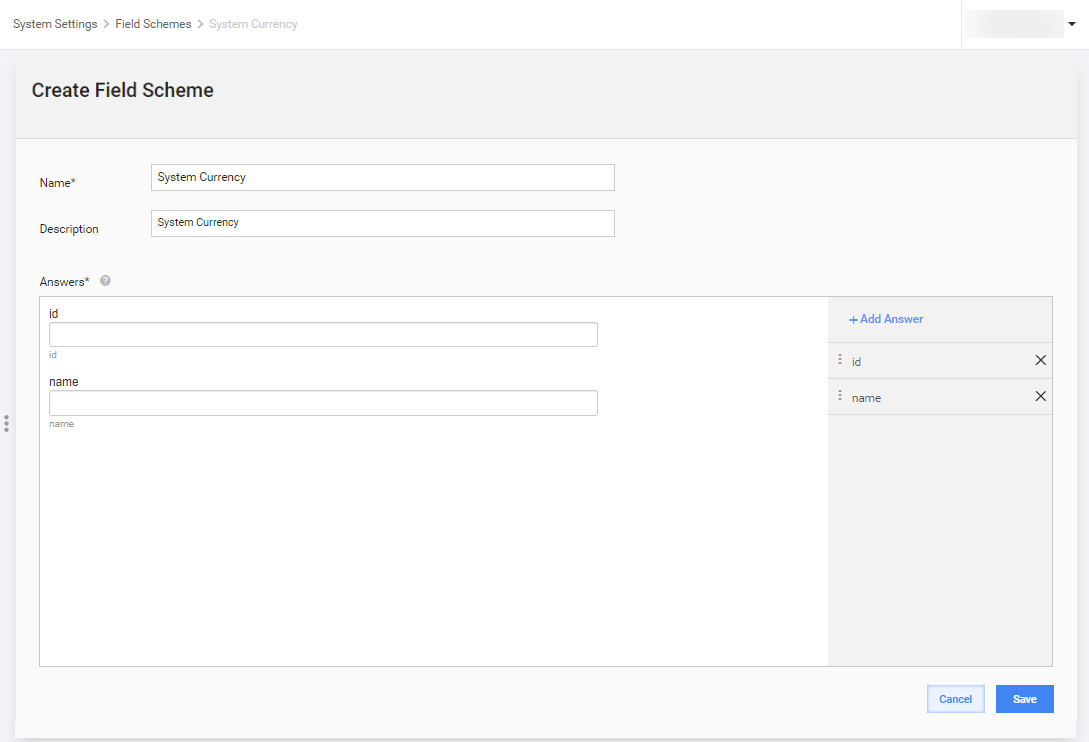
- Press Save.
Select Field Scheme
Open your Business Process > Run > Advanced Options.
Select the Field Scheme in the Custom Attributes dropdown.
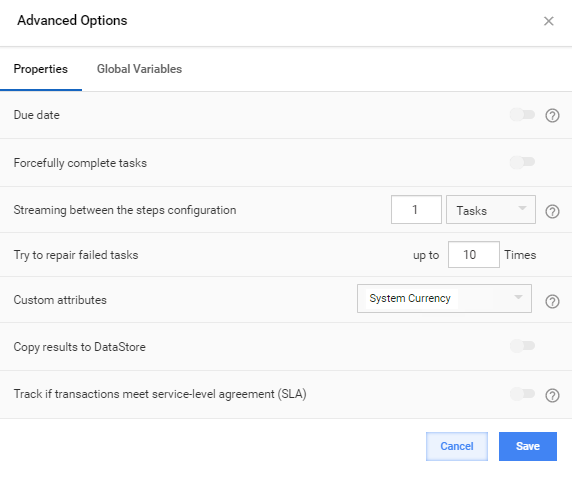
Press Save.
Define values
- In the top left corner of the Run BP tab, hover over the green Attributes labels.
- Click on the pencil icon.
- Enter values for each field in the Custom Attributes popup.
- Press Save
- Save the Business Process.
note
There is no ability to run Task/BP when one of the required Custom Attributes is not provided. A warning message is displayed.
Use Custom Attribute values
You can use Custom Attributes in Bot steps by getting their values from item.getWrappedObject().getRun().getCustomAttrMap():
Using Custom Attributes in Bot Config
<?xml version="1.0" encoding="UTF-8"?>
<config charset="UTF-8">

<script><![CDATA[

  java.util.Map attrsMap = new java.util.HashMap();

  void extractMvelAttributes(Object mapValue, Map attrsMap) {
     java.util.List values = new java.util.ArrayList();
     String attrs = (String) mapValue;
     while(attrs.indexOf("'")>=0) {
         attrs = attrs.substring(attrs.indexOf("'")+1);
         values.add(attrs.substring(0, attrs.indexOf("'")));
         attrs = attrs.substring(attrs.indexOf("'")+1);
     }
     java.util.Iterator listIterator = values.iterator();
     while(listIterator.hasNext()) {
        attrsMap.put(listIterator.next(), listIterator.next());
     }
  }

  if (sys.isVariableDefined("item")) {
    java.util.Map customRunAttrMap = item.getWrappedObject().getRun().getCustomAttrMap();

    for (Object key: customRunAttrMap.keySet()) {
      if (key.toString().equals("mvel_attributes")) {
         extractMvelAttributes(customRunAttrMap.get(key), attrsMap);
      } else {
         attrsMap.put(key, customRunAttrMap.get(key));
      }
    }
  }
]]></script>


<case>
  <if condition='${attrsMap.containsKey("capabilities")}'>
     <var-def name="result">
         <template>${attrsMap.get("capabilities")}</template>
     </var-def>
  </if>
  <else>
     <var-def name="result">
          <template>Not Found</template>
     </var-def>
  </else>
</case>
    <export include-original-data="true">
        <single-column name="result" value="${result}"></single-column>
    </export>
</config>
Next, do as follows.
- Copy your BP.
- Set new Custom Attribute values if needed. The source BP run will not be affected. By default, Custom Attribute values are copied from the previous run.