
Learn about workflow
Learn about the roles
These are our two main roles:
| Data Analyst (DA) | Subject Matter Expert (SME) |
|---|---|
| This dedicated role is essential during delivery of automation projects which include unstructured data processing. The DA is a person assigned to help with automation of the Use Case via WorkFusion's solution in terms of documents' workflow. The main aim of the Data Analyst is to collect a high-quality data set to train the model. | This is an individual (from the customer’s side) with a deep understanding of a particular process, function, technology, machine, material, or type of equipment, who provides knowledge of business rules for automation projects and who participates in data labeling. |
The Data Analyst and the Subject Matter Expert work in closely together on the Use Case. They collaborate in the process of collecting the data set. The Data Analyst gives training on how to label documents in WorkSpace, verifies the quality of the documents for model training, and validates the result. The Subject Matter Expert provides information on documents' logic, meaning, workflow, and any corner cases. The SME learns how to use WorkSpace with the help of the DA and labels documents in this application for the data set.
Takeaway: The Subject Matter Expert is sharing knowledge and the Data Analyst is constructing the data set.
Learn about the functions
Now, let's talk about the particular functions the Data Analyst and the Subject Matter Expert fulfill.
| Data Set Collection steps | Data Analyst | Subject Matter Expert |
|---|---|---|
| 1. Investigation | Study documents' logic, quality, and distribution | Provide marked documents' samples |
| 2. Alignment on tagging logic | Create tagging instructions | Share expert knowledge on fields' logic and some corner cases |
| 3. OCR | Check documents' quality after OCR | Search for additional documents if necessary (with better quality for OCR) |
| 4. Training | Provide training task(s) and teach how to use WorkSpace | Take the training task in WorkSpace |
| 5. Active labeling | Validate tagged data | Tag documents with the help of instructions and guidance provided by Data Analyst |
Takeaway: There are five tasks which the Subject Matter Expert and Data Analyst do together.
Investigate the workflow
As we now know the roles and the functions of the Data Analyst and the Subject Matter Expert, it is time to learn the workflow of their collaboration.
| # | Step | Description |
|---|---|---|
| 1. | DA studies the requirements | In the first step, the Data Analyst should learn as much as possible about logic, the workflow of the documents, document layouts, and production distribution. DA reviews the requirements for the Use Case, documents' quality, format, and the data that needs to be selected from the document in terms of fields. |
| 2. | SME shares samples and marked values | SME consults with DA on different questions about the documents and explains the logic of documents' samples. |
| 3. | The questions and answers session and alignment on tagging logic | DA reviews the received documents and provides notes concerning documents' structure and quality to SME. This investigation step can be a reiterative series of questions and answers, which should result in a common understanding of what values should be tagged and where they should be found in documents of different types and vendors. It's crucial to cover all the documents, formats, templates that will be placed in the data set. |
| 4. | (optional) Split into batches | If the amount of documents is overwhelming or/and we are not sure about the success of initial tagging, we can divide available documents into batches. |
| 5. | DA prepares tagging instructions and Manual Task | DA records tagging logic established at the questions and answers session. step in the form of instructions for SME and designs a Manual Task for tagging. It's essential that tagging instructions are comprehensive and followed by SME while tagging. Any further nuances discovered later, or new documents added to data set alignment on tagging logic, can incur a review of the whole data set, or retagging, or a re-design of the Manual Task. That's why it's crucial to cover all the documents at Step 3. |
| 6. | SME has training on tagging | DA provides training tasks for SMEs. The rules of tagging are explained there, and experts study how to work with the WorkSpace application. Tagging rules and typical mistakes are discussed when the training task is outlined. |
| 7. | DA provides feedback | DA provides feedback on results and shows what can be improved. When enough training is done, tagging for data set collection begins. |
| 8. | SME labels documents | A Manual Task is created in WorkSpace with the set of necessary fields. DA uploads documents and SME starts tagging with the help of instructions provided by DA. |
| 9. | DA validates the results | This is a cycle: The Subject Matter Expert tags documents and the Data Analyst validates results. |
To simplify things further, we also visualized the workflow.
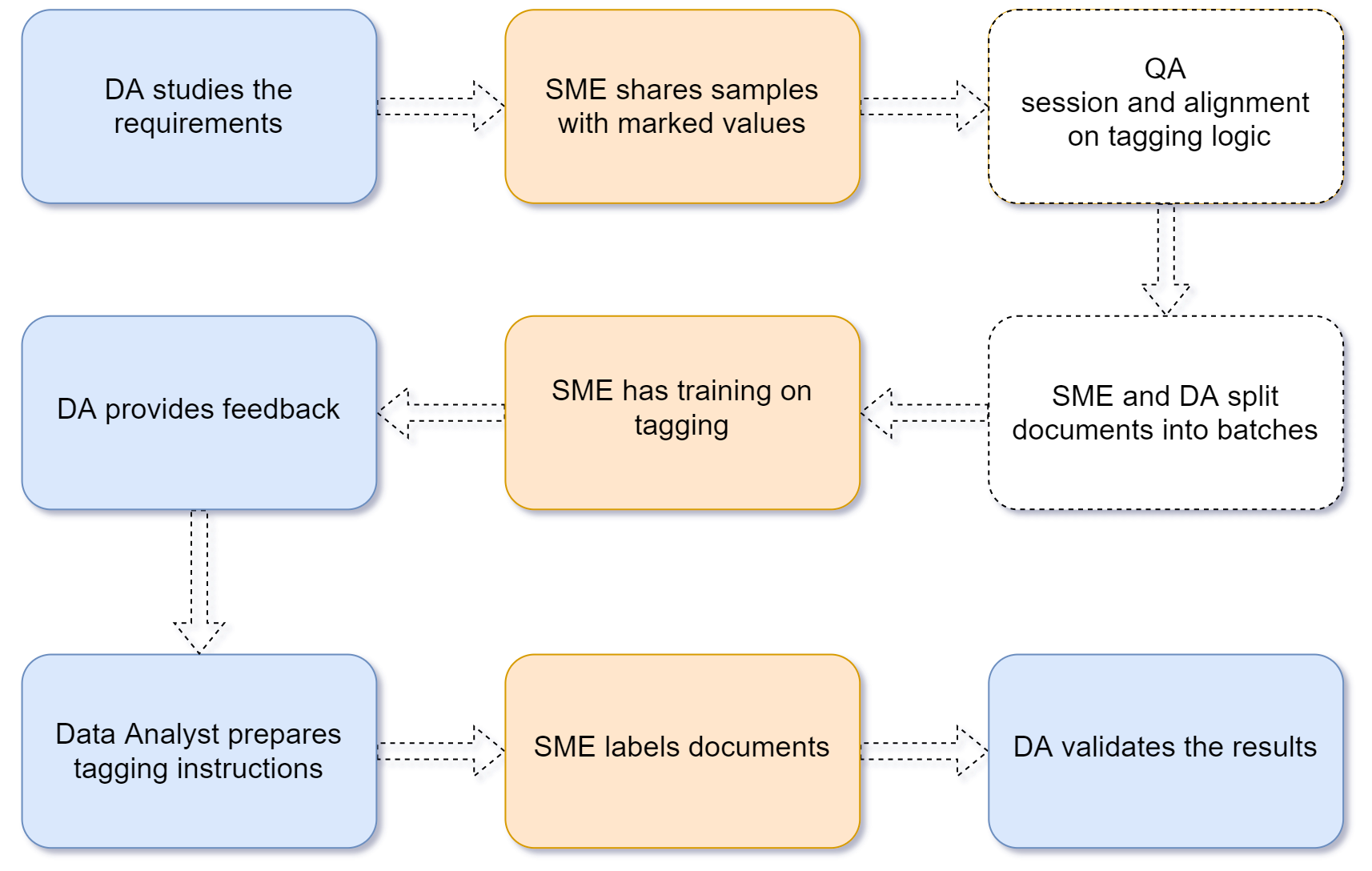
What do these colors mean?
- Pale red is the function of the Subject Matter Expert
- Light blue is the function of the Data Analyst
- White is for collaboration
Takeaway: This workflow is nine steps, from checking the requirements to the validation of results.
important
The order of the steps is not strict, but highly recommended. Mind that some steps can be changed by a Data Analyst.
Move further
Now that we have learned about the roles of Data Analyst and Subject Matter Expert, next we will learn about technology. In the following module, we will learn what components of the automation solution the tagging process relies on.