
Perform Automatic Quality Control
Automatic Quality Control (AutoQC) refers to the use of statistical methods in the monitoring and maintaining the quality of products and services. In the WorkFusion Automation workflow, the AutoQC sub-process chooses a cost-effective combination of automated machines and cloud workers to deliver at or above the acceptable quality level.
The main concept of AutoQC is to take a Sample from a defined Batch of items, such as BP records, documents, and so on, and verify each item in that sample. After the sample verification, the whole batch is considered as accepted or rejected, depending on the Rejection Limit.
Therefore, AutoQC allows to verify only a part of a batch but maintains continuous quality checks.
Theoretical bases and real-world usage
For better understanding of the theory, read the following articles:
- Walter A. Shewhart, Economic control of quality of manufactured product
- Six Sigma as a set of techniques and tools for process improvement
- United States Army Ordnance Corps used statistical quality control among its divisions and contractors at the outbreak of World War II.
Detecting sample size and rejection limit
WorkFusion AutoQC is based on Military Standard 105E (Inspection Level II) that defines the dependence of the sample size and rejection limit from the batch size, AQL, and inspection type.
The input includes the following parameters:
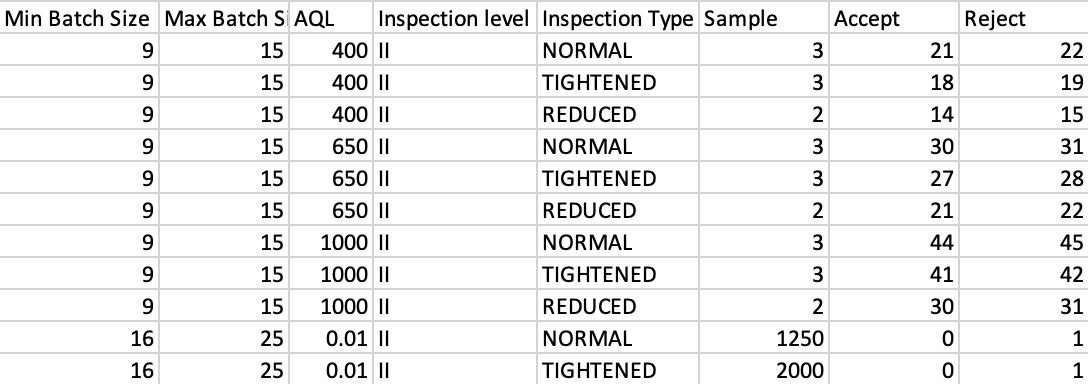
The AutoCQ application uses the following table as a reference to determine the Sample Size and Rejection Limit.
Extending and expiring batches
The following rules are applied to batches:
- A batch is created only when a minimum number of items is available. By default, it is two items.
- A batch can be extended during a defined time period—extendTime in the Assemble Batch step, which is, by default, five minutes. It means that the batch size is increased, thus the sample size and rejection limit can be increased and more items will be sent for inspection.
- A batch is marked as expired, if NOT all items from the sample are inspected during a defined time period (by default, Task Expiration Time— expirationTime in the Assemble Batch step).
Accepting or rejecting batches
The main purpose and result of AutoQC is to provide an answer: accept or reject a batch. This decision is made after verifying all items in the sample (or a part of a sample in some cases described below).
A batch is rejected if it is expired, meaning not all sample items were inspected during expirationTime or the rejection limit was reached when inspecting the sample.
A batch is accepted if the (number of correct sample items) ≥ (sample size - rejection limit).
If a batch is rejected, all remaining batch items (records in the BP) go to the manual step.
Switching between inspection types
On the Assemble Batch step, a Batch Executor is created for each unique combination of automation Use Case and automated Human Campaign. One Batch Executor can contain multiple batches distinguished by their unique ID.
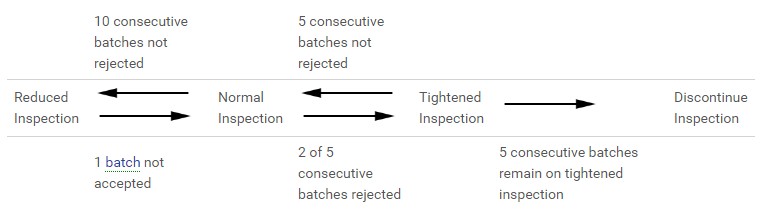
Depending on the number of consecutively accepted or rejected batches, the Batch Executor can be switched to another inspection type.
note
In the Discontinue Inspection mode, ALL upcoming items are routed to human inspection without sampling. It means that Accuracy drops under the AutoQC acceptable level, and the BP author gets an email notification.
The following diagram displays an example of a Batch Executor with three batches:
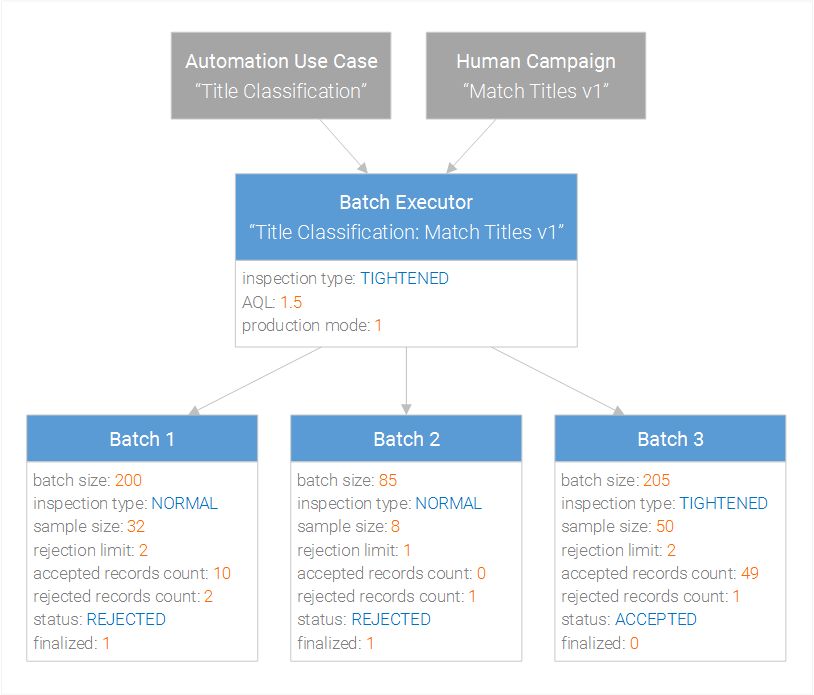
- The Batch Executor has production mode: 1. It means that the AutoQC process is triggered only for production runs of the automated Human Campaign.
- Note that batches have different sample size and rejection limit because of their batch size and inspection type.
- Batch 1 and Batch 2 were rejected because they've reached the rejection limit, therefore Batch 3 has the TIGHTENED inspection type.
- Batch 1 and Batch 2 were taken into consideration when switching to another inspection type (two of five consecutive batches rejected, as shown in the previous figure), therefore they have finalized: 1.
note
Expired batches are not taken into consideration when switching to another inspection type.
AutoQC sub-process in the automation process
Cloud workers statistically verify the automated and delivered results match the predicted accuracy from historical performance. AutoQC will automatically increase and decrease the amount of work sent to cloud workers to maintain the process performance at the requested acceptable level. AutoQC adapts during periods of repeated algorithm over-performance by decreasing human cloud work. Repeated periods of algorithm underperformance signal AutoML to retrain the algorithm.
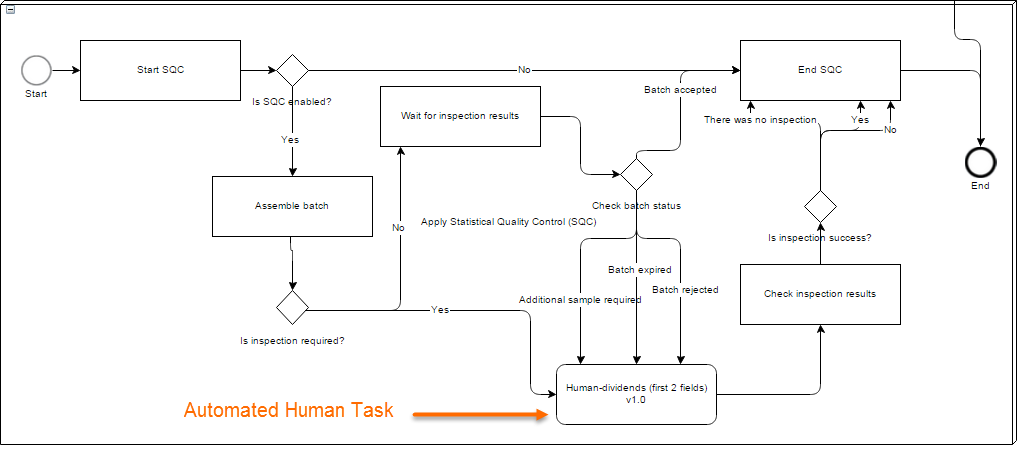
- AutoQC can be enabled or disabled on the 1st BP step.
- After records pass Extract Information step with the Success outcome, they are sent to the SQС sub-process.
- The first Is AutoQC enabled rule checks whether the quality control is needed. If the AutoQC was disabled on the Automation Settings step, all records are routed directly to the end without any inspection.
- On the Assemble Batch step, a Batch Executor is created for each unique combination of automation Use Case and automated human campaign. See the assembleBatch operation.
- Once the batch is assembled, the number of records that corresponds to the sample size are sent to a Manual Task. The rest of the batch is sent to Wait for Inspection Results step. This condition is verified in Is inspection required? by using AutoQC REST isInspectionRequired.
- After workers complete the Manual Task, records are sent to the Check Inspection Results step where machine answers are compared with human ones.
- The results of the comparison are sent to the AutoQC application via REST addInspectionResult, and the AutoQC app provides the inspection type and the batch status getBatchStatus:
- IN_PROGRESS
- ADDITIONAL_SAMPLE_REQUIRED
- ACCEPTED
- REJECTED
- EXPIRED
- Depending on the batch status, the rest of the batch records are routed to the End AutoQC step (if the batch is accepted) or to the Manual Task. In case when an additional sample is required, only one record is sent to the Manual Task.
- The last Is inspection success? rule routes records to an appropriate outcome, depending on their inspection result (the _sys_sqc_inspection_result column):
- Yes
- No
- There was no inspection
AutoQC application
AutoQC is an application that provides statistical sampling through REST API. It is used in WorkFusion Automation processes to verify automatically extracted information by Workers.
Tomcat configuration
Normally, AutoQC is deployed to a separate server, and its URL should be set in the WF server Tomcat configuration:
<Resource name="jdbc/sqc" auth="Container" type="javax.sql.DataSource"
maxActive="75" maxIdle="-1" maxWait="-1"
username="root" password="root" driverClassName="com.mysql.jdbc.Driver"
url="jdbc:mysql://localhost:3306/sqc?useLegacyDatetimeCode=false&serverTimezone=UTC&rewriteBatchedStatements=true"/>
<Environment name="sqc/applicationUrl" value="http://<host>:<port>/sqc-rest/api" type="java.lang.String"/>
In case the AutoQC service is on another host, only "sqc/applicationUrl" JNDI is required on the WF Instance.
AutoQC REST API
These are common parameters:
sourceIdis a parameter for multi-tenancy, uselocalin all cases.identifieris a batch group identifier. The statistics for the executor is calculated based on the batches related to the identifier.executorTypehelps to logically group executors. Currently used:ML: machine learningQC: quality check
assembleBatch
- URL:
http[s]://<host>:<port>/sqc-rest/api/assembleBatch - Method: POST
- Headers:
Content-Type = application/json - Parameters:
{
         "sourceId":"sourceId",
         "identifier":"identifier",
         "executorType":"ML",
         "name":"name",
         "numOfRecords": 100,
         "extendTime": 100000,
         "expirationTime": 10000000,
         "targetQuality":85
}
- Response:
{
    "status": "OK",
    "errorMessage": "",
    "result": {
        "batchUuid": "9a64afb5-25cf-4d31-a23c-de2999e1a3d6",
        "inspectionType": "NORMAL"
    }
}
isInspectionRequired
- URL:
http[s]://<host>:<port>/sqc-rest/api/isInspectionRequired - Method: POST
- Headers: –
- Parameters:
batchUuid = 9a64afb5-25cf-4d31-a23c-de2999e1a3d6 - Response:
{
    "status": "OK",
    "errorMessage": "",
    "result": true
}
addInspectionResult
- URL:
http[s]://<host>:<port>/sqc-rest/api/addInspectionResult - Method: POST
- Headers: –-
- Parameters:
batchUuid = 9a64afb5-25cf-4d31-a23c-de2999e1a3d6 result = 1 - Response:
{
    "status": "OK",
    "errorMessage": "",
    "result": {
        "inspectionType": "NORMAL",
        "prevInspectionType": "NORMAL"
    }
}
getBatchStatus
- URL:
http[s]://<host>:<port>/sqc-rest/api/getBatchStatus - Method: POST
- Headers: –-
- Parameters:
batchUuid = 9a64afb5-25cf-4d31-a23c-de2999e1a3d6 - Response:
{
    "status": "OK",
    "errorMessage": "",
    "result": "IN_PROGRESS"
}
projectInfo
- URL:
http[s]://<host>:<port>/sqc-rest/api/projectInfo - Method: GET
- Headers: –-
- Parameters: –-
- Response:
{
    "version":"2.0-SNAPSHOT",
    "repository":"https://svn.crowdcomputingsystems.com/svn/sqc",
    "path":"trunk",
    "revision":"143",
    "committedDate":"2014-12-23 06:56:50 +0000 (Tue, 23 Dec 2014)"
}
resetDiscontinue
The method returns the Batch Executor from DISCONTINUE inspectionType to TIGHTENED and finalizes its current batches.
- URL:
http[s]://<host>:<port>/sqc-rest/api/resetDiscontinue - Method: POST
- Headers: –
- Parameters:
sourceId: BatchExecutorsourceId(String) (for example,local)identifier: BatchExecutor identifier (String) (for example,84:a513ad77-65eb-4e7c-b472-128fd15794da)productionMode: BatchExecutorproductionMode(boolean), for example,1
- Response:
{
    "version":"2.0-SNAPSHOT",
    "repository":"https://svn.crowdcomputingsystems.com/svn/sqc",
    "path":"trunk",
    "revision":"143",
    "committedDate":"2014-12-23 06:56:50 +0000 (Tue, 23 Dec 2014)"
}
Continuous sampling (not used in automation)
This type of AutoQC does not use batches, the statistics is calculated for all records. The AutoQC application returns a response whether this particular record needs to be checked or not.
isNeedInspect
- URL:
http[s]://<host>:<port>/sqc-rest/api/isNeedInspect - Method: POST
- Headers:
Content-Type = application/json - Parameters:
{
    "sourceId":"sourceId",
    "identifier":"identifier",
    "executorType": "ML",
    "name": "name",
    "targetQuality":90
}
targetQuality should be within 0–100.
- Response:
true/false
addResult
- URL:
http[s]://<host>:<port>/sqc-rest/api/addResult - Method: POST
- Headers:
Content-Type = application/json - Parameters:
{
    "sourceId":"sourceId",
    "identifier":"identifier",
    "result": 0,
    "targetQuality":90
}
targetQuality should be within 0-100.
result should be 0 or 1.
Average results for experiments
Each experiment was performed 10 times.
Expand to learn results
| Experiment | 1 | 2 | 3 | 4 | 5 |
|---|---|---|---|---|---|
| PRECONDITIONS | |||||
| Total batches processed | 100 | 100 | 100 | 100 | 100 |
| Min batch size | 1 | 1 | 1 | 1 | 1 |
| Max batch size | 1000 | 1000 | 1000 | 1000 | 1000 |
| Avg batch size | 446 | 547 | 407 | 368 | 402 |
| Min batch quality | 0,70 | 0,75 | 0,80 | 0,85 | 0,90 |
| Max batch quality | 0,95 | 0,95 | 0,95 | 0,95 | 0,95 |
| Target quality | 0,90 | 0,90 | 0,90 | 0,90 | 0,90 |
| RESULTS | |||||
| Accepted batches | 4,7 | 7,9 | 39,4 | 82,1 | 99,7 |
| Rejected batches | 95,3 | 92,1 | 60,6 | 17,9 | 0,3 |
| Total records | 44680 | 54740 | 40700 | 36890 | 40220 |
| Correct records | 44530,5 | 54422,2 | 39886,5 | 34418,5 | 37402,4 |
| Incorrect records | 149,5 | 317,8 | 813,5 | 2471,5 | 2817,6 |
| Manually processed | 43567,7 | 51892,1 | 34142,8 | 12186,0 | 2788,8 |
| Manually processed, % | 0,98 | 0,95 | 0,84 | 0,33 | 0,07 |
| Actual results quality | 0,9943 | 0,9917 | 0,9563 | 0,9272 | 0,9313 |