
Add OCR Bridge step
OCR Bridge is introduced to improve:
- Performance. The new OCR Bridge step reduces throughput due to processing documents asynchronously without submitting redundant tasks to Control Tower workers and receiving responses instantly in Control Tower.
- Usability. Only one step is needed to recognize a document whose output is compatible with the ToD Manual Task.
Architecture
Control Tower handles the OCR Bridge steps in a particular way. It redirects input data to the OCR Bridge queue without involving the CT worker. After the document is processed, CT consumes the response from the result queue.
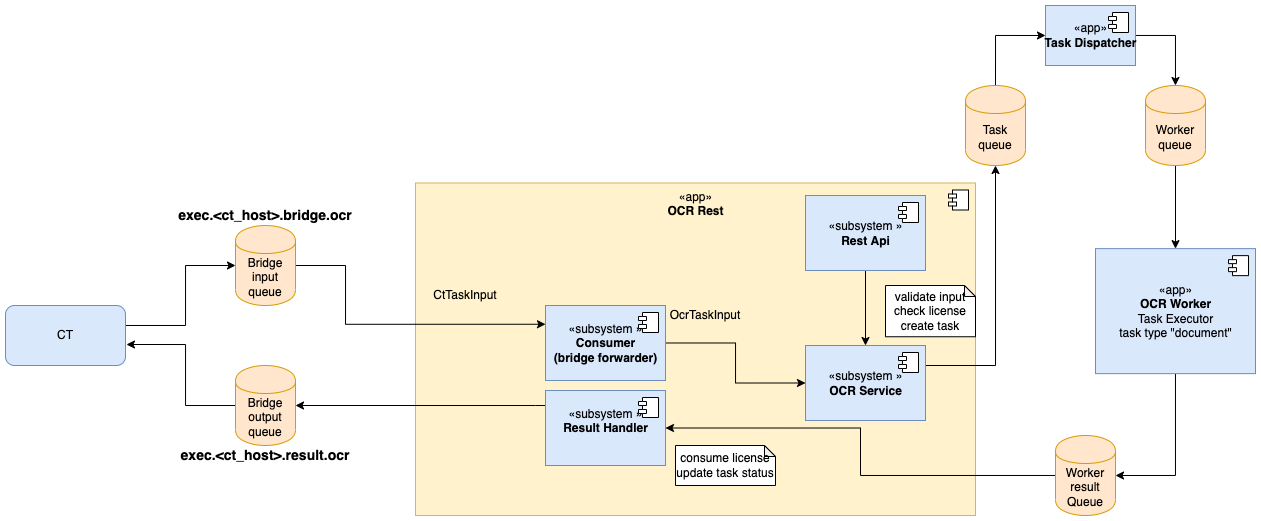
An OCR REST application can work with both REST and Bridge queue interfaces. It validates incoming tasks, checks and consumes licenses, stores tasks in DB with the correct status.
OCR REST configuration properties
| Property | Default value | Description |
|---|---|---|
execution.bridge.task.queue | exec.<CT_HOST>.result.ocr | Name of the OCR Bridge queue |
execution.bridge.prefetch.count | 100 | Prefetch count of the Bridge queue |
execution.bridge.thread.count | 20 | Count of threads for consuming messages of the Bridge queue |
OCR Bridge Step
Input parameters
| Parameter | Code | Default value | Description |
|---|---|---|---|
| Document URL column name | document_url_column_name | `original_document_url | Document URL column name for processing by OCR. |
| OCR Type | ocr_type | enriched | OCR Type values: Standard and Enriched (prepare output for TOD Manual Task). |
| S3 bucket name | s3_bucket_name | doc-upload | An S3 bucket to store results. |
| OCR Provider | ocr_provider | Abbyy | Type of the OCR provider:
|
| OCR parameters JSON | ocr_parameters | See later | See parameters in the table below. |
OCR JSON. Default values
{
    "exportFormat":"xmlForCorrectedImage,xmlWithoutRecognitionVariants",
    "language": "English",
    "correctSkew": true,
    "correctOrientation": true,
    "writeRecognitionVariants": true,
    "invertImage": false,
    "discardColorImage": false,
    "skipPreprocessing": false,
    "useOnlyCustomRegions": false,
    "useDefaultPattern": false,
    "profile": "documentConversion",
    "removeGarbageSize": 0,
    "lowResolutionMode": false,
    "enhanceLocalContrast": false,
    "allowedRegionTypes": null,
    "changeDPI": 0,
    "version": "V_2",
    "storePreprocessedDoc": true,
    "textTypes": ["normal"],
    "timeout": 60
}
OCR parameters
| Parameter | Values | Description |
|---|---|---|
exportFormat |
| Step's export format. |
language |
| Predefined language. You can also define multiple languages using a comma as a separator: English,German,Polish |
correctSkew | boolean | The page skew is detected and automatically corrected. |
correctOrientation | boolean | The page orientation is detected and if differs from normal, it is rotated automatically. |
writeRecognitionVariants | boolean | Causes the xml/xmlForCorrectedImage formats to include all variants of character or word, OCR considered as a possible recognition. |
invertImage | boolean | Inverts image. |
discardColorImage | boolean | Leaves only black-and-white plane in the prepared image. |
skipPreprocessing | boolean | Skips preprocessing stage. It increases performance up to 30%. |
useOnlyCustomRegions | boolean | Skips original analyzing stage and extracts information from custom regions only. |
useDefaultPattern | boolean | If true, it requires to apply the default pattern from the OCR application bundle. |
profile | documentConversion | Converts documents into editable formats. |
textExtraction | Extracts text from documents. | |
barcodeRecognition | Extracts barcodes. | |
removeGarbageSize | integer | Removes garbage: excess dots that are smaller than a certain size from the image. Optinal, valid value > 0 and -1 for automatically detect garbage size. |
lowResolutionMode | boolean | Improves recognition of images with low resolution. |
enhanceLocalContrast | boolean | Specifies whether the local contrast of the image should be increased. |
allowedRegionTypes |
| Deprecated. Specifies allowed region types for identified blocks classification. NOTE: narrowing down type of regions can break page layout. Do not use it if you’re not sure you need it. |
changeDPI | integer [50 : 3200] valid range null or 0 for disable | Specifies the new value for the resolution. |
version | V_2 | ABBYY FRE 12 |
| V_1 | ABBYY FRE 11 | |
storePreprocessedDoc | boolean | Specifies whether preprocessed documents should be saved into data storage. |
textTypes |
| Specifies the type of the text in the document. This parameter can also contain several text types separated with commas, for example 'normal,matrix'. See Text type. |
timeout | integer | Sets a timeout in seconds for task execution. |
Output parameters
OCR Result. Document processing result in the JSON format.
Code:
ocr_resultExample:
{
    "originalDocument": "https://minio-host/doc-upload/1.pdf",
    "documents": {
        "xmlForCorrectedImage": "https://minio-host/doc-upload/bp-id/task-id/1- xmlForCorrectedImage.xml",
        "xmlWithoutRecognitionVariants": "https://minio-host/doc-upload/bp-id/task-id/1-xmlWithoutRecognitionVariants.xml"
    },
    "pageDetails": "https://minio-host/doc-upload/bp-id/task-id/preprocessed/links.json"
}
Task id. The ID of an OCR task.
- Code:
task_id - Example:
066416ed-20e8-4e96-9df1-7f7e133f1211
- Code:
Meta Info JSON: extended info for the ToD Manual Task.
- Code:
meta_info_json - Example:
{ "pages": "https://minio-host/doc-upload/bp-id/task-id/preprocessed/links.json", "ocrXmlUrl": "https://minio-host/doc-upload/bp-id/task-id/1-xmlWithoutRecognitionVariants.xml", "imageUrl": "https://minio-host/doc-upload/1.pdf" }- Code:
Process time: record's process time in milliseconds.
- Code:
_sys_ocr_process_time - Example: 24053
- Code:
Page details json example https://minio-host/doc-upload/bp-id/task-id/preprocessed/links.json
[
    {
        "imgUrl": "https://minio-host/doc-upload/bp-id/task-id/preprocessed/1.png",
        "charsUrl": "https://minio-host/doc-upload/bp-id/task-id/preprocessed/1.json",
        "height": 3300,
        "width": 2550,
        "charsCount": 2216
    }
]
Build BP with OCR and ToD Manual Task
To build a Business Process with the OCR and ToD Manual Task, do the following:
Create a Business Process.
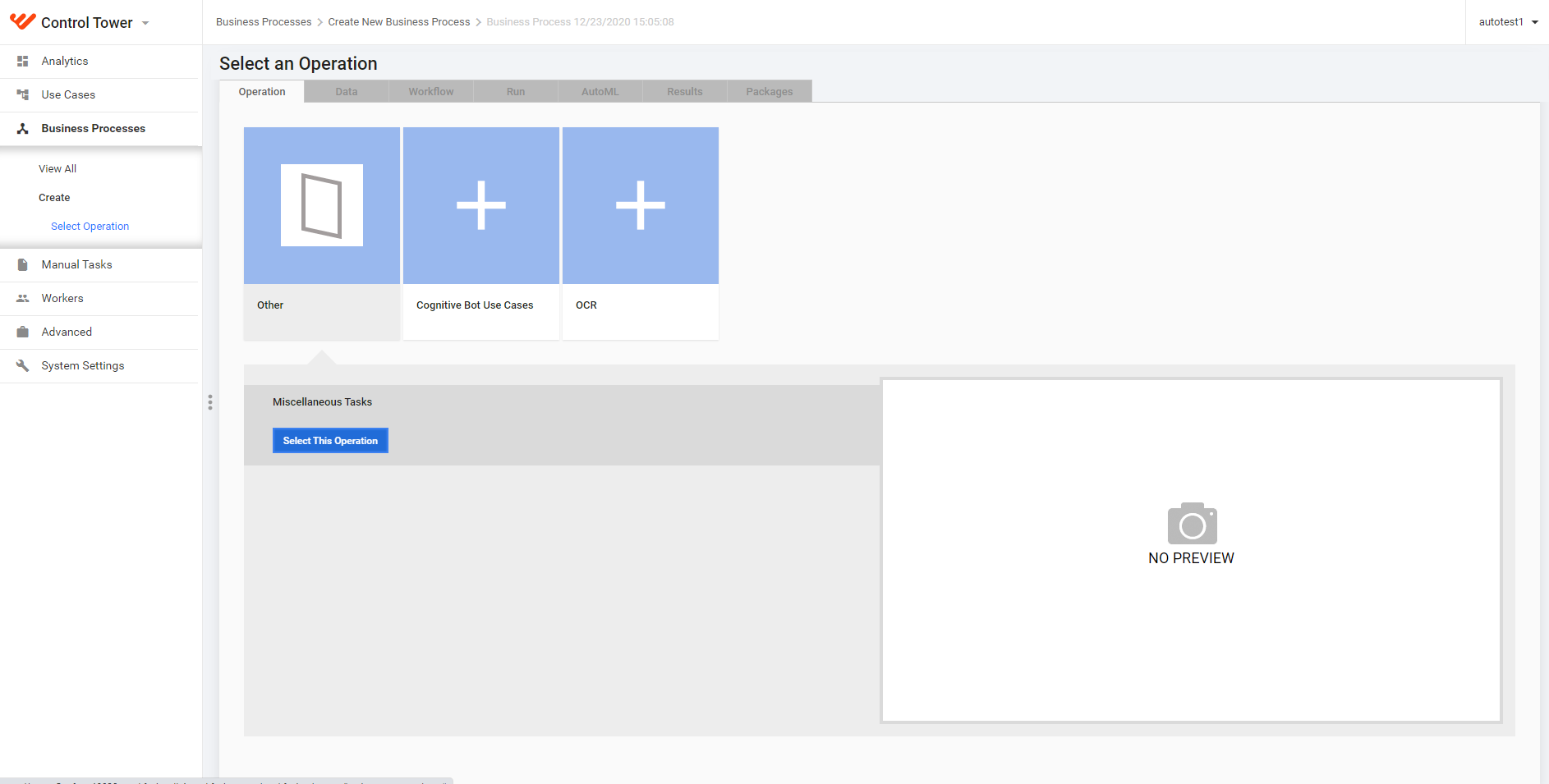
Create an OCR Bridge step.
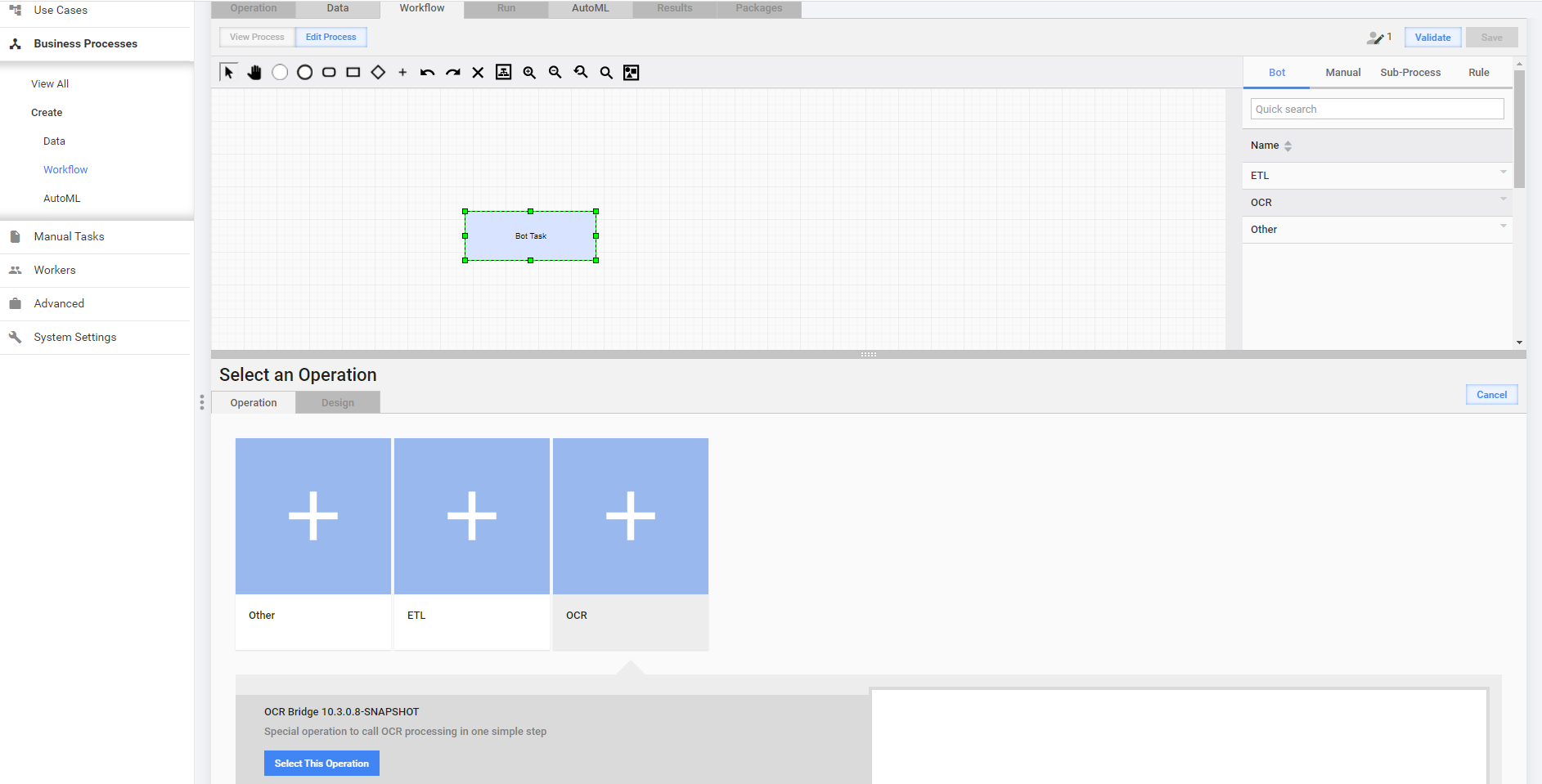
Configure OCR Bridge.
Add IE Cognitive Bot Task, Start, End, and link all steps together
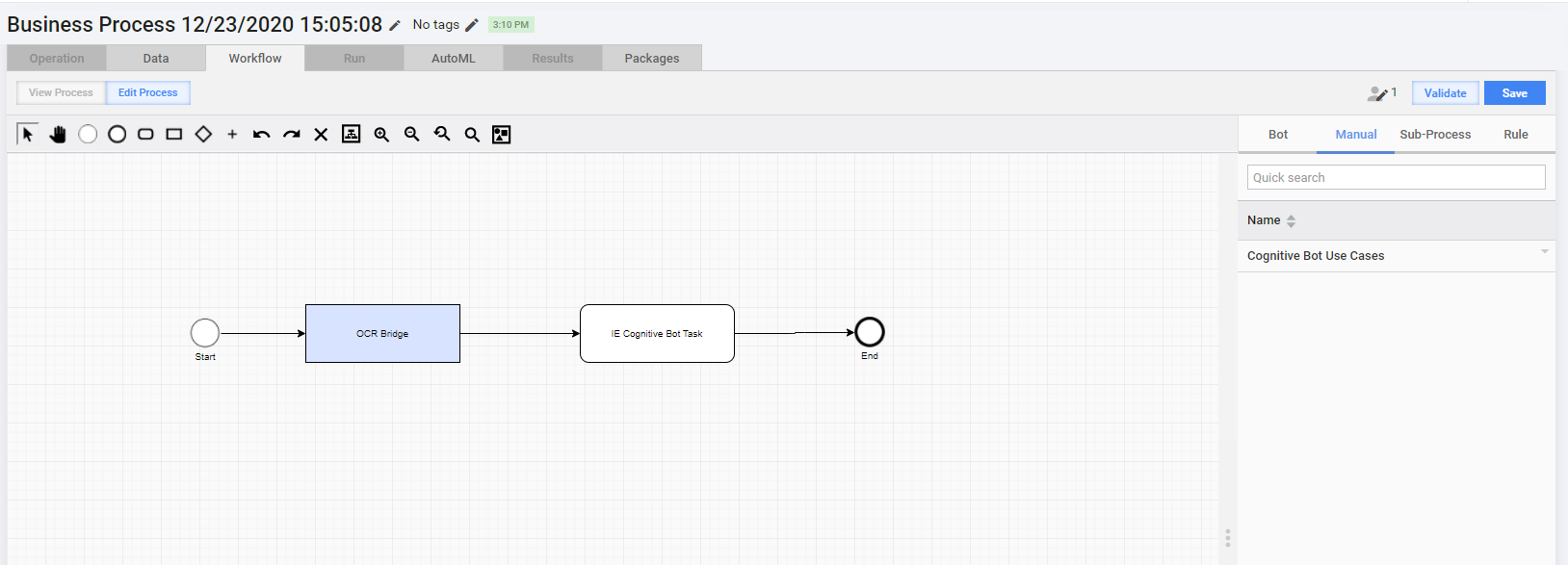
The Business Process is now ready to process incoming documents by OCR and Manual Task.
Performance
| Documents number | OCR Settings + BP | OCR Bridge | Diff | |||
|---|---|---|---|---|---|---|
| AVG | Best Time | AVG | Best Time | AVG | Best Time | |
| 10 | 02:00.8 | 01:37.3 | 00:51.1 | 00:46.0 | 58% | 53% |
| 50 | 04:34.0 | 02:56.6 | 02:03.3 | 01:53.1 | 55% | 36% |
| 100 | 06:52.3 | 06:01.9 | 05:05.2 | 04:51.9 | 26% | 19% |
| 300 | 13:07.7 | 11:35.9 | 10:10.2 | 10:01.6 | 23% | 14% |
OCR Bridge demonstrates up to 23% performance boost compared to OCR Setting + OCR BP approach. See Bridge Perfomance.xlsx.