
Set up Moderation flow
note
Prior to reading the material, see the Business Process topic.
The moderation workflow is a Business Process (BP) typically comprising the two main steps:
- Creation is the step where the creator worker creates specific info: writes reviews, translates texts, transcribes audio fragments, and so on.
- Moderation is the step where the moderator worker checks the creator's work, and can accept or reject it with different options. For details, see Сreate Moderation Task.
BP examples: Translation—Proofreading, Find Headquarters Address—Moderate Address, and so on.
Diagrams for moderation flow
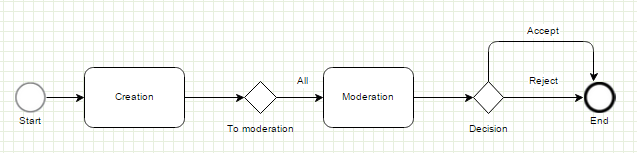
All tasks are moderated without the Rework option.
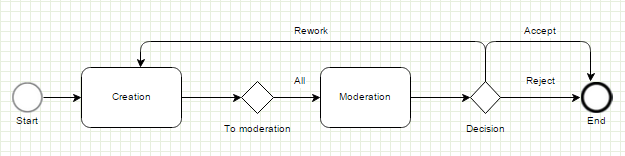
All tasks are moderated with the Rework option.
Creation step and adjudication rules in Manual Tasks
In the Creation step, select an Adjudication Rule:
Open a Manual Task. Go to Task properties.
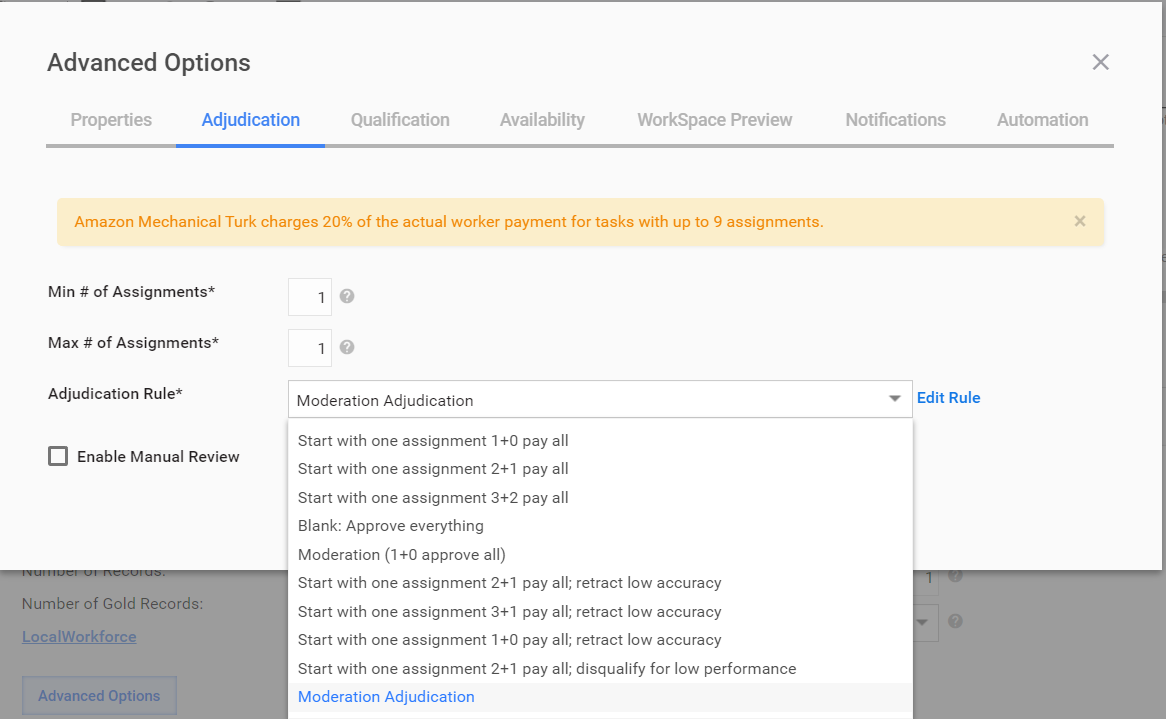
Select the Advanced Options and go to the Adjudication tab.
In the Adjudication Rule field, select Moderation Adjudication. No need to create a new rule. Use the existing rule named Moderation Adjudication as shown below.
Moderation Adjudication
package com.freedomoss.requester;

#list any import classes here.
import com.freedomoss.objective.model.RuleContext;
import com.freedomoss.objective.model.RuleAssigmentContext;
import com.freedomoss.objective.model.RuleQuestionContext;
import org.slf4j.Logger;
import java.util.Map;

#declare any global variables here
global RuleContext source
global Logger log
global Map params

rule "Rule context initialization"
auto-focus true
no-loop
agenda-group "initialization-group"
    when
        $ctx:RuleContext(initialized == false);
    then
        # set parameters
        $ctx.addProperty(RuleContext.MAJORITY_TYPE, RuleContext.MajorityType.COUNT);
        $ctx.addProperty(RuleContext.MAJORITY_VALUE, new Integer(2));

        # $ctx.addProperty(RuleContext.MAJORITY_TYPE, RuleContext.MajorityType.PERCENTAGE);
        # $ctx.addProperty(RuleContext.MAJORITY_VALUE, new Double(0.5));

        # insert processed facts into memory
        $ctx.updateWorkingMemory();
        # move to business rules
        kcontext.getKnowledgeRuntime().getAgenda().getAgendaGroup("calculation").setFocus();
        $ctx.logExecutedRule(kcontext.getRule().getName());
end

rule "1. Orignal taks: set moderation flag and send to moderation"
agenda-group "calculation"
dialect "mvel"
salience 100
no-loop
    when
        $ctx:RuleContext(initialized == true , hit.rework != true, hit.processingStatus.name != 'COMPLETING');
    then
        $ctx.setSplitByAssignment(true);
        $ctx.setModeration(true);
        $ctx.logExecutedRule(kcontext.getRule().getName());
end

rule "2. Rework task: approve and send to moderate"
agenda-group "calculation"
dialect "mvel"
salience 100
no-loop
    when
        $ctx:RuleContext(initialized == true, hit.rework == true);
        $rac:RuleAssigmentContext();
    then
        $rac.approveAnswer();
        $ctx.addApproved($rac);
        $ctx.setDisposeHit(true);
        $ctx.logExecutedRule(kcontext.getRule().getName());
end
Composite rules in moderation flow
The 1st composite rule (to moderation) defines whether the moderation step can be optional or not.
In the Advanced Options, enable the MODERATION_RULE.
note
If the Rework option is needed, also enable the SPLIT_DATA one.
The 2nd composite rule (decision) defines possible task flows depending on the Moderator decision. You can add the following outcomes:
- Accept—an outcome defining a case when the Moderator accepts the Creator task. Add a condition with the Approve initial worker's task Advanced Option.
- Reject—an outcome defining a case when the Moderator rejects the Creator task. Add a condition with the Reject initial worker's task Advanced Option.
- Rework—an outcome defining a case when the Moderator wants the Creator to redo the task. In the Advanced Options, enable SPLIT_DATA and select one of the following options:
- Rework task by the same worker. The worker does not get a reward for reworking.
- Assign task to the same worker. The worker does get a reward for each reworking iteration.
- Prohibit the current worker to work on the task. The Creator gets a reward, but the task is assigned to another worker.
Known issues and limitations
- Currently, the Prohibit current worker to work on this task outcome option is not supported.
- N/A option is not restored correctly for Free Text, Number, and other text fields.