
Group records by Unique Column
This topic describes how to set up a Human Task with denormalized input data using the Unique Column Name functionality.
This information can be useful, for example, when you want Workers to provide a "True/False" answer, but each question will have different answer options (variants). Moreover, each Task can have different number of answer options.
Initial Input File
In the following example, Worker should pick up a match "action" with "tool".
| seq | action | tool |
|---|---|---|
| 1 | Hit Nail | Shovel |
| 2 | Hit Nail | Rake |
| 3 | Hit Nail | Saw |
| 4 | Hit Nail | Hammer |
| 5 | Hit Nail | Hose |
| 6 | Cut lawn | Edger |
| 7 | Cut lawn | Rake |
| 8 | Cut lawn | Mower |
| 9 | Cut lawn | Hammer |
| 10 | Cut lawn | Screwdriver |
And the Human Task should look like this:
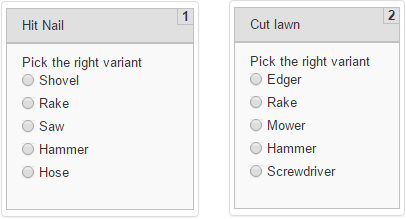
Initial file has 10 Records, but we need only 2 Records with 5 different answer options. To implement this Task using the standard column-answer mapping, we need to create a new Task for each record, which is not the right approach.
Therefore, we need to:
Group (merge) Records by the "action" column.
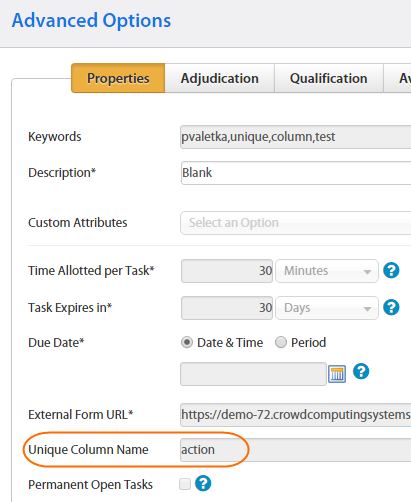
- Go to Run Task > Advanced Options > Properties
- Enter the appropriate column name into the Unique Column Name field.
 .
.
On Design Task tab, add an Answer with "check one" type. Depending on your task, the answer type can be: Check Multi, Select One, Select Multi, etc.
Edit the Task Code to load the answer options from the "tool" column. To do this, you need basic CSS, HTML, and JavaScript (jQuery) knowledge.
File after Grouping
Records are merged by the Unique Column, the strings are concatenated using the following delimiter:
♮ - music natural sign (U+266E)
Some text editors can incorrectly display this symbol. Do not forget to use the UTF-8 encoding.
| seq | action | tool |
|---|---|---|
| 1♮2♮3♮4♮5 | Hit Nail | Shovel♮Rake♮Saw♮Hammer♮Hose |
| 6♮7♮8♮9♮10 | Cut lawn | Edger♮Rake♮Mower♮Hammer♮Screwdriver |
Task Design
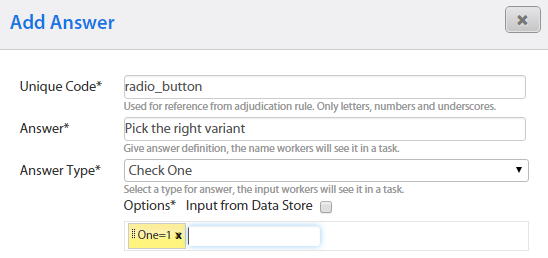
Add a new Answer with "Check One" type and one option (for example, "One=1").
This option is needed as a prototype for copying, and it will be removed with JavaScript on the next step.
Editing Task Code
To load the string from the "tool" column to answer options, you need to write the following JS code:
Script Example
 function splitter(initialString) {
    var variants = initialString.split("♮");
    var id = $("input[name*='radio']").attr("name");
    var hidden = $("input.check-one-hidden[name=" + id + "]");
    var etalon = $(".cc-label").clone(true, true);
    $(".cc-label").remove();
    for (i = 0; i < variants.length; i++) {
      var temp = etalon.clone(true, true);
        temp.find('[value=1]')
            .attr("value", variants[i])
            .attr("text", variants[i])
            .attr("name", id);
        temp.find(".hotkey-text").text(variants[i]);
      $(hidden).before(temp);
    }
}
window.onload = splitter("${questions[0].data.tool}");
Algorithm
- Splitting the string into an array (variants) using the (♮) delimiter.
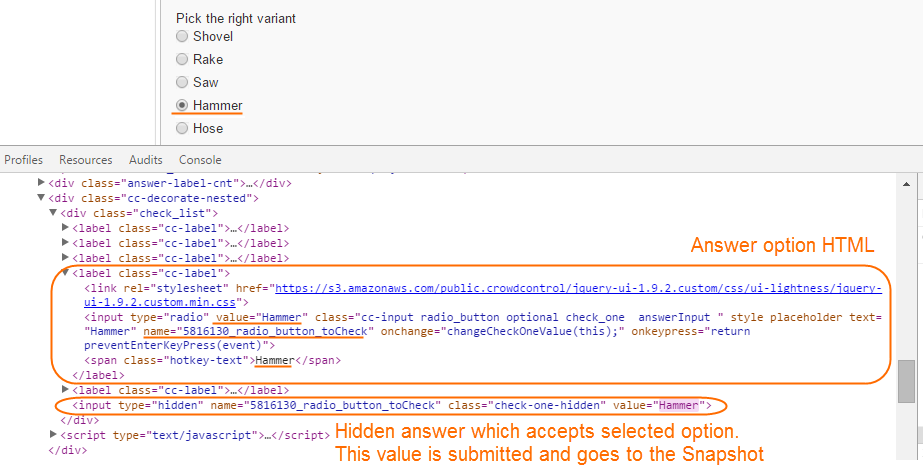
- Copying the answer id into the (id) variable.
- Cloning and removing the answer option.
- Pasting new answer options with appropriate name, text and value attributes.
Running the Task
To start testing, run the Task.
The merged Records will be correctly displayed only after the Run Task action.
Results
