Automate mainframe applications
A typical application looks like the one on the screenshot below:
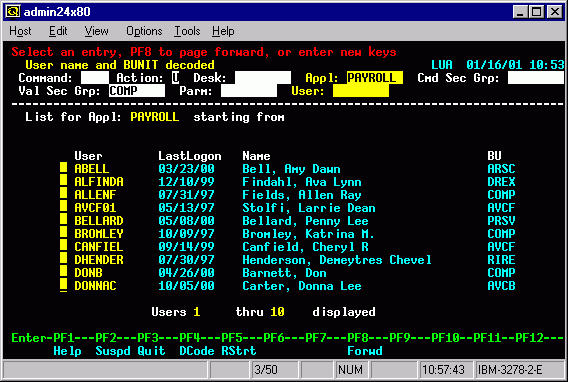
The main RPA goals when automating mainframe applications are as follows:
- Enter information into a mainframe application. Usually, to navigate to application input fields or views, there will be a legend of keys used on the bottom of an application. Simulating keystrokes by
sendKeys(), you can put a cursor into the desired field. The same API is used to enterStringdata into a field. - Collect information from a mainframe application. A WorkFusion RPA tool can only fetch the whole current application state as
String. It is split into multiple lines. Thus, you have to develop algorithms for parsing and fetching required portions of data from the entire content.
Preconditions
- Download and set up Windows SSH and Telnet client PuTTY.
- If the script doesn't work, make sure the path to
putty.exeis added to Environment Variables.
Example of SSH automation via Putty (Edit text file remotely)
import com.workfusion.bot.service.SecureEntryDTO;
import com.workfusion.odf2.compiler.BotTask;
import com.workfusion.odf2.core.cdi.Requires;
import com.workfusion.odf2.core.task.AdHocTask;
import com.workfusion.odf2.core.task.TaskInput;
import com.workfusion.odf2.core.task.output.TaskRunnerOutput;
import com.workfusion.odf2.core.webharvest.rpa.RpaDriver;
import com.workfusion.odf2.core.webharvest.rpa.RpaFactory;
import com.workfusion.odf2.core.webharvest.rpa.RpaRunner;
import com.workfusion.odf2.service.ControlTowerServicesModule;
import com.workfusion.odf2.service.vault.SecretsVaultService;
import com.workfusion.rpa.helpers.RPA;
import org.openqa.selenium.By;
import org.openqa.selenium.Keys;
import org.slf4j.Logger;
import javax.inject.Inject;
import java.security.Key;
import java.util.UUID;
import java.util.regex.Matcher;
import java.util.regex.Pattern;
import static com.workfusion.rpa.helpers.RPA.*;
import static com.workfusion.rpa.helpers.RPA.clipboardText;

@BotTask(requireRpa = true)
@Requires({ControlTowerServicesModule.class})
public class AutomateMainframeApplications implements AdHocTask {
    private final RpaRunner rpaRunner;
    private final Logger logger;
    private static final String PORT_NUMBER = "2222";
    private final SecretsVaultService secretsVault;

    @Inject
    public AutomateMainframeApplications(RpaFactory rpaFactory, Logger logger, SecretsVaultService secretsVault){
        this.rpaRunner = rpaFactory
                .builder(RpaDriver.UNIVERSAL)
                .closeOnCompletion(true)
                .build();
        this.logger = logger;
        this.secretsVault = secretsVault;
    }

    @Override
    public TaskRunnerOutput run(TaskInput taskInput) {

        rpaRunner.execute(driver->{
            this.exampleOfSSHAutomationViaPutty();
        });

        return taskInput.asResult()
                .withColumn("example_bot_task_output", "completed_successfully");
    }

    private void exampleOfSSHAutomationViaPutty(){

        openPuttyAndStartSession();

        RPA.sendKeys("vim the-new-filee.txt{ENTER}");
        RPA.sleep(1000);

        // switch to edit mode
        RPA.sendKeys("i");
        RPA.sleep(1000);

        // delete row command
        RPA.sendKeys("aaaaaaa");
        RPA.sendKeys("{TAB}{ENTER 2}");
        RPA.sendKeys("{UP}{UP}{DOWN}{DOWN}");
        RPA.sendKeys("1 2 3 4 5 6 7 8 9");
        RPA.sendKeys(Keys.ENTER);

        // edit text file
        RPA.sendKeys("{UP}{RIGHT}{RIGHT}{TAB}{TAB}  ");
        RPA.sendKeys("Hello, Robot{!} ");
        RPA.sendKeys("{TAB}{ENTER 2}");
        RPA.sleep(200);

        //Exiting the vim editor
        RPA.sendKeys(Keys.ESCAPE);
        RPA.sendKeys(":q{!}");
        RPA.sendKeys(Keys.ENTER);
        RPA.sleep(1000);

        //Copying the entire terminal window
        copyEntirePuttyWindowText();

        //Saving result in text file
        RPA.open("notepad.exe");
        RPA.switchTo().window("[CLASS:Notepad]");
        RPA.sendKeys(Keys.chord(Keys.LEFT_CONTROL, "v"));
        RPA.sendKeys(Keys.chord(Keys.LEFT_CONTROL, "s"));
        RPA.sleep(200);
        RPA.switchTo().window("[CLASS:#32770]");
        RPA.sleep(200);
        String fileName = UUID.randomUUID().toString();
        $("[CLASS:Edit]").sendKeys("C:\\Users\\sshukla\\Desktop\\New folder\\mainframe-" + fileName);
        $("[CLASS:Button;NAME:Save]").click();
        RPA.sleep(200);
        RPA.switchTo().window("[CLASS:Notepad]");
        RPA.sleep(200);
        $("[CLASS:Button;NAME:Close]").click();

        logger.debug(" Clipboard Text " + clipboardText());

        RPA.sleep(5000);

    }

    private void openPuttyAndStartSession(){
        SecureEntryDTO secureEntry = secretsVault.getEntry("SSHCredentials");
        final String HOST_NAME = secureEntry.getKey();
        final String PASSWORD = secureEntry.getValue();
        RPA.open("putty.exe");
        RPA.sleep(2000);
        RPA.switchTo().window("[CLASS:PuTTYConfigBox]");
        RPA.sleep(200);
        $("[CLASS:Edit;NAME:Host Name (or IP address)]").sendKeys(HOST_NAME);
        $("[CLASS:Edit;NAME:Port]")
                .sendKeys(Keys.chord(Keys.LEFT_CONTROL, "a"))
                .sendKeys(Keys.BACK_SPACE)
                .sendKeys(PORT_NUMBER);
        $("[CLASS:Button;NAME:Open]").click();
        RPA.sleep(5000);

        //Entering the credentials
        RPA.switchTo().window("[CLASS:PuTTY]");
        RPA.sleep(2000);
        RPA.sendKeys(PASSWORD);
        RPA.sendKeys(Keys.ENTER);
        RPA.sleep(2000);

    }

    private void copyEntirePuttyWindowText(){
        RPA.switchTo().window("[CLASS:PuTTY]");

        $("[CLASS:MenuBar]").click();
        RPA.actions().sendKeys("{DOWN}{DOWN}{DOWN}{DOWN}{DOWN}{DOWN}{DOWN}{DOWN}{DOWN}{DOWN}{DOWN}{DOWN}{DOWN}{ENTER}").build().perform();
        RPA.sleep(2000);
    }

}
The supported console actions are as follows:
copyPuttyWindowText()selects and returns console text from PuTTY.selectAllTextAndCopy()selects and returns all console text.copySelectedText()returns currently selected console text.clipboardText()returns all clipboard text.setClipboardText(String text)sets text to the RPA agent clipboard.
Logging into system and working with sessions
import com.workfusion.bot.service.SecureEntryDTO;
import com.workfusion.odf2.compiler.BotTask;
import com.workfusion.odf2.core.cdi.Requires;
import com.workfusion.odf2.core.task.AdHocTask;
import com.workfusion.odf2.core.task.TaskInput;
import com.workfusion.odf2.core.task.output.TaskRunnerOutput;
import com.workfusion.odf2.core.webharvest.rpa.RpaDriver;
import com.workfusion.odf2.core.webharvest.rpa.RpaFactory;
import com.workfusion.odf2.core.webharvest.rpa.RpaRunner;
import com.workfusion.odf2.service.ControlTowerServicesModule;
import com.workfusion.odf2.service.vault.SecretsVaultService;
import com.workfusion.rpa.helpers.RPA;
import org.openqa.selenium.By;
import org.openqa.selenium.Keys;
import org.slf4j.Logger;
import javax.inject.Inject;
import java.security.Key;
import java.util.UUID;
import java.util.regex.Matcher;
import java.util.regex.Pattern;
import static com.workfusion.rpa.helpers.RPA.*;
import static com.workfusion.rpa.helpers.RPA.clipboardText;

@BotTask(requireRpa = true)
@Requires({ControlTowerServicesModule.class})
public class AutomateMainframeApplications implements AdHocTask {
        private final RpaRunner rpaRunner;
        private final Logger logger;
        private static final String PORT_NUMBER = "2222";
        private final SecretsVaultService secretsVault;

        @Inject
        public AutomateMainframeApplications(RpaFactory rpaFactory, Logger logger, SecretsVaultService secretsVault){
            this.rpaRunner = rpaFactory
            .builder(RpaDriver.UNIVERSAL)
            .closeOnCompletion(true)
            .build();
            this.logger = logger;
            this.secretsVault = secretsVault;
        }

        @Override
        public TaskRunnerOutput run(TaskInput taskInput) {

            rpaRunner.execute(driver->{
            this.LoggingIntoSystemAndWorkingWithSession();
        });

            return taskInput.asResult()
            .withColumn("example_bot_task_output", "completed_successfully");
        }

        private void LoggingIntoSystemAndWorkingWithSession(){
            SecureEntryDTO secureEntry = secretsVault.getEntry("SSHCredentials");
            final String HOST_NAME = secureEntry.getKey();
            final String PASSWORD = secureEntry.getValue();
            openPuttyAndStartSession();
            String toBeSearched = "who";

            //Starting another session
            RPA.sendKeys("ssh " + HOST_NAME);
            RPA.sendKeys(Keys.ENTER);
            RPA.sendKeys(PASSWORD);
            RPA.sendKeys(Keys.ENTER);
            RPA.sleep(2 * 1000);


            RPA.sendKeys("who{ENTER}");
            RPA.sleep(2*1000);

            copyEntirePuttyWindowText();

            String clipboardText = clipboardText();
            if(clipboardText.contains(toBeSearched)){
                RPA.sendKeys(Keys.ENTER);
                RPA.sendKeys(Keys.ENTER);

                //Do Your stuff here
                RPA.sendKeys("ping 8.8.8.8{ENTER}");
                RPA.sleep(5*1000);
                RPA.sendKeys(Keys.chord(Keys.LEFT_CONTROL,"c"));

                copyEntirePuttyWindowText();

                logger.debug("CLIPBOARD TEXT " + clipboardText());

            }

            // Below piece of code will work if only single session login is allowed.
            //Below is the example is just a demonstration how user can work with session and perform certain task.

            //        // Checking the last session is available and if so kill it
            //        String checkContent = "Do you want to kill the earlier session for this relogin? (y/n) : n";
            //
            //        if (clipboardText.contains(checkContent)) {
            //            sendKeys("y{ENTER}");
            //            sendKeys("y{ENTER}");
            //            copyPuttyWindowText();
            //        }
            //
            //        // Confirmation to continue
            //        Pattern pattern = Pattern.compile("Press \"(.+?)\" key to continue");
            //        copyEntirePuttyWindowText();
            //        Matcher matcher = pattern.matcher(clipboardText());
            //        String keyToSend = "";
            //        if (matcher.find()) {
            //            keyToSend = matcher.group(1);
            //            // do here stuff to continue automate putty
            //        }

        }

        private void openPuttyAndStartSession(){
            SecureEntryDTO secureEntry = secretsVault.getEntry("SSHCredentials");
            final String HOST_NAME = secureEntry.getKey();
            final String PASSWORD = secureEntry.getValue();
            RPA.open("putty.exe");
            RPA.sleep(2000);
            RPA.switchTo().window("[CLASS:PuTTYConfigBox]");
            RPA.sleep(200);
            $("[CLASS:Edit;NAME:Host Name (or IP address)]").sendKeys(HOST_NAME);
            $("[CLASS:Edit;NAME:Port]")
            .sendKeys(Keys.chord(Keys.LEFT_CONTROL, "a"))
            .sendKeys(Keys.BACK_SPACE)
            .sendKeys(PORT_NUMBER);
            $("[CLASS:Button;NAME:Open]").click();
            RPA.sleep(5000);

            //Entering the credentials
            RPA.switchTo().window("[CLASS:PuTTY]");
            RPA.sleep(2000);
            RPA.sendKeys(PASSWORD);
            RPA.sendKeys(Keys.ENTER);
            RPA.sleep(2000);

        }

        private void copyEntirePuttyWindowText(){
            RPA.switchTo().window("[CLASS:PuTTY]");

            $("[CLASS:MenuBar]").click();
            RPA.actions().sendKeys("{DOWN}{DOWN}{DOWN}{DOWN}{DOWN}{DOWN}{DOWN}{DOWN}{DOWN}{DOWN}{DOWN}{DOWN}{DOWN}{ENTER}").build().perform();
            RPA.sleep(2000);
        }
}