Deploy RPA
General overview
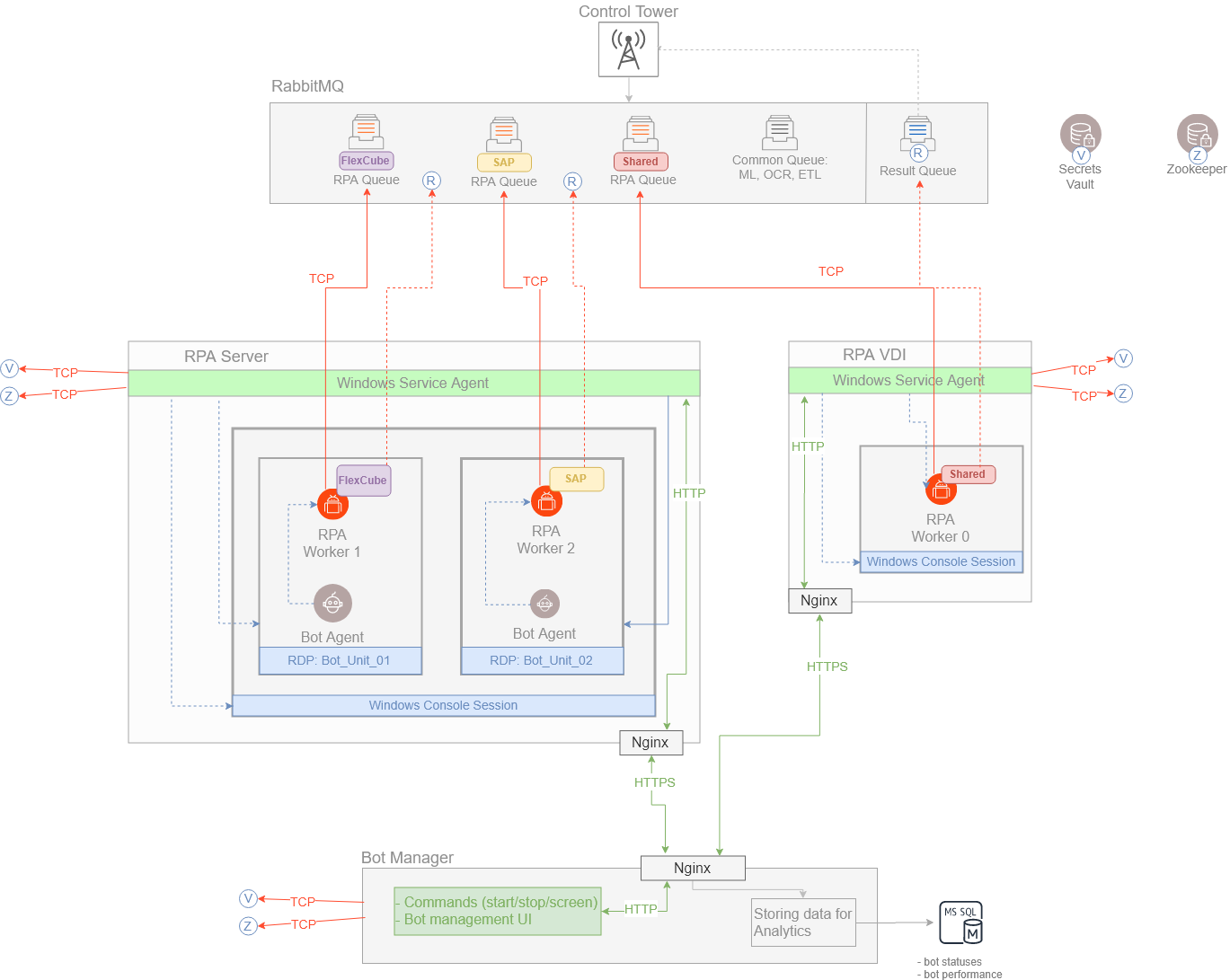
How it works
Master Bot Service starts automatically on the system startup. It runs registered bot-agent.jar that initiates the Java application.
First, Master Bot starts to subscribe to the Windows events, and then the Bot Master Service opens a console session with the Bot Master user. In this console session, the service starts the Unit's RDPs.
All other services like Nginx, Filebeat, and Metricbeat are started by the Bot Master Service at the console session.
Requirements
- The Master Agent Service should be registered as Windows System Service.
- The Windows RPA installer should be able to copy a customization DLL to the
System32folder.
RPA infrastructure deployment
There are two scenarios of RPA infrastructure deployment:
- Multiple RPA Units per server, or RDP-in-RDP
- 1 RPA Unit per Windows machine, or VDI
To trigger RPA Units, establish an active RDP session:
- For RDP-in-RDP deployment, the Bot Master User starts an RDP session allowing Master Bot Agent to initiate RPA Units. For that, Bot Manager retrieves Bot Master credentials from Secrets Vault.
- For VDI deployment, the Bot Agent startup is scheduled, and an RDP session is automatially started by Bot Manager.
RDP-in-RDP
The RDP-in-RDP approach allows you to run RPA Units in isolated sessions. On the deployment scheme above, look for RPA Server.
When the RDP-in-RDP deployment type is used, the following conditions are created:
- All processes cannot be accessed remotely as they are executed on local interfaces. Thus, other processes cannot influence your Bot Task execution.
- You can have remote access from your workstation only to the necessary RDP session and check what task is in progress at that particular time.
With the credentials rotation mechanism on, the RDP timeout no longer affects task execution due to automatic reconnection. If an RPA Unit is inactive for some time, for example, 15 minutes, an RDP session is locked. A new logic requires the RPA Worker to automatically refer to Secrets Vault for credentials before executing each Bot Task. Thus, the RPA Worker closes the current RDP window, gets new credentials from Secrets Vault, and connects again.
VDI
In the VDI deployment approach, there are two possible scenarios:
- RPA VDI refers to a Windows machine having all RPA components in a single active console session. No additional RDP connections are created. All services are run by one user, for example, Administrator. On the deployment scheme above, look for RPA VDI.
- Master Session VDI is responsible for opening multiple RDP sessions and keeping them active on several Windows machines. The number of RDP connections corresponds to that of Windows machines.
GUI active session support
Bot Manager maintains active RDP sessions. As soon as the RDP session is started, RPA Units are triggered to perform task execution.
Each RPA Unit contains two specific Java applications: Bot Agent and an RPA Worker.
- Bot Agent is used to start the RPA Worker and is also responsible for sending data to ZooKeeper.
- The RPA Worker connects to the assigned RPA Queue, retrieves tasks, and sends results to the Result Queue as soon as Bot Tasks are successfully executed.
RPA Units are managed via the Bot Manager UI. The communication between RPA Units and Bot Manager is established via the secured Nginx connection.
To learn more about Bot Manager, refer to Work with Bot Manager.
Data flow
The data flow is as follows:
- As soon as RPA Units are started, Filebeat and Metricbeat are initiated to send logs and metrics to Logstash—the service used to ingest them, transform, and transfer to Elasticsearch.
- Bot Manager gets RPA Unit statuses and performance data from Bot Agent and sends it to MS SQL Server to store.
- ZooKeeper stores information on RPA Unit configuration and queue addresses transferred from Bot Agent, the RPA Worker, and Bot Master.
- Secrets Vault is used as a storage to hold all the RPA-related credentials and not to request the credentials on the RPA machine (in Windows Credential Manager). When credentials rotation is configured in Control Tower, new credentials automatically apply to all RPA Units.
For details on the task distribution, refer to the Distribute tasks and Work with fleets topics.