Soft-stop Business Process
The monitor design assumes continuous managed loops generation during a scheduled period of time. For certain business needs, you may require to stop your Business Process (BP) immediately upon some trigger. Moreover, it is desired that the BP does not ruin transactions that already came out of the monitor's loop and are processed further.
ODF 2 provides a "soft stop" feature. It is implemented using the specific stopped field of the uc[UCCODE]_monitor[UCVERSION] Data Store. If you set stopped to 1, it makes the monitoring loop terminate. Once all previously left monitoring loop records reach the end of the BP, the whole BP ends successfully in Control Tower. You can initiate a soft stop either manually or programmatically.
Check the ODF 2 Example Project for implementation details of the uc[UCCODE]_monitor[UCVERSION] Data Store.
A soft stop is recommended to initialize the finish of long-running BPs when there is a high risk of losing transactions that are processed when a traditional BP stop action occurs via the Control Tower UI.
Manual soft stop
Anyone with access to AI Agent Data Stores can perform a manual soft stop. The steps are as follows:
Go to Control Tower > Advanced > Data Stores and find the uc[UCCODE]_monitor[UCVERSION] Data Store.
To identify which record belongs to the needed BP, look at the
monitor_idfield. The field contains the monitor's name and the BP unique ID divided by #, for example:FileMonitorTask#7ebec100-baa1-413e-bc61-4ee7b1ad07bf.Set the record's
stoppedfield to1.Click Save.
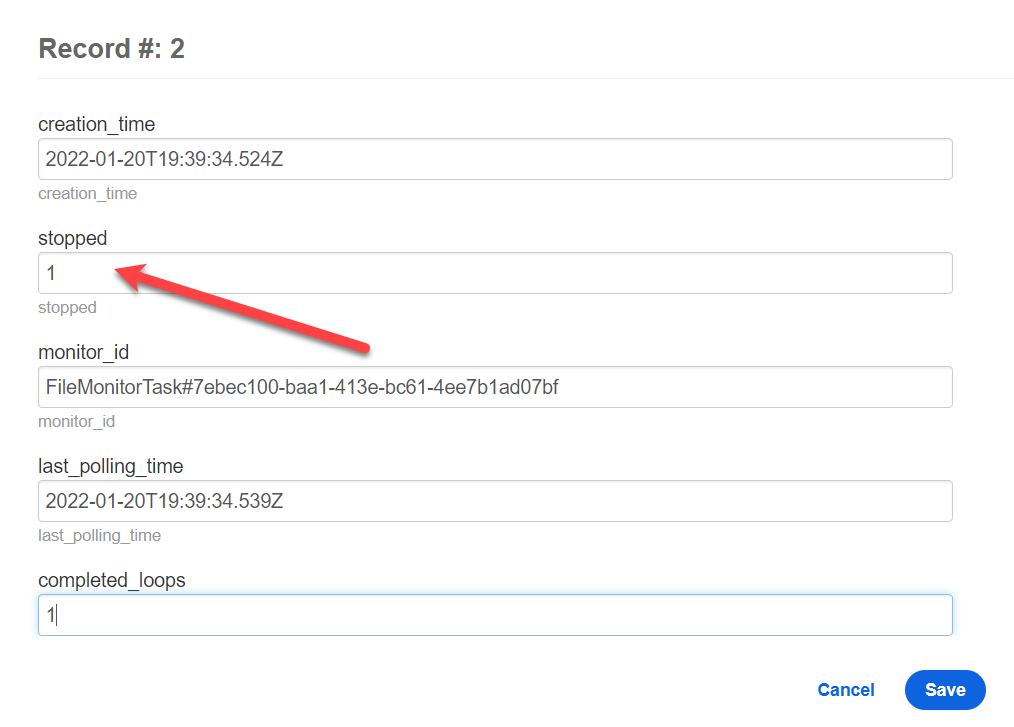
Perform soft stop from code
Let's assume your goal is to have a monitor waiting for a file to appear on the shared drive. Once the file is pulled for processing, stop monitoring. The file must be taken into a single transaction and processed in further BP steps. Here is an example showing how to proceed with this scenario:
Invoke a Bot Task that contains the work with the file:
@BotTask
public class FileMonitorTask implements MonitorTask {

   @Override
   public Class<? extends OdfTaskRunner<?>> getRunnerClass() {
      return FileMonitorTaskRunner.class;
   }

   // Here your file-finding logic goes. byte[] is used just for example's sake.
   public byte[] findFile() {
      byte[] byteArray = new byte[100];
      return byteArray;
   }
}
Apply
TaskRunnerwith your specific monitor and transaction logic:public class FileMonitorTaskRunner extends AbstractMonitorTaskRunner<FileMonitorTask> {
private final MonitorFactory monitorFactory;
private final TransactionOperation transactionOperation;
@Inject
public FileMonitorTaskRunner(TransactionOperation transactionOperation, MonitorFactory monitorFactory, TaskOutput taskOutput) {
super(monitorFactory, taskOutput);
this.transactionOperation = transactionOperation;
this.monitorFactory = monitorFactory;
}
@Override
protected Collection<Transaction> queryTransactions(FileMonitorTask task) {
final byte[] file = task.findFile();
if (file == null) {
return Collections.emptyList();
} else {
final Transaction transaction = createTransactionForFile(file);
final Monitor monitor = monitorFactory.getMonitor(task, getMonitorIdentity());
monitor.stop(); // This sets flag in DB that causes the monitor to stop on its next loop, without calling this logic anymore.
return Collections.singleton(transaction);
}
}
private Transaction createTransactionForFile(byte[] file) {
final Transaction newTransaction = transactionOperation.newTransaction();
return newTransaction;
// In practice, you must create some data entity to store your file and attach it to the transaction.
}
}To test your Bot Task in any IDE, use the Bot Task JUnit:
@WorkerJUnitConfig
class FileMonitorTaskTest {

    @BeforeEach
    void setUp(OrmSupport ormSupport) {
        ormSupport.createTables(MonitorStateEntity.class, MonitorConfigurationEntity.class, Transaction.class);
    }

    @Test
    @DisplayName("should get new file from external service")
    void shouldGetNewEmailsFromExternalService(BotTaskFactory botTaskFactory, OrmSupport ormSupport) {
        // when
        List<Map<String, String>> stepRecords = botTaskFactory.fromClass(FileMonitorTask.class).buildAndRun().getRecords();

        // then
        Map<Boolean, List<Map<String, String>>> partitions = stepRecords.stream()
                .collect(Collectors.partitioningBy(record -> Objects.equals(record.get(MONITOR_REPEAT_VARIABLE), "true")));

        List<Map<String, String>> loopRecords = partitions.get(true);
        List<Map<String, String>> transactionRecords = partitions.get(false);

        assertAll("Assert monitor task output", () -> {
            assertThat(loopRecords).hasSize(1);
            assertThat(transactionRecords).hasSize(1);
        });
     }
}
To add the code to an ODF 2 standard project, deploy to Control Tower. Now, you can produce a simple BP to test the approach. Reuse the rule from standard ODF 2 processes. The
DummyBot Task here is an empty one.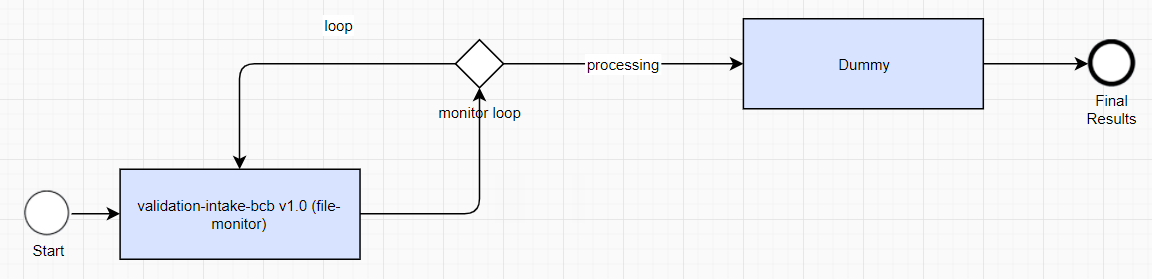
Run the BP and watch the execution behavior.