Apply Feather modules
Inversion of Control and Dependency Injection
To better understand the following sections, let's look at the Inversion of Control (IoC) principle and the Dependency Injection (DI) pattern.
IoC is a principle in software engineering that transfers the control of objects to a container or a framework. In contrast with traditional programming where custom code makes calls to a library, IoC enables a framework to control a program flow and make calls to custom code. To enable this, frameworks use abstractions with additional behavior built-in.
The advantages of this architecture are as follows:
- Decoupling task execution from its implementation
- Making it easier to switch between different implementations
- Greater program modularity
- Easier program testing by isolating a component or mocking its dependencies
Dependency injection is a pattern that implements the IoC principle. In this pattern, the control is inverted to set up an object's dependencies. Using DI, you move the creation and binding of dependent objects outside of the class that depends on them. Connecting objects with other objects or injecting objects into other objects is done by an assembler (injector) rather than by objects themselves.
The DI pattern usually involves three types of classes:
- Client depends on the service class.
- Service provides a service to the client class.
- Injector injects the service class object into the client class.
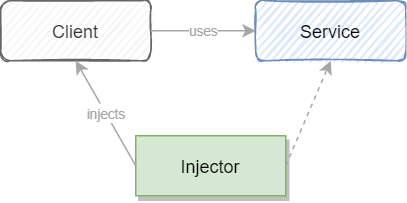
Here's an example of how to create an object dependency in traditional programming:
public class Client {

    private Service service;

    public Client() {
        service = new ServiceImpl();
    }

}
In the example above, you need to instantiate an implementation of the Service interface within the Client class itself.
By using DI, you can rewrite the example without specifying the implementation of the Service you want:
public class Client {

    private Service service;

    @Inject
    public Client(Service service) {
        this.service = service;
    }

}
With the DI pattern, the Client class is no longer responsible for instantiating the objects it requires. Those responsibilities are passed to the outer framework or container.
Both Inversion of Control and Dependency Injection are simple concepts, but they have deep implications for structuring your code. To get deeper into the details, read the following articles by Martin Fowler:
ODF 2 and Feather container
A container is a common characteristic of frameworks that implement IoC. It manages object creation and its lifetime and injects dependencies into the class. In the ODF 2 framework, we initially used Feather, an ultra-lightweight DI library for Java responsible for creating and injecting objects and basically representing a container. Due to multiple feature requests, we decided to make a fork of Feather in our codebase as its license allows to do that. The Feather documentation is still relevant; new features introduced in ODF 2 are documented on this page.
The ODF 2 framework creates a new Feather container for each Bot Task instance. As a Bot Task developer, you don't need any extra configuration. When you work with a Bot Task, it's already a part of the Feather container.
@BotTask
public class SimpleBotTask implements AdHocTask {

    private CurrentTransaction transaction;

    @Inject
    public SimpleBotTask(CurrentTransaction transaction) {
        this.transaction = transaction;
    }

}
In the example above, the CurrentTransaction object is injected through the class constructor. To make the framework aware that CurrentTransaction is expected to be injected by the framework, the @javax.inject.Inject annotation is used. The ODF 2 framework creates a proper instance of the CurrentTransaction class to be used during the SimpleBotTask class construction when it comes to runtime.
There are plenty of out-of-the-box objects to be injected into a Bot Task, and we will get to them later, but for now, let's understand where these objects come from.
Feather module
A module in terms of the ODF 2 framework is a configuration that defines objects available within a container.
Let's take a look at a typical module:
public class TimeModule implements OdfModule {

    @Provides
    @Singleton
    public OdfTime odfTime() {
        return new ProductionTime();
    }

}
As you can see, the module is a simple Java class that implements the com.workfusion.odf2.core.cdi.OdfModule interface. The interface is a marker interface declaring that the class contains one or more methods annotated with org.codejargon.feather.Provides and may be processed by the framework. The @Provides annotation tells the framework that a method will return an object that can be registered within the Feather container.
javax.inject.Singleton is another useful annotation. When an object is a singleton, only one shared instance of the object is managed, and all requests for that object result in that one specific instance being returned by the Feather container.
ODF 2 comes with multiple predefined modules already available in every Bot Task. You can also define your own modules and provide required objects to be processed within the Feather container.
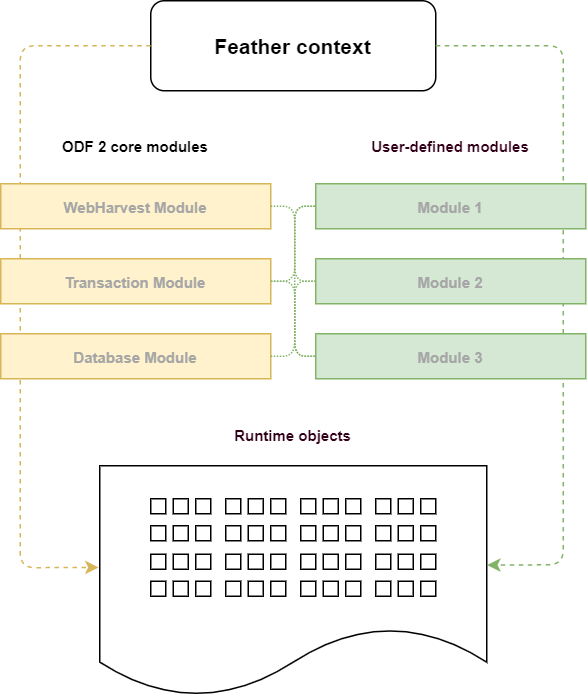
To put it all together, let's create a custom module and register Service inside it to be further used in your Bot Task:
public class CustomModule implements OdfModule {

    @Provides
    @Singleton
    public Service service() {
        return new ServiceImpl();
    }

}
Bind the
ServiceImplclass to the interfaceService. This is particularly useful as the module clients can obtain an object based on the interface rather than the implementation.Create a Bot Task and use
CustomModuleinside it.@BotTask
@Requires(CustomModule.class)
public class SimpleBotTask implements AdHocTask {
private Service service;
@Inject
public SimpleBotTask(Service service) {
this.service = service;
}
@Override
public TaskRunnerOutput run(TaskInput taskInput) {
service.importantMethod();
return taskInput.asResult();
}
}Use the
com.workfusion.odf2.core.cdi.Requiresannotation in yourSimpleBotTask. This annotation bindsCustomModulewith theFeathercontainer and lets all the@Providesobjects from the module be available within the container and therefore within your Bot Task.Inject the required
Serviceby the interface.
You can also create multiple modules. Mind that the @Requires annotation perfectly works with the module class as well. You can even reuse objects from one module inside another.
public class FooModule implements OdfModule {

    @Provides
    public Foo foo() {
        return new FooImpl();
    }

}
@Requires(FooModule.class)
public class BarModule implements OdfModule {

    @Provides
    public Bar bar(Foo foo) {
        return new BarImpl(foo);
    }

}
After you declare the Foo object in FooModule, you can access it using the method parameter inside BarModule. In the same way, you can refer to any object available within the Feather container.
ODF 2 built-in modules
The section describes modules and their related objects that are available out-of-the-box in the ODF 2 framework.
OdfCore module
com.workfusion.odf2.core.OdfCoreModule provides fundamental objects that make the foundation of ODF 2.
| Java class | Description |
|---|---|
| com.workfusion.odf2.core.TaskInput | Input data associated with the current step. |
| com.workfusion.odf2.core.UseCaseSettings | Object that handles AI Agent settings associated with the current project, for example, code, name, version. |
| com.workfusion.odf2.core.Configuration | Service that serializes AI Agent configuration data using com.workfusion.odf2.core.orm.repository.ConfigRepository and ConfigEntity. |
| com.workfusion.odf2.core.ConfigRepository | Key-value storage that stores AI Agent configuration data. |
WebHarvest Integration module
com.workfusion.odf2.core.webharvest.WebHarvestIntegrationModule provides access to objects related to the WebHarvest context.
| Java class | Description |
|---|---|
| groovy.lang.Binding | Groovy binding from the WebHarvest context associated with the current step. |
| com.workfusion.odf2.core.webharvest.BindingReader | Utility class that eases reading values from the Groovy binding. |
| @BpRunId java.util.UUID | Current Business Process's run ID. Can be injected using the @BpRunId qualifier. |
| com.workfusion.utils.security.DatabaseProperties | Database properties extracted from the current WebHarvest context. |
| org.webharvest.runtime.Scraper | WebHarvest scraper associated with the current step. |
| com.workfusion.odf2.core.webharvest.rpa.RpaFactory | Factory object responsible for creating RPA runners. |
| org.slf4j.Logger | Instance of a common Logger associated with the current step. |
| com.freedomoss.crowdcontrol.webharvest.web.WebServiceConnectionProperties | Connection properties related to the Control Tower instance to which the current step is bounded. |
| com.workfusion.odf2.core.task.output.TaskRunnerOutput | Output data associated with the current step. |
ControlTowerServices module
com.workfusion.odf2.service.ControlTowerServicesModule provides access to Platform Services normally available via Control Tower.
| Java class | Description |
|---|---|
| com.workfusion.odf2.service.pool.PoolObjectFactory | Factory class that provides Java API for the WebHarvest's pool plugin. |
| com.workfusion.odf2.service.CacheService | Service class that provides Java API for the WebHarvest's cache plugin. |
| com.workfusion.odf2.service.ControlTowerTaskService | Service class responsible for starting a Business Process inside Control Tower. The class behaves identically to the WebHarvest's task-start plugin. |
| com.workfusion.odf2.service.vault.SecretsVaultService | Secrets Vault service responsible for operations regarding to Secrets Vault. |
AbstractS3 module
com.workfusion.odf2.service.s3.AbstractS3Module provides objects that power S3 integration with an arbitrary S3-compatible service.
| Java class | Description |
|---|---|
| com.workfusion.odf2.service.s3.S3ConnectionProperties | S3 connection properties extracted from the current WebHarvest context. |
| com.workfusion.odf2.service.s3AmazonS3 | Default S3 client associated with the S3 instance specified in the WebHarvest context. |
| com.workfusion.odf2.service.s3.AmazonS3ClientBuilder | S3 client builder that enables building the S3 client with custom settings. |
S3 module
com.workfusion.odf2.service.s3.S3Module provides an object that powers S3 integration with S3 Manager hosted on Work.AI.
| Java class | Description |
|---|---|
| com.workfusion.odf2.service.s3.S3Service | S3 service wrapper over the S3 client. |
Transaction module
com.workfusion.odf2.transaction.TransactionModule is responsible for handling the Transaction entities.
| Java class | Description |
|---|---|
| com.workfusion.odf2.transaction.CurrentTransaction | Object that holds the current transaction state meaning the transaction of this specific step. |
| com.workfusion.odf2.transaction.TransactionBuilder | Object that provides core methods for building a new Transaction entity. |
| com.workfusion.odf2.transaction.repository.TransactionRepository | ORMLite repository responsible for the Transaction entities. |
| com.workfusion.odf2.transaction.repository.JoinRepository | ORMLite repository responsible for the JoinEntity entities. |
| com.workfusion.odf2.transaction.repository.TransactionStageRepository | ORMLite repository responsible for the Stage entities. |
| com.workfusion.odf2.transaction.repository.TransactionStageLogRepository | ORMLite repository responsible for the TransactionStageLog entities. |
| com.workfusion.odf2.transaction.StageLoggingService | Logger service for Transaction stage events like start and stop. |
Monitor Module
com.workfusion.odf2.transaction.task.monitor.MonitorModule is responsible for the entities powering Monitor Tasks.
| Java class | Description |
|---|---|
| com.workfusion.odf2.transaction.task.monitor.MonitorConfigurationRepository | ORMLite repository responsible for the MonitorConfigurationEntity entities. |
| com.workfusion.odf2.transaction.task.monitor.MonitorStateRepository | ORMLite repository responsible for the MonitorStateEntity entities. |
DI features added in ODF 2
Non-static injection of named instances
During large implementations, you may need to dynamically select an implementation based on some calculated value. It is elegant to use a dependency injection for that.
Baseline Feather supports the javax.inject.Named qualifier annotation to differentiate between multiple instances of the same type.
public class MyModule {

  @Provides
  @Named("MD5")
  HashFunction md5function() {
    return new MD5HashFunction();
  }

  @Provides
  @Named("sha256")
  HashFunction sha256function() {
    return new SHA256HashFunction();
  }
}
You can inject an instance by name without knowing its exact type.
public class MyClass {

  @Inject
  public MyClass(@Named("sha256") HashFunction hashFunction) {
    assert hashFunction instanceOf SHA256HashFunction.class;
  }
}
Additionally, ODF 2 makes it possible to know what named instances of a given type are known to Feather and to decide in runtime which instance to use.
public class MyClass {

  @Inject
  public MyClass(NamedInstances<HashFunction> allHashFunctions) {
    if (allHashFunctions.getNames().contains("sha256")) {
      HashFunction f = allHashFunctions.get("sha256");
    }
  }
}