Use OCR Bridge step
The article is an example of the OCR Bridge step usage in the scope of the ODF 2 framework. The Bot Tasks used in the example are a part of Processing Business Process from the example project.
Before getting into the details of the OCR tasks, let's make a quick description of the Business Process:
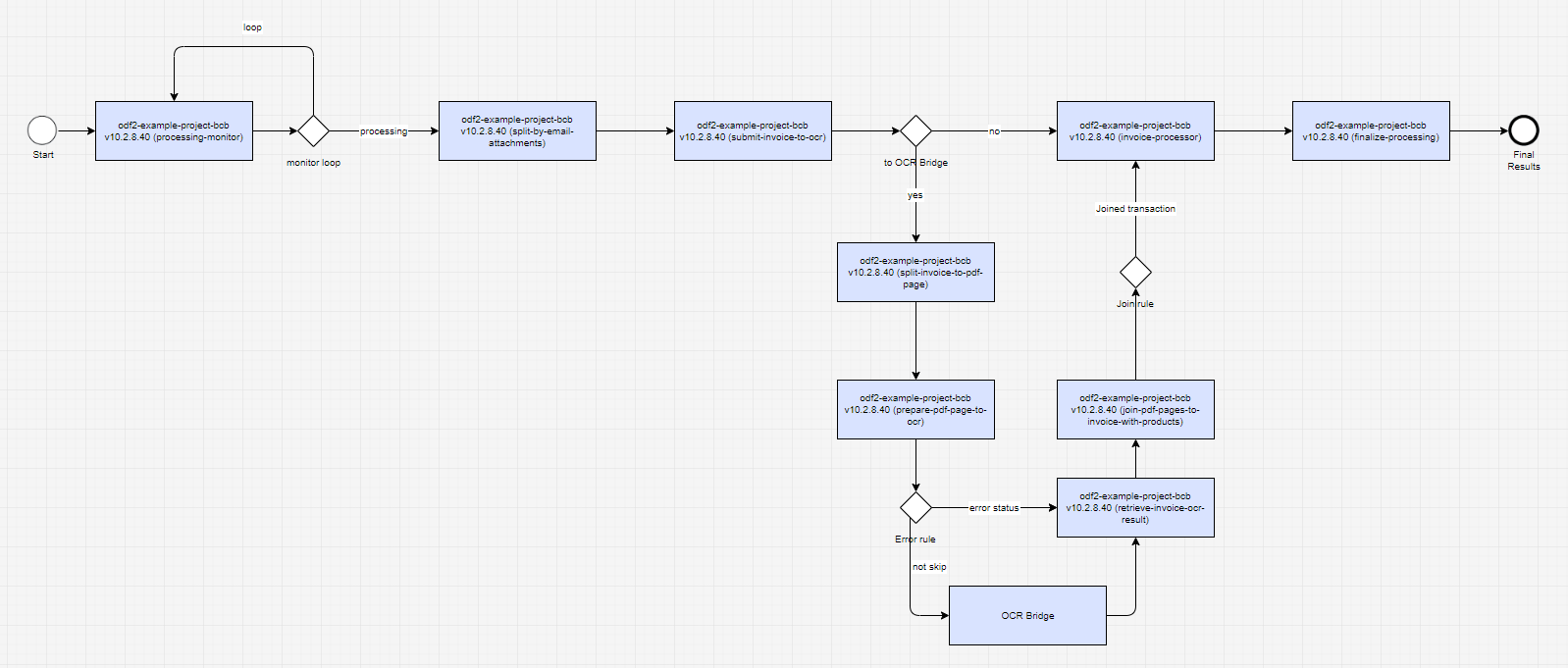
- The Business Process starts with a Processing Monitor that picks Transactions finalized by the Intake Business Process.
SplitByEmailAttachmentsTaskcreates anInvoiceobject for eachAttachmentin a givenEmail.SubmitInvoiceToOcrTaskprepares a document link for the OCR Bridge step.RetrieveInvoiceOcrResultTaskfollows the OCR Bridge step and showcases the OCR result processing logic.InvoiceProcessorTaskshowcases the business entity processing logic.- At the end of the Business Process, there is a default finalization task.
Prepare document for OCR processing
To add the OCR Bridge step to a Business Process, refer to the OCR Bridge step documentation.
By default, the OCR Bridge step requires only one input field, which is a URL of a document to be processed. You can set the corresponding column name inside the OCR Bridge step in Control Tower. The default value is original_document_url.
Basically, submitting a document to OCR refers to providing a document URL to the output data of a Bot Task. In the example, the document URL is stored as part of the Invoice entity. Let's take a look at SubmitInvoiceToOcrTask:
@BotTask
@Requires(RepositoryModule.class)
public class SubmitInvoiceToOcrTask implements AdHocTask {

    private final CurrentTransaction transaction;
    private final InvoiceRepository invoiceRepository;
    private final Logger logger;

    private Invoice invoice;

    @Inject
    public SubmitInvoiceToOcrTask(CurrentTransaction transaction, InvoiceRepository invoiceRepository, Logger logger) {
        this.transaction = transaction;
        this.invoiceRepository = invoiceRepository;
        this.logger = logger;
    }

    @Override
    public void afterConstruction() {
        invoice = transaction.getId()
                .map(invoiceRepository::findByTransactionId)
                .orElse(Collections.emptyList())
                .stream().findFirst()
                .orElse(null);
    }

    @Override
    public boolean shouldRun() {
        return invoice != null
                && "PDF".equals(invoice.getType())
                && StringUtils.isNotEmpty(invoice.getOriginalDocumentUrl());
    }

    @Override
    public TaskRunnerOutput run(TaskInput taskInput) {
        logger.info("Sending invoice '{}' to OCR Bridge", invoice.getUuid());

        return taskInput.asResult()
                .withColumn("original_document_url", invoice.getOriginalDocumentUrl());
    }

}
You can specify any other input parameters of the OCR Bridge step in the same way.
You may notice that the task contains two additional methods: afterConstruction and shouldRun. They are a part of the execution lifecycle methods and help to define whether the current Transaction has to be processed or not.
In our case, the Invoice and the related document are sent to OCR processing only when:
- The current Transaction is present and
InvoiceRepositorycontains the associated Invoice entity. - The Invoice entity has a PDF type.
- The Invoice entity has a document link.
Receive OCR result
To learn more about OCR Bridge step output parameters and their format, refer to the OCR Bridge step documentation.
After the OCR Bridge step is completed, the document processing result returns together with the output data (input data of the next step in a Business Process) in the JSON format.
Since the example uses enriched format and output is prepared for a labeling Manual Task, we will read the meta_info_json field that contains extended meta information.
RetrieveInvoiceOcrResultTask retrieves an Invoice entity associated with the current Transaction from InvoiceRepository and updates the related field with the OCR result. The upcoming Bot Tasks can use this information to complete the processing.
@BotTask
@Requires(RepositoryModule.class)
public class RetrieveInvoiceOcrResultTask implements AdHocTask {

    private final InvoiceRepository invoiceRepository;
    private final Logger logger;

    @Inject
    public RetrieveInvoiceOcrResultTask(InvoiceRepository invoiceRepository, Logger logger) {
        this.invoiceRepository = invoiceRepository;
        this.logger = logger;
    }

    @Override
    public TaskRunnerOutput run(TaskInput taskInput) {
        Map<String, String> metaInfo = readJsonToMap(taskInput.getRequiredVariable("meta_info_json"));
        String ocrXmlUrl = metaInfo.get("ocrXmlUrl");

        String transactionId = taskInput.getRequiredVariable(TaskVariable.TRANSACTION_ID);

        Invoice invoice = invoiceRepository.findFirstByTransactionId(UUID.fromString(transactionId));
        invoice.setOcrResultUrl(ocrXmlUrl);
        invoiceRepository.update(invoice);

        logger.info("OCR result received for invoice '{}'", invoice.getUuid());

        return taskInput.asResult()
                .withoutColumn("ocr_result") // clean up output data from OCR Bridge fields
                .withoutColumn("task_id")
                .withoutColumn("meta_info_json")
                .withoutColumn("_sys_ocr_process_time");
    }

    private static Map<String, String> readJsonToMap(String json) {
        try {
            return new ObjectMapper().readValue(json, new TypeReference<HashMap<String, String>>() {});
        } catch (JsonProcessingException e) {
            throw new IllegalStateException(e);
        }
    }

}