Script as custom action
The Script action allows to create any custom action using the following APIs:
The action is located within Custom Actions in Actions Library.
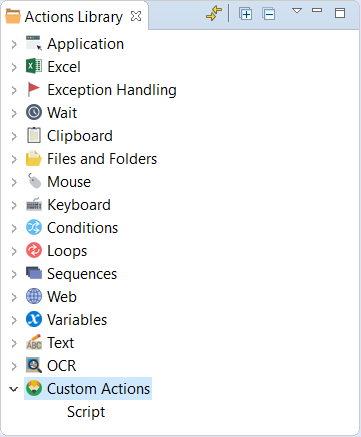
Script action
The Script action operates with the variables explicitly defined inside it only, i.e. local variables. If you want to operate with any variable from the general Recorder Variables list, you should map it to local variable first.
- Original Recorder variables mapped as Input to local variables won't be modified during the execution of the script. Only local variables will be modified.
- Only one Output variable is allowed for mapping, and this variable will be modified as well as the local variable as the result of script execution.
In Recorder
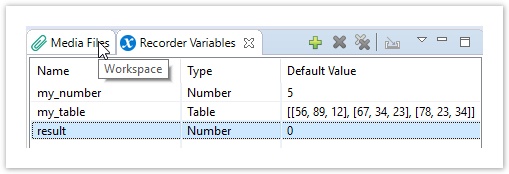
Define variables in Recorder.
Define input and output variables in the script.
@CustomScriptAction(
    input = ['my_number', 'my_table'],    // mapping script local variables to Recorder variables
    output = 'result'                     // return script result and assign to a Recorder variable
)

def customScript() {
    // your code goes here, for example:

    my_table.put(1,1, my_number.asRString("#,##0;en-AU"))
    def new_table = my_table.transpose()
    result = RNumber.fromRepresentation(new_table.get(3,3),"0.0000;en-US")
}
Paste the code to the Script action in Recorder. See more working samples in Code samples.
You can add a Name to your script to distinguish it from other actions of this type.
In Eclipse
To test and debug this script, you need to create a Bot Task in Eclipse. Note that you need to add imports and explicitly define recorder variables.
<?xml version="1.0" encoding="UTF-8"?>
<config xmlns="http://web-harvest.sourceforge.net/schema/1.0/config" scriptlang="groovy">
    <robotics-flow>
        <robot driver="universal" close-on-completion="true" start-in-private="true">
            <capability name="SEARCH_ALL_WINDOWS" value="true" />
            <script><![CDATA[
                import com.workfusion.studio.rpa.recorder.api.internal.representation.*
                import com.workfusion.studio.rpa.recorder.api.*
                import com.workfusion.studio.rpa.recorder.api.types.*
                import com.workfusion.studio.rpa.recorder.api.custom.*
                import static com.workfusion.studio.rpa.recorder.api.RandomValues.CharacterSet.*

                enableTypeOnScreen()

                // defining recorder variables (needed only in Studio)
                my_number = RNumber.of(5)
                my_table = RTable.builder()
                                 .row('56', '89', '12')
                                 .row('67', '34', '23')
                                 .row('78', '23', '34')
                                 .build()
                result = RNumber.of(0)

// ========= Copy from here ===============================================

                @CustomScriptAction(
                    input = ['my_number', 'my_table'],
                    output = 'result'
                )

                def customScript() {
                    my_table.put(1,1, my_number.asRString("#,##0;en-AU"))
                    def new_table = my_table.transpose()
                    result = RNumber.fromRepresentation(new_table.get(3,3),"0.0000;en-US")
                }

// ========= Copy to here (and paste to Recorder Script action) ===========

            ]]></script>
        </robot>
    </robotics-flow>
    <export include-original-data="true"/>
</config>
While debugging, add an additional function call specific to Custom Action debugging. Comment or delete it when no debugging is needed.
...

def customScript() {
    my_table.put(1,1, my_number.asRString("#,##0;en-AU"))
    def new_table = my_table.transpose()
    result = RNumber.fromRepresentation(new_table.get(3,3),"0.0000;en-US")
}

customScripActionCall_customScript: {}

...
Recorder data types
Imports
import com.workfusion.studio.rpa.recorder.api.internal.representation.*
import static com.workfusion.studio.rpa.recorder.api.RandomValues.CharacterSet.*
import com.workfusion.studio.rpa.recorder.api.*
import com.workfusion.studio.rpa.recorder.api.types.*
import com.workfusion.studio.rpa.recorder.api.custom.*
The libraries below don't require external import in Script as a custom action.
import java.lang.*
import java.util.*
import java.io.*
import java.net.*
import groovy.lang.*
import groovy.util.*
import java.math.BigInteger
import java.math.BigDecimal
Create recorder variables
def my_string = RString.of("Hello")
def super_list = RList.of("a", "b", 'c')
def my_number = RNumber.of(78)
RString aa = new RString('new r type')  // workaround

def my_date = RDateTime.now()
def cool_date = RDateTime.fromCanonical("2018-02-08T17:17:26+01:00[Europe/Monaco]")

def myTimezone = java.time.ZoneId.systemDefault()
def another_date = RDateTime.of(2018, 2, 20, 7, 25, 0, myTimezone)

def table = RTable.builder()
        .row("a", "b")
        .row("c", "d")
        .row("e", "f")
        .build()

def mask = RTable.mask(';', ',', '', true)
def mask2 = new RTableRepresentation([
    RTableRepresentation.Argument.ROW_SEPARATOR: ';',
    RTableRepresentation.Argument.VALUE_SEPARATOR: ','
    ],
    RTableRepresentation.Option.TRIM_VALUES).asMask()

def new_table = RTable.fromRepresentation(mask)
def new_table2 = RTable.fromRepresentation(mask2)
def new_table3 = RTable.fromRepresentation('11,12;21,22', ';;^;;;;;;,;')

def mask_list = RList.mask(',', '', true)
def new_list = ('1,2,3,4').asRList(mask_list)

def my_bool = RBoolean.of(false)


// create a Random recorder variable

def random = RandomValues.newInstance()

def my_list =  random.randomList(10, ALPHA_NUMERIC)
def my_table = random.randomTable(5, 10, NUMERIC)
Operations with recorder variables
RList operations
def list_size = (my_list as RList).size()
my_list = my_list + my_number
my_list.add('new item')
my_list.remove(5)
my_list = my_list + other_list
my_list.putAt(5, "Hello world!")
def java_list = my_list.asList()
my_list.each {
    println it
}
def first_element = my_list.get(1)
assert 'a' in RList.of('a', 'b', 'c')
def reversed_list = my_list.reverse()
def sub_list = my_list[1..7]
RTable operations
my_table.addColumn(my_list)
def rows_in_table = my_table.getNumberOfRows()
def columns_in_table = my_table.getNumberOfColumns()
def table_element = my_table.get(3,3)
def first_column = my_table.getColumn(0)
my_table.put(5,1, 'new value')
my_table.removeRow(5)
my_table.setRow(1, my_list)
def transposed_table = my_table.transpose()
RDateTime operations
def current_year = my_date.getYear()
def current_day = my_date.getDayOfMonth()
def date_as_number = my_date as RNumber
RNumber operations
BigDecimal new_number = my_number.asBigDecimal()
def a, b, c, d = RNumber.of(2)
def result_number = abs((a + b) / c - d.power(3))
def int_result = my_number.roundToCeiling()
RString operations
def caps_string = my_string.capitalize()
def substring = my_string[2..5, 7]
def trim_str = my_string.trim()
def a = b + c
RBoolean operations
def my_false = RBoolean.of(false)
def my_true = RBoolean.of(true)
def bool_result = (my_false && my_true) || true
Type conversion
my_number = RNumber.fromRepresentation("100500","0.0000;en-US")
my_string = RString.of(RNumber.fromRepresentation("100500 dsddsd","0.0000;en-SG").toRepresentation("0%;et-EE"))
my_string = RString.of(my_number.toRepresentation("#,##0;en-AU"))
my_string = my_number.asRString("#,##0;en-AU")
my_string = RString.of(my_date.toRepresentation("dd/MM/yy;en-US;" + myTimezone))
my_string = RString.of(RDateTime.fromRepresentation("22/12/2018","dd/MM/yyyy;en-US;" + myTimezone).toRepresentation("dd MMMM;en-US;" + myTimezone))
my_date =  RDateTime.fromRepresentation("18-05-30","yy-MM-dd;en-US;" + myTimezone)
my_bool_str = RString.of('true').asBoolean('true;false')
my_date_str = RString.of('true').asRDateTime(mask_d)
my_list_str = RString.asRList(mask_l)
my_number_str = RString.asRNumber(mask_n)
my_table_str = RString.asRTable(mask_t)
For code samples to include to your scripts, see Code samples.