Automate drag-and-drop operations
Some web applications have functionality allowing to drag web elements from one location and drop them on a defined area or even another web element.
These kinds of complex actions are not available in basic element properties. You can automate drag-and-drop actions using advanced user interactions.
The action chain generator implements the Builder pattern to create a composite action containing a group of other actions. It eases building actions by configuring an action chains generator instance and invoking its perform() method to get the complex action.
actions().dragAndDrop(
    $("From Selector"),
    $("To Selector"))
    .perform();
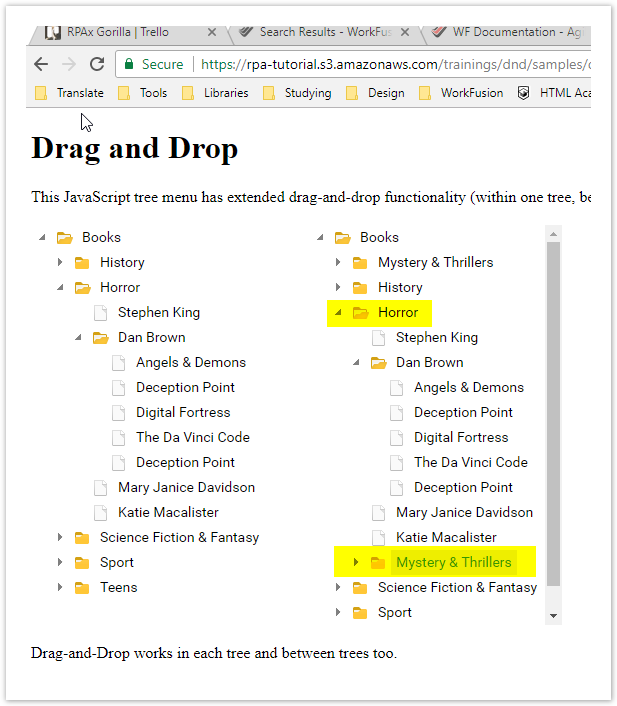
In this example, drag the Mystery & Thrillers folder from the left table to the Horror folder of the right side table.
Expand to view the code
import com.workfusion.odf2.compiler.BotTask;
import com.workfusion.odf2.core.task.AdHocTask;
import com.workfusion.odf2.core.task.TaskInput;
import com.workfusion.odf2.core.task.output.TaskRunnerOutput;
import com.workfusion.odf2.core.webharvest.rpa.RpaDriver;
import com.workfusion.odf2.core.webharvest.rpa.RpaFactory;
import com.workfusion.odf2.core.webharvest.rpa.RpaRunner;
import com.workfusion.rpa.driver.Driver;
import com.workfusion.rpa.helpers.RPA;
import com.workfusion.rpa.helpers.UiElement;
import com.workfusion.rpa.helpers.UiElementCollection;
import org.openqa.selenium.By;
import org.openqa.selenium.WebElement;
import org.openqa.selenium.support.ui.Select;
import org.slf4j.Logger;
import javax.inject.Inject;
import java.util.ArrayList;
import java.util.Arrays;
import java.util.List;
import java.util.Set;
import static com.workfusion.rpa.helpers.RPA.*;
import static com.workfusion.rpa.helpers.UiSelectors.byImage;
import static com.workfusion.rpa.helpers.UiSelectors.byText;


@BotTask(requireRpa = true)
public class AutomateWebElements implements AdHocTask {

    private final RpaRunner rpaRunner;
    private final Logger logger;

    @Inject
    public AutomateWebElements(RpaFactory rpaFactory, Logger logger){
        this.rpaRunner = rpaFactory
                .builder(RpaDriver.UNIVERSAL)
                .closeOnCompletion(true)
                .build();
        this.logger = logger;
    }

    @Override
    public TaskRunnerOutput run(TaskInput taskInput) {

        rpaRunner.execute(driver->{
            this.automateDragAndDropOperation(driver);
        });

        return taskInput.asResult()
                .withColumn("example_bot_task_output", "completed_successfully");
    }

    private void automateDragAndDropOperation(Driver driver){

        RPA.timeouts(10 * 1000);

        // open site
        RPA.openChrome("https://rpa-tutorial.s3.amazonaws.com/trainings/dnd/samples/dhtmlxTree/05_drag_n_drop/12_tree_drag.html");
        this.popAlert(driver,"Drag and Drop Example - Moving Mystery & Thrillers under Horror");

        // find base element
        WebElement element = $(By.xpath("//*[@id='treeboxbox_tree']/div/table/tbody/tr[2]/td[2]/table/tbody/tr[2]/td[2]/table/tbody/tr[1]/td[4]/span"));
        RPA.sleep(2000);

        // find target element
        WebElement target = $(By.cssSelector("#treeboxbox_tree2 > div > table > tbody > tr:nth-child(2) > td:nth-child(2) > table > tbody > tr:nth-child(4) > td:nth-child(2) > table > tbody > tr:nth-child(3) > td:nth-child(2) > table > tbody > tr:nth-child(1) > td.dhxTextCell.standartTreeRow > span"));

        // get base element center coordinates
        int elementX = element.getLocation().getX()+element.getSize().width/2;
        int elementY = element.getLocation().getY()+element.getSize().height/2;

        // get target element center coordinates
        int targetX = target.getLocation().getX()+target.getSize().width/2;
        int targetY = target.getLocation().getY()+target.getSize().height/2;

        // move mouse to base element and click and hold
        RPA.actions().moveByOffset(elementX, elementY).clickAndHold().build().perform();

        RPA.sleep(500);

        // move mouse to target element and click a click context for make realese
        RPA.actions().moveByOffset(targetX-elementX, targetY-elementY).build().perform();

        // for IE need to use next work around
        if(driver.toString().equalsIgnoreCase("internet explorer")) {
            RPA.actions().contextClick().build().perform();
        } else {
            // for all other drivers
            RPA.actions().release().build().perform();
        }

        RPA.sleep(5000);
    }

    private void popAlert(Driver driver,String popupMessage){
        driver.switchDriver("chrome");
        //Switch to default content inorder to work with alert if already on a IFrame
        RPA.switchTo().defaultContent();String script = popupMessage;
        driver.executeScript("alert(arguments[0])",script);
        RPA.sleep(3000);
        RPA.switchTo().alert().accept();
    }


}
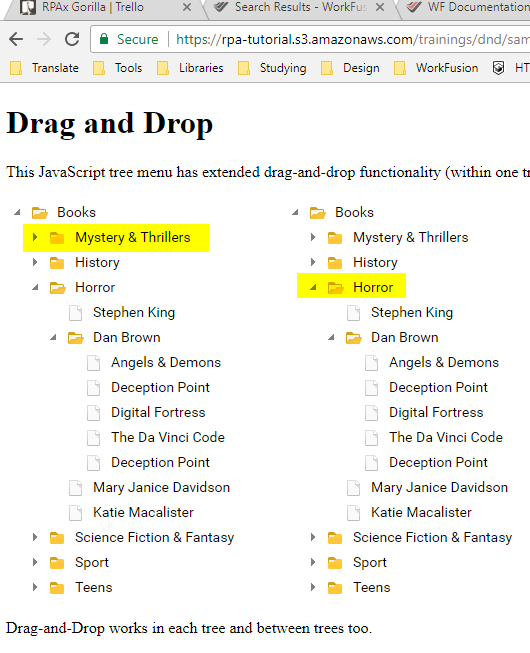
The Mystery & Thrillers folder is moved to the Horror folder. The new folder structure looks like this: