Version 10.1
Release date: 16 September 2019
With 10.1, Smart Process Automation is finally reborn as The Intelligent Automation Cloud Enterprise edition — an entire automation ecosystem for large organizations digitizing their operations.
This release crystallizes the groundbreaking capabilities of the 10 series into a solid and definitive Intelligent Automation experience. We worked hard to meet the demands of our clients and bring the best enterprise-scale solution possible.
Speaking of large scale, we think rock-solid stability and maximum performance are absolutely essential. With that in mind, version 10.1 brings high availability and disaster recovery, per the strictest industry standards, to keep your business up and running amidst even catastrophic events. We fine-tuned our Bot Execution Platform (BEP) cluster architecture for improved performance and document throughput on the same hardware.
Asset Bundle import allows to you transfer any part of your project in development to a new environment with minimal effort and errors.
Full product localization finally delivers The Intelligent Automation Cloud Enterprise edition to Japanese and Spanish speakers.
High availability and disaster recovery
Here at WorkFusion, we believe that losing even the slightest piece of work is frustrating. Losing time and data in a real-world enterprise environment where thousands of people rely on your system is simply unacceptable. With that in mind, we introduce a new type of system architecture which ensures Intelligent Automation Cloud Enterprise edition is available all the time, whatever happens.
High availability (HA) is the ability of a system to be continuously operational for a long period of time. Its aim is zero data loss and a maximum of 10 minutes of service downtime, after which it must be fully restored. The Enterprise edition supports HA through all components.
To take advantage of the high availability feature, you need to provide several emergency servers for each system component of the Intelligent Automation Cloud. In case of a component's failure, this allows the system to automatically switch to a “healthy” machine and continue its operation with minimum or zero downtime and data loss. All your data is stored on a shared file system or a mounted NAS, thus it is always available.
To provide the availability of services and distribute traffic among them, the load balancer (LB) component must be installed on the customer's side. It accepts all the traffic and forwards the application requests to the APP server. After that, the traffic is routed among other servers. Here’s a simplified diagram to make things clearer.
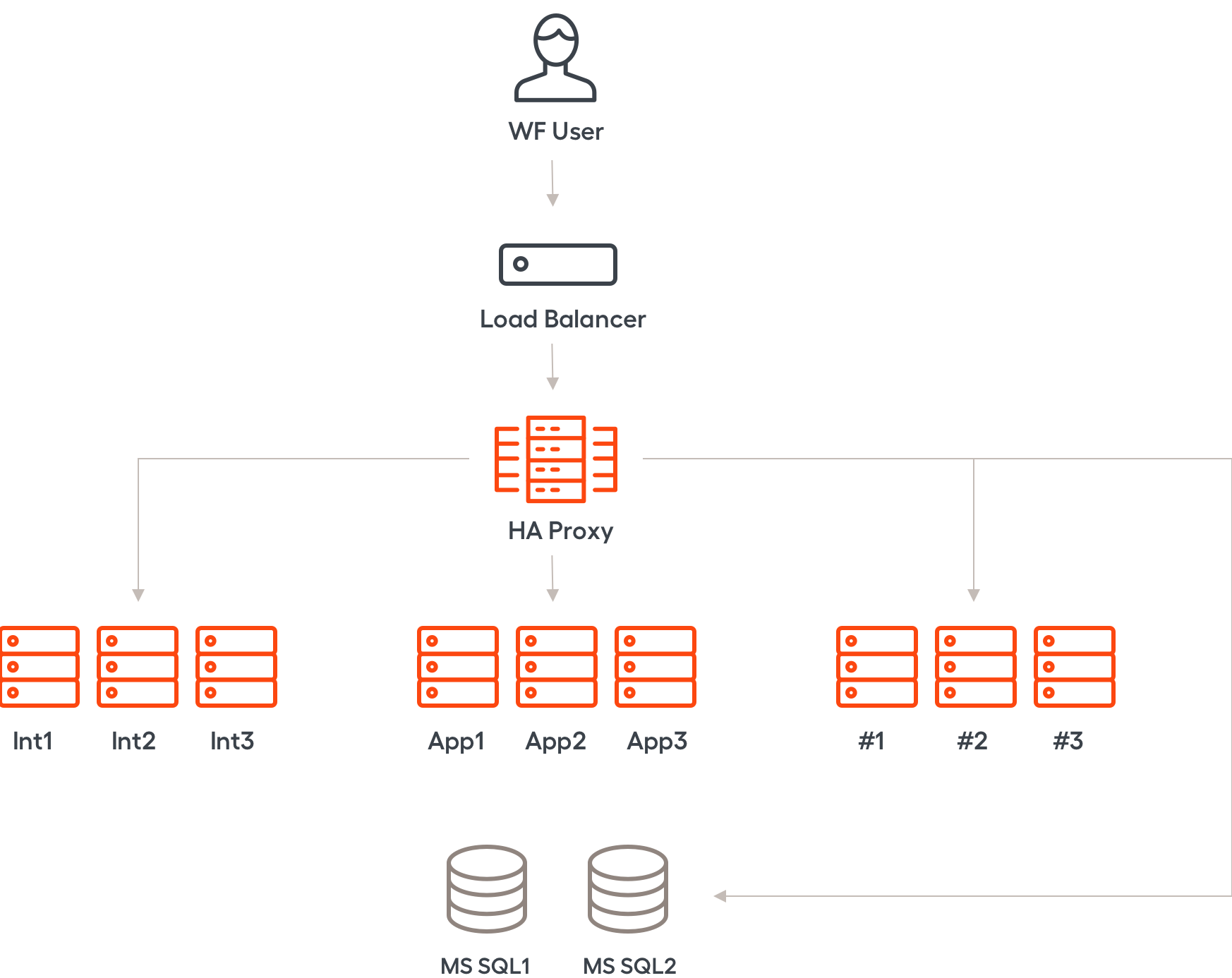
Bot Manager on the Application server is also highly available, with distributed architecture making Workers available by default. The RPA hosts list is now saved in a secured database and highly available too.
The Disaster Recovery (DR) architecture includes two sites: primary and emergency. The primary site hosts the full set of servers (either in the HA mode or without it) with running components. The DR site is a full and exact copy of the primary one. All the servers on the DR site keep running, while the components on them are stopped. Replication of data between the sites is performed every 30 minutes. If the primary site fails, the system is switched to the emergency one, with minimal loss of data.
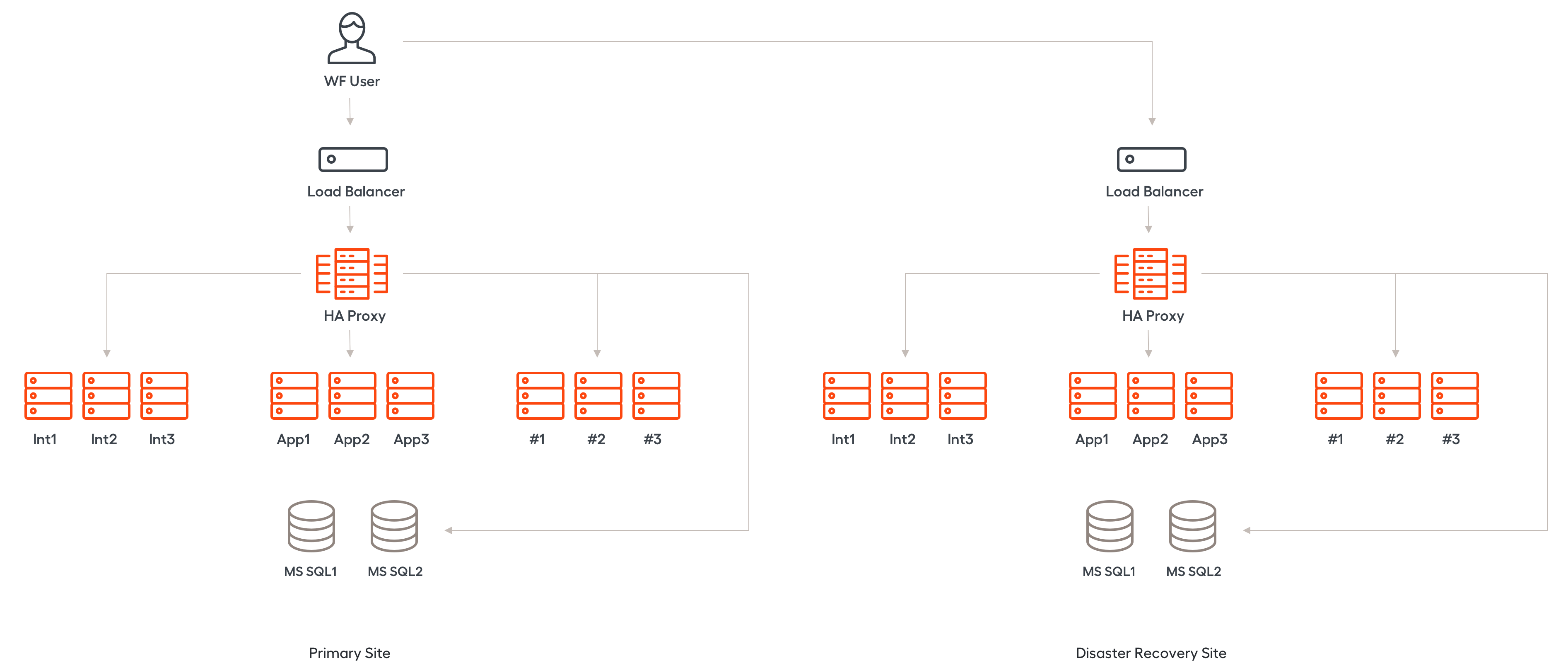
The high availability and disaster recovery features can be installed and configured with our common installer. The combination of the emergency modes is limited only by your needs and available servers: You can install HA and DR separately or combine them in one completely fault-resilient system. For detailed information, refer to the high availability and disaster recovery documentation.
Asset Bundle import
Asset Bundle is a structure composed of a Business Process and its supporting resources: AutoML models, bot configs, data, templates and more. Asset Bundle can represent either a complete BP with all its dependencies or any dependency required to run a BP: models, data, config etc. It is intended for easy asset transfer between environments.

Previously, BP import required an in-depth model knowledge, direct access to resources, multiple permissions, and credentials. You had to follow a multiple-page instruction for a long sequence of steps, including nuanced pre- and post-import steps. There was no way to check the import status or correct the failure cause.
With the introduction of the Asset Bundle, everything required for a Business Process delivery is conveniently wrapped in a self-sufficient bundle. The bundle is ported to a target environment via script execution or a REST request to the Control Tower API with minimal precautions. You only need correct permissions in Control Tower. This import mechanism supports large files and is less error-prone than the traditional methods. Successful import is asynchronous – meaning fast – and verified by a checksum.
This accelerates BP delivery, decreases total cost of development, and eventually contributes to continuous integration. To learn more about Asset Bundle, refer to the Import Asset Bundle documentation.
Performance
Remember that we introduced a brand new Bot Execution Platform (BEP) in version 10.0? The team did a tremendous job rethinking the whole product architecture from the ground up.
In 10.1, we focused on optimizing BEP communication with other system components, Control Tower in particular. Why is this important to you? Based on several in-house test Business Processes, the maximum documents throughput per hour for Intelligent Automation Cloud is now, on average, 30% higher than in 10.0 — depending on the scale of your Business Process. This became possible due to a 3x shorter execution overhead, allowing for leaner resource utilization on the same hardware.
The above-mentioned improvements allow some Business Processes to utilize more BEP nodes for a visibly better result than in 10.0. It’s also worth mentioning that the maximum efficient number of BEP nodes heavily depends on the complexity of your Business Process.
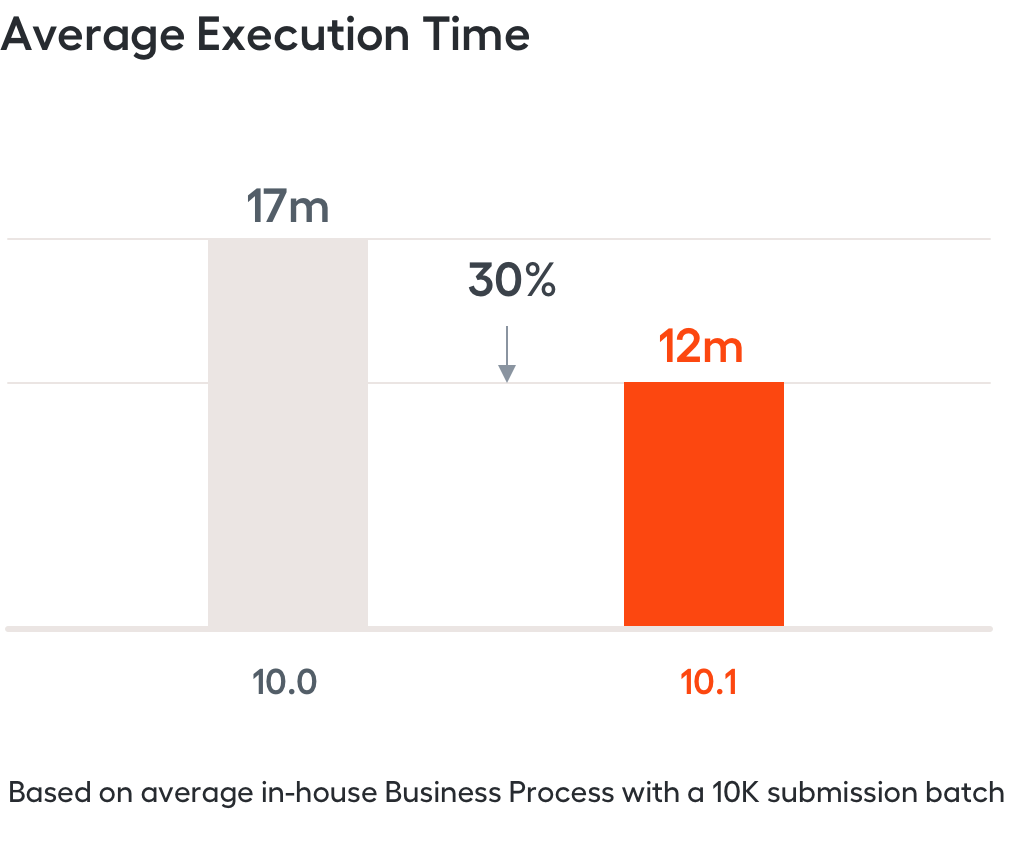
We also enhanced the performance of Control Tower, decreasing the processing time of transition steps, as well as optimized some MS SQL queries to ensure our database contributes to the overall performance improvement. Last but not least, we updated some Kibana dashboards, like [BEP] Tasks, [BEP] Tasks trace by BP steps, [BEP] Throughput to help you track BEP cluster performance and make data-driven decisions. For more information, refer to Monitoring documentation.
OCR
ABBYY FineReader Engine SDK upgrade to version 12 resulted in a number of improvements, enabling our users to select between FRE SDK 11 and FRE SDK 12. Thus, we added a second (alternative) OCR engine, with advanced recognition of tables and texts in images, as well as significantly improved recognition of Japanese characters.
- With the help of enhanced layout reconstruction, you can easily detect complex tables and reconstruct them to match the layout in the original document.
- Based on Artificial Intelligence algorithms, we provide higher accuracy and increased speed in recognition of the Japanese language, as well as dictionary enhancements and alphabet corrections
- Text classifier easily extracts textual data from any image and ensures high precision and classification accuracy. For more information, refer to Aggressive table recognition and detect text on image.
Robotics
Security
Mutual TLS authentication is now in place in communication between the RPA server and the Application server. Certificates exchange means all traffic between RPA components (Control Tower, Bot Manager, Bot Agent, Worker) is secured. RPA server gets commands from Application server only — so that no one can access RPA data or connect to any of the components without authentication, even from the customer intranet and having gained Control Tower credentials. For more details, refer to RPA Deployment.
Credentials rotation
All RPA-related credentials are now saved in Secrets Vault, so an RPA bot does not request the RPA server for credentials. As soon as credentials rotation is configured in Control Tower, new credentials automatically apply for all bots.
The credentials rotation mechanism makes RDP timeout no longer affect task execution due to automatic reconnection. If a bot is inactive for some time, for example, 15 minutes, an RDP session becomes locked. A new logic requires the Worker to automatically refer to Secrets Vault for credentials before executing each bot task. Thus, the Worker closes the current RDP window, gets new credentials from Secrets Vault, and connects again.
Performance
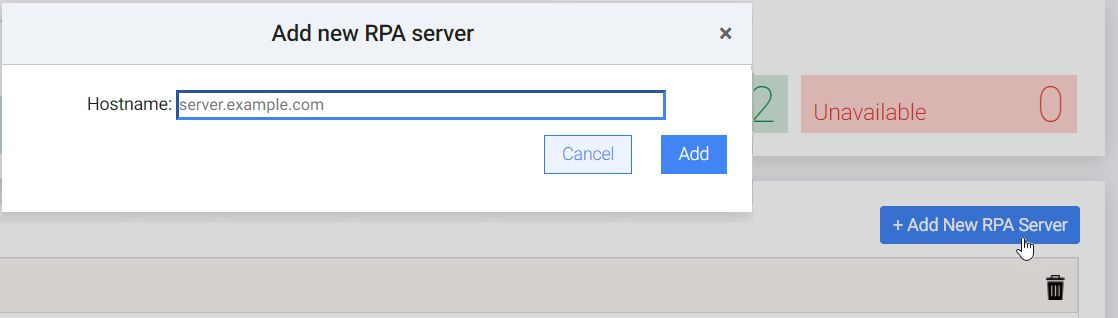
To add an RPA machine to an RPA cluster or remove it, you no longer need SSH access to the Application server; a Control Tower user with sufficient permissions to access Bot Manager is enough. Previously, getting SSH was tricky and time-consuming in a corporate environment, thus RPA cluster resizing happening on the UI-only contributes to deployment acceleration. For more details, refer to Bot Manager.
SAP
Let's not forget that WorkFusion Intelligent Automation Cloud is the only SAP-certified automation solution. In the 10.1 release, SAP automation for huge tables/trees as well as ALV trees is now two times faster (as measured by SAP Order Management: transaction codes MIRO, VA02).
WorkFusion Studio
All Studio improvements are aimed at simplifying developer flow, saving time, and avoiding unnecessary actions. The result is faster deployment and happier developers.
- WorkFusion Studio now provides full Worker support. You can launch and debug bot tasks on a local BEP-compatible RPA Worker, as well as start, restart, and stop Worker in the Studio console.
- With the new Bot Execution architecture, where Bot Relay and Bot (or Hub and Node) are redundant now, all interactions occur directly with Worker, ensuring each "Run a Bot" action to happen instantly without delays and freezes. To learn more about RPA deployment, see here.
- WorkFusion Studio and RPA package are tightly coupled. You only need to point WorkFusion Studio to the RPA package location once to reuse it in all development activities.
Installation
Intelligent Automation Cloud Enterprise
The updated Intelligent Automation Cloud Enterprise installer offers you two installation modes:
- Common installation
- Installation with the high availability support
When deciding to make your system highly available, the installation process is almost the same. Make sure you have the required amount of instances of each server, a load balancer to route the traffic, and then enable the HA mode during the installation in one step. When completed, you will have the fault-resilient system.
RPA
Due to the removal of Bot Relay and Bot, we managed to decrease TCO by 1GB RAM together with dependencies for each bot, enabling big scripts with multiple loops to work lightning-fast.
RPA server installation on a Windows machine now takes place in the RPA setup wizard with next-next navigation and requires no additional pre- or post-installation manual steps. There is no more need to make numerous network and RPA bot configuration changes in various places, with the installation procedure saving up to 1 hour of installation time per each RPA machine. From now on, the easy-to-follow wizard with tool tips and user-friendly UI makes everything work like magic.
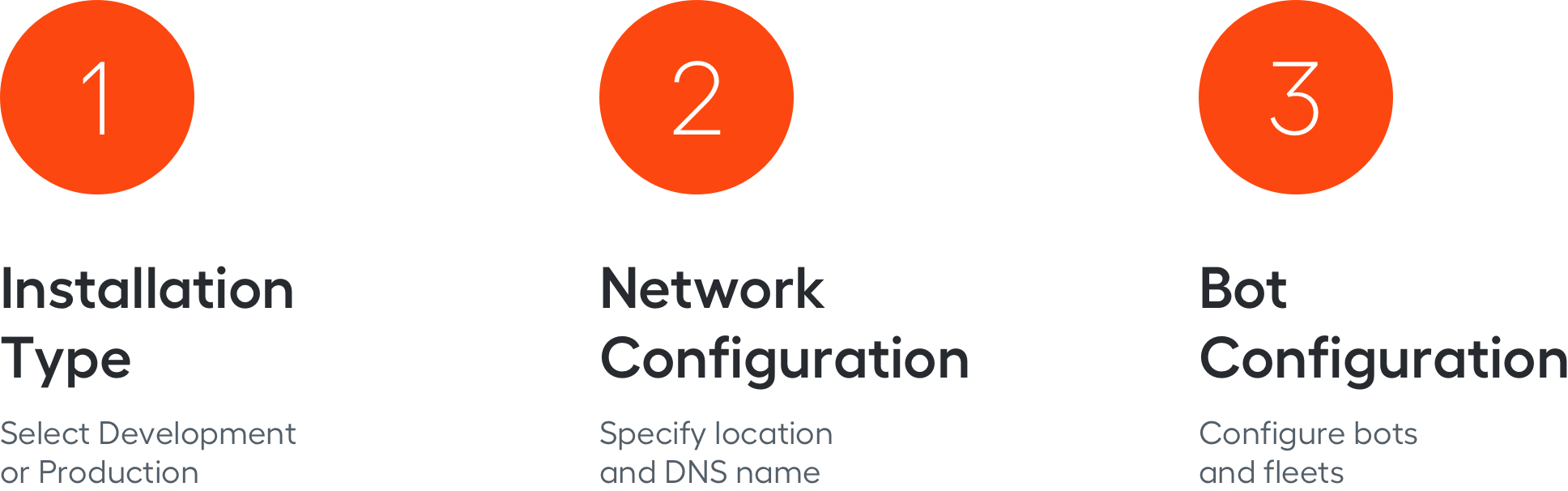
A new RPA installer offers two installation modes to select from according to your needs:
- Development – used for developing and debugging tasks from WorkFusion Studio, configured for one bot and a local task queue, has lightweight (without network) configuration
- Production – used for executing bot tasks from an external task queue, configured for multiple bots and needs installation of other components
Creation of centralized configuration during installation allows you to seamlessly upgrade by running the RPA installer in the repair mode. It retains variables from the previous installation and prompts you to use them.
To learn more, refer to the installation documentation.
Analytics
As business users immersed themselves in the productive insights of the 10.0 release analytics, they became more knowledgeable and demanded more in-depth information. Based on their feedback, the 10.1 release adds a new dimension to analytics with a sharper visualization.
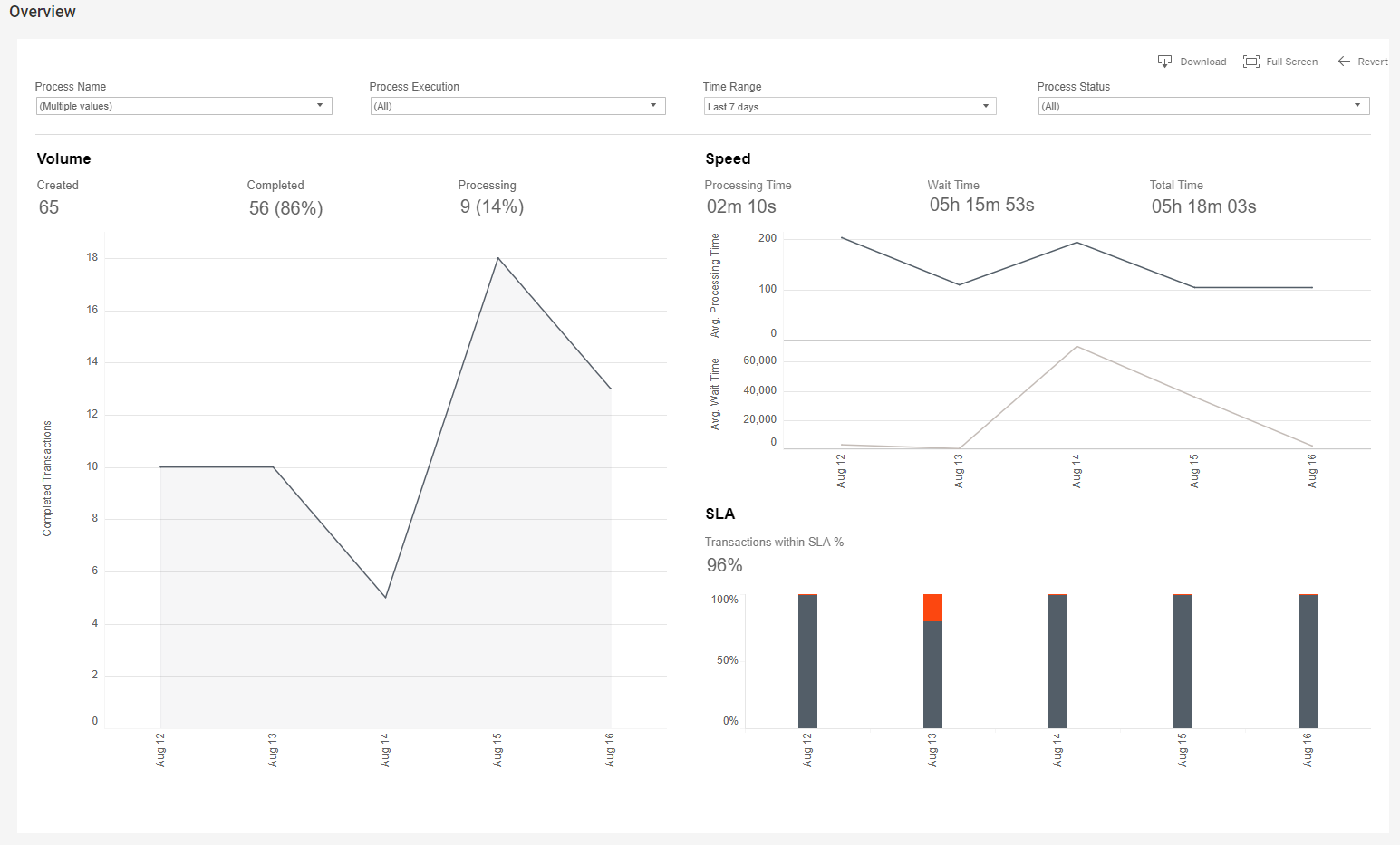
The Overview dashboard presents a cross-section of the task volume, showing a proportion of the completed and processing tasks of any kind among all the tasks created. Speed is a double chart, presenting average wait and processing time for tasks, as well as total processing time.
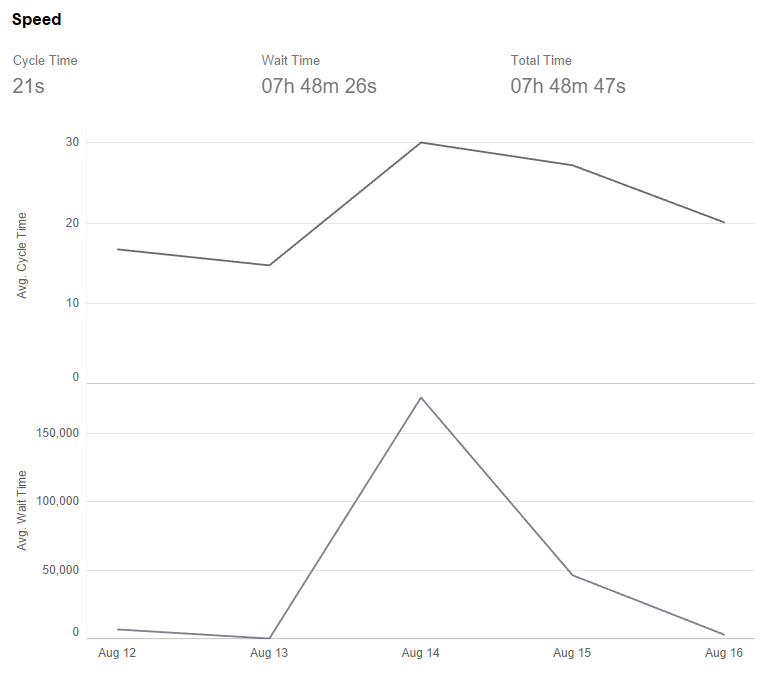
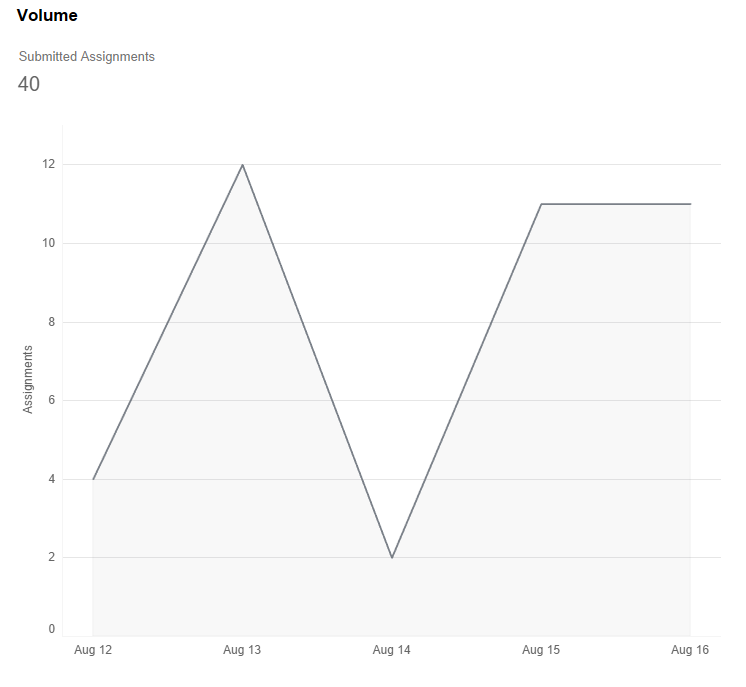
On the Manual dashboard, we've added another Volume chart to visualize the number of completed manual tasks on a particular day. Manual processing speed has also become a double chart, presenting the time spent working on a task, wait time, and total processing time.
On the Tasks, Workers and Worker Details charts, you can filter data by a single click on the element.
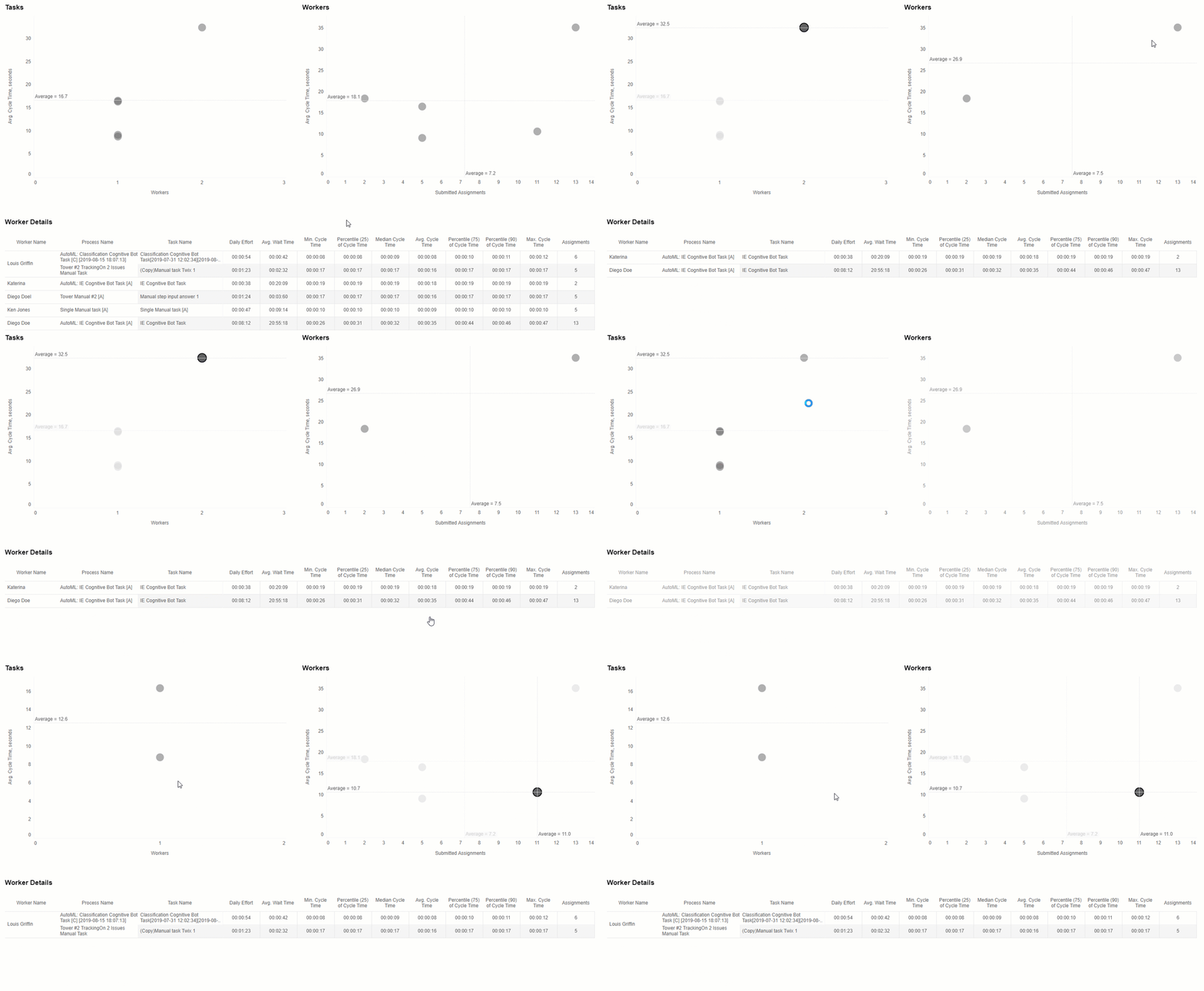
Improved analytics focuses on process ownership, allowing us to distinguish between a fluctuation and a bottleneck. With this knowledge, a process owner can prompt an IT operations engineer to monitor components performance. See the full list of 10.1 dashboards for more information on each of them.
Monitoring
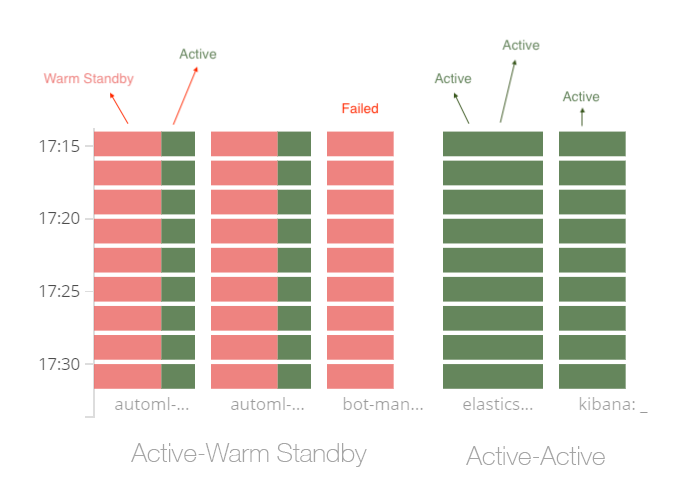
Intelligent Automation Cloud Enterprise features new dashboards in Kibana that help check the health of your system deployed in the high availability mode. The dashboard demonstrates the status of each server in the group and events that have caused switching operations from the faulty to the healthy ones in case of minor outages.
Localization
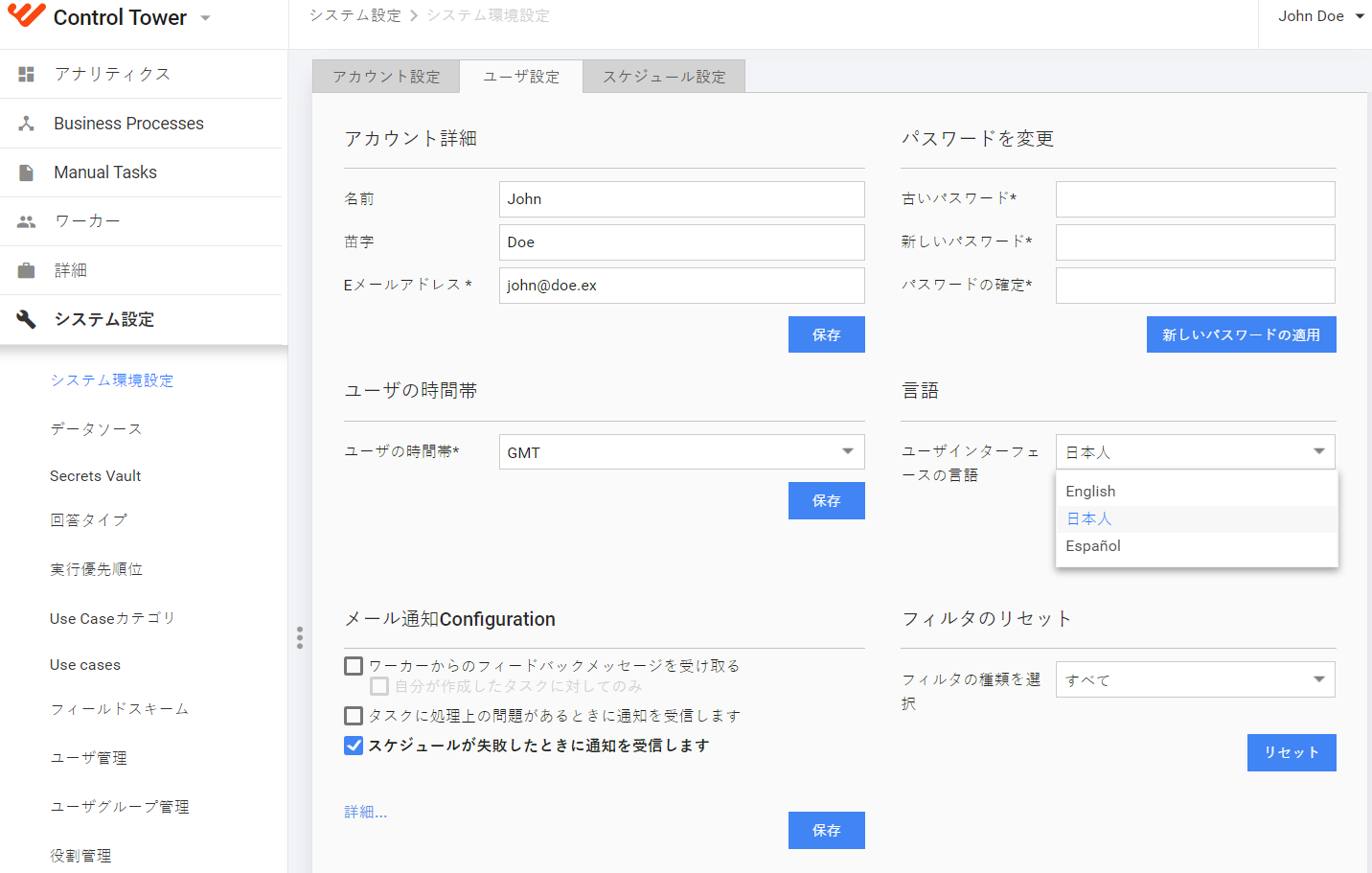
With the 10.1 release, WorkFusion is expanding the Intelligent Automation global reach. Business users and subject matter experts (SMEs) can now use the Intelligent Automation Cloud in Japanese and Spanish. The user interfaces for several major components are provided in those languages, to increase accessibility, particularly for native speakers. The following components have the new multi-lingual options:
- Control Tower: build and schedule business processes
- WorkFusion Studio: develop bot tasks
- Workspace: perform and submit manual tasks
- Analytics: view business intelligence
Improvements
Security
- RPA .dll and .exe (binary) files have verified digital signatures, so that corporate security tools do not regard them as a threat.
- jSessionID cookie now has a
secureflag. - Change password fields are no longer available when SSO is enabled.
- Workspace web server messages and UI error messages are optimized to secure sensitive information.
- User input data is now hidden from the JavaScript payload in Workspace.
- Updated JavaScript components to use guards that prevent hijacking on returned JavaScript or JSON.
Analytics
- To improve dashboards and ETL performance, you can now purge data from the Analytics database. By default, data older than 30 days is cleaned.
- The encryption algorithm for the Analytics server is improved.
WorkFusion Studio
- When recording bot actions, RPA Recorder now supports capturing keystrokes (for example,
Alt+F4orAlt+Tab) instead of directly applying them to the operating system. - When getting a selector from a desktop application, the action triggered by a click is no longer executed right away. This means you can inspect buttons that previously triggered unwanted actions (like close page or pay money) and include these actions into the bot code without actually performing them. You can also easily inspect dynamic interface elements (dropdowns, tooltips, etc.).
- The working directory used by WebHarvest to save bot task plugins data is set per project workspace (not per instance as before). To find the data, go to the working directory within the current workspace (by default c:\Users\Some_User\workfusion-workspace\working_directory\crowdcontroldata\webharvest).
SAP
- Improved performance for SAP XML generation and search elements.
- Decreased time for SAP table interaction.
- Improved SAP automation maintainability.
Monitoring
- Kibana with all required metrics can now be accessed from Control Tower.
- ELK updated to 7.3.0 bringing improved performance.
- Java logs in Kibana are now displayed in a more structured and convenient way.
- Log level can now be changed for all components at once with a single mouse-click.
- A new HA Monitoring dashboard in Kibana helps you check the health of all your servers that are deployed in the high availability mode.
Installation
- The installers of all components are amalgamated into a single package.
- RHEL 7.7 support added.
- The support of new shared file systems added, including NFS, GFS2, GPFS, AWS EFS, SAN/NAS storage.
- SAN certificates support added.
- ImageMagick is updated to 7.0.8-50.
- Nexus is updated to 2.14.13.
- Apache Mesos is updated to 1.6.1.
- The cron utility is replaced with supervisord.
Known issues
Analytics
SLA Value by time can be inaccurate because there is no splitting on the Transaction Tracking feature during calculation.
AutoML Dashboard: extracted and gold values for group fields are NULL.
When the environment was stopped and then started again, the following license issues can occur:
- License service cannot be started automatically.
- License was deactivated.
- For a workaround, refer to the Tableau documentation.
List of custom dashboards cannot be refreshed in the LDAP mode. To resolve this issue, update the workfusion DB:
TABLEAU_CUSTOM_DASHBOARDvalue in the ct.preference table. Example:[{"name":"User Friendly Name of Dashboard 1",
"link":"/t/<tableau_site>/views/<workbook1_name>/<dashboard1_name>"},
{"name":"User Friendly Name of Dashboard 2",
"link":"/t/<tableau_site>/views/<workbook2_name>/<dashboard2_name>"}]AutoML dashboard has a 15-minute data gap: the data from the last 15 minutes is not displayed. To resolve, run ETL for two times or wait for more than 30 min for scheduler.
While failover SQL Server nodes dashboards may have a 15-minute data gap: the data from the last 15 minutes is not displayed. To resolve, run ETL manually or wait for 15 minutes.
Filter selection is not saved when switching to the Manual dashboard. If this is the case, apply the desired filter manually.
Control Tower
- Business Process step may still continue processing when you press Pause > Resume > Pause in a short time span.
- AutoML conflicts warning not displayed properly when importing a package from one Control Tower instance to another in a non-HA environment
- On substantially large record volumes BEP strategy may cause AutoML execution timeouts, using BP repair in Control Tower clears the processing of delayed records.
- If Workspace goes down when a Manual Task is stopped, part of the MT records may have indefinite status and the MT needs to be stopped again when Workspace goes live.
- Importing a Manual Task or a Business Process with a Manual Task package from 9.x to 10.x can lead to errors if the task includes Information Extraction sub-answers not present in 10.x. To fix these errors, select a different sub-answer type and save the answer. Learn more about Information Extraction answer types.
Asset Bundle Import
- If you import a modified AutoML model artifact, it should have a version different from the one present on a target environment. Otherwise BP execution will fail until BEP is restarted.
- Repeatable import of the Rules ot the Composite type results in duplicates created across the instance.
Security
Conduct a review to prevent malicious use of session credentials within cookies in the following cases:
- Creating a Manual Task
- Adding a new RPA server
Workspace
New Task Notification toggle in the application settings becomes unresponsive when the notifications.send.enabled property is set to false in the application-local.properties file.
OCR
- Linux FRE SDK 11 does not support mathematical formulas in text. Thus, when you have this type of formulas and meta text containers in your document, OCR SDK tries to process meta text containers in a native C library, and the exception is thrown. We recommend using a workaround: the parameter
detectLanguage=falsein OCR API disables automatic recognition of text language, and JVM does not crash. - Business Process may fail on Linux when trying to use OCR for large documents (more than 500 pages). Issue reproduces in cases of high memory utilization on a machine. We recommend increasing task memory (
-Xmxparameter) to process really large files.
Installation
During the installation, Kibana tries to connect to ELK to acquire the xPACK license, and receives a response about invalid certificates.
Deprecations
Control Tower
- Removed support of PHP and separate TinyMCE web application, as now TinyMCE is a part of Control Tower services.
- Removed the following outdated and obsolete elements:
- Advanced and Active Tasks tabs on the System Preferences page
Enable Manual Reviewsettings for Manual TaskReceive notifications when Tasks returned from Workspacetracking and settings<alexa>and<who-is>bot pluginscostanddata-onlyattributes for the export plugin
- Export XML action removed from the Manual Tasks list. It is no longer used since it is impossible to import XML. To explore alternative migration options, refer to Migrate Task, BP, Use Case to another CT instance.
- Import Use Case functionality removed in favor of Asset Import.
- Hit and EndPoint task activities are no longer registered in Control Tower Activity Log.
OCR
GET processDocumentrequest deprecated in OCR API and will be removed in the next major release. UsePOST processDocumentrequest method instead. For usage tips, see OCR REST API.
RPA
- Hub and Node (also known as Bot Relay and Bot) removed from the RPA Server deployment, as being redundant in the new BEP architecture. Now, RPA Worker sends commands directly to web or desktop drivers. Therefore each Bot Unit consists of a Bot Agent and an RPA Worker.
- Hub and Node processes removed from Bot Agent configuration/package structure together with relevant hardcoded environment variables: bot-agent-nordp.yml, bot-agent-unit.yml, unit.yml, unit_nordp.yml.
- The following components inside RPA installer removed: start-process.bat, start-unit-hub1.bat, start-unit-nod1.bat, unit-hub.json, unit-node.json.
- Unused jar files from dependency directory removed in RPA installer.
- Unused analytics data on Bot Relay and Bot removed from
bot_unit_statusandbot_unit tablesin Bot Manager. - Node searching mechanism and driver registry removed from
<robot>and<robotics-flow>plugins. - In compliance with the changes above, all unused maven dependencies and environment variables removed from rpa-api and rpa-desktop components.
- All constants, environment variables, and paths to drivers removed from .bat files and set up as Windows environment variables by the installer automatically during the installation process.
Analytics
- As Bot Relay and Bot are removed from the RPA Server deployment, we remove Reporting API bot_unit view Bot Relay Port and Bot Port fields. This does not affect analytics statistics calculation.
- Bot Relay Host was renamed to Bot Unit all over the RPA dashboard.