Version 10.3
October 2, 2025
Work.AI v10.3 features a reimagined user experience with more intuitive workflows built on a modernized technical stack:
Enable engineers to build efficient automations with Java 21 available for creating WebHarvest steps
Get insights into manual assignments and decision logic metrics using the new out-of-the-box analytics charts and dashboards enhanced with AI Chart Generator and AI insights features
Enjoy enhanced analytics data layer performance with a new event-based data collection architecture decoupled from the MS SQL database and using Elasticsearch indices to store collected metrics
Build advanced analytics visualizations by fetching chart data via API, making API calls straight from Table charts, or using a JSON configuration editor
Prevent accidental loss of critical process data using new data management configurations to set automatic backup of Business Process definitions
Leverage Artificial Intelligence to process data in automation flows with OpenAI, Mistral IA, and ML Ops Large Language Models (LLM) available out of the box as Business Process steps
Create higher-quality model datasets tailored to your needs by leveraging newly introduced normalizers, dataset testing flow, improved OCR, and custom data mapping capabilities for tabular formats
Gain better control over your bot execution resources by managing and monitoring them from a dedicated user-friendly interface
Streamline automation development and testing with the new Trigger testing framework and a common development framework for Java Native Workers (JNW) and connectors
Speed up the setup of a data pipeline in your automations by autogenerating input and output contracts for the entire Business Process flow instead of configuring them step by step
Source data for sub-process steps more efficiently with the Signal ID assigned dynamically based on the required processing logic
Reduce data processing load in automation flows with the new Upstream variable object introduced for configuring output contracts
Cut infrastructure costs with optimized Elastic Stack (ELK) deployment and the non-licensed Ceph replacing MinIO for data storage purposes
Leverage Azure as a cloud service provider to enjoy all the benefits of the Work.AI platform without on-premises installation efforts and costs
With this release, we officially moved from using the Digital Workers term to AI Agents across the platform’s interface in line with our latest marketing strategy. As part of the major modernization, multiple improvements and upgrades were made to meet the security compliance requirements, enhance the platform’s stability and performance, and support multi-tenancy. Major benefits are as follows:
An infrastructure optimized for RHEL compatibility, reduced maintenance costs, and stronger data security
Friendlier user experience for building Manual Tasks and configuring Bot Sources
Better Control Tower performance, faster restarts, and reduced database load with an auto-rotation mechanism to support long-running automation with large inputs
Ability to modify paused Business Processes and resume them with updated steps and refreshed Manual Task templates
Extended capabilities for configuring bot steps, sub-process execution, and step inputs and outputs in a Business Process
Improved chart customization features in Work.AI analytics with upgraded and extended interface controls
Cloud deployments offering more efficient billing services, a possibility to track MS SQL metrics, and an extended 60-day expiry notification period
Dataset creation and labeling flows enhanced with the Parquet format support and more efficient OCR configuration
Smoother model training experience with ML Ops-based classification models and pipelines available out of the box, updated IE Example Training set, and optimized Kubeflow API calls
Better security of process data with private S3 buckets supported for the OCR and Model steps
Extended RPA capabilities thanks to revised RPA API, migration to Selenium 4, more options to install RPA Windows Server, automatic restart of video recording, and faster troubleshooting with Filebeat
Authentication and role-based access to Bot Manager and S3 Manager controlled via WorkFusion's user management system (Keycloack)
Improved Work.AI Developer offering a simplified project structure, faster response times, and better scalability
Simplified automation development and shared data management with Trigger and JNW supporting a distributed cache
New File Upload Trigger providing a secure way to handle data files in automations without exposing them publicly and column encryption support in OrmLite
Inspector, available as a Work.AI Developer component, and the webharvest-core codebase supporting multiple Java environments, including Java 21
Streamlined authentication in bot steps thanks to the cache clearing mechanism
Hazelcast integration to support distributed computing for better scalability and reliability
Simplified authentication for Traefik-to-Marathon access and execution of the Healthcheck Business Process at platform deployment
A possibility to deliver universal workers for multiple AI Agents thanks to a new dedicated module in JNW Toolkit
New API to retrieve user lists from Workspace, independent from Control Tower
Smoother Generic Connector update flow with automatic identification of the nearest matching component
Simplified integration of the JNW Rest Client with XML-based systems and Rest Server authentication aligned with the state-of-the-art security standards
As a result of the renovation, some platform features and capabilities were deprecated. For the full list of deprecations, see the Deprecations section.
New features
Java 21 supported for WebHarvest steps
As part of the technical stack modernization, WorkFusion is moving from Java 8 to Java 21 for WebHarvest steps used for building automation flows. The goal is to enhance the overall platform performance and stability, while empowering engineers with state-of-the-art tools to deliver complex custom automations.
Java 8 step remain available for backward compatibility with plans to sunset them entirely in further platform releases. When designing an automation flow, you can choose to use a Java 8 bot step or a Java 21 one. However, when choosing the Java 8 option or migrating Bot Task implementations to Java 21, mind the backward compatibility issues. For details, read View Java 21 migration changes.
New event-based analytics data collection architecture
The new event-based architecture provides a streamlined way to share and collect the Work.AI platform metrics. It is meant to eliminate inefficient data flows and enhance the overall platform performance. In addition, you can easily scale out Analytics in both on-premises and cloud-native setups without affecting the database performance.
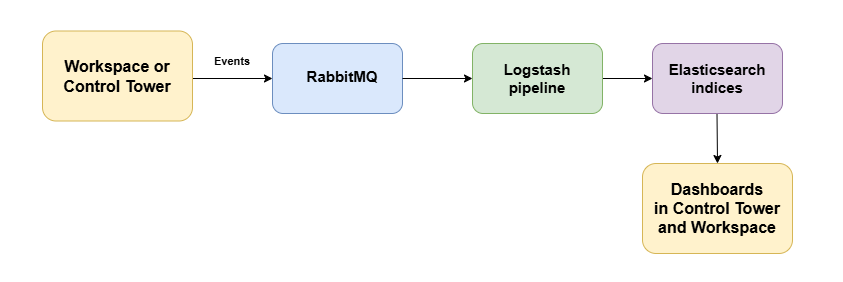
The event-based approach implies that data attributes representing specific events, such as assignment opening or task submission, are sent as part of payload messages to a RabbitMQ queue. Through a Logstash pipeline, the events are consumed by the Analytics component in Control Tower or Workspace and rendered in analytics charts and dashboards. For details, read Learn about analytics in WorkFusion.
The Analytics component is uncoupled from the MS SQL database tables with all data now stored and managed through Elasticsearch indices. MS SQL is only supported for backward compatibility.
Out-of-the-box AI-powered dashboards to monitor manual reviews and rules
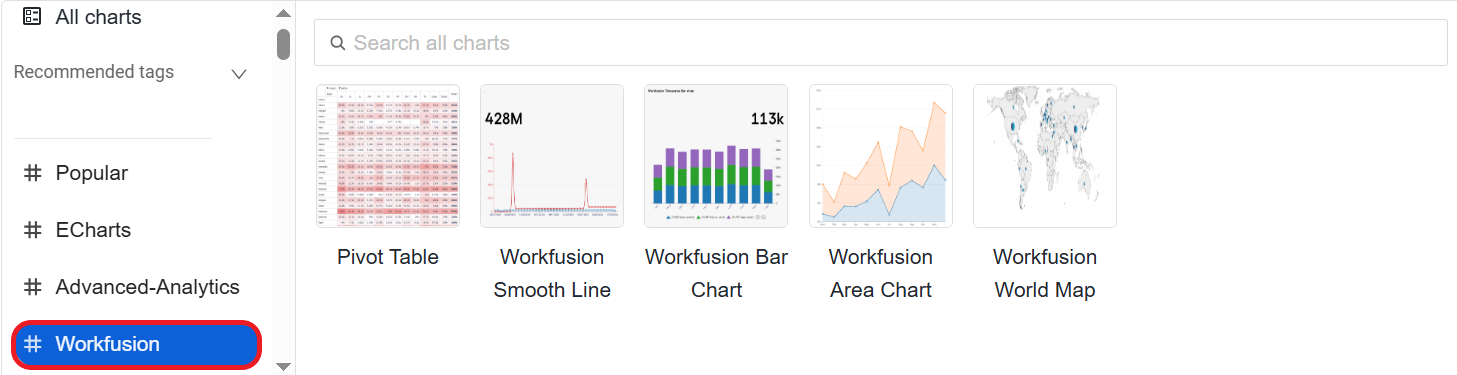
With the 10.3 release, the Overview, Manual, Speed, and Scheduler Monitoring dashboards, previously available out of the box, are deprecated. Instead, we are introducing the Case Management and Decision Rules ones. We also added a collection of #Workfusion out-of-the-box charts to help you deliver customized analytics with less effort and within a shorter time.
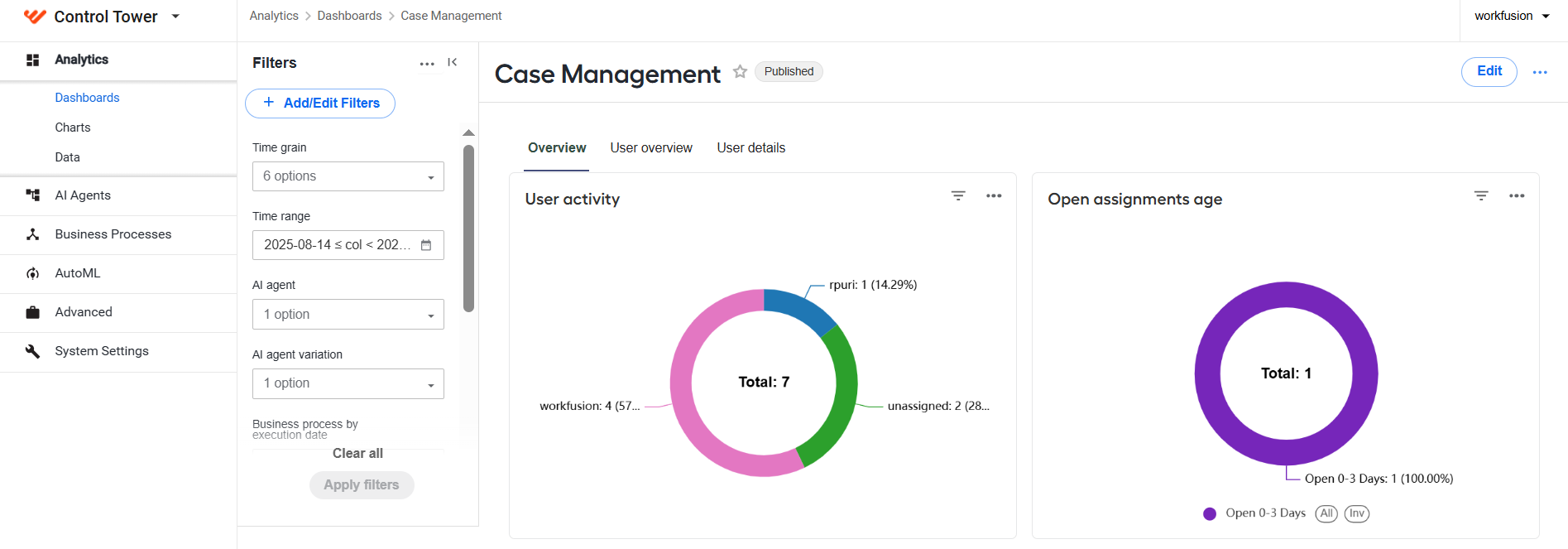
The Case Management dashboard provides you with comprehensive insights into key worker- and assignment-related metrics. It is accessible both from Workspace and Control Tower, allowing you to segregate access to Analytics and Work.AI applications for different user groups. Thus, Workspace becomes a manual review hub, where employees process tasks and managers can monitor their work without switching to a different application. For more information, read Case Management dashboard.
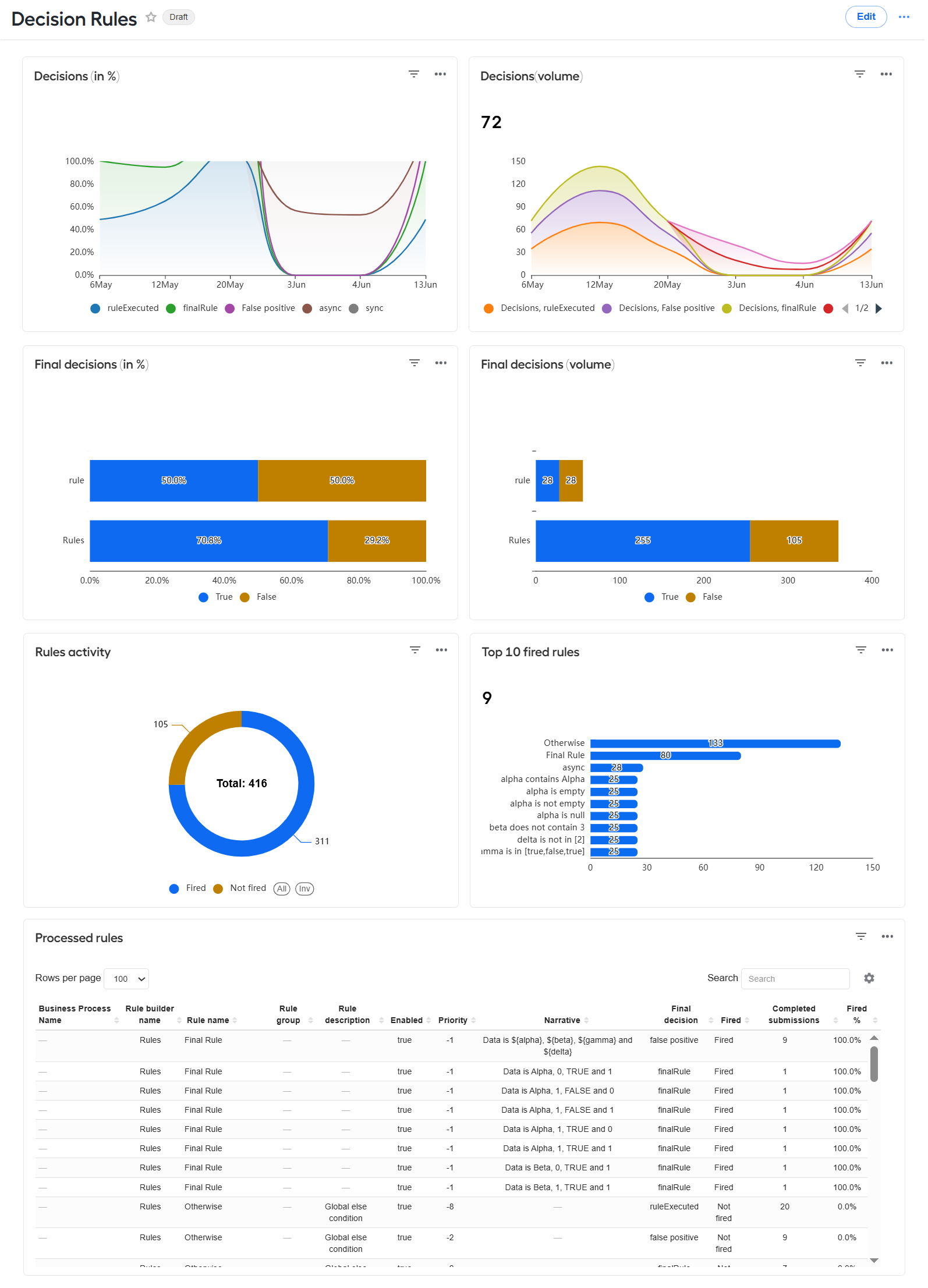
The Decision Rules dashboard is available in Control Tower only and gives a comprehensive overview of rule execution across your Work.AI automations. From its charts and tables, you can learn which rules were submitted, which fired, and what decisions were taken based on the rules. For more information, read Decision Rules dashboard.
Both dashboards are enhanced with the following AI capabilities:
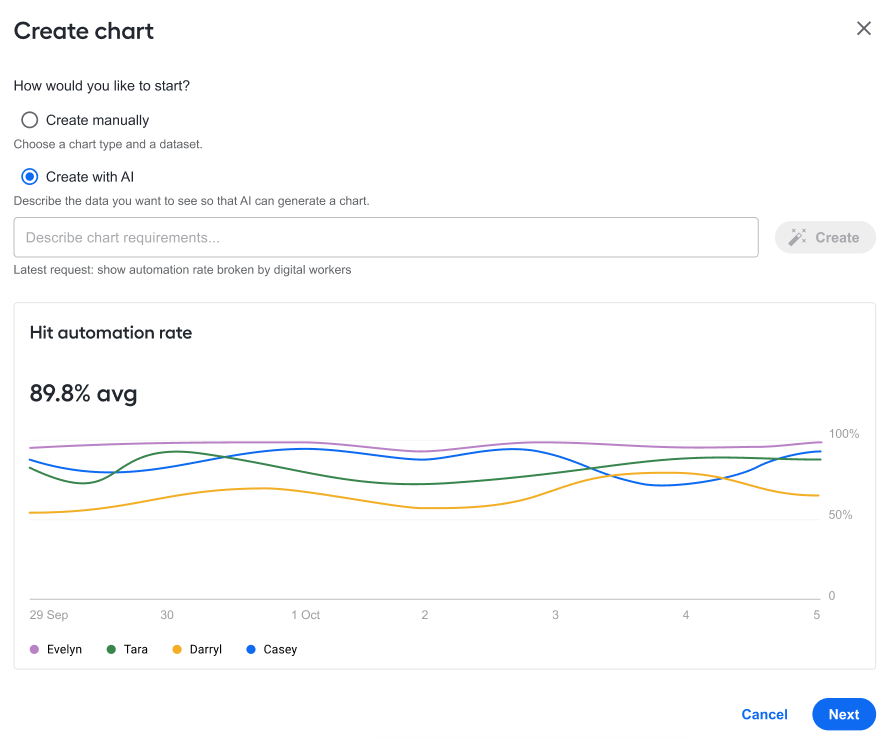
AI Chart Generator saves the manual efforts and time required to build a chart, reduces the learning curve for new users, and increases productivity by enabling intuitive chart creation. You can simply input a query or describe the data you want to visualize, and the Gen AI underlying the feature will generate an appropriate chart. For details, read Create custom dashboards | Create chart with AI.
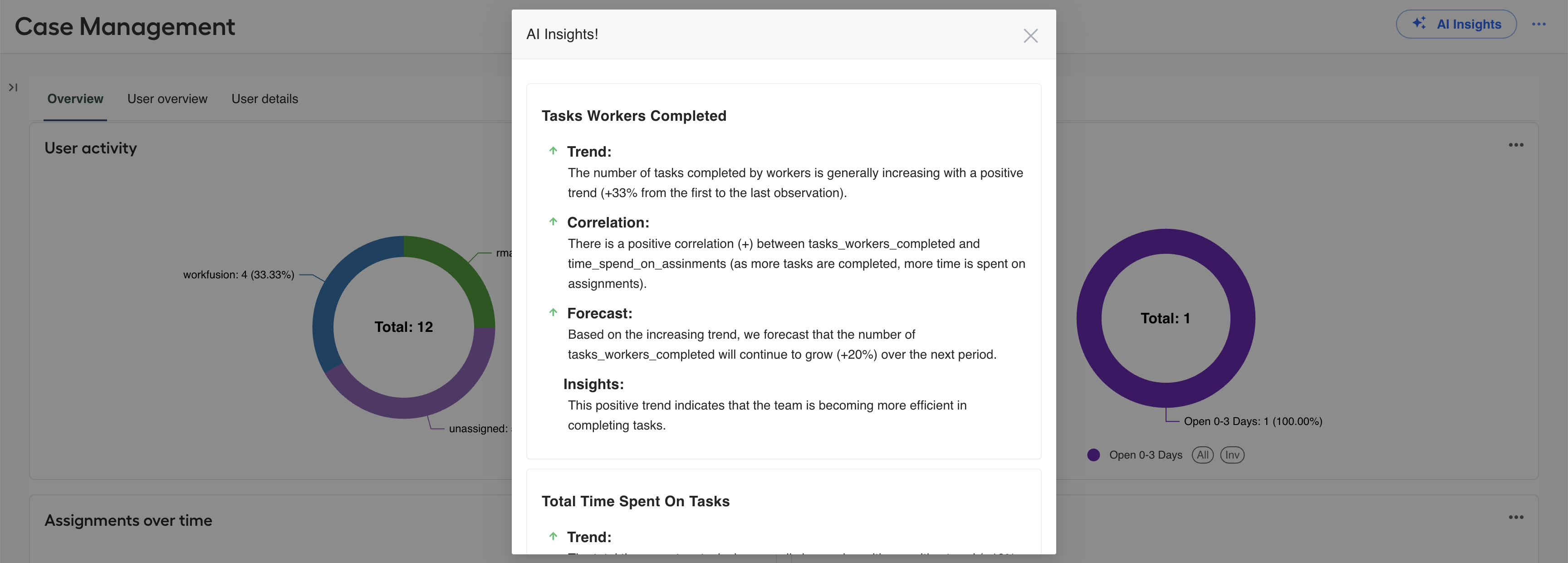
AI Insights lets you get valuable insights based on displayed metrics within seconds. Instead of manually analyzing data, you can focus on interpreting the AI-generated conclusions presented in a clear easy-to-understand format and speed up the decision-making process. For details, read Learn about analytics in WorkFusion | Get analytics insights with AI.
Both AI-backed features are enabled at installation, and users need to have necessary permissions to access them. For details on the permissions, read Set roles and permissions for Analytics.
Advanced chart configuration options
To give you more flexibility with handling analytical metrics, we enabled API-based access to chart data in a secure and user-friendly manner. The feature lets you retrieve data based on various filters and parameters configured in charts. For details, read Create and manage charts and dashboards | Access chart data via API.
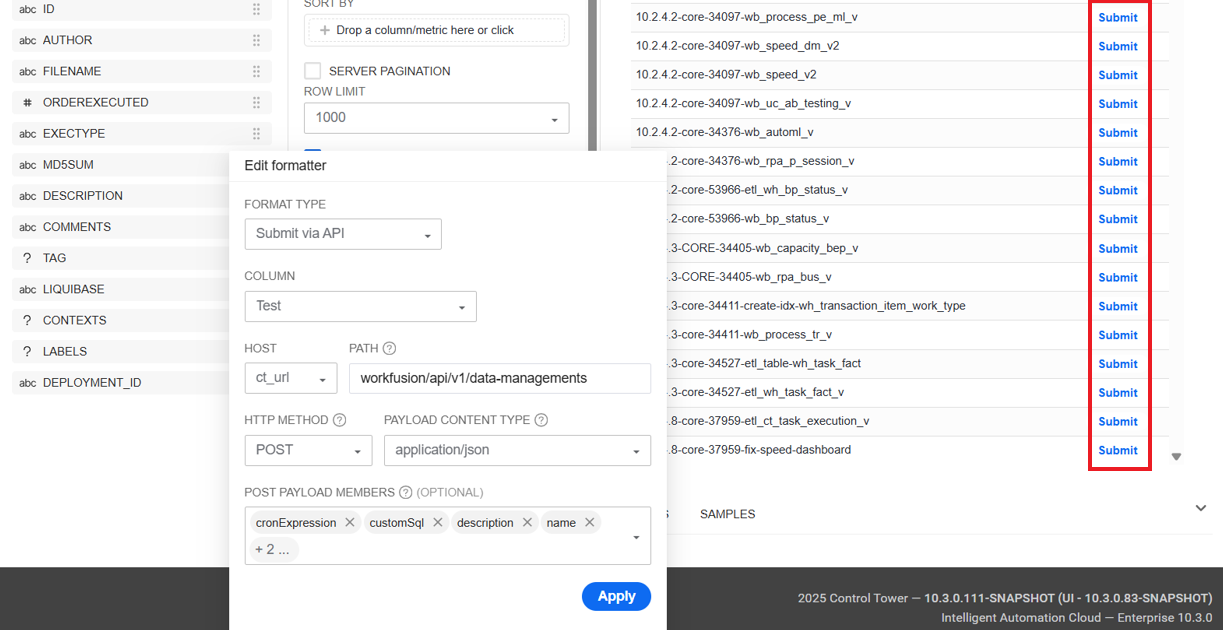
The Table type OOTB chart also supports POST and GET requests to WorkFusion API endpoints. Using the in-built conditional formatter, you can set chart values to be sent as POST or GET requests straight from the chart with one click. The formatter also includes options for configuring conditional highlighting and adding icons or changing their color. For details, read Create and manage charts and dashboards | Customizing table charts.
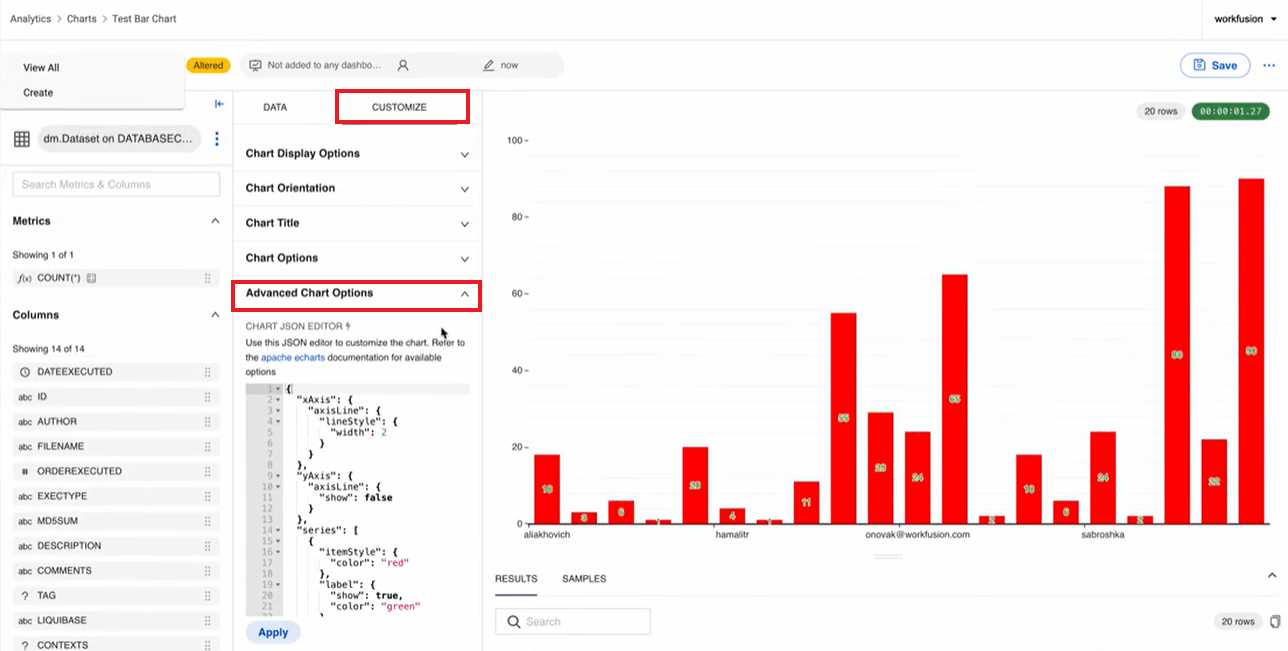
As managing a large number of chart configurations through interface controls can be overwhelming, we introduced a raw JSON editor. In the editor, you can input chart configurations directly in the JSON format, based on the Apache ECharts syntax. The new feature allows you to define chart behaviour more precisely and extends your options for chart customization without cluttering the interface with too many controls. For details, read Create and manage charts and dashboards | Advanced JSON editor.
Enhanced process data integrity
The data purging capability was extended with a dedicated data backup mechanism to protect your historical data from accidental losses as a result of applying the data management procedure removing Business Processes that have not been active for over 90 days. For details, read Manage database and S3 data | Back up process data before purging.
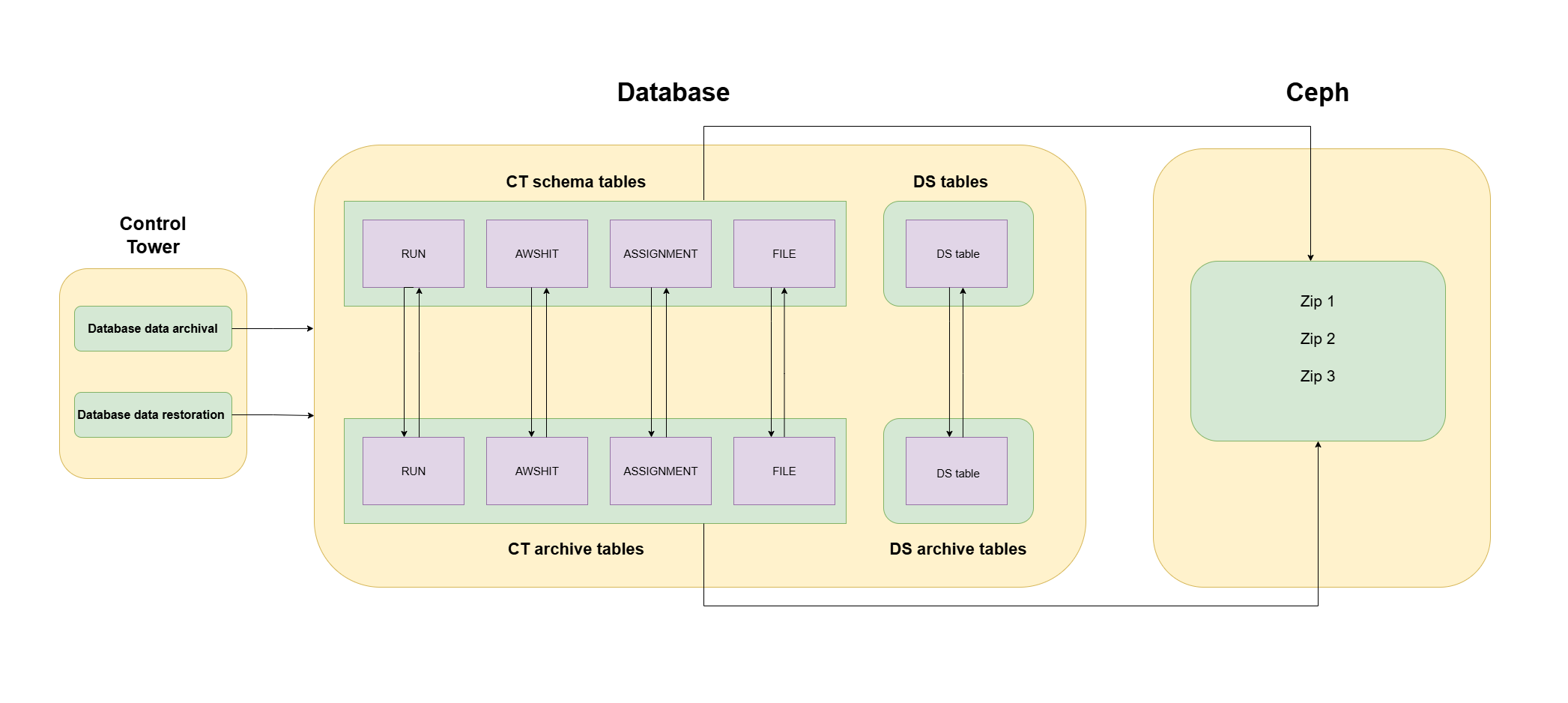
To set the mechanism working, use the two new data management configurations:
Database data archival fetches data from the Control Tower and Data Store archive tables and moves the data to a specified S3 storage in the ZIP file format.
Database data restoration retrieves data from the Control Tower and Data Store archive tables that you want to restore and merges it with the Control Tower and Data Store schema tables.
Improved optical recognition quality
Optical Character Recognition (OCR) in Work.AI has been reinforced with high-quality handwriting recognition and checkmark detection capabilities. Together with other improvements, these allow you to get high-quality datasets even if input files are of lower quality than you expected.
ABBYY FineReader 11 is no longer available as an OCR provider, and the OCR API v1 version is deprecated. The ABBYY FineReader engine, updated to v12.6, and v2 OCR API offer improved recognition quality and better OCR output for large and complex tables. Custom allowedRegionType, customRegions, and useOnlyCustomRegions parameters were deprecated, while skew correction and image inversion are now applied automatically with no manual adjustments needed.
Reference LLMs available OOTB as automation flow steps
The integration of the ML Ops Platform with the core Product is becoming closer so that you can seamlessly deliver and leverage more complex and powerful models in your automation flows. Self-hosted LLMs can now be deployed to the ML Ops Platform and then called and executed directly from the ML Ops LLM step in a Business Process in Control Tower.
In addition to the ML Ops LLM step, the Reusable components panel also features OpenAI LLM and MistralAI LLM steps out of the box. The steps are easy to configure in a no-code manner, which means you can integrate the AI power into your automations faster and with less effort.
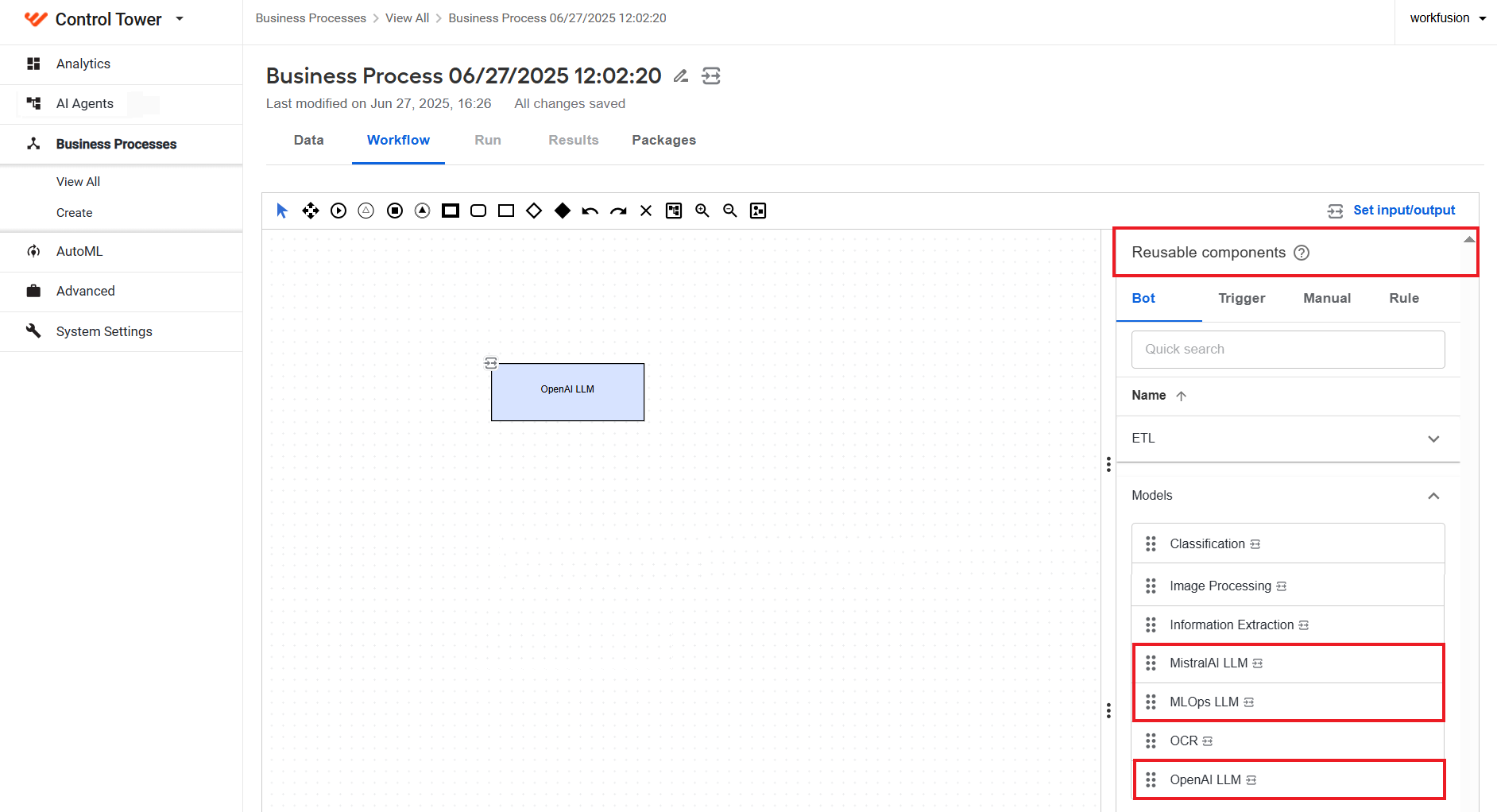
For details on LLM steps, read Add and configure Model, LLM, and Dataset steps.
Higher-quality Template model output
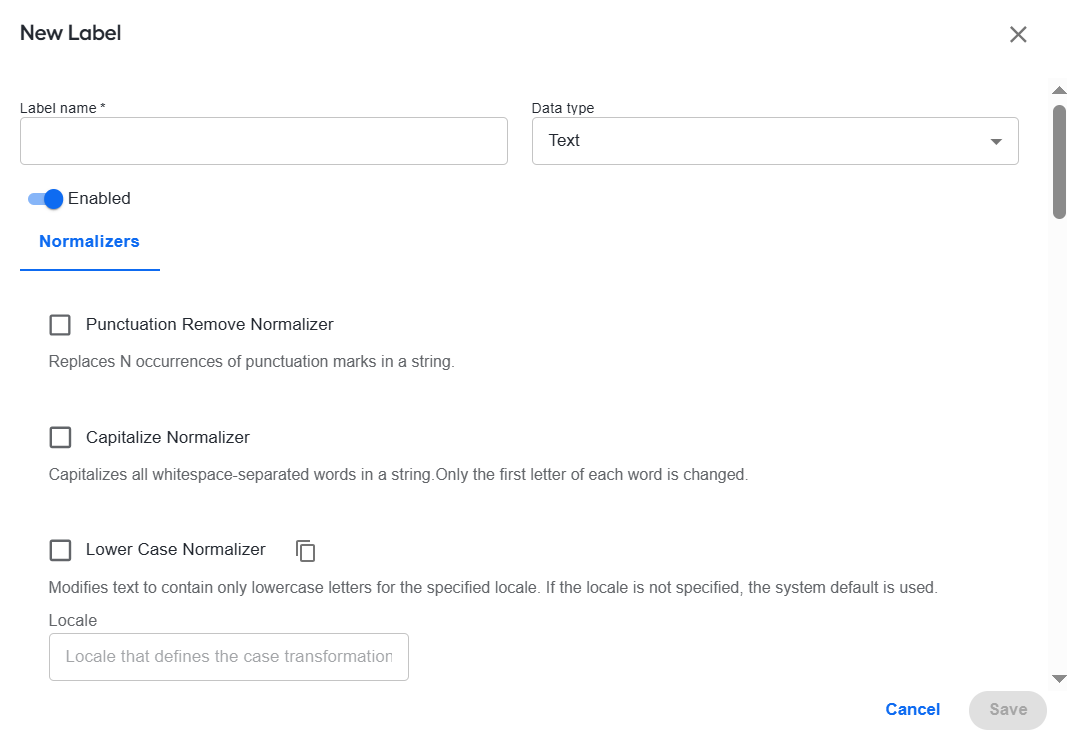
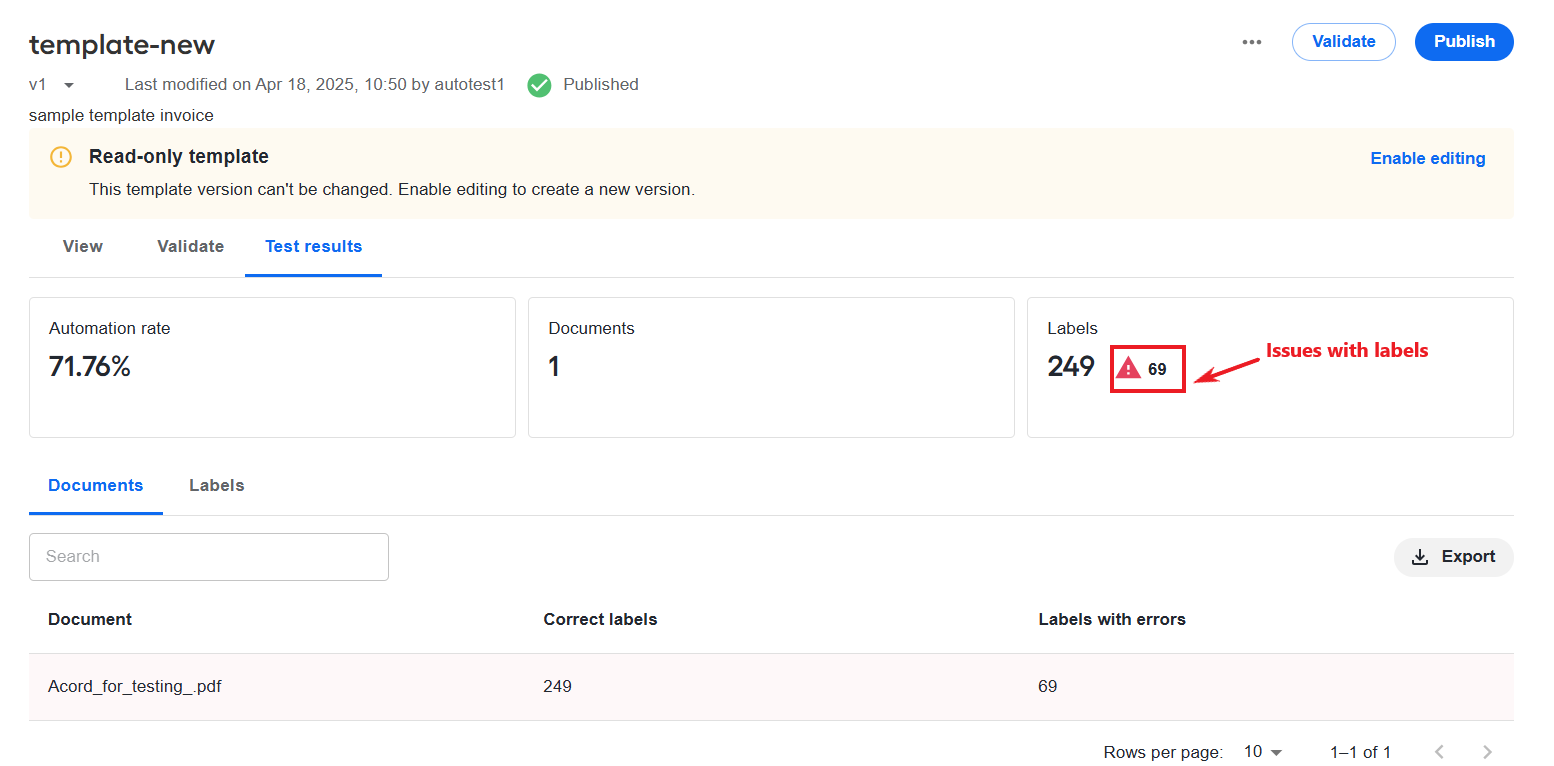
You can now improve the quality of the template model output by leveraging the normalizers for text, number, signature, and date formatting. The normalizers work the same way as with conventional information extraction models. You can configure them as you create or edit labels in the user interface, and they will then be passed to the model during training. For details, read Create and manage templates | Create labels.
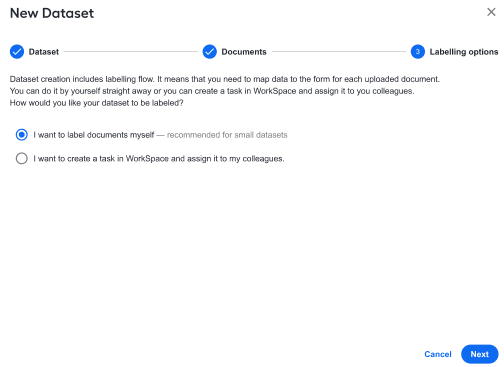
Two new flows are introduced for template models: for testing templates and creating test datasets. The flows can help you optimize the template model quality and address extraction issues in a prompt manner. In addition, when creating a test dataset for a template, you can label the input from Control Tower or create a Manual Task for another user to do the labeling in Workspace.
The template testing flow lets you compare and download statistics for different test sets and drill down to specific documents to review labels and errors. For details about the testing and test set creation flows, see Create and manage templates | Test templates.
Revamped creation flow and custom data mapping for Tabular datasets
We have revamped the flow and user interface for creating datasets of the tabular type to let you customize them for specific model intake and work with non-standard tables. This way, you can save time on pre-processing, while making data samples more representative.
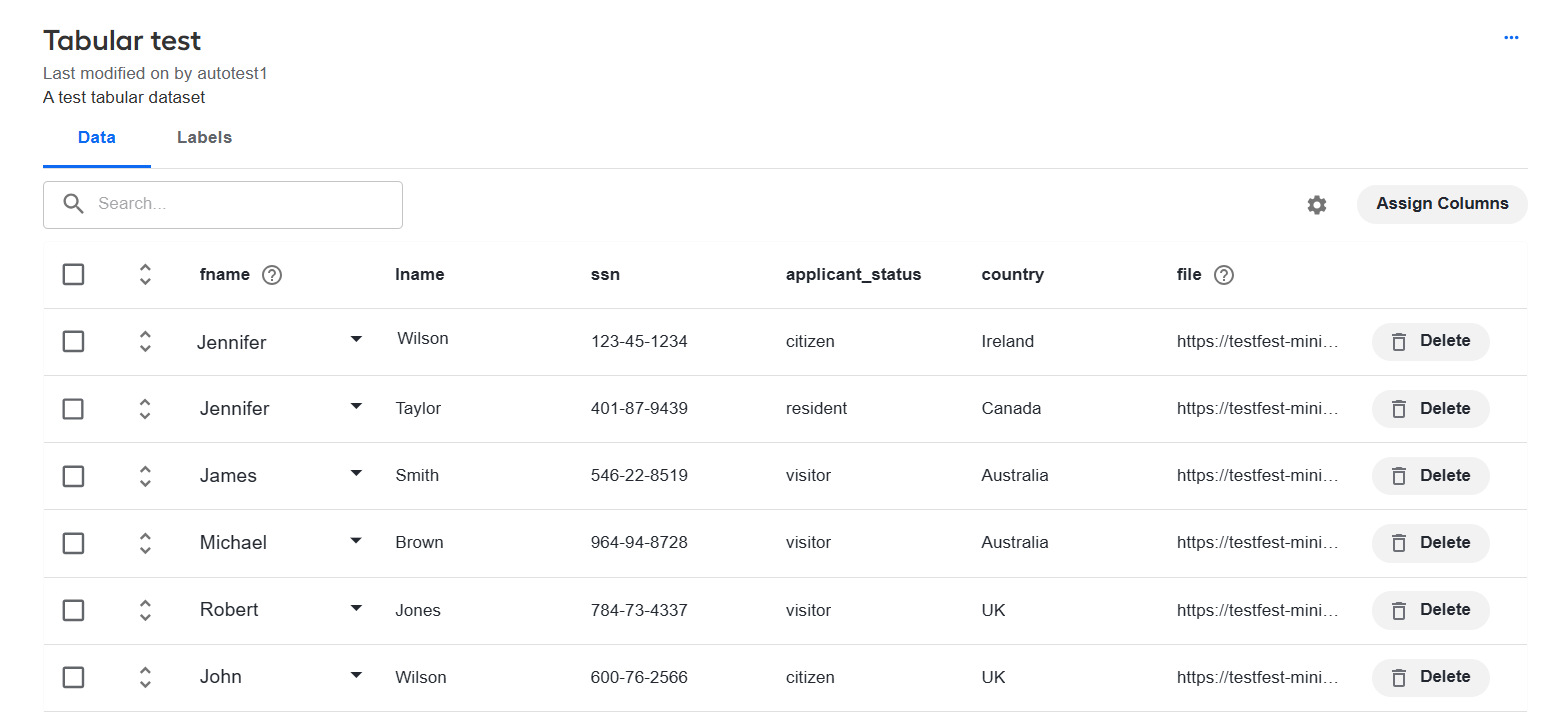
As you upload a CSV or Parquet file from the Datasets page in Control Tower, you can now see all columns in the uploaded file, review them, and enable or disable. In addition, you can map the columns to the expected model input and data types. For detailed instructions, read Manage datasets | Create tabular dataset.
New capability to set Business Process-level contracts
In addition to setting inputs and outputs for each specific step, you can now configure them at the Business Process level (BP-level), resulting in shorter time to production for your automations and less setup effort. You can generate BP-level contracts automatically, create them manually, or use a combination of both methods depending on your needs. Simply click the Set input/output in the Workflow Designer in a Business Process to start the flow.
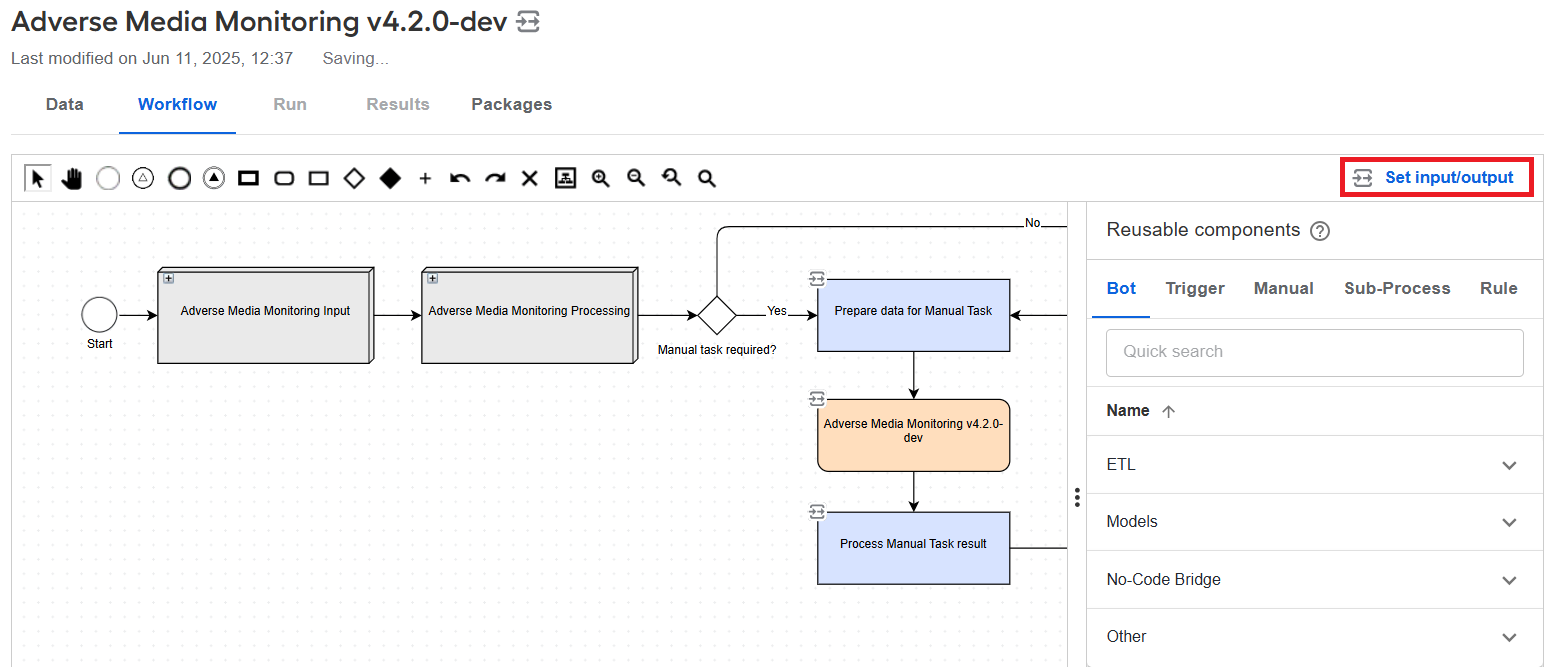
BP-level contracts can reference any variable types in the Business Process schema, work with custom types, and ensure these types are available across all Business Process steps. They are also automatically included in exports and imports to ensure consistency across environments. For more details, see Configure input and output contracts in Business Process | Create BP-level contract.
Reduced data load with new variable type
To reduce the amount of data sent across steps and thus optimize the utilization of computational resources by the platform, we introduced a new Upstream variable variable type you can use to define output contracts in Business Process steps.
The new variable type allows you to back up any values coming from preceding steps and pass downstream the original value of the variable instead. Any values you set for the upstream variable in a step are not processed by the step’s execution logic and go straight to the destination specified in its output contract mapping. These values are saved in the Business Process transaction data but do not appear in its final output on the Results tab.
Dedicated interface for BEP resource management
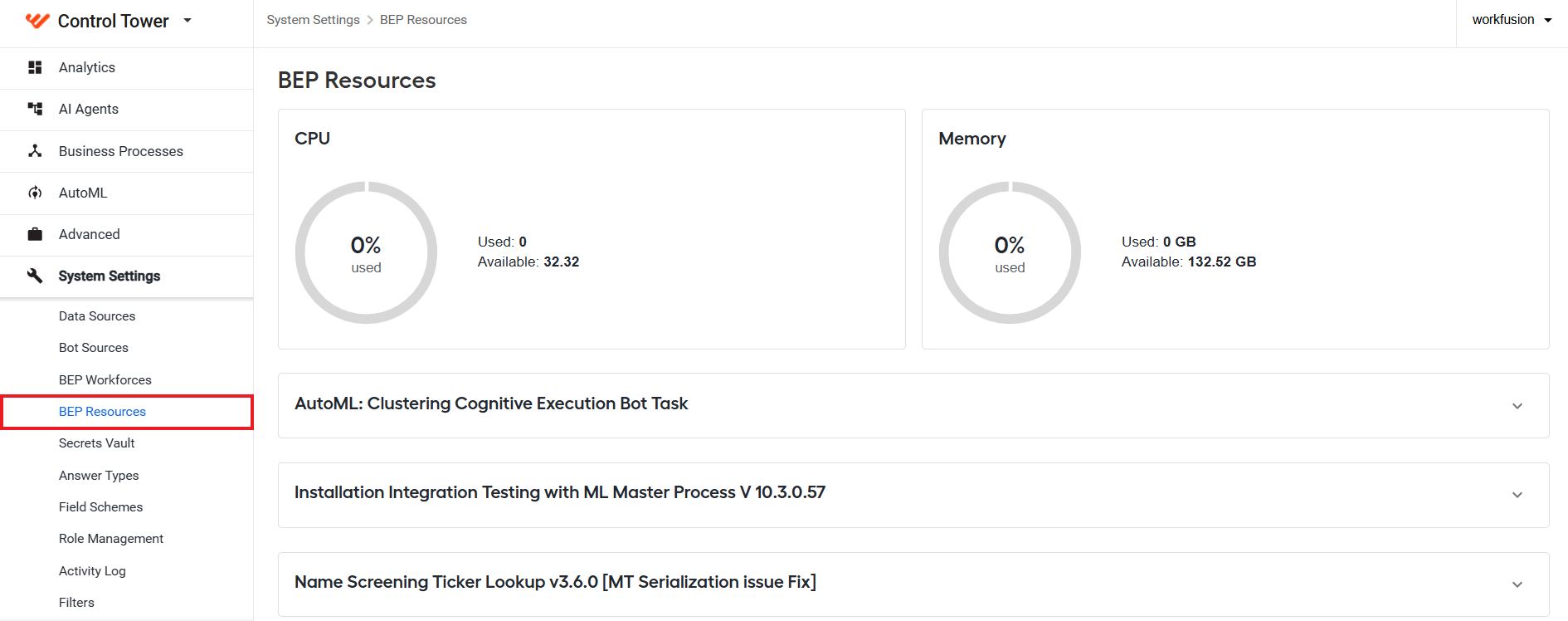
Control Tower features new interfaces that provide a transparent and flexible way to adjust the allocation of the Bot Execution Platform (BEP) resources and regulate processing priorities.
On the BEP Resources page, you can view current resource consumption metrics and adjust resource requirements and limits for each individual BEP worker pool. The platform also calculates the total and available cluster capacity and alerts you in case you misconfigure a pool against available resources. Thus, you can access and control all BEP metrics from a single place and scale up or down flexibly as required to ensure better utilization and optimal performance.
On the BEP Workforces page, you can allocate BEP worker pools to specific automation flows (Business Process definitions) to optimize capacity utilization or address Service Level Agreement (SLA) violations. The allocation mechanism allows the processing of different loads without affecting the SLAs of executed automation flows.
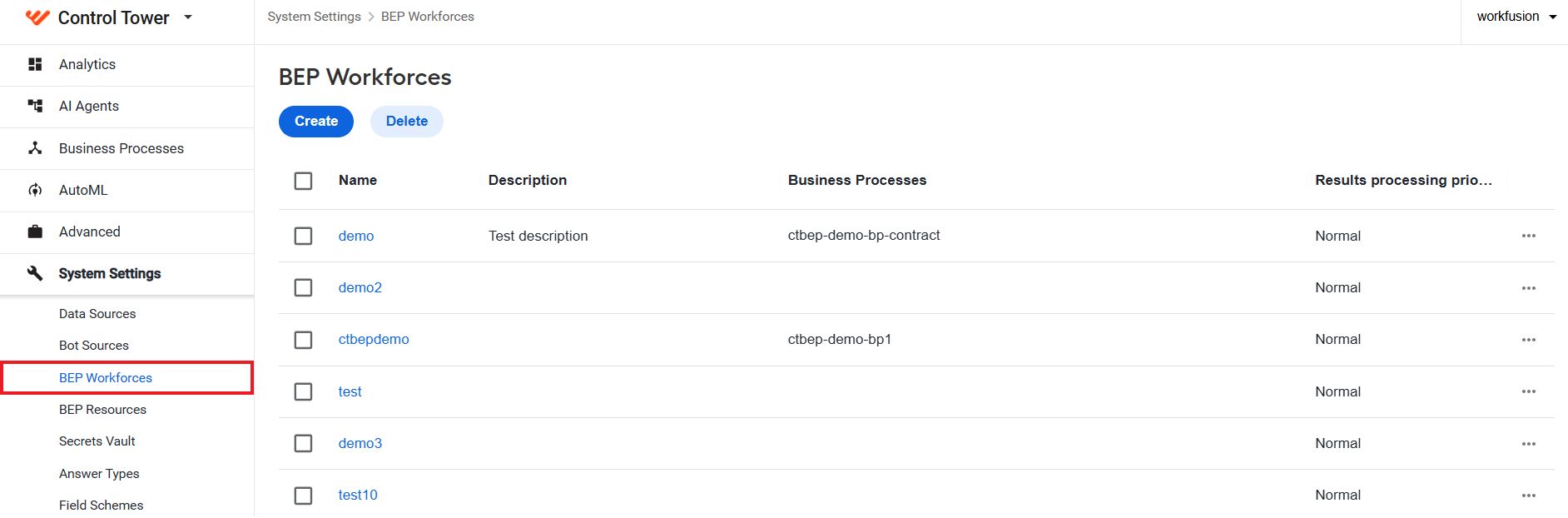
For details on the new interfaces and configuration instructions, read Manage bot execution resources from Control Tower.
Optimized data sourcing for sub-process steps
In addition to Signal ID, you can now specify Override Signal ID to call one automation flow as a sub-process from another automation flow. The Override Signal ID feature enables you to dynamically assign a Signal ID value to match the required processing logic, allowing you to deliver more advanced automations with less effort and within a shorter time.
You can define the Override Signal ID on the configuration page for a specific Asynchronous Sub-process Execution step. The value is a reference both to a variable in the input and to a specific Business Process to be called from the sub-process step.
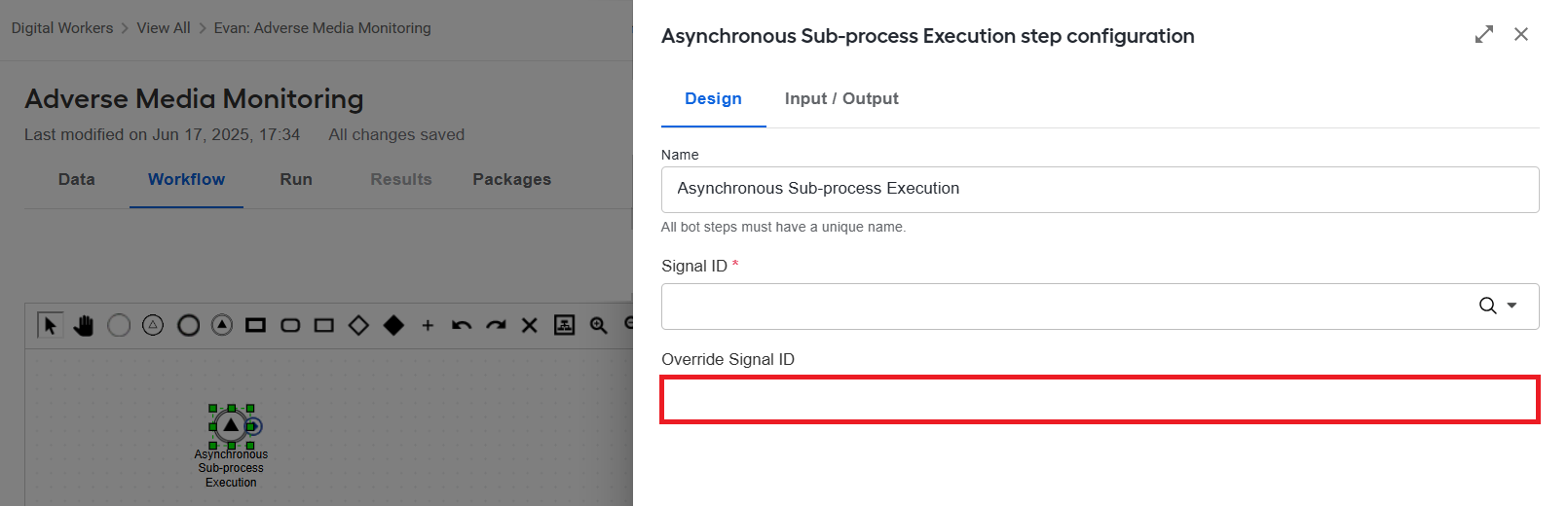
Thus, if Override Signal ID is configured, the process goes to the override_signal_id column in the input file and looks for records containing the specified value. Then, these records (if any) are sent to the Business Process with the Signal ID matching the configured override value, while the rest of the records are fed to the Business Process with the original Signal ID. For detailed information, read Start Business Process by internal event.
Reduced data storage costs with S3 Manager
The MinIO S3 emulator was replaced with S3 Manager based on open-source Ceph to reduce platform data storage costs. For seamless data migration from MinIO to Ceph, WorkFusion offers you an automated migration tool.
Note that when migrating to Ceph, the S3 endpoint URL changes from https://{host-name}-minio.cloud.workfusion.com to https://{host-name}-s3.cloud.workfusion.com. If your Business Processes reference S3 objects using full URLs, you need to update them to the new format to maintain continued access after migration. However, as a workaround, when the old MinIO URLs are saved in your Data Stores or hardcoded in Business Processes, update the DNS entries to point to the legacy MinIO endpoints.
You can use S3 Manager to view, create, upload, and delete files and manage buckets. For usage instructions, see Organize and access objects in S3 Manager.
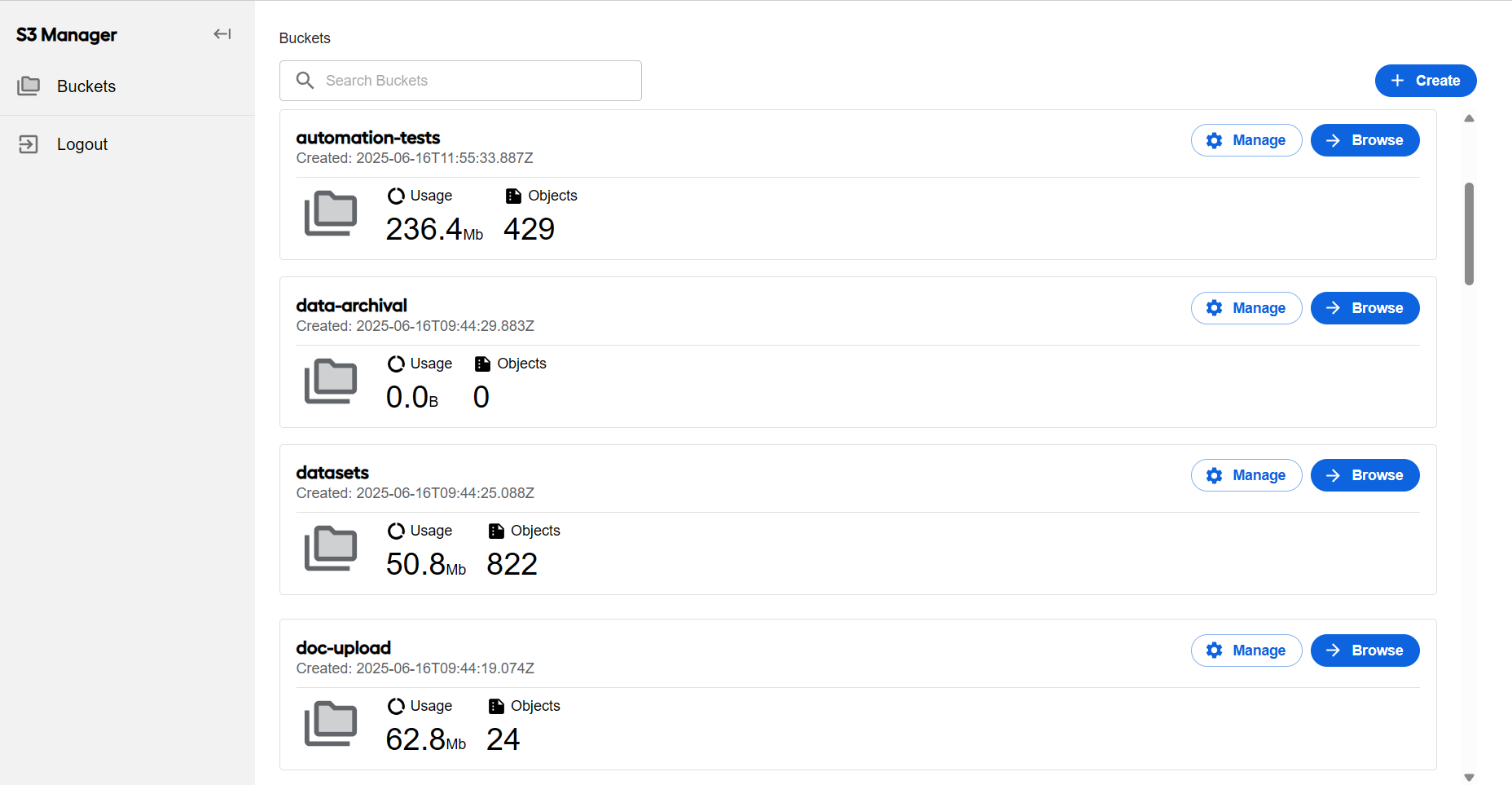
To ensure adequate S3 Manager performance and prevent any interference with the main load on the Master server, a separate drive is required to store Ceph data. Before installation, the dedicated disk must be mounted to <install_dir>/ceph.
Like MinIO, S3 Manager has dedicated dashboards and visualizations for metrics monitoring in Kibana. It is also integrated with WorkFusion’s Keycloak-based user management system. So, you can access your S3 data via Single Sign-on (SSO), while ensuring that only properly authorized people can view or manage it. To enable the integration, a new s3-management-be client was added in the Keycloak admin module, featuring default roles for read-only and full access. In addition, you can create custom roles and user groups to fine-grain access. For more details, see Manage and assign realm and client roles.
Optimized ELK deployment and resource consumption
The Elasticsearch, Logstash, Kibana (ELK) stack was moved away from the Master server to eliminate its impact on the processing of automation flows. You can now deploy it on different Linux sever groups, for instance, Agent or Superset.
All logs for cloud deployments are sent to a centralized ELK instance. Cutting the index size made it possible to reduce the RAM and CPU footprints and disk space for storing the index. The optimization involved filtering out unnecessary fields and making sure APM indices have proper lifecycle policies and replica count.
Automated deployment and scaling in Azure cloud
We have extended our software-as-a-service offering with Azure as a new cloud service provider. An automated script deploys the Product with the required infrastructure (non-HA) and runs a health check Business Process for validation.
So, you can enjoy the benefits of cloud Work.AI installations with your preferred provider without complicated installation and setup. In addition, you can scale up or down the Azure services for the Product to regulate the usage and associated costs flexibly.
Refined Java application automation
Workers running on Java 21 can now seamlessly connect to and automate Java-based applications running on any LTS version of the JDK—including Java 8, 11, 17, and 21.
The Worker automatically detects the JDK version of the target application and uses the most compatible method to attach a lightweight agent that enables UI structure access and JMX-based communication, even across different JDK versions. For more details, refer to the documentation.
This enhancement allows you to modernize your Worker runtime to Java 21 while maintaining full support for legacy applications. By supporting all LTS JDK versions from a single Worker instance, it also reduces fragmentation across environments and simplifies maintenance of your automation infrastructure.
Trigger testing framework for streamlined development workflow
A novelty structured approach is introduced to testing trigger execution—the Trigger testing framework featuring the following key benefits:
External dependencies are replaced with in-memory ones for seamless integration. As a result, the setup is simpler, and you have no more dependency-related failures.
Record processing behavior can be simulated using custom rules, which allows for higher accuracy and more flexibility in testing. You can replicate real-world processing scenarios to identify potential issues and reduce the debugging time.
The framework is integrated with a common Bill of Materials (BOM), allowing you to manage the testing library version externally. This ensures that dependency versions for development, testing, and custom implementations are aligned and consistent. A separate BOM introduced for the framework contains all necessary dependencies to facilitate the integration into existing projects.
Assertions can be delayed based on rules, and triggers can be stopped on a timer to collect and return processed records, which ensures assertions are only evaluated when conditions are met. Thus, false negatives in tests are reduced, leading to more reliable results and efficient troubleshooting.
Trigger execution results are validated using an AssertJ-based API, which simplifies the implementation of tests and minimizes the validation overhead.
The record processing API allows you to track and update the record status asynchronously using a scheduler for improved lifecycle control. Using the API, you can start, stop, and check trigger execution, reinitialize queues, and clear data from ZooKeeper after test execution.
Common framework for Java Native Workers and connectors
The common framework for Java Native Workers and connectors streamlines development and maintains consistency across automation projects. A unified BOM manages common dependencies, ensuring version consistency and reducing potential conflicts. The framework also includes reusable modules that support both JNW and connector workflows, improving maintainability and minimizing duplication. Built-in code generation utilities facilitate project building.
Additionally, the Distributed Service Module and JNW Control Tower Service Module are now independent of the Worker Core, which gives you more flexibility. The JNW Toolkit dependencies have also been migrated to the Worker Development Toolkit to align the tooling stack and simplify maintenance.
Digital Workers renamed to AI Agents across interface
To align the interface microcopy with the latest WorkFusion marketing strategy, Digital Worker labels were replaced with AI Agent ones across the platform interface. The AI Agent term is a better way to describe our AI-enabled digital employees who can execute complex multistep workflows across environments while applying reasoning.
Improvements
Infrastructure
WorkFusion now supports automated Work.AI installations on the hardware with the Red Hat Enterprise Linux (RHEL) operating system of the 9.0 version. You can use RHEL 9.0 both for on-premises and cloud infrastructures to enjoy a faster and a more consistent deployment experience.
To enhance data security and guarantee no essential credentials are lost, a mechanism for secret duplication was implemented. User-defined secrets are duplicated from
secret/policy/WFApplication/workfusion_WFApptowf-client-secretsas they are. All other platform secrets are duplicated fromsecret/policy/WFApplication/workfusion_WFInternaltoconfig/applicationas a single JSON object where each secret has its own separate field.Superset is now running on a server with Podman instead of Docker. The move towards Podman is meant to enhance security, provide full RHEL 8 compatibility, and integrate seamlessly with RHEL Container Platform allowing for a more streamlined lifecycle management experience.
The HashiCorp Vault component is no longer using ZooKeeper as its backend to persist data as we moved the component to Raft, officially supported by HashiCorp. The replacement enhances the platform’s stability and reduces ZooKeeper’s workload, while providing high availability. Raft has no single source of data; instead, the Vault’s data is replicated across all nodes in a cluster.
To increase the overall platform security and protect your sensitive data from hacking attacks, the use of static cipher suites and CBC, 3DES ciphers was disabled for WinRM TLS endpoints. Instead, the TLS/ SSL server was configured to use GSM ciphering and a randomly generated 2048-bit Diffie-Hellman group.
A new flag is introduced in the installer to provide for conditional deployment of the ocr2rest service, which allows you to save the platform’s operational resources. By default, the flag is added to the deployment manifest, and the OCR component is deployed. However, if your automation flows do not require OCR, you can remove the flag, and the component will not be deployed.
To accomodate the changes in the execution logic of the Healthcheck Business Process and marathon-auth plugin updates, we reworked the associated user authentication mechanism. Now, as you deploy the platform, two users are created automatically in WorkFusion’s Keycloak-based user management system with the minimum privileges required for Traefik-to-Marathon authentication and execution of the Healthcheck Business Process:
system_marathon_user with the assigned View role in the wf-marathon Keycloak client
system_ct_user with the assigned Developer role in the wf-control-tower Keycloak client
To avoid losing customer-defined Kibana configurations (rules, connectors, and so on) during upgrade, a special mechanism was implemented allowing you to preserve those when ELK is deployed on a separate server. You can now export all custom objects in the Kibana user interface before the upgrade and then import them back after the upgrade.
The installer now includes a flag for S3 encryption allowing to protect your sensitive process data.
Control Tower
To resolve the recurrent Control Tower performance issues related to long-running Business Processes with large input volumes, we implemented an auto-rotation mechanism that monitors and limits how many records are processed per Business Process instance. Once the configured input record threshold is reached, the mechanism creates a new instance of the same Business Process to continue processing new inputs. Data purge procedures can clean completed Business Process instances and their data without being blocked by long-running Business Processes.
As a result, Control Tower restarts, the overall database is reduced, and there is no need to implement and maintain manual workarounds to address associated performance bottlenecks. Mind that when a Business Process is started by the scheduler, the auto-rotation mechanism is not applied. For details, see Configure auto-rotation for signal-based Business Processes.
The renewed Bot Source configuration flow provides a completely different user experience and a reworked logic to let you manage Bot Sources in a more transparent and streamlined way.
To make all bot performance metrics easily accessible from a single place, we added the Bot performance panel to the Statistics tab displaying Bot Task results. The info panel is not visible by default, but you can switch it via the user interface. When the feature is enabled, Control Tower saves the
AwsHitAssignmentinfo for bot steps and displays it together with other Bot Task results.You can now modify Business Processes while they are paused and then resume them with updated tasks and refreshed Manual Task templates. This change gives you greater flexibility and control over existing automations.
A validation flag was added to initiate checks if synchronous calls in a Business Process or its sub-process steps with streaming from external sources can return results as expected. The new flag prevents Business Process failures, and hence process disruptions, due to misconfigurations and allows you to detect and address configuration errors promptly.
You can set the validation flag when you define the Signal ID for the parent Business Process. When the flag is on, the platform returns a validation error if the check shows that the steps in the called flow do not have the
send-resultattribute.The Add operator is now available for type list items in the Then section of the Transformation step, allowing you to deliver more complex transformations. The feature is enabled only when the left-hand side is a list, and the right-hand side variables are filtered to ensure type compatibility.
To improve transparency and prevent the silent loss of your previous work, a warning is now displayed when the existing mappings are reset due to type updates on the Input/Output tab.
A new Bot Task configuration attribute,
legacy-data-format, is introduced to control whether step outputs are returned in modern JSON format or a legacy format. This allows to simplify downstream validation and perform more consistent data handling, particularly in schema-based Business Processes. For more details, refer to Develop and import steps for schema-based Business Process.When a Bot Configuration or a Manual Task used in multiple Business Processes is updated in a Business Process workflow, the corresponding step titles are now automatically synchronized across all affected Business Processes. This enhancement ensures naming consistency across Business Process designs and run results, improving transparency in the management of shared Bot or Manual Tasks.
Analytics
The Analytics dashboards are now visualized faster thanks to HTTP/2 protocol and caching speeding up the loading of Superset static assets.
Multiple enhancements were introduced in charts to facilitate their customization and eventually make charts easier to read and understand:
Two types of queries are now available in a single chart—one for fetching numbers and the other for rendering area, bar, and line charts. In number-based charts, you can select up to five metrics to be displayed simultaneously and set their formatting individually, hide or show titles, and leverage extended font size options.
The new controls in bar, area, and line charts let you customize the display direction, manage icons in a chart legend, and design fine-grained X and Y axes. Additionally, when designing the X axis, you can choose to show or hide boundary gaps and use two new time formats—a day name in a week and a date with a month name.
When building bar charts, you can customize the edge border radius and draw additional lines to visualize the average, maximum, and minimum value levels.
The newly introduced WorldMap plugin allows you to create WorldMap charts with data points using pie sectors. It features controls to zoom in and out on a map, add a legend, and show pie sector labels and line mappings to the pie sectors with labels.
The chart controls now include the View Details section where you can build navigable links from a source dashboard to a destination one. Once the link is created, any filters you applied to the source dashboard are applied to the destination one as you navigate to the latter from the source. Additionally, back navigation was also implemented to let users get back easily from the destination dashboard with details to the source one.
For detailed instructions on using the enhanced options, read Create and manage charts and dashboards | Customize charts.
Workspace
Manual Tasks are now secured with built-in platform SSO, ensuring authentication is required before access. Additionally, session sharing enables seamless integration with the Workspace API directly from a Manual Task. This allows real-time retrieval of users and groups, which lets you assign or reassign tasks dynamically within tasks, simplifies workflows, and improves task management efficiency.
For better visibility and tracking of locked assignments without requiring users to hover over or inspect individual items, the name of the user who locked the assignment is now displayed in a separate column in the assignment list.
Manual Task
The Manual Tasks option on the main Control Tower menu and the associated flows are deprecated. You can now create Manual Tasks only as part of an automation flow using Workflow Designer in a specific Business Process.
To let you process complex tables in Manual Tasks with less configuration efforts, Manual Task Designer was enhanced with the possibility to create components with the same Property name in different Line Items. The Line Item is a task form component used to organize the task content as a table for labeling, and the Property name attribute serves to map expected form field values to the values in input files.
The new Reset field on wrong date parameter was introduced for configuring the Date/Time component in Manual Task Designer. This change aims to prevent the issue where the date picker resets to an arbitrary date when a user selects an invalid month or day.
Cloud deployments
The BillingInfoService interface was improved to reduce the manual effort required for integrating AI Agents with the Billing API and the impact of the billing queue on the platform’s performance. ZooKeeper now includes dedicated global settings to enable billing that are available for all WorkFusion services. Control Tower Workers and JNW check the settings and ignore the billing logic altogether if they are disabled, so you can regulate the load at your discretion.
The BillingInfoService working principles are the same both for Bot Config Bundles (BCB) and JNW tasks. It accepts input and validates it to make sure it matches the required format. In case of any infrastructure failures, BillingInfoService throws exceptions. Thus, you have better control over the billing data flow.
The certificate expiry notification period for cloud deployments was extended from 30 to 60 days to make sure you have more time to get approvals and renew certificates without disruptions.
Kibana dashboards now include metrics for MS SQL database instances for all cloud deployments, allowing you to trace CPU and memory usage with greater precision.
AutoML
One more file type is supported for model training: you can upload Parquet data table files using the same flow as for CSV or XLS. Column-based Parquet files have smaller sizes as compared to row-based formats, such as CSV, and allow for better data compression and faster data processing.
Re-labeling is no longer needed when you change OCR parameters for a dataset, except when you choose another OCR provider. This gives you more room for experimentation to find an optimal OCR parameter setup for better-quality recognition results without the additional re-labeling effort.
Aiming at closer integration of the ML Ops add-in with the core Work.AI platform, we enabled you to test ML Ops models straight from the AutoML user interface in Control Tower. Thus, you can access all test data across models from a single place with just a few clicks.
To assist you in solving classification problems more efficiently, we have integrated support for ML Ops-based classification models and pipelines within the AutoML interface. These models and pipelines are now available among the options in respective drop-down lists.
The default IE Example Training set is updated to ensure a smoother out-of-the-box experience with training LayoutLM models.
ML Ops
- To simplify the use of the Kubeflow API and ensure a consistent standard across ML Ops pipelines, raw calls to Kubeflow API were replaced with calls through a native Kubeflow client. Additionally, we modified the related code so that all properties, such as URLs, are stored in a single file for all pipelines.
OCR
- To make sure your sensitive data is safe and under control, we introduced support for private S3 buckets in OCR and Model steps. As you initiate OCRing, input documents are taken from the private bucket and, after OCRing, the resulting data is returned to the same bucket.
RPA
The internal implementation of the Web and Desktop driver creation mechanism is modified due to the migration from Selenium Fork to the latest version of Selenium 4. Check the migration guide for details on required adjustments.
The RPA API was revised for improved clarity and usability. For details, see the API documentation.
RPA now supports Java 21 and introduces the ability to select the Java version (Java 8 or Java 21) for Worker execution on a particular server. During the installation, select an appropriate Java version for the RPA Worker. For instructions, see Install RPA Windows server.
The RPA installer wizard allows you to select an RPA configuration file from a folder other than the one containing the
RPAInstaller.exebinary, thus addressing the scenarios where security policies restrict software installation to approved locations only. For detailed instructions, read Install RPA Windows server.To have greater control over browser session management, you can now enable or disable browser cleanup by updating the configuration in either
RPA/worker/worker.batorRPA/worker/worker-java21.bat, depending on the Java Development Kit (JDK) version running on the server.Bot Manager authentication is now managed via Keycloak, allowing users to log in directly via a dedicated URL, similar to Workspace, Control Tower, and Kibana. Logging out of Control Tower automatically causes you to be logged out of Bot Manager, which ensures session consistency. Access to Bot Manager remains role-based, with permissions also controlled via Keycloak. Additionally, the security mechanisms for communication between Bot Manager and Bot Agents are updated to align with the integration.
Instead of configuring the Bot Agent log level for the entire cluster, you can now set that for individual servers via the runtime logger configurator. For more details, see the documentation.
To improve the performance of large tabular UI desktop automations, a new search engine is introduced. While the previous approach relied on meta ID usage and required XML tree generation, the new one enhances efficiency by retrieving Control Type (or Class Name) and Name (or Automation ID), thus eliminating the need for XML tree generation. The newly introduced engine supports automation based on object selectors and requires the latter to include Class and Name components, along with an Instance component if Class and Name are not unique. For more details, refer to the documentation.
The Bot Manager interface offers the automatic screen unlock feature that actively monitors the screen status and unlocks it as needed. The new feature prevents disruptions caused by screen locking and ensures seamless task execution.
The newly introduced configurable driver auto-update simplifies driver management by allowing easy control over updates and ensuring compatibility with the latest browser versions.
The video recording process is now restarted automatically when sufficient disk space becomes available after the process is stopped due to a low storage capacity. However, if you manually stop the recorder in Bot Manager, the automatic restart becomes impossible. The enhancements reduce manual intervention while maintaining uninterrupted recording in RPA instances.
You can now control video recorder settings and start or stop recording at runtime. These actions no longer require restarting the WFSvc service or RPA Unit, which improves efficiency and streamlines workflows. For more details, see the Bot Manager documentation.
Filebeat is integrated into the RPA installer and configured to collect logs from the Windows service WFSvc and RDP clients. This enhancement improves monitoring and enables faster detection of issues in RPA workflows.
Developer tools
The Work.AI Developer structure is simplified based on typical user workflows and customers’ feedback. Reduced system requirements and minimized support time for changes make the application easier to maintain, with faster response times and improved scalability.
The REST API now supports secure file handling, enabling you to upload files, process them without exposing publicly, and securely download the results. The file upload mechanism is implemented using the File Upload Trigger, eliminating the need for workarounds, such as uploading files to external storage and passing links. The enhancement provides a more streamlined and secure workflow, which is especially critical for document processing AI Agents.
To streamline authentication in bot steps and provide greater flexibility when interacting with distributed services, we introduced a cache cleaning mechanism. It allows both manual and automatic cleanup of the distributed cache that enables reusing of authentication tokens across bot steps by directly accessing Hazelcast to store and retrieve the tokens.
The Distributed Service Module is enhanced with access to a Hazelcast instance. You can leverage the Hazelcast capabilities for distributed computing to improve scalability and reliability in automation workflows. Additional API methods are introduced to enable seamless and simple interactions with the Distributed Service Module.
A new module is introduced to the JNW Toolkit to support Spring JDBC in multi-AI Agent environments. The module allows you to create universal workers for multiple AI Agents using pre-built repository classes.
Built-in support for column encryption is added to OrmLite for ODF 2, which enhances database security and ensures compliance with data protection standards.
Inspector now supports interactions with Java applications running on versions 8, 11, 17, and 21, enabling you to inspect and analyze applications across commonly used Java environments.
The webharvest-core codebase has been split into separate versions for Java 8 and Java 21, with the Java 21 version updated to use the latest HTTP client. The separation ensures compatibility across different Java environments and provides modern protocol support for applications running on Java 21.
A distributed cache is now available for Trigger and Java Native Worker, enabling the reuse of authentication tokens between bot steps without direct access to Hazelcast. The enhancement simplifies development and provides a consistent way to manage shared data across processes.
The workfusion-webharvest-core library is upgraded to Java 21, with dependencies updated to enhance maintainability and security for future development.
Connectors
When upgrading to a newer version, the Generic Connector now automatically identifies and selects the nearest matching component if an exact match is not available. This feature ensures smooth upgrades, prevents configuration mismatches, and reduces manual adjustments for Business Processes that rely on renamed components.
To simplify integration with XML-based systems and minimize manual data handling, the JNW Rest Client component now supports XML payloads. In the dedicated XML Configurations section of the component's configuration window, users can define related content structures, handle arrays, and adjust formatting rules.
The Rest Server component no longer includes the Basic authentication from request payload option, ensuring alignment with modern API security practices.
Upgrades
To eliminate vulnerabilities, the following updates are introduced:
Moved the OCR and AutoML UI components to Java 21 LTS.
Upgraded Ansible in the Work.AI installer to v9.9.0.
Upgraded Kibana to v8.14.2.
Upgraded JDK for the Work.AI installer from v21 to v21.0.5 and from v8 to v8.0.432.
Upgraded the pip Requests component to v2.32.3.
Upgraded Apache Commons Text to v1.13.1.
Upgraded HashiCorp Vault to v1.14.8.
Upgraded Consul Template to 0.27.3.
Upgraded Apache Camel to v4.10.3.
Updated Simple Logging Facade for Java (SLF4J) to v2.0.17.
Upgraded Logrotate to v3.22.
Upgraded Tomcat to v9.0.108.
Upgraded HAProxy to v3.0.9.
Upgraded Nginx to v1.26.3.
Upgraded Apache Groovy to v4.0.24.
Upgraded MVEL to v2.5.2.Final.
Upgraded Apache Tika to v3.1.0.
Upgraded Woodstox to v6.5.1.
Upgraded Apache POI Common to v5.4.0.
Upgraded Apache Freemarker to v2.3.34.
Upgraded Jsoup Java HTML Parser to v1.18.3.
Upgraded Guava to v33.4.0-jre.
Upgraded Gson to v2.11.0.
Upgraded Protocol Buffers to v3.25.6.
Upgraded Apache Commons Codec to v1.18.0.
Upgraded Apache Commons Math to v3.6.1.
Upgraded Apache Commons Validator to v1.9.0.
Upgraded SLF4J API Module to v2.0.16.
Upgraded PF4J to v3.13.0.
Upgraded JSON Path to v2.9.0.
Upgraded JSON Small and Fast Parser to v2.5.2.
Upgraded Mockito to v5.2.0.
Upgraded OkHttp to v4.9.3.
Upgraded JsonIO to v4.14.1.
Upgraded Elastic APM Java Agent to v1.51.0.
Upgraded Java Native Access (JNA) to v5.13.0.
Upgraded Spring Boot to v3.4.1.
Upgraded Guava to v33.4.0-jre.
Upgraded Apache Commons CSV to v1.13.0.
Upgraded Logback to v1.5.18.
Upgraded Selenium to v4 for RPA running with Java 21.
Upgraded Oracle JDK to v8.0.432.
Upgraded ELK to v8.17.3 and migrated it to JDK21.
Corrected issues
Control Tower
Resolved the Manual Task Designer preview issues. Now, Manual Tasks are displayed in the preview window as expected.
Fixed the application query issue resulting in multiple deadlocks on the database side by improving the query performance.
Eliminated the role hierarchy issues. Now, the tree structure of user groups created in Keycloak is fully supported in Control Tower access filters.
Resolved the problem with multiple entities blocked from being sent to downstream steps at high load during entity screening with multiple preset external providers.
Fixed the issue when a Bot Task with a configured Bot Source was lost due to RabbitMQ instability. The mechanism checking for Task Dispatcher Service (TDS) tasks in an input queue was modified. Now, when a Bot Source task node is removed from ZooKeeper, the corresponding task will also be removed from the in-progress cache.
Eliminated the issue with the Start date filter on the Business Processes page. You can now select today's date as expected.
Resolved the issues caused by the server timezone settings removed with the v10.2.9 release. The application now displays the customer’s local time for all entities, except in the following areas where server time is still used: BP autogenerated names, Cron expressions, event log descriptions, last and next executions on the Data Management page. The logs for Control Tower in Kibana are also shown in local time.
Infrastructure
- Fixed the issues with the Superset data directory permissions. Now, both the
dataandcachelocal directories storing Superset data are owned by the samewfuser.
Manual Task Designer
- Eliminated the problem with the display of a dropdown in Line Items.
Developer tools
- Fixed the Bundle Maven plugin issue where
apply-migration-templatesadded empty lines tochangelist.xml.
ML Ops
Resolved the issue when dataset documents with Line Item components in the labeling form labeled with AI were marked as labeled but contained no extracted values.
Eliminated the issues preventing the correct operation of the Label with AI feature on multi-page documents.
Eliminated the problem preventing the Gemma model from processing the system prompt from LLM steps in automation flows.
Deprecations
The following pages are removed from the Control Tower (CT) interface due to the deprecation of the related functionality:
Workers and Workforce. The removal also entails the deletion of the
workforceandcrowdtables from the CT database schema. Associated field schemas are retained for compatibility, whereas user groups to replace workforces and crowds can be configured from Manual Tasks.System preferences. As the page is removed, the related permission (System preferences) on the Role Management page is renamed to Filter Management. The new name better matches the actual functionality underlying the permission.
Manual Tasks. The removal scope covers the list of Manual Tasks and associated flows previously available from the page. However, Manual Tasks remain in use, though not as standalone entities. You can now create, configure, and manage Manual Tasks only as part of automation flows using Workflow Designer in a Business Process.
The functionality for setting advanced task properties via Advanced Options > Properties and Advanced Options> Availability is no longer available. Instead, you can configure valid Manual Task settings on the dedicated Task properties tab. For details, read Add Manual Task | Set priority.
The Manual Tasks > Results > Workers and Manual Tasks > Results > Analytics pages are removed as the new Case Management Superset-based dashboard covers the same functionality.
Operations and Operation Categories. The pages available via System Settings for viewing and creating task and process templates are no longer available. However, existing Operation Categories and Operations continue to be in use within the Bot and Manual Task configuration interfaces.
Run Priorities. Though the System Settings > Run Priorities page is deprecated, you can still set a Manual Task priority when configuring its settings on the Task properties tab. For details, read Add Manual Task | Set priority.
Sub-Process. The Sub-Process tab was removed from the Reusable components panel, and the option to add BPs as nested sub-processes was eliminated from the Workflow Designer toolbar. Instead, you can use Synchronous and Asynchronous sub-process execution steps to embed some BPs as steps within another BP. For details, read Start Business Process by internal event.
In the Business Process Workflow Designer, the Validate and Save buttons are no longer available. The validation flow is deprecated altogether, while saving is now automatic: once you make any changes to the flow, those are saved to the database.
To cut the amount of processed data and avoid out-of-memory issues, the filtering and sorting feature based on the JSON data from
HitsubmissionDataItemwas removed from the the Business Process Results pages. However, you can still sort and filter data after exporting it in Excel or CSV datasheets.The Generate snapshot button on the Business Process Results page was removed in favor of the existing and more widely used Export functionality available on the same page.
As part of the deprecation scope, the following AutoML-related functionality is deleted from the CT UI and the underlying workflows:
Automation Training Sets
Configure AutoML and AutoML tabs in Manual Tasks
AutoML tab in the Business Process Workflow Designer
typecolumn in the Data Store table in the CT schema
Automatic quality check (AutoQC) feature is deprecated, and the associated logic and fields are removed from the user interface and the WorkFusion ecosystem.
ABBYY FRE 11 is no longer supported as an OCR engine. Associated annotations were also removed from ODF 2.
In the OCR configuration, the following properties are no longer in use:
allowedRegionType,customRegions, anduseOnlyCustomRegions.ODF 1 is no longer supported, and v10.3 users are encouraged to fully transition to ODF 2.
JDK v8 references related to third-party components are removed from the Work.AI installer. To allow for the deprecation, Nexus is updated to the version that supports JDK 17+.
RHEL 7 is no longer supported for WorkFusion installations, and RHEL 7 packages and associated code mentions are removed from the Work.AI installer.
Apache OpenNLP is removed together with the split plugin that used it.
Java Servlet API is deprecated and replaced with Jakarta Servlet API v6.1.0.
Apache WSS4J is removed.
Reflections Maven Plugin is deprecated and replaced with Reflections Core Library v0.10.2.
Multiple WebHarvest CT Worker Java 8 constants, classes, and methods are deprecated due to backward compatibility breaks when migrating to Java 21. For the complete list, see the documentation.
ImageMagick and its dependencies are removed from the Work.AI installer.
The
<s3-put-public>or<s3-put-private>Bot Task plugins are no longer supported.