Version 10.3.3
September 18, 2026
The Work.AI v10.3.3 release focuses on enhancing analytics, simplifying user onboarding and platform deployment, and streamlining automation design and management:
Strengthen security and reduce exposure to known vulnerabilities with upgrades to the Keycloak and Tomcat components and other third-party dependencies.
Implement large-scale transaction analysis and anomaly detection with new no-code capabilities for analytics pipeline management in Control Tower.
Run MLOps-trained models in environments without MLOps by leveraging BEP-compatible conversion.
Scale compliance reporting with greater consistency and less manual effort using Dossier Document Assembly to create reusable report templates, map Business Process data to template placeholders, and generate consistently formatted reports.
Strengthen remote browser orchestration for web data retrieval with secure BrowserUse connectivity and a simplified Playwright-based architecture.
Enable scalable retrieval and visualization of large analytics datasets without the limitations of SQL cursor-based methods.
Expand OCR processing options with the newly introduced UiPath OCR provider.
Streamline static asset deployment by automatically uploading and managing static files in an Asset Bundle structure.
Accelerate user onboarding with a new mechanism that automates account creation and setup.
Simplify Manual Task and other UI form design with the new Panel Feed and Transfer list components in Manual Task Designer and Form Builder, enabling dynamic panel generation and intuitive selection of multiple values.
Accelerate Azure-based deployments using an installer script that provisions an infrastructure automatically and allows flexible Mesos Agent scaling without manual effort.
Streamline process output analysis by enabling scalable filtering, sorting, and export of Business Process (BP) results.
Improve traceability and troubleshooting in Business Processes by grouping related records under a shared identifier.
Reduce process interruptions by providing configurable error handling for sub-processes called from a larger automation.
Enable more accurate, context-aware AI responses through integrated document retrieval and inference.
Simplify AI Agent development with reusable name-matching and NER capabilities.
Centralize interactions with MLOps Large Language Models (LLMs) using MLOps Chatbot.
We have also made multiple improvements across Work.AI components, resulting in the following:
Faster navigation across Data Store lists thanks to instant access to the last page of paginated results
More stable RPA processing through improved handling of duplicate records and consistent database updates across fleets
Reduced RPA maintenance effort and enhanced long-term compatibility with automated Edge driver updates for Java 8 Workers and Windows Server 2025 support
Improved Bot Manager user experience with automatic logout and redirection after session expiration
More reliable Bot Master task execution and unit reconnection in locked-session scenarios
Earlier issue detection and expanded integration capabilities in the Worker Development Toolkit
More flexible trigger testing and AI Agent integration through enhanced record processing controls and direct access to the AI Agent context
Simplified Data Store module reuse and maintenance for automation development through modular architecture
More efficient task filtering and status management in Workspace with the new shared API endpoint for filter attribute administration
Support of duplicate submission for the Select component in Manual Task Designer and Form Builder
Improved AutoML Python models with updated Python 3.14 compatibility
Simplified Control Tower deployment and configuration management with Control Tower becoming a Spring Boot 3-based application
New features
Improved MLOps model portability with BEP-compatible conversion
To facilitate MLOps-trained model deployment and usage across environments, we have implemented a flow to convert such models into Bot Execution Platform (BEP)-compatible packages directly from the Control Tower user interface. You can download, test, and execute these converted models through Control Tower in environments where MLOps is not available. The conversion flow preserves traceability to related model versions, training runs, and datasets.
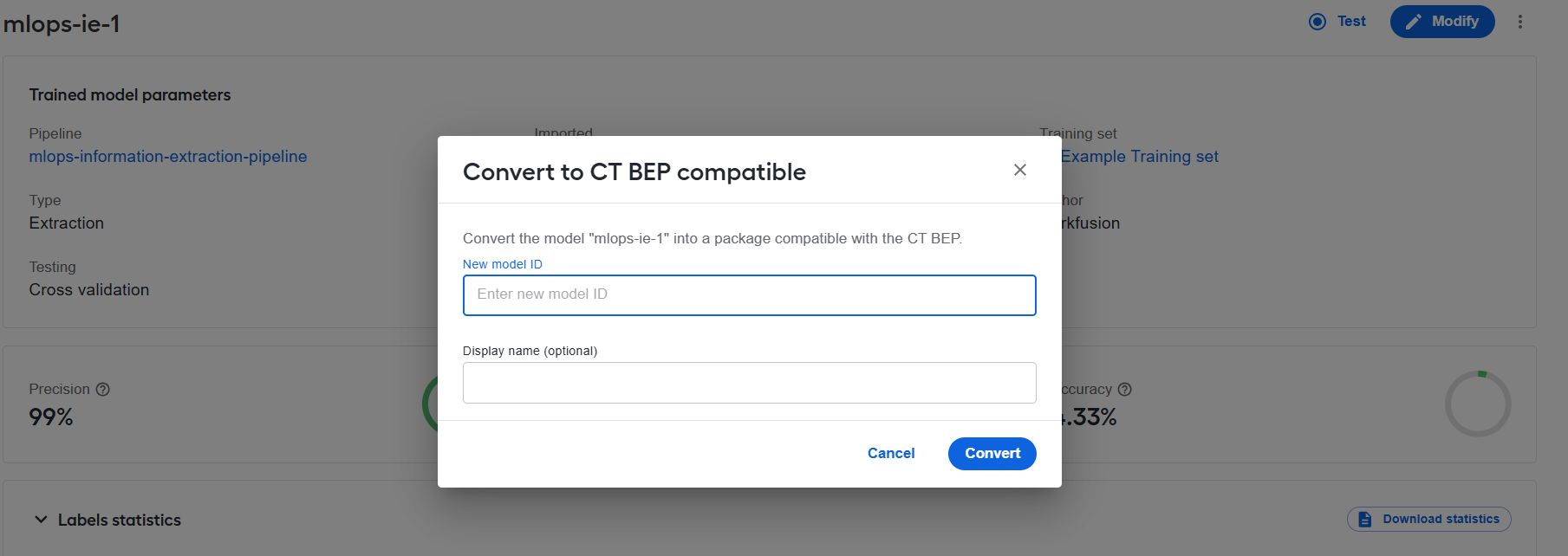
For details on using the feature, read the Manage models guide.
Enhanced transaction analytics and anomaly detection
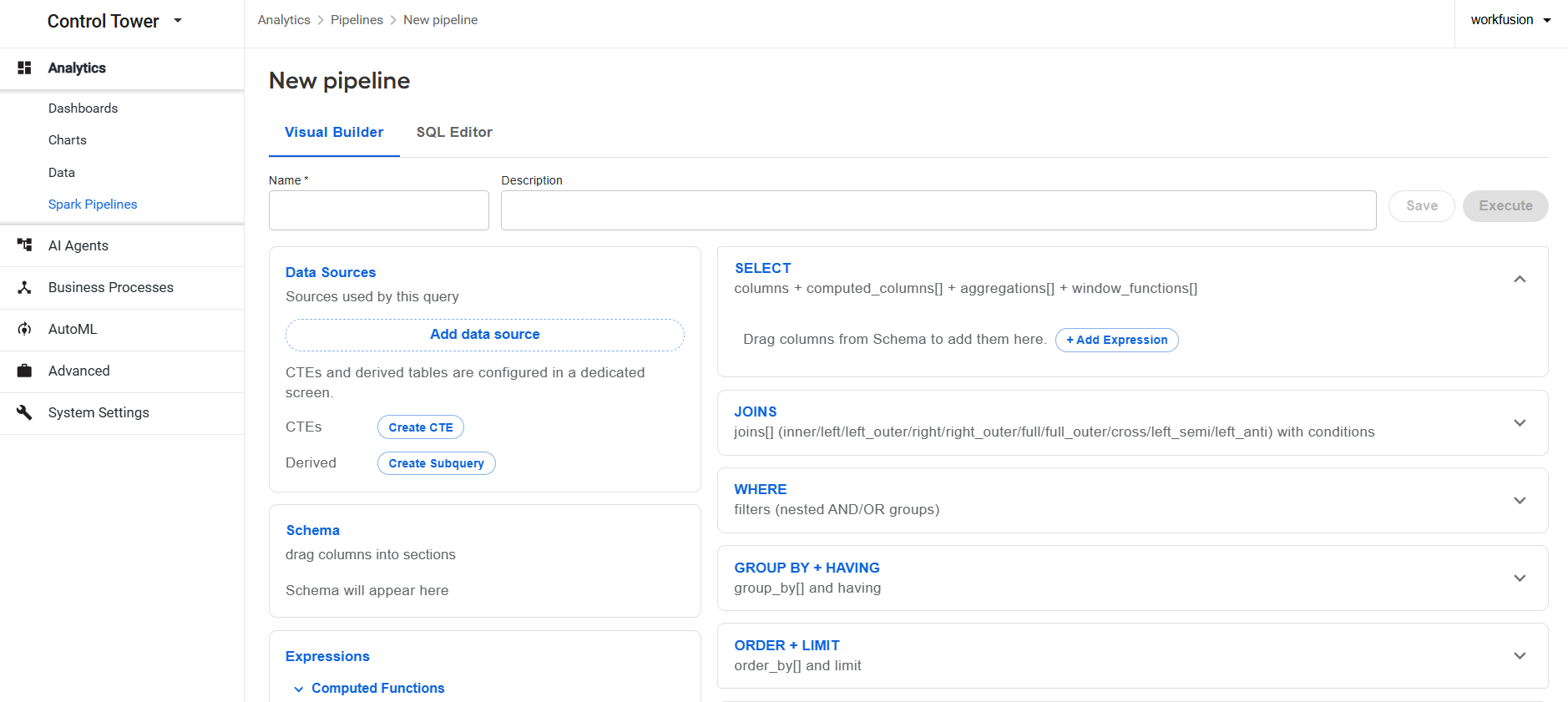
To improve the speed, scalability, and intelligence of transaction analysis within the Work.AI Analytics component, we have introduced a Spark-based analytics engine. The new capability supports large-scale processing of transaction data, allowing you to identify patterns, compare activity over time, detect anomalies, and generate meaningful analytics insights.
Control Tower features a dedicated Spark Pipelines interface within the Analytics module. The new interface allows you to complete the full delivery lifecycle of an analytics data pipeline using the no-code Visual Builder tool or SQL Editor for the more advanced SQL coding practices. In the interface, you can create pipelines by building SQL queries, execute pipelines, and preview and download the output. For details, read the Create and manage data pipelines guide.
Standardized compliance reporting with Dossier Document Assembly
Dossier Document Assembly introduces reusable report templates for creating structured compliance documents, including Enhanced Due Diligence (EDD) dossiers, Suspicious Activity Reports (SARs), and Know Your Customer (KYC) reports. Templates help compliance teams standardize report layouts and reduce manual preparation.
A dedicated workspace lets you upload and manage Word templates, define placeholders, and map Business Process fields to them. Report templates can then be selected for bot steps that accept input to generate consistently formatted reports.
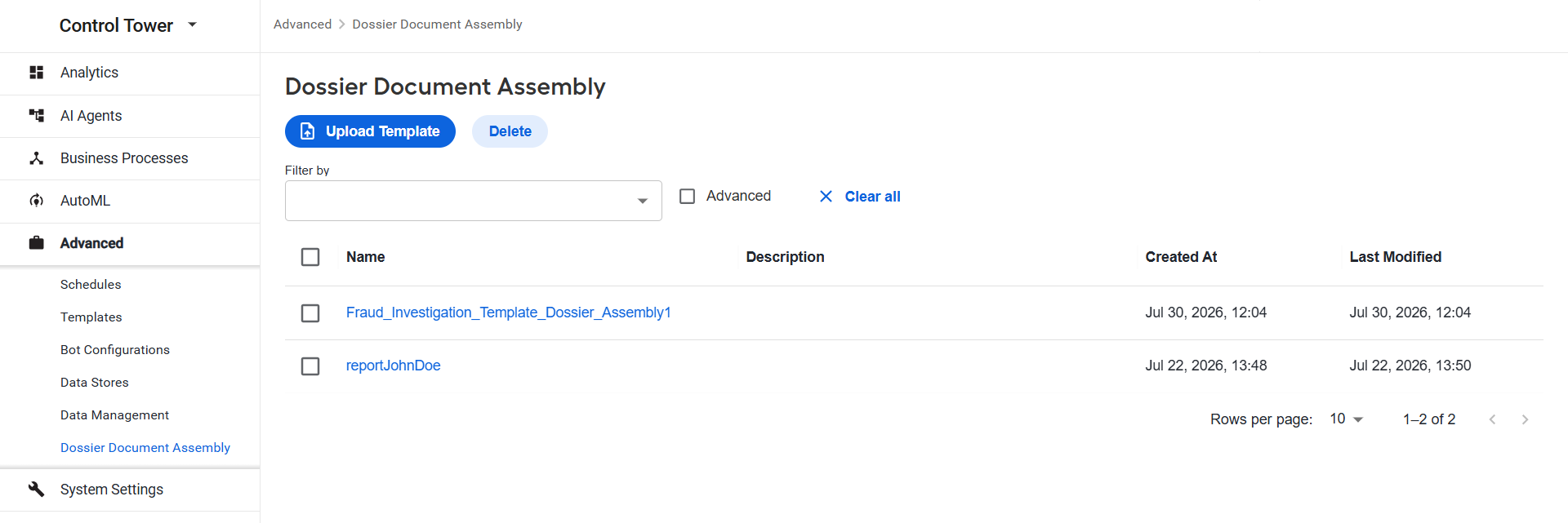
Report templates used by Business Processes are automatically included in exported Asset Bundles, making it easier to transfer complete reporting workflows between environments. For more details, see Manage report templates.
Enhanced browser automation for web data retrieval
The Web Data Retrieval (WDR) framework now uses Playwright as its sole browser automation engine. We have removed all Selenium and Selenide dependencies and migrated existing automation flows to native Playwright APIs, simplifying the browser automation architecture.
With Playwright's native support for externally managed Chrome DevTools Protocol (CDP) sessions, WDR can connect securely via WebSocket Secure (WSS) to remote browsers managed by BrowserUse. This integration strengthens remote browser orchestration and reduces maintenance risk.
Teams can also assess whether these managed sessions reduce CAPTCHA interruptions, potentially making web data retrieval more reliable and limiting the need for manual intervention.
Improved access to analytics datasets
To improve the reliability and scalability of analytics on large datasets, the Elasticsearch data retrieval capabilities are enhanced with Point-in-Time (PIT) searches and search_after pagination. The approach maintains a consistent search context while efficiently retrieving large volumes of records. It also enables analytics workflows to process and charts to display extensive result sets without the limitations of traditional SQL cursor-based methods.
Expanded OCR capabilities with UiPath OCR integration
In addition to ABBYY, Azure AI Document Intelligence, Google Vision, and Paddle OCR, the Work.AI platform now extends your choice of engines for optical character recognition (OCR) with the UiPath OCR provider. You can select UiPath OCR as an OCR provider within OCR step and dataset configurations, enabling seamless integration with existing OCR processing workflows.
For details, read the Configure OCR step and OCR providers.
Simplified static asset deployment with Asset Bundle
Asset Bundle import now supports automatic upload of static assets to a web server. The update streamlines bundle deployment, eliminates the need for manual uploads, and improves Manual Task performance by ensuring required assets are managed consistently and efficiently.
The enhanced import mechanism recognizes an extended bundle structure and copies supported static files into the shared web server storage, from which they are served over HTTPS with browser caching enabled. Supported file types include JavaScript, CSS, images, and fonts. The mechanism also allows you to overwrite existing static files with newer versions. For details on the updated bundle structure, refer to Package AI Agent Asset Bundle.
More flexible and intuitive Manual Task and UI form design
To reduce manual configuration and make complex forms easier to build and complete, Manual Task Designer and Form Builder now include the new Panel Feed and Transfer list components.
Panel Feed dynamically generates configurable panels from arrays of string values supplied through input data or other form components. Panels update automatically when source values change, and duplicate values create separate panels. This enables scalable, data-driven forms without manually configuring each panel instance.
With the Transfer list component, managing multiple values in Manual Task forms becomes simpler and more intuitive. You can configure the available items and default selections, then move items between the lists as needed.
For details on using and configuring the new components, refer to the following documentation:
Faster onboarding of users through automated provisioning
To reduce manual effort and minimize onboarding errors, we have introduced automated provisioning for bulk user creation via CSV upload. This onboarding mechanism processes user data to automatically create accounts, assign group memberships, and generate credentials.
The mechanism outputs a CSV or XLSX file containing key details, such as a name, an email address, a username, and a temporary password. It also supports automated email sendouts with login information and instructions, ensuring a seamless onboarding experience.
Effortless Azure deployment with automated Mesos Agent scaling
To support customers who prefer Microsoft Azure for their cloud infrastructure, Work.AI now offers an automated deployment solution tailored to Azure environments. Azure users can quickly set up and scale Mesos Agents without manual intervention, accelerating time-to-value and reducing operational overhead.
An automated installer script provisions the required infrastructure, including virtual machines, subnets, and security groups, in a non-HA setup. A dedicated health check Business Process then validates successful installation.
Scalable result filtering for Business Processes and individual steps
You can now filter and sort final BP results and results of individual Business Process steps. Create filter conditions using the result table column names and export the filtered and sorted results to a CSV or XLSX file. The enhancement reduces manual analysis and helps teams investigate and resolve issues faster.
The result data is now processed directly in the database, which ensures stable performance for Business Processes with large numbers of tasks. However, Business Processes implemented before upgrading to Work.AI v10.3.3 continue to use the existing result view without filtering and sorting controls. For instructions on using the filters, see View Business Process results.
Easy tracking related records with record group ID
You can now assign a shared record group ID to related input records through the REST connector or within a Business Process step. The ID is passed to synchronous and asynchronous sub-processes, making it easier to correlate events, warnings, and errors for records from the same batch, request, or transaction.
The record group ID is optional, so existing integrations continue to work without changes. For more details, see Process transactions with REST connector.
Improved error handling in Business Processes
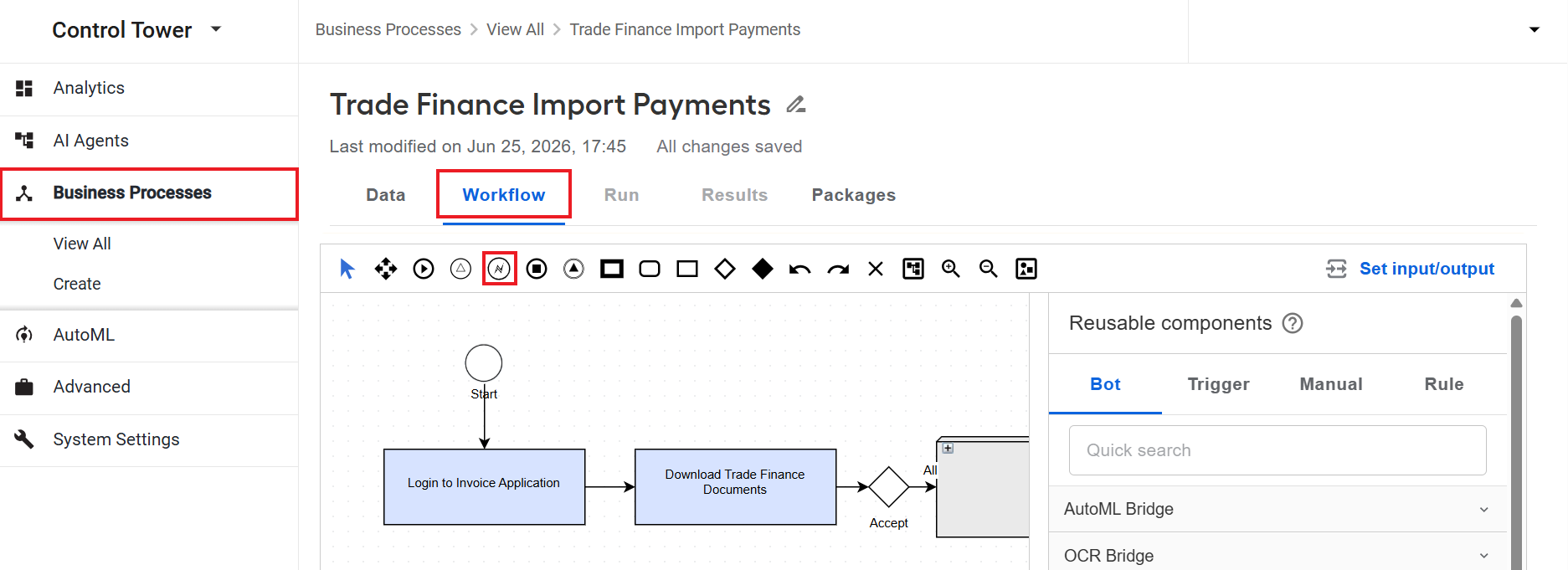
To improve process resilience and give you greater control over task execution, we have implemented a configurable error handling mechanism that comprises a dedicated Error Handler step and settings governing the automation behavior on failure.
The Error Handler step is used to build a branch, independent of the main automation workflow, that handles record-level failures and returns an error response. Additionally, if you set the automation to continue executing despite any record failures, the branch handles failures without terminating the automation. For details, read Add and configure error handling.
Seamless AI-powered retrieval and inference through unified API
To simplify the deployment and consumption of AI-powered solutions, a Retrieval Augmented Generation (RAG) system has been added to the MLOps platform, with its capabilities exposed through a dedicated REST API. The RAG system ingests supported document formats, including TXT, JSON, HTML, and XML, stores full text in a database that supports Model Context Protocol, and enables data retrieval at inference time.
The RAG system is part of a unified architecture using the Orchestrator service as a single external API surface for interactions with clients. The Orchestrator streamlines integration and delivers more accurate, context-aware AI responses by combining the existing Model Service for inference with the newly introduced RAG system for ingestion, storage, embedding, and retrieval.
Faster integration of AI-backed name-matching and NER capabilities across AI Agents
To enable reuse and accelerate adoption of AI capabilities for name-matching and named entity recognition (NER) across AI Agents, these services are now deployed on the MLOps platform and accessible via centralized REST endpoints. The enhancement eliminates the need for teams to maintain separate implementations of the AI capabilities for each AI Agent, provides a stable and scalable integration model, and enables reliable synchronous inference through standardized service endpoints.
Centralized LLM interactions through MLOps Chatbot
To help you make the most of Large Language Models (LLMs) shipped with the MLOps platform, we have delivered MLOps Chatbot, a centralized interface for natural-language interactions with the models. In a chatbot session, you can choose a model, submit text prompts, and upload text-based files for analysis. The chatbot also supports selectable RAG collections and model configuration options, enabling flexible use of AI services while reducing the complexity of interacting directly with underlying LLM deployments.
Improvements
Control Tower
To improve the navigation and user experience in the Data Store interface, we have added a button to navigate to the last page in paginated results. Instead of moving sequentially through multiple pages with the Next button, you can now instantly jump to the final page.
To simplify deployment and improve maintainability, Control Tower has been migrated to Spring Boot 3. The update eliminates legacy XML-based and other obsolete configurations, enables centralized property management in ZooKeeper, and reduces technical complexity through a more modern and streamlined architecture.
RPA
To ensure stable RPA processing and avoid failures caused by data inconsistencies, the process data update logic in Bot Manager has been enhanced to correctly handle duplicate records across fleets. The update mechanism now consistently modifies existing records when a fleet change occurs and safely addresses scenarios with duplicate entries for the same entity.
Bot Manager now automatically logs users out when their session expires without page refresh. At the same time, users are redirected to the authorization page, which enhances usability and transparency.
The auto-unlock capability is extended to Bot Master sessions. The Bot Master now automatically unlocks when the screen is locked, which ensures stable reconnection of units if they are signed out and more reliable task execution in locked-session scenarios.
Microsoft Windows Server 2025 is now supported, enabling long-term platform compatibility and smoother customer upgrade paths.
WebDriverManager now automatically updates
msedgedriverfor the Java 8 Worker, keeping driver versions in sync across environments. The enhancement eliminates manual driver maintenance, reduces environment inconsistencies, and improves test stability.
Developer tools
Testing controls now support callbacks for processed records, letting you verify and manage how records are handled after a trigger runs. Statuses are updated in the background without interrupting workflows, and you gain more flexible options to stop trigger execution by record volume, status conditions, or both.
Worker Development Toolkit (WDT) now enforces required Data Store configuration upfront, preventing silent errors and ensuring issues are caught early in development.
To speed up the reuse of existing Business Processes, we have added a WDT service that exposes the Control Tower connector REST API to Java worker code. You can start sub-processes and pass data to them directly from a worker, without writing custom REST integration code.
You can now access the
DigitalWorkerInfoobject directly in trigger code, so your triggers can work with AI Agent-specific Data Stores and other AI Agent context right out of the box.Data Store modules are now independent from the worker core, which makes them easier to reuse and maintain across different platform components.
Workspace
To help you find assignments for a specific day or period, task filter attributes now support the
dateanddatetimeattribute types in addition to strings. You can filter these attributes with the GTE, LTE, EQUAL, and BETWEEN operators, or select a dynamic range, such as Today, Yesterday, or This Month, which resolves to concrete dates in UTC each time the query runs.The new
shared/filters/attributes/valuesshared API endpoint is introduced, supportingGET,POST, andPUTrequests for retrieving, creating, and updating task filter attribute values. With the new endpoint, you can update task status values and filter tasks more efficiently to enhance the productivity of your teams.
Manual Task Designer
- The Select component now includes the Allow duplicates setting when the Multiple values option is enabled. The new setting supports forms where the same value must be submitted more than once. When the setting is enabled, selected options remain available for repeated usage, while the component output is still represented as an array.
AutoML
- To improve platform stability and ensure continued compatibility with modern runtime environments, the AutoML IPC Server module has been updated to support Python 3.14. The enhancement replaces deprecated module-loading mechanisms with supported Python APIs, removes legacy Python 2 compatibility constructs, updates deprecated logging methods, and validates server discovery and initialization workflows across AutoML SDK.
Upgrades
To eliminate vulnerabilities and ensure the platform's stability, the following components have been updated:
Keycloak is upgraded to v26.7.0.
Apache Tomcat is upgraded to v11.0.24.
The ELK stack (Elasticsearch, Logstash, and Kibana) components are upgraded to v9.2.5. For RPA, the ELK stack is upgraded to v9.4.2.
Java Development Kit (JDK) is updated as follows:
JDK 8 to v8.96.0.19-ca-jdk8.0.502
JDK 17 to v17.68.17-ca-jdk17.0.20
JDK 21 to 21.52.15-ca-jdk21.0.12
NGINX is upgraded to v1.28.3 for the RPA component.
Handlebars.js is upgraded to v4.7.9 for the following components:
OpenBao
Superset
Manual Task Renderer
The io.undertow:undertow-core library is upgraded to v2.4.1.Final for the ODF 2 and the ODF 2 Email Fetch components to address the CVE-2026-28369 and CVE-2026-3260 critical vulnerabilities.
Log4net is upgraded to v3.3.2 to address the CVE-2026-40021 critical vulnerability.
Node.js is upgraded to v24.14.0.
Apache Superset is upgraded to v6.0.
.NET for
windows-rpa-installeris upgraded to v4.8.1.
For the full list of updated third-party tools and libraries, see the documentation.
Corrected issues
Workspace
- Fixed the issue where closing a high volume of Workspace assignments in parallel caused
UNIQUE KEYconstraint violations and prevented assignment completion. Concurrent task processing is now handled correctly, ensuring successful completion even under high parallel load.
Control Tower
Fixed the issue where Data Stores with uppercase column names displayed data incorrectly in the Control Tower user interface. Column names are now handled consistently and displayed correctly regardless of letter casing.
Fixed the issue where Control Tower displayed menu options for components not installed with the trimmed Work.AI package, causing errors when users try to access the options. Only installed components are now shown in the menu, while unavailable pages are hidden.
Resolved the issue where rule generation failed with a Control Tower log error stating that the gpt-4-0125-preview model is unavailable. The Transformation step now uses GPT-4.1, and rule generation completes as expected.
RPA
Fixed the issue with log level changes applied inconsistently. Log updates were not fully propagated, causing missing detailed logs. Log level changes are now applied correctly across all components, so all relevant logs are recorded as expected.
Resolved the issue that caused instability during user login in a unified installation. Previously, user sessions took a long time to start and did not reconnect automatically after a restart, requiring manual login.
Resolved the issue with the click multiple times mouse action for Java 21. The action failed because clicks targeted a wrong area, preventing elements from appearing or responding properly. The logic was corrected to ensure accurate and reliable interaction.
Resolved the coordinate retrieval issues with the Java 8 Worker. Retrieving element coordinates in certain scenarios resulted in errors when used in subsequent actions. Now, coordinates are obtained and used consistently, ensuring stable execution of mouse interactions.
Fixed the issue affecting Internet Explorer automation with the Java 21 Worker, where some browser-specific actions executed incorrectly. All supported actions now work as expected.
Fixed the issue causing instability in the screen unlock logic. In some cases, especially during automatic reconnection, the screen remained locked for an extended period, blocking further execution. The fix ensures that the screen unlocks reliably and workflows continue without interruption.
Resolved the issue in the
waitUntil()behavior for the Desktop driver, where the wait time could be shorter than configured. The fix ensures the full timeout is observed, resulting in more predictable and stable execution.
Developer tools
- Resolved the issue where S3 keys starting with a slash were handled incorrectly, causing unexpected behavior when interacting with Amazon S3.
Infrastructure
- Resolved an OpenSSL use-after-free vulnerability where
SSL_free_bufferscould free a buffer that was still in use while processing incoming data. The fix reduces the risk of data corruption, application crashes, or arbitrary code execution in affected scenarios.
Deprecations
The STREAMING and NAMED_RULE options have been removed from the legacy Business Process Composite rule step configuration.
The option to configure streaming between steps has been removed from the Run tab of the Business Process configuration. Control Tower now consistently follows the default behavior of processing Business Process records sequentially.
The capability to manually force task completion has been deprecated, and the corresponding option has been removed from the Run tab of the Business Process configuration. Tasks are now completed only if all records are processed.
The Track if transactions meet service-level agreement (SLA) option and related capabilities have been removed from the Run tab of the Business Process configuration.
The
workfusion.propertiesfile for advanced Control Tower configuration is no longer supported. Configuration properties must now be managed through ZooKeeper or, where applicable, theapplication.ymlfile.