Version 10.3.2
February 17, 2026
The Work.AI v10.3.2 release focuses on strengthening security, simplifying deployment and automation development, boosting performance, and enhancing visibility into process metrics:
Strengthen platform security by leveraging the upgraded third-party components, such as Keycloak, ELK, JDK, and PaddleOCR.
Improve compliance and maintainability by updating transitive dependencies to ensure clean security scans.
Reuse rule configurations effortlessly by importing and exporting JSON‑based rule sets across Business Processes and AI Agents.
Empower your automations with custom GenAI models by importing the models directly through the AutoML interface.
Optimize resource utilization for training data preparation by leveraging extended dataset export options.
Accelerate manual review configuration and completion using the new Email component in MT Designer and Form Builder.
Personalize data display in dashboards by saving as bookmarks and reapplying frequently used filter configurations.
Boost dashboard performance by controlling when filter value lists are retrieved and displayed.
Optimize data storage utilization and reduce compliance risks by enabling parallel process data purging across SQL Server and S3.
Enable flexible performance tuning for analytics by adopting fully configurable Gunicorn and related runtime settings.
Accelerate Trigger development by leveraging a standardized Archetype to build WorkFusion Development Toolkit (WDT) projects.
Enable engineers to control Trigger execution more precisely using a dedicated API for managing and updating records and new launch methods in the
TriggerTaskRunnerinterface.Standardize and simplify dependency version control in Trigger tests by integrating a unified BOM file for external management of testing libraries.
We also made multiple improvements across Work.AI components:
Enhanced platform stability and security through the replacement of XML configurations with Java‑based classes and upgraded Spring Security, early detection of Worker misconfiguration, and the removal of all GitHub Advanced Security vulnerabilities
Faster task transitions and fewer delays during peak loads by removing processing bottlenecks during concurrent completions
Redesigned Work.AI Developer offering improved maintainability and reduced system requirements
Reintroduced ODF1 with enhanced robustness and extended integration capabilities through an updated PF4J‑compatible release
More accurate list‑object transformations within automation workflows with operators that apply changes only to matching items instead of entire arrays
A standardized LLM deployment pipeline aligned with AutoML deployment standards
Simplified model lifecycle management with safe UI‑based removal of models and pipelines
More consistent builds and clearer failure diagnostics through centralized dependency management and stricter fail‑fast validation in Java Native Worker (JNW) Toolkit
A more modular JNW architecture with Data Store-related modules decoupled from the
worker-coredependencyFewer build errors and smoother project maintenance with updated Bundle Versions Maven plugin releases for Java8 and Java21
Faster and more stable test execution with a lightweight HTTP server library replacing MockServer
More stable database operation and protected data integrity through controlled APM index growth and restricted database‑schema access
Faster data purge issue resolution through clearer error messages
Clearer reporting for Workspace cancelled assignments through improved handling of metrics in the Case Management dashboard
More reliable RPA operations through improved remote connectivity, scalable deployments, and real‑time worker utilization insights
More precise and flexible PaddleOCR configuration through an updated parameter structure
New features
Faster analytics dashboard personalization
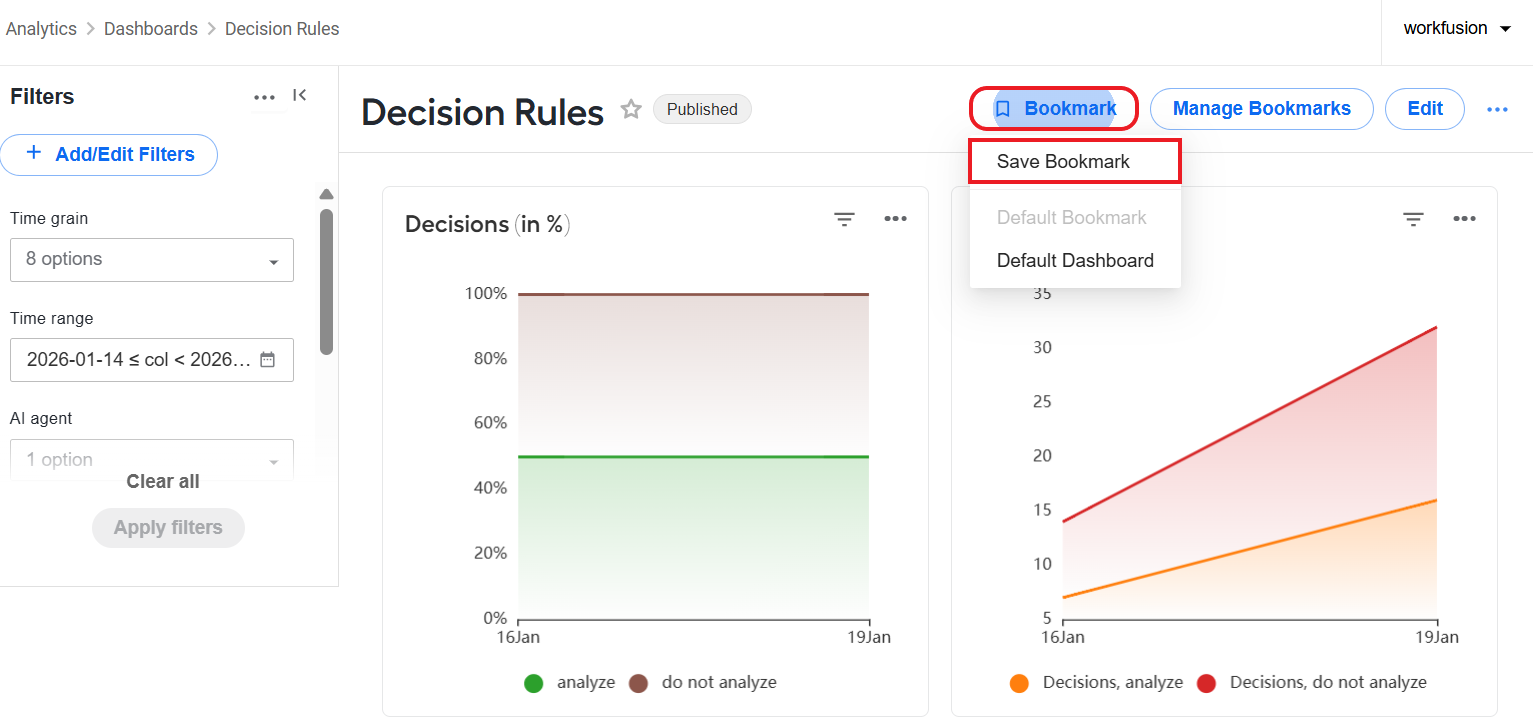
To streamline analytics workflows and enable your teams to personalize dashboards quickly and consistently, we have introduced the bookmark management feature. Instead of repetitive filter selection, users can create a bookmark representing frequently used filter states and reapply it as needed—either directly from dashboard pages or programmatically via APIs.
Applying a bookmark instantly syncs the dashboard filters to the saved states. You can also update or remove bookmarks at your discretion straight from dashboard pages or via API. For details, read Save and reuse filter configurations as bookmarks.
Customizable filter value loading in analytics dashboards
To improve dashboard performance and give you the flexibility to optimize filters based on specific use cases, the new Show filter value list option is added to the filtering settings in analytics dashboards. You can now decide per filter whether the platform should retrieve value lists or not, enabling faster load times when such lists are unnecessary or too costly to compute.
When the option is selected, the associated filter will continue to display the full list of values. Otherwise, the value retrieval is skipped. For details, read Create and manage charts and dashboards | Set filters.
Optimized data cleanup approach
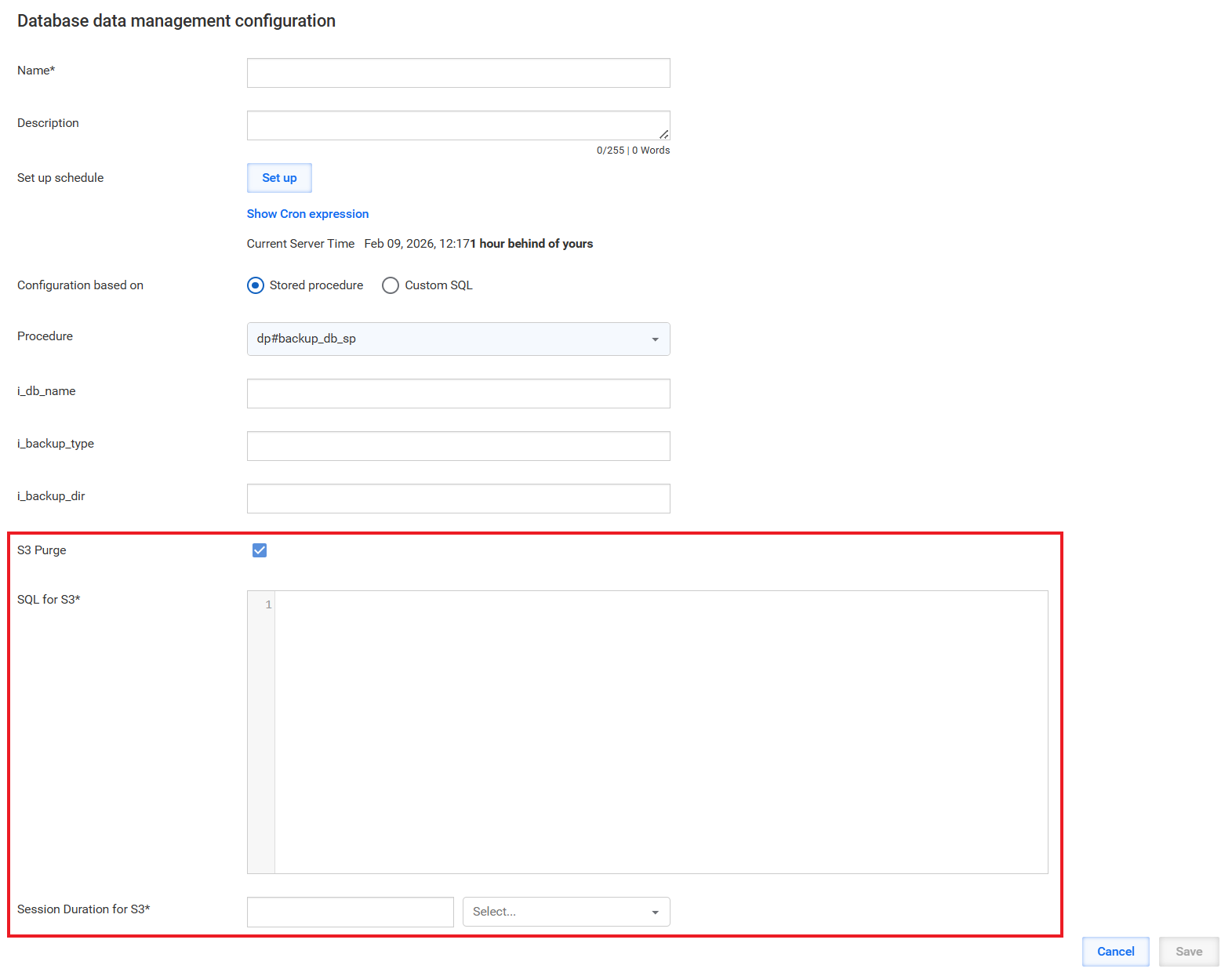
To strengthen data integrity, increase storage efficiency, and reduce compliance risks, we have enabled you to clean the process data from S3 buckets in parallel with the SQL Server DS table purge. You can configure the S3 cleanup straight from database data management configurations using SQL syntax. Execution of the configurations will then automatically trigger the S3 cleanup, preventing orphaned records and guaranteeing idempotent execution for safe re-runs. For details, read Manage database and S3 data.
Flexible analytics performance tuning
To enhance scalability, performance, and long‑term maintainability across analytics workloads, we have standardized Gunicorn and related runtime configurations to a flexible configuration model based on the instance size. Instead of relying on hardcoded values, you can now fine-tune the configurations to your needs via the docker-compose.yml file.
The updates enable easy adjustment of parameters, such as worker count, worker class, timeouts, and worker connections, for the analytics component. As a result, the configuration drift is reduced, and analytics teams can tune performance quickly without rebuilding images. For details, read Fine-tune Analytics performance.
Quick import and export of rules across automations
Rules can now be downloaded as a JSON file and uploaded into another no-code rule step or Business Process to support reuse, backups before changes, and multiple configurations across different AI Agents.
When you upload a file with rules, the object schema is automatically checked against the target Business Process. If it matches, the rules are applied immediately. If the schema is different, a warning is shown so you can review and adjust the contract before applying the rules. Invalid or corrupted files are also detected and reported. For instructions, refer to Configure no-code Decision rules step.
Smarter Trigger control
To improve the traceability and control over the execution of Trigger elements in an automation flow, a new mechanism was implemented for testing record callbacks. The mechanism uses an Application Programming Interface (API) to manage the status and data of the records processed by Triggers, updating them asynchronously.
Additionally, new launch methods have been introduced in the TriggerTaskRunner interface. These methods allow execution to be stopped not only based on the record size, but also on its status. For more information, read Test Trigger Connector framework.
Accelerated Trigger development with new Archetype
To streamline development and standardize implementation patterns, a new Archetype has been introduced for creating Trigger projects based on the WDT framework. This archetype encapsulates recommended design patterns and configurations, enabling developers to quickly scaffold new Trigger components with a consistent structure and behavior. For more information, see Trigger development.
Unified dependency management for Trigger tests
To ensure the consistency of dependency version management, the Trigger Testing Framework has been integrated with a common BOM file. The integration enables the external management of the testing library versions and ensures the alignment of dependency versions across customer implementations.
Import of custom GenAI models via user interface
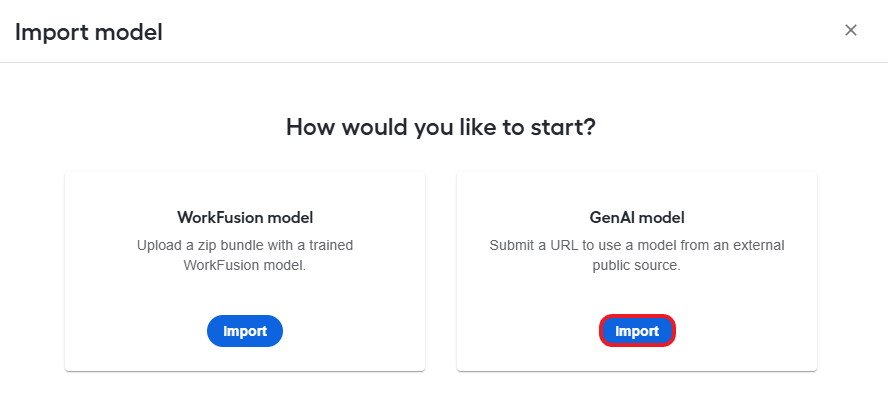
You can now import custom Generative AI (GenAI) models directly through the AutoML user interface in Control Tower. The enhancement allows you to seamlessly integrate your custom AI-based models into the platform, with built‑in validation to ensure the correct format and compatibility.
Once uploaded, custom GenAI models are securely stored and managed within the ML Ops framework, enabling their reuse and deployment for further inference and integration into workflows. The platform also records detailed logs for model import, usage, and errors to ensure transparency and consistent governance across all imported GenAI assets. For import instructions, read Manage models | Import GenAI model.
New Email component for streamlined task form building
The Manual Task Designer and Form Builder modules now offer the Email component allowing you to add email entry fields to Manual Task and configuration forms. The new component speeds up form creation, minimizes user input errors, and enhances the overall reliability of collected data, delivering a more efficient and consistent form‑building experience.
The Email component behaves like a standard text field and leverages the Form.io native email format validation to confirm that both the email prefix and domain follow accepted patterns. For details, read the documentation.
Extended export options for labeled document datasets
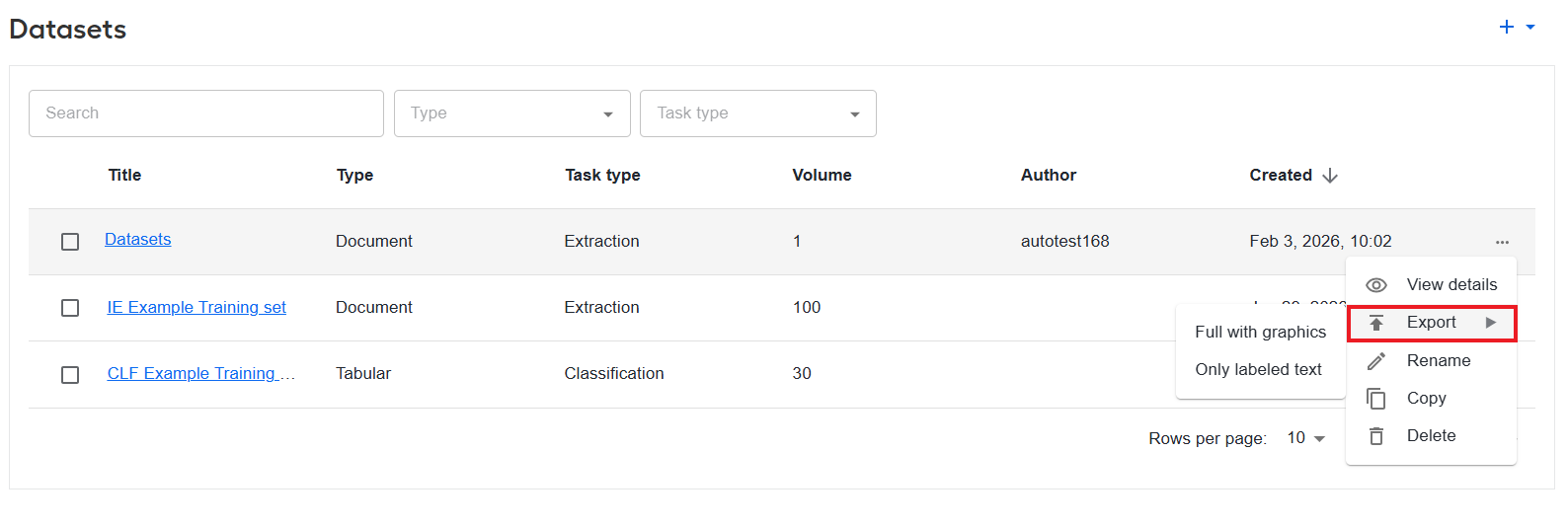
Users can now export either the full dataset or only the labeled text content, enabling more efficient data review, sharing, and model training workflows. The new export option is available exclusively for document datasets that contain at least one labeled document. For details, read Manage datasets | Export document dataset.
Improvements
ML Ops
The LLM deployment pipeline has been improved and renamed to
llm-deployas part of its integration with the AutoML component. The update standardizes the deployment of LLM models through the Kubeflow pipeline, providing a more streamlined and predictable user experience.To ensure reproducibility and alignment with AutoML deployment standards, two required parameters have been introduced:
model-namefor specifying the LLM model andmodel-binaries-rlfor providing the URL to the model binary location. Additionally, the option to load models directly from S3 has been made optional to simplify configuration.
AutoML
- To give you better control over model management flows and improve their usability, the AutoML interface in Control Tower now allows removing models and pipelines directly from both Model and Pipeline lists and details pages. The enhancement includes technical safeguards, such as confirmation dialogs before deletion and validation, preventing the removal of pipelines that still have actively used models or training processes associated with them. For details, read Manage models | Delete model and Manage pipelines | Delete.
Analytics
To streamline troubleshooting and reduce reliance on engineering teams, the data management functionality in Control Tower now provides clear and detailed error messages whenever a data purge job fails. The enhancement gives users immediate insight into the root cause of failures, enabling faster corrective actions.
To ensure accurate reporting and clearer interpretation of cancelled Workspace assignments, the Case Management dashboard now displays both Cycle Time and Wait Time as 0 seconds for all assignments with the Cancelled status. The update scope also includes adjustments to the embedded JSON file used for model training.
Control Tower
The rule builder now provides the advset and advappend transformation operators for expressions targeting objects in lists or nested lists. The new operators support looping functionality: updates are applied only to list items that match the rule conditions. This prevents unintended changes across entire arrays and ensures rule dispositions and transaction counts for risk are accurate. For more details, refer to Operators supported for list-based transformations.
To improve maintainability, security, and long‑term platform stability, Control Tower has been migrated from XML‑based Spring configurations to modern Java‑based configuration classes. As part of this effort, the Spring Security dependency was also upgraded to ensure resilience against security vulnerabilities.
The data storage for
CompletedBotTaskis redesigned with table-per-Business Process instance sharding, which prevents heavy cleanup operations from locking a shared table when multiple Business Processes complete at the same time. The change eliminates table locking during concurrent completions and improves transition phase efficiency under high concurrency. Post-completion processing is also streamlined with the removal of the dedicated worker, resulting in reduced operational overhead.
Developer tools
The internal structure of Work.AI Developer has been redesigned to reduce system requirements and improve maintainability based on user feedback. The refactoring decreases the time needed to support any implemented platform changes, resulting in a more efficient development environment.
The JNW Data Store-related modules were decoupled from the
worker-coredependency. The architectural change improves modularity, enabling more flexible development and testing of Data Store components.To streamline dependency updates, reduce the risk of integration issues, and enable faster and safer delivery, the dependency management in JNW Toolkit has been updated to use
shared-libraries-bomas the centralized source of truth for third-party library versions. The flattened user-level BOM file provides unified information about all dependencies, including internal ones.To improve reliability and ensure consistent error handling, the behavior of building Data Store names in JNW Toolkit was changed to fail fast when the
dw-codeandmodel-versionrequired parameters are missing. Connections to Data Stores can still be established, but interactions with versioned or non-versioned tables will now fail explicitly. Globally named tables remain accessible without exception.A PF4J-compatible version of ODF 1 is reintroduced, allowing teams that rely on the original ODF framework to continue using it seamlessly within PF4J-based projects. The updated release improves maintainability and includes refreshed components to address outdated or vulnerable dependencies.
New releases of the Bundle Versions Maven plugin are provided for Java 8 and Java 21 users, reducing build issues and maintenance effort.
To enhance testing performance and stability, a new test-http-server library is implemented and integrated as a replacement for MockServer.
RPA
Remote JMX support has been introduced to improve RPA Worker connectivity to target JVM processes. The improvement enables connections to JVMs that have local attachment disabled and allow interactions using the standard JMX protocol, including authentication and SSL when configured. For more details, see Configure remote JMX attachment for Java applications.
We have increased the RPA installation scalability and processing capacity by supporting deployments of up to 20 RPA Units. For more details, see the RPA hardware requirements.
The new RPA Worker Utilization dashboard in Kibana provides real-time and historical visibility into RPA Worker performance, workload, and execution patterns. It helps teams monitor resource utilization, detect idle or overloaded Workers, analyze process execution duration and concurrency, and make informed capacity-planning and load-distribution decisions. For more information, refer to Monitoring | RPA overview.
OCR
To enable more precise tuning when OCRing with the PaddleOCR provider, we have introduced an updated parameter structure. The new parameters provide the following extended configuration capabilities:
Document‑level orientation classification and unwarping
A more convenient model selection through both directory paths and model names
Finer control over inference behavior with customizable input shapes, thresholds, and output options
Language and OCR version configuration
Infrastructure
To increase the platform’s reliability and reduce downtime, a new validation mechanism has been implemented to verify Worker configurations during installation. The enhancement addresses the condition where Workers appeared healthy despite being in an unhealthy state. With the new validation in place, such issues are detected early, preventing faulty deployments and ensuring that Workers start in a consistently healthy state.
All APM-related indices have been assigned proper lifecycle policies to eliminate the risk of uncontrolled index growth.
To strengthen security posture and reduce operational risks, we have eliminated all identified GitHub Advanced Security vulnerabilities across the codebase.
To safeguard database data integrity and prevent operational risks caused by unintended changes, limitations have been introduced to ensure that only authorized database users can manipulate the CT schema. Now, only CT users or super admins can perform database operations involving altering tables or modifying CT‑related structures.
Upgrades
To eliminate vulnerabilities, the following updates are introduced:
Java Development Kits (JDK) are upgraded as follows:
JDK 8 to v8.90.0.19-ca-jdk8.0.472
JDK 17 to v17.62.17-ca-jdk17.0.17
JDK 21 to 21.46.19-ca-jdk21.0.9
Updated the following Elastic Stack (ELK) components to v9.2.3: Kibana, Heartbeat, Metricbeat, and Filebeat.
Updated Keycloak to v26.3.5.
PaddleOCR updated to v3.2.0.
Upgraded the following WebHarvest Worker (Java 8) dependencies:
tomcat-embed-core to 9.0.115
htmlcleaner to 2.29
jsoup to 1.15.3
Corrected issues
Workspace
- Fixed the issue where queries generated by Java Persistence API were incorrect, leading to unexpected or inefficient data retrieval.
Control Tower
Fixed the issue where a Trigger-based Business Process stuck after the first step when another BP instance of the same definition started at the same time. Concurrent BP starts are now correctly handled, ensuring that the initial BP is not halted and the record progresses smoothly beyond step one.
Fixed the issue where the Trigger configuration initialization failed due to a
NullPointerException. The logic has now been updated to ensure the Trigger configuration context is built correctly.Resolved the issue where the Trigger configuration failed to build during parallel test execution after upgrading to Spring 6, causing intermittent runtime errors. The fix ensures Triggers are configured and executed reliably during testing and production runs.
BEP
- Resolved the issue where task transitions involving search merges or conversions to search slowed down when processing batches larger than five entities in multi-provider entity screening (MPES) workflows.
Infrastructure
Fixed the issue where JNWs failed to start due to a
VaultException: Status 405 METHOD_NOT_ALLOWED, preventing workflows from executing. Now, workers initialize correctly and proceed to process data as expected.Fixed the issue causing the installations on RHEL 9.4 to fail in a high-availability (HA) setup using an external load balancer. The installation process now correctly handles the OpenSSL version included with RHEL 9.4, ensuring the HA installation completes successfully without errors.
Connectors
Resolved the issue where the REST Client connector created unbounded unique routes for every path parameter combination leading to increased memory consumption. Unused routes are now tracked and safely shut down.
Resolved the issue where the connector failed to convert error responses to JSON when a response transformer was configured. Now, instead of returning the XML payloads, the connector returns JSON as expected.
Resolved the issue where the REST Server connector failed to start when throttling was disabled due to invalid duration parsing in throttle configuration parameters.
Resolved the issue where the REST Server connector failed to retry task submission after a failure when forwarding to the next step. A retry mechanism is added for transient submission errors.
Resolved the issue where the connector configuration form incorrectly used field label styling instead of the proper section heading style.
Deprecations
Removed Windows 10 and Windows Server 2016 support for the RPA component.
Removed the outdated JSON Web Token (JWT) authentication in the OCR REST API.
Removed the vulnerable OpenSSL 1.1.1 component from the installer.
Removed the automl-train-start and automl-train-status plugins.
Removed the bp_transaction and bp_transaction_data tables from the CT schema as part of the transition to a new module for handling shared data within the Business Process execution engine.
Removed the
odf_dependencies,odf-archetypes, andodf-installartifacts from the installer to avoid security issues that might be caused by the vulnerabilities in these artifacts.Removed unused database indices from Control Tower tables to reduce overhead during bulk data operations.
Python 3.7.9 environments are no longer supported.
Known issues
On January 13, 2026, a vulnerability in Metricbeat (CVE-2026-0528) was discovered that involves improper validation of array indices. A fix is scheduled for inclusion in the Work.AI v10.3.3 release. Until the update is available, you can mitigate the issue by disabling the affected functionality. For detailed instructions, see Fix Metricbeat vulnerability.
When the default SSO session settings in Keycloak are changed, Control Tower fails to trigger an automatic logout after the configured session duration elapses. To avoid the behavior, we do not recommend modifying the default SSO session settings in Keycloak.