View report
The concluding output of the AMM solution is a final report. This report serves as an audit trail and includes all sourced articles, confidence score per article, overall decision, and other data elements. It is stored inside the WorkFusion platform by default and is available either in HTML or in a reader-friendly PDF. You can configure the report to be pushed directly into the organization's internal applications, for example:
- Save it to a case management or transaction monitoring system
- Store the report in a shared folder
- Use a custom connector to integrate it with an in-house application
Typically, the report is only generated after an analyst has completed the investigation in Workspace. However, there are a few exceptions to this:
Using Workspace and the Manual Task is optional, and you can enable or disable the capability when configuring an AMM variation. If the capability is disabled, reports are generated as the model completes its review and analysis of each entity.
Occasionally, no search results are returned for an entity or search criteria. When this occurs, the Manual Task is skipped, and a report is generated and stored in the same predetermined location for audit purposes. When initiating a search via an Ad Hoc search tool, a message with a report link is sent to the specified email address.
If the investigation was run using Evan's Core Business Process, you can find a direct link in Control Tower. To access it, open the Adverse Media Monitoring Business Process, navigate to the Results tab, and click the link in the pdf report link column.

The PDF version of the report is generated using third-party components, including the Flying Saucer library. The library is licensed under the GNU Lesser General Public License (LGPL) v2.1. In accordance with the license terms, the unmodified library is used in a compliant manner.
To read the full text of the LGPL v2.1 license, click the link. For reference, the newer LGPL v3.0 license is also available in the GNU project.
There are four reporting options:
Report for a single entity
- Full version
- Short version
Combined report for multiple entities or counterparty investigations
- Full version
- Short version
Single entity report
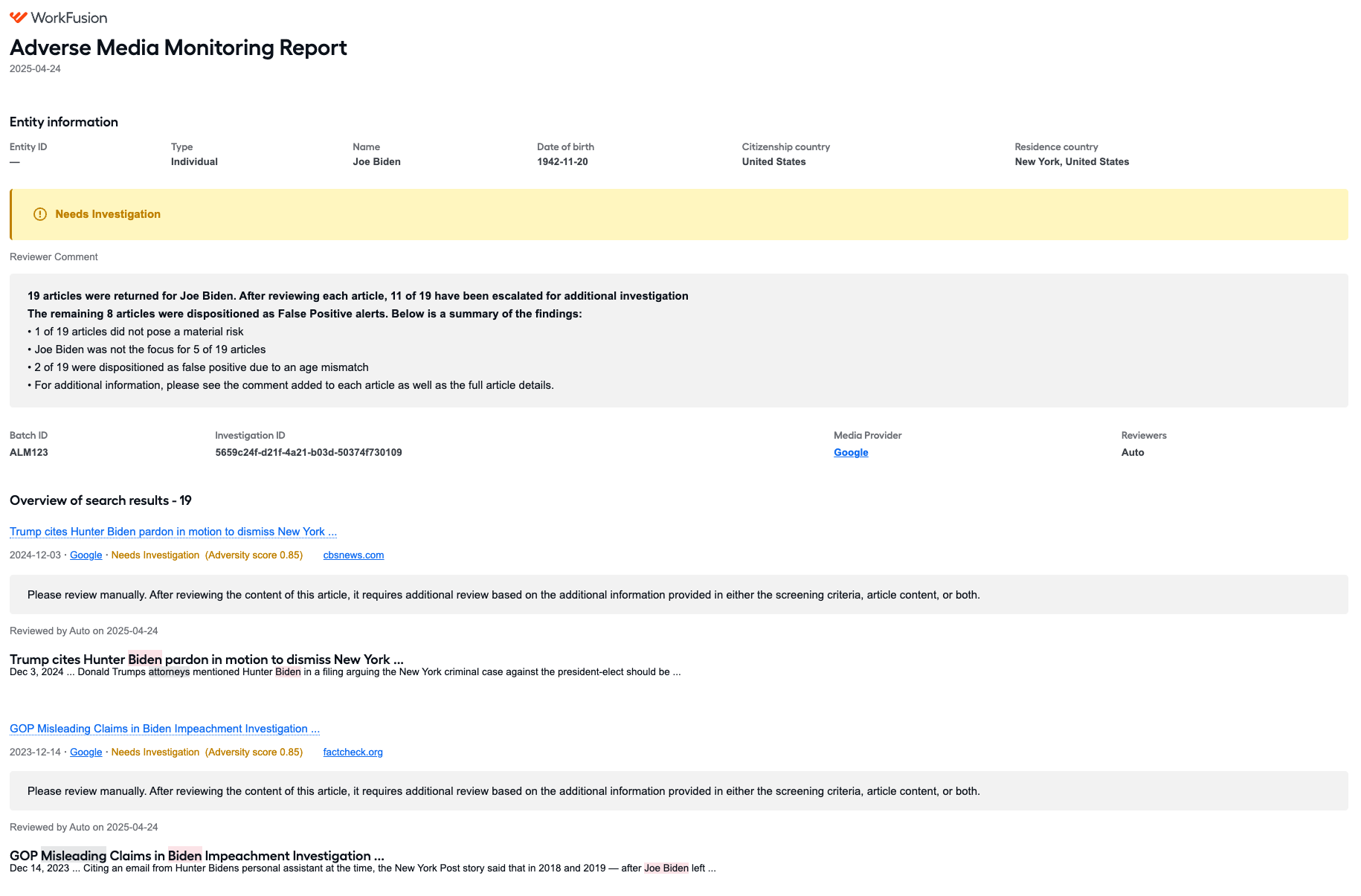
Investigation title and date
The top section contains the title of each AMM report and the date when the report was generated.
Entity information
The following information about the entity included in the search request is listed first:
- Entity ID, which is the optional custom identifier to be used for decision re-application
- Name
- Type: individual or company
- Gender: applicable only if the entity type is individual
- Year of Birth or Date of birth, which is only applicable if the entity type is individual
- Year of incorporation or Date of incorporation, which is only applicable if the entity type is company
- Citizenship country (for an individual) or Incorporation country (for a company)
- Residence country (for an individual) or Operating country (for a company) (Country and Subdivision in a search request)
- Entity Details, corresponding to the Additional information field in the search request
Investigation status
Underneath the title, you can see the investigation status. There are four possible options:
| Status | Description |
|---|---|
| Needs Investigation | A final decision cannot be reached based on the information returned in the search results. Further escalation or investigation is needed to determine if there is a material risk. |
| True Positive | After analyzing the search results, one or more material risks are found. |
| False Positive | Material risks are not found in the search results for the entity. |
| No articles found for the entity | No search results are found for the entity based on the provided search parameters. |
Reviewers
A list of all analysts who reviewed the search results is shown in the Reviewers section. If the article was reviewed by the ML model, Auto is indicated as the reviewer.
Reviewer comment
If a comment is provided for the investigation, it is displayed in this section. Additional comments might be listed with each article further below. If Human in the Loop (Manual Task) is not used, the model generates the comment automatically.
Investigation ID and batch ID
An investigation ID is generated for each entity name.
A batch ID is generated for a single investigation request submitted by a user. It always contains at least one entity name but can include multiple ones as well.
Media providers
The provider name is a link to the appendix where you can find additional details on the used search parameters.
Overview of search results
The number of found results is indicated next to the Overview of search results heading.
Each article returned in the search is listed in this section. A short summary of the findings is displayed, including the following:
Article title
The link leads to the entire article in the Details section of the report.
Article publication date
Article status & score
Reviewer
Note that if the article was reviewed automatically, the reviewer is set to Auto.
Article comment
If an analyst or the model added no comment, No comment provided is displayed.
Article snippet
A key section from the article is included for reference.
Article details
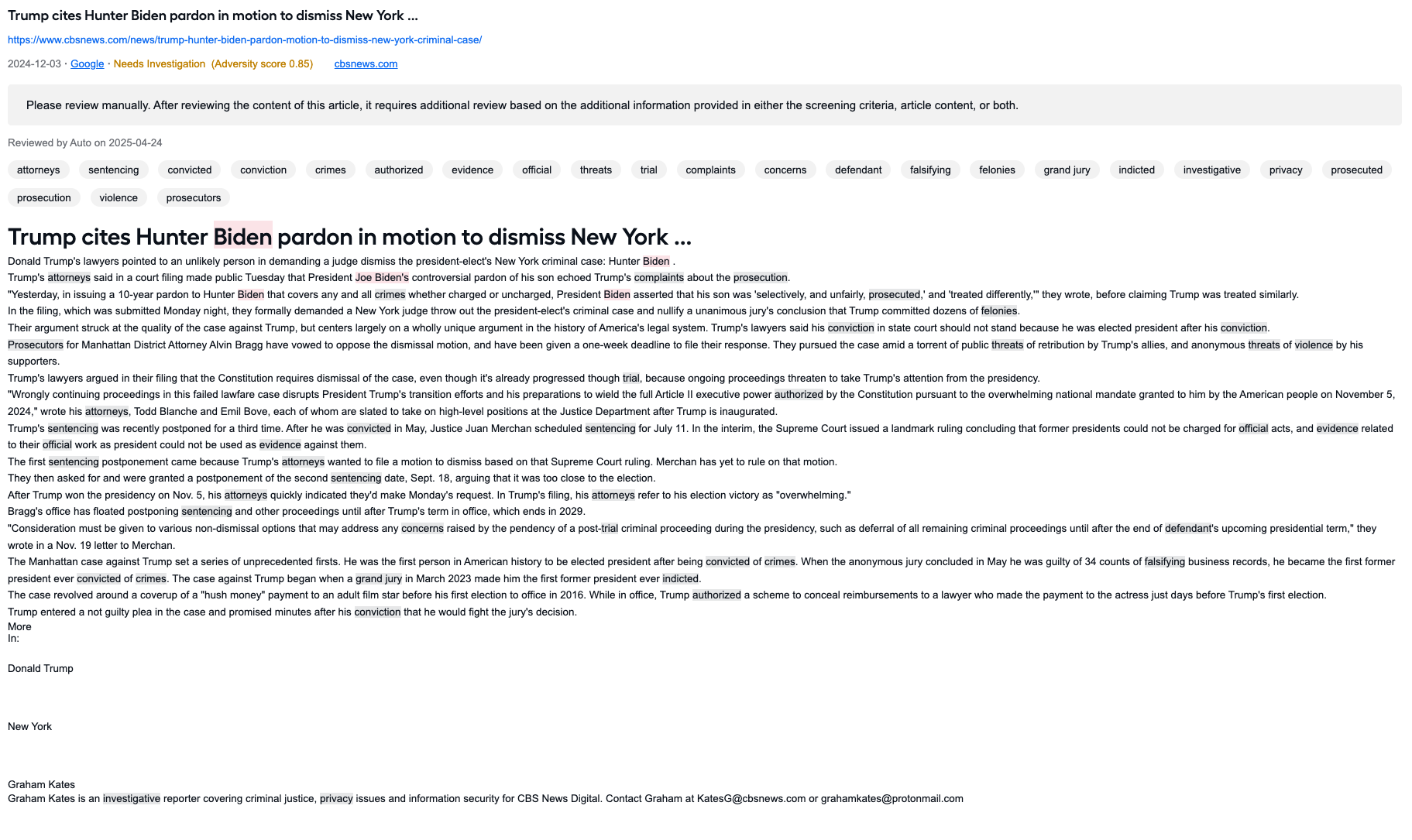
The remainder of the report contains the full details of the investigation. The entire content from each article is shown along with the following information:
Article title
The system first checks if the tagged title is available. If not, it checks for a translated title (if the article was translated). If neither is available, it falls back to the original title provided by the source.
Article publication date
Article content
The content is chosen in the following order of availability:
- Tagged content
- Translated content if the article was translated
- Parsed content (original article content)
Article Summary
The report uses the tagged summary if it exists. If not, it uses the translated summary (if available). If neither is available, it resorts to the original summary provided by the article.
Article source
A link to the source is only available if the data provider is Google API.
Media provider
Article status & score
Reviewer
Note that if the article was automatically reviewed, the reviewer is set to Auto.
Article comment
If an analyst or the model added no comment, No comment provided is displayed.
Article snippet
A key section from the article is included for reference.
Entity details
Translation indicator
If the article was translated, the report includes the Translated from field that names the language in which the article was originally written. This label is displayed prominently in the report alongside the title and summary.
Customers who use Google API as the data provider might occasionally encounter articles in which the full text could not be parsed or included in the report due to latency or website downtime. A link to the source is provided for users to navigate to the article and review the results.
Investigation history
The section outlines the history of the investigation runs for an Entity under the same Entity ID. You can download previous investigation reports by clicking the Report icon.

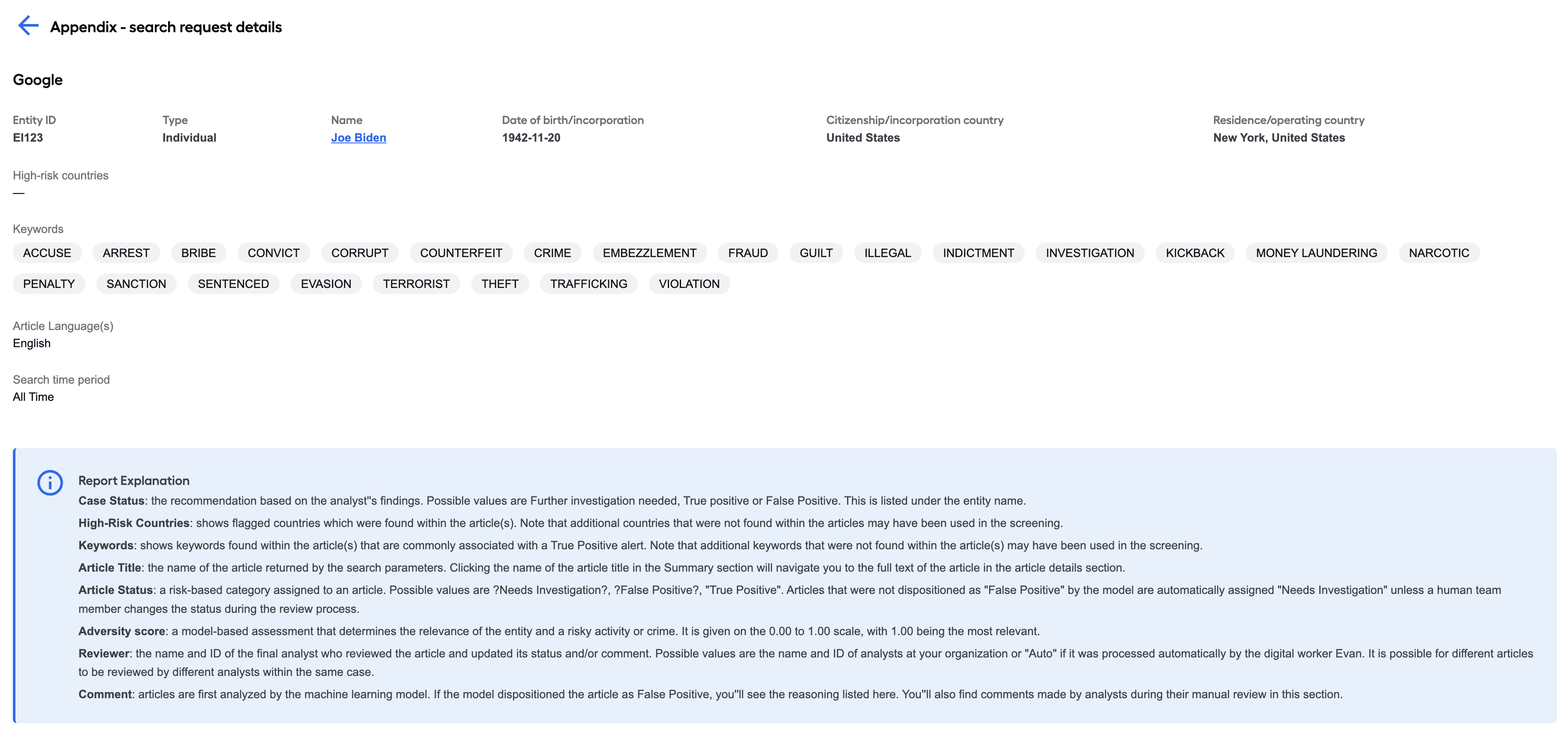
Appendix
Report explanation
The section includes an explanation of the various terms users can encounter in the report.
Combined report for multiple entities
The combined report includes a summary page of all entities in a batch. A batch is one or more entities submitted as a single request.
The batch summary page includes the following:
- Batch ID.
- Date when the investigation was completed. This is also the date when the report was generated.
- Entity name.
- Entity type.
- Investigation status per entity.
- Investigation comment per entity.
After the summary page, the full individual report for each entity is included. The report's structure is the same as for a single entity.
Only one appendix is provided in this report. The appendix summarizes the search parameters used for the batch.