View report
The final output of the AMM solution is to generate a final report. This report serves as an audit trail and includes all sourced articles, confidence score per article, overall decision, and various other data elements. It is stored inside WorkFusion platform by default and is available either in HTML or in a reader friendly PDF. It is possible to configure that report to be pushed directly into an organization’s internal applications, for example:
- Saved into a case management or transaction monitoring system.
- Stored in a shared folder.
- Custom connector to in-house application.
Typically, the report is only generated after an analyst has completed the investigation within Workspace. However, there are a few exceptions to this:
Use of Workspace and the Manual Task is optional and is configurable via a user interface when installing AMM and/or adding a new variation. If the Manual Task is not enabled, then the report(s) will be generated as the model completes its review and analysis of each entity.
Occasionally, no search results will be returned for an entity and the search criteria. When this occurs, the Manual Task will be skipped and a report will be generated and stored in the same predetermined location for audit purposes. If the search was initiated via the Launcher, then the email address provided will receive an email with a link for them to download and view the report.
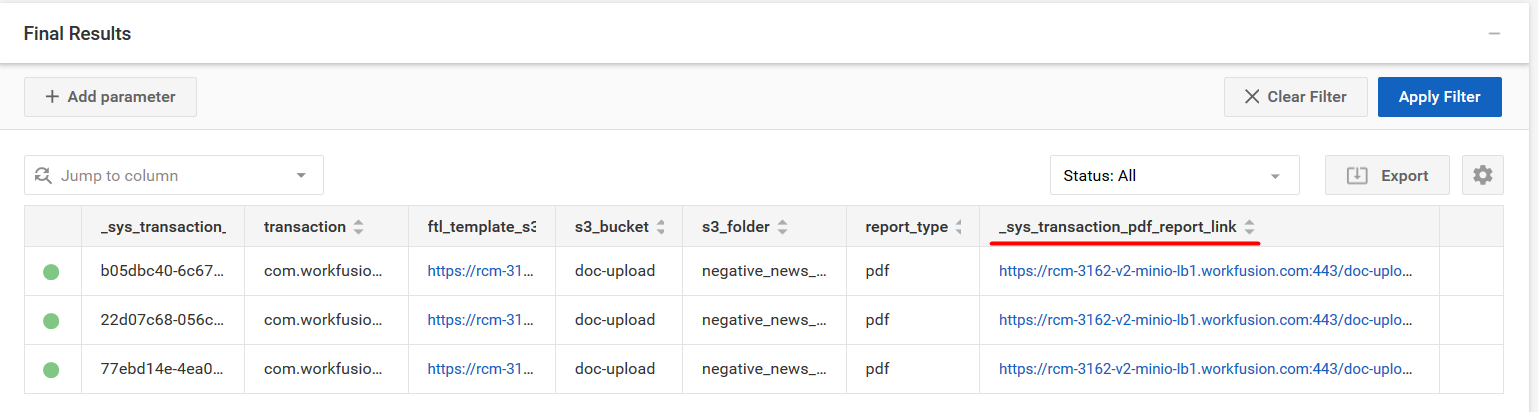
If the investigation was run using the core business process, a direct link is also available in the Control Tower. To access it, open the required Business Process, and on the Results tab, click the link in the "_sys_transaction_pdf_report_link" column.
Report structure
Investigation title and status
The title of each Adverse Media Monitoring Alert report is determined in part by the entity which was screened. Underneath the title, the status of the Investigation can be found. There are four possible statuses.
| Status | Description |
|---|---|
| Needs Investigation | A final decision could not be reached based on the information that was returned in the search results. Further escalation and/or investigation is needed to determine if there is material risk. |
| True Positive | One or more material risk(s) were found after analyzing the search results. |
| False Positive | Material risk(s) were not found in the search results for the entity. |
| No articles found for the entity | No search results were found for the entity based on the search parameters which were provided. |
The date the report was generated is included for reference.
Search Parameters
The search parameters which were included as part of the search request are listed. These include:
Entity Information:
- Name
- Type (individual or company)
- Year of Birth (only applicable if entity type is individual)
- Location
Keywords
High-risk countries
Article Language(s)
Media Provider
Business Process
Summary
Search Results
The risk factors (keywords and high-risk countries) which were found in the search results are listed here. The number next to each found keyword and/or high-risk country indicates the number of times the risk factor was found within the articles returned.
Reviewer(s)
A list of all analysts who reviewed the search results is shown here. If an article was automatically reviewed by the machine learning model, then “Auto” will be listed as the reviewer
Reviewer Comment
If a comment was provided for the investigation, it will be displayed here. Additional comments may be listed with each article further below.
Article Summary
Each article which was returned in the search is listed here. A short summary of the findings is displayed which includes the following:
Article Title
This title is a link which will take the user to the full body of the article located in the Details section of the report
Article Publication Date
Article Status & Score
Reviewer
Note that if the article was automatically reviewed, the reviewer will be “Auto”
Article Comment
If no comment was provided by an analyst or the model, then “No comment provided” will be displayed.
Article snippet
A key section from the article is included for reference
Report Explanation
An explanation of the various terms users may encounter in the report is provided in this section for easy reference.
Details
The remainder of the report contains the full details from the investigation. The full content from each article is shown along with the following information:
Article Title
This title is a link which will take the user to the full body of the article located in the Details section of the report
Article Publication Date
Article source
A link to the source. This is only available if the media provider was Google
Article Status & Score
Reviewer
Note that if the article was automatically reviewed, the reviewer will be “Auto”
Article Comment
If no comment was provided by an analyst or the model, then “No comment provided” will be displayed.
Article snippet
A key section from the article is included for reference
Note that customers who use Google as the Media provider may occasionally encounter articles in which the full text could not be parsed or included in the report due to latency and/or website downtime. A link to the original source will be provided for users to navigate to the article and review the results.