Overview
Isaac, the Transaction Monitoring Investigator (TMI), automates transaction monitoring on the alert review level by investigating and evaluating unusual transactions generated from surveillance monitoring systems.
Current challenges in transaction monitoring
Transaction Monitoring (TM) is a critical tool for fighting global financial crime under anti-money laundering and countering the financing of terrorism (AML/CFT) programs. However, it can be a difficult compliance obligation since suspicious activity monitoring programs take a lot of time, require large teams of people, and cost a lot of money:
Monthly, banks are expected to manually review millions of transaction monitoring alerts, most of which are non-suspicious.
Vast amounts of data and supporting documentation are aggregating in case management systems as a result of the monitoring activities.
Banks need to provide integrations to enrich the investigation with data from third-party sources and internal tools.
Transaction monitoring requires not only monitoring per se but also analyzing the links and relationships between multiple data points, detecting anomalies to identify unusual patterns and outliers, and comparing actual versus expected activity.
Teaming up with Isaac to address challenges
As an AI Agent, Isaac helps with TM alert management by using machine learning to process first-level alerts, auto-escalate those likely to require investigation, and close non-suspicious alerts.
The Transaction Monitoring Investigator helps with common Bank Secrecy Act (BSA) transaction monitoring scenarios generating high alert volumes. Examples include:
- Structuring
- Excessive fund transfers, movement of funds, and patterns of fund transfers
- Unexpected account usage or behavior
- High-risk factors
- Use of dormant accounts
To maintain transparency for examiners and auditors, each Isaac decision is supported by a human-readable justification, reporting documentation, and a confidence threshold. However, Isaac is not a transaction monitoring tool and does not generate alerts.
Isaac's capabilities
In terms of AI-based transaction monitoring, Isaac offers the following capabilities:
Sampling on transactions related to alerts
Gathering KYC information on focal entities, for instance, occupation, onboarding date, risk rating, source of funds, status of a politically exposed person (PEP), and previous suspicious activity reports (SARs)
Identifying all counterparties to transactions and the line of business using available data and analyzing red flags on counterparties, for example, lack of website, shell company address, high-risk geographies
Sourcing and reviewing negative news on counterparties and focal entities and conducting PEP or sanction alert reviews
Reviewing alerted transactions and historical transactions for counterparties or focal entities for consistency, value, volume, expected frequency, quick succession payments, and so on
Summarizing, justifying, explaining decisions, and clearing or escalating them accordingly
Fraud detection
Business Process overview
A Business Process (BP) represents the core workflow and design of any automation use case in the WorkFusion platform. Out of the box, Isaac comes with the following Business Processes:
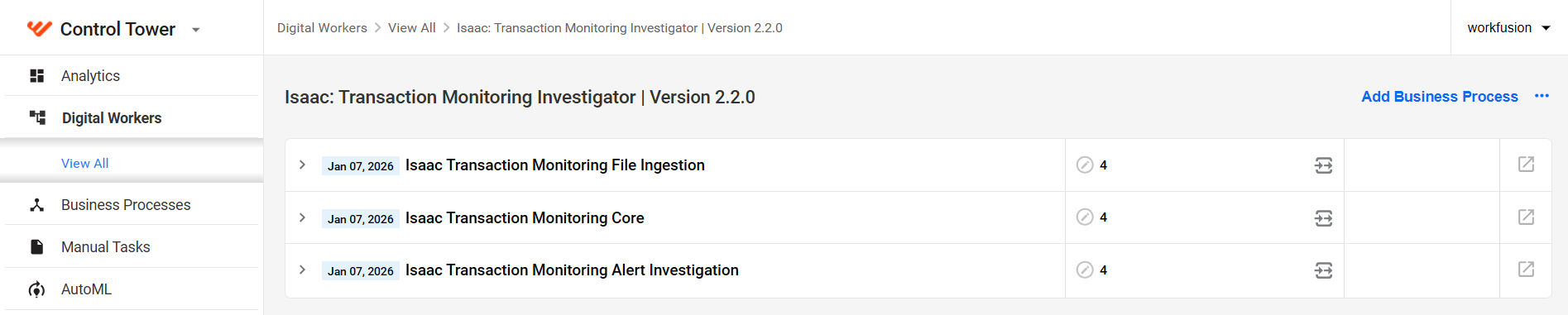
Transaction Monitoring Core
The Transaction Monitoring Core Business Process is recommended for batch alert processing.

It does the following:
Picks up the input alert data from the configured source. It can be an internal monitoring system integrated through an API or the output of the Transaction Monitoring File Ingestion BP.
Groups alerts by entity ID and identifies individual entities, attaching the appropriate alert lists to each.
Sends an email notification on potential deferrals if the capability is enabled in the investigation settings.
Initiates the Transaction Monitoring Alert Investigation BP for each separate entity. For instance, if 10 entities were identified in the input data, it would call the Transaction Monitoring Alert Investigation BP 10 times.
Collects the output from Transaction Monitoring Alert Investigation BP and updates entity details with the collected data.
Generates a summary report and sends it to the configured email.
Transaction Monitoring Alert Investigation
The Transaction Monitoring Alert Investigation Business Process is recommended for alert-by-alert real-time processing.
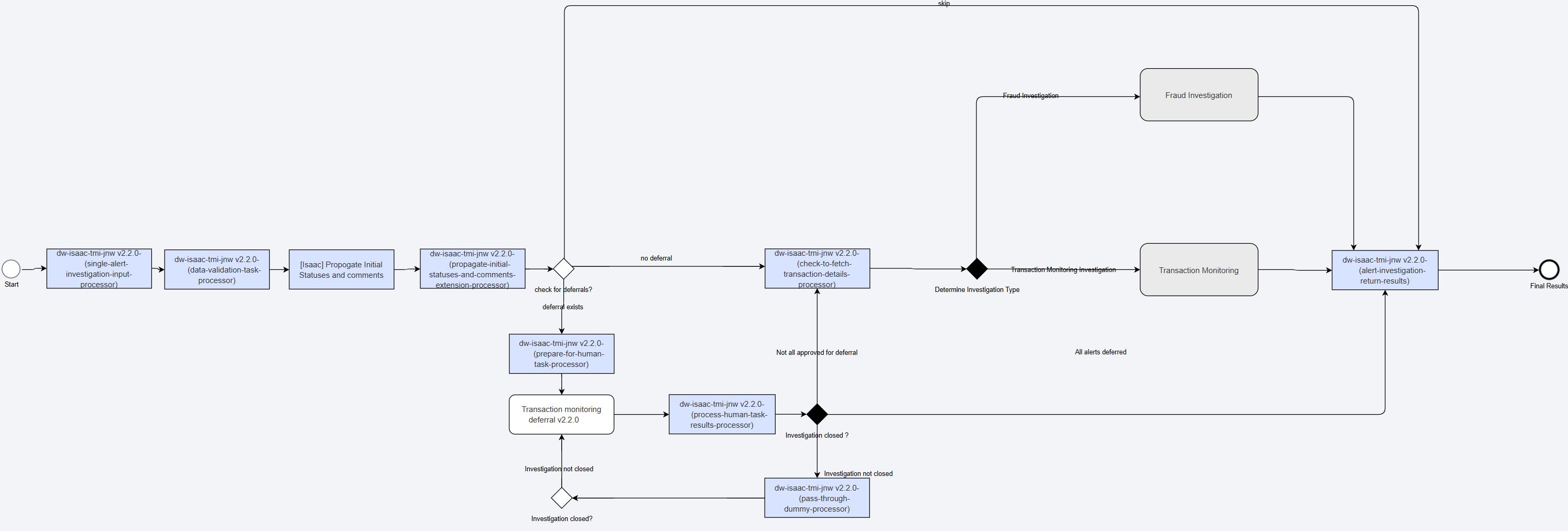
It does the following:
Fetches alerts from the source using a dedicated API and evaluates them, providing initial statuses and comments.
Checks the deferral list and input data against the investigation settings and, if needed, identifies alerts eligible for deferral to an open investigation.
Creates deferral requests and routes them for manual review in Workspace according to the specified settings if the Human-in-the-loop step is enabled during configuration.
Collects the output from manual review (if any) and automatic evaluation results and redirects the data for further processing into one of the flows:
Applies the rule engine rules (if enabled) to standardize risk detection, accelerate alert triage, and reduce false positives.
Combines the outputs from the fraud investigation and transaction monitoring flows and returns them to the Transaction Monitoring Core BP if the latter is used.
Transaction monitoring flow
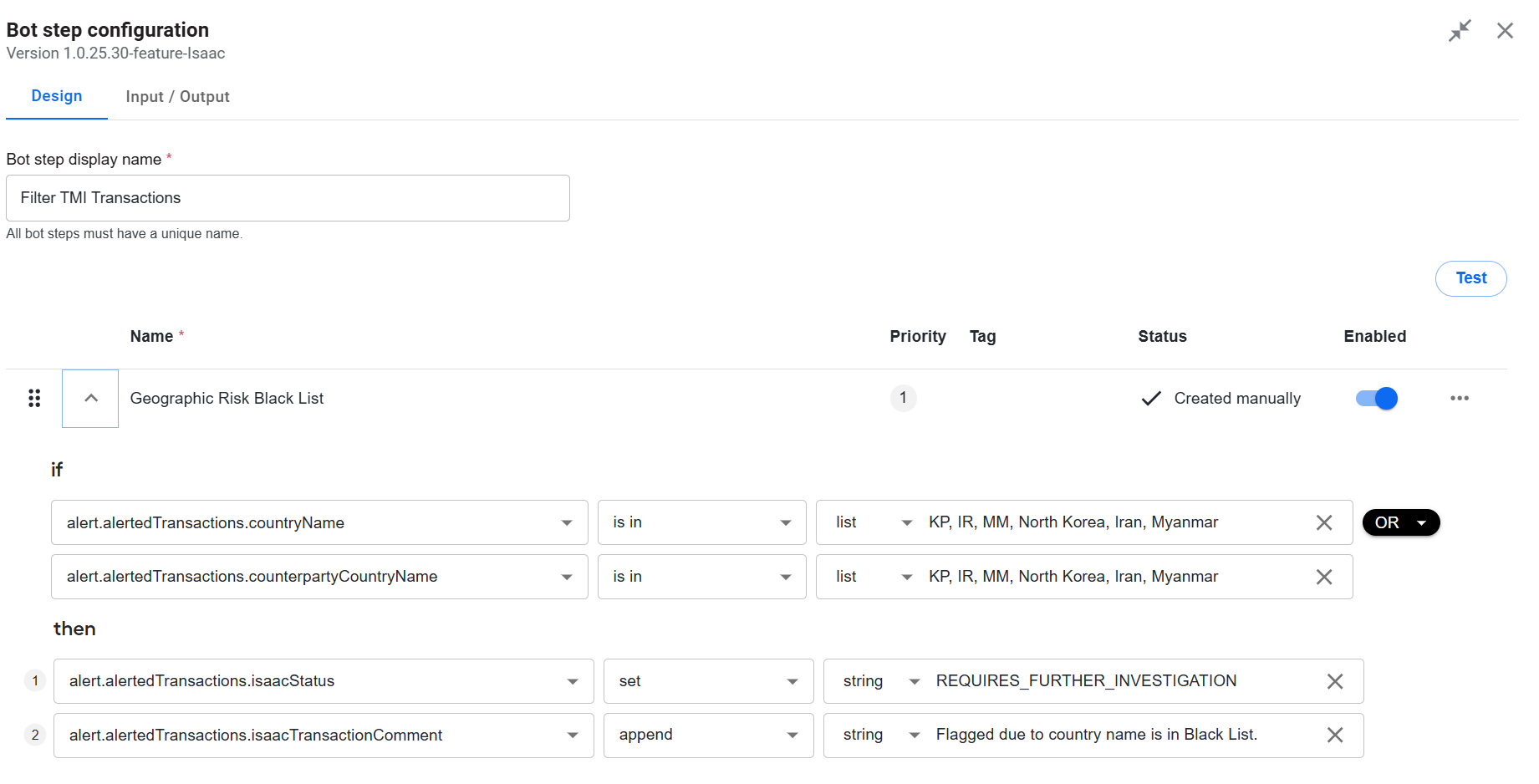
This is the default transaction data processing flow that outputs a transaction report. The flow includes a rule engine comprising no-code bot steps (Transformation and Decision rules) evaluating transactions against required filtering criteria, for instance, labeling them as high risk or low risk.
You can enable the rule engine per variation during Isaac's configuration on the Investigation step. If the rule engine is disabled, Isaac will not apply the rules to the transaction data.
The figure below illustrates a filtering rule configured to compare the country names in the transaction data against blacklisted countries and add a REQUIRES_FURTHER_INVESTIGATION flag if a country appears to be among those blacklisted. Additionally, a comment is appended explaining that the flag was added because the country is on the blacklist. For more details on no-code rules, refer to Configure rules | No-code rules.
Optionally, the transaction monitoring flow can include sub-flows for enriching the processed data with input from external systems (for instance, customer internal systems) or additional transaction details (for instance, details extracted from cheque images). To make the optional sub-flows work as part of the transaction monitoring flow, do as follows:
Build custom Business Processes to fetch appropriate enrichment data as described in the guide.
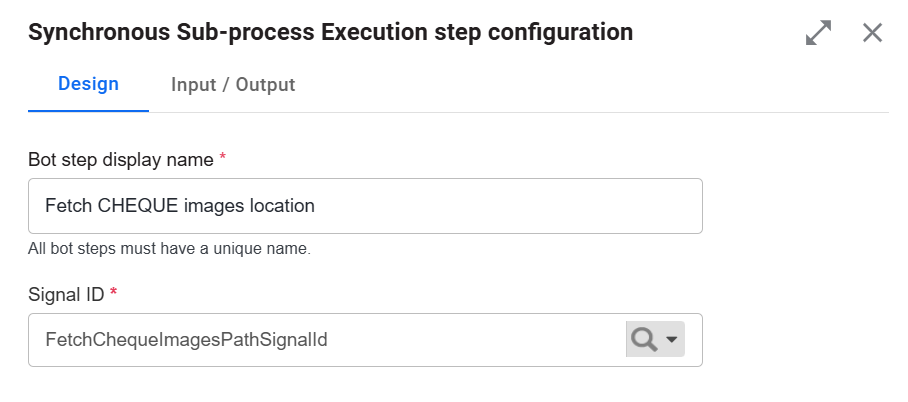
Integrate the BPs into the transaction monitoring flow as synchronous sub-process execution steps by specifying a Signal ID. For details, read the guide.
Enable the Run the rule engine on transactions to identify suspicious activity? option during Isaac's configuration on the Investigation step. For details, read the Install and configure guide.
The figure below illustrates a synchronous sub-process step for enriching the transaction monitoring flow with the details extracted from cheque images.
WorkFusion provides some preset filtering rules out of the box, but you can customize or add them at your discretion. For instructions on setting the filtering rules, read the Configure no-code Transformation step guide.
Fraud investigation flow
The flow is optional and initiated when the input data includes a fraudInvestigationDetails object. Its output is a fraud summary report.
Similar to the transaction monitoring flow, the fraud investigation one includes a rule engine comprising no-code bot steps (Transformation and Decision rules) evaluating transaction data against specific criteria and identifying fraud (if any).
You can enable the rule engine per variation during Isaac's configuration on the Investigation step. If the rule engine is disabled, Isaac will not apply the rules to the transaction data passing through the flow.
The figure below illustrates a filtering rule that compares the transaction amount in the input data against a reference sum and adds a REQUIRES_FURTHER_INVESTIGATION flag if the amount exceeds the reference. Additionally, a comment is appended, explaining that the flag was added because the amount was too large. For more details on no-code rules, refer to Configure rules | No-code rules.
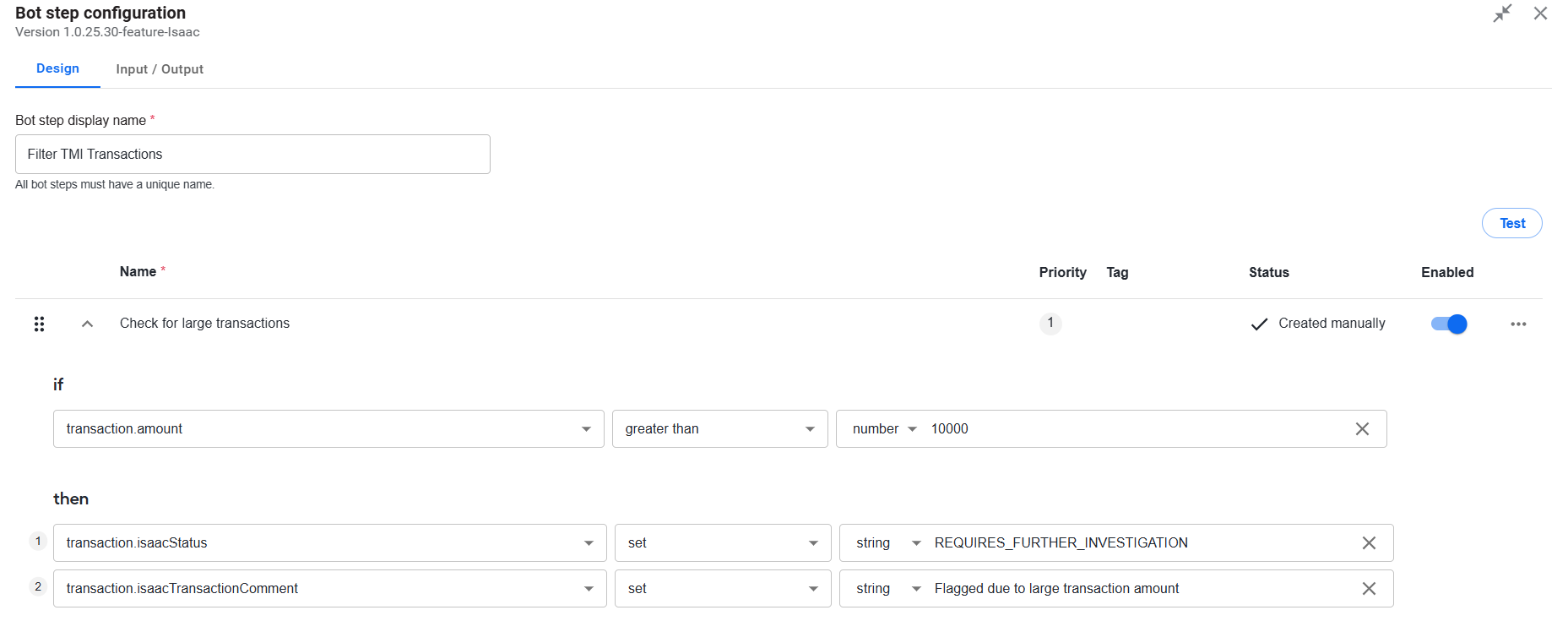
WorkFusion provides preset filtering rules out of the box, but you can customize or add them as needed. For instructions on setting the filtering rules, read the Configure no-code Transformation step guide.
Transaction Monitoring File Ingestion
The Transaction Monitoring File Ingestion Business Process does the following:

Updates the list of deferrals and alerts based on one or more input CSV files in the configured S3 storage. The input files comprise the data collected from surveillance monitoring systems.
Checks the processed file folder for any missing alerts.
Passes the data on to the Transaction Monitoring Core BP.
Download PDF
To download a PDF version of the documentation, right-click the document below, and choose Save As or Print > Save.