
Set up FIFO vs Dynamic Task Rendering
Beginning with Version 10.1.1, the new prioritizing strategy is enabled for WorkSpace task records. The prioritizing strategy is called FIFO (first in, first out): the oldest (first) entry is processed first. The FIFO strategy helps to improve adherence to the service-level agreement (SLA) for the record processing time.
In the current approach, FIFO and DTR work separately and cannot cause unwanted behavior. FIFO prioritization is enabled by default and is switched off when the user enables DTR for the Task.
FIFO logic
Record priority and order are determined based on the record date (primary parameter) and record order (secondary parameter). All records from the same Manual Task have the same date. If the record date is not set, it equals to the Manual Task start date.
Basic flow
Let's say a Manual Task contains five records: record1, record2, record3, etc. As they have the same date (= MT start date), they appear in WorkSpace in the very same order:
- record1
- record2
- record3
- record4
- record5
Gateway flow
Let's say, the Manual Task from the previous example is a part of a Business Process with a Decision Rule, where record1, record3, and record5 are rerouted to a 10-second processing step, and records 2 and 4 are processed in a 30-second step:
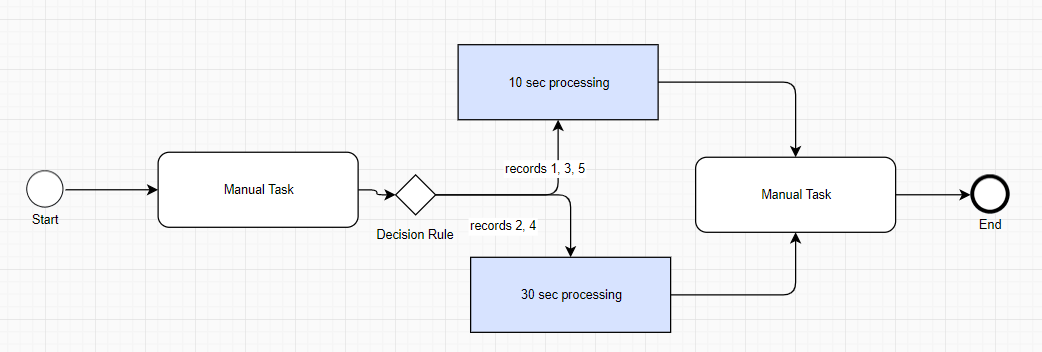
For the first 20 seconds, only record1 and record3 appear in WorkSpace:
- record1
- record3
On the 30-second mark, record2 appears after record1 because of its record order, and the list looks as follows:
- record1
- record2
- record3
- record5
On the 60-second mark, the list looks as follows:
- record1
- record2
- record3
- record4
- record5
Adjudication flow
When the Task has an Adjudication rule associated with it (for example, 2+1), Worker 1 sees a list of records from the first example:
- record1
- record2
- record3
- record4
- record5
Worker 1 takes record1, so Worker 2 sees the following list:
- record2
- record3
- record4
- record5
Worker 2 takes record2, so after Worker 1 completed their record, the record list looks as follows:
- record3
- record4
- record5
Worker 1 takes record3. Record2 is visible once Worker 2 completes it. Workers finish with the record list in the same manner.
FIFO in Control Tower
Control Tower sets hits ordering during the hits creation.
When a hit is created, Control Tower adds a JSON object to it. This JSON object is stored in the _sys_record_order column of Business Process or Manual Task data and contains parameters for ordering. BP or MT data is used to start a BP or an MT and to transfer data from step to step in BP.
These parameters are passed to WorkSpace during the hit submission operation in the CreateHITRequest#customAttributes field.
{
"hitOrder" : {number of record in csv file },
"hitOrderDate" : { date from csv file column, in case date is missed in input record, current time will be used. }
}
Here's an example of a JSON object:
{
"hitOrder":1,
"hitOrderDate":"2020-03-11T10:15:55.935"
}
The CSV file column should be named record_date to use it in the sorting operation.
The hitOrderDate parameter value should be formatted according to the ISO-8601 specification:
"YYYY-MM-DDThh:mm:ss[.sss]" - "2019-09-15T15:00:28.638"
note
The JSON format is used here for future extensions of the list of parameters for sorting Manual Tasks.
FIFO in WorkSpace
To enable FIFO in WorkSpace, set the core.task.queue.fifo.enabled application property to true. To turn FIFO off and switch to legacy (DTR) behavior, this property should be set to false.
WorkSpace uses parameters passed from Control Tower in a JSON object.
These parameters are passed in JSON format using the CreateHITRequest#customAttributes field and stored in the WorkSpace table hit custom_attributes field.
The AbstractAvailableHitsLookupStrategy implementation for FIFO uses these custom attributes to construct a query for the next task:
SELECT ... FROM hit h JOIN hit_type ht ON (h.hit_type_id = ht.id)
CROSS APPLY OPENJSON(h.custom_attributes)
    WITH (num int 'lax $.hitOrder', orderDate datetime 'lax $.hitOrderDate') AS hit_order
  WHERE ht.vid = :hitTypeVid
    AND h.hit_status = 'ASSIGNABLE'
    AND NOT EXISTS (SELECT 1 FROM assignment a WHERE a.hit_id = h.id AND a.worker_id = :workerId AND a.assignment_status IN ('SKIPPED', 'ACCEPTED', 'SUBMITTED', 'APPROVED', 'REJECTED'))
    AND NOT EXISTS (SELECT 1 FROM assignment a WHERE a.hit_id = h.id AND a.worker_id = :workerId AND a.assignment_status IN ('RETURNED', 'ABANDONED') AND a.deadline > :currentServerTime)
    AND h.assignment_count < h.max_assignments

ORDER BY hit_order.orderDate asc, hit_order.num asc;
Dynamic Task Rendering
Dynamic Task Rendering (DTR) is a legacy strategy intended to sort hits in hit types, to make completing the tasks in a custom order possible. To enable this feature (except for the Priority parameter), a user should set up Task Comparator and select the Enable Dynamic Task Rendering parameter in the Run tab of the Manual Task.