Configure sensitivity analysis
The general flow to configure the sensitivity analysis is as follows:
Configure the sensitivity analysis for a data set.
Configure the sensitivity analysis for hyperparameters.
Run the sensitivity analysis and check the results.
note
Define all sensitivity settings in the model configuration. By default, all out-of-the-box (OOTB) models contain the DATA_SET and HYPERPARAMETERS sensitivity configurations.
You can import default configurations for your custom models by adding one of the following classes into your model configuration: GenericClassificationSensitivityAnalysisConfiguration or GenericIeSensitivityAnalysisConfiguration.
Configure data set sensitivity analysis
Let us explore the steps to configure the sensitivity analysis for a data set based on the sample below. For the sample, all preset values are defaults.
@Named("dataSetSensitivity")
public DatasetSensitivityConfiguration dataSetSensitivity() {
    new DatasetSensitivityConfiguration.Builder()
        .numberOfExperiments(5) //default
        .steps(10) //default
        .analysisRatio(0.1) //default
        .numberOfBootstrapIteration(1000) //default
        .bootstrapTestSetRatio(0.1) //default
        .build();
}
To configure, follow the steps below:
(Optional) To set the number of experiments for the sensitivity analysis, define the value for the
numberOfExperimentsparameter.Mind that the reliability of the resulting statistics depends on the number of experiments. The more experiments you run, the more detailed statistics you get. The default value is 5.
(Optional) To set the number of times to reduce the training set, define the value for the
stepsparameter.The parameter works in coordination with
analysisRatio. The default value is 10.The number of
stepsdefines the degree of the statistics detail. At each step, the training set is reduced based on the relation:(analysisRatio/ step)*experimentTraingSetSize.(Optional) To specify the ratio for each training set reduction during an experiment, define the
analysisRatioparameter. The parameter is used together withsteps(see above).The default value is 0.1. The larger you set the value, the larger should be the
stepsparameter setting. This is essential to save the degree of detail of the final statistics.(Optional) To set the number of subsampling times for the experiment statistics calculations, define the
numberOfBootstrapIterationparameter.No values are allowed that are lower than the default 1000. The higher the
numberOfBootstrapIterationvalue is, the more accurate and stable the experiment statistics are.(Optional) To configure the test set ratio to be used for the bootstrapping step, define the
bootstrapTestSetRatioparameter.No values are allowed that are lower than the default 0.1. The higher the
bootstrapTestSetRatiovalue is, the more representative the experiment statistics are.
Configure hyperparameter sensitivity analysis
Let us explore the steps to configure the sensitivity analysis for hyperparameters based on the sample below. For the sample, all preset values are defaults.
@Named("hyperparametersSensitivity")
public HyperparametersSensitivityConfiguration hyperparametersSensitivity() {
    new HyperparametersSensitivityConfiguration.Builder(
        new LiblinearParamGridClassifier.Builder()
            .cost(new RealMultipliedRange(Math.pow(2D, -3), Math.pow(2D, 5), 2.))
            .solverTypes(ImmutableList.of(L2R_L2LOSS_SVC, L1R_L2LOSS_SVC))
            .build())
    .numberOfFolds(5) //default
    .numberOfBootstrapIteration(1000) //default
    .bootstrapTestSetRatio(0.1) //default
    .build();
}
To configure, follow the steps below:
(Mandatory) To set the hyperparameter classifier enabling to provide parameter ranges, define the
paramGridClassifiervalue.This parameter is passed in the
Builderconstructor. Currently, the only working implementation isLiblinearParamGridClassifier.(Optional) To set the number of folds for cross-validation, define the
numberOfFoldsparameter.The number of folds for cross-validation determines the reliability of the statistics. The default value is 5.
(Optional) To set the number of times to perform subsampling for statistics calculation during the experiment, define the
numberOfBootstrapIterationparameter.No values are allowed that are lower than the default 1000. The higher the
numberOfBootstrapIterationvalue is, the more accurate and stable the statistic for the experiment is.Note that a high
numberOfBootstrapIterationimpactvalue impacts the execution speed for each experiment.(Optional) To configure the test set ratio to be used for the bootstrapping step, define the
bootstrapTestSetRatioparameter.No values are allowed that are lower than the default 0.1. The higher
bootstrapTestSetRatiois, the more representative the experiment statistics are.Note that a high
bootstrapTestSetRatiovalue impacts the execution speed for each experiment.Also, take into account that
bootstrapTestSetRatiois used for each Bootstrap iteration.
Run and check results
To run a sensitivity analysis, act as follows:
Check that you have configured the mandatory and optional parameters as described in the previous two sections.
In the run configuration, find the
ConfigurationConstants.SENSITIVITY_ANALYSIS_TYPEparameter and set it to either of the sensitivity types—SensitivityAnalysisType.DATA_SETorSensitivityAnalysisType.HYPERPARAMETERS.Proceed according to the Model Training article.
Sample configuration:
You can find the full example in the SensitivityAnalysisRunner class of vds-models.
Map<String, Object> parameters = new HashMap<>();
parameters.put(ConfigurationConstants.PARAM_MAX_FIELDS_IN_PARALLEL, 3);
parameters.put(GenericPipelineConfiguration.BALANCE_WEIGHTS, Boolean.TRUE.toString());
parameters.put(ConfigurationConstants.SENSITIVITY_ANALYSIS_TYPE, SensitivityAnalysisType.DATA_SET);
parameters.put(ConfigurationConstants.CONFIDENCE_INTERVAL, 0.95); //default value

LocalTrainingConfiguration localConfiguration = LocalTrainingConfiguration.builder()
        .inputDir(TRAINING_SET_FOLDER)
        .testSetDir(TEST_SET_FOLDER)
        .outputDir(LOCAL_WORKING_FOLDER)
        .parameters(parameters)
        .build();

ModelRunner.run(MultiClassClassificationGenericSe20Hypermodel.class, localConfiguration);
Pay attention to the following:
When you run
SensitivityAnalysisType.DATA_SET, always settestSetDir, which is the path to the test set to validate each experiment. Otherwise, the analysis won't work correctly.Skip
ConfigurationConstants.CONFIDENCE_INTERVALif you want to use the default 0.95 value.
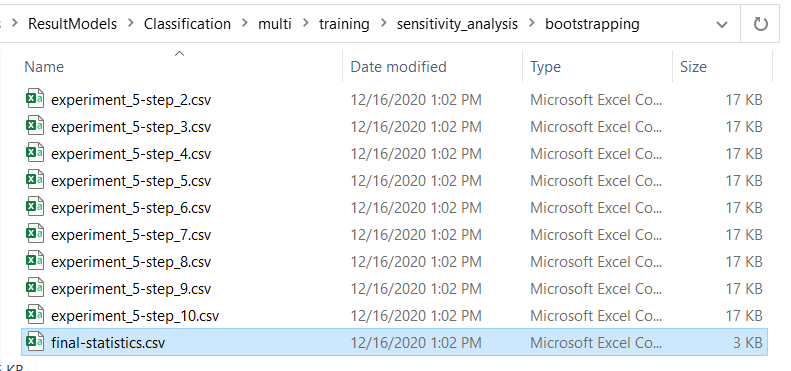
The figure below illustrates the resulting statistics structure.
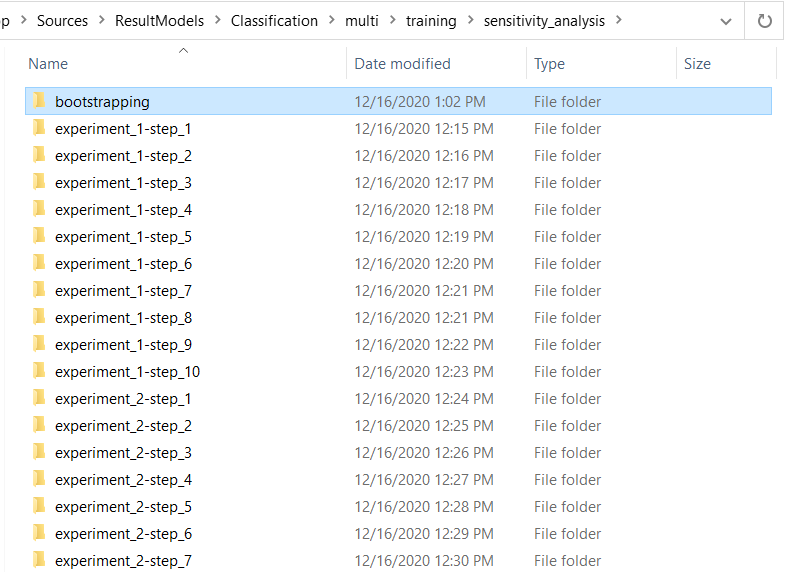
The structure contains a folder for each step of each experiment. Each experiment folder contains a result model for a particular step and a corresponding reduced training set.
The bootstrapping folder contains statistics for each experiment and each step and aggregated statistics for all experiments.