
Exception handling
The guide explains how to provide non-blocking exception handling in a Use Case. In this context, “non-blocking“ means that after a record failure, Control Tower execution is not stuck on a step, and the entire Business Process is not marked as having errors. The design paradigm allows you to operate BPs normally—without problem-driven restarts and manual data preparations. In this way, you can handle exceptions properly according to the unique Use Case business logic design.
In short, the ODF 2 exception handling principle is to record all unhandled exceptions to a table in Data Stores and change the status of the corresponding Transaction to reflect that. Therefore, if a Transaction makes it to the end of a Business Process, this does not mean it is successful because you still have to check its status.
Recommended ODF 2 error processing
Provided with Full Archetype out-of-the-box, the Error Handling BP is expected to analyze an error and attempt a recovery, for example, using a Manual Task to prompt human operators the actions to address the issue. In any case, an invalid Transaction never returns to the common data flow. At the end of the respective BP, its status is set to ABORTED.
note
As a developer of the Error Handling BP, you are to create a new Transaction with any applicable status and assign any required entities from the aborted Transaction to be processed again. For details on Transactions, refer to the Create and process user Transactions guide.
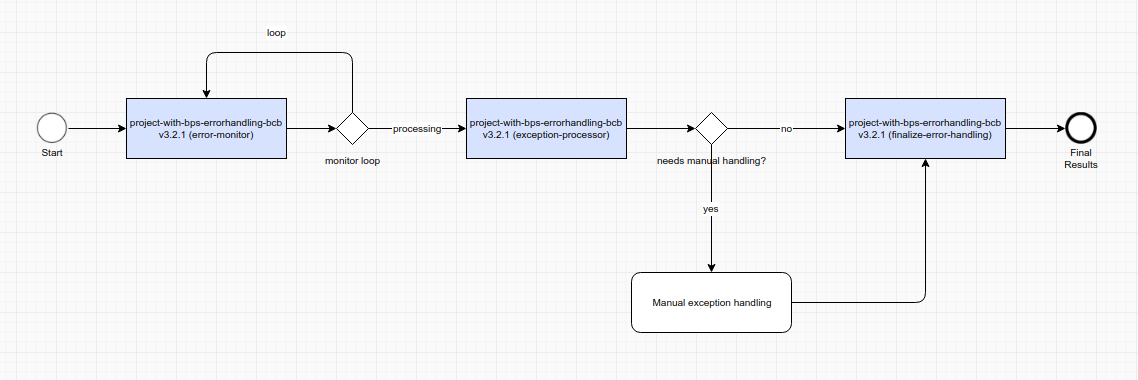
Error Monitor specifically looks for Transactions with the HAS_ERROR status and passes them down the Error Handling BP. It is the only case when a Transaction can be processed by two BPs simultaneously because it can take time to reach the end of the BP where the Transaction was originally in, whereas Error Monitor can find it faster. Therefore, Transactions with error-related statuses must not be processed in any way because they can already be processed by Error Handling Bot Tasks.
In the Full Archetype’s Error Handling BP, you can find an example of implementing a simple handling logic when any non-BUSINESS exceptions are routed to a custom Manual Task to be displayed to an operator with all available details. In this example, the Transaction status is changed to ABORTED. ExceptionProcessorTask is a sample implementation of automated actions with an exception:
@BotTask
public class ExceptionProcessorTask implements ErrorHandlingTask {

    private final Logger logger;

    @Inject
    public ExceptionProcessorTask(Logger logger) {
        this.logger = logger;
    }

    @Override
    public boolean isNeedManualErrorHandling(ErrorEntity errorEntity) {
        return !errorEntity.getType().equals(ErrorType.BUSINESS);
    }

    @Override
    public void automationHandling(Transaction transaction) throws OdfException {
        logger.info("Handling error in transaction '{}'", transaction.getUuid());
    }

    @Override
    public TransactionStatus updateTransactionStatus() {
        return TransactionStatus.ABORTED;
    }

}
In many cases, there is no way to automate exception handling, so the human-in-the-loop step is needed. To showcase how to include a Manual Task into the Exception Processing BP, the Full Archetype provides one out-of-the-box. To enable operators to manually manage the Transaction status (in the sample Manual Task, between the ABORTED and COMPLETED statuses), the last Bot Task in the BP, provided out-of-the-box with ODF 2, checks the _sys_new_transaction_statusvariable. In case the latter exists, the Bot Task sets its value as the Transaction status.
@BotTask
public class FinalizeErrorHandlingTask implements TransactionProcessorTask {

    private final TaskInput taskInput;

    @Inject
    public FinalizeErrorHandlingTask(TaskInput taskInput) {
        this.taskInput = taskInput;
    }

    @Override
    public boolean shouldProcessTransaction(CurrentTransaction currentTransaction) {
        return TransactionStatus.ERROR_IN_PROGRESS.appliesTo(currentTransaction);
    }

    @Override
    public void doWithTransaction(Transaction transaction) {
        final String newTransactionStatus = taskInput.getVariable(TaskVariable.NEW_TRANSACTION_STATUS)
                .orElse(TransactionStatus.ABORTED.name());

        transaction.setStatus(newTransactionStatus);
    }

}
note
The provided simple exception handling case is for illustration only. Your case is unique to the business logic you implement. Follow the proposed design pattern to handle exceptions in BPs. Build the processing logic by implementing and extending the available interfaces.
Exception throwing from custom ODF 2 Bot Tasks
Concerning the ODF 2 exception handling mechanism, pay attention to the following considerations:
The mechanism is ON by default. To turn it off, add the
errorHandlingEnabled=falseline to theusecase.propertiesfile. After that, a failed record behaves the common Control Tower way: the record execution stops on the failed step.It works only in terms of Transactions. If there is no Transaction initialized and passed between steps, ODF 2 cannot operate with Transaction statuses, which is the core of the entire multi-BP mechanics.
When executing operations with Transactions, the core ODF 2 framework utilizes a few exception classes. As a Use Case developer, you are to design using BusinessException to have ”NON-BLOCKING” WORKS scenarios to the greatest extent possible:
| Exception | Thrown by | ODF 2 action | Description |
|---|---|---|---|
BusinessException | Use Case developer | If ODF 2 Error Handling is enabled:
The above is the ”NON-BLOCKING” WORKS scenario. Otherwise:
The above is the ”NON-BLOCKING” BROKEN scenario. | This is the exception to be used by Use Case developers to handle various failure scenarios. For example, you can have a logic according to which a received email must have attachments. When no attachments are actually there, the Use Case designer may want to implement the failure scenario as part of “normal“ exception handling via a separate BP. The latter will trigger a Manual Task for each event so that the operator can manually review, contact the Sender, and then manually assign another Transaction status to enable further processing. |
OdfException | ODF 2 core | Problems indicated by the exception make further processing impossible. When the exception is thrown, Control Tower behaves “as usual”: records stop on the failed step, and a respective message appears in the Events popup. The above is the ”NON-BLOCKING” BROKEN scenario. | Used within the ODF 2 core to address such issues as abnormal behavior while persisting data to Data Stores, saving files to S3 File Storage, fetching from Secrets Vault—essentially when expected platform APIs or accesses fail. Users do not throw |
RetryRequiredException | ODF 2 core | If the exception is caught inside TransactionOperation, it is thrown further so that the Odf class—the entry point for the entire framework—can process it properly. | Used in the “release“ flow design of Monitors. In case the execution of a Bot Task must be terminated, RetryRequiredException is thrown. Users do not throw RetryRequiredException manually. |
OdfDeveloperException | ODF 2 core | ODF 2 throws The above is the ”NON-BLOCKING” BROKEN scenario. | Thrown if ODF 2 Error Handling is disabled. Users do not throw OdfDeveloperException manually. |
Exception | any other failed code | If ODF 2 Error Handling is enabled:
The above is the ”NON-BLOCKING” WORKS scenario. Otherwise:
The above is the ”NON-BLOCKING” BROKEN scenario. | Any other unexpected failure. Users do not throw |
BusinessException can be thrown with specified error messages only, for example:
if ("UNSUPPORTED".equals(attachment.getType())) {
    throw new BusinessException(errorEntity -> errorEntity.setShortDescription(String.format("Email '%s' contains UNSUPPORTED attachment", attachment.getEmail().getUuid())));
}
However, in some scenarios, it’s important to create ErrorEntity with more valuable data for troubleshooting. For example, take a screenshot of an RPA server failure and store the link to it in the screenshotLink property of ErrorEntity.
Behavior if one sub-transaction is aborted
Now, let's consider a situation when a BP is designed for parallel processing in the way that a Transaction is split into multiple sub-Transactions. And, in the course of processing, one sub-Transaction fails with an exception.
According to the ODF 2 core design, in this case, the exception is propagated to the parent Transaction as well. Here, BusinessException is handled in the TransactionOperation.java class from the ODF 2 core:
private SingleResult businessExceptionOutput(Transaction transaction, BusinessException e) {
    if (useCaseSettings.isErrorHandlingEnabled()) {
        final Transaction rootTransaction = transactionRepository.getRootTransaction(transaction);

        TransactionStatus.HAS_ERROR.setTo(transaction);
        errorRepository.create(ErrorEntity.forBusinessException(transaction, rootTransaction, e));
        updateTransactionState(transaction, rootTransaction);

        return transactionOutput(transaction);
    } else {
        throw new OdfDeveloperException("Exception was thrown inside a task, while error handling is explicitly disabled", e);
    }
}
Note that the updateTransactionState() method has the two following implementations in ODF 2:
SingleTransactionOperation—works for most scenarios. In this case, the current sub-Transaction and the parent (root) Transaction are the same so singleErrorEntityis created and linked to them both. For the Transaction, the status is set toHAS_ERROR.TransactionTreeOperation—works for the SPLIT-JOIN design. In this case, all child Transactions are set to theHAS_ERRORstatus. SingleErrorEntityis created but linked only to the parent (root) Transaction.
Classification of BP errors in Control Tower
note
When you deal with exceptions in a BP, it is important to distinguish between the ones covered by ODF 2 exception handling and the causes outside of ODF 2.
Error in Event log for BP run
Usually, exceptions in ODF 2 do not entail any records to the error log. If an error appears in the Control Tower (CT) error log, it means either of the two things:
The default exception handling behavior is disabled. Act as you usually do to handle stack traces. To disable the default behavior, add the
errorHandlingEnabled=falseline to theusecase.propertiesfile. In this case, an unhandled exception is immediately wrapped intoOdfDeveloperExceptionand re-thrown. For BP execution, the behavior is the same as in old pre-ODF 2 projects: any exception stops executing the entire record in BP.Something happened outside of the ODF 2 code. Analyze the stack trace in the CT error log. Look into the RPA Worker log. Most likely, it is an infrastructure-related issue.
To access the Control Tower and RPA Worker logs via IA Cloud Developer, use the Launcher application. For access to logs via IA Cloud Enterprise, use Platform Monitor as described in the following guides:
Warning in Event log for BP run
When ODF 2 catches an otherwise unhandled exception, and the default error handling mechanism is enabled, the latter logs a warning that states the following: "Error was raised inside ODF task.” Check the ds_uc_<uc_name>_exception_v<version> table for a complete stack trace:
If the exception is wrapped in
OdfException, it means that something happened within the framework code. For example, the configuration is incorrect, or there’s a database issue, and so on.If the exception is wrapped in
BusinessException, it means that it was explicitly raised in the Bot Task code by the Use Case developers.
In any case, act the same way as you usually do to handle stack traces.