
Overview
Major technical concerns of Use Case delivery
Each Use Case delivery team faces main technical concerns represented by:
- Verified standard practices for complex automation:
- Data modeling and storage standards
- Use Case tech initialization and configuration standards
- Convenient programmatic access to the platform's APIs
- A way to extend with more components, and more
- Fast standardized implementation start. Tech project blueprints accelerate development start. The packaged multi-process architecture, components use examples, and the modulized extendable structure speed up the entire implementation.
- Transparent and flexible infrastructure. The enterprise nature of automation requires supporting two distribution ways: via WorkFusion-managed cloud artifacts and on-prem artifacts. You must manage dependencies, Archetypes, and plugins for various IA Cloud versions.
- Quality control with automated testing. Quality is the key to success. Automating quality control provides delivery teams with the next confidence level when introducing new Use Case features or changing the existing ones.
- Safe and fast deployment. The number of environments and variety of project resources make deployment quite complex and manual error-risky. Tools for deployment automation remove risks and accelerate deployments.
ODF 2 framework features
Here are the basics of how the framework addresses the listed tech concerns.
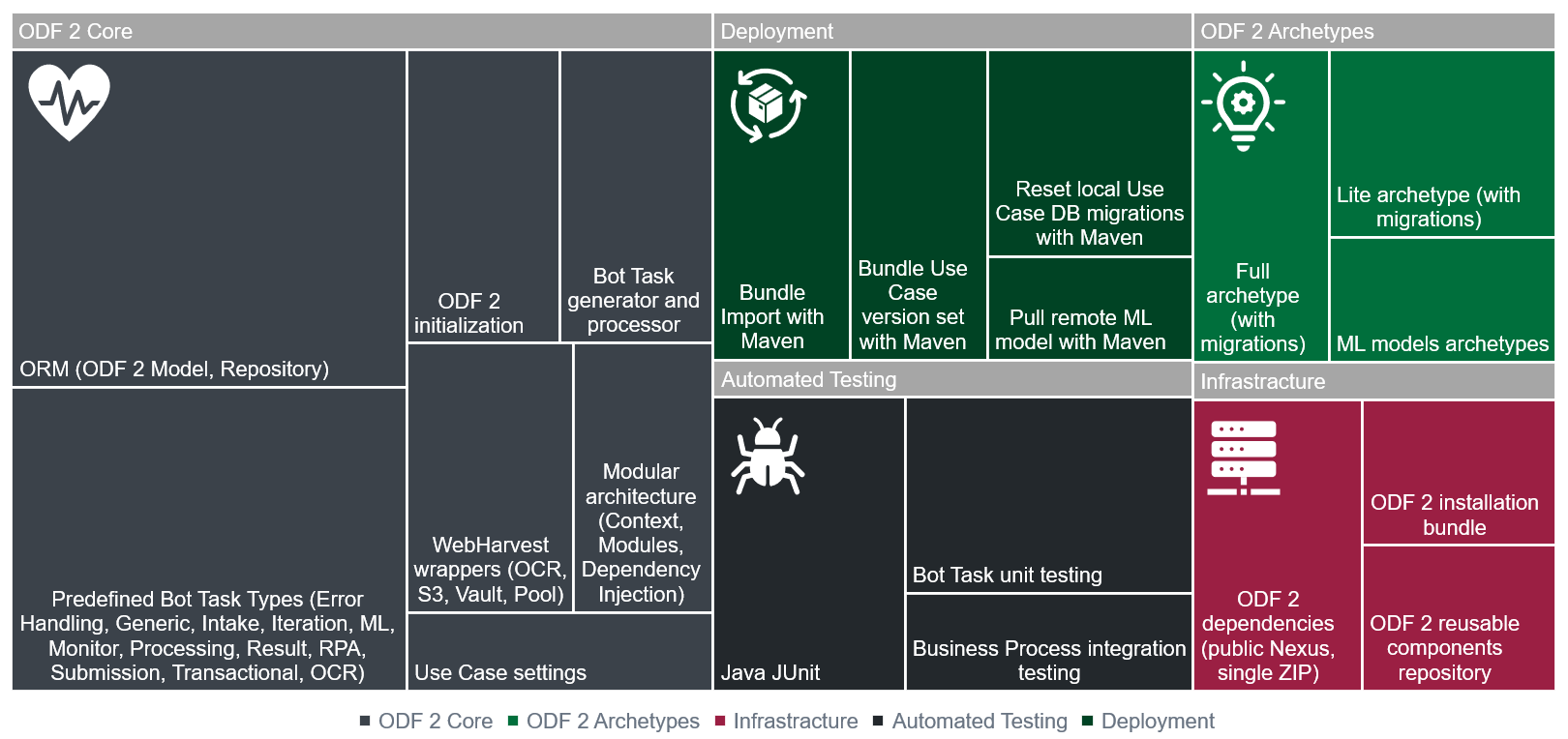
WorkFusion's Open Development Framework of the second version (ODF 2) provides Automation Engineers with five feature groups that cover all major automation concerns:
- ODF 2 Core:
- Provides the Object-Relational Mapping standard with Liquibase migrations support
- Provides Bot Task generator out of Java definition and processor
- Defines all required Bot Task wiring with the ODF 2 framework to properly initialize the Java context
- Defines ODF-based Use Case data model and initial migration
- Provides all required standard Bot Task types
- Provides automation project modular architecture via modules, context, and dependency injection
- Defines standard Use Case settings via a Data Store
- Provides Java wrappers for standard WebHarvest components
- ODF 2 Archetypes:
- Two pre-packaged ODF2-based project blueprints of various complexity are provided as Maven Archetypes: Full and Lite
- Archetypes for Machine Learning models with build-in deployment
- Infrastructure:
- ODF 2 is distributed out-of-the-box with IA Cloud Enterprise. You can also update the ODF 2 version by deploying the latest ODF 2 Bundle.
- To update all required Maven dependencies, either use the public WorkFusion's Nexus repository or manually install all dependencies into on-prem Nexus.
- Automated testing:
- Java JUnit
- Bot Task unit testing
- Business Process integration testing
- Deployment:
- Deployment automation is done leveraging a single universal Bundle concept. ODF 2 provides Maven goal to build and send a Bundle to the Control Tower's import API.
- To accelerate the next Use Case version creation, a special Maven plugin increments every project's artifact for Use Case multiple versions to simultaneously run on one Control Tower.
Use Case implementation flow
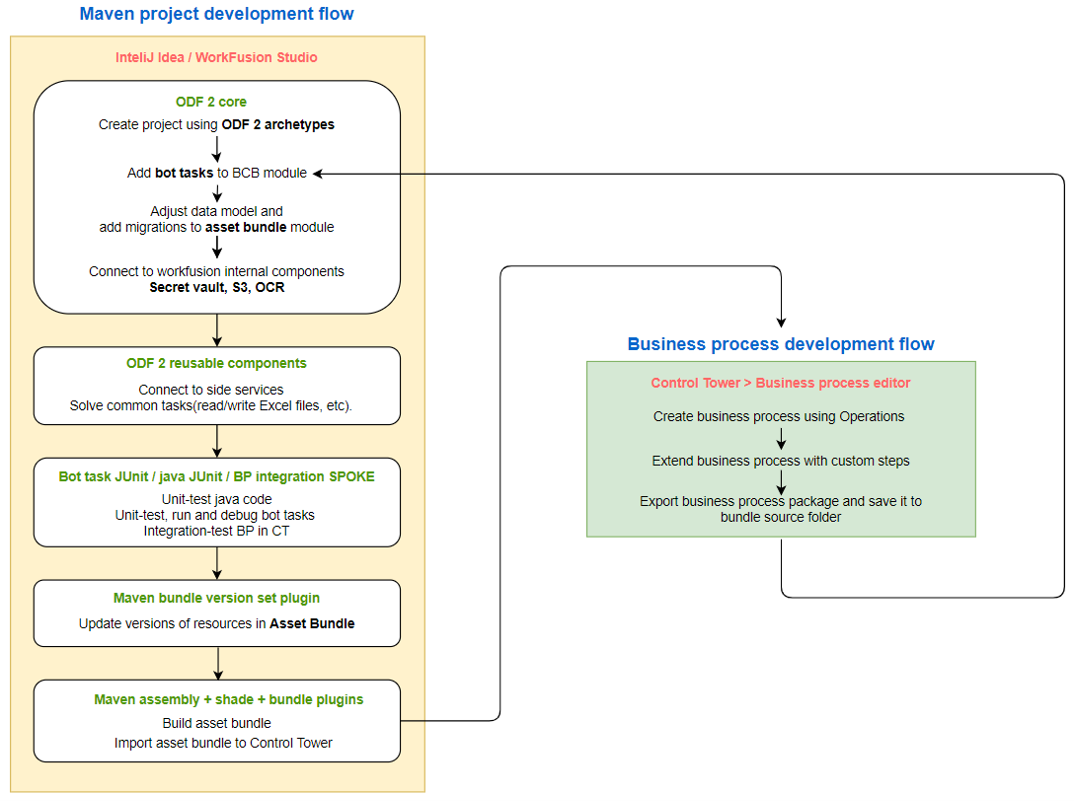
The Use Case implementation flow reflects ODF 2 features and is represented by the following procedures:
Core:
You start an ODF 2 Maven project from one of two available templates—Archetypes. Right after the generation, the project is buildable, deployable, and contains code samples covering all major basic scenarios.
Initial entity objects and the first required Liquibase migration are created out-of-the-box.
You can add unique business logic into Bot Tasks, knowing the framework will assist in read-write procedures and provide the modularized Java project structure, armored with suggested auto-testing practice.
The data model is easily adjustable and extendable, and an Archetype and the ODF documentation provide samples for all common scenarios.
All platform core components have Java APIs in ODF. Therefore, you don't need to pass data back and forth to WebHarvest XML to use old plugins.
Reusing independent components:
WorkFusion and customer's teams accumulate a library of independent, useful tools (convertors, validators, processors) for you to accelerate by reusing them.
Testing automation:
Three layers of automated testing are available and recommended for usage from project's day 1.
Use Case versioning and deployment automation:
To support an iterative approach to project development and allow A/B testing in the real environment, the framework provides an accelerated way to rapidly clone all project's resources to build a new 100% independent project version. Then, in a few minutes, you can manually deploy this new version to the server-based Control Tower and test in parallel with older versions without impacting those.
Business Process design:
When the business project is built for the first time, or changes need to be applied, you work in Control Tower with the recently deployed project to drag-and-drop Bot Tasks and build a proper workflow in Designer.
Business Process export:
When done, manually export the package and add it to project Business Process sources for the same Business Process to be recreated later on in all other environments.
After that, a loop may start over to perform as many times as needed.
Environments
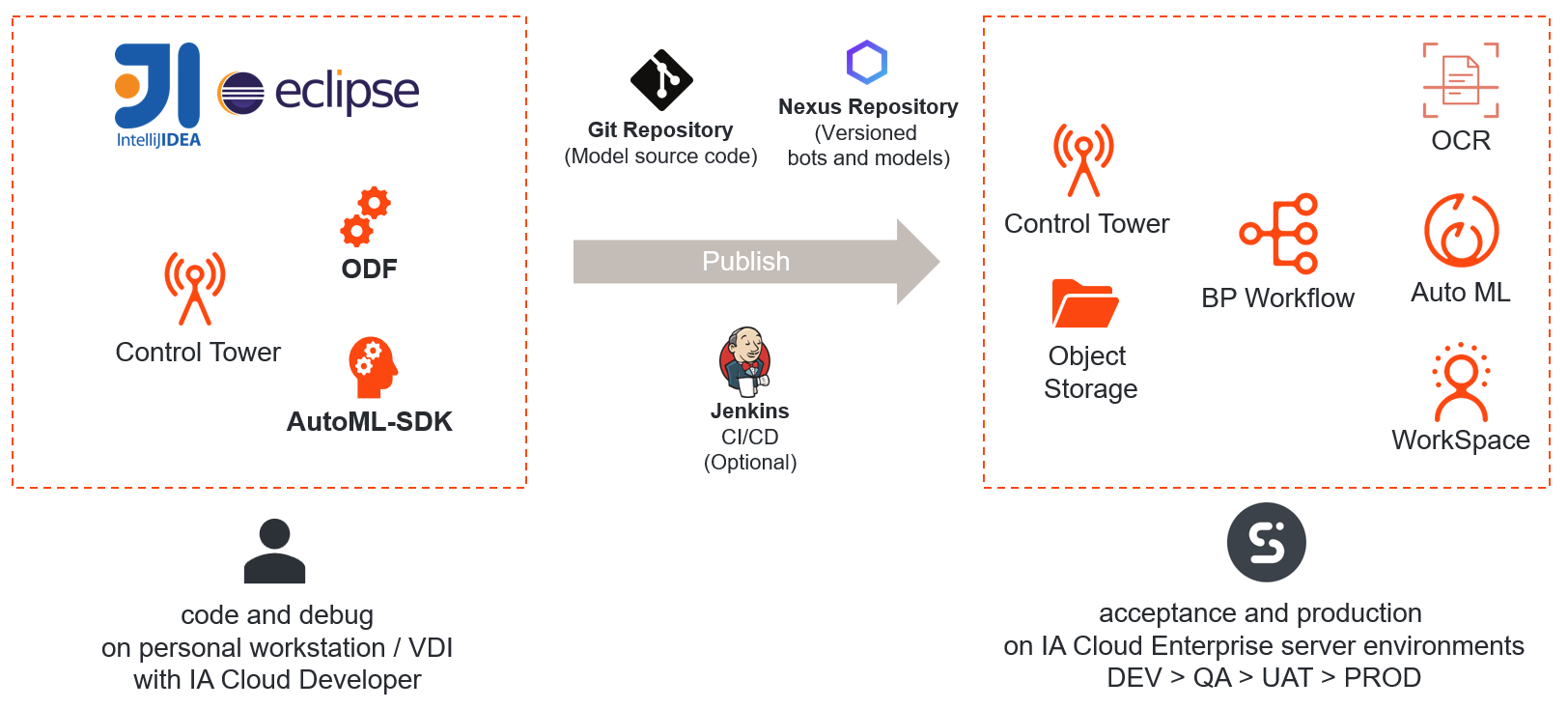
For an Automation Engineer to start working, the main environment consists of IDE—either IntelliJ IDEA or Eclipse—and Control Tower. Both are part of the IA Cloud Developer environment.
For an end-to-end solution, the build-out and manual testing server-based DEV IA Cloud Enterprise environment is used. First, an automation project is manually deployed to Control Tower.
For mature teams, recommended automated deployment lifecycle steps are as follows:
- An Automation Engineer makes changes locally and pushes to the version control system like Git.
- The Jenkins build automation tool pulls changes from the version control system and builds a deployable artifact.
- Before deployment, Jenkins stores the artifact in the Nexus artifact storage.
- The version plugin increments all project artifacts for the new version not to interfere with the previous one.
- Jenkins runs automated tests. In case of a failure, the deployment process is aborted, and notifications are sent.
- In case of success, Jenkins publishes the automation to the target IA Cloud Enterprise environment.
VDI personal environment
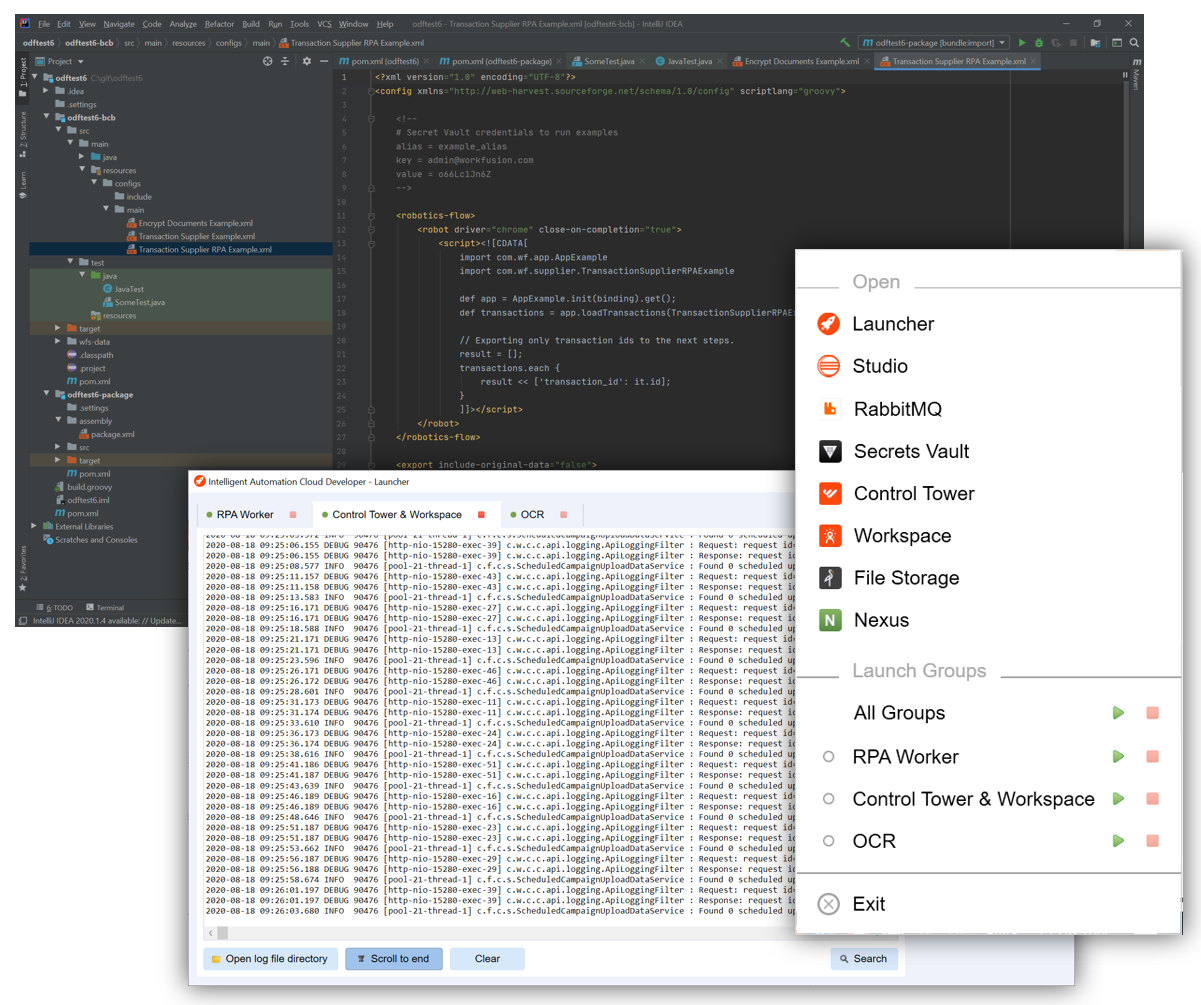
IA Cloud Developer is a desktop environment for WorkFusion developers. It includes Eclipse and IDEA IDEs. The main features of IA Cloud Developer are as follows:
- Selective components launch allows starting currently needed components only.
- Console with real-time logs allows to notice and understand exceptions rapidly.
- OCR license status enables to check the license status to request an updated one.
- Start buttons for all user apps provide quick access to local versions of control applications.
tip
For more details, refer to the IA Cloud Developer documentation.