
ML models
Model training
ODF 2 differs from ODF when it comes to where AutoML SDK is used to train a model. Previously, ODF had two Archetypes that included ML modules for IE and Classification models.
In ODF 2, such modules do not exist. Instead, you must use separate ML Archetypes to generate an AutoML project with a typical model implementation example and training and testing executables. New ML Archetypes also include Bundle building and single-command deployment to Control Tower. For more details, refer to the guides.
Model execution
Starting from IA Cloud Enterprise v10.1.6, Control Tower introduces the new Execute AutoML Model: Bridge that significantly simplifies ML execution. It takes some input parameters and returns ML output in the model_result or model_error columns.
You can integrate ML execution into the ODF 2-based Business Process using two Tasks to pass documents to and from the Bridge step: MlBridgeInputTask and MlBridgeOutputTask.
Construct Business Process
To find Execute AutoML Model: Bridge, go to the Workflow editor > the Bot panel.
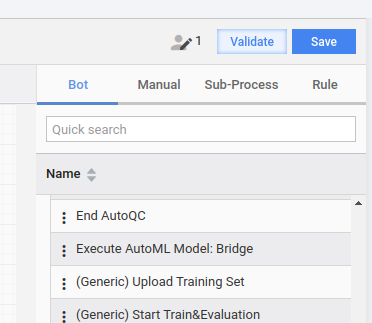
Place your
MlBridgeInputTaskimplementation before Execute AutoML Model: Bridge, and MlBridgeOutputTask implementation after it.
Implement tasks
The MlBridgeInputTask interface defines a set of methods used by its runner in the following way:
- A value returned by
getDocumentLink()is a link used to retrieve the document content. - Data returned by
getDocumentContentByLink()is passed to the Execute AutoML Model: Bridge step. - A value returned by
getModelId()defines an ID of an ML model to be executed. - A value returned by
goForwardOnFailure()instructs the Execute AutoML Model: Bridge step whether to ignore errors.
public interface MlBridgeInputTask extends TransactionProcessingTask {

    @Override
    default Class<? extends MlBridgeInputRunner> getRunnerClass() {
        return MlBridgeInputRunner.class;
    }

    String getDocumentLink();

    String getDocumentContentByLink(String textLink);

    String getModelId();

    default boolean goForwardOnFailure() {
        return false;
    }

}
ODF 2 offers an abstract class named AbstractMlBridgeInputTask to simplify the implementation. The class implements the getDocumentContentByLink() method to actually retrieve a document content through an HTTP client. This method can be overridden in a concrete implementation to alter the document content or define additional behavior.
public abstract class AbstractMlBridgeInputTask implements MlBridgeInputTask {

    // other code omitted for clarity

    @Override
    public String getDocumentContentByLink(String textLink) {
        if (StringUtils.isEmpty(textLink)) {
            throw new IllegalArgumentException("Document link is empty.");
        } else if (textLink.startsWith("http://") || textLink.startsWith("https://")) {
            return getContent(textLink); // actually performs HTTP request
        } else {
            return textLink;
        }
    }
}
MlBridgeOutputTask has two methods that deal with successful and unsuccessful model results. In both cases, the result is a string as the ML output is not standardized by now. Therefore, you should parse it on a case-by-case basis.
Implement getBusinessEntityRepository() for the task runner to load entities correctly.
public interface MlBridgeOutputTask<T extends BusinessEntity> extends OdfSingleResultTask {

    @Override
    default Class<? extends OdfSingleResultTaskRunner<?>> getRunnerClass() {
        return MlBridgeOutputRunner.class;
    }

    TransactionalEntityRepository<T> getBusinessEntityRepository();

    void processModelResult(String modelResult, String processingTime, String correlationId, T entity);

    void processModelError(String modelError, String processingTime, String correlationId, T entity);

}
tip
For more details on AutoML SDK, refer to End-to-end AutoML SDK walkthrough.
The AutoML menu allows you to train and manage models, maintain model pipelines, run experiments, and create and manage datasets without coding. For details, check the Manage AutoML models in Control Tower section.