
Get to know IA Cloud Developer
Intelligent Automation Cloud Developer (IA Cloud Developer) is a part of WorkFusion IA Cloud Enterprise and provides a unique automation environment to evaluate, learn, design, create, and support automation projects.
important
Download Intelligent Automation Cloud Developer. You can install it either on a developer's laptop (desktop) or into a remote server accessible by a developer.
IA Cloud Developer installation for a single server production is not allowed. You can use the tool for design and development only.
Compatibility
Developer compatibility with IA Cloud Enterprise v10.x
| IA Cloud Developer version | IA Cloud Enterprise version |
|---|---|
| 10.2.7 | 10.2.7 |
| 10.2.6 | 10.2.6 |
| 10.2.5 | 10.2.5 |
| 10.2.4 | 10.2.4 |
| 10.2.3 | 10.2.3 |
| 10.2.2 | 10.2.2 |
| 10.2.1 | 10.2.1 and 10.2 |
| 10.2.0 | 10.2 |
| 10.1.7 | 10.1.7 |
| 10.1.6.2 | 10.1.6.2 |
| 10.1.6.1 | 10.1.6 |
| 10.1.6 | 10.1.6 |
| 10.0.1 | 10.0 |
RPA Express Developer compatibility with SPA v9.x
| RPA Express Developer version | SPA version |
|---|---|
| 9.3.4 | 9.3.4 |
Express/Business Edition compatibility with SPA v9.x
note
Starting from May 2020, WorkFusion is not releasing any new versions of Express and Business Editions. However, the WorkFusion Customer Success team continues to provide tips, workarounds, and answers to questions coming from the existing Enterprise and Business customers about the Recorder capability. The Low-Code Developer training is also still available, but for the current Enterprise and Business customers only.
| Express/Business Edition version | Download link | SPA version |
|---|---|---|
| 2.4.2 | Version 2.4.2 | 9.4.0 |
| 2.4.1 | Version 2.4.1 | 9.4.0 |
| 2.4.0 | Version 2.4.0 | 9.4.0 |
| 2.3.3 | Version 2.3.3 | 9.3.1 |
| 2.3.1 | Version 2.3.1 | 9.3.0 |
| 2.2.2 | Version 2.2.2 | 9.2.0 |
| 2.1.5 | Version 2.1.5 | 9.1.3 |
| 2.0.6 | Version 2.0.6 | 9.0.5 |
Components
To understand the goals of each component included in IA Cloud Developer and how parts work together, first, let's group them on a high level.
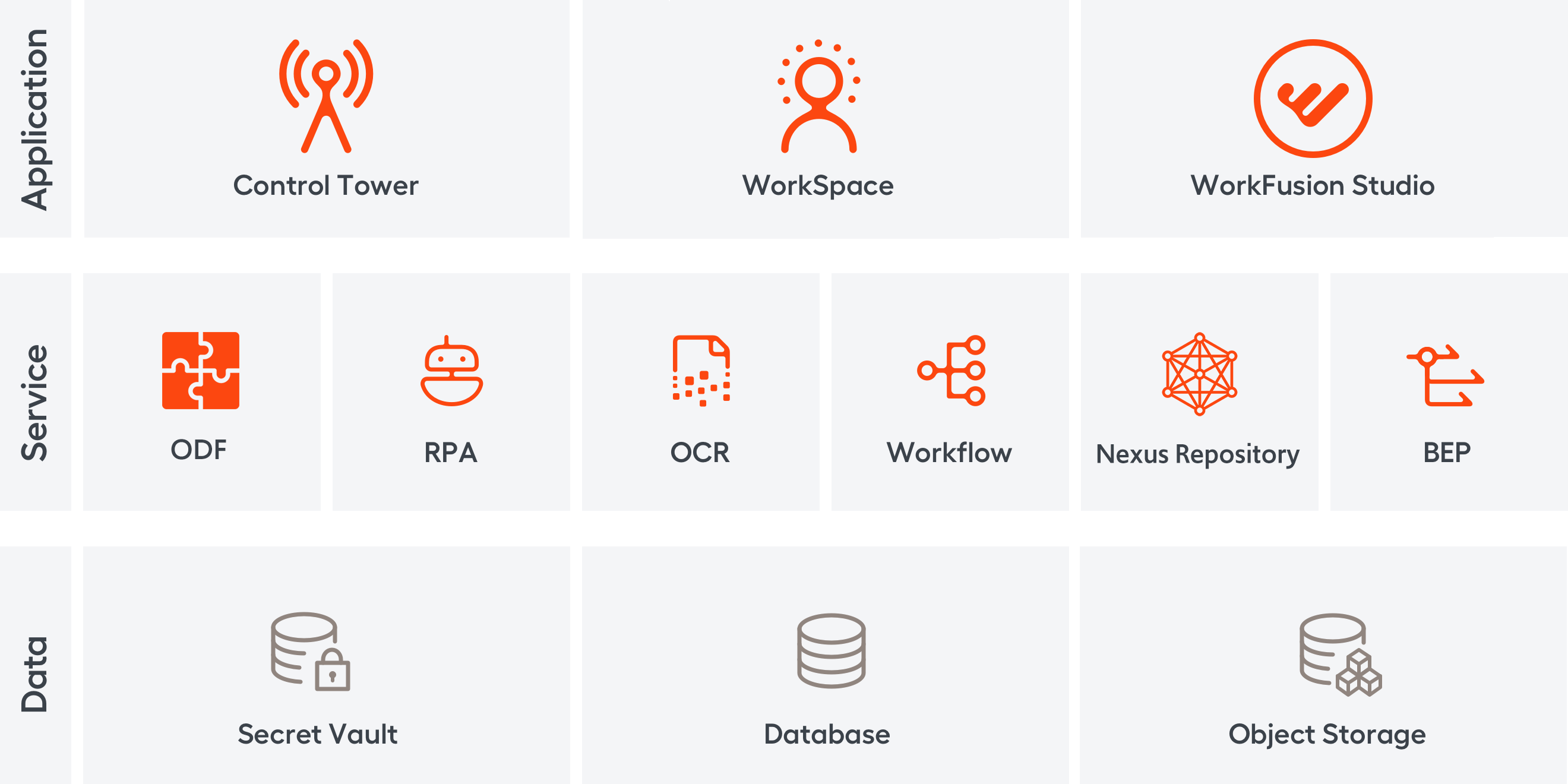
Now, let's look at each component description and the functions it provides.
Application level
Launcher
Launcher is the management desktop application that allows to start and stop local server components, access their logs, and search in them.
The component is designed for:
- Managing local server components
- Monitoring component processes
- Handling log data
Related components: Control Tower, WorkSpace, RPA, OCR, Object Storage, WorkFusion Studio, Secrets Vault, RabbitMQ, Nexus Repository
Control Tower
Control Tower is the central managing web application orchestrating automation processes and tasks and providing a user interface for power users, admins, and developers.
The component is designed for:
- Managing automation processes
- Creating and editing workflows using GUI tools
- Running and monitoring automation
- Handling input and output data
- Managing user and roles
- Managing Manual Tasks
- Providing system-wide configuration
Related components: WorkSpace, Workflow, RPA, AutoML, OCR, Object Storage, WorkFusion Studio
WorkSpace 2.0
WorkSpace 2.0 is a local web application for Manual Task management.
The component is designed for:
- Manual Task queue management
- Manual Task processing
Related components: Control Tower, Object Storage
WorkFusion Studio
WorkFusion Studio is an Eclipse-based IDE used to develop Bot configurations.
WorkFusion Studio IDE includes:
- Code (for Automation Engineer) and Recorder (for Low-Code Developer) perspectives
- Inspector tool for collecting handlers from native Windows (multiple frameworks), Java, SAP applications
- Git and Subversion (svn) IDE plugins for working with version control systems
- Maven build tool IDE plugin for Automation Engineer
- Out-of-the-box integration with ODF 2 archetypes to quick-start RPA/ML automation projects
- Compatibility with IA Cloud Enterprise (a concrete compatible Enterprise version depends on the ODF 2 archetype version used)
The component is designed for:
- Creating, editing, and publishing Bot configurations
- Recording user workflows
- Inspecting desktop applications
Related components: Control Tower, ODF 2, OCR, AutoML, RPA, Object Storage
Service level
ODF 2
Open Development Framework 2 (ODF 2) provides high-level components and API for data processing, architecture for large RPA and ML automation, support for dependency injection, unit, and integration testing. It reduces the usage of XML code and adds deployment automation.
The component is designed for:
- Quick project start from archetypes
- Multi-team SDLC and internal components sharing
- Business Process data flow optimized for developers
- Scalable RPA architecture
- Java API wrappers for WebHarvest WorkFusion components
- Tools for CI/CD based on the SPOKE testing framework
- Library of ODF 2 OOTB components
Related components: WorkFusion Studio, Control Tower, Nexus Repository
BEP
Bot Execution Platform (BEP) is the engine that increases AutoML performance and the number of running Workers. The platform processes tasks and distributes them to queues.
The component is designed for:
- Horizontal scaling of Workers
- Bot execution isolation
- Reuse of shared resources (cluster nodes) both by Control Tower and AutoML tasks
- Task processing fault-tolerance
- Aggregation of logs and metrics from tasks and Workers
Related components: Control Tower, AutoML, Workflow, RPA
RPA
An RPA Cluster is a scalable computing environment that executes user scenarios within desktop or web applications. It takes control of the keyboard and mouse pointer to emulate user inputs.
The component is designed for the automation of user scenarios within desktop and web applications.
Related components: WorkFusion Studio, Control Tower, Bot Manager, BEP, Secrets Vault, Database
OCR
OCR engine converts unstructured, image-based data into structured character documents in several formats (HTML, XML). The component includes two bundled licenses:
- FRE 11 license for 1,000 pages
- FRE 12 license for 1,000 pages
Related components: WorkFusion Studio, Control Tower, WorkSpace, Object Storage, Secrets Vault, Database, RabbitMQ
Workflow
Workflow Engine executes automation processes authored in Control Tower. This is the server application configured within Control Tower.
The component is designed for Automation Process execution according to the process definition created in Control Tower. Execution is handled in different computing environments�RPA, WorkSpace, OCR, and AutoML.
Related components: Control Tower, RPA, WorkSpace, AutoML
Nexus Repository
Nexus is a repository manager. It allows to proxy, collect, and manage dependencies so that developers aren't constantly juggling a collection of JARs. Internally, the team configures a build to publish artifacts to Nexus for them to become available to other developers.
The component is designed as:
- Single source of truth for all your project Java components, binaries, and build artifacts
- Efficient distribution of parts and containers to developers, OOTB integration with most Java tools
- WorkFusion Java dependencies provider
Related components: Control Tower, ODF 2, WorkFusion Studio
Data level
Database
The database stores Business Process definitions, runtime and tracking information on their execution, including RPA and Cognitive automation.
The component is used as a reliable storage of the designed automation implementation.
Related components: Control Tower, Bot Manager, WorkSpace, Analytics, OCR
Secrets Vault
Secrets Vault is a secured storage destination for sensitive data.
The component is designed for:
- Storing authentication data (logins and passwords) for applications involved in automation and providing secure access to it during Business Process execution
- Storing authentication data for WorkFusion Intelligent Automation Cloud inter-component interaction
Related components: Control Tower, Bot Manager, RPA, OCR
Object Storage
Object Storage based on the Minio tool keeps binary file type content, such as OCR results, AutoML models, screenshots, and reports generated by automation.
The component is designed for reliable storage of OCR results and trained AutoML models.
Related components: WorkFusion Studio, Workflow, OCR, AutoML