AutoML dashboard
Dashboard is out-of-the-box tool in WorkFusion to provide all kinds of analytics including AutoML statistics. It is a convenient and user-friendly way to present model statistics to the customer as well.
However, it doesn't contain links to the original document and extracted model results so this tool is not effective when analyzing model results by the Data Analyst.
AutoML Dashboard includes actual AutoML training data only if your Business Process contains a Statistics calculation Bot Task.
AutoML statistics chart
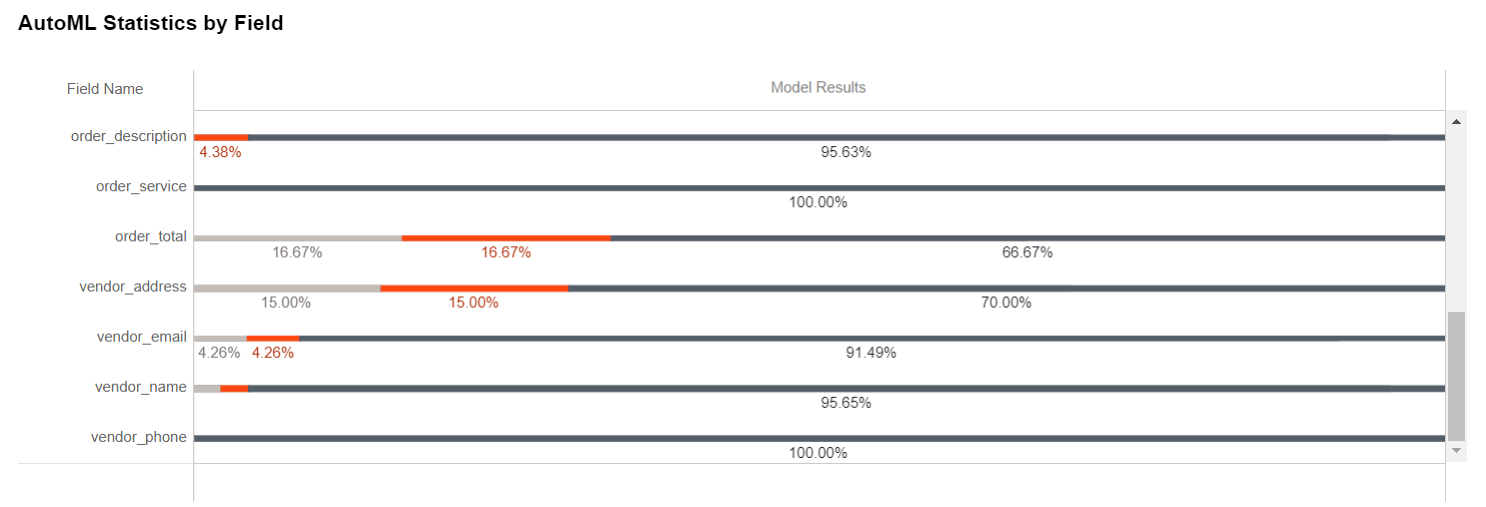
In the AutoML Statistics by Field chart, you can find results for each field. Chart shows model quality results per each field over all documents.
Tooltips
Tooltips contain the following information:
- Field Name
- Value for specific metric.
Chart explainer
Chart explainer has metrics description.
Colors
- Black is Correct (True Positive); (66.67% for order_total)
- Orange is Mistake (False Positive); (16.67%)
- Grey is Not Learned (False Negative); (16.67%)
Model metrics
- Accuracy: Ratio of correctly extracted fields to the number of extracted fields.
- Precision: How accurately the model extracts values
- Automation Rate: Ratio of correctly extracted fields to the total number of fields.
- Recall: Percent of existing values that can be extracted by the model.
- Not Learned: Ratio of fields that should be extracted but were not extracted by model.
- Low Confidence: Ratio of fields that should not be extracted but were/weren't extracted, with model score lower than selected Accuracy Threshold.
- Mistake: Ratio of fields that should not be extracted but were/weren't extracted, with model score equal or greater than selected Accuracy Threshold.
- Correct: Ratio of correctly extracted fields.
Gold vs extracted statistics chart
Gold vs Extracted Statistics chart can be filtered by process name and execution and field name.
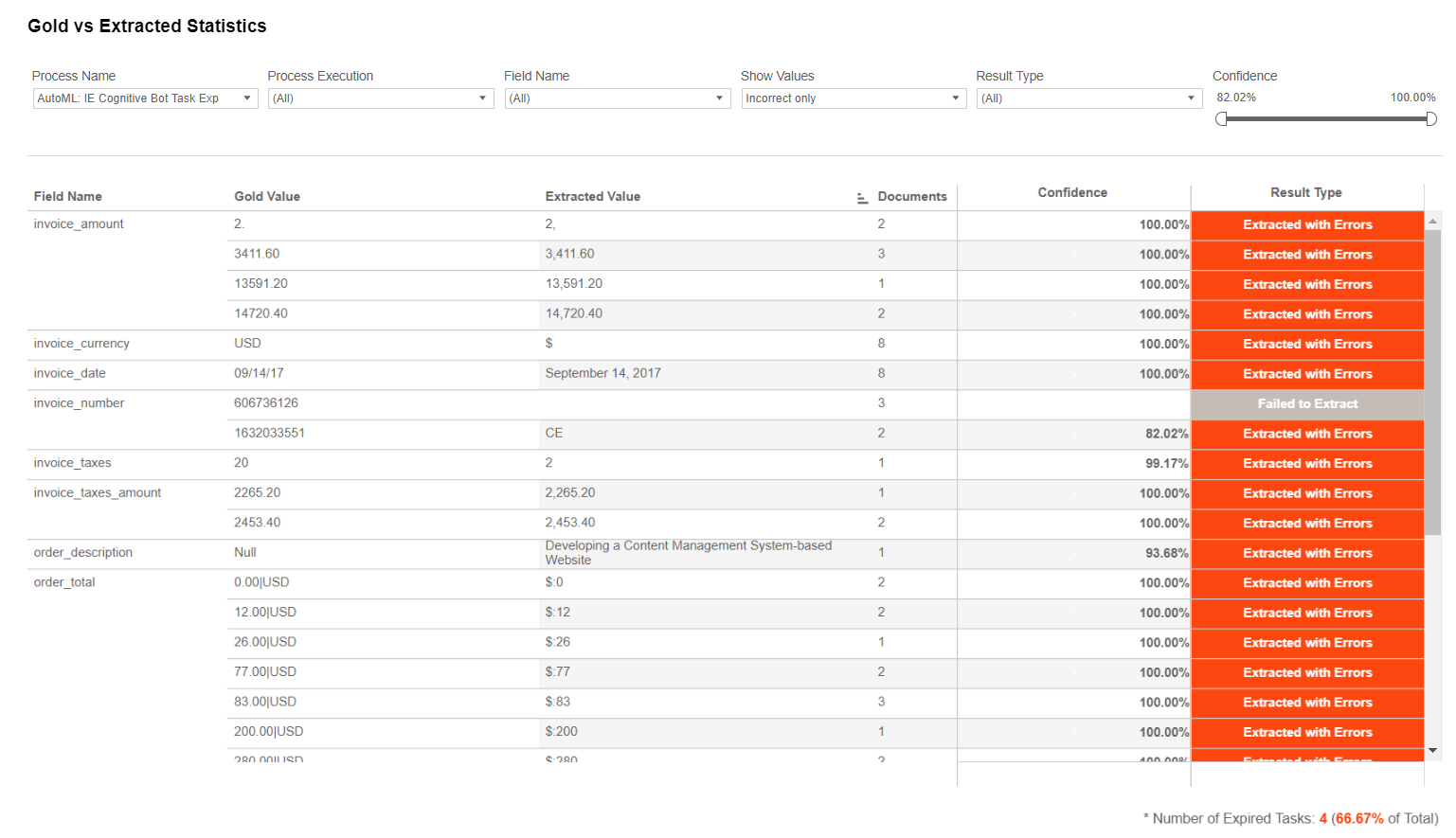
In addition, the Gold vs Extracted Statistics chart allows filtering by:
- Values: all, incorrect only (FP+FN), correct only (TP+TN). By default this filter is set to "Incorrect only".
- Result type: In the dashboard for the purpose of being easy to read by customer, FP is referred to as "Extracted with Errors"; FN as "Failed to Extract"; TP as "Correctly Extracted", TN as "Should not be Extracted".
- Confidence: The confidence with which a field was extracted is reported by the model.
Apart from field name, confidence and result type, the table contains:
- Gold Values: Values that were extracted by SMEs in the manual task and are supposed to be correct.
- Extracted Values: Values extracted by the model.
- Documents: Number of documents in which this combination of gold/extracted values occurred.
Result type:
- Correctly Extracted: Value should be extracted and was extracted correctly.
- Extracted with Errors: Value should not be extracted, but was extracted; or should be extracted, but was extracted with errors.
- Failed to Extract: Value should be extracted, but was not extracted by the model.
- Should not be Extracted: Value should not be extracted and was not extracted.
Learn more information on the AutoML dashboard here.