Estimate resources for AutoML execution
This article provides recommendations on how to adjust AutoML Worker parameters, such as CPU and memory consumption, for better cluster utilization and throughput.
Information Extraction
For Information Extraction models, it is advisable to decrease AutoML Worker memory to 2 GB for documents of the S and M size and 3 GB for those of the L size. From the CPU perspective, it's better to stick to the default value of 1 CPU per Worker.
The table below contains explanatory notes on the document sizes mentioned above.
| Document size | Explanation |
|---|---|
| S | 300 to 3,000 tokens per document, 1 to 5 pages (~ 120 Kb) |
| M | 3,000 to 5,500 tokens per document, 5 to 10 pages (~ 200 Kb) |
| L | 5,500 to 80,000 tokens per document, over 10 pages (~ 500 Kb) |
| XL | 3x size of an L document |
To estimate Worker memory for Information Extraction models, use the following formula:
Memory in Mb = ROUNDUP( 520 * (1 + number_of_fields * 0.06) * document_size_coefficient, -2)
Where the document_size_coefficient is based on the values in the table below.
| Document size | Coefficient |
|---|---|
| S | 1 |
| M | 1.35 |
| L | 1.9 |
| XL | 3.8 |
Classification
For a Classification model, it's safe to decrease AutoML Worker CPU to 0.5 or 0.7 in the case of L size documents. As for memory, 1 GB per Worker is the recommended upper limit, especially for Use Cases with the classification of S size documents, for instance, emails.
The table below contains explanatory notes on the document sizes mentioned above.
| Document size | Explanation |
|---|---|
| S | 100 to 300 tokens per document (~ 2 Kb) |
| M | 300 to 500 tokens per document (~ 4 Kb) |
| L | 500 to over 80,000 tokens per document (~ 6 Kb) |
Example
To illustrate the estimations, let's consider an example with the following assumptions:
- A multi-class classification model was trained for 20 categories.
- A 2x-reduced AutoML execution Worker (0.5 CPU, 2 GB RAM) was created for this model.
- The BP with the model was launched for 20k records (a 20k new data set).
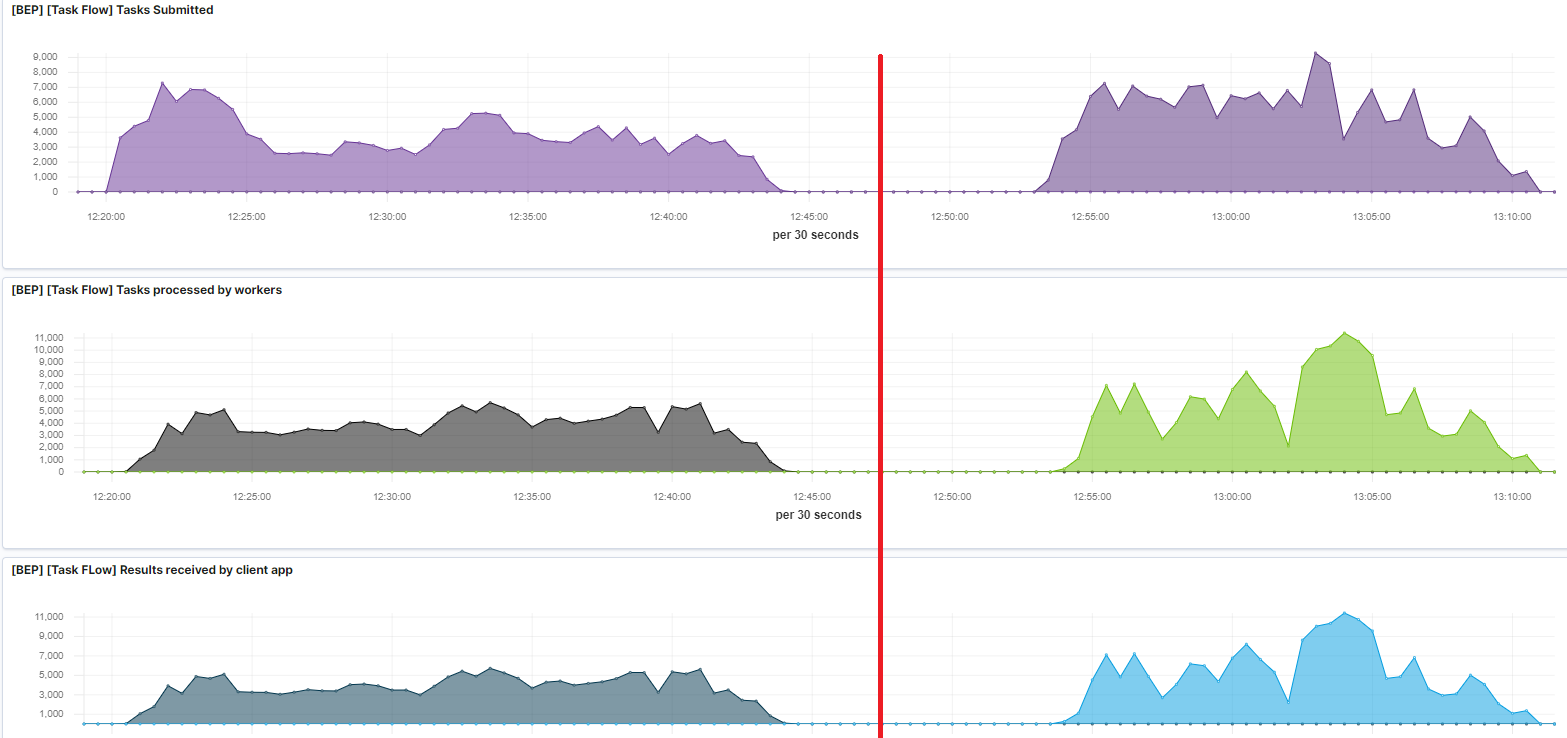
Below, you can find Kibana dashboards for task submission and processing rates. The left side is for the default Worker values. The right side is for the reduced Worker values.
In both cases, the BEP cluster was fully utilized. The trick is that, in both cases, only 13 AutoML Workers were running, which is enough to process the current load. However, in the second case, an extra 6.5 CPU and 26 GB RAM were available. The extra CPU and memory allowed running 16 more CT Workers to process other tasks in the automation BP, resulting in a 30% reduction of the end-to-end processing time.
Based on the example above, the benefits of reducing AutoML execution worker resources are as follows:
- With the same hardware, you can process more AutoML tasks.
- With the same hardware, you can get additional resources for other BEP Worker types, for instance, CT or OCR Workers, and so on.