Use File Storage as transaction source
Download sample project
Download the project tutorial-filestorage_10.1.0.4.zip.
Learn how to input to application from S3 file
To make it easier to understand the important classes and interfaces, we recommend downloading and importing the example project into Eclipse IDE and referring to it as you read this guide.
The downloaded project must have the file structure shown below.
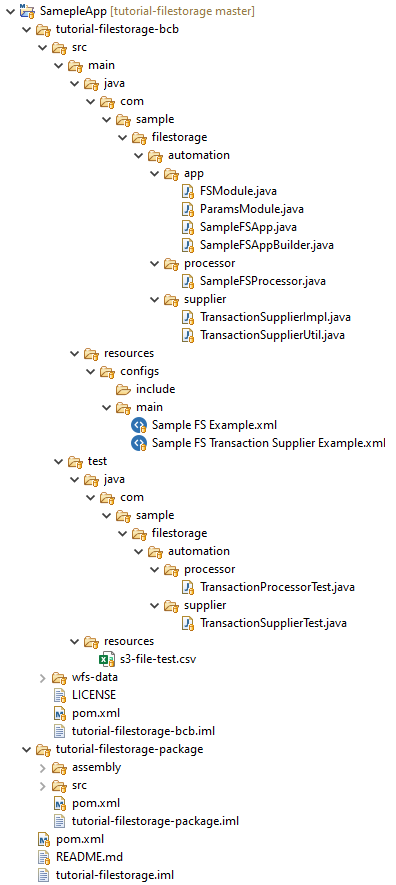
Once you downloaded the project, perform the following actions:
Run
mvn clean installon the parentpom.xmlfile.Make sure you set all the required data for Control Tower and Nexus users.
- The user specified is
settings.xmlunder server IDbcb-repositorymust exist in Nexus. - The Nexus user should have deployment privileges in the
wf-machine-config-bundlerepository. - In the parent
pom.xmlfile, you specified the Nexus repository where your JARs will be installed. Make sure to point it to your Nexus, for example:
<workfusion.nexus.host.url>http://localhost:8081/</workfusion.nexus.host.url>- Add the following code with the Control Tower user credentials to the
settings.xmlfile:
<servers>
    <server>
        <id>control-tower</id>
        <username>CT_username</username>
        <password>CT_password</password>
    </server>
</servers>- In parent
pom.xml, you have set the Control Tower host where your bundle will be published.
<workfusion.controltower.url>https://yourinstance.workfusion.com/</workfusion.controltower.url>- The user specified is
Now, you can deploy your bots to Nexus or publish a bundle with a Business Process (BP) to Control Tower.
Deploy to Nexus
- Run
mvn deployon parentpom.xml. This deployment depends on your Nexus repository configuration. - Once the build appears in Nexus, upload the bots into the local Control Tower. Go to Advanced > Bot Configurations > Import from Repository. You can build your BP by selecting a Bot Task from the list.
Publish to Control Tower
- Run
mvn bundle:importontutorial-filestorage-package/pom.xml. The command calls the import plugin. - Open your Control Tower and find the BP named tutorial datastore v0.0.7.
You must make some changes for the samples to work properly:
- Upload a CSV file to the S3 bucket (the instance must have access to this bucket). The file can be found at
tutorial-filestorage-bcb/src/test/resources/s3-file-test.csv. - Set the bucket name in the File Storage module:
com.sample.filestorage.automation.app.FSModule. - Change the file link in the
TransactionSupplierconnector:com.sample.filestorage.automation.supplier.TransactionSupplierImpl.
Learn TransactionSupplier
In this case, TransactionSupplier is TransactionSupplierImpl.java.
Navigate to the following files:
src > main > java > com > sample > filestorage > automation > supplier > TransactionSupplierImpl.javasrc > main > resources > configs> main > Sample FS Transaction Supplier Example.xml
This is the Bot Task that triggers the execution of the TransactionSupplier class mentioned in [1].
The following code in the Bot Task initializes the task of creating transactions:
def app = SampleFSApp.init(binding).get();
def transactions = app.loadTransactions(TransactionSupplierImpl.class);
Transactions are created for each row in the CSV file in the fs-odf-demo S3 bucket. To read the file, the S3Manager class is used. S3Manager is a utility in ODF that performs file-based operations in S3 and interacts with your local file system.
Execution flow inside Collection\<Transaction> get() method
The following steps describe the execution flow inside the Collection<Transaction> get() method. Refer to the code in TransactionSupplierImpl.java.
- Using the
s3Manager.getFile(url)method, the uploaded file in the S3 bucket is read andInputStreamof the file is returned. - The
BufferedReaderobject is created usingInputStream. - Each line of the file is read using the
readLine()method ofBufferedReaderin a while loop. - An ODF transaction is created for each line in the CSV file, except for the header line (
"first_name","last_name","email"). - The line is split by the delimiter
",", and the values for the column names are extracted. - The extracted values are inserted into transaction attributes using the
transaction.putAttribute()method.
Work with File Storage
S3PluginAdapter
Since S3Manager is deprecated, you should use S3PluginAdapter that provides similar utility functions.
To implement this class in ODF projects, create a module that provides two resources:
A method with the return type as String, which provides the name of the S3 bucket (similar to
S3Manager)A singleton instance of the
S3PluginAdapterclass, for example:@Provides
@Singleton
public S3PluginAdapter s3PluginAdapter(PluginAdapterFactory pluginAdapterFactory) {
return(S3PluginAdapter) pluginAdapterFactory.getPluginAdapter(PluginAdapterFactory.PluginsEnum.S3);
}
Sometimes, in client environments, you may need to define s3EndpointUrl while interacting with s3PluginAdapter. You can perform this action in the constructor of your class as follows:
public MyClass {

    private SystemUtilities systemUtilities;

    @Inject
    public MyClass (SystemUtilities systemUtilties) {
        this.systemUtilities = systemUtilities;
        this.systemUtilities.defineVariable("s3EndpointUrl", "client_env_specific_s3_endpoint_url");
    }

}
Methods available with S3PluginAdapter are as follows.
| Method | Result | Parameters | Description |
|---|---|---|---|
getCommonS3Attributes | Map<String, String> | Returns basic attributes for S3Adapter. You can set the S3 access and secret key, bucket name, and endpoint URL in this map. | |
get | byte[] | String url | Downloads a file from the S3 bucket specified in CommonS3Attributes. |
listEntries | List<String> | String prefix, String pattern, ZonedDateTime minDate, ZonedDateTime maxDate | Returns a list of entries from S3. Can return all the entries from a folder or filter them. If you want to use only the prefix, set null for the minDate and maxDate parameters. |
delete | void | String url | Deletes a file by URL. |
put | S3ResultItem | byte[] data, String s3key, CannedAccessControlList acl, String contentType, String contentDisposition, Long expiresInSeconds | Uploads a file to the S3 bucket. The s3key parameter is the path where the file is uploaded. The acl, contentType, contentDisposition and expiresInSeconds parameters match those in the s3 plugin in the Bot Configuration. |
copy | void | String from, String to, CannedAccessControlList acl | Copies files within the S3 bucket. |