Package AI Agent Variation Asset Bundle
The article describes an AI Agent Variation Asset Bundle. For details on the structure of an AI Agent Asset Bundle, refer to Package assets into AI Agent Asset Bundle.
You can generate an AI Agent Variation Asset Bundle in one of the two ways:
- Using the AI Agent Variation Asset Bundle migration API. For instructions, see the API documentation.
- Via the Control Tower UI. For a detailed workflow, refer to the Manage AI Agent Variations guide.
An AI Agent Variation Asset Bundle depends on an AI Agent it relates to. It does not have its own BCBs, models, and so on.
Control Tower starts generation asynchronously and prepares an AI Agent Variation Asset Bundle with the following structure:
├── business-process
├── report-template
├── web_resource
│   └── assets
├── configuration_payload.json
├── meta-info.json
├── variation.json
A sample AI Agent Variation Asset Bundle can look as follows:
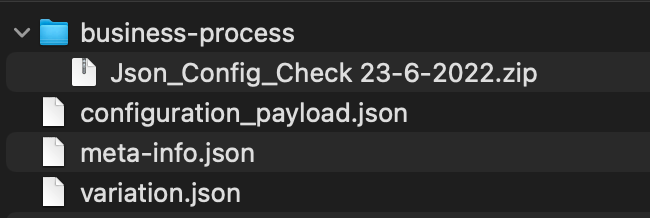
business-process
The directory contains all Business Process packages linked to the variation and available as zip files.
report-template
The directory contains the report templates used by Business Processes in the variation. The directory appears only if a Business Process in the variation uses a report template.
Each report template has its own sub-directory containing the Word template file and a JSON description file:
└── report-template
    └── report-template1
        ├── report-template.docx
        └── report-template-desc.json
web_resource
The directory contains the static assets referenced by the Manual Tasks and step configuration panels in an AI Agent variation. The directory appears only if Control Tower finds assets to collect.
To decide what to pack, Control Tower renders each Business Process step template of the variation and collects the asset paths declared in the head resource parameters. Every collected file is read from the web server and written to web_resource/assets, preserving the directory structure. Importing the resulting bundle on another environment puts the assets back on that environment's web server.
Control Tower reads the paths from the following places only:
| Parameter | Where the path is read from |
|---|---|
headLinks | The href attribute of an entry. If you passed a raw string, it is parsed as HTML and both its href and src attributes are read |
headScripts | The src attribute at the top level of an entry, or the whole entry if you passed a string. A src nested inside attrs is not read, although the macro honors it at run time |
headImportMaps | The values of the top-level imports object inside the json attribute. The keys of imports, and the scopes and integrity objects, are ignored |
An asset is collected only if it meets all of the following conditions:
The template references it as a literal path starting with
/static/. A path assembled from a FreeMarker expression, such as${basePath}/app.js, is not recognized. Content delivery network (CDN) and S3 addresses are not collected either as they are not hosted on the platform's web server.Its extension is on the list of allowed extensions. The list is the same as the one that governs import. For details, refer to Package AI Agent Asset Bundle | Explore allowed file extensions.
The file exists on the web server of the environment you export from. Control Tower reads it from the configured static resource directory, and a path that resolves outside that directory is refused.
An asset that fails any of these conditions is left out of the bundle while the export still reports success, and the Manual Task fails to load it only after you import the bundle elsewhere. The two failure modes leave different traces: a path the parser does not recognize is dropped without any record, whereas a file that is missing or resolves outside the static resource directory is reported as a warning in the logs. Once a variation is exported, check the web_resource/assets directory of the resulting bundle for the files you expect.
In particular, the headInlineScripts parameter and the inline content of a script entry are never scanned. An asset that a Manual Task loads only from inline code has to be referenced from headLinks, headScripts, or headImportMaps as well, otherwise it is left out of the exported bundle.
configuration_payload.json
The file contains exported settings.
A sample configuration_payload.json file looks as follows:
{
    "default_configuration":
    {
        "select":"factiva",
        "countries":[],
        "factivaSearchServiceUrl":"httpsApiBetaDowjonesCom",
        "factivaUsernameNamespaceUserId":"FactivaUser1",
        "numberOfArticlesToExtract":"15"
    }
}
meta-info.json
The meta-info.json file is required and must be a valid JSON file. The structure is as follows:
{
    "WF_VERSION":"10.2.5.23-SNAPSHOT",
    "DATA_MODEL_VERSION":"0.1.0",
    "USE_CASE_CODE":"UCDEMO3",
    "INSTANCE":"example.workfusion.com",
    "MULTI_CONFIGURATION":true,
    "AUTHOR":"User1",
    "USE_CASE_VERSION":"0.1.0",
    "PACKAGE_DATE":"2022-07-18 09:48:55",
    "NAME":"odf-install"
}
USE_CASE_CODE and USE_CASE_VERSION should contain the code and any of the versions of the AI Agent the variation relates to. Restrictions that apply to the USE_CASE_CODE and USE_CASE_VERSION parameters are the same as for the AI Agent Asset Bundle | meta-info.json.
variation.json
The variation.json file is required as it allows to distinguish between an AI Agent Asset Bundle and an AI Agent Variation Asset Bundle.
The file can be empty or can contain the VARIATION_NAME attribute, for example:
{ "VARIATION_NAME" : "MyVariation" }
The import behavior depends on whether variation.json is empty or not:
- The file is empty: a new variation is created, and its name is generated automatically. The VariationX postfix is added right after the AI Agent name and version, for example, Version 0.1.0-Variation1.
- The file contains a variation name:
- If there is no variation with such a name, a new variation with the name specified in
variation.jsonis created. - If a variation with the same name already exists, Business Processes (
/business-process) and configuration settings (configuration_payload.json) are replaced with data from a newly imported variation.
- If there is no variation with such a name, a new variation with the name specified in
Unlike for the AI Agent Asset Bundle import, there are no special import strategies for an AI Agent Variation Asset Bundle.