
Backup and restore data
Currently, if DNS names are changed, the following backup and restoration process cannot be used as a part of migration process, due to the fact that the VAULT DB component will contain records with old DNS names from the previous installation.
The described backup script can backup and restore only Intelligent Automation Cloud data components.
General Information
The Ansible installation features the script that implements the following cold backup solution:
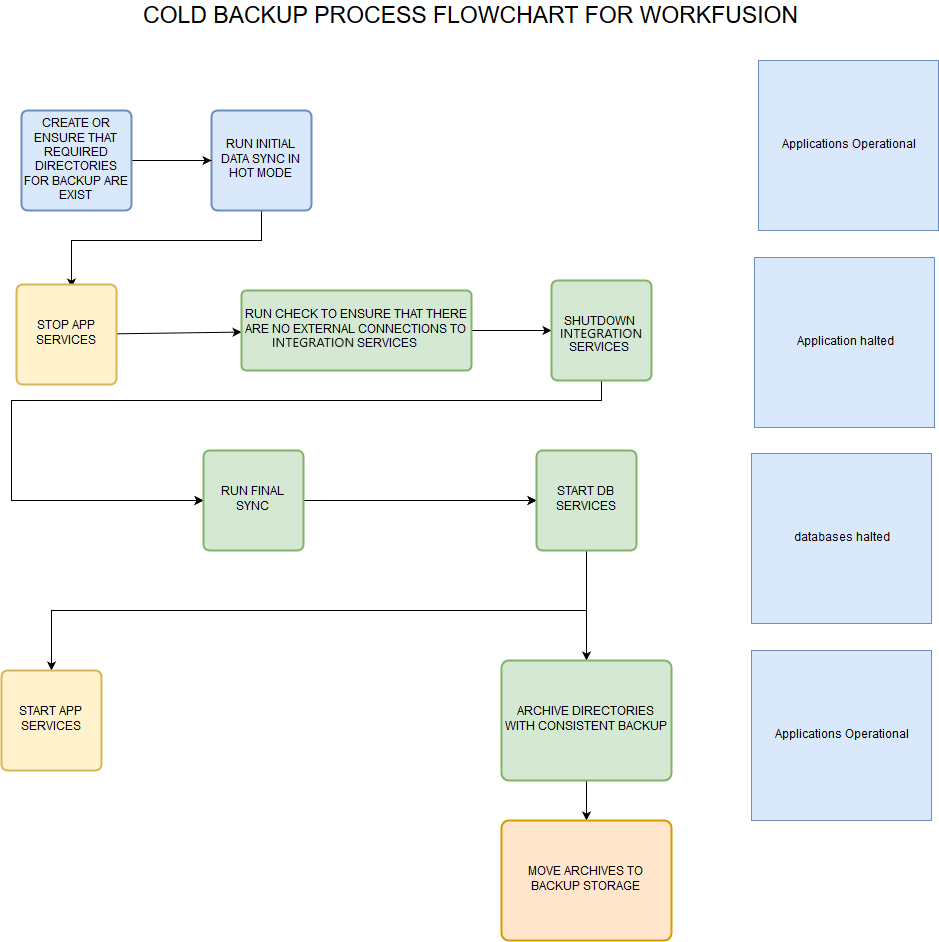
Backup script
Syntax
wf-backup.sh { OPERATION } { COMPONENT } { ROLE }
Usage:
./wf-backup.sh {prepare,backup,restore} {all,minio,vault,nexus,distr} {int} [EXTRA_VARS...]
Examples:
$ ./wf-backup.sh prepare all int
$ ./wf-backup.sh backup all int
$ ./wf-backup.sh restore all int
Available procedures
Backup script supports the following operations:
Prepare (optional)
Hot-sync data. It is part of the Backup operation, but can be launched separately before the main backup process to achieve minimal downtime.
Backup
All Intelligent Automation Cloud services are turned off, components are archived. Once completed, the services are restarted.
Restore
The script searches for backup archives in the backup directory and performs the restoration process.
Components for backup
The script supports backup and restoration of the following components:
- minio
- vault
- nexus
- distr
Script variables
$ cat config.yml

install_dir: /opt/workfusion
backup_directory: '{{ install_dir }}/backup'
Backup data
To backup data:
On the INT Server, run the script with the
prepareparameter (hot-sync step):./wf-backup.sh prepare all intThe script copies (hot-sync) all INT components to
{{ backup_directory }}.Result
ls -1 /opt/workfusion/backup/

minio

nexus

vault

distr
On the APP Server, manually terminate all APP services:
wfmanager stop allRun the main backup operation.
./wf-backup.sh backup all intThe script checks if there are no external connections to WF databases, shuts WF services down, then performs cold-sync of database components files. After that, the files are archived.
As result in your
{{ backup directory }}, you find the archives with backups of components' content:ls -1 /opt/workfusion/backup/ ... minio-08-47-21-02-05-2019.tar.gz nexus-08-47-21-02-05-2019.tar.gz vault-08-47-21-02-05-2019.tar.gz distr-08-47-21-02-05-2019.tar.gzMove the archives to a backup storage.
Restore data from archives
On the INT Server, run installation as a root.
$ ./install.sh preinstall int
$ su - wfuser
$ ./install.sh install int && ./install.sh check int
Place the backup archives with the INT components to a backup directory.
Before proceeding, make sure that all services on the APP Server are stopped.
Run the restore command:
./wf-backup.sh restore all intVerify that the services have started successfully.
wfmanager status
After restoration, the old data is located in {{ backup_directory }}/state_before_restore/.