
System requirements for non-HA setup
The system requirements described in this article are suitable for the Intelligent Automation Cloud Enterprise Edition (former SPA) installation in the high availability mode.
For detailed capacity and scaling planning, see the Infrastructure Capacity Planning guide.
Hardware Specifications and OS requirements
Servers specifications:
| Server | Supported OS (Recommended in bold) | CPU cores Development or Pilot/Production | RAM Development or Pilot/Production | Disk Development or Pilot/Production |
|---|---|---|---|---|
| MS SQL Server | MS Windows Server 2016, 2012 R2, 2012 | 4/8 | 16/32 GB | 500 GB |
| INT server | RHEL/CentOS 7.7, 7.6, 7.5, 7.4, 7.3 | 4/8 | 16/32 GB | 150 GB |
| BEP Master | RHEL/CentOS 7.7, 7.6, 7.5, 7.4, 7.3 | 8/8 | 32/32 GB | 150 GB |
| BEP Agent | RHEL/CentOS 7.7, 7.6, 7.5, 7.4, 7.3 | 8/8 | 32/32 GB | 150 GB |
| BEP Agent 20 | RHEL/CentOS 7.7, 7.6, 7.5, 7.4, 7.3 | -/8 | -/32 GB | -/150 GB |
| BEP Agent 30 | RHEL/CentOS 7.7, 7.6, 7.5, 7.4, 7.3 | -/8 | -/32 GB | -/150 GB |
| APP server | RHEL/CentOS 7.7, 7.6, 7.5, 7.4, 7.3 | 4/8 | 16/32 GB | 100 GB |
| OCR1 |
| 2/8 | 8/16 GB | 100 GB |
| RPA (5 bots)1 |
| 8/8 | 16/16 GB | 100 GB |
| Analytics (BI server)1 | Microsoft Windows Server 2016, 2012 R2, 2012 | 4/8 | 16/32 GB | 100 GB |
0 - only one BEP agent is required for the Development or Pilot environments.
1 – the server is required only if you are planning to use the functionality.
Disk space and file system requirements
Disk space in hardware requirements denotes the addressable space left on a single partition, where you plan to install the software after the disk has been formatted with a filesystem.
For the installation, it is advised to use Disk volumes mounted separately from the root volume of the operating system. The values in the Disk column describe required disk space in
INSTALL_DIRof IA Cloud components.The components are allocated on the file system only within
INSTALL_DIR, and do not use space allocated for the operating system. There are no special requirements for the amount of disk space dedicated to the Operating System.Example: INT server requires 150 GB. This means that 150 GB must be available on disk mounted to
INSTALL_DIR(typically install_dir = /opt/workfusion). Root disk with the Operating system must have reasonably enough space for Red Hat family 7.x OS functioning (for example, 20 Gb is enough for the root drive).The recommended file system for RHEL/CentOS servers is XFS, EXT4.
NAS or other shared file systems must be mounted to the BEP Master, and BEP Agent servers before the installation.
Server Directory to mount Shared disk size
Development or PilotProduction
Development or PilotBEP Master
BEP Agent 1
BEP Agent 2, BEP Agent 3INSTALL_DIR/vds-data
(the single directory must be mounted to all BEP servers)2 TB 250 GB The following shared file systems are supported:
- NFS
- GFS2
- GPFS
- AWS EFS
- NAS storage
warning
Windows Server based storage solutions (DFS, NFS, CIFS/SMB) are not supported.
Servers
All latest OS updates are recommended to be installed. To check that, run the following command on all Linux servers:
yum check-updateIf there are no available packages of newer versions, your system is up-to-date.
If the command displays any available OS updates, install them to the system:
yum update -yDNS names for all servers must be configured according to DNS Names Configuration.
Linux servers:
- <linux_installation_user> must exist on each Linux server and have SSH access from INT1 server to all other Linux servers (the same single user for all Linux servers).
- <linux_installation_user> must have the sudo permissions on all linux servers (the following privileged operations are required for this user: /usr/bin/sh, /usr/bin/su, /usr/bin/mkdir, /usr/bin/chmod, /usr/bin/chown).
- <linux_installation_user> is only required during installation. IA Cloud services are running under different user (unprivileged runtime user, or <wf_user>). After installation, the sudo privileges can be revoked.
- <linux_installation_user> can be either local linux user or LDAP user (for example, from ActiveDirectory).
- Linux runtime user (<wf_user> – an unprivileged user, which will be used to run the IA Cloud services) must exist on each Linux server.
- Linux runtime user (<wf_user>) can be either local linux user or LDAP user (for example, from ActiveDirectory).
- Linux runtime user (<wf_user>) and the group it belongs to (<wf_group>) must be the same for all Linux servers (including UID and GID).
- Linux runtime user (<wf_user>) and group (<wf_group>) must not contain any whitespace characters in the name.
Windows servers:
BI installation user (<bi_user>) must exist on the BI (Analytics) servers with the Administrator privileges.
The following password policies are applied for the BI installation user:
- Allowed symbols: #*@/+-=_$}{][:,)(.;!?
- Forbidden symbols: ^'|`<>"&%
RPA installation user (<rpa_user>) must exist on RPA servers with Administrator privileges.
OCRWin installation user (<ocrwin_user>) must exist on OCR windows servers (in case if Windows was chosen as OCR Platform).
All usernames on Windows servers must not contain any whitespace characters.
For more infromation on creating the users, see Create users.
WinRM (over HTTPS with CredSSP authentication) must be available from INT1 server to all Windows servers for respective windows installation users.
Application Ports are open on the required servers.
Domain and local policies provide Administrator permissions at least for 60 minutes.
Time must be synchronized on all servers.
The server SSL certificate and its private key must be provided to secure communication among end users, product services, and internal services. Certificate must match DNS names of all servers and all DNS names assigned to load balancer. See Prepare certificates for the detailed guide.
Wildcard certificate can be used (for example, if all DNS names are in the same domain zone 'example.com' the certificate's CommonName in cert subject must be *.example.com);
Alternatively, the SAN certificate can be used and it must match all required Subject Alternative Names. The below is an example of the full list of Subject Alternative Names that certificate must match. All the below DNS names must be provided in hosts.yml file (this file is included into installation package and must be filled with real existing resolvable DNS names assigned to servers and to load balancer):
Note: if it is planned to use more than two RPA servers, or more than two OCR servers, or more than three BEP Agent servers (the mentioned servers can be added on demand after initial installation to scale environment capacity horizontally), it is advised to include additional Subject Alternative Names into cert to match more DNS names.
For example, it will be wise to include rpa3.example.com, rpa4.example.com, ocr3.example.com, etc. into certificate SANs. This will ensure that it will not be required to re-generate server certificate if at some point of time more specific capacity is required to add to the environment.
Example of domain names in SAN...
vault-lb.example.com
minio-lb.example.com
nexus-lb.example.com
rabbitmq-lb.example.com
mesos-lb.example.com
marathon-lb.example.com
workspace-lb.example.com
workfusion-lb.example.com
bot-manager-lb.example.com
kibana-lb.example.com
ocr-lb.example.com
bi-lb.example.com
int1.example.com
int2.example.com
int3.example.com
ct1.example.com
ct2.example.com
ocr1.example.com
ocr2.example.com
bi1.example.com
bi2.example.com
bepmaster1.example.com
bepmaster2.example.com
bepmaster3.example.com
bepagent1.example.com
bepagent2.example.com
bepagent3.example.com
rpa1.example.com
rpa2.example.com
warning
If any of the following requirement can't be provided, follow the Legacy installation steps, instead of the recommended single point one:
If a sudo user can't be provided, the user with the root privileges must perform all the required operations manually.
If the SSH connection via the SSH-key can't be provided, the connection must be established without it.
WinRM can't be provided.
MS SQL server
MS SQL version:
- Recommended: MS SQL Server 2016 SP1 (The RTM version is 13.0.4001.0).
- Supported: Developer edition for non-production environments, Standard Edition, Enterprise edition.
The activated instance of MS SQL server must be provided.
If a named SQL instance is used, it must listen for connections on statically-assigned TCP port.
The mixed authentication mode must be enabled.
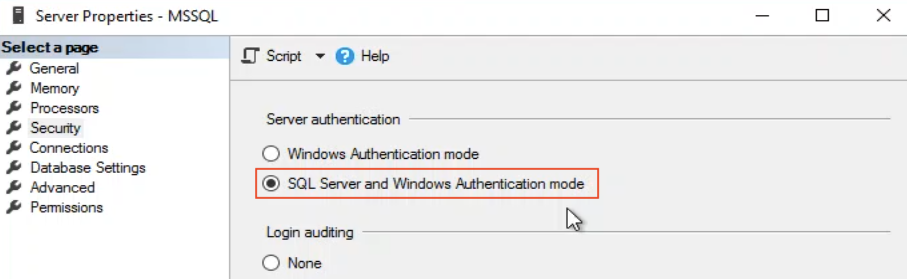
Only local users can be used.
Windows clustering must be configured to setup SQL clustering in the AlwaysOn mode.
The database must be created and configured under AlwaysOn Active-Active cluster.
The database must be configured with a static AG listener.
Asynchronous replication must be set up between primary and secondary replicas.
Database should reside in the separate network segment.
Required MS SQL Server features DB Engine.
Default server-level collation must be SQL_Latin1_General_CP1_CI_AS. See Collation support.
Database-level collation must be set.
The separate database with the name "workfusion" must be created.
Only the following special symbols for db password for <mssql_pm_user> (the setting in config.yml) are allowed: @#^*():,.}<>/
Only the following special symbols for db password for <mssql_dm_user> (the setting in config.yml) are allowed: @#^*():,.;}[]/
The following MS SQL logins must be created:
Parameter Default login Description mssql_dba_user 'wf_dba' The name of the database owner, which provides permissions for the database to other users and schemas mssql_ct_user 'workfusion' The name of the MS SQL Login and of the corresponding MSSQL DB user for the Control Tower component mssql_ws_user 'workspace' The name of the MS SQL Login and of the corresponding MSSQL DB user for the Workspace component mssql_sqc_user 'sqc' The name of the MS SQL Login and of the corresponding MSSQL DB user for the SQC component mssql_ds_user 'ds' The name of the MS SQL Login and of the corresponding MSSQL DB user for the CT datasource connection mssql_rpa_user 'rpa' The name of the MS SQL Login and of the corresponding MSSQL DB user for the RPA component mssql_pm_user 'pm' The name of the MS SQL Login and of the corresponding MSSQL DB user for the monitoring tools mssql_dm_user: 'dm' The name of the MS SQL Login and of the corresponding MSSQL DB user for the Analytics component mssql_rapi_user 'rapi' The name of the MS SQL Login and of the corresponding MSSQL DB user for the Analytics remote api mssql_ocr_user 'ocr' The name of the MS SQL Login and of the corresponding MSSQL DB user for the OCR component mssql_automl_mms_user 'automl_mms' The name of the MS SQL Login and of the corresponding MSSQL DB user for the AutoML Model Management component In the workfusion database, the user must be created for the <mssql_dba_user> MSSQL login with the same name. This user must be granted the db_owner role in the database.
See Prepare MS SQL Server for the detailed guide.
RPA server
The RPA component is installed on one or multiple Windows-based servers. The number of the required RPA servers depends on the disk size and daily load they must handle.
RPA machines must have the installed business applications that are required to complete the operational task(s). The RPA component simulates standard business operations by interacting with the Graphical User Interface of these applications.
Microsoft RDS license must be purchased from Microsoft to run more than two bots on one server. More details: RDS Licensing for Multiple Bots.
Each RPA server must have at least two service accounts: a Bot Master and a Bot Unit Windows users. The users must be created:
- Automatically by the installation script. See Single Point Setup.
- Manually before the installation.
A Bot Master user must be a member of the Administrators and Remote Desktop Users groups on all RPA servers.
A Bot Unit user must be a member of the Remote Desktop Users group on all RPA servers.
A Bot Unit user must have the write permissions for the installation directory so that services can create a log directory and start properly.
All Bot Unit users must have common basename and different and sequential index numbers at the end of the basename if you plan to use several Bot Units. For more information, see config.yml, section RPA.
For example, if, in config.yml, you set '
rpa_bots_per_server: 2', and 'bot_unit_base_name: BotUnit', then the following users must be created on each RPA server: BotUnit1, BotUnit2.
note
RPA Installer automatically creates all Bot Unit usernames with the same passwords in Secrets Vault. After RPA installation is completed, you can change these usernames and passwords in Secrets Vault admin UI to match the credentials that you have created manually before the installation.
Browser
For optimal work we recommend using the Chrome V 67.+ browser.
Environment readiness checklist
Download the requirements checklist.