
Enable Analytics
The following figure is an example of a typical out-of-the-box (OOTB) AutoML Business Process (BP).
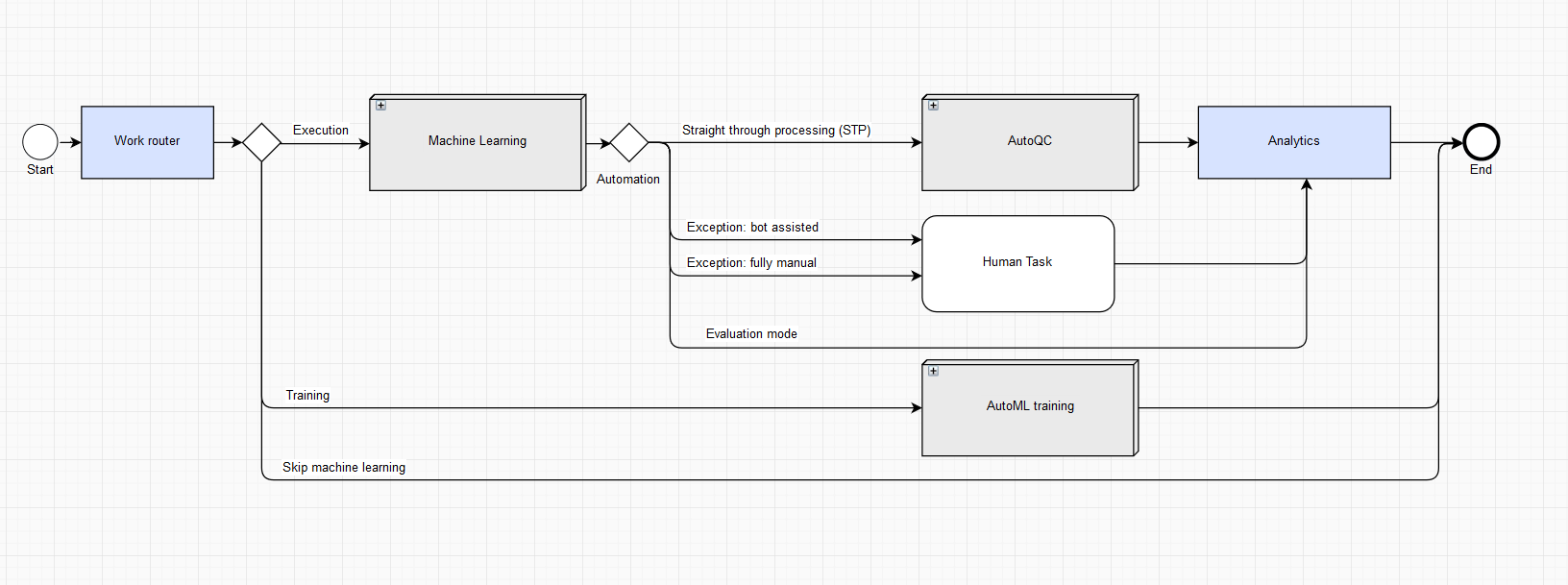
Analytics in an OOTB AutoML BP allows you to collect and rate model predictions and AutoML performance against gold (human) answers and human performance.
If Analytics is enabled, you have two options:
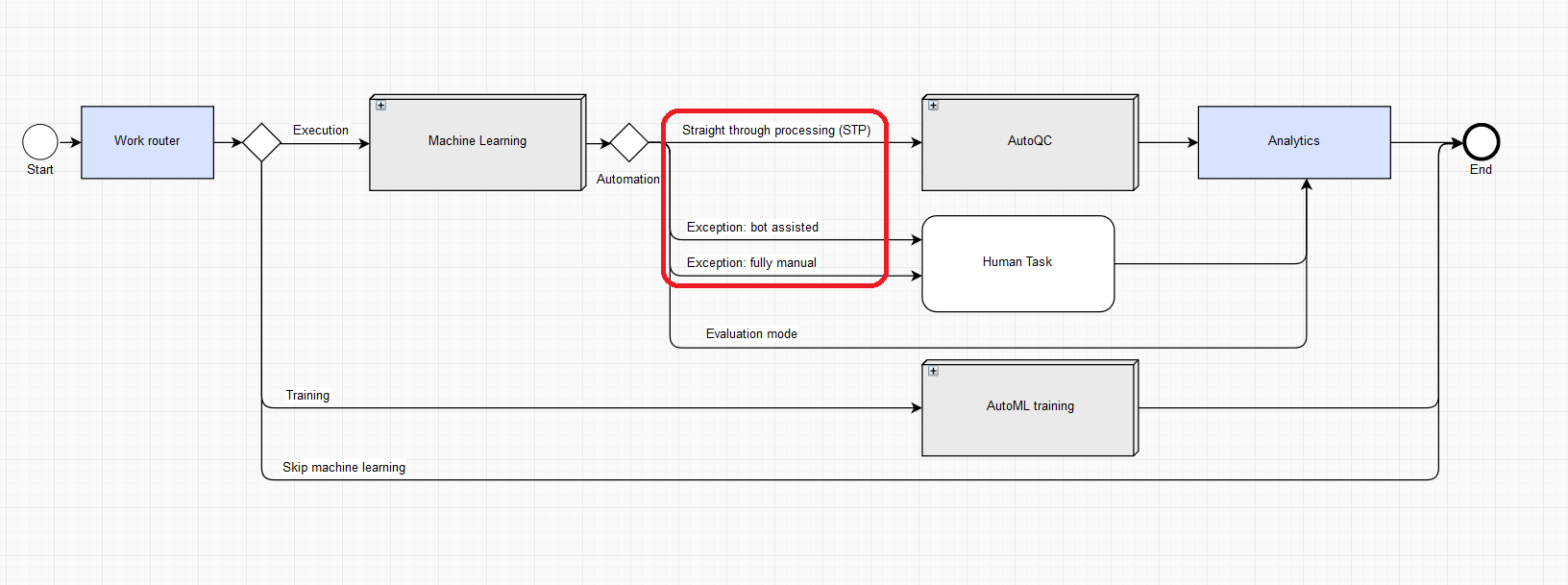
Option 1. Input is raw data without the answers. In this case, the document goes through the STP or exception pipeline, and you get the real-time Analytics.
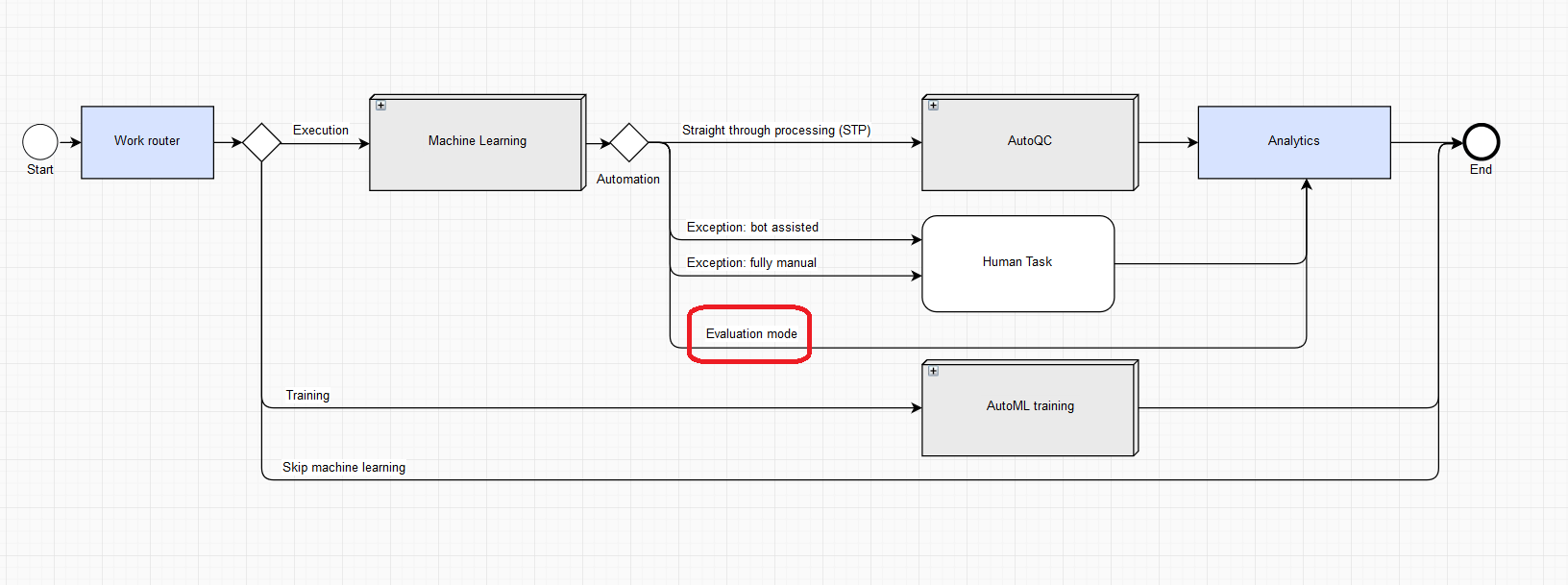
Option 1. Input is a tagged document containing answers for a given Manual Task, that is, a gold document for the current Manual Task. In this case, processing is in the evaluation mode. All human work is omitted because answers are already there. In the evaluation mode, model answers are compared with gold ones on the Analytics step.
Enabling Analytics
To enable storing data for further analysis, follow these steps:
On the Business Processes page, click a BP where you want to enable Analytics.
On the Workflow tab, double-click the Work router step.
In the Analytics section, select Enabled and click Save.
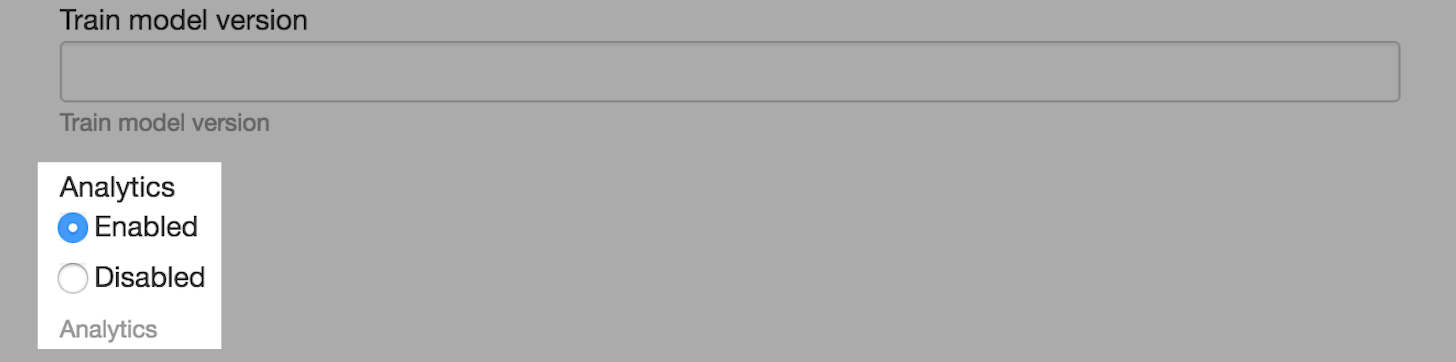
This setting is applied to each AutoML BP created for a given Operation.
Model predictions in daily executions
When Analytics is enabled, the AutoML BP collects comparison information for model predictions against human answers.
- If the processed document goes through the Exception: bot assisted or Exception: fully manual branch, the model answer is compared against human answers.
- If the processed document goes through the Straight through processing (STP) branch, the model answer is compared against itself.
- If AutoQC is used and the document goes through the Manual Task branch, the model answer is compared against human answers.
Collected data usage
Comparison data is saved in a Data Store with a name set according to the following pattern: automation_stat_[bp_campaign_uuid].
_bp_campaign_uuid corresponds to the _sys_bp_campaign_uuid field after the machine learning sub-BP with the following replacement: [^\w] with _ (underscore).
The Data Store has the following structure by column names.
run_uuid
Current BP instance UUID.
- Data type: TEXT
field_name
Answer code.
- Data type: TEXT
- Aggregation: per field in document.
group_name
Group name if field_name relates to a group.
- Data type: TEXT
- Aggregation: per field in document.
gold_value
Gold answer, if any.
- Data type: TEXT
- Aggregation: per field in document.
extracted_value
Model answer, if any.
- Data type: TEXT
- Aggregation: per field in document.
TP
Metric for a given answer code: True Positive.
- Data type: INTEGER
- Aggregation: per field in document.
- Additional information: used INTEGER because BOOLEAN is not supported by Data Store plugins.
TN
Metric for a given answer code: True Negative.
- Data type: INTEGER
- Aggregation: per field in document.
- Additional information: used INTEGER because BOOLEAN is not supported by Data Store plugins.
FP
Metric for a given answer code: False Positive.
- Data type: INTEGER
- Aggregation: per field in document.
- Additional information: used INTEGER because BOOLEAN is not supported by Data Store plugins.
FN
Metric for a given answer code: False Negative.
- Data type: INTEGER
- Aggregation: per field in document.
- Additional information: used INTEGER because BOOLEAN is not supported by Data Store plugins.
score
Model answer metric: score for a given answer code.
- Data type: TEXT
- Aggregation: per field in document.
- Additional information: used TEXT because DECIMAL is not supported by Data Store plugins.
confidence
Model answer metric: estimated accuracy for a given answer code.
- Data type: TEXT
- Aggregation: per field in document.
- Additional information: used TEXT because DECIMAL is not supported by Data Store plugins.
document_id
Equals to hitUUID.
- Data type: TEXT
- Aggregation: per document
doc_html_link_tagged
Empty by default.
- Data type: TEXT
- Aggregation: per document
timestamp
Record insert timestamp.
- Data type: TIMESTAMP
- Aggregation: per document
environment
Workspace environment type: production.
- Data type: TEXT
- Aggregation: per document
ml_process_time
Process time of the automation-extract plugin (post to ML service + ML extract + so on). In milliseconds.
- Data type: INTEGER
- Aggregation: per document
note
The automation-extract plugin is deprecated.
human_process_time
Time a human worker spent on their work. In case of multiple workers, total time spent. In milliseconds.
- Data type: INTEGER
- Aggregation: per document
human_process_type
Type of human work: FULLY_MANUAL, BOT_ASSISTED, EXPIRED.
- FULLY_MANUAL: Manual Task without ML answer assistance.
- BOT_ASSISTED: Manual Task with ML answer assistance.
- EXPIRED: Manual Task is not processed and overdue.
The manual step in AutoQC is not accounted for at the Analytics stage.
- Data type: TEXT
- Aggregation: per document
Collected data is used to build the Cognitive Automation Breakdown chart.