
Configure Bot Task no-code components
When you design a Business Process, you can apply no-code components to Bot Tasks.
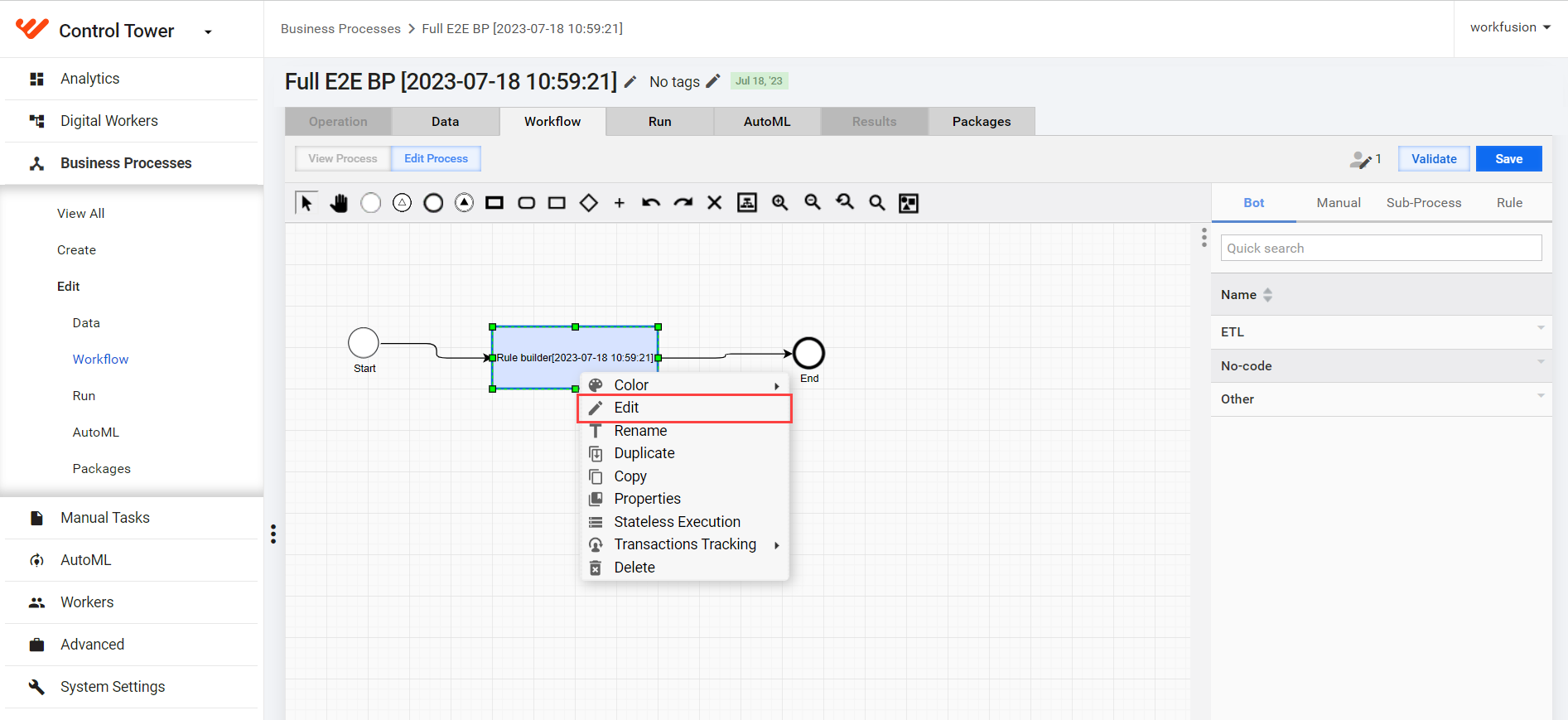
Open a Business Process, right-click a Bot Task, and select Edit.
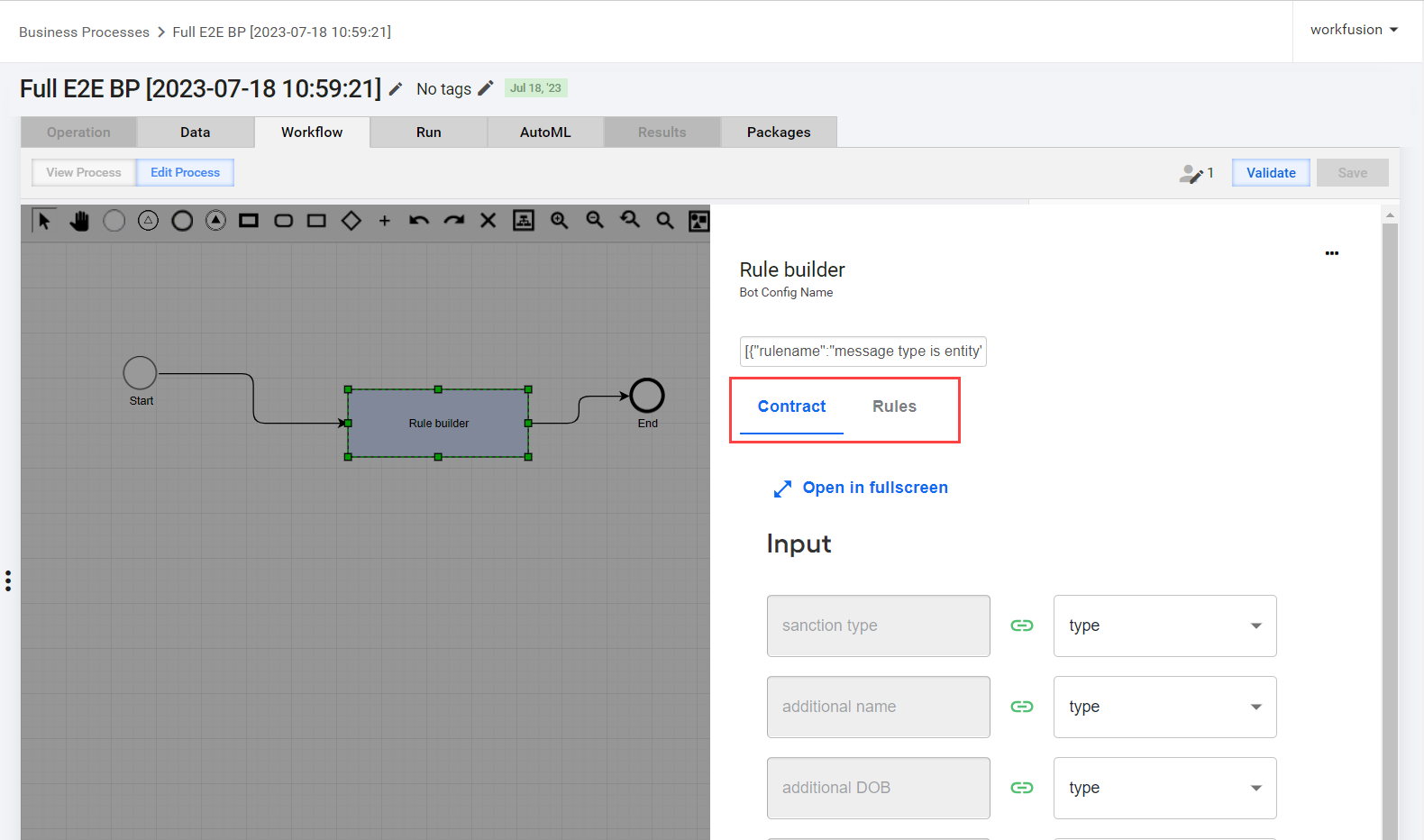
In the Rule Builder menu, you can configure the following settings for the selected Bot Task:
- On the Contract tab, input and output data
- On the Rules tab, decision rules
tip
For more convenient work, you can switch to the fullscreen mode by clicking Open in fullscreen.
Configure contract
You cannot use a Bot Task until you define the Bot Task input and output in a contract. On the Contract tab, perform mapping for the Input and Output sections.
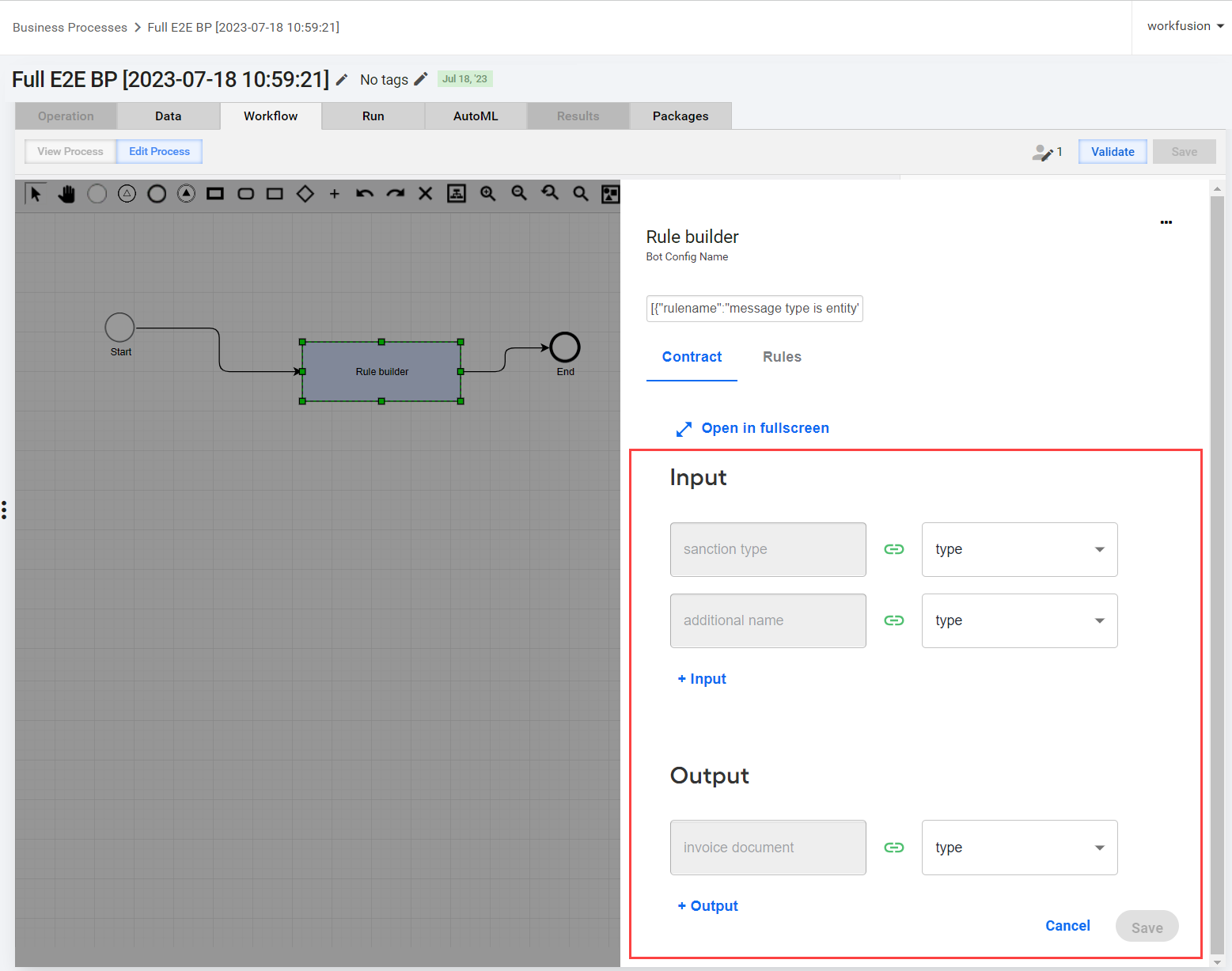
The Variable on the left is required for a Bot Task to work.
The Value on the right is the given input with required data. The type of the Value must be the same as the type of the Variable.
You cannot change the required Variables, but you can add data by clicking the Input or Output options in the respective sections.
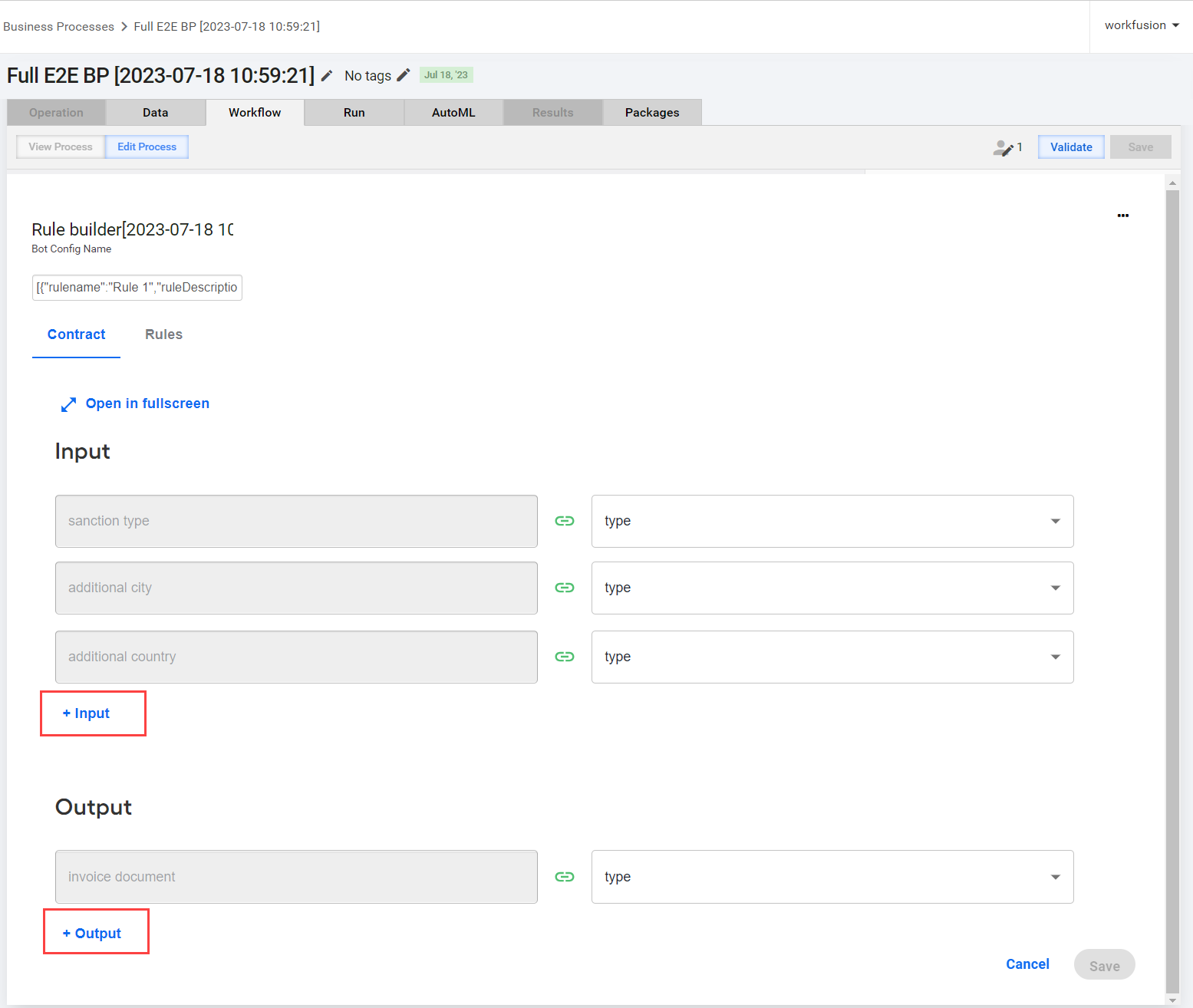
All no-code Bot Tasks utilize a global data object called a schema. Specify the default value in the schema selector. To do that, select a matching type or the type of data you are using.
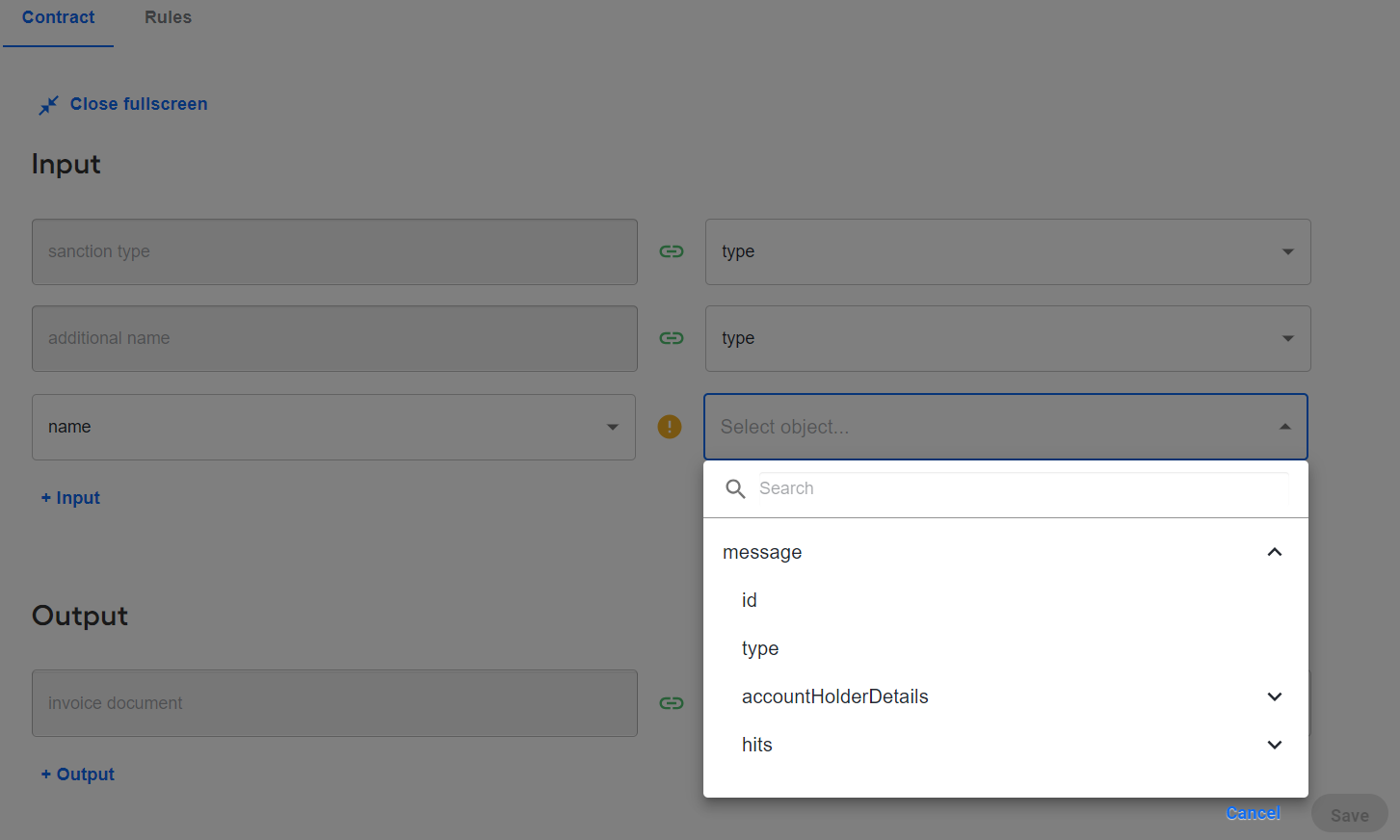
tip
In the Output section, you can add the Bot Task output to the schema context and then use it as input in a later Bot step of your Business Process.
Configure rules
Rules are individual collections of logic that can potentially define a decision. If multiple rules are true, the priority is given to the highest rule.
A decision is a form of a no-code step that takes in some schema objects and outputs a single string called a decision.
The decision element functions as follows:
- Each rule has access to all data objects in the context.
- Rules have priorities.
trueis the highest priority that defines the decision. - You can use any string input as a decision and then apply it at a later step.
Add rule
To set up a rule, do as follows:
Go to the Rules tab and click Add rule.
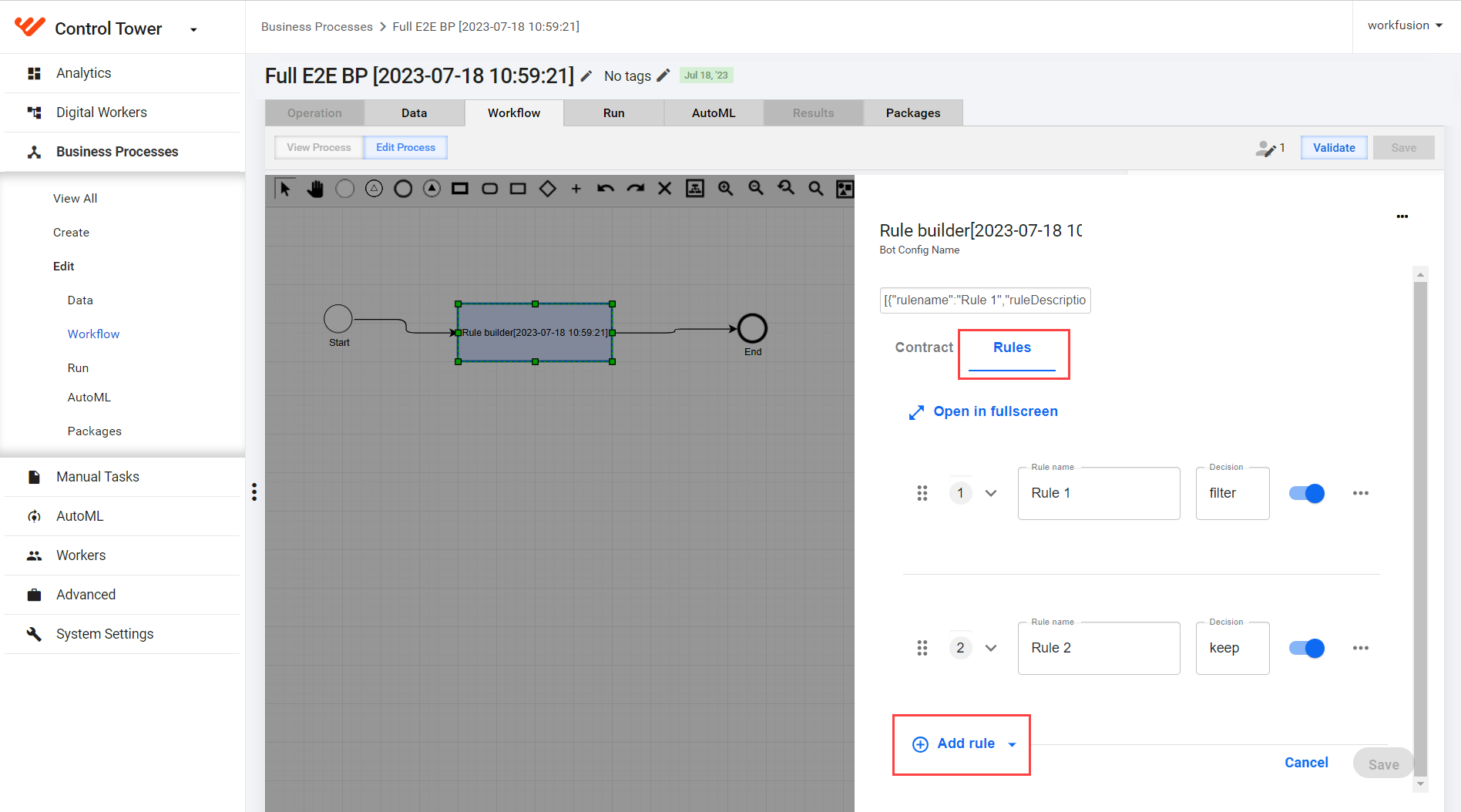
In the Rule name field, enter a name for the rule.
In the Decision field, specify the decision.
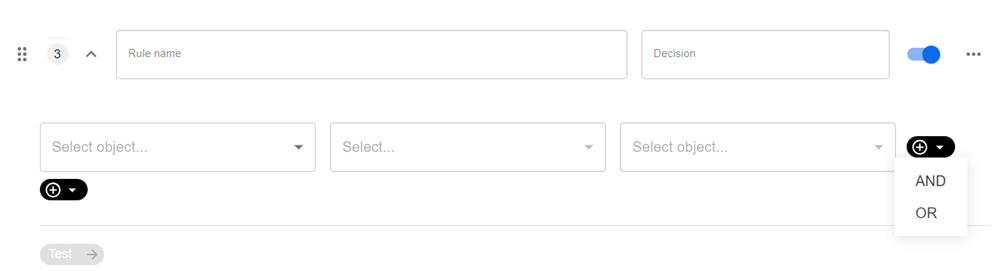
Set up a condition. Any condition requires a certain number of parts, such as a primary variable, an operator, and a secondary variable:
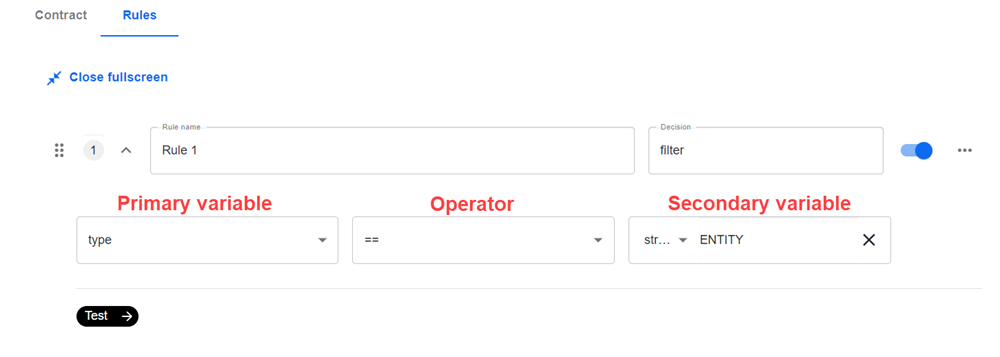
- Specify variables in the right and left fields.
- Select the operator.
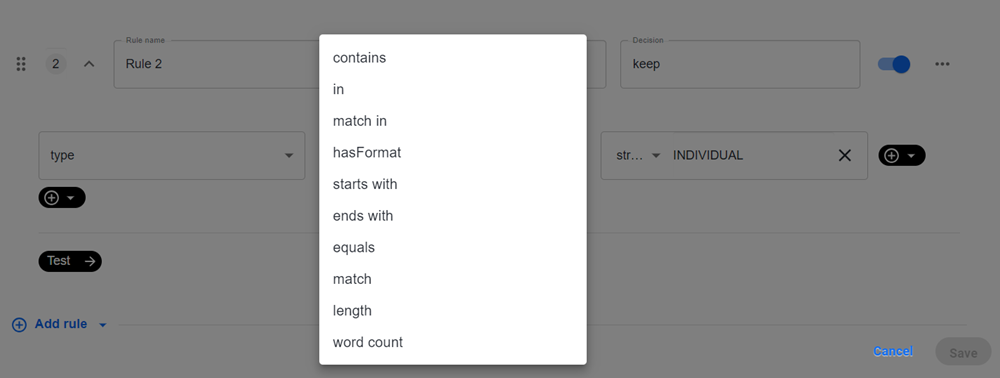
See supported rule operators
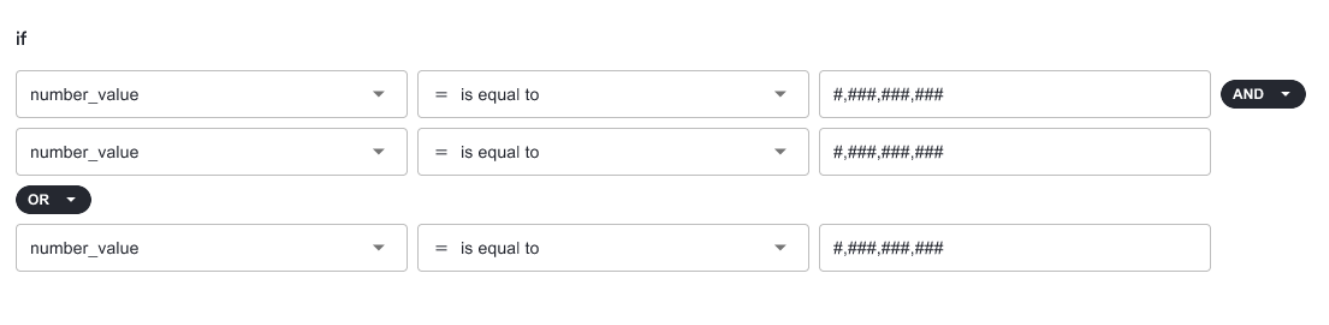
Operator (JSON value) Operator (UI) Description Example ==is Equals attribute1 == 1000!=is not Not equals attribute1 != 110>> Greater than attribute1 > 20000>=>= Greater than or equals attribute1 >= 5000<< Less than attribute1 < 40000<=<= Less than or equals attribute1 <= 300&&AND Logical "and" ( expression1ANDexpression2istrueif both expressions aretrue)<AllColumns>: SIZEOF (TRIM b.TEST) = 0) and (SIZEOF(TRIM c.TEST)!Is not Logical "not" (NOT expression1istrueifexpression1isfalse.)Applicant(age > 18) not Loan(applicant == Applicant, status == "Approved")existsexists Specifies facts and constraints that must exist. The option is triggered on the first match only, not subsequent matches. If you use this element with multiple patterns, enclose the patterns in parentheses ().exists /persons[ firstName == "John"]exists (/persons[ firstName == "John", age == 42 ])exists (/persons[ firstName == "John" ] and /persons[ lastName == "Doe" ])containsis in Verifies if a field that is an Array, a Collection, or a character contains a specified value. attribute contains 's' in "string"/familyTree[ countries not contains "UK" ]not containsis not in Verifies if a field that is an Array, a Collection, or a character does not contain a specified value. attribute not contains 's' in "string"/familyTree[ countries contains "UK" ]starts withstarts with Verifies if a field that is a string starts with a specified value. routingValue str[startsWith] "R1"ends withends with Verifies if a field that is a string ends with a specified value. routingValue str[endsWith] "R2"matchesis Indicates that a field matches a specified Java regular expression. /persons[ country matches "(USA)?\\S*UK" ]not matchesis not Indicates that a field does not match a specified Java regular expression. /persons[ country not matches "(USA)?\\S*UK" ]memberOfis in Verifies if a field is a member of an Array or a Collection that is defined as a variable. The Array or Collection must be a variable. /familyTree[ person memberOf $europeanDescendants ]not memberOfis not in Verifies that a field is not a member of an Array or a Collection that is defined as a variable. The Array or Collection must be a variable. /familyTree[ person not memberOf $europeanDescendants ]soundslikesounds like Verifies if a word has almost the same sound, using English pronunciation as the given value. The operator uses the Soundex algorithm. // Match firstName "Jon" or "John"/persons[ firstName soundslike "John" ]in,notinis in Specifies more than one possible value to match a constraint (compound value restriction). The second operand of the operators must be a comma-separated list of values enclosed in parentheses. /persons[ $color : favoriteColor ]/colors[ type in ( "red", "blue", $color ) ]/persons[ $color : favoriteColor ]/colors[ type notin ( "red", "blue", $color ) ]before Checks if one date is before another. after Checks if one date is after another. in last Checks if a date is within a certain number of days from the current date. There is a limit to one nested level of groups, but you can still have multiple separate groups. See the example of two groups split by an OR operator below:
Click Save.
Test rules
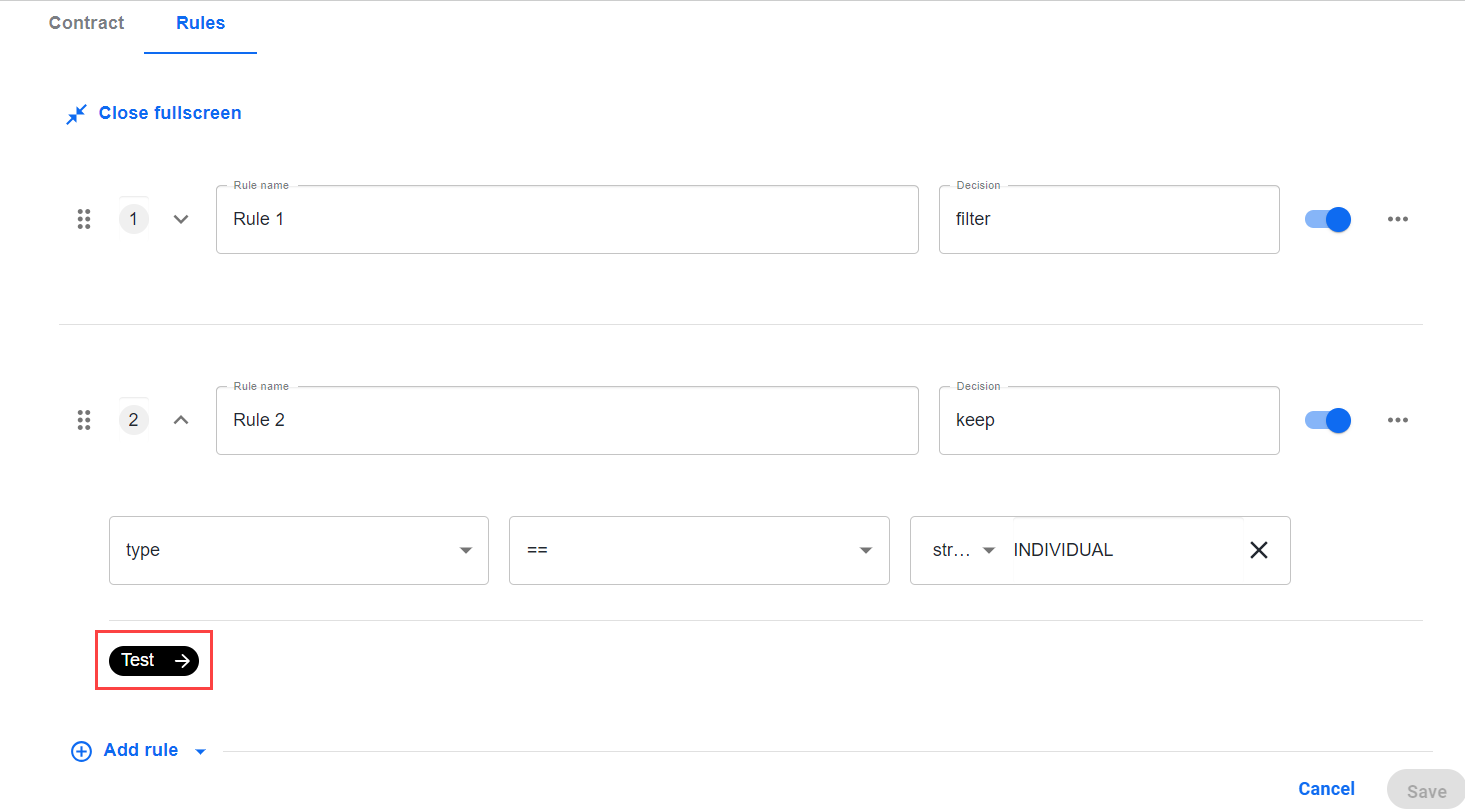
To test the design logic you create while adding or modifying a rule, click the Test button.
note
You can manually enter data for any number of test cases.
Manage rules
To copy or delete a rule, click the Options button next to it and select a needed option.

To disable a rule, use the toggle next to it. The disabled rule appears as grayed out in the list of rules.
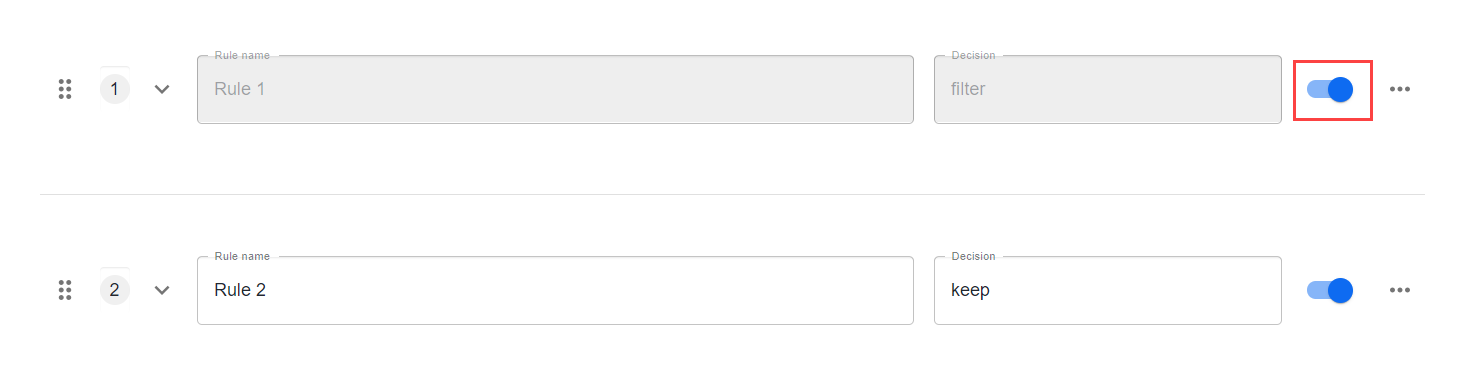
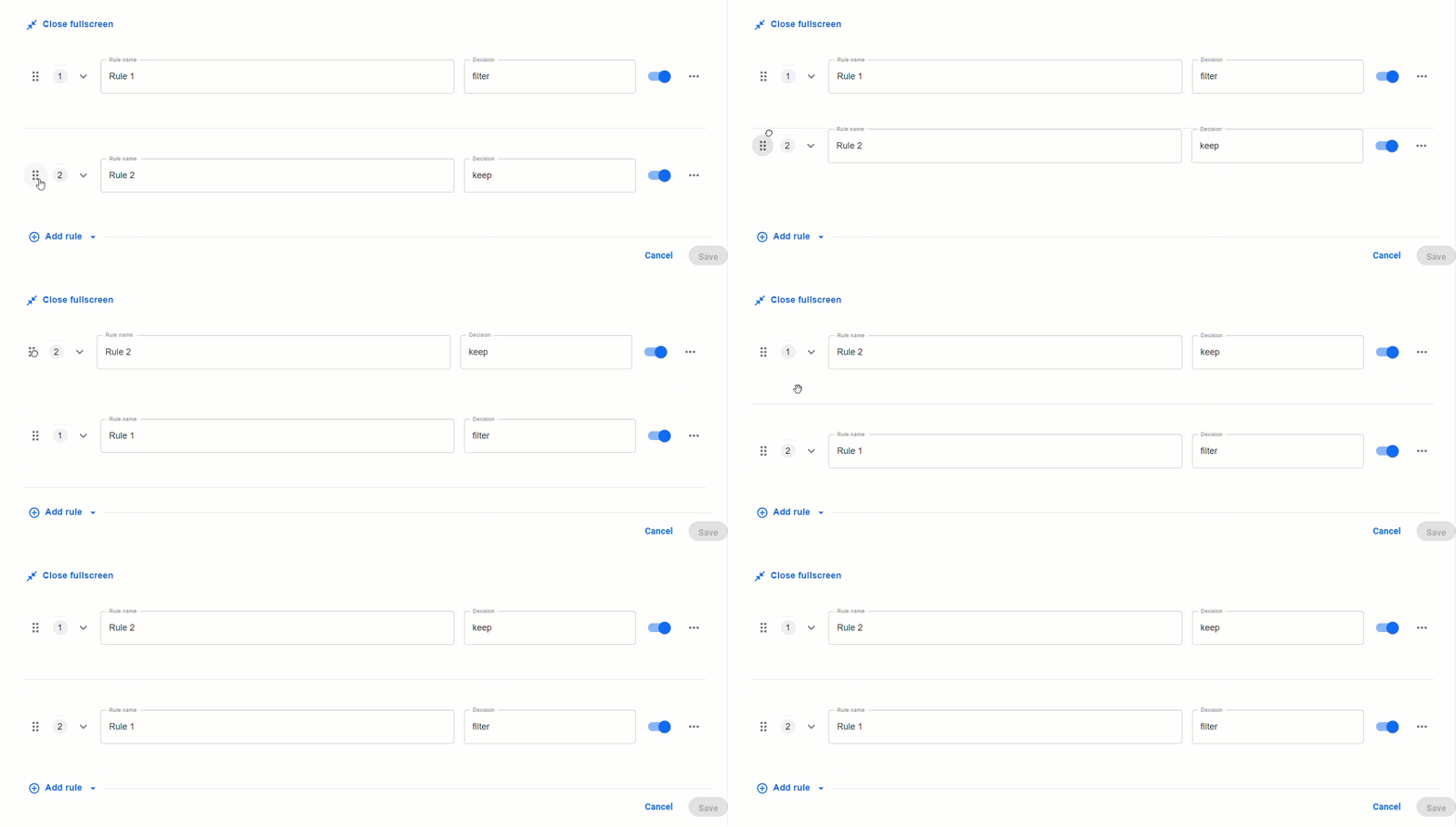
You can manage the priority by dragging rules in the preferred order.
Apply transformations
A transformation is a more advanced form of a no-code step where you can perform actions on data in the schema.
Transformations still appear in the form of rules. Similar to decisions, you can have a complex conditional logic defining if a transformation occurs. The addition comes in the form of the then section.
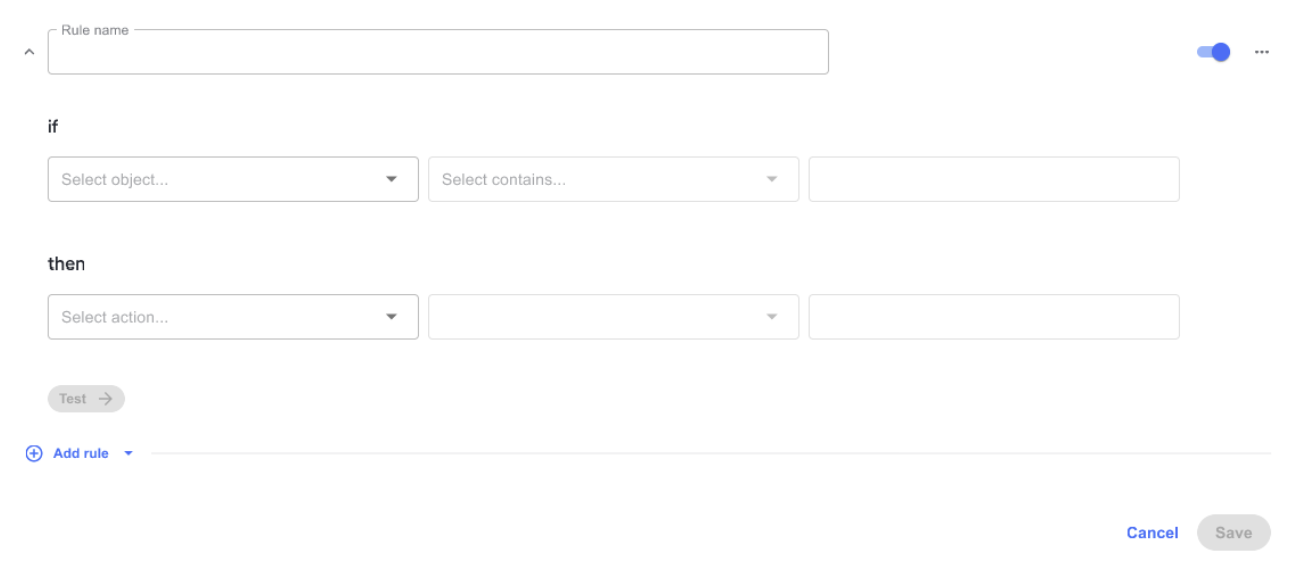
Any action requires a certain number of parts, such as a primary variable, an action type, and action parameters.

The right side of a transformation can have multiple fields required in different ways. Once you select a function, you see a number of labeled input parameters you must populate.
See supported rule operators for transformations
| Operator | Description | Input to operator | Example | Rule |
|---|---|---|---|---|
| Replace | Replaces a character with the desired character in the string. | srcValue, tgtValue | transaction.amount = "$69,234" srcValue = “$“, tgtValue = ““ THEN transaction.amount= "69,234" | Replaces scrValue from transaction.amount with tgtValue. |
| Append | Adds a string at the end of another string. | tgtValue | Addresslist = "Liver Pool, L.A, Chicago, Bristol, Manchester" tgtValue = “Broad St, Oxford OX1 3AZ, UK" THEN Addresslist = "Liver Pool, L.A, Chicago, Bristol, Manchester, Broad St, Oxford OX1 3AZ, UK" | If the address in tgtValue is not in addresslist, append tgtValue to addresslist. |
| Format Date | Tranforms one format of to another format. | srcValue, tgtValue | transaction.date = “25-01-2000" srcValue = “dd-mm-yyyy" tgtValue = “mm-dd-yyyy" THEN transaction.date = “01-24-2000" | Transform the scrValue format of transaction.date to tgtValue. |
No parameters
For some rebuilt functions, you do not need to select a variable on the right, for example, to clear, clean, rest, or switch a boolean.

1 parameter

Functions, such as updating a field, performing a mathematical operator, or removing an item from a list, require one input on the left. The input types are as follows:
- A schema-selected item.
- A custom value, for example, a string or a list of varying sizes.
- A custom dropdown, for example,
<document.output> <Change Case> <lower>where the dropdown containslowerandupper.
2 parameters

You can apply two-parameter inputs to change strings, for example, reformat date or clean up messy text output. The input types are as follows:
- A schema-selected item.
- A custom value, for example, a string or a list of varying sizes.
- A custom dropdown, for example,
<document.output> <reformat> <“MM-DD-YYY> TO <“DD/MM/YY>, where there is a list of supported date formats.
3 parameters

For three-parameter use cases, you can apply the functions to fetch data from Data Stores or perform some complex prebuilt functions, such as geocoding. The input types are as follows:
- A schema-selected item.
- A custom value, for example, a string or a list of varying sizes.
- A custom dropdown, for example,
<customer.address> <find> <“CURRENT”> from <addressStatus> In <fenergo.Addresslist>, where there is an array ofaddressobjects that have theaddressStatusfield.
List operations
- You can select to perform an action with a list of complex actions on the left side, for example,
List[Hits]. - The actions can each have their own conditions and actions.
- You can remove a number of objects from the list.
Sample use cases
You can apply no-code Bot Task components for Payment Sanction Screening (PSS) Alert Disposition, a skill of the Digital Worker Tara.
Tara decisions
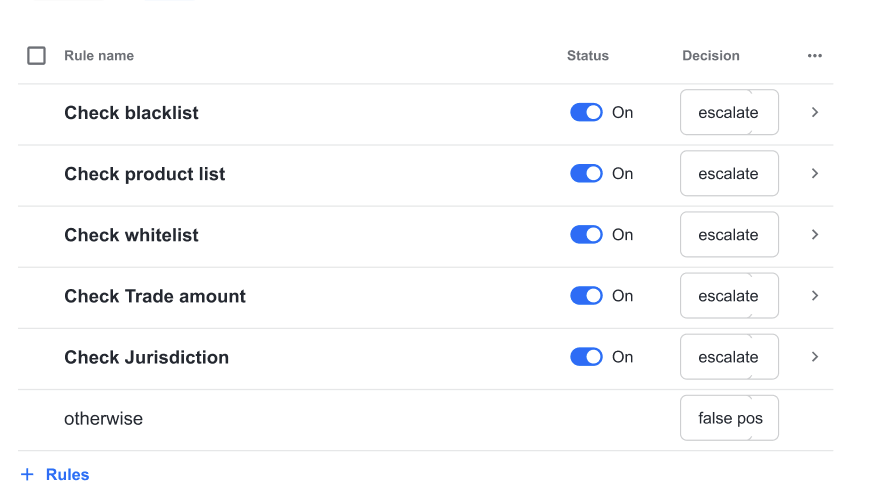
While screening, you can escalate a transaction for review due to various reasons, for example:
- A payer or a payee is on a most wanted list.
- The items to purchase are prohibited.
- The amount they are spending is suspicious.
- The country of a transaction and the people associated with it do not match.
However, every bank can have a slightly different policy. Thus, it will be helpful to configure how these decisions are made. You can create the needed criteria for a decision using a no-code decision step:
Tara filtering hits
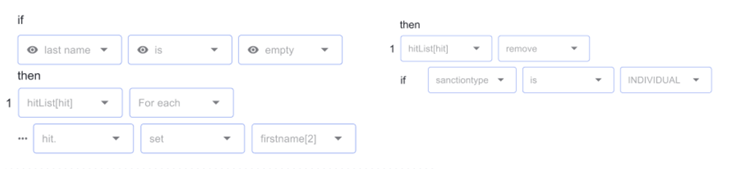
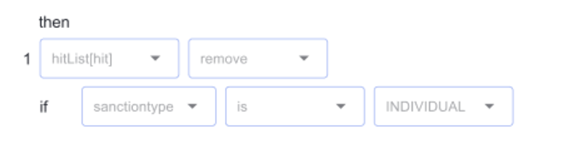
Tara has a step where you filter irrelevant hits from the sample Tara message.
You can perform this action in a transformation with a then action, for example:
Sample Tara message
{
  "id": "11111",
  "type": "PAYMENT_TRANSFER",
  "accountHolderDetails": {
    "type":"INDIVIDUAL",
    "name":"Doer Jerry"
  },
  "hits": [
    {
      "id": "2001",
      "tagContent": "DOE, J",
      "tagType": "NAME",
      "hitStartIndex": 0,
      "hitEndIndex": 5,
      "hitText": "DOE, J",
      "screenedData": {
        "type": "INDIVIDUAL",
        "name": "DOE, J",
        "dob": "10/12/1965",
        "country": "US"
      },
      "additionalData": {
        "type": "INDIVIDUAL",
        "name": "Doer Jerry",
        "dob": "10/10/1975",
        "address": "10 Bressenden Place, 8th floor",
        "country": "GBR",
        "city": "london",
        "state": "GBR",
        "postal": "SW1E 5DH"
      },
      "sanctionData": {
        "name": "doe, john",
        "type": "INDIVIDUAL",
        "country": "syrian arab republic",
        "sourceEntryId": "1111",
        "source": "OFAC",
        "listType": "WORLD_COMPLIANCE"
      }
    },
    {
      "id": "2002",
      "tagContent": "DOE, J",
      "tagType": "NAME",
      "hitStartIndex": 0,
      "hitEndIndex": 5,
      "hitText": "DOE, J",
      "screenedData": {
        "type": "INDIVIDUAL",
        "name": "DOE, J",
        "dob": "10/12/1965",
        "country": "US"
      },
      "additionalData": {
        "type": "INDIVIDUAL",
        "name": "Doer Jerry",
        "dob": "10/10/1975",
        "address": "10 Bressenden Place, 8th floor",
        "country": "GBR",
        "city": "london",
        "state": "GBR",
        "postal": "SW1E 5DH"
      },
      "sanctionData": {
        "name": "doe, johanna",
        "type": "INDIVIDUAL",
        "dob": "10/21/1970",
        "country": "US",
        "sourceEntryId": "2222",
        "source": "OFAC",
        "listType": "WORLD_COMPLIANCE"
      }
    }
  ]
}
Tara message schema
[
{
"id": "message",
"parents": [],
"children": [
{
"id": "id",
"parents": [
"message"
],
"type": "string"
},
{
"id": "type",
"parents": [
"message"
],
"type": "string"
},
{
"id": "accountHolderDetails",
"parents": [
"message"
],
"children": [
{
"id": "type",
"parents": [
"message",
"accountHolderDetails"
],
"type": "string"
},
{
"id": "name",
"parents": [
"message",
"accountHolderDetails"
],
"type": "string"
}
]
},
{
"id": "hits",
"parents": [
"message"
],
"children": [
{
"id": "hit",
"type": "hit",
"parents": [
"message",
"hits"
],
"children": [
{
"id": "id",
"parents": [
"message",
"hits",
"hit"
],
"type": "string"
},
{
"id": "tagContent",
"parents": [
"message",
"hits",
"hit"
],
"type": "string"
},
{
"id": "tagType",
"parents": [
"message",
"hits",
"hit"
],
"type": "string"
},
{
"id": "hitStartIndex",
"parents": [
"message",
"hits",
"hit"
],
"type": "string"
},
{
"id": "hitEndIndex",
"parents": [
"message",
"hits",
"hit"
],
"type": "string"
},
{
"id": "hitText",
"parents": [
"message",
"hits",
"hit"
],
"type": "string"
},
{
"id": "screenedData",
"parents": [
"message",
"hits",
"hit"
],
"children": [
{
"id": "type",
"parents": [
"message",
"hits",
"hit",
"screenedData"
],
"type": "string"
},
{
"id": "name",
"parents": [
"message",
"hits",
"hit",
"screenedData"
],
"type": "string"
},
{
"id": "dob",
"parents": [
"message",
"hits",
"hit",
"screenedData"
],
"type": "date"
},
{
"id": "country",
"parents": [
"message",
"hits",
"hit",
"screenedData"
],
"type": "string"
}
]
},
{
"id": "additionalData",
"parents": [
"message",
"hits",
"hit"
],
"children": [
{
"id": "type",
"parents": [
"message",
"hits",
"hit",
"additionalData"
],
"type": "string"
},
{
"id": "name",
"parents": [
"message",
"hits",
"hit",
"additionalData"
],
"type": "string"
},
{
"id": "dob",
"parents": [
"message",
"hits",
"hit",
"additionalData"
],
"type": "date"
},
{
"id": "address",
"parents": [
"message",
"hits",
"hit",
"additionalData"
],
"type": "string"
},
{
"id": "country",
"parents": [
"message",
"hits",
"hit",
"additionalData"
],
"type": "string"
},
{
"id": "city",
"parents": [
"message",
"hits",
"hit",
"additionalData"
],
"type": "string"
},
{
"id": "state",
"parents": [
"message",
"hits",
"hit",
"additionalData"
],
"type": "string"
},
{
"id": "postal",
"parents": [
"message",
"hits",
"hit",
"additionalData"
],
"type": "string"
}
]
},
{
"id": "sanctionData",
"parents": [
"message",
"hits",
"hit"
],
"children": [
{
"id": "name",
"parents": [
"message",
"hits",
"hit",
"sanctionData"
],
"type": "string"
},
{
"id": "type",
"parents": [
"message",
"hits",
"hit",
"sanctionData"
],
"type": "string"
},
{
"id": "country",
"parents": [
"message",
"hits",
"hit",
"sanctionData"
],
"type": "string"
},
{
"id": "sourceEntryId",
"parents": [
"message",
"hits",
"hit",
"sanctionData"
],
"type": "string"
},
{
"id": "source",
"parents": [
"message",
"hits",
"hit",
"sanctionData"
],
"type": "string"
},
{
"id": "listType",
"parents": [
"message",
"hits",
"hit",
"sanctionData"
],
"type": "string"
}
]
}
]
}
]
}
]
}
]
Tara contract
{
    "Inputs": [
        {
            "leftValue": {
                "value": "Tara message",
                "custom": false,
                "type": "message"
            },
            "rightValue": {
                "custom": false
            },
            "isMandatory": true
        },

    ],
    "Outputs": [
        {
            "leftValue": {
                "value": "decision",
                "custom": false,
                "type": "string"
            },
            "rightValue": {
                "custom": false
            },
            "isMandatory": true
        }
    ]
}