Prepare dataset
Training set
A training set is a set of documents (invoices, emails, contracts, and so on) used for training a Machine Learning (ML) model. For Information Extraction (IE), a training set consists of documents containing gold values for a set of fields.
Fields are attributes that should be extracted from documents (for example, date, email, company name, company address).
Each labeled value is an object for a particular field. Special labels with attributes surround it. The text and the label are called a gold label or a gold value.
Here's an example of IE labels in the user interface:

And here's the IE label in an HTML structure:
<span class="font5">
"PGS 1 $13.00 DF $"
<total_transfer_tax data-toggle="tooltip" style="background-color: rgb(183, 151, 98);"
class="extraction-tag" tagorder="1" appendorder="2" data-value="24,20"
data-original -title=" Total Transfer Tax (99999.99)"
confidence="1/1">24, 20</total_transfer_tax> ==
</span>
The field name is used as the label name, and its attributes indicate that it is a special class="extraction-tag" label—text containing a gold value and information about the value. The most important attributes of a label are the follows:
data-value: a gold label attribute returned as the extraction result—this is what a user sees if they try to save the extraction results as JSON or CSV. You can change it in a Manual Task or by post-processing as the final result does not necessarily equal the labeled string. Note that ML focuses on the labeled string, notdata-value. In the example above,data-value="24.20". Below is the case when thedata-valueis not equal to the labeled text.tabnumber: the attribute showing that the label belongs to a group of labels and the number of this group.appendorder: the attribute defining in which order different chunks of the same label should be appended to each other.
Dataset requirements
The first requirement for a dataset concerns its size:
- For unstructured data, it should consist of at least 500 to 1,000 documents.
- For highly structured data, the training set can be smaller. For example, if your population contains only one layout and all documents have the same structure, 100 of them would be enough for training.
An ML dataset should be labeled in a particular way since models do not treat text the same way as people do. People can perceive text (whether it consists of proper names, or separate words, or numbers, and so on) in its entirety, understanding the meaning of what they see and identifying why it makes sense. To a model, any text is just strings of symbols organized in an HTML or XML tree. Its goal is to identify a value and the context surrounding the value.
Basically, context is everything that surrounds the labeled piece of text, its position on the page and, in some cases, its position relative to other important pieces of information. Context is the most important source of features and is used to determine where a gold value should be searched.

In the picture above, R is labeled as currency and 316,920.00 as total_amount. All the rest of the text is a short context for these two values.
The gold values in the dataset are the objects that should be classified as "the value to be extracted". The set of features is defined on the entire dataset (all documents). In each document, for each gold value, feature values are calculated and weighed during the training process, and the model (the function) is built. When the model is trained and you run it on some data, it extracts the strings that can be classified as "the value to be extracted" by their features. They are located in the part of the feature space that contains objects intended for extraction.
Values themselves are the source of features as well. For example, the CUSIP number that is used for classifying financial instruments worldwide has a definite shape and checksum, so any extracted value for CUSIP can be validated by these criteria. Suppose that documents contain more than one CUSIP and you are interested in a particular one, for example, the facility CUSIP. In this case, the CUSIP shape and checksum can be used for identifying all CUSIPs in the document, whereas their context can be used for identifying the specific CUSIP you are interested in.
The data set quality is very important for Machine Learning as wrong values or context are the sources of incorrect features and weights, affecting the model's quality. "Garbage in—garbage out" is the main principle of supervised ML, which means if the training set is not good enough and big enough, the model won't show good results. And the dataset quality is one of the most important DA responsibilities. A good dataset meets the following requirements:
Diversity
Objects from badly represented or not represented layouts may have feature values that cause the model to treat them like outliers. In the best case, they are ignored, and in the worse case they generate additional false positives. That's why it's important to have enough representation of all layouts and features you aim to extract.
Consistency
Each field should be consistently labeled across all the documents or a certain layout. For example, if an invoice has the same po_number occurring on all the pages in a document, you should always label the one at the same location (on the same one page across the entire dataset, for example, on the first page). Otherwise, it can confuse the Machine Learning algorithm:
If a layout contains the same value several times in different parts of a document (it's rather common case for some fields, for example, total invoice amount, taxes), it's recommended to choose in advance one context where it is labeled and stick to the context across all the documents of this layout.
If you have the following situation for a field:
Context/Value Value 1 Value 2 Value 3 Value 4 Value 5 Context 1 Labeled Labeled Context 2 Labeled Context 3 Labeled Labeled The model may treat it in the following way:
Context/Value Value 1 Value 2 Value 3 Value 4 Value 5 Conclusion Context 1 Correct Incorrect Incorrect Incorrect Correct Not extracted in 60% => most probably should not be extracted => "not to extract" => FN Context 2 Incorrect Incorrect Correct Incorrect Incorrect Not extracted in 80% => most probably should not be extracted => "not to extract" => FN Context 3 Incorrect Correct Incorrect Correct Incorrect Not extracted in 60% => most probably should not be extracted => "not to extract" => FN In this case, the fact that the same value was labeled in different contexts across documents resulted in the model deciding that the value should not be extracted at all.
As mentioned, the context and the document structure around the labeled value are important sources of features. If the value is not extracted in the context where the model expects it to be, the model can conclude that the values in this context are incorrect and should not be extracted at all. It generates additional false negatives in the extraction results, thus affecting Recall.
Another bad effect may occur if the model defines the features for a context in a non-optimal way. For example, in one type, invoice_date is given in the document after Invoice date: and after Date: and is labeled in both contexts. But documents also contain Payment date: {date in the same format}. In this case, the model may find "the context as required" and extract the payment date instead of the invoice date as it has the incorrect date: {value that should be extracted} feature . It generates additional false positives in the extraction results, thus affecting Precision.
If a Data Scientist requires to label all field instances (in case they want to let the model learn all possible contexts), label the field in each of its instances—missing any of them is a gross error. However, it's a rare practice as long as you understand that a human factor may result in missed and untagged instances and, futhermore, in additional false values.
Completion
Completion has two different aspects:
- If a correct field is given in the document, it must be tagged. Otherwise:
- The model may treat it as incorrect and generate additional FN, following the same logic as in the previous example (affects Recall).
- If the field's feature values are enough to be extracted and the field is extracted, when counting evaluation statistics, you may have FP here because the gold value is empty (affects Precision).
- If a field contains multiple words (in the ML domain, it is called a "token"), always label the entire string (with all the words) belonging to the field.
For example, you need to extract supplier_name, and it's always a company name. You see "WorkFusion Inc." and think that "WorkFusion" is important information and should be labeled, and "Inc." is not very important and you don't need to label it. The model gets the information that only a part of a string that contains supplier_name should be extracted as supplier name. And when the model "sees" "The Bank of America", it extracts "The Bank of" because previously you "told" it that a part of the company name is a correct value, and an entire string is an incorrect value.
| Gold data | Extraction results |
|---|---|
WorkFusion Inc. | The Bank of America |
In case you need to exclude a part of a string from values (for example, there is a requirement that supplier_name shouldn't contain legal endings), it's recommended to proceed the following way:
- Label the full value
- Correct
data-value - Apply post-processing (in case of legal endings, it's better to use the dictionary-based approach) to the model results so that you have full control of what is changed.
Normalization
If the value can be given in many formats, normalize it to a single format across all the gold data.
For example, a date can be given as 01/18/2024, January 18, 2024, Jan-18-2024, and so on. All these options are correct but presented in different formats, so you need to normalize them.
If the values are not normalized, additional false positives may appear in extraction statistics (which affects Precision).
| Gold value | Extracted value | Decision | Comment |
|---|---|---|---|
| Jan-18-2024 | 01/18/2024 | FP | Cannot be compared with the extracted result correctly. |
| 18.01.2024 | 01/18/2024 | FP | The date wasn't normalized in gold data and cannot be compared with the exacted result correctly. |
| WorkFusion Inc. | WorkFusion | FP | The extracted value is correct and normalized, but the gold value is not normalized, therefore, they cannot be compared correctly. |
| WorkFusion Inc. | WorkFusion (UK) Limited | FP | The extracted value was derived from the company name and its address (which is UK address) using reference data, but it wasn't done in the gold value. Therefore, gold and extracted values cannot be compared correctly. |
These are the most common requirements to a dataset. A few other requirements for a training set include the following:
- Make sure that there are no conflicting values in different fields (for example, “Male” and “Pregnant”).
- Number values should not out of range (“Age=1000”).
- Check for missing values (either empty fields or the fields recognized as containing backspaces but that are actually empty).
Typical cases of incorrect labeling
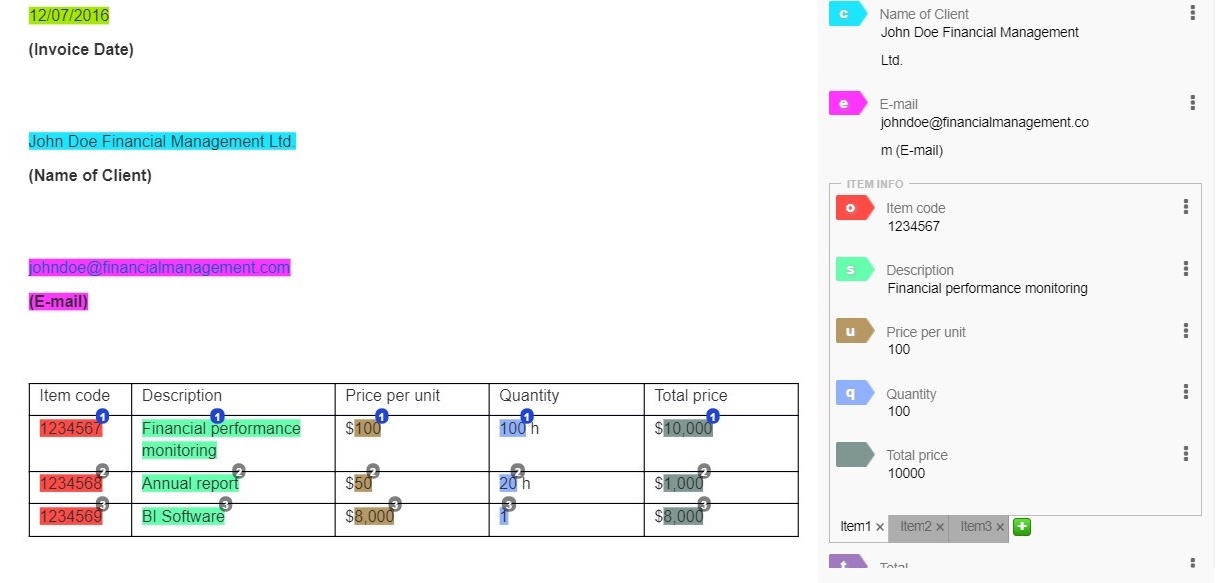
Extra data labeled
The E-mail label contains the "E-mail" phrase that doesn’t relate to the label.
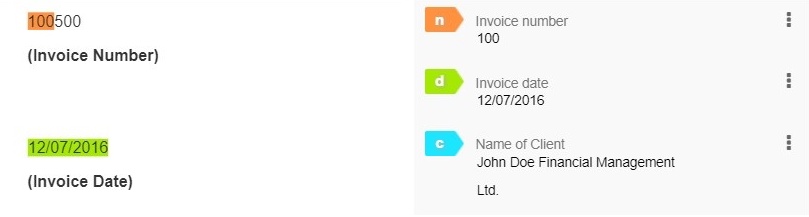
Incomplete data labeled
The Invoice number label doesn’t contain full information from the required field.
Optical Character Recognition (OCR)
In 80% of use cases, WorkFusion AutoML processes such documents as scans, unsearchable PDF files or images. All WorkFusion models require HTML, XML, or plain-text documents as input. Therefore, to get the documents in a suitable format, the third-party OCR (Optical Character Recognition) software is required to convert images and PDF documents into text (plain text, XML, or HTML).
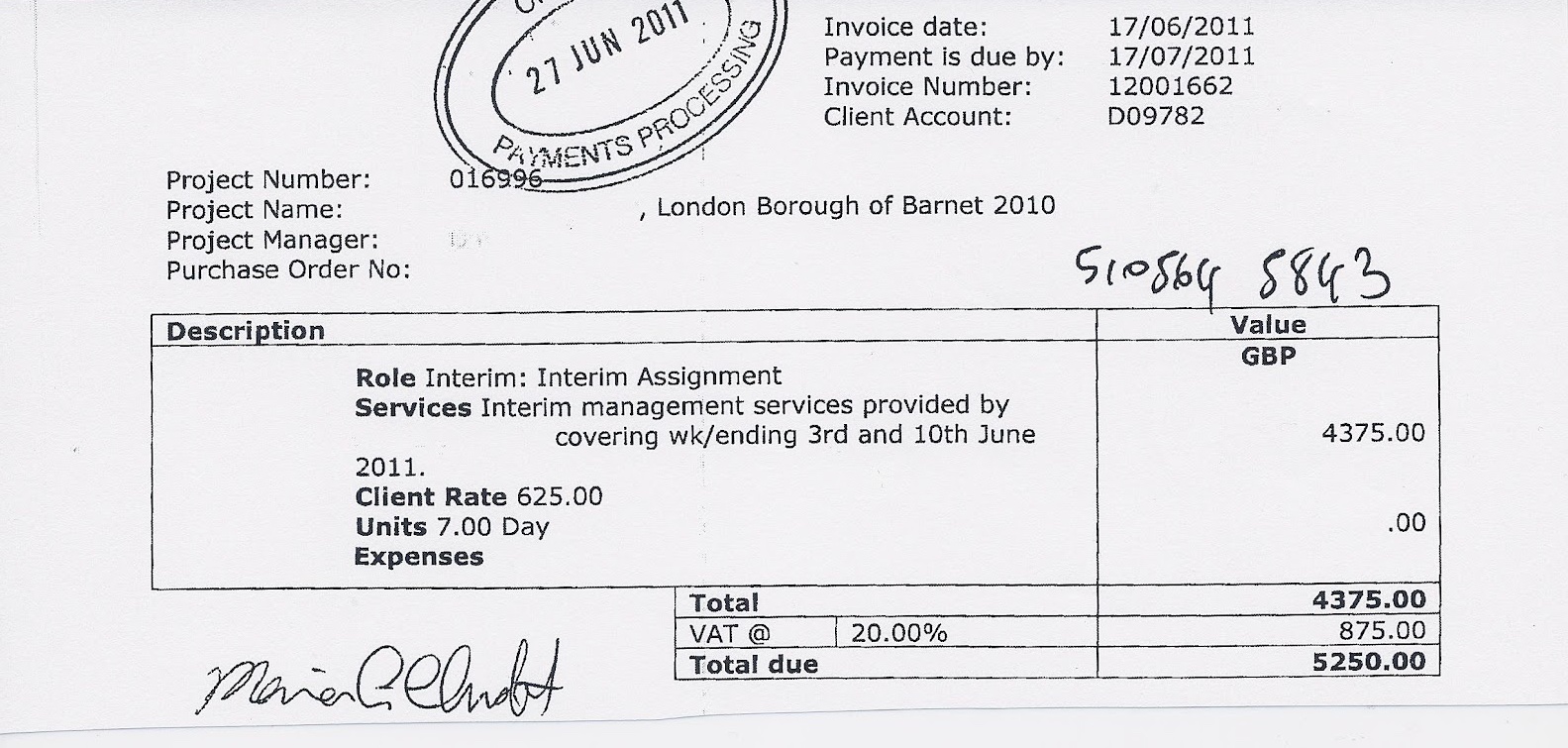
To achieve that, WorkFusion offers the following OCR providers: ABBYY, Azure Form Recognition, and Google Vision API. For more information, refer to Configure OCR Bridge step and OCR providers.
Before sending documents for manual labeling and preparing a dataset, check the OCR quality because the OCRed document structure is an important source of features. OCR may not always reproduce the original document structure exactly. There can be some differences between the original and OCRed documents. For example, different line quantity or table formatting, additional new lines and paragraphs. So, an OCRed document may not look exactly the same as the original document, but it doesn't prevent ML from processing it and handling these changes correctly, especially if they are reproduced across all or most of the documents within one layout.
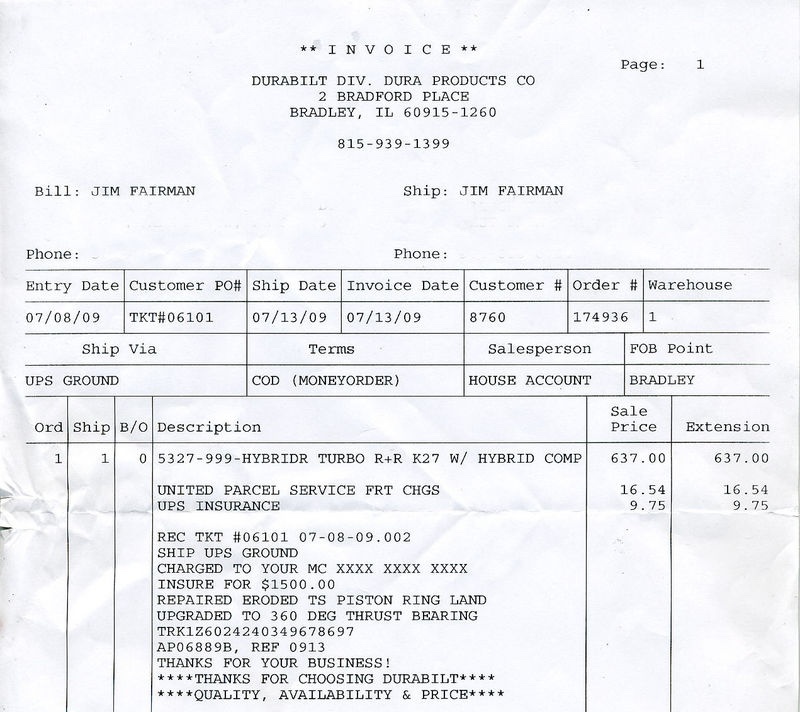
OCR can make mistakes when recognizing specific characters. For example, zeros ("0") can be recognized as the letter "O". Such mistakes can be handled by adding post-processing logic that replaces incorrect symbols or symbol sequences with correct ones. If OCR makes mistakes in values or changes the document structure, you can fix those by post-processing without changing OCR settings.
In some cases, OCR results are not accurate enough (hand-written text in documents, low-DPI images, twisted scans, crumpled paper, scans of photocopies, and so on), which causes certain problems (table margins, wrong or missing characters, additional structures that corrupt values in the way that ML cannot find them and extract correctly).
Therefore, OCR results may be not accurate. Below are some common problems that you can see after OCR:
| Problem | Solution | Dataset compliance |
|---|---|---|
| Text is missed. | Change OCR parameters. | Exclude |
| Characters are wrong, but a human can recognize them. | If it's an occasional mistake that appears in some documents of a layout, correct it manually in the Manual Task when creating the gold set and handle it by post-processing in the automation results. If a value is corrupted in the entire layout and cannot be corrected by post-processing (only removed), improve OCR. There can be some exclusions, for example, when a company name is given only in a logo, and it cannot be recognized well by OCR. | Include in case of an occasional mistake |
| The value is totally corrupted, and a human cannot recognize it. | If the value itself and its context are totally corrupted, and without checking the original document, you cannot understand what should be in a document part, do not label it. Exclude the document from the training set because it won't let the model learn anything useful and may be the source of wrong features and weights. If such documents are rather frequent in the common document flow and are not caused by the original document quality, it's recommended to improve the OCR quality. | Exclude |
| Corrupted, irregular structure. | ext can be converted into a table with a random structure that cannot be reproduced in other documents. If the value to be extracted is in such a table, it's recommended to exclude these documents from the training set as they may be the source of wrong features and weights. If such documents are rather frequent in the common document flow and are not caused by the original document quality, it's recommended to improve the OCR quality. | Exclude |
It's recommended to exclude the documents with strongly corrupted structures, missed text, and values that cannot be recognized by a human from the training set, but they should be included in a test set (ideally, in the same proportion as they are represented in the regular document flow). If they are excluded from the ML results evaluation, the statistics are overestimated and cannot be reproduced during the customer testing phase.
Remember, a good enough and big enough training set is an important factor in ML success. "Garbage in – garbage out" is how ML works. If the OCR quality is low and wrong features are defined, the model quality is low. If the training set contains mistakes, they are reproduced during evaluation, and you may not achieve your targets (each AI Agent has targets for Precision and Recall). If gold data precision is lower than the target for your AI Agent, you will never be able to achieve such a target. So, be mindful of the training set quality.