Version 10.2.9.2
December 03, 2024
The patch introduces new features and improvements to deliver more complex data flows in Work.AI automations, fine-tune models with advanced parameters, facilitate the integration of ML Ops-based models, and set up Digital Workers (DW) within a shorter time. Additionally, the patch includes component upgrades to strengthen your data security and fixes to eliminate revealed issues.
Sharable schema objects to streamline data flow setup
Instead of defining custom data schema objects for each automation individually, you can now define a custom data schema object once and reuse it as many times as you need across automations. The new feature allows you to reduce redundant efforts to configure custom no-code data flows, thus decreasing time and related costs to deliver automation flows to production.
To make custom data objects reusable, the Shared schema object type is introduced in schema-based Business Processes. You can share or stop sharing data schema objects at your discretion from the object's configuration window. The type synchronization works even if a signal ID for a Business Process is changed or removed. For details, see Manage custom schema objects.
No-code Data Store steps to deliver more complex data flows
Control Tower features two new Data Store Operation types allowing to easily retrieve or modify data in Data Store tables. The steps send queries to a database, which processes them and returns the results, enabling the creation of complex data flows across automation steps with less effort.
In the Operation's interface, choose Select from Data Store or Insert or update Data Store and enter a required SQL query. You can also use values from the step input or execution context to build your queries. For instructions, see Add no-code Data Store steps.
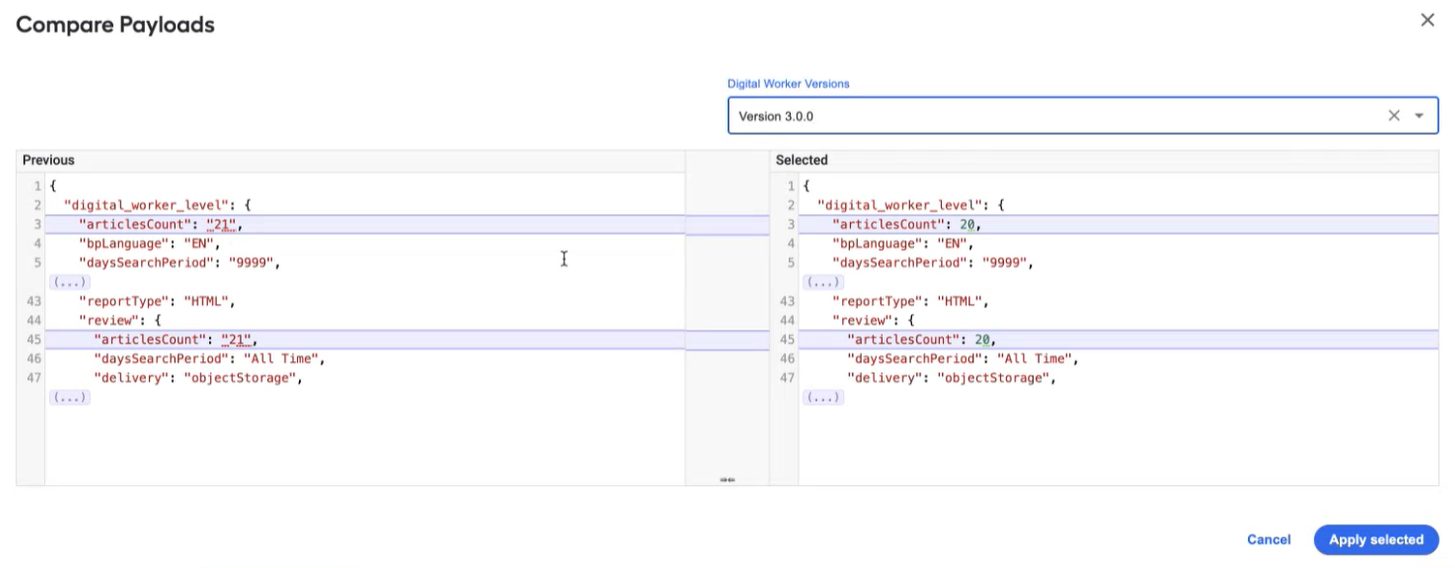
Importing Digital Worker configurations from other versions
The functionality to import configurations is available in the Control Tower interface for managing Digital Workers. With the new feature, you do not need to manually reconfigure a Digital Worker every time you upload its new version, thus saving related time, cost, and effort and preventing human-factor errors.
You can import a configuration from another configured version of the same DW available in your environment. The configuration selected for import is compared against the newly uploaded one, and the revealed mismatches are highlighted so that you can knowingly choose to apply the selected version or not. For details, see Import Digital Worker configuration.
Multiple decision routes executed concurrently
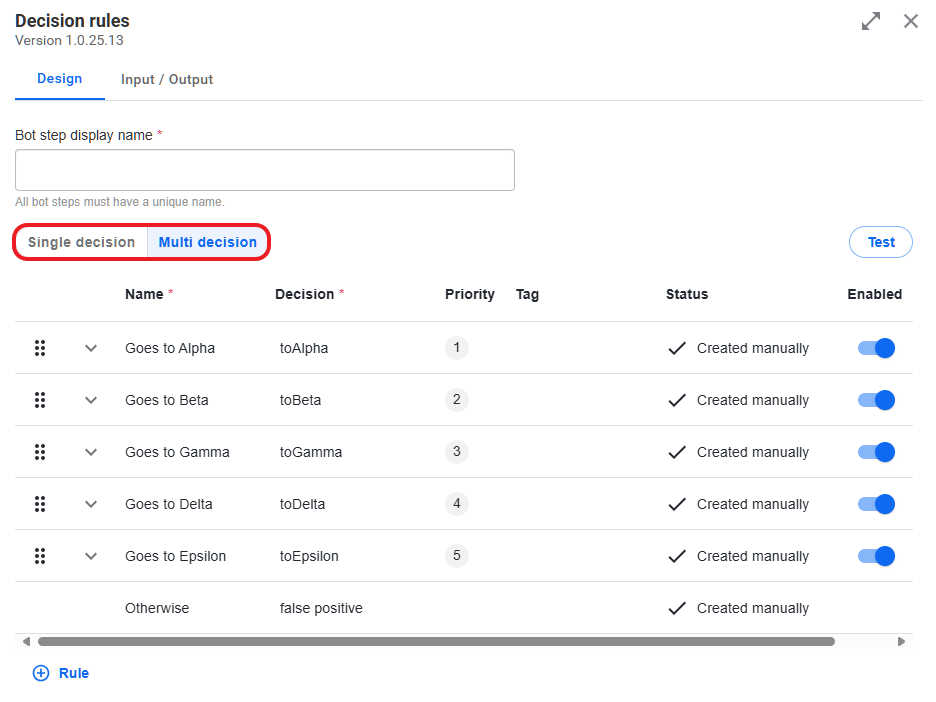
To let you build more complex decision logic into your automations, the no-code Decision rules step was enhanced to support the concurrent execution of multiple decision routes.
Previously, the step allowed for multiple routes but resulted in the decision with the highest priority. Starting with 10.2.9.2, you can choose between executing the highest priority route or executing multiple decision routes concurrently.
On the step's configuration screen, select the Multi decision option to return all fired decisions as an array in the order of priority. For instance, if a decision step comprises four rules (A, B, C, D) that fired with the descending priority, resulting in four routes (A1, B1, C1, and D1), the sys_rule_outcome parameter contains the [0:A1,1:B1,2:C1,3:D1] array routed accordingly. For details, see Configure no-code Decision rules step.
Expanded capabilities with new connectors
The release introduces new connectors within the Generic Connector and Generic Connector Trigger configurations, enabling seamless integration with file transfer systems and automation of critical file-based workflows:
- FTP Producer enables uploading files to an FTP server. Files can be sourced from S3, a local shared file system, or data generated in preceding steps.
- FTP Consumer allows bot steps to download files from an FTP server.
- FTP Consumer Trigger is a long-running poller that monitors FTP, FTPS, or SFTP servers for new files and triggers actions upon detection.
You can also take advantage of custom connector steps allowing you to edit routes, modify dependencies, and add custom parameters to contracts.
Additionally, the Generic Connector multi-part processor is updated to support large files for efficient processing of high-volume data. For details, see the Configure no-code Generic Connector documentation.
OOTB template to deliver custom Digital Workers
To streamline the delivery of custom Digital Workers in a no-code manner, an empty Digital Worker bundle is pre-installed for you as you upgrade to the new Work.AI version. The bundle serves as a starter project you can modify as much and as many times as you need to build custom Digital Workers. For detailed instructions, read the Create custom Digital Worker topic.
ML Ops models becoming BEP-compatible
You can leverage the computational power of ML Ops-based models, including LayoutLM ones, within Bot Execution Platform (BEP) without having to install the ML Ops platform. For that, WorkFusion implemented an on-demand mechanism for converting ML Ops-based models automatically into those compatible with BEP.
User experience improvements
For schema-based Business Processes, warnings are introduced to let you know when mappings are reset automatically upon changes to variable types in input or output contracts. So, you can be sure that you will not miss any important configuration changes.
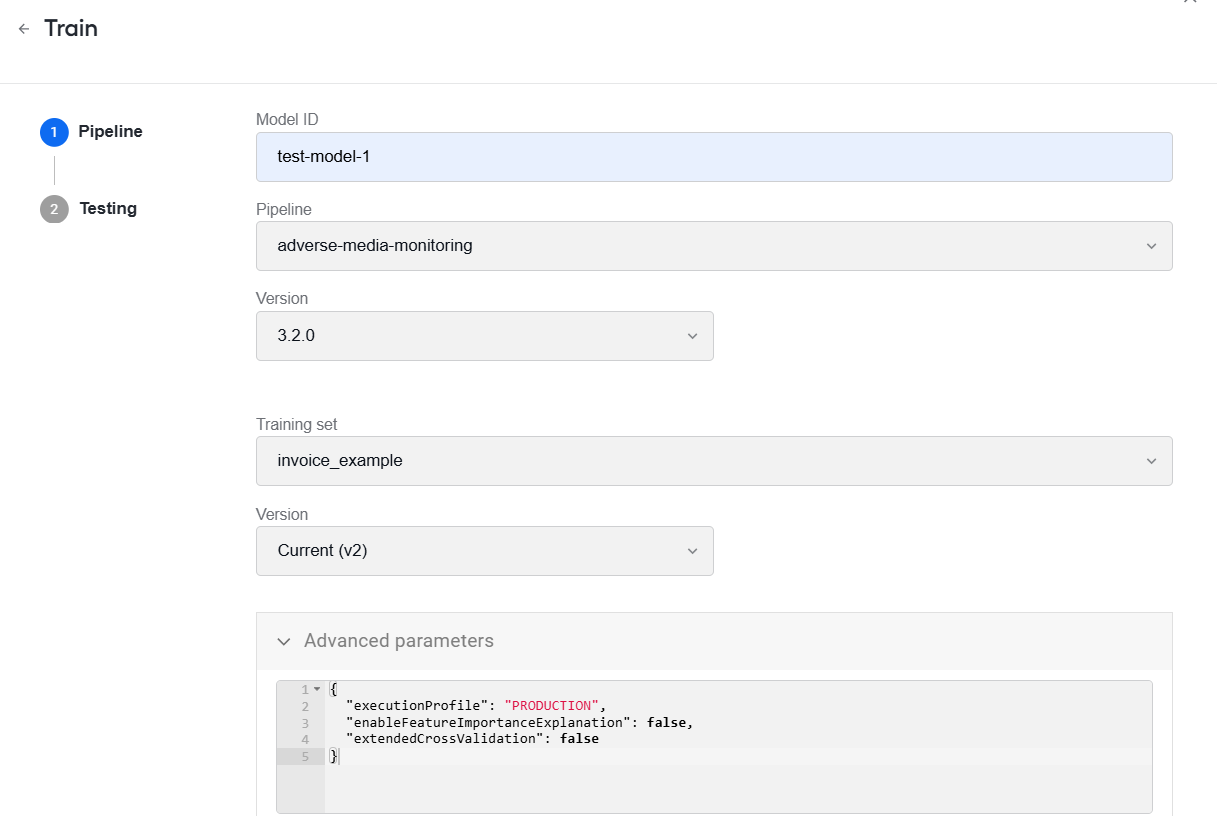
To allow for more sophisticated no-code model tuning, the model training wizard in the AutoML user interface in Control Tower is enhanced with an Advanced parameters JSON editor. In the section, you can add and set model training and execution parameters as JSON values. For details, read the Manage models topic.
The no-code Transformation step was enhanced with new expressions, extending your options for handling data across automation steps. The list of novelties includes expressions to support data encryption or decryption, get one or more elements as a string from the XML or JSON data passed as a string, and to leverage JSONPath syntax. For details, refer to Learn about supported rule and transformation operators.
The no-code Transformation step was further improved with the Add operator, which is now available in the
thensection for type list items, enabling users to streamline and simplify list-based data transformations. For more information, see Operators supported for list-based transformations.To enable you and your support specialists to locate issues faster, the Rabbit MQ log timestamp format was changed from the hard-to-read
epoch_secstime format to the human-readablerfc3339_Tone.The rule builder component was enhanced with a mechanism to handle incorrectly formatted numbers and warn users about them, allowing you to detect and correct such exceptions in a timely manner without wasting time on investigations.
Upgrades
To eliminate vulnerabilities and enhance security, the following third-party component updates were made:
Kibana was upgraded to v8.14.2.
ELK (APM Server, Metribeat, Filebeat) was upgraded to v8.15.0 on the RPA server.
Java Development Kit 8 is updated to 8.0.432.
Corrected issues
OCR
Eliminated the storage space issue when images pre-processed by Paddle OCR occupied 10x times the storage capacity as compared to PDFs. Now, the size of the folder with such pre-processed files and Business Process performance with Paddle OCR steps are back to baseline values.
Eliminated the OCR step out-of-memory (OOM) error during PDF-to-TIFF conversion. As a result, PDF documents of any size are converted to the TIFF format and recognized by OCR successfully without any disruptions.
Fixed
NullPointerExceptionoccurring in the course of validating templates with Paddle selected as the OCR provider. After the fix, templates are validated and labels are extracted as expected.
Infrastructure
Fixed the issue with setting access permissions for Superset dashboards in Control Tower by making changes to the Work.AI installer. Now, customers using corporate certificate authority have a truststore to validate trust to the endpoints requested by the Python libraries leveraged under the hood for setting and updating access permissions in Control Tower.
Resolved the issue with incorrect Marathon settings for static applications deployed on Agent servers. The fix introduced the maxumum memory (
xmx) limit and realmemvaule for such services as connectors-api, rules-builder-rest, genai-rulesbuilder, input-connector-rest, helping to avoid resource mismanagement and OOM errors.Eliminated the post-upgrade or post-installation Spring Boot initiation issues causing the RPA startup to fail.
Control Tower
Resolved the issue when a Business Process fails to be started from WorkFusion REST API if the input file length exceeds 20,000,000.
Fixed the problem with the monitor bot loop running continuously in a schema-based Business Process even though the
_sys_repeatvariable controlling the monitor is empty. The fix involved resolving issues with incorrect conversion of system variables from legacy data formats.