Version 10.2.9
June 07, 2024
This Work.AI version focuses on enhancements to create an end-to-end no-code automation experience and to make advanced coding faster and more convenient. The enhancements empower you to achieve the following:
Integrate data enrichment sources without engineering assistance by leveraging an out-of-the-box connector library that features Email Fetch, Fenergo, Pega, LexisNexis, and newly added Kafka and SOAP Clients. Configuring custom connectors has also become more intuitive.
Cut time to production for human-in-the-loop tasks by automating form layout generation with Artificial Intelligence (AI).
Implement complex decision logic without coding using AI-powered rule generation and rule-building operators enhanced with narratives for explaining decisions and expressions for setting conditions.
Enjoy greater flexibility in designing automation data flows with revamped input and output contract mapping and an option to combine steps with and without contracts in a single workflow.
Cut time and manual effort on model training by leveraging the AI power embedded into the new automated labeling flow for document dataset creation.
Speed up automated data extraction and improve its quality by running multiple template model versions in parallel, fine-tuning OCR, and using the special drawing mode to correct the extraction output.
Create a seamless data processing sequence with zero engineering involvement by integrating the no-code Dataset and Model steps into your automations.
Set up event-based communication with external systems using Trigger Connectors enhanced with asynchronous data transmission and REST API exposure.
Monitor execution schedules across the platform from one place using the out-of-the-box Scheduler Monitoring dashboard.
Get real-time process data insights straight to your email using reports and alerts configured in Work.AI Analytics.
Optimize workforce utilization and workload management across bigger teams, making use of the group assignment feature in Workspace.
Integrate Manual Tasks seamlessly into automations by mapping the tasks' contracts to the input or output from other steps.
Customize the platform’s look and feel with your branding assets by leveraging the newly implemented white labeling flow.
Leverage extended computational resources and LayoutLM deep learning pipelines of the new Kubernetes-based ML Ops Platform to create comprehensive datasets, run compute-intensive experiments, and train more complex models faster.
Streamline code delivery and testing for Java Native Workers (JNW) with the JNW Toolkit and worker-task-test library featuring a range of plug-and-use reusable components.
Enjoy streamlined RPA management and optimized RPA performance with the unified RPA setup eliminating the effort-consuming Windows console sessions.
Leverage OCR configuration flexibility with the range of available OCR providers extended with Paddle OCR.
In addition to the major features, WorkFusion has also upgraded vulnerable components, fixed known issues, and increased the platform’s overall performance. These are the most important benefits of the work:
Faster and better-quality processing of documents with complex structures thanks to the table extraction capability
Direct ingestion of EML and MSG formats into datasets
Enhanced platform performance due to the automatic RAM adjustment mechanism and increased Analytics cache timeouts
More efficient cluster resources utilization when running multiple Digital Workers on the same environment thanks to the newly introduced Rate Limiter
Optimized RPA performance and security, backed with maximum heap size setting in Bot Manager, automatic screen unlocking, and automatic driver cleanup
Improved process data management with upgraded data cleansing logic and a default 90-day period to remove unused automations
Extended capabilities for designing Manual Task layouts, including with multi-level structures
More efficient workload distribution due to bot fleets becoming available not only for RPA but for other tasks
New Asset Bundle import strategies allowing you to easily detect import issues, including those associated with backward platform compatibility
Strengthened application-level security due to the newly implemented role-based access to Marathon UI
Workspace API exposed at the bot step level to provide easier navigation to specific assignments or assignment queues
Rocky Linux 8.9 supported as an alternative operating system for Work.AI installation servers, extending your hardware management options
New features
AI-backed automated document labeling
Instead of manually labeling documents in a dataset, rely on AI-backed models to do that for you. Choose any of the three providers: WorkFusion, OpenAI, and Mistral AI. The WorkFusion AI-backed model is available out of the box. To enable auto labeling with OpenAI and Mistral AI, follow the guide.
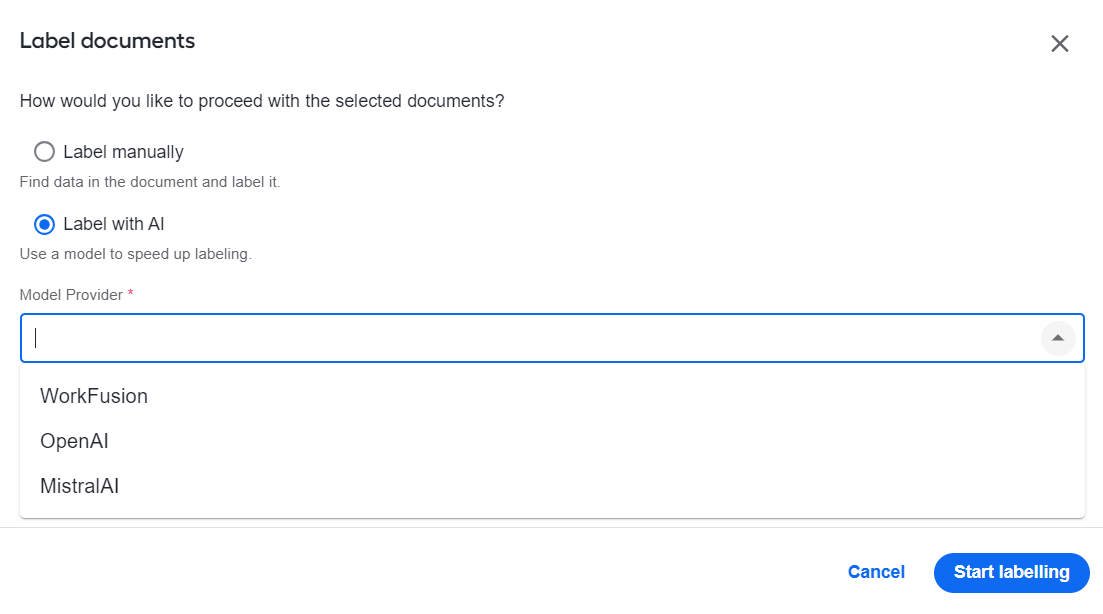
Irrespective of the provider, the labeling process is fully automated and code-free: upload a batch of documents to the platform and get them labeled within minutes. For details, read Manage datasets | Label documents.
Enhanced no-code model management experience
To make the experience of managing Work.AI models still more user-friendly, WorkFusion continues to extend associated no-code capabilities:
No-code AutoML Bridge steps are renamed into Model steps and all readily available from one place—the Models section in the Workflow Designer's step panel. You can now select Model IDs from a dropdown list, which saves you the trouble of memorizing or searching for them. For details, see Add and configure Model and Dataset steps in Business Process.
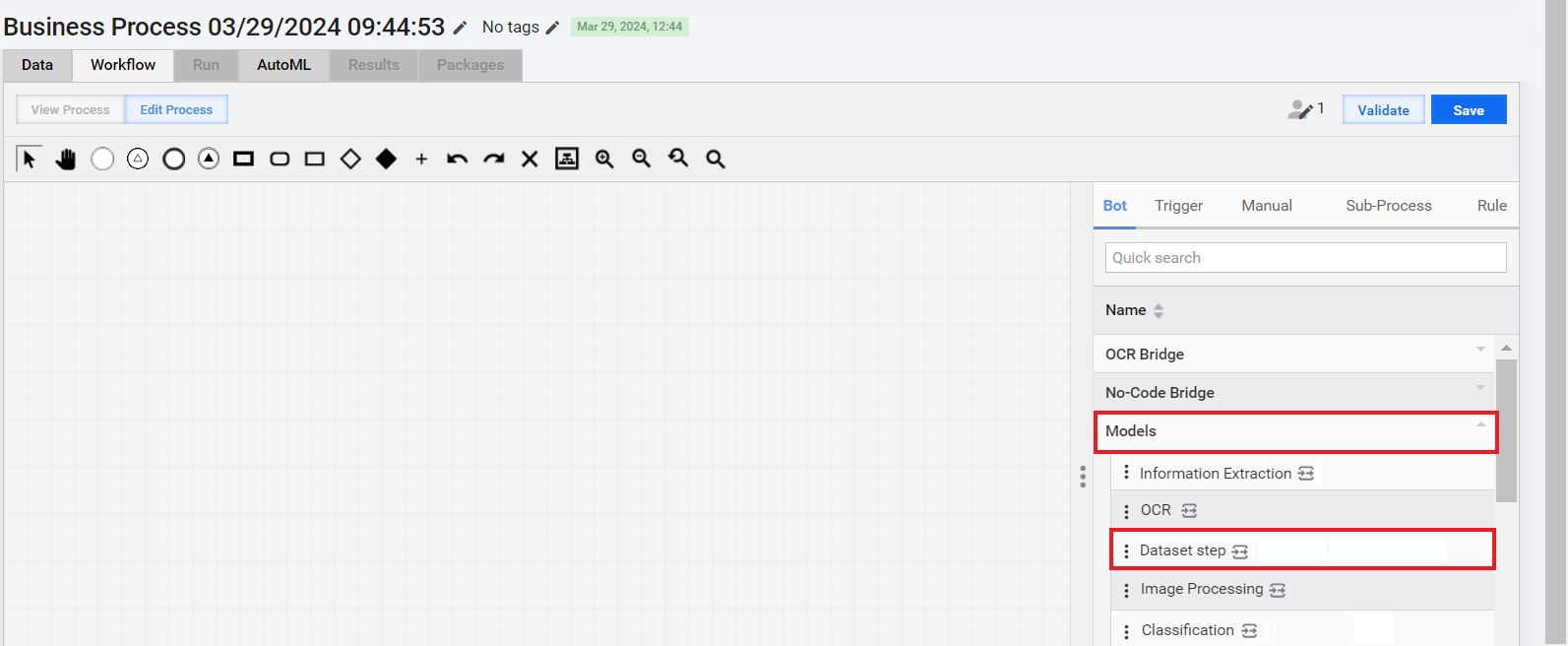
The Dataset step is introduced as a new no-code flow-building element. It can serve as a convenient bridge to join a model, a manual review task, and a dataset into an end-to-end document-processing sequence.
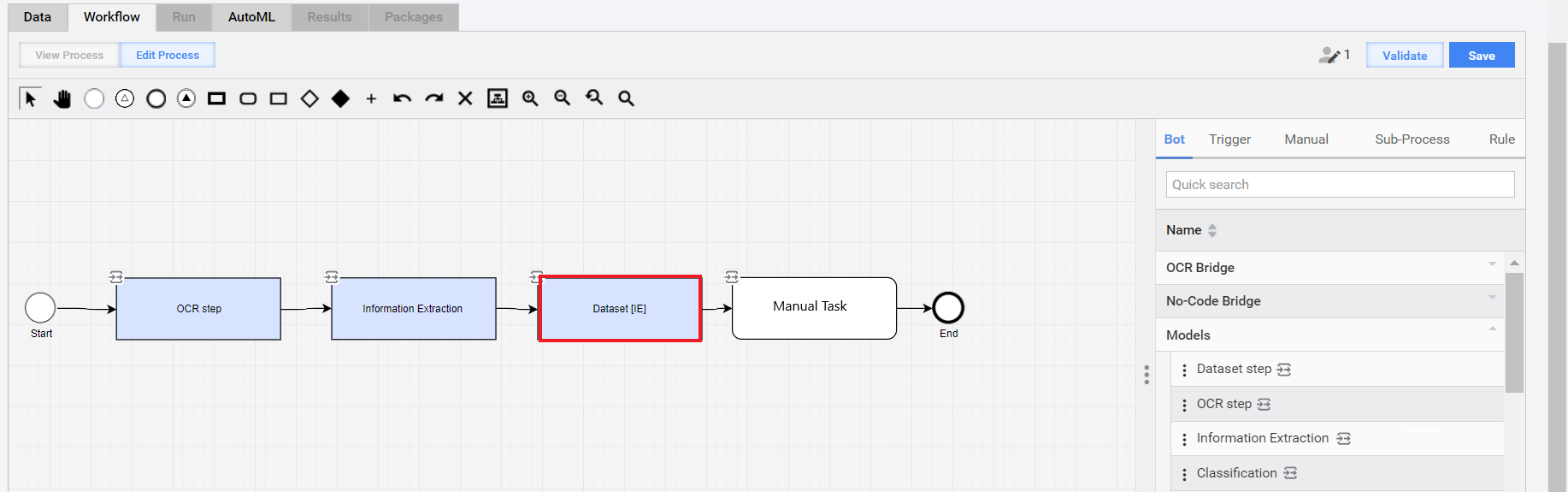
For instance, you can insert a Dataset step after a model to create a dataset from its output and then feed the result as input to a Manual Task. Such a configuration helps you avoid additional transformations and cuts automation efforts and time to production. For details on the Dataset step configuration, see Add and configure Model and Dataset steps in Business Process.
Template models boast a versioning mechanism allowing you to further speed up data extraction and experiment with its quality on a broader scale. You can create and validate multiple versions for the same original template simultaneously. With a newly introduced OCR configuration interface, you can get better control over the template input quality and hence ensure better model performance.
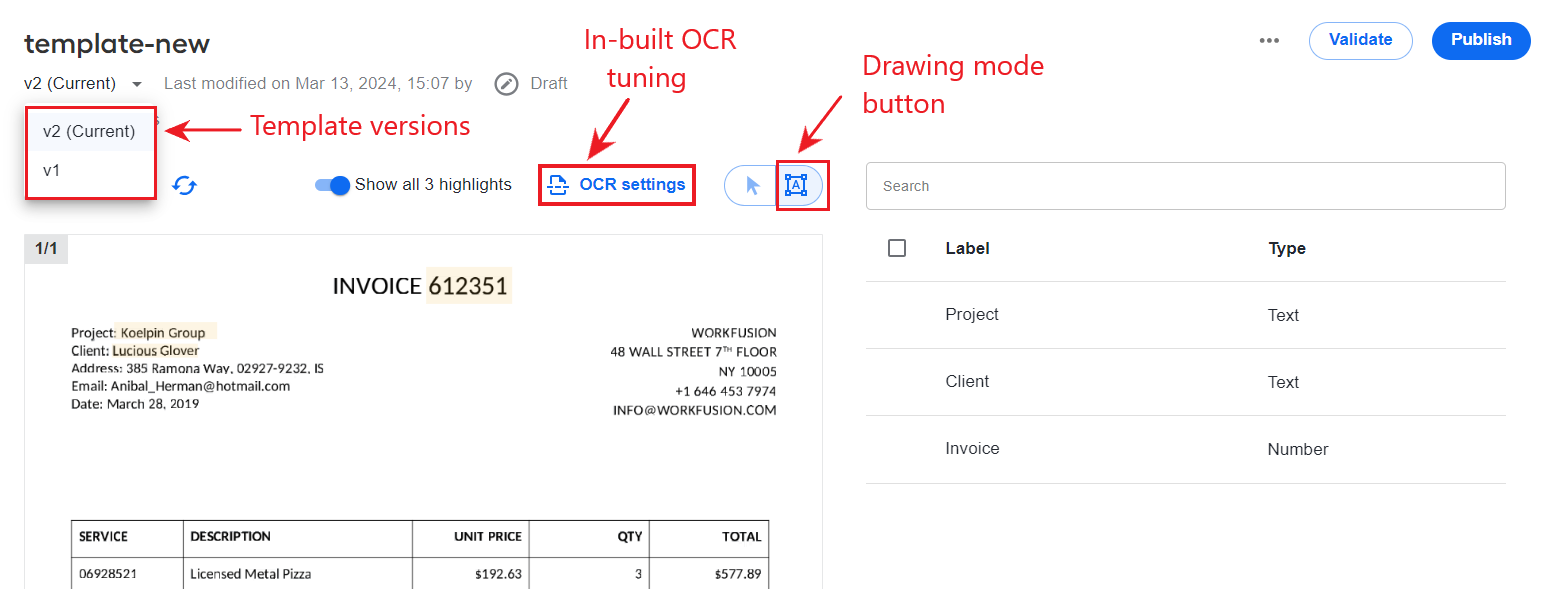
In addition to generating from fillable PDFs, you can build templates from scratch using the novelty drawing mode. Thanks to the new mode, working with labels in a generated template has also become more flexible and error-proof. You can not only view or delete labels but also create or edit them. This way, you can cover a wider variety of extraction input formats, even with non-standard layouts, and correct the template model’s mistakes on the fly. For more information, see Create and manage templates.
Automated task form generation with AI
Manual Task Designer is now empowered with AI to assist you in automating form layout generation for labeling tasks. Employing an AI-backed model accelerates Manual Task delivery and reduces required manual effort.
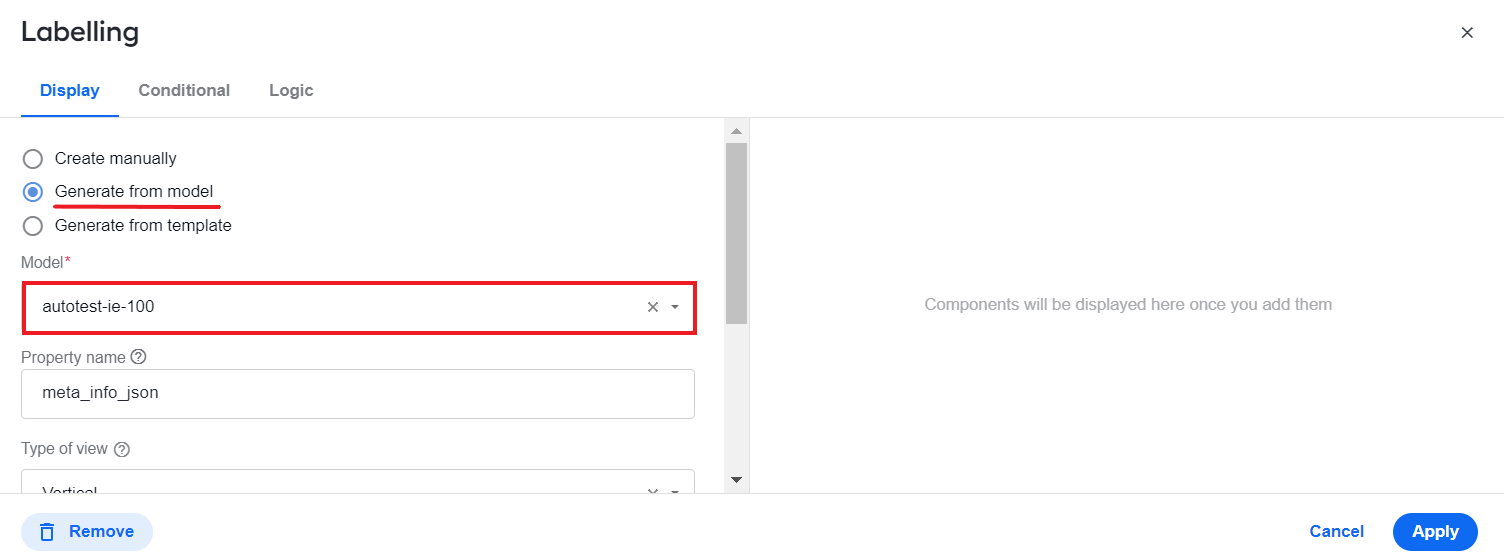
A selected model creates a task form automatically based on its training set or configuration within minutes. For details, see Design Manual Tasks via Task Designer Operation.
Process monitoring and reporting
WorkFusion Superset-based Analytics is enhanced with the following features:
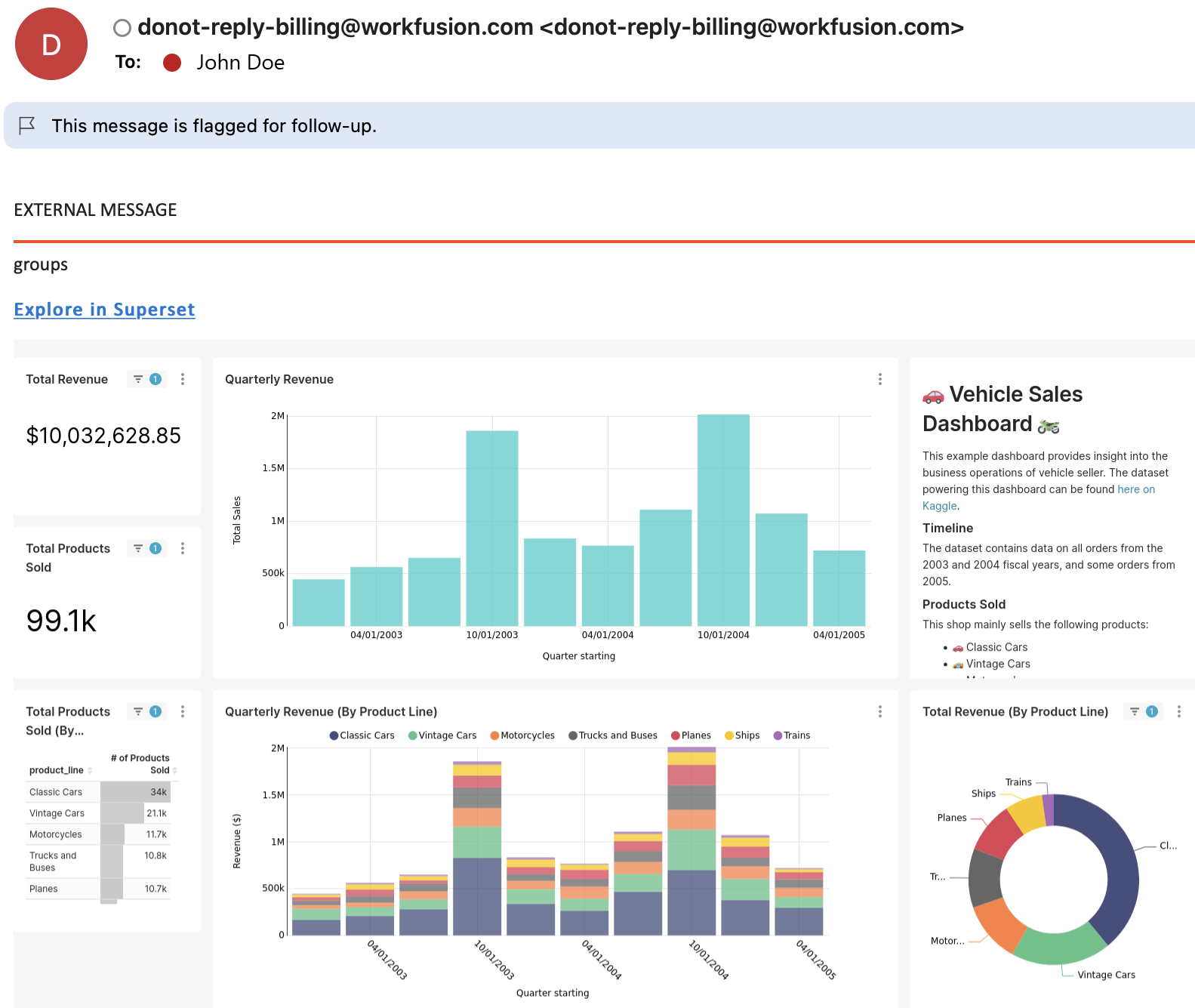
Alerts allow you to monitor in real time and promptly respond to critical changes in automation-related data. You can set custom alerting rules and get scheduled notifications straight to your email.
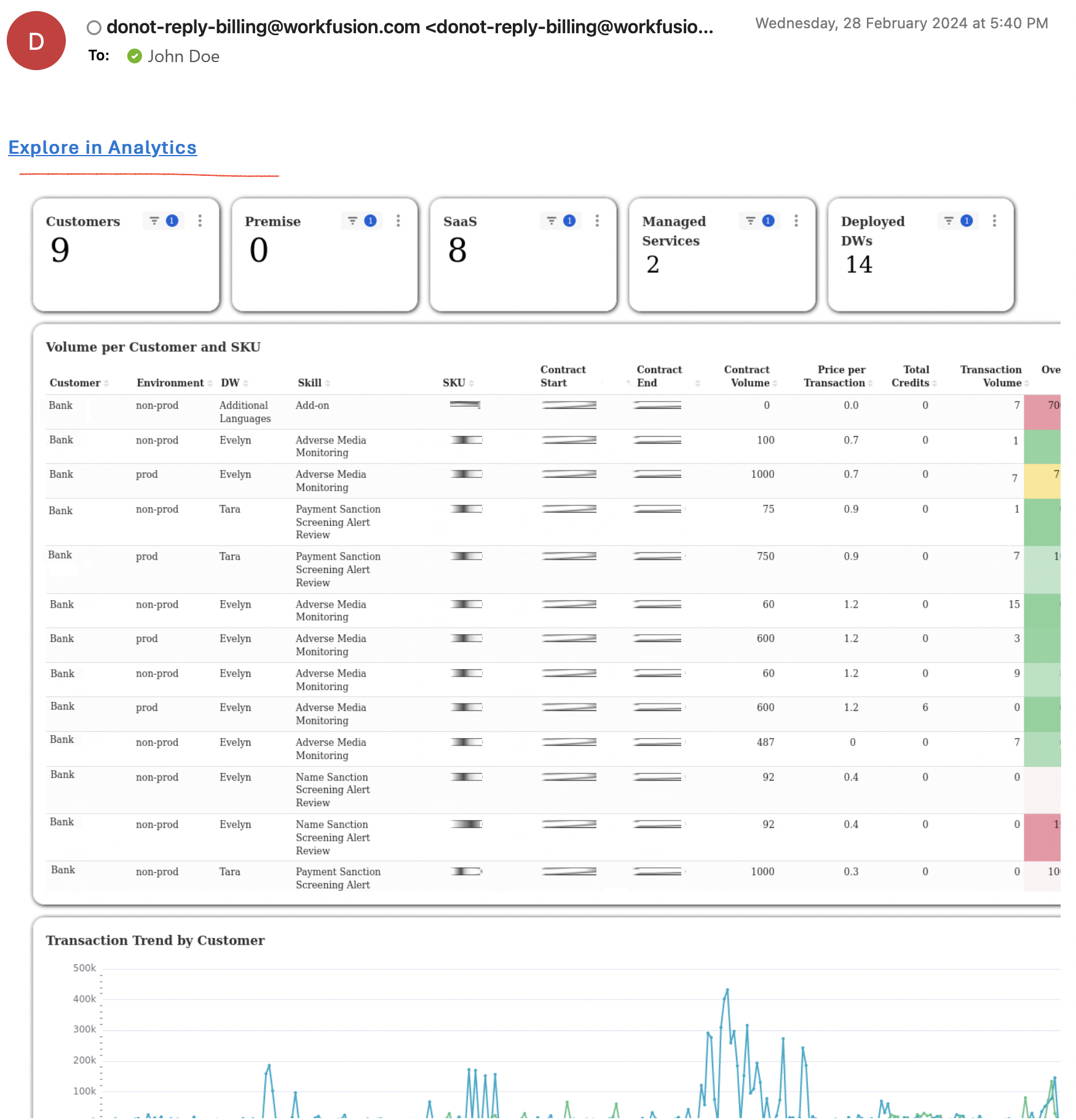
Reports enable you to create interactive and visually compelling data narratives and share them with stakeholders. Set a schedule and receive reports regularly to your email.
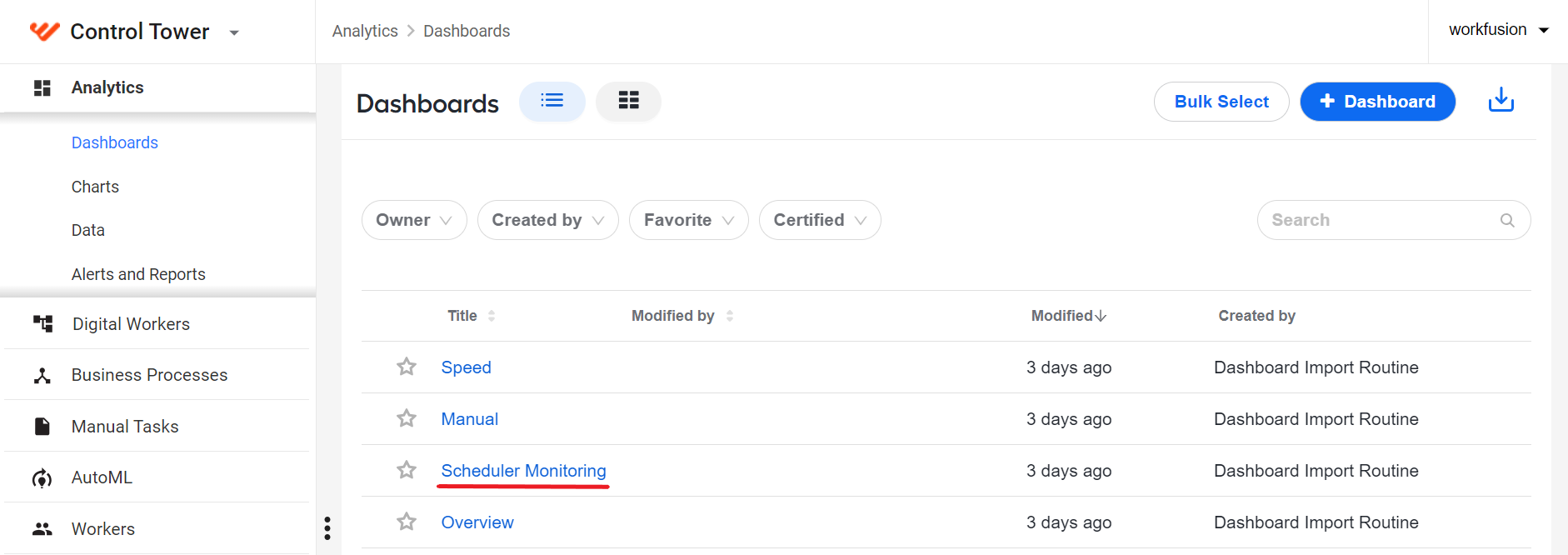
The Scheduler Monitoring dashboard is available out of the box in addition to the Overview, Manual, and Speed ones. It monitors and gathers metrics on all scheduled processes across Work.AI. You can also set up alerts and reports for the dashboard to get regular updates on specific schedules. For details, see the topic.
For instructions on activation and usage, read Set up alerts and reports.
White labeling
WorkFusion aspires to turn its Work.AI flagship product into a customizable solution that one can redesign and adapt to a wide range of business needs. This release provides the means to restyle the look and feel of the platform to your branding standards.
With a few simple actions, you can replace the WorkFusion logo in the platform interface with a custom one of your choice and change the WorkFusion’s original copyright text. For details, see the Upload branding images guide.
Streamlined development with JNW Toolkit
The newly introduced Java Native Worker (JNW) Toolkit is a Java library designed to simplify JNW development and integration into existing non-JWN implementations. The toolkit’s extensive range of features reduces coding efforts and increases developers’ productivity:
A single Bill of Materials (BOM) file aggregates all dependencies across the library tiers, thus simplifying dependency management.
A set of ready-to-use annotations and annotation processors generate boilerplate code, significantly reducing the need for manual coding.
A collection of pre-packaged modules provides commonly used functions, thus promoting code reusability.
A new dedicated Archetype is included to expedite the implementation of Digital Workers based on JNWs and input and output contract mapping.
A special annotation is available to support migrating from WebHarvest to the JNW-based approach without switching from ODF to other frameworks.
For more details, refer to the JNW Toolkit documentation.
Deep learning pipeline to enhance information extraction
The new LayoutLM deep learning pipeline allows processing more complex document types and using advanced development approaches to deliver information extraction models with less effort and within a shorter time:
The model lifecycle is built on top of Kubernetes, which makes it easier for ML engineers to develop, deploy, and manage portable and scalable machine learning (ML) workflows.
Transfer learning approaches help avoid retraining models from scratch with large amounts of data.
Continuous integration and deployment are supported to integrate Kubeflow Pipelines in downstream ML workflows via REST APIs.
You can use LayoutLM deep learning pipelines, provided you installed ML Ops Platform.
End-to-end ML cycle management on top of Kubernetes
To empower you with extended computational resources and an industry-standard Kubernetes-based model management experience, WorkFusion introduces ML Ops Platform. The optional add-in to our core Product allows you to process datasets with diverse template structures, while cutting time to deliver production-grade models. The add-in is installed separately from the Platform. For installation instructions, see the Install ML Ops Platform guide.
With ML Ops Platform, you get the following benefits:
Reduced time to value for AI-based solutions due to leveraging deep learning pipelines, streamlined deployment, and fewer dependencies
Elastic scaling through Kubernetes, helping you to better utilize computational resources and reduce costs
Access to real-time model performance data during training and in production with state-of-the-art analytics
Seamless integration with both on-premise and cloud deployments of the WorkFusion platform
Monitoring and detecting model drift and decay in production
Support of federated and transfer learning
Reduced maintenance effort to support the infrastructure and functionality
Compatibility with multiple languages (Python, Java, R, and even C++) and frameworks (TensorFlow, PyTorch, scikit, Apache Spark, and others)
Acceleration tiers: CPU, GPU, and TPU-optimised deployment modes
You can leverage the features and benefits of ML Ops Platform to annotate datasets, train models, and run experiments via the AutoML menu in Control Tower.
Improved JNW testing experience
To facilitate and streamline the testing of JNW-based Bot Tasks, WorkFusion introduces the worker-task-test library. You can use it to configure and run tasks with different input data types (empty input, single or multiple rows), implement a range of testing scenarios, and integrate your tests with the ones based on the Spring Boot-like approach.
The library’s robust API allows you to implement advanced testing cases, such as running multiple tasks in a chain with a shared context or setting a task start configuration with multiple records. AssertJ-style assertions simplify checking the execution results, optimize the workflow, and decrease test duration.
For more details, see Test JNW-based tasks.
Unified RPA setup
The unified setup is a novel RPA installation approach that eliminates Windows console sessions initiating ELK services, engines, and Remote Desktop Clients. The novelty approach supports the Virtual Desktop Infrastructure (VDI) and Server setup options, the only architectural difference between them being the number of units to install in the target environment.
The unified RPA setup offers the following benefits:
Optimized system resources, leading to smoother operation and reduced overhead
Streamlined RPA management due to the eliminated complexity associated with managing separate console sessions for various services
Improved security and privacy with server administrators unable to access user sessions without credentials
Seamless and streamlined RPA experience, free from potential disruptions caused by multiple console sessions
For details, see Deploy RPA and Install RPA Windows server.
Upgraded and extended external connectivity options
WorkFusion has overhauled all available connector configuration interfaces to make them more accessible and to simplify and speed up their setup. In addition to Email Fetch, Simple Email, Fenergo, Pega, and LexisNexis, WorkFusion’s out-of-the-box connector library now offers two new items, saving you the trouble of configuring a custom solution to enrich your automations with data from the respective input sources:
Kafka Connector in two implementations—Consumer and Producer. Kafka Consumer gets records from Kafka topics, transforms them to JSON, and makes them available for subsequent steps. Kafka Producer handles records from a preceding step, transforms the data format, and dispatches them to a designated Kafka topic.
SOAP Client allows connecting with any SOAP web service to effortlessly retrieve required data and seamlessly dispatch it to subsequent steps.
For details on the new connectors, see Configure no-code Generic Connector.
The Trigger Connector capabilities are also extended with asynchronous data transmission, which reduces required coding volumes. The Trigger’s REST APIs are now directly exposed to third-party services to enhance interoperability and allow for seamless integration with diverse external systems. For more details, see the Trigger Connector documentation.
Extended options to assign Manual Tasks
WorkFusion upgraded its human-in-the-loop experience to cater to large teams with multiple users reviewing daily workloads. In addition to existing assignee options in Workspace, you can now assign tasks to one or more user groups.
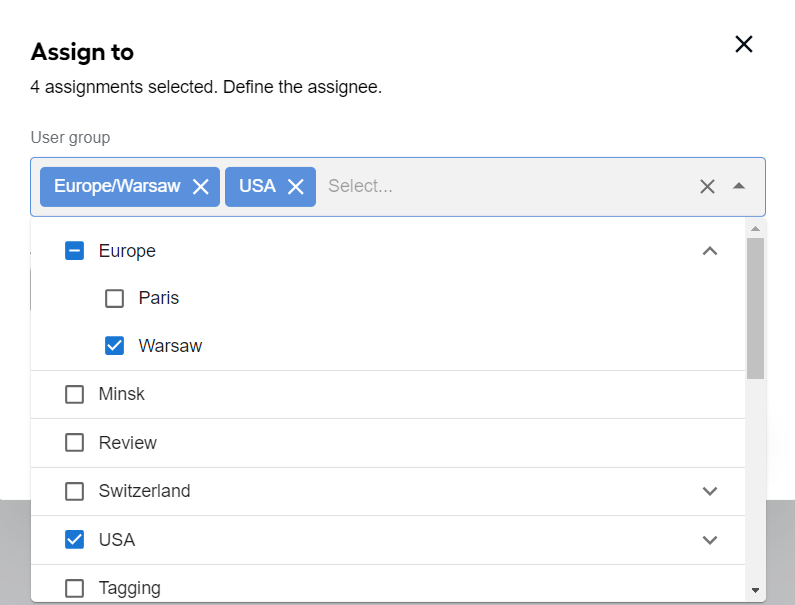
The new feature allows for quicker and more efficient workload distribution, while reducing bottlenecks and ensuring that appropriate teams promptly address tasks. For details, see the Select assignee topic.
Improved logic for configuring step input and output
Significant changes were made to simplify building automation flows from steps with output and input data contracts—less effort and in a shorter time:
Manual Task steps and connectors now support input and output data contracts, facilitating their integration into automation flows and increases their usage flexibility. For details, read Add Manual Task | Set contracts.
Back propagation from step to component contracts is enabled to promote the reusability of automation flow components. If you create a step and assign a contract to it, the latter is backported as a component contract so that you can reuse the same step inside another automation workflow.
Support for nested variable mapping simplifies building complex data flows and enhances data handling capabilities.
New user-defined custom variable types and object schemas make delivering tailored solutions to match specific business needs less time-consuming.
Global variables you can set for contracts allow for the reusability of automation steps and their consistent and predictable behavior across automations.
Steps with and without input and output contracts can be combined into a single automation flow, which expands your options for integration and workflow design.
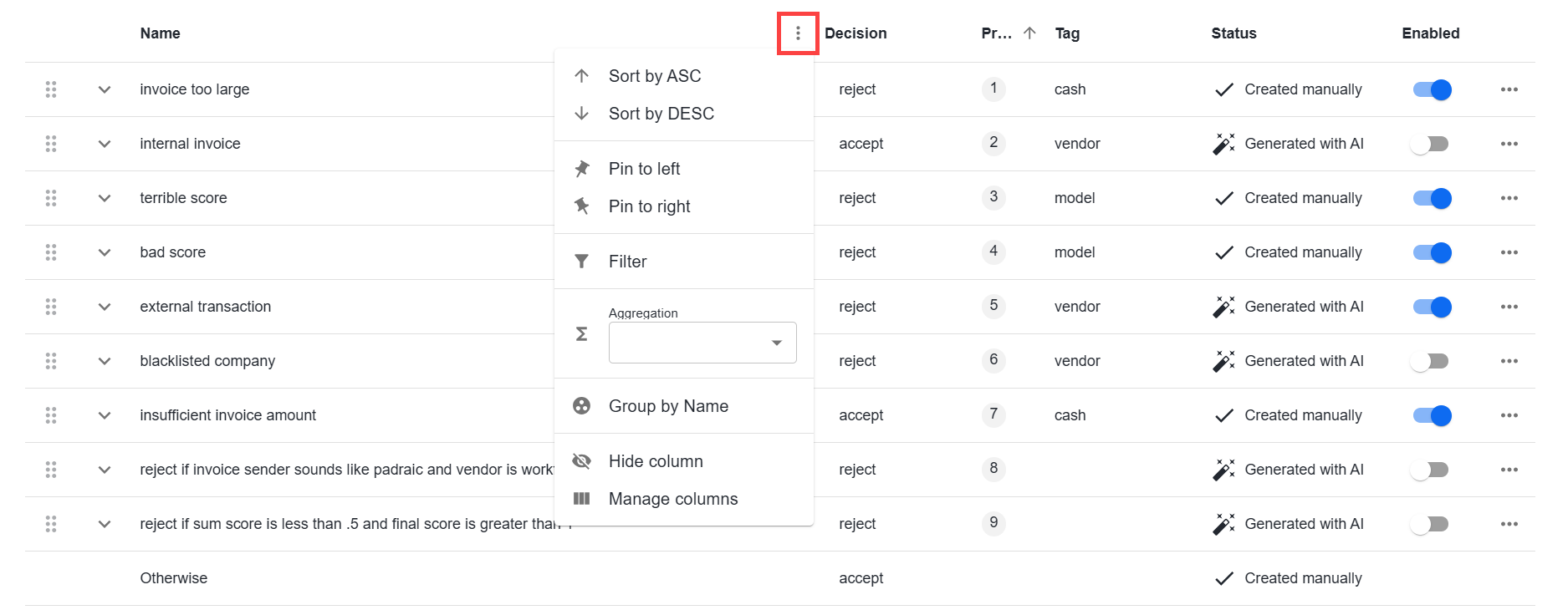
The diamond rule operator is integrated into the Digital Worker configuration, facilitating efficient handling of large rule sets through table-based management. You can now apply filters, sort, reorder, and group rules to get an aggregated view of all the available data.
Enhanced usability and numerous interface design improvements optimize navigation and provide a more intuitive and user-friendly experience.
For more details on contracts and schemas, see Implement schema-based Business Process.
Enhanced no-code decision logic
To allow you to set up more complex decision-making logic without coding, WorkFusion revamped the rule operators in Workflow Designer and expanded their capabilities:
The AI-powered rule generation leverages advanced algorithms to analyze data and generate high-accuracy rules, thus reducing the manual effort and time required to deliver automations.
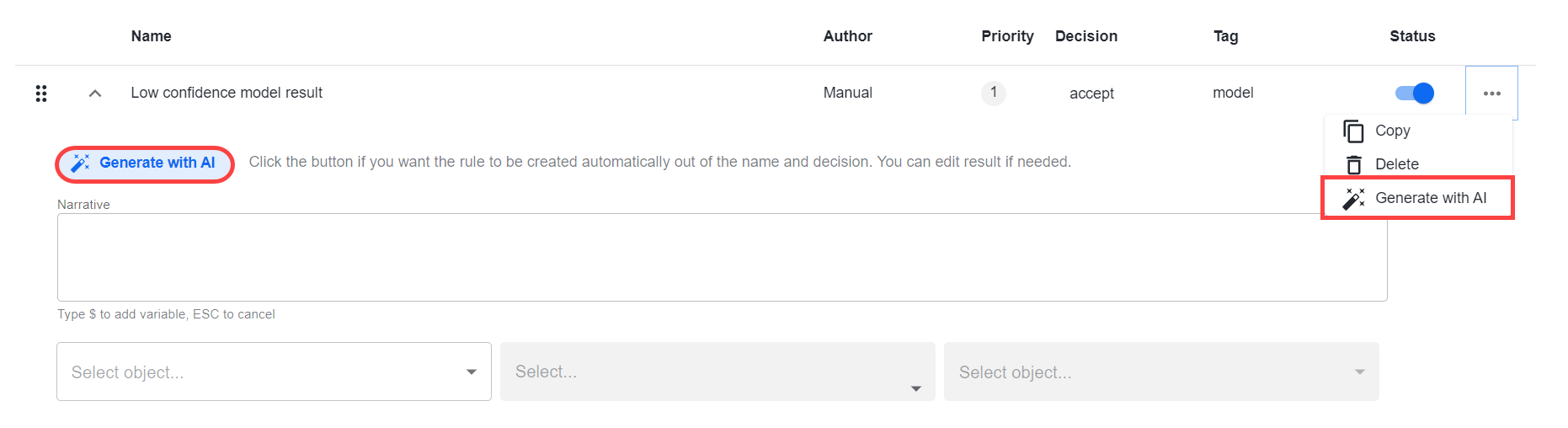
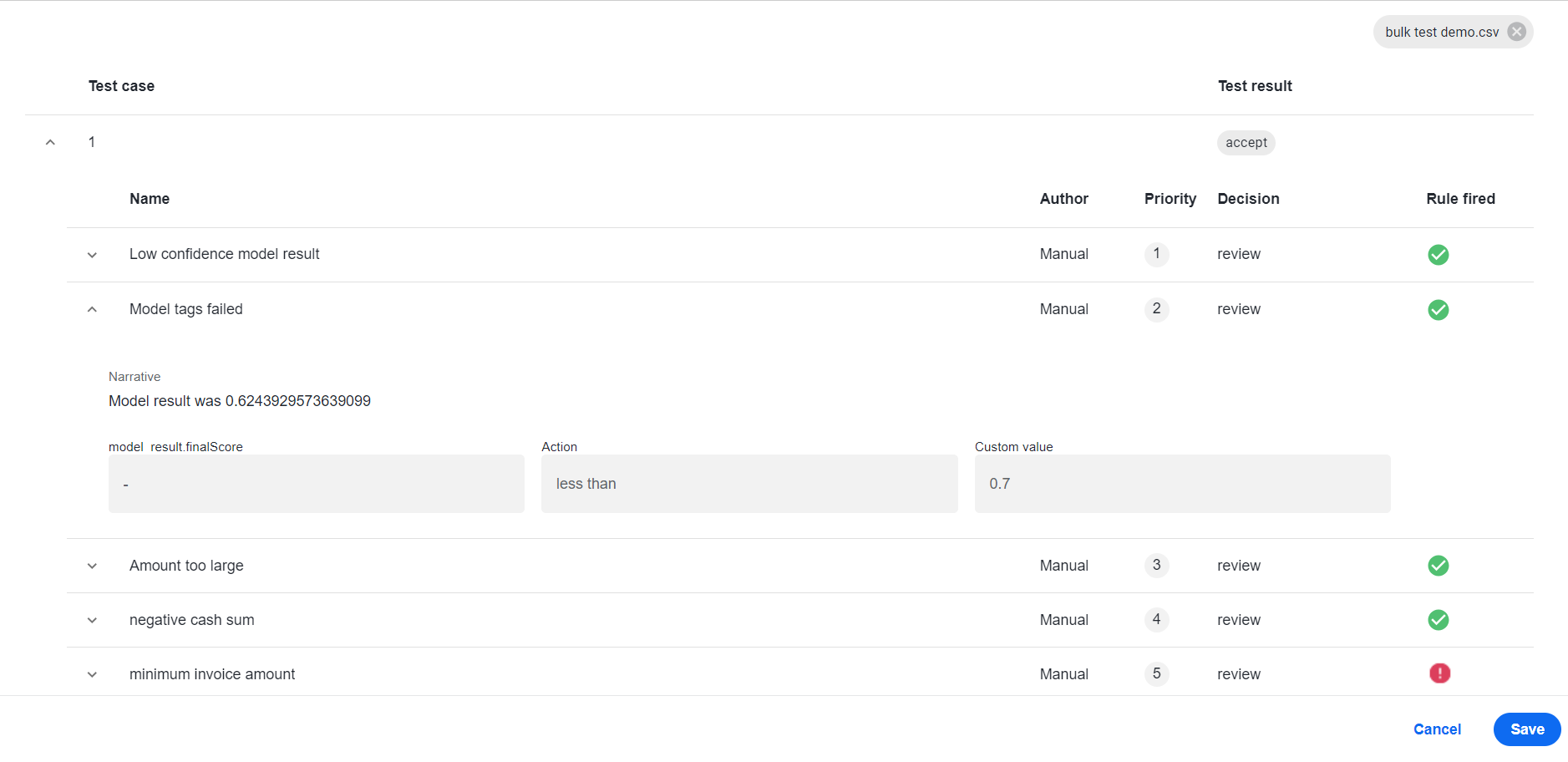
Bulk rule testing streamlines the validation process for improved efficiency and shorter time to production.
Dynamic narratives are now passed from rule operators, enabling you to get human-readable explanations of outgoing decisions.
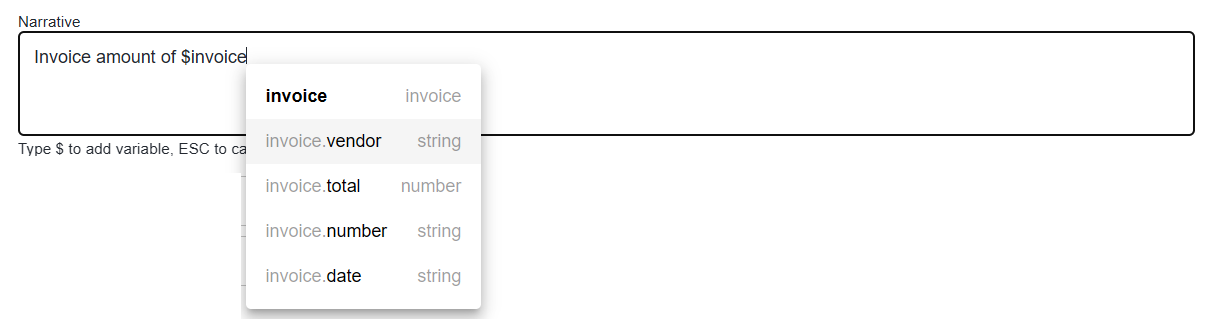
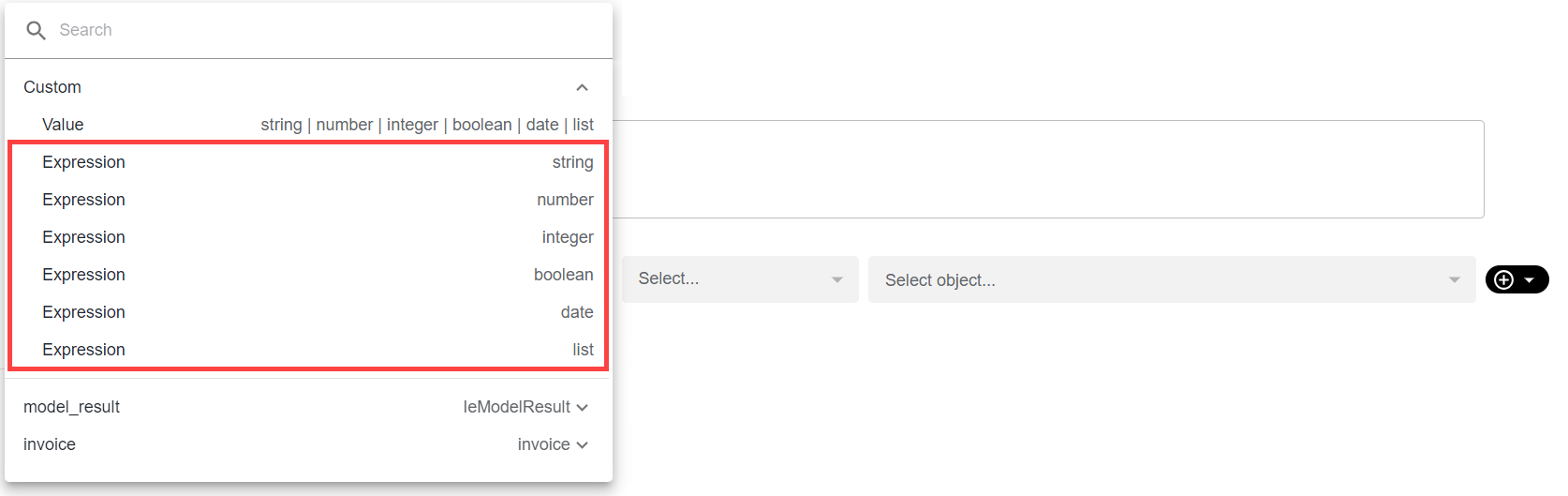
Expressions are introduced as a new object type for setting rule conditions.
The rule-based steps are redesigned to display data in a more compact and legible tabular format via a variety of sorting options.
One more diamond operator is brought in to facilitate and speed up designing the automation flow decision logic. While the new diamond operator is recommended for implementing the decision-making logic, the legacy diamond operator remains accessible for more technical operations, such as splitting, joining, or throttling data.
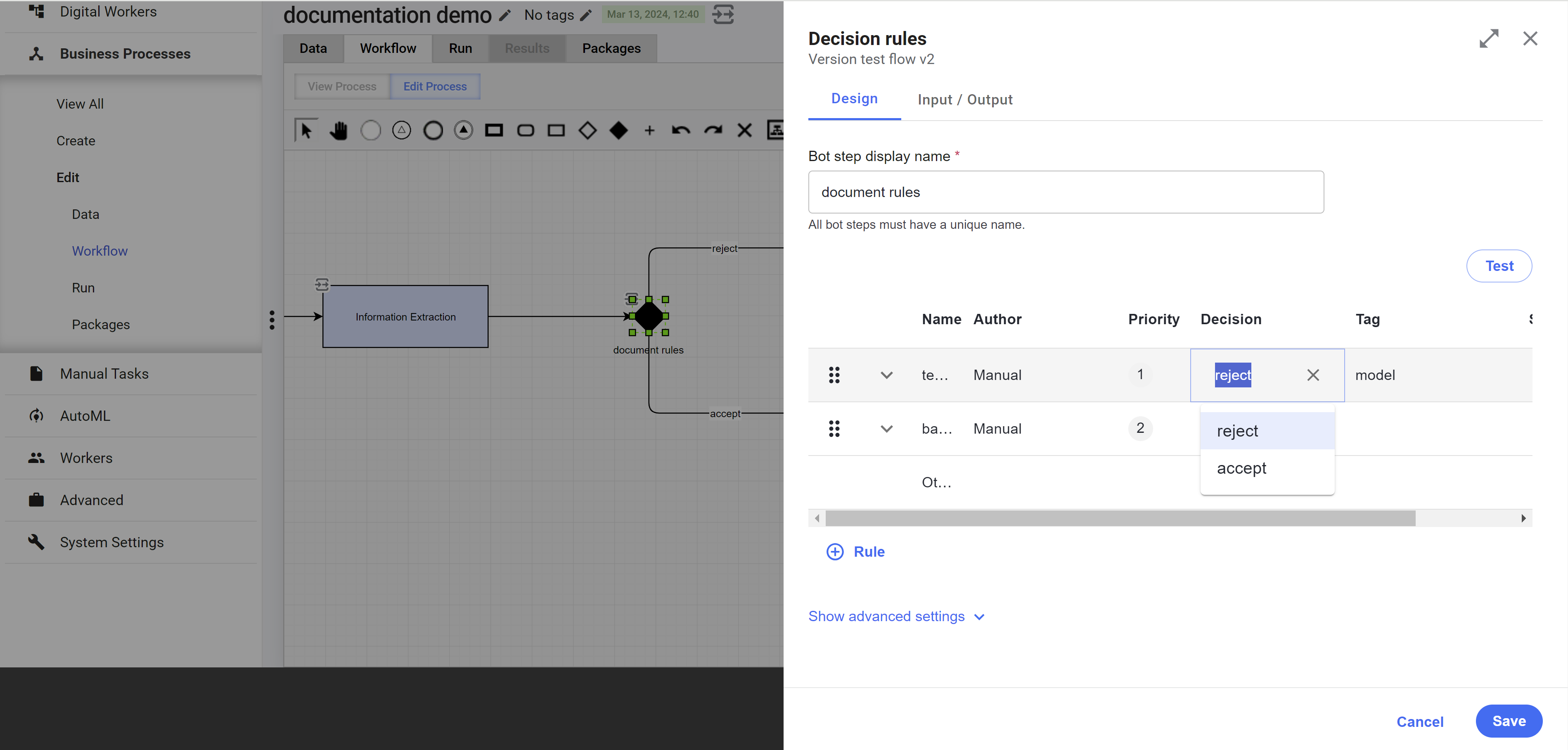
For details on the decision logic enhancements, refer to Configure no-code Decision rules step and Configure no-code Transformation step.
More OCR providers
To empower you with flexibility in document handling, WorkFusion expands the choice of available OCR providers. The initially supported ABBYY, Azure Form Recognizer, and Google Vision API are supplemented with Paddle OCR. You are free to use your preferred and probably more familiar tool.
The new provider is fully compatible with standard models and labeling tasks and is configurable from the Control Tower interface. For details, read Configure OCR step and OCR providers.
Improvements
AutoML
To speed up the processing of documents with complex structures and improve the quality of model output on such documents, WorkFusion implemented table extraction. The new feature detects and recognizes table structures and contents from processed documents. For now, table extraction is available for Native PDFs and the Paddle OCR provider.
In addition to TXT, PDF, JPEG, PNG, BMP, and TIFF, datasets can work directly with EML and MSG formats. As you upload emails or messages to create a dataset, those are converted automatically to the TXT format, and you can easily label them just as any other document. The new feature expands the input sources for model datasets and reduces the dataset generation time.
The extraction pipeline for template models boasts enhancements providing better model output quality:
Page detection, including in Manual Tasks using template-based extraction for form layout generation
Processing of scaled- or squeezed-dimension documents by template models
Support for automatic shift detection in Python-based checkbox and signature detection operations
Analytics
- To prevent Work.AI Analytics security issues, a secret key rotation mechanism is implemented to be used for upgrading to Work.AI versions later than v10.2.8. The mechanism supports the Superset requirement to assign a random complex secret key.
Manual Task Designer
To give you more flexibility during the manual review, WorkFusion enabled adding custom selection options for the Select component in a task form and submitting them with the rest of the assignment data from Workspace. For instructions on enabling the feature, see Create configuration form in Form Builder.
WorkFusion further enhanced user experience in delivering task forms for working with complex hierarchical data structures. The enhancements provide more convenience and variety in building repeatable panels and blocks with nested layouts, thus enabling you to handle more complex input within a shorter time.
Infrastructure
Memory limits for all major Work.AI services are now automatically adjusted at server startup proportionally to the RAM available on the Master server, making it possible to substantially increase the overall platform’s performance. Moreover, when RAM is increased manually on the Master server, the new limit values are picked up at boot time.
To improve Control Tower performance and that of charts and dashboards in Work.AI Analytics, the cache timeout values for Analytics-to-database connections are increased. For high-availability installations, the timeout is 100 seconds. For non-HA ones, it is set to 500 seconds.
To give you a wider choice of operating systems (OS) you can use for the Work.AI infrastructure, support for Rocky Linux 8.9 is introduced. You can employ the OS to set up Master, Agent, and Analytics (Superset) servers in both the Basic and High Availability installation modes, as well as for PROXY in the High Availability mode. For details, see System requirements | Hardware and OS.
For you to have better control over third-party components and avoid disruptions due to licensing issues, WorkFusion implemented alerting on ELK license validity. The platform warns you automatically two weeks before the ELK license expires.
To eliminate the Rapid Reset vulnerability discovered in Nginx 8.11.1, the component's configuration was changed to minimize the exposure. The changes allow Nginx to detect malicious attacks better and drop insecure client connections faster.
As part of the effort to enhance the continuous delivery and continuous integration within Work.AI, LayoutLM pipelines are made available in Control Tower from initial installation. Whereas earlier their usage required manual preparations, you can now see the LayoutLM pipeline populated automatically as you build a new Control Tower instance.
RPA
To fine-tune your RPA environment with precision and allocate resources more thoughtfully, we added the possibility of setting the maximum heap size per Worker in the Bot Manager UI. For instructions, see the Bot Manager documentation.
With seamless integration with CyberArk, you can ensure robust protection of sensitive credentials and data, safeguarding your automated workflows against potential breaches and unauthorized access. For more details, refer to Configure CyberArk integration with RPA.
To avoid situations with the screen lock when running long Business Processes, especially those relying on image-based automation, we enabled the automatic screen unlocking by default, ensuring uninterrupted bot execution and enhancing productivity.
Inspector is made a part of the RPA installation, boasting the same object-inspecting capabilities.
The automatic driver cleanup, now enabled by default, simplifies maintenance tasks by automatically removing obsolete or redundant drivers, freeing up valuable system resources and reducing the risk of compatibility issues.
Bot Agent and Worker logs were optimized, facilitating proactive identification of performance bottlenecks, error patterns, and potential security threats and empowering users to quickly pinpoint issues and take corrective actions.
Control Tower
To avoid confusion and provide naming consistency across Work.AI, the Data Purge API endpoints were updated, following the renaming of the Data Purge UI functionality in the v10.2.8 release. Now, the same functionality you knew as Data Purge API is available as Data Management API. For updated endpoints, see the API reference.
To optimize data management across the platform and make sure no obsolete data remains to downgrade your performance, the cleansing logic was updated to cover not only the child ct.run tables but also the run table itself. Additionally, a default 90-day purging period was introduced. As the period expires, the out-of-the-box purging procedure removes any automation flows you have not been using over this time. You can also customize the default setting to your needs.
To utilize available cluster resources effectively when running several Digital Workers on a single environment, WorkFusion introduces Rate Limiter, a new replaceable component represented as a single Bot Task. It allows you to configure throughput wherever needed, for example, when re-distributing the loading between Business Processes. To tailor performance to your specific requirements, configure the approximate wait time and amount of records to pass.
To prevent backward compatibility issues with Digital Worker bundles, the Asset Bundle import mechanism was enhanced with new strategies. Any files or folders in a bundle that the current version import mechanism fails to recognize are skipped with warnings, while those recognized but having invalid structure or content cause import failure. With the enhancements, you can identify the exact reason for the bundle import failing and address it promptly.
To enhance the working experience with contracts, WorkFusion improved parallel branch analysis for contract validation. Previously, contract validation considered all parallel branches mutually exclusive, which is not valid for split and join cases. Now, when parallel branches provide a conflicting type for the same variable, a warning is shown only if a downstream step uses the variable.
For you to reuse tasks created for a specific Digital Worker in other Digital Workers, the Digital Worker code, version, and variation name are available at the task runtime.
Routing of tasks for different business purposes based on bot fleets is now available not only for RPA steps but also for non-RPA Bot Tasks. Set a fleet when configuring a Bot Source and then assign the Bot Source to any automation step as required. For configuration instructions and existing limitations, see Work with fleets.
Titles for specific tasks on the bot step configuration pages are renamed according to the task purpose. Thus, a more general title of Bot step configuration is changed to Asynchronous Sub-process Execution step configuration, Synchronous Sub-process Execution step configuration, Trigger step configuration, AutoML Bridge step configuration, and OCR Bridge step configuration for the respective bot steps.
Steps with contracts in the Workflow Designer now have a special indicator in the top right corner to distinguish them from schemaless steps on the canvas.
The final step data in a Business Process is processed on the Control Tower side, enabling you to reduce the required hardware for Business Process execution. BEP Workers are no longer used to do the job as opposed to the previous Product versions.
The reworked mechanism of loading field schemas allows you to reduce time and optimize resource usage when handling a large number of field schemas. The
loadFieldSchemaItemsmethod in the Workspace preview controller is triggered when you open the Workflow Designer.To allow transferring custom object types across environments, the Product now supports the export and import of object schema entities as part of Digital Worker variation bundles. As you import a variation, the previously exported object schema is recognized as a Digital Worker asset. The import mechanism also accounts for the fact that one schema object can be included in multiple DW variations in the target environment.
Bot Execution Platform (BEP)
- To optimize BEP resource utilization, WorkFusion introduced a solution allowing you to limit the throughput of records between steps per unit of time.
User Management
- To prevent unauthorized access and operations with platform services, two new roles were introduced for the Marathon client in WorkFusion’s User Management system. During authentication, the roles are added to the access token, restricting login only to users with appropriate permissions.
Workspace
- To improve interoperability of the human-in-the-loop component and enable more straightforward navigation to assignments, the Workspace API client is now accessible directly from Bot Tasks. Use it to construct URLs for assignment filters and to retrieve assignment-specific URLs. For details, see Use pre-packaged APIs | Workspace.
Upgrades
To eliminate vulnerabilities, strengthen security, and improve performance, WorkFusion has done the following:
Upgraded Superset Analytics to 3.0.2.
Upgraded to MS SQL Server 2022.
Upgraded Traefik to 2.10.7.
Upgraded ZooKeeper to 3.8.3.
Upgraded HashiCorp Consul Template to v0.27.3.
Upgraded Tomcat to 9.0.84.
Upgraded the Manual Task Rendering service to Java 17.
Upgraded HAProxy to 2.9.1.
Upgraded JDK 8 to 8.76.0.17 and JDK 17 to 17.48.15.
Upgraded ELK to 8.11.1.
Migrated AutoML SDK and AutoML components to Java 17.
Upgraded RabbitMQ to 3.13.2.
Upgraded Java to 8u402.
Corrected issues
Control Tower
Resolved the issue with a BP copy taking too long to be created when an environment has multiple Digital Worker versions. Now, the BP copy popup opens and a BP copy is created in less then 10 seconds.
Resolved the issue with the Asset Bundle import taking too long.
Resolved the misconfiguration issues when the Thread count field was filled unnecessarily on the Bot Source configuration page. Now, the Thread count field is empty by default. For more details, see Configure Bot Sources.
Resolved the issue with the error mode enabled when only one Worker failed to start, causing Business Process records to fail. Now, a timestamp field from the
lastTaskFailureobject is updated on each failure or application restart. The timestamp changes are accounted for all Workers.Resolved the issue with slow performance when opening the Results tab for a Business Process with a large amount of data.
Resolved the issue with the Bot side panel in the Workflow Designer showing only one bot step instead of several imported bot steps if they have the same names.
Resolved the issue with a Business Process starting without input data when it has a signal ID and is launched with the task-start plugin. Now, such a Business Process is initiated with the input data passed.
Resolved the issue with invalid result data for schemas by adding validation for output data based on the Business Process schema execution type. In case of invalid output, an exception is raised and shown in error events for the respective Business Process.
Fixed the issue with Asset Bundle import failing due to the access token expiration when many bundles are uploaded simultaneously. Now, bundles are uploaded successfully irrespective of their quantity.
User management
- Corrected miscellaneous issues to improve the interaction of the User Management component (Keycloak) with the rest of the Product’s service and components and proper access management.
Infrastructure and installer
Fixed the issue when the import of multiple bundles failed with an expired token. As a result, all bundles in a batch are uploaded successfully.
Eliminated the problem with ELK failing to start when the
/tmpdirectory is restricted on the server side. Related parameters inelasticsearch/config/jvm.optionsare now set to the directory where Work.AI has unrestricted access.Resolved the issue with user authentication failures due to Keycloak port 7600 not listening after the upgrade from v10.2.7 to v10.2.8.1. The related TCP bind port parameter is modified in
keycloak/conf/keycloak-cache.xmlto include the IP address of the desired network interface.
Analytics
Resolved the chart area adjustment issue in Work.AI Analytics. Now, as you filter dashboard data, the top chart adjusts automatically to fit the available space instead of leaving it empty.
Eliminated the Superset ETL job failure for the
pm_bep_worker_metric_synandetl#datamart_2_check_tables_spsource names during database querying. The ETL job is now executed successfully without any failures registered in the ETL log.
RPA
Fixed the RPA approach to setting capabilities when using several robot plugins.
Resolved the issue with Recorder launching even though it was disabled in configuration. As a result, during RPA startup, there is no Recorder launching activity if the corresponding ZooKeeper property is deactivated.
AutoML
- Resolved the issue associated with deletion of the Task Designer's Labelling component used in the dataset labeling flow. Now, you cannot delete the Labelling component on the Labels tab of a dataset.
Workspace
Resolved the issue leading to assignment drafts saved with a unique identifier (UUID) from a previously opened task. Now, assignment drafts are saved with the UUID of the currently displayed task even if you work with this task only briefly.
Corrected the issue with Manual Tasks not expiring in due time by synchronizing the MS SQL Server time and the Workspace server time. As a result, Manual Tasks expire as expected.
Resolved the issue with the rotating index that broke the search functionality by changing the Workspace Elasticsearch index policy.
Deprecations
Windows 2012 is no longer supported for the RPA server.
Machine learning models v9.2.0.22 and v9.3.0.10 are no longer supported or packaged out of the box into the Product.
The SQC service is removed from the Product.
The Import and Export buttons are removed on the Bot Configurations page in the Advanced settings in Control Tower. To import bot steps with contracts, use the import Asset Bundle functionality.
Known issues
When a no-code Transformation step gets an empty value as input for an append rule, the step returns the value doesn't exist message instead of appending the empty value.
As a workaround to fix the issue, before the append logic, add a rule that checks for null values and replaces them with empty strings. For details on setting Transformation step rules, see Configure no-code Transformation step.