Version 10.2.8
November 8, 2023
The release centers around the key initiative to provide an end-to-end no-code automation experience, extending your automation capabilities as follows:
Deliver to production within a shorter time with minimum coding using the new drag-and-drop user interface (UI) elements to design and modify the conditional logic and steps in automation flows.
Handle more data without impacting process performance by leveraging the novelty schema-based approach to design data flows across steps in your automations.
Automate more complex scenarios with less effort, making use of event-based communication across automation flows and their separate steps.
Integrate easily with external systems by employing a downloadable library of connectors or delivering custom connectors to match your goals via a user-friendly UI.
Get out-of-the-box process analytics with no licensing expenses or integrations needed as Tableau is replaced with Superset-based dashboards installed with the Product and requiring no license.
Strengthen your analytics data security with fined-grained access permissions and new data filtering capabilities, allowing or restricting certain users or groups to manage data.
Speed up and improve the quality of model-backed information extraction with automated document template generation, LayoutLM support, and handwriting recognition.
Enjoy more flexible and faster model experiment configuration using the dataset versioning feature, a convenient user interface for setting OCR, and automated labeling with novelty templates.
Build more complex Manual Tasks within a shorter time using the template model output to automate form layout generation and new no-code components for advanced customizations. The enhanced Task Designer also allows viewing PDF documents without OCRing.
Accelerate task execution by 80-90% with Java Native Workers introduced for ODF 2-based development of automation use cases.
Empower developers with extended ODF 2 capabilities, such as revamped split-and-join logic, a set of reusable tasks in the
TransactionalTaskinterface, the newSkipUntilfeature for fast logic recovery, improved error handling, and failed transaction retrying.Enable engineers to use any Java IDE they prefer instead of the discontinued WorkFusion Studio.
Get better control over the RPA infrastructure with direct Heartbeat monitoring for RPA units, new Kibana dashboards, an auto-restart mechanism, and memory consumption tracking.
Manage manual review assignments more efficiently by sorting them flexibly based on custom criteria and using the advanced search with extended attributes.
Make the manual review process fail-safe and expand collaboration capabilities with the new worker answer auto-saving feature.
In addition to the above, the WorkFusion team upgraded miscellaneous components to eliminate third-party vulnerabilities and improve the Product’s overall performance. Other enhancements and bug fixes bring you the following benefits:
Reduced model customization efforts with extended normalizers and post-processors and improved OCR setting experience
Greater stability and better performance of the ODF 2 framework and development tools
Smoother Product installation and easier infrastructure monitoring and troubleshooting
End User License Agreement available at installation
More user-friendly process orchestration from Control Tower and stabilized performance of the component
Improved tagging experience for documents with large-size complex tables, such as Loss Run forms
With the release, we also announce integration with the Pendo tool for user onboarding and user experience exploration. We hope it empowers us to improve our Product by getting us insights into how you interact with it, helping you onboard, and learn new features faster.
New features
Extended no-code automation capabilities
We have significantly extended the Control Tower (CT) features for no-code automation delivery. The updates simplify the process of building and modifying automations and reduce the time to production, while also cutting engineering support costs.
Non-engineer users are empowered with the following no-code capabilities embedded into our Workflow Designer as separate flow-building steps:
Decision Builder allows users to build and modify the logic behind decisions within an automated workflow. The step not only generates decisions based on user-defined rules but also, in its output, provides a full narrative of why the decision was made.
You can add and remove decision and transformation rules in real time, create complex logic by grouping them, as well as test how the rules work, and prioritize them as needed. For more details, see the documentation.
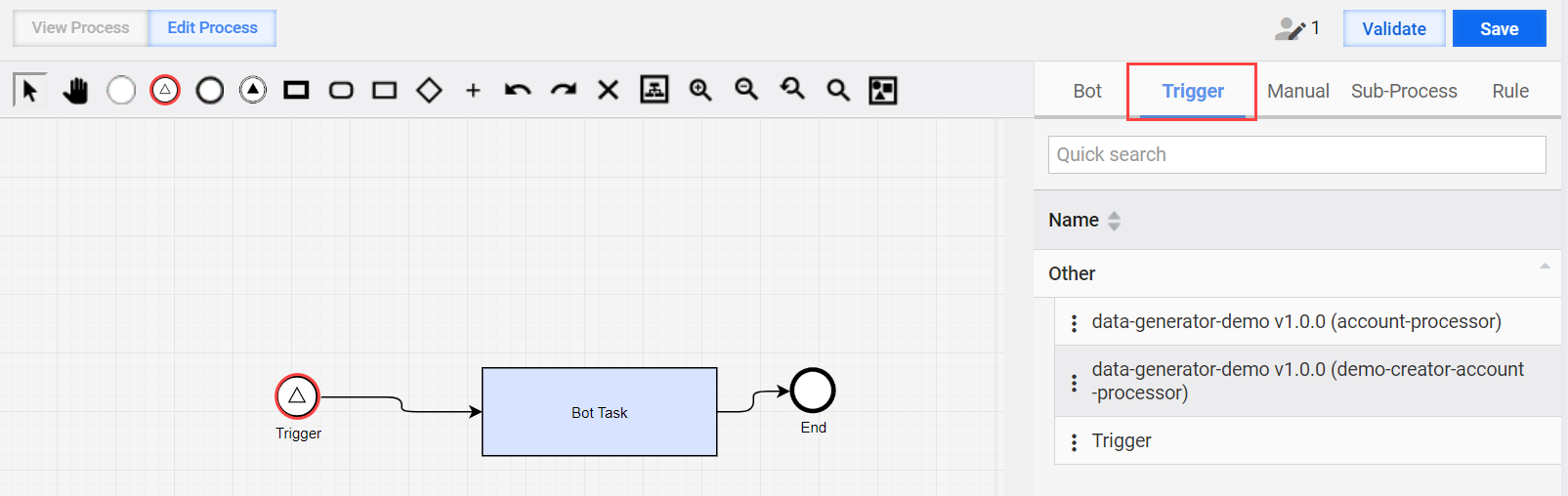
Triggers are reusable and configurable components of an automation workflow that can serve as a starting element to launch another workflow. They eliminate the need for complex logic with infinite loops at the start of an automation flow, thereby improving its performance and minimizing errors.
Supporting the newly introduced event-based communication, triggers can start record processing on an external event: one automation flow or an event within the flow can initiate another automation flow. For instructions, refer to Start Business Process with Trigger element.
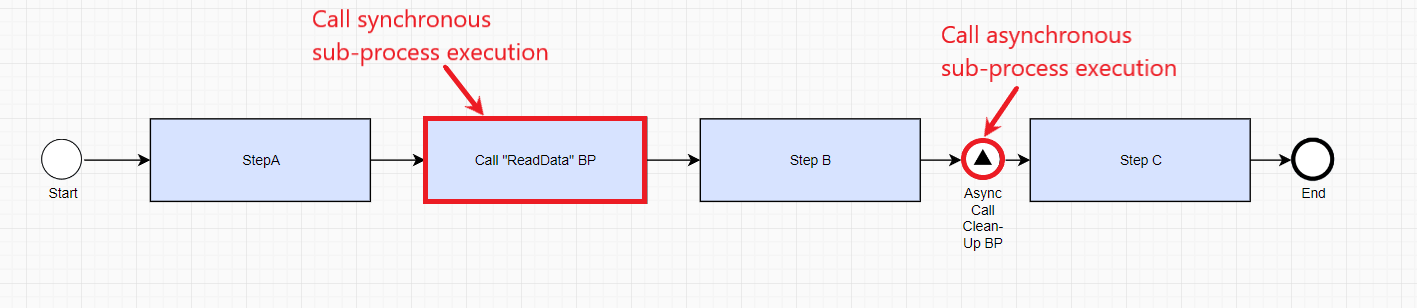
Sub-process calls. Both synchronous and asynchronous calls are supported, enabling you to start an automation flow as a sub-process from another automation. No more code-intensive workarounds—simply add a corresponding no-code step to the flow, set up a signal for the target BP to call, and enjoy the seamless data transfer from one process to another.
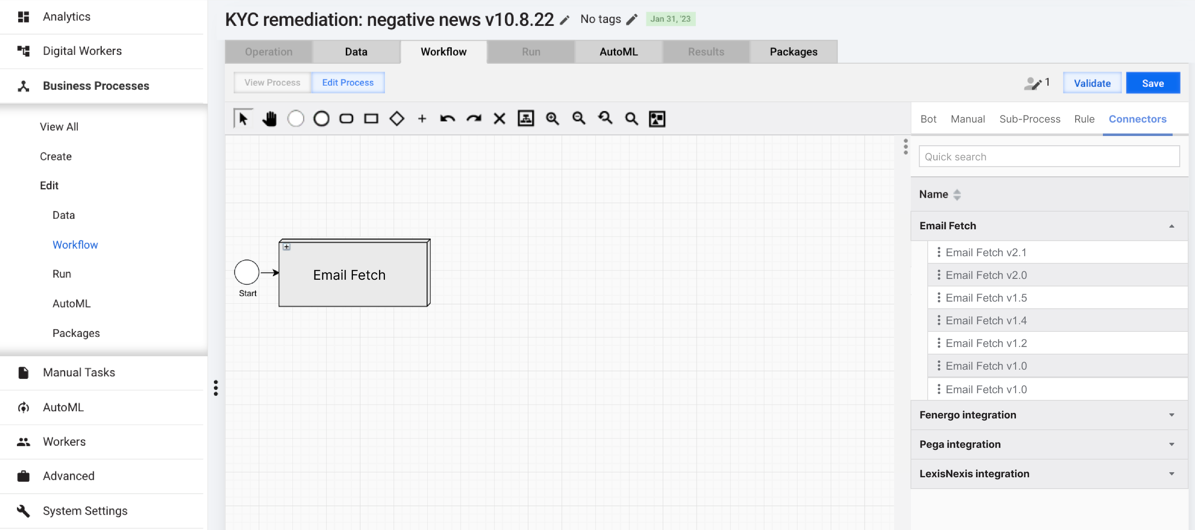
Connectors are now available as drag-and-drop elements in the Workflow Designer menu in CT. The reusable components are essential for Digital Workers and other automation workflows to fetch data from external sources.
Connector configuration is separated from the Digital Worker one, which allows for greater setup and usage flexibility. You can add and configure connectors as separate bot steps to any automation flow with zero coding. See also Simplified integration with external services.
No-code OCR Bridge and AutoML Bridge steps simplify the integration of model-backed transactions and optical recognition into automation flows. The steps are available as drag-and-drop elements from bot configuration menus in CT and offer built-in schema objects for defining input and output contracts.
Out of the box, the Product includes three variations of the no-code AutoML Bridge step to support information extraction, classification, or image processing transactions. For details on the new no-code steps, refer to the following guides:
Improved data handling across automations
With the new schema-based approach to building automation flows (Business Processes (BP) within our Product’s context), all data is stored within the flow’s transactional context and sent to corresponding steps filtered by its input contracts. Such an approach significantly reduces the amount of data passed across steps, thus increasing the overall automation performance.
When editing or creating a process flow step, you no longer need to manually type input or output variables. Instead, you can select them from a dynamically changing drop-down list. The new no-code capability also enables you to validate expected and provided variable sets and detect potential issues with missed values or mismatched types.
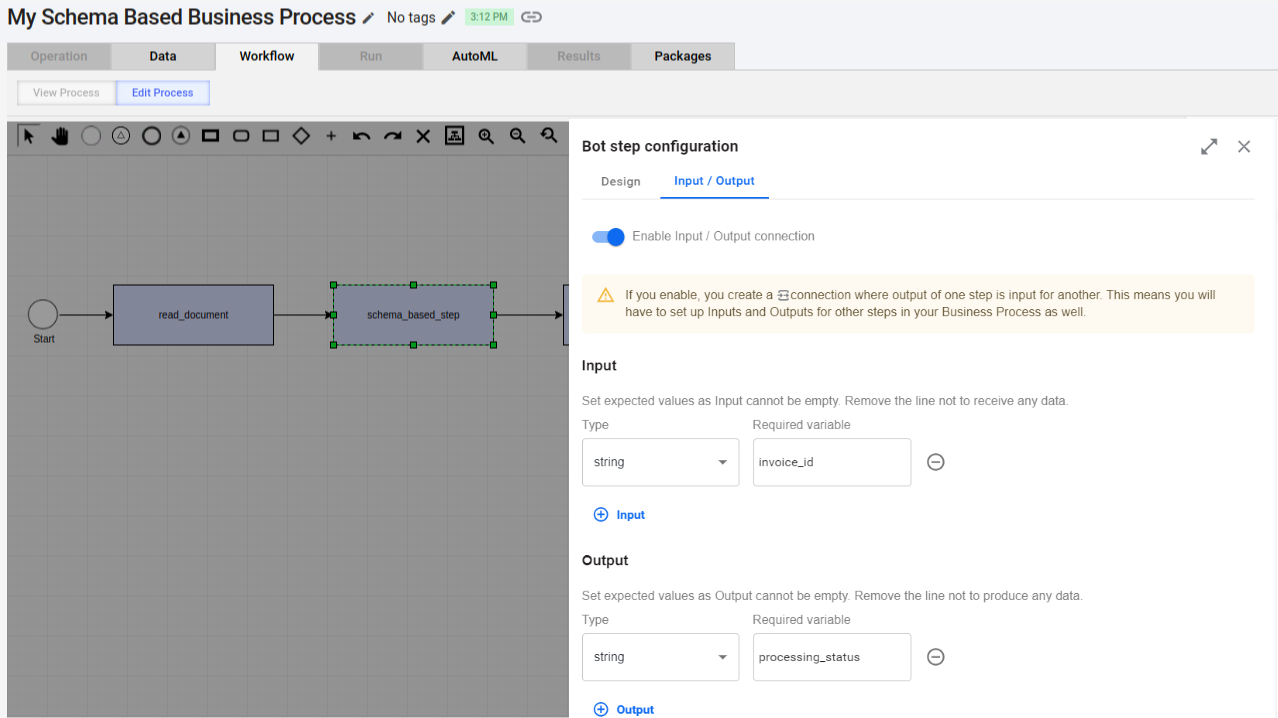
Contract mapping makes it possible to create and modify the step contracts defining the input and output to Bot Steps with no code. All it takes is to open a contract, understand what type of data is needed, and make modifications accordingly. You can change an input, add an additional input or output, or create a contract from scratch.
For details, refer to the following guides:
Simplified integration with external services
You can download a library of connectors straight from the Solution Catalog and re-use them for Digital Workers or other automations multiple times. Available out-of-the-box options are as follows:
Email Fetch for email retrieval
Fenergo, Pega, and LexisNexis integrations for pulling data from respective providers.
In addition to the out-of-the-box connectors, a new generic connector configuration capability is accessible via the CT UI. Requiring no coding, it allows you to create custom connectors for the integration of external services with your automations. Thus, you can enhance your automations with additional capabilities without spending extra effort on building in-house solutions or inventing elaborate and code-intensive integration workarounds.
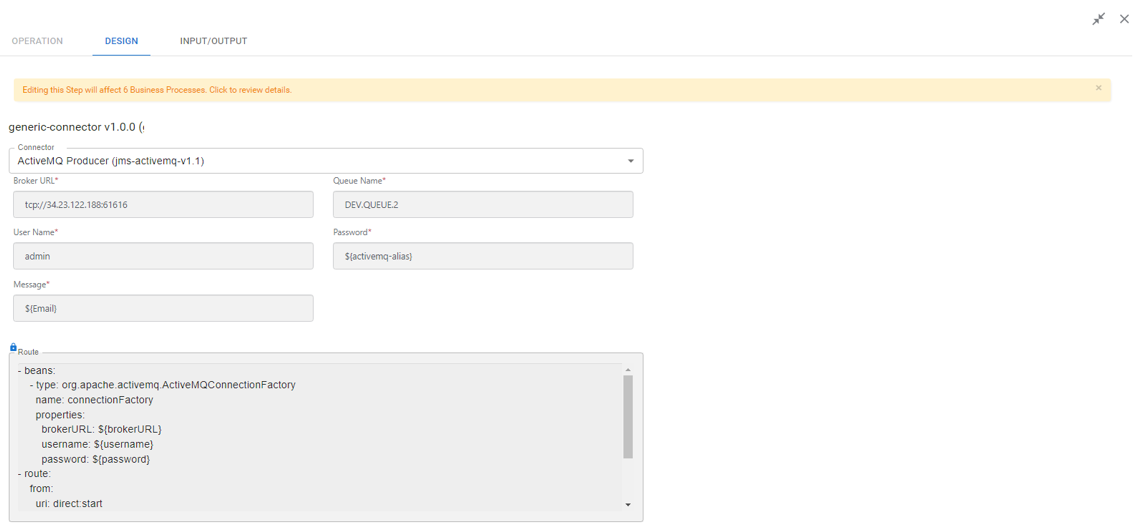
The generic connector capability allows for scheduled polling of external systems in one of the modes:
Listen: the connector starts polling once your automation is started and keeps listening for any signals from the source system for as long as the automation is running.
Discrete: the connector is executed once per input task, acting as a trigger for the connector.
See also Configure no-code Generic Connector.
Superset-based dashboards as default analytics tool
The Superset-based analytics introduced in v10.2.7 replaces Tableau as the default analytics platform, meaning Tableau is no longer supplied with the Product. However, those of you who have data and dashboards in the Tableau format can continue using it in the read-only mode, provided you bring your license.
With this move, we aspire to cut your efforts and costs of getting valuable insights into process and performance metrics. Because Superset is based off an open-source platform, no fee or licenses are required. You can create analytical reports in the CT interface without switching to any external services. Plus, the new analytics tool has a smaller hardware footprint than Tableau.
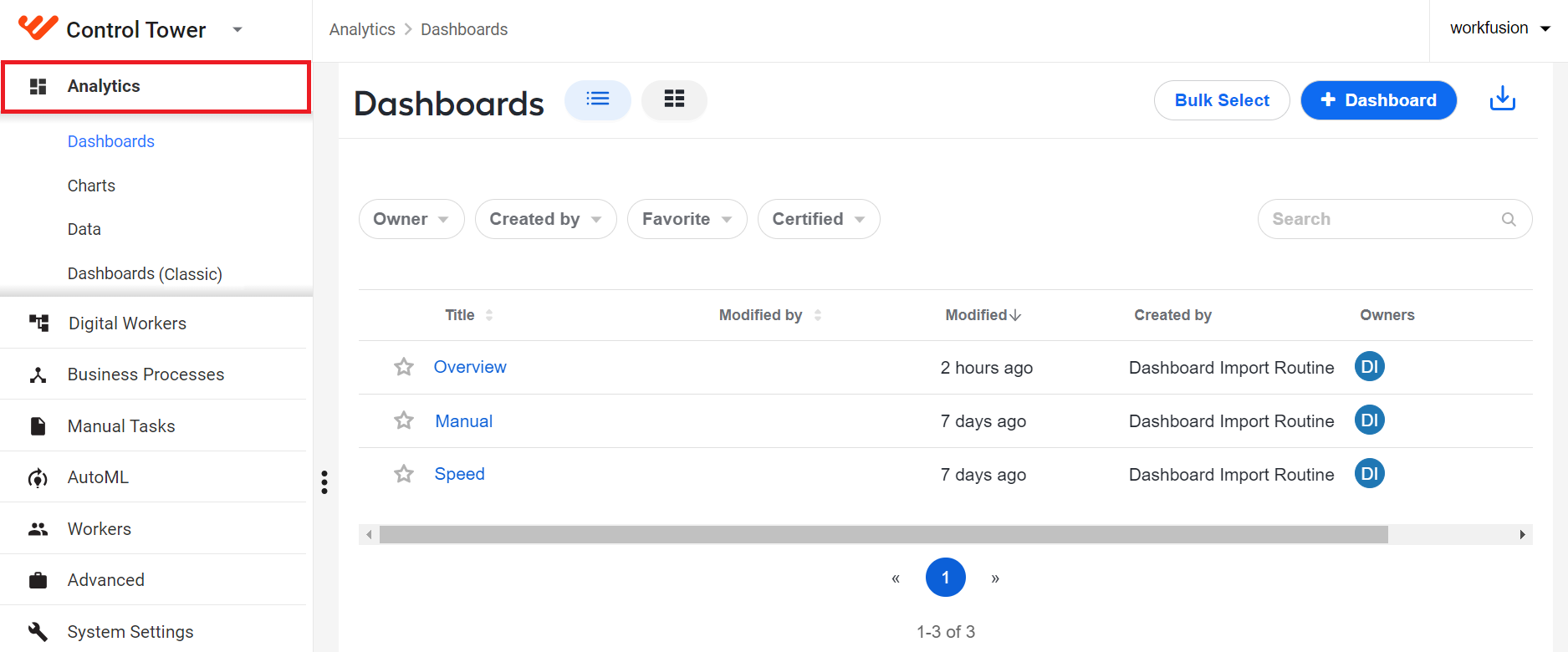
To make your transition as smooth as possible, the Superset-based analytics component is installed along with the Product. So, you only need to configure access rights and permissions to start enjoying the full range of its capabilities:
Visualize and monitor process metrics
Build and flexibly modify custom dashboards and charts to address specific business needs
Manage database connections for feeding analytical data
Create and manage analytical datasets
Similar to Tableau, we provided a set of out-of-the-box dashboards you can start using immediately after you log in to Control Tower. For now, these are as follows:
Overview for a high-level summary of daily operations and overall automation health
Speed for identifying performance bottlenecks
Manual for reviewing statistics on Manual Task processing
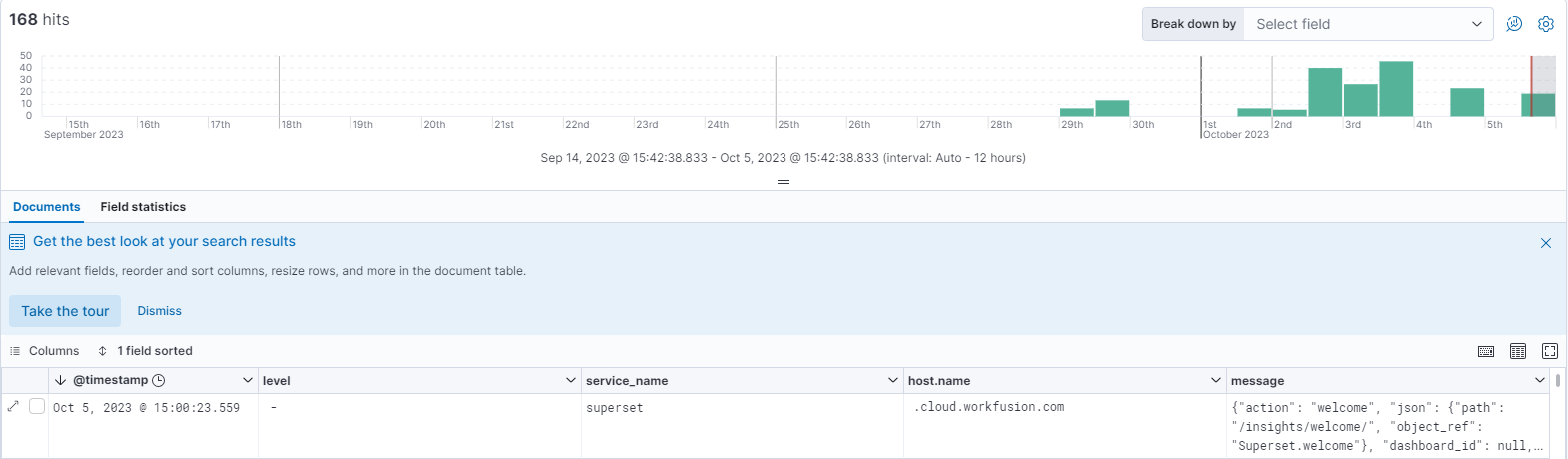
To strengthen your control over the analytics component performance and to enable faster fault detection and troubleshooting, we’ve provided Superset logs in Kibana. For details, refer to Monitor analytics interactions in Kibana.
Superset-based dashboards for Digital Workers
Reproducing the functionality provided with legacy Tableau, Superset-based dashboards are now included out of the box in the following Digital Worker (skill) installations:
Adverse Media Monitoring (Evelyn)
Names Sanction Screening (Evelyn)
Payment Sanctions Screening (Tara)
You can also install and import Superset dashboards with a single click as part of Digital Worker bundles, together with all required components, such as charts, datasets, access settings, and so on. All dashboards from the bundle are deployed to appropriate analytics servers without any additional actions on your part, such as specifying credentials or hosts.
Role-based access to analytics
With a new set of CT permissions, you can efficiently manage access to any analytical data, from entire dashboards to separate datasets. So, your sensitive data is safe from unauthorized access or accidental leaks.
Setting the permissions in the CT interface, you can restrict or allow users with Admin, Operator, or Developer roles to do the following:
View Superset-based dashboards and data
Edit dashboards or only specific charts and datasets
Perform import operations
Access legacy Tableau dashboards
For more details, refer to Set roles and permissions for Superset Analytics.
Additionally, you can fine-grain the above dashboard permissions using extended CT filters:
Allow only specific users or groups to access specific dashboards
Restrict or give access to specific data coming from specific automation flows (Business Processes)
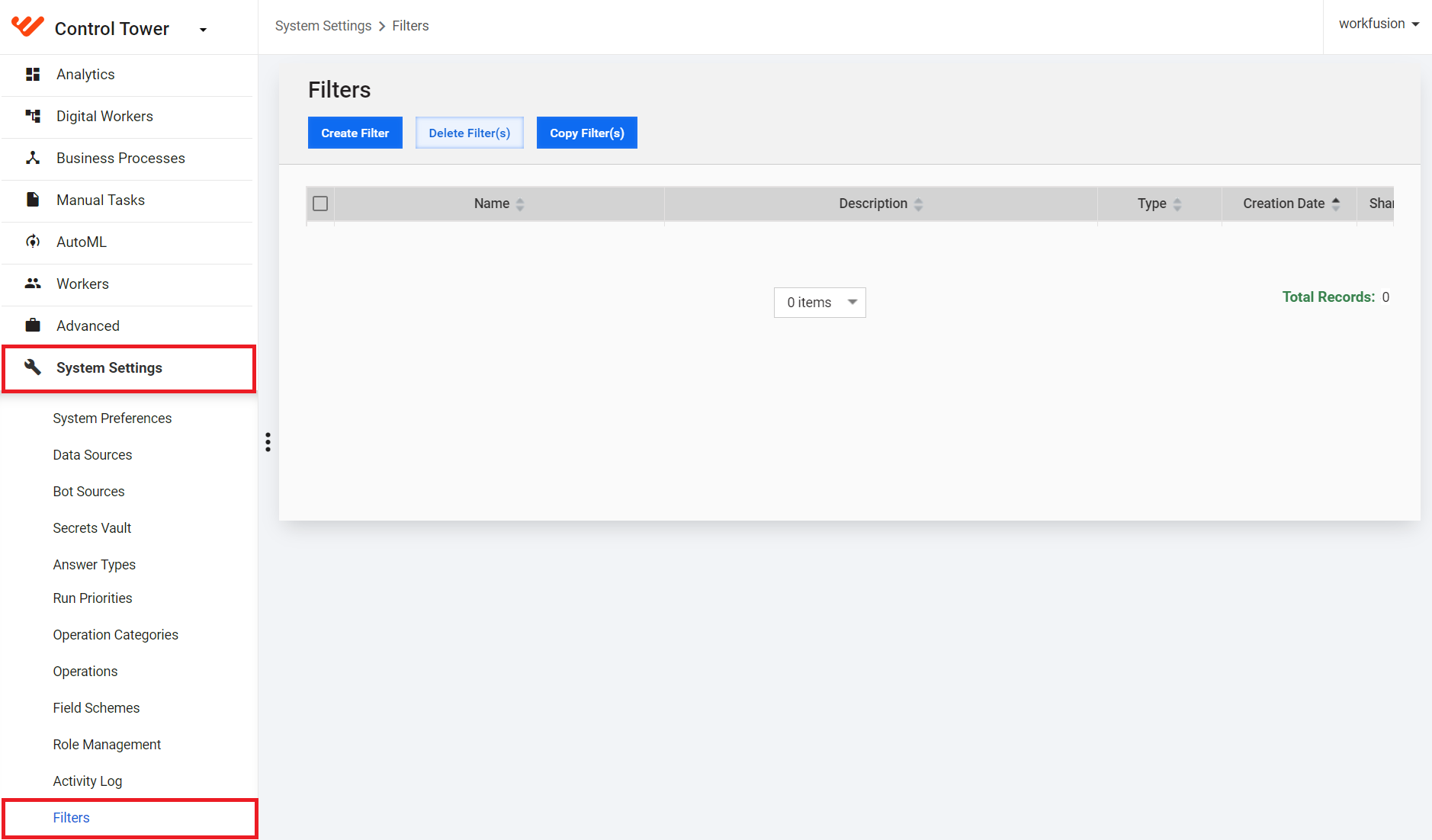
For more details on CT filters, refer to the following guides:
New ETL process for Superset-based analytics
To support the transition from Tableau to Superset-based analytics, we’ve implemented the new ETL Scheduler, available out of the box. It replaces the native Tableau scheduler in doing the extract, transmission, and load operations to aggregate data for Superset-based dashboards.
You can also create your own custom data aggregation procedures and schedules from the Data Management page in Control Tower. Previously, the page was known as Data Purge since it was used exclusively for data cleansing settings. Now that you can also configure ETL schedules from there, the renaming is only logical to reflect the extended functionality adequately.
| Prior to v10.2.8 | In v10.2.8 |
|---|---|
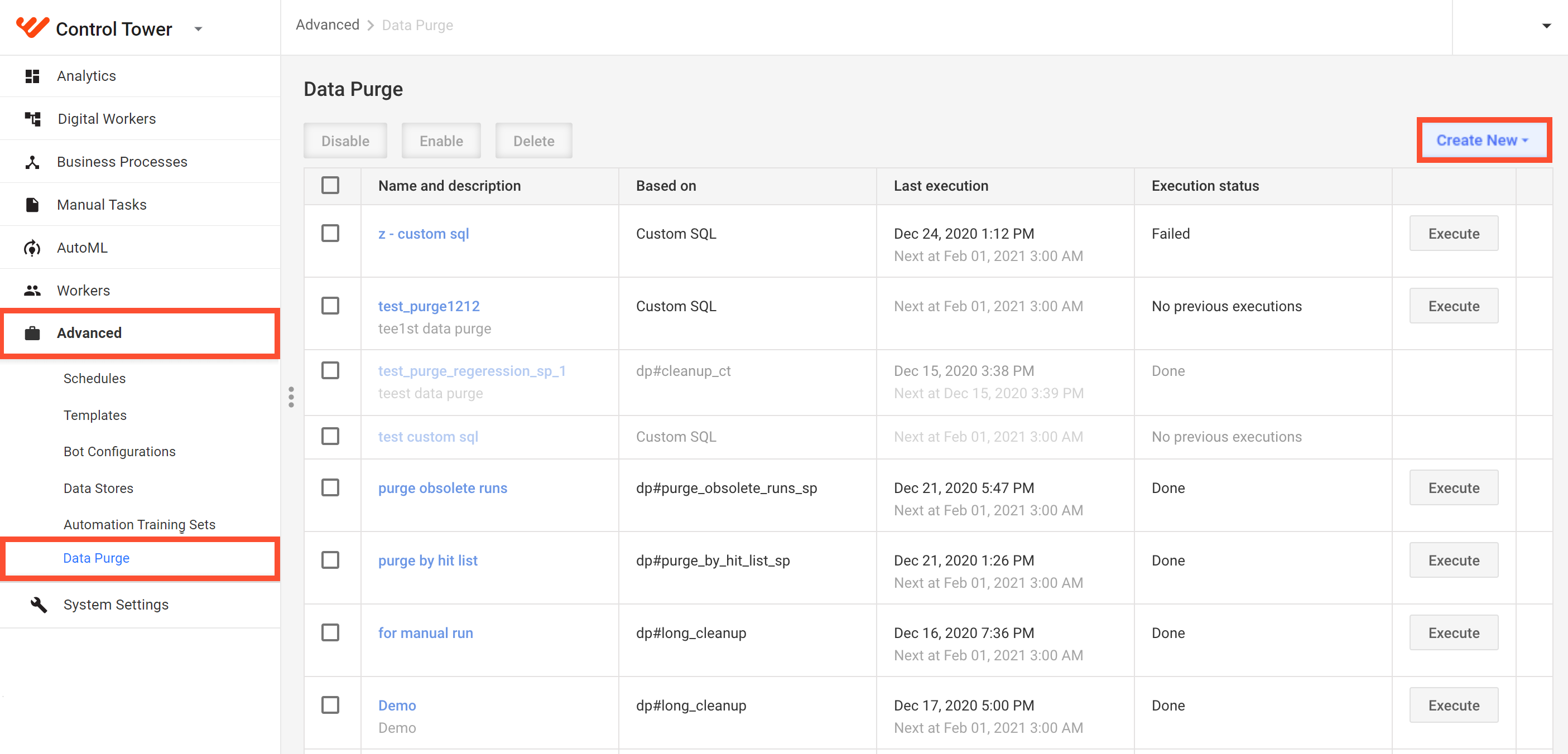 | 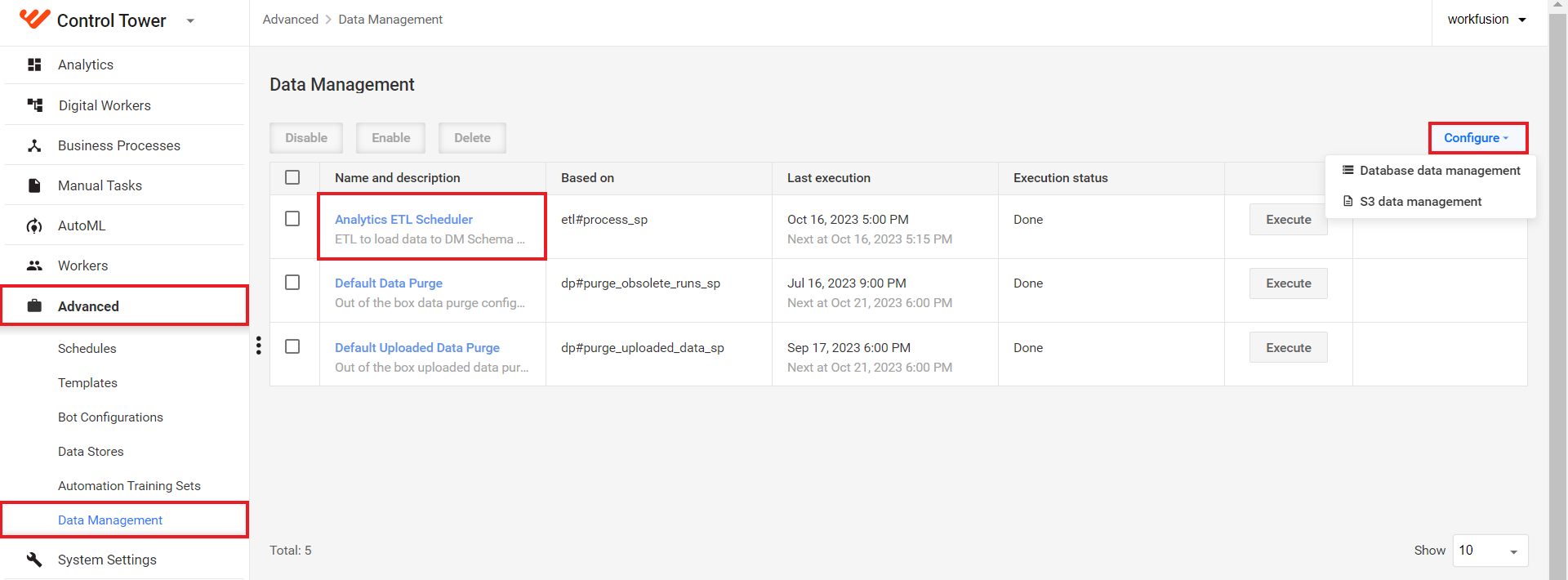 |
For instructions on creating custom ETL scheduler procedures, refer to the guide.
Template models
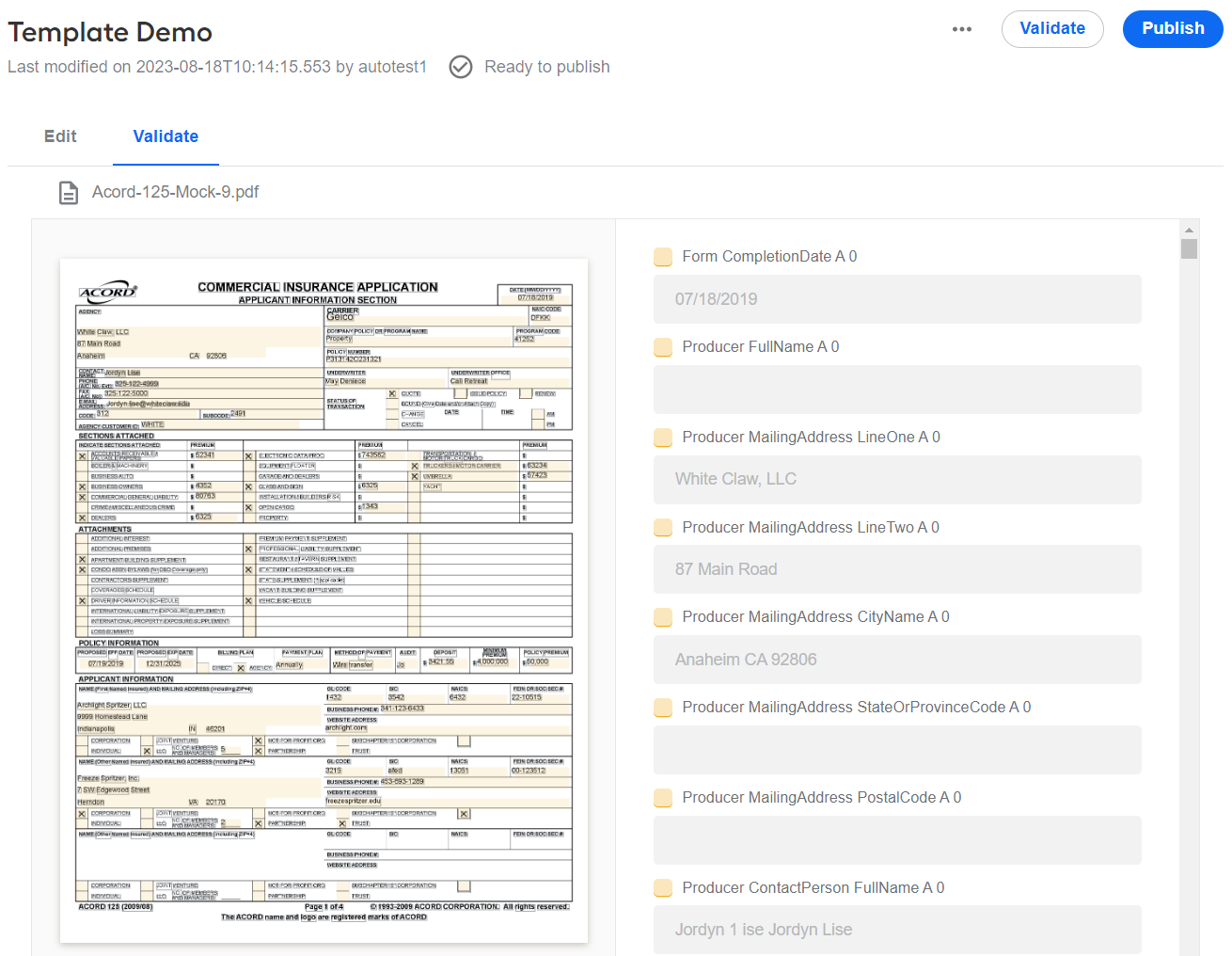
The AutoML menu in Control Tower now boasts the new Templates item for no-code creation and management of template models. The capability reduces the time and effort to extract data from structured forms (for instance, ACORD), while requiring no special coding expertise from its users. Rather than training a model on hundreds of documents, you can now generate a template based on a fillable PDF, validate it on a handful of filled forms—and enjoy the benefits of model-backed data extraction within days, not weeks.
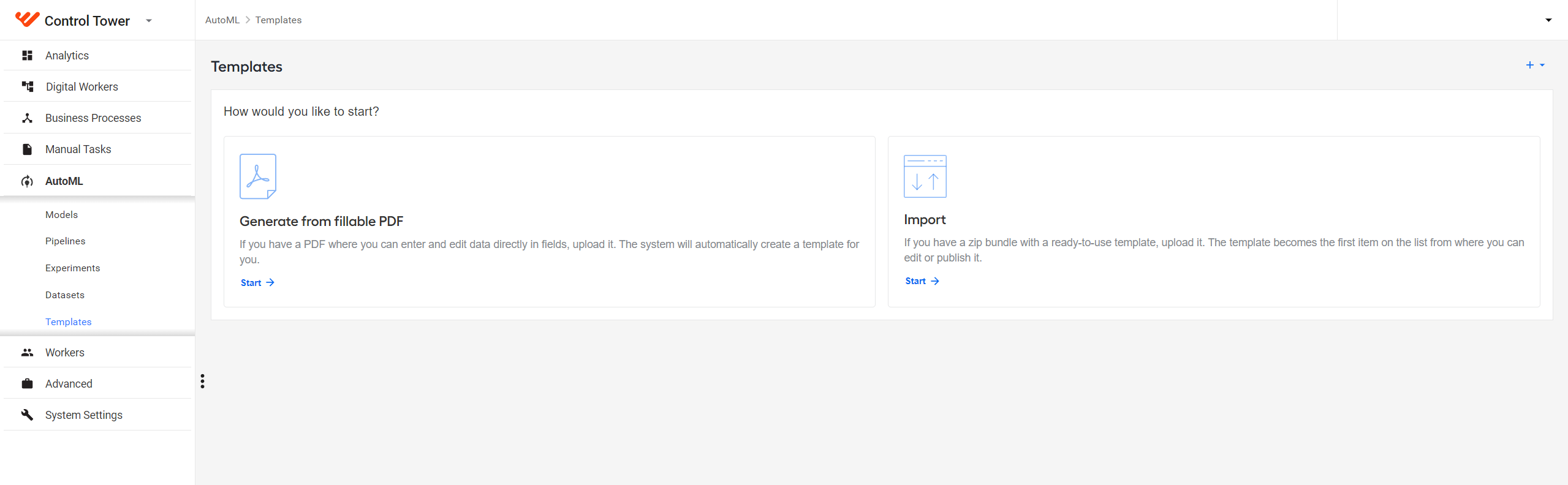
Moreover, you can re-use the templates to build Manual Task forms and create datasets for model testing, thus speeding up the overall automation delivery and saving on engineering resources.
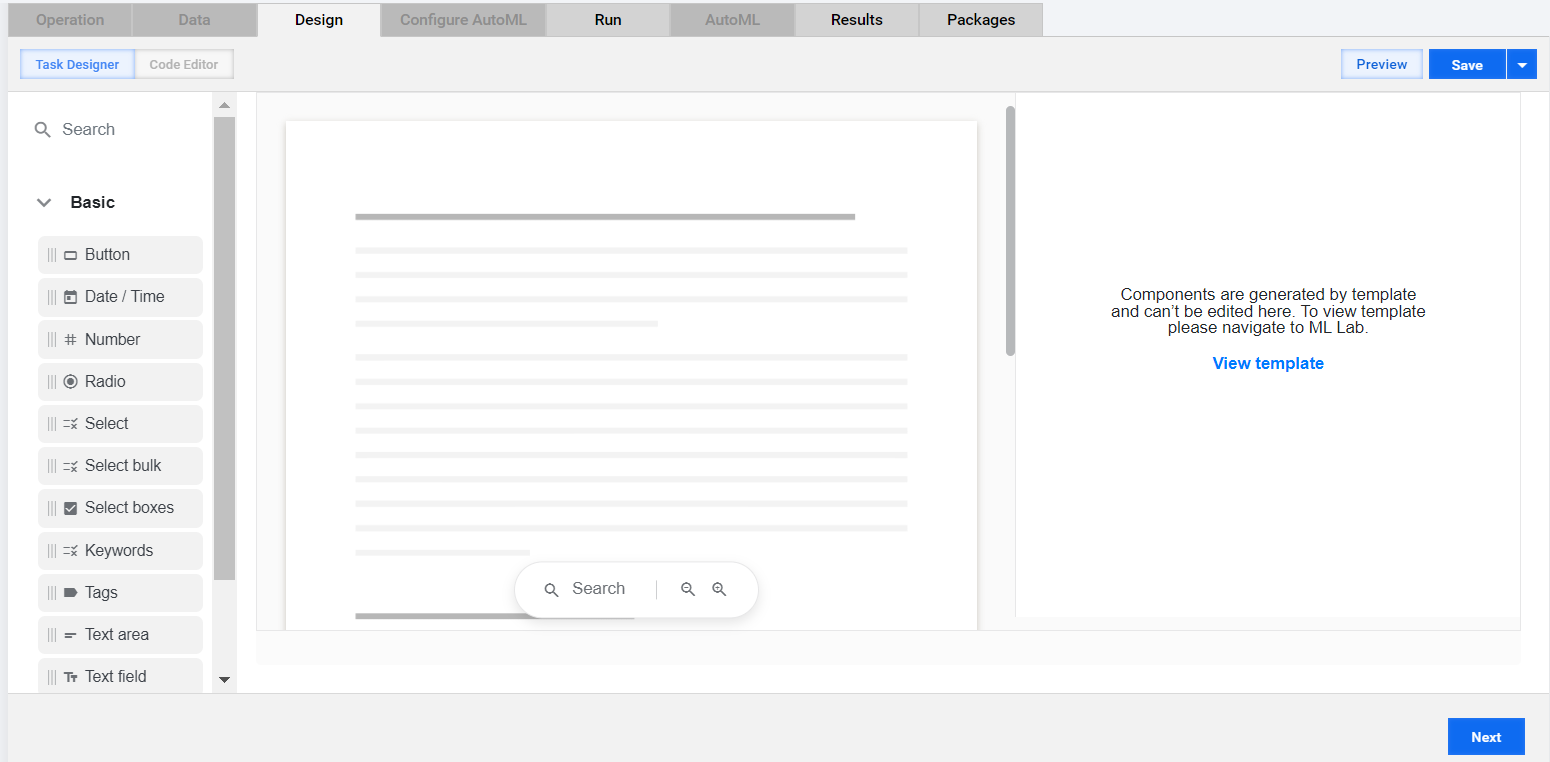
Template-based extraction also supports automatic shift detection and recognition of documents with squeezed and scaled dimensions, allowing quality output even with non-standard input. For details on using templates, refer to Create and manage templates.
Dataset versioning
In the dataset management UI, we added a new option enabling you to create dataset versions as immutable snapshots and use them to train and test models. The new feature provides greater data versatility and makes preparing datasets faster. You can create a new dataset with just as much as a few changes or go back to a certain dataset state with a few clicks.
For instructions on working with versioned datasets, refer to Manage datasets | Publish dataset.
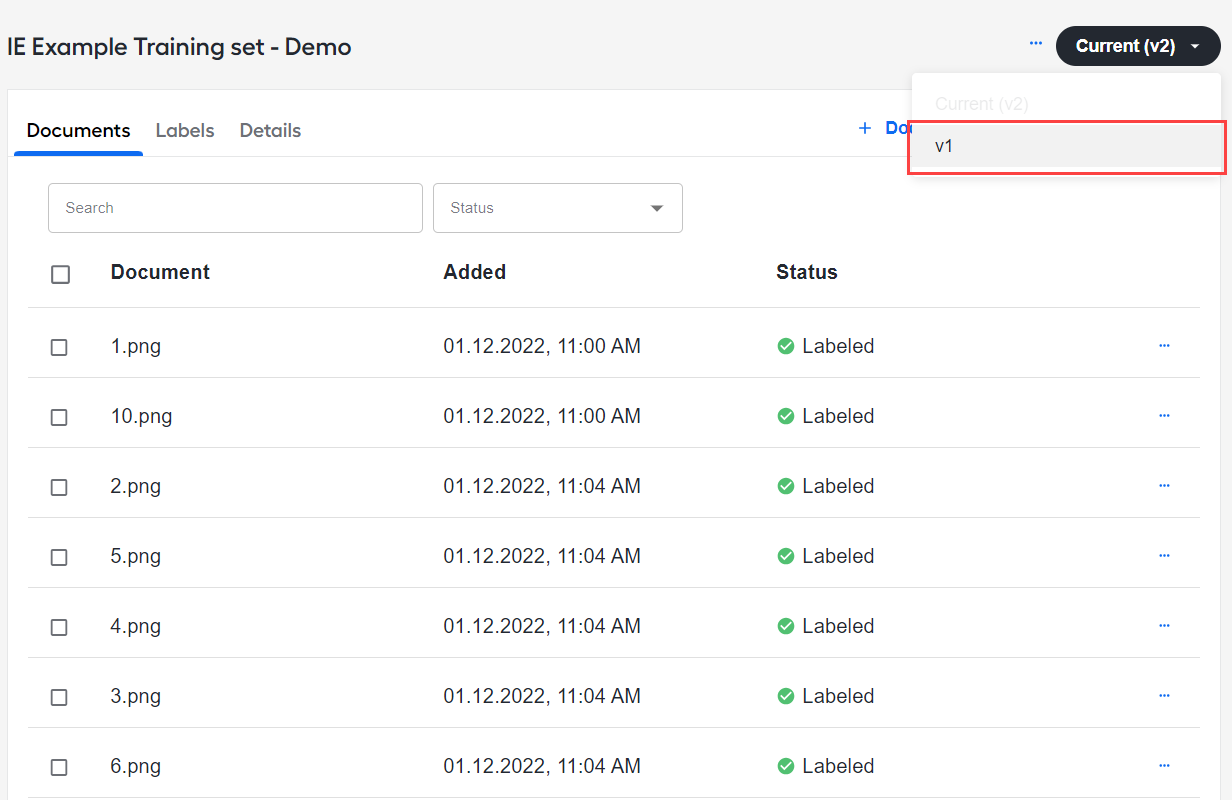
It is possible to train and test models on any published dataset version. The default choice is the current version. A new dataset version is published during model training and linked to the respective trained model if the current version is selected. For details, see Manage models | Train new model.
OCR configuration in UI
The release introduces a convenient UI for configuring OCR, allowing you to generate a Document type dataset with better quality and in a more user-friendly way. There are two modes you can work in:
The Basic mode provides the controls you can use to configure OCR settings, depending on your chosen OCR provider.
The Advanced mode allows you to set the same OCR settings you configured in the Basic one but in the JSON representation.
Any changes you make in the Basic mode are reflected on the Advanced tab or vice versa.
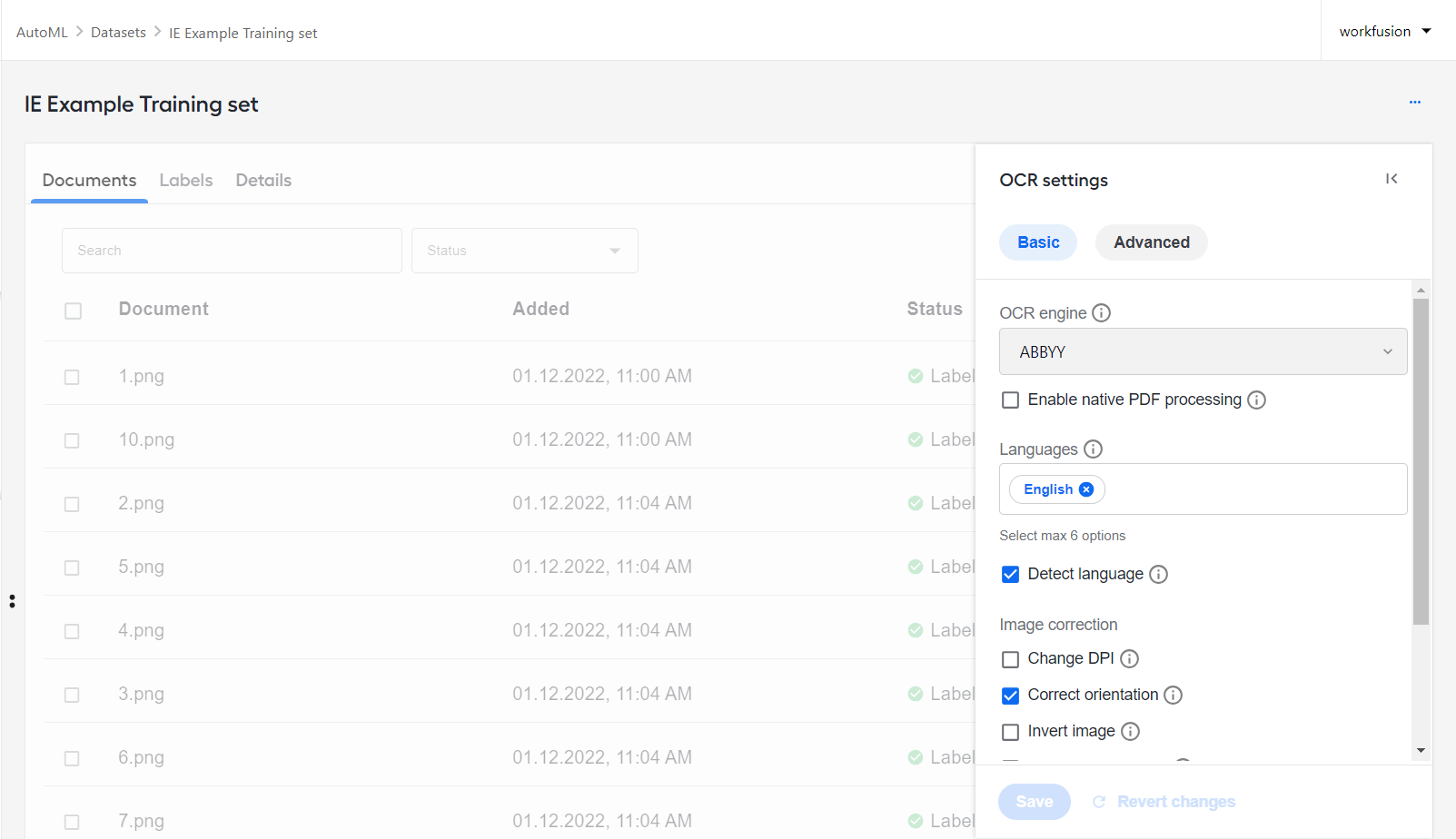
For more details, see Manage datasets | Configure OCR settings.
Enhanced Manual Task building experience
To reduce the time and effort to deliver human-in-the-loop tasks for your automations and allow for more advanced customizations without coding, we introduced the following enhancements to our Manual Task Designer component:
Template-based layout generation. In addition to the usual method of manually dragging and dropping form components, you can now automatically generate a layout using a template model output. As a result, you get a pre-built form with a range of fields on the right and a sample document on the left with bounding boxes matching the form fields. The capability is available from the settings page of the new Labelling component on the Layout menu.
Simpler multi-page task setup. Unnecessary settings were removed from the Multi doc configuration page. Instead of writing complex JavaScript logic to show or hide certain tabs with documents, you can implement it with few interface clicks. You can set the tabs to be generated dynamically based on how many and which documents are in the task input or configure them up manually by adding key-value rows.
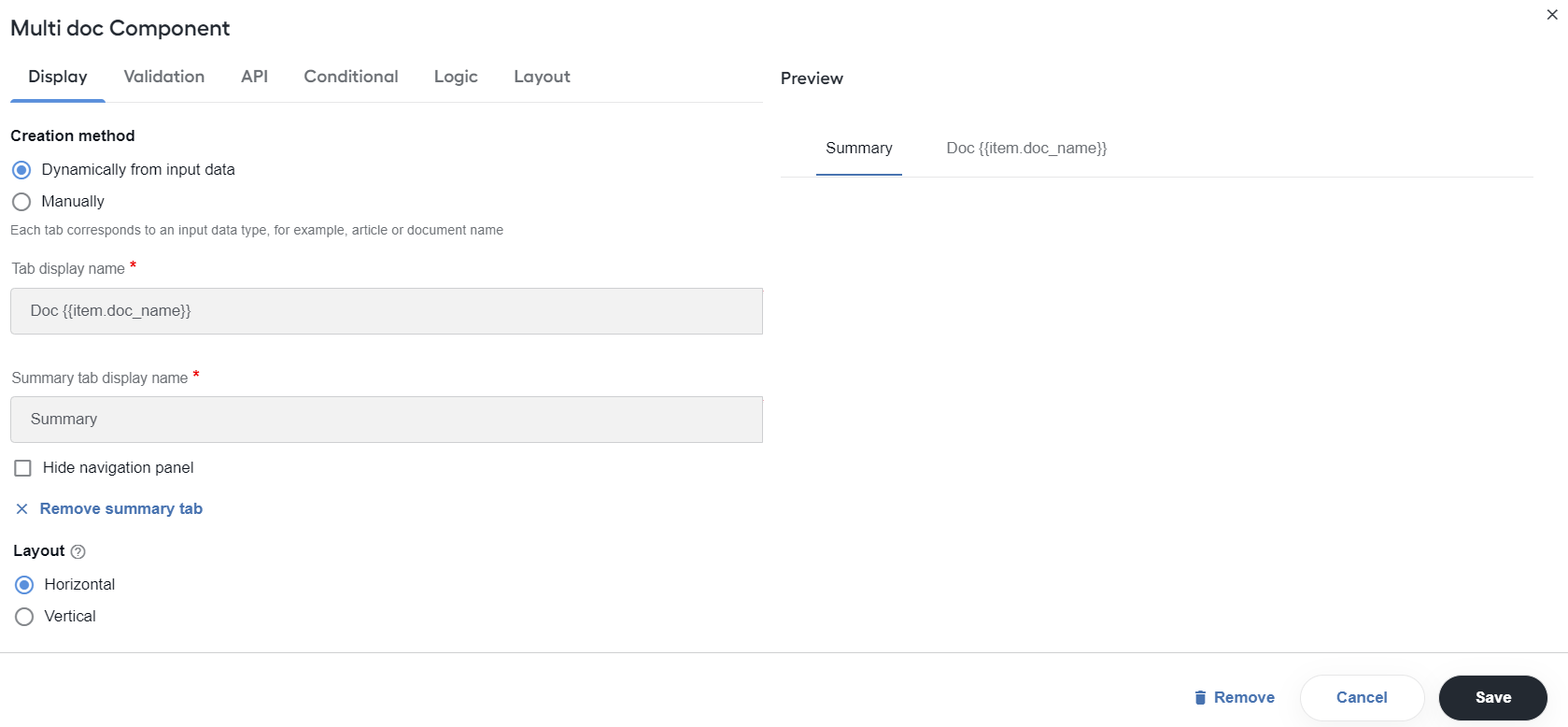
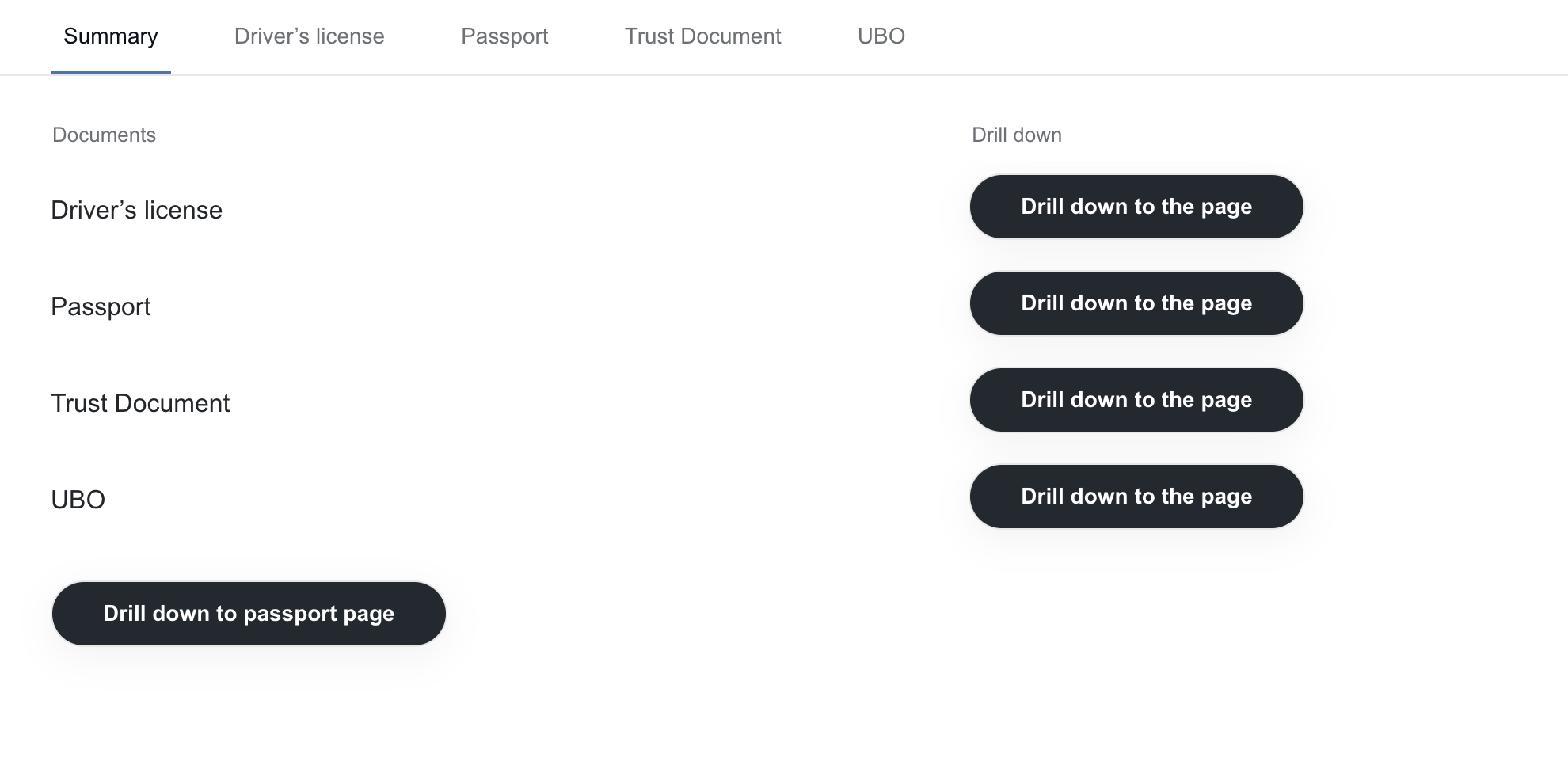
From the Multi doc component’s configuration page, you can also add or remove a static Summary page to aggregate the processing results from all other tabs and set the navigation panel for the tab to be shown or hidden.
Ability to build layouts with nested hierarchical structures. The Layout menu now boasts two new items: Panel list and Drill down. The Panel list component enables rendering dynamic input as a set of rows on a static page. The Drill down one is meant to support complex hierarchies, cascading from one element to another.
Support of PDF rendering. The new PDF Viewer component enables the display of original PDF documents in a rendered form during manual review without the need to process them with OCR.
Support of non-taggable fields. You can now set the components from the Basic menu to be non-taggable. In a rendered form, you cannot fill a field based on a non-taggable element by selecting data in the task input preview area.
No-code HTML styling. Now, you don’t have to know HTML to add styles to your advanced layout customizations using the HTML component from the Layout menu. Available in addition to the existing coding mode, the WYSIWYG Editor also enables automatic conversion of the HTML markup, including from earlier task versions.
Flexible table and panel sizing. In addition to setting a Line item table to have equal column width, you can now configure the minimum width for one or more specific columns. For the rest of the columns, the width is adjusted accordingly to fit the labeling panel size.
You can also adjust the size of the labeling and task input display panels relative to each other. When the width of one panel is changed, the other panel’s width is adjusted automatically to match. The values you set in Manual Task Designer are the default width values with which the resulting task form is displayed in WorkSpace assignments.
For details on the above changes, refer to Design Manual Tasks via Task Designer Operation.
Java Native Worker in ODF 2
Implementing a Digital Worker on top of Java Native Workers (JNW) offers a significant enhancement in task execution performance of Java-based tasks. The execution time of a JNW task is 20-30 ms on average, which is by 80%-90% faster than that of a WebHarvest task equaling 200 ms to 300 ms.
Additional enhancements in ODF 2 introduced with the release simplified the migration process for ODF 2-based Digital Workers. As a result, you can quickly apply the benefits of the JNW execution within a predictable timeframe without modifying the business or task execution logic.
For instructions on migrating an existing project based on the ODF 2 framework, see ODF 2 integration with Java Native Worker.
Improved split-and-join logic in ODF 2 transactions
A new set of task types introduced with the release facilitates the implementation of split-join logic. This enhancement empowers engineers with greater flexibility in their development approach. Task interfaces now exclusively define transaction-to-transaction mapping, allowing for customization of all other aspects of the logic.
Furthermore, we improved significantly the performance of join operations. The execution time of join tasks is now closer to that of simple tasks. To learn more about the new mechanism, see Split and join Transactions.
Enhanced ODF 2 transactions
Based on the feedback we gathered throughout the last year, we made the ODF 2 framework more convenient with the following enhancements:
Ready-to-use transactional tasks. To simplify the correct implementation of transactional tasks, we introduced the new
TransactionalTaskinterface, which is now the easiest way to create a task that runs in a transactional context. The framework checks if a transaction is in the input and then passes it to the output.Transaction skipping. The
SkipUntilfunctionality allows you to restore automation flow execution from a specific task, skipping all preceding business logic. It also enables starting the automation flow execution from any desired step when necessary.Error handling in sub-transactions. Error-handling tasks based on
AbstractPersistingErrorHandlingcan now specify whether to propagate an error raised by a sub-transaction to its siblings.Improved retrying of failed transactions. Whether the error handling is done in the same automation flow or a separate one, the transaction skipping logic allows you to set the retrying of failed transactions in a couple of simple steps. Simply mark a failed transaction and then route it to the beginning of the automation flow containing it.
A new Monitor Task polls for data as usual and for existing transactions with a specified error status, clears the status, and sends the transactions back into the automation flow.
For more information about the above enhancements, refer to Enhanced retrying of failed transactions and Example project overview.
Improved RPA performance and stability
The RPA infrastructure now boasts better memory monitoring and observability due to the following improvements:
Support for Windows Server 2022 to give you more flexibility in how you manage the RPA component.
Heartbeat integrated with the installer to help you monitor the status of RPA Units. Thus, you can quickly assess RPA Worker health, with the assement becoming a more dynamic experience.
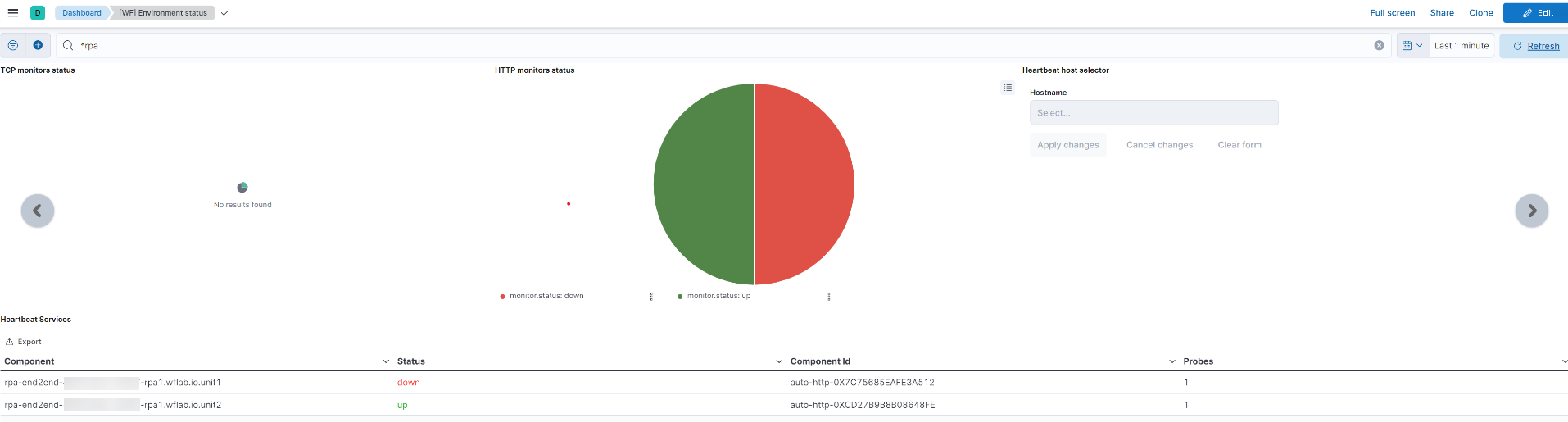
Enhanced RPA monitoring with new dashboards in Kibana that support the newly integrated Heartbeat feature and provide the ability to select a custom date range when viewing metrics.
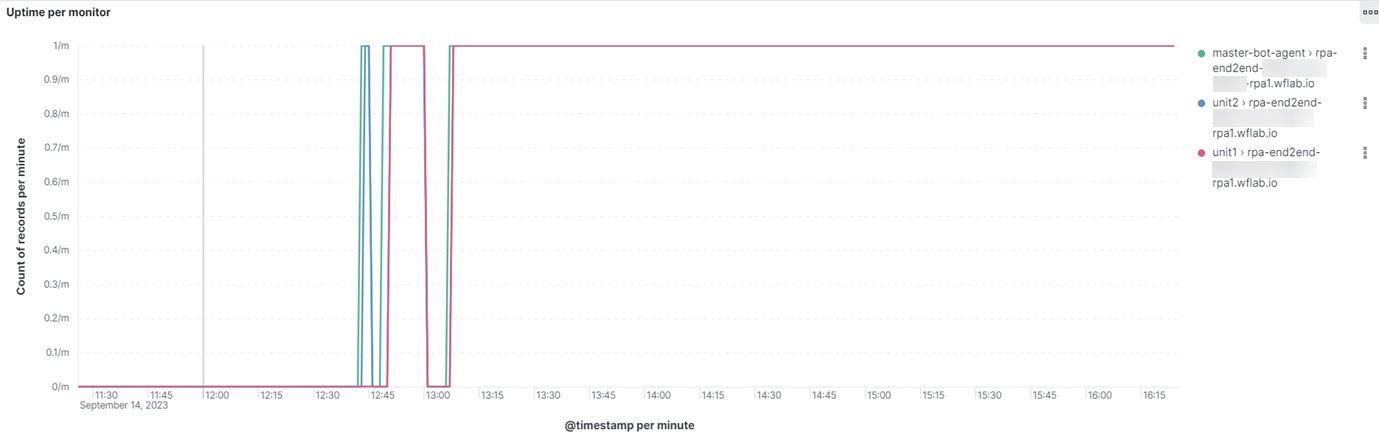
The RPA bot uptime dashboard displays the uptime percentage per bot.
The RPA server uptime dashboard checks the uptime percentage of the RPA and Control Tower server. This eliminates the need for tedious manual calculations based on outage tickets created and resolved over time.
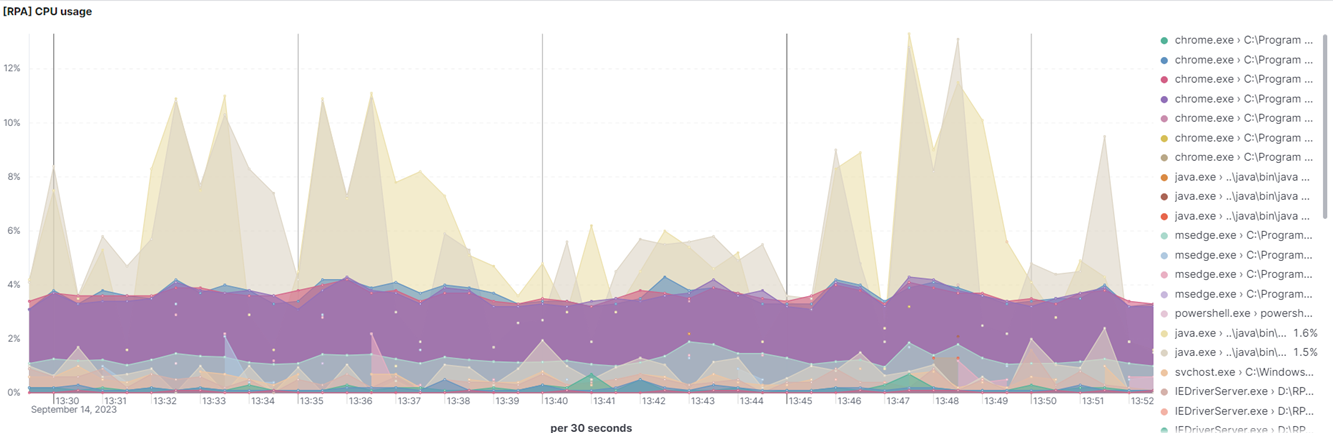
The RPA resources usage dashboards display memory and CPU usage for each Java process on the RPA Server.
The RPA auto-restart mechanism increases the stability of the RPA infrastructure and makes it less fault-tolerant, enabling the Unit Agent to recover automatically in case of a crash. For more details, see Relaunch Unit Agent.
Additional Memory Tracker allows restarting RPA Workers if memory consumption exceeds a predefined threshold. It prevents RPA Workers from utilizing too much memory during execution, thus eliminating possible issues with system slowness and unresponsive behavior. Applications, such as CT Workers, are empowered to track memory and take needed action (for example, to restart) if they detect memory leaks. For configuration parameters, refer to Track memory consumption.
Improved user experience in WorkSpace
To make manual review data more accessible and fail-safe and facilitate navigation and collaboration across assignments, we’ve enhanced our Product with the following:
Assignment list configuration. You can choose custom attributes you want to be displayed on the assignment list, bringing forward the essentials and hiding the rest, depending on what you need at a given moment. Each selected custom attribute corresponds to a separate column on the list. For more information, see View assignments | Configure columns.
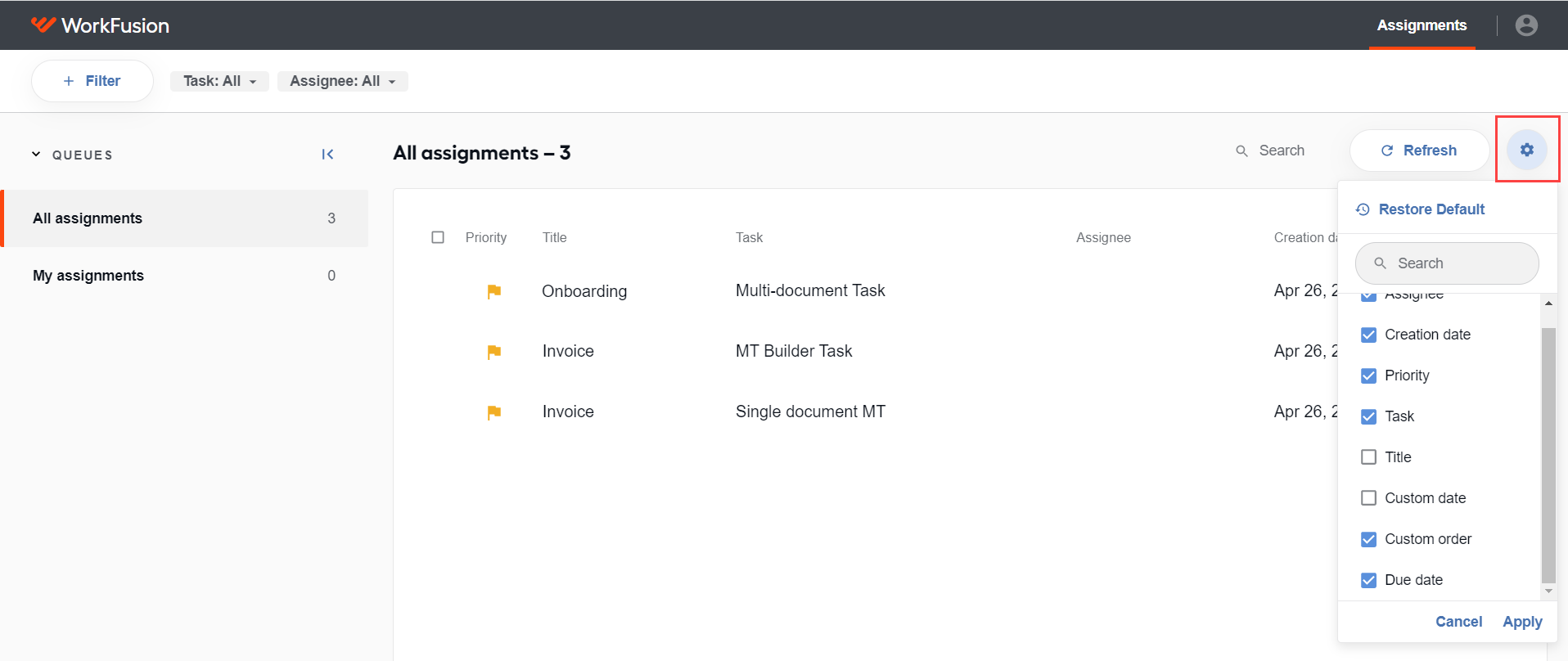
Advanced search by business attributes. You can search by one or more criteria across all custom attributes, even the ones that are not displayed in the list. The search is initiated upon the first symbol entered, with suggestions displayed immediately in a drop-down list. For details, refer to View assignments | Search for assignments.
Assignment list sorting. Using the up and down arrows in headers, you can sort the information displayed on the assignment list by any custom attribute included in it. Each column header corresponds to a separate custom attribute.
Autosaving of worker answers. The new feature extends your capabilities to work with long-life assignments. At the same time, it protects any changes made in assignments from sudden disruptions, such as bad connection or session timeouts. Moreover, it extends the collaboration capabilities, making it possible to continue the review from where another worker left off.
Thus, if you leave or refresh the page with the assignment you are working on, close the browser, or the processing time is out and the assignment is returned to the queue, your changes are saved automatically. For more details, see Process individual assignment.
Improved information extraction
Information extraction within the Product was strengthened with the LayoutLM technology. Whereas most natural language processing models focus on text-level manipulations only, LayoutML-based processing combines the three dimensions of information—the text, the image, and location of the given text. In our environments, LayoutLM-based models are proven to demonstrate higher performance than other information extraction types—by +26.2% in terms of Precision and by +9.9% in terms of Recall.
To address the advanced cases when processed documents include handwritten data, we enabled our models to recognize handwriting, thus improving the quality of the information extraction output.
New onboarding experience
With the release, we are announcing the integration of Pendo, a software usage analytics and onboarding tool. No additional efforts are required on your part—the Product is already shipped with Pendo integrated.
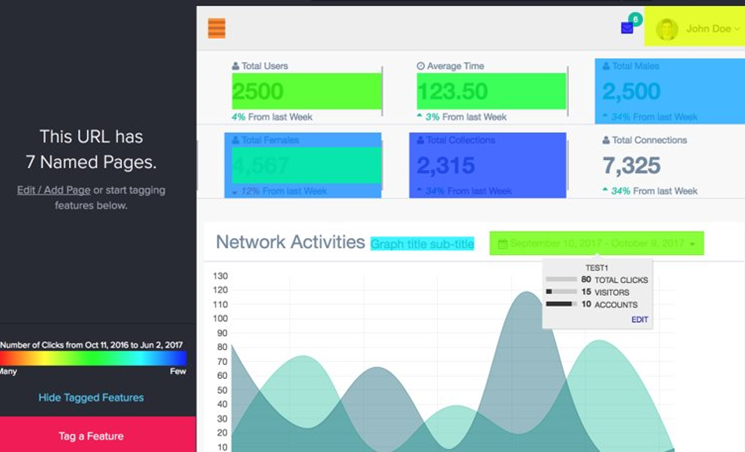
Our goal is to create a new onboarding experience to empower your personnel with a steep learning curve. We also plan to trace how you use our Product to locate potential user experience flaws and navigation bottlenecks. The usage analytics will serve as a basis for our further Product improvements.
Improvements
AutoML
We have done our best to make your experience with model customization more enjoyable:
YOLO v5 models are now available out of the box to empower developers with a fast means to detect signatures across processed documents.
The list of OOTB normalizers and post-processors available via Digital Worker configurations was extended. The improvement allows you to minimize the involvement of engineers and avoid the generation of a whole new custom project.
The OCR settings are now stored in the output of the Classification model during training, and you can pass them in
TrainingRequest. If your model uses a Document type dataset, the OCR settings can be fetched from the dataset.
Developer tools
The WorkFusion Product is becoming friendlier not only to non-engineer users but also to skilled coders:
Support for Studio, based on the outdated version of Eclipse IDE, was discontinued in favor of a code-first strategy where developers can use any Java IDE they prefer. Recorder and Inspector were decoupled from Studio and are available as separate applications in Work.AI Developer. For more details, see the documentation.
With improved automation of Excel files, the Recorder component boasts greater stability and better performance.
The maximum timeout for
LocalBotTaskExecutorTaskbecomes configurable, preventing test failures due to exceeding the hardcoded execution time of 30 minutes.
Infrastructure
To meet compliance requirements and mitigate legal risks, the End User License Agreement (EULA) is now available for users to accept at the installation stage. The contents of the EULA are displayed before installation starts, and users can proceed only after they accept it.
We also introduced several improvements to make the installation, infrastructure monitoring, and troubleshooting processes smoother and more convenient for you:
Integrated Traefik into the WorkFusion installer to enable the auto-discovery of the listener service connectors.
Implemented a separate index on the Logstash level for Product component logs.
Added a startup timeout for Heartbeat on the Agent Server to eliminate false-positive service down alerts for the Mesos Agent in an auto-scaled environment.
Enhanced the RPA component monitoring by removing the Filebeat component from WFSVC and creating a new RPA WFSVC service for Filebeat.
Optimized logging in WorkFusion environments. The DEBUG logging level is disabled by default, which allows you to avoid cluttering logs with unnecessary data.
Added Java JDK v17 into the installer. Existing JDK installations remain intact.
ODF 2
Improvements in ODF 2 support the newly implemented functionality and reduce your effort and time to deliver code:
Provided an ability to work with steps having contracts. The ODF 2 task input and output API is enabled to have Objects from schemas in the input and output.
Introduced task-level configuration for JNW-based steps in Spoke. Now, you can replace the content of the
<configuration>section in a JNW task definition with a custom string value via Spoke API. For more details, see Business Process integration testing | Mock JNW step.
RPA
We did our homework on improving how the RPA component does its job for you to benefit from its improved performance, unfailing service, and smooth automatic updating. Enhancements are as follows:
Changed the default browser from Firefox to Chrome.
Enhanced the stability of the user reconnection and web browser session creation procedures.
Improved the download logic of the WebDriverManager library's driver supporting the RPA driver auto-update feature. The WebDriverManager logic was incorrect in that the library tried to download ChromeDriver v114 when it detected Chrome browser v115. As WebDriverManager doesn’t have a separate Java 8-compatible patch with the applied ChromeDriver v115 fix, the latest library changes were merged manually into its current version. The resulting custom WebDriverManager version is now used with the Product to enable correct auto-updates of the RPA driver.
Control Tower
With the release, we introduced various stabilization fixes to meet your expectations of smooth operation, accessibility, and usability:
Added a Manual Task ID (
instanceID) in the FTL template for Manual Tasks.Added a clickable WorkSpace logo in Business Process steps for easy access to manual review assignments in WorkSpace.
Improved the mechanism of creating a Digital Worker variation copy. Now, a deep copy is generated, meaning that all BP settings at the task level are saved. This eliminates the need to synchronize the settings across step copies in different BPs when a new variation is created. Subsequently, when you change any settings in one BP, they are not updated in the other.
Improved the logging mechanism for logs to contain only those messages that are critical for investigating automation flow failures.
Increased the default value for the
s3.maxUrlLengthproperty from 200 to 1024. You can now use longer filenames and folder names in the URLs for Control Tower and Manual Task Renderer.Removed the override to the TRACE log level for
ConfigExecutionLoggerfromapplication.propertiesof CT Workers. Unwanted events are no longer passed from bot steps using the logger to Control Tower and displayed in BPs.Cleaned up Log4j v1 dependencies in the java-native-worker and worker-control-tower components and added the enforcer rule to prevent the Log4j usage.
WorkSpace
Labeling of large-size complex tables, such as the ones in Loss Run forms, is now much more convenient:
Table headers are now visible whenever you are within the document, and you don’t have to always scroll back to the top.
Horizontal scrolling is also possible from anywhere within a table without navigating to the bottom.
When cell values are truncated to match the table size, you can move the pointer over the values and see them in full in a tooltip.
Instead of wrapping and stacking, any header or other text exceeding a given cell width is appended with an ellipse (…) to indicate the spillover.
The panel separator between the task input display and the labeling areas is now dynamically adjustable. As you change its position, the content in respective areas is resized to match. Once you close the assignment page, the separator resets to its default position.
Upgrades
Upgraded Java SDK Azul for the RPA component to v1.8.0_382.
Updated Java to v17 for WorkSpace.
Upgraded to the latest Eclipse version that supports Java 8.
Upgraded the .NET framework in the RPA installer to v4.8.
Upgraded the Spring framework to v5.3.18 for the RPA component.
Upgraded Tableau to v2021_4_21.
Upgrade ELK components on the RPA server to v8.7.1.
Upgraded the MSSQL JDBC Driver to v8.4.1.jre8 in My Traceroute.
Upgraded JSON Smart to v2.4.10.
Upgraded Apache Commons Codec to v1.15.
Upgraded Apache Tomcat to v9.0.79.
Upgraded vulnerable third-party dependencies and C++ libraries for the RPA component.
Upgraded Nexus to 2.15.1 to resolve Apache Shiro vulnerabilities.
Upgraded SpringFox to 3.0.0 to address vulnerability issues.
Upgraded Keycloak underlying the Product’s User Management component to v20.
Corrected issues
ODF 2
Resolved the issue with the ODF 2 example project failing without a failure notification.
Resolved the issue with a merge Bot Task exception that was thrown when a Bot Task was added first to a split transaction and then to a merge one.
Resolved the issue with the Email Fetch connector failing after adding to a project from Simple Archetype.
Fixed the issue with bundle import failing when a project version included uppercase symbols.
Resolved the issue with the bundle version plugin failing on MacOS.
Fixed the problem with failing compilation in IntelliJ IDEA IDE when a Bot Task had a space in its name.
Fixed the issue with data models updated during bundle migrations even if their versions did not change. Data models are no longer updated unless the
usecase code,data model version, orusecase versionfields are modified in the migrated bundle.Resolved classpath issues with Bot Task JUnit.
Developer tools
- Resolved the logging issue during recording playback. Now,
CacheStatsis logged without issues.
Manual Task Designer
- Fixed the table labeling issue when empty cells were skipped in the resulting structure and tooltips. Now, labelled data has the same structure as in the selection, and the tooltip represents the current selection most accurately.
Infrastructure
Fixed the issue with the billing flow breaking down due to Logstash pipelines created with spaces in their names. Thanks to the introduced automatic trim for
billing_customer_idandbilling_environment_id, the space-related issues no longer prevent proper billing operation.Resolved the issue with broken integration between MinIO and Keycloak, resulting in the invalid scope exception during a login attempt to Keycloak.
Fixed the issue with APM not working after the environment deployment.
Resolved the issue with incorrect port allocation by Mesos Agent, resulting in Marathon apps (Workers) failing to start. An additional root step was introduced to make the operating system use a custom port range, excluding the Mesos port range.
Fixed the broken Heartbeat selector on the WF Environment status dashboard in Kibana.
Resolved the issue with no Java memory top metrics for the Master instance and no metrics for the database instance in Kibana.
Fixed the issue with the failing upgrade if
mssql_dm_passpreviously contained a@symbol.Resolved the issue with indices created by APM on CLE, resulting in shrinking disk space on
/opt/workfusion/elasticsearch/data. Now, all indices created by APM are covered by the predefined ILM policy.
Control Tower
Resolved the issue with a Business Process step triggered every 60 seconds rather than immediately when the previous run is finished, causing a backlog. To get rid of those delays, the
task.delay.processMachineRunsdefault value inworkfusion.propertieswas modified.Fixed the issue with incorrect results for a sub-process with more nested sub-processes.
Fixed the issue with the results for a single Manual Task unfiltered on the Results tab in Control Tower after the assignment was processed and submitted from WorkSpace.
Resolved the issue of being unable to change a key and a value for the Secrets Vault Entry with a specific name.
Fixed the issue with headers containing a single colon (:) that broke snapshot generation after a BP run. To avoid problems like that, we introduced validation rules that do not allow adding restricted symbols to a variable name.
Resolved the
"Unknown enum value ALL for the type TemplateUITypeEnum"error in logs.Resolved the issue with wrong serialization of error messages on the CT Worker side and deserialization on the Control Tower side when the base framework sent error results on redelivered or expired tasks.
Resolved the issue with duplicated empty filter criteria for the STRING type in Data Stores.
BEP
Resolved the issue with Logstash Appender being unable to inject task-related messages sent to ELK. To apply the fix, we propagated the logger MDC (Mapped Diagnostic Context) to the CtTaskExecutorService thread.
Resolved the issue with the Worker Management Service (WMS) failing to notify users when Workers could not be started because of an incorrect value in the
worker.ymlfile, for example, a negative value forheapormetaspace.Fixed the issue with WMS not starting Workers if there is a Marathon exception on the first Worker start. Now, WMS switches the failing Worker into the error mode and launches other Workers from the queue.
Resolved the issue with an unneeded charset parameter added to the Content-Type response header when implementing REST API for handling the raw format.
RPA
Fixed the issue with
Response 500 INTERNAL_SERVER_ERRORshowing in Worker logs in VDI installations without any obvious RPA component failure. Now, if the auto-reconnect works as expected and the screen is unlocked before the Business Process execution, the error no longer appears in the logs.Fixed the capability to switch the driver auto-update on and off in the Bot Manager UI in case there are more than 10 RPA servers.
User management
Corrected miscellaneous issues to improve the interaction of the User Management component (Keycloak) with the rest of the Product’s service and components and to allow correct access management.
Deprecations
Removed the redundant Edit in WF Studio item from the Workflow Designer context menu in Control Tower.
Python v2.7 is no longer supported for AutoML out of the box.