
Sunbird 1.1.0
note
Available since May 15, 2017.
New features and improvements
Performance and installation
- Control Tower, Workspace and OCR are launched on demand to optimize the utilization of machine's resources.
- System information check has been added to detect if the requirements for 64-bit OS, CPU specifications and memory size are met.
- The hosts file is not modified anymore. All resources are launched on the localhost to avoid possible conflicts with antiviral software.
RPA Recorder
OCR actions
Now OCR actions are available in the Recorder for automatic image recognition and saving the recognized text to a string variable.
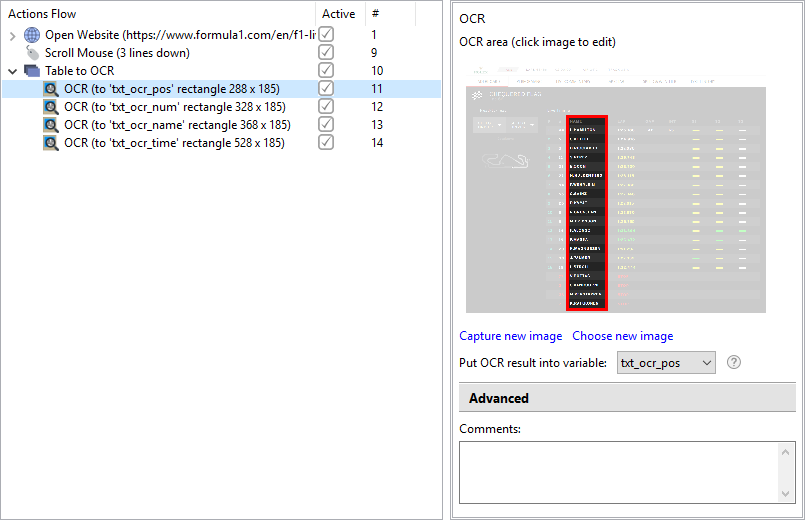
When you are to extract textual information from an image, desktop application, applets, like Java, Adobe Flash or alike and the information cannot be copied directly - use OCR action, process it with the OCR plugin to recognize and extract the text.
Text actions
Manipulations with the texts are the key procedures, when extracting or harvesting the information from different sources such as web-pages, documents or processed images.
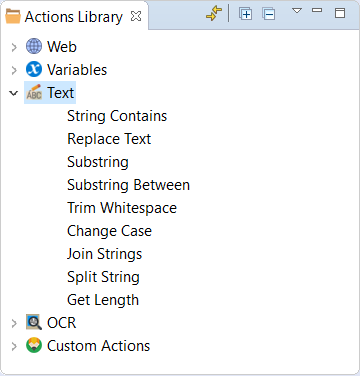
The following operations with the textual information are available in this release:
- Substring - you can extract the required characters starting and ending from any position in the text to skip irrelevant information.
- Trim Whitespaces - the text acquired may contain non-printable characters. With this function you can remove leading and trailing characters such as spaces, tabs, line brakes and other non-printable characters.
- String Contains - you can check, if the text contains necessary characters or a piece of text.
- Join Strings - you can concatenate a number of strings into one and delimit the texts in the output string.
Variables actions
New actions group for assigning values to Recorder variables using predefined values or expressions.
- Random - a value is generated at random depending on the variable type with a pre-set length, character sets, table/list properties, time spans or true/false values.
- Constant - a pre-defined constant is written to a variable of the same type. All types of Recorder Variables are supported.
- Expression:
- the value is computed using expressions and numeric variables
- you can append a content of a list to another or get the size of the list and insert it to another list
Excel actions
The Excel actions are extended with Loops and Conditions, which can be used to serialize an operation in Excel.
Additionally, there is an option now to select the current cell to put the data in.
Action groups
An Action Group can be named now for better recognition in the Actions Flow tree.
Recorder Variables log
Upon execution of a recording or several steps of the recording, a log file is created. The log file contains the values of all Recorder variables after the last step.
The log file is very useful for debugging or troubleshooting of your recordings.
Export of recordings
Want to create, test and fine-tune a piece or the whole Bot Task without writing numerous lines of code? Use RPA Express Recorder: create your recording by adding actions and setting their properties, lick into shape by running and debugging the recording; and then export it either as a Groovy script or a Bot Task directly from the Recorder. Add the exported script to your Bot Task or Business Process. Export of recordings accelerates creation of thoroughly tested automated tasks.
Bug fixes
- Recorder: Incorrect code generation for conditions or loops containing number variables during publishing to Control Tower.
- Recorder: A value with default size can not be assigned from Random variable.
- Recorder: Random variable of number type, whose range starts from 0, causes exception.
- Recorder: Recorder is unable to insert recording after Web actions.
- Control Tower: Entering of keystrokes from a number variable fails in Control Tower.
- Control Tower: Execution of scripts containing a list or a table as a constant fails.
- Control Tower: Control Tower fails to start from the tray menu.
- RPA Express setup: uninstall procedure does not delete all entries from the registry.
Known issues
- Recorder: Impossible to import script if it has been imported to the previous version of Control Tower. As a workaround, right-click on the recording and select Export as new script from the context menu.