
Sunbird 1.4.0
note
Available from April 2, 2018.
Sunbird 1.4.0 contains a new Mouse Click action to find a web element using text and update of the OCR license.
caution
If you are an RPA Express user already, you should update to this version to continue using OCR as the previous license expired on April 1, 2018.
New features and improvements
General
All major components such as Control Tower, Platform Monitor and WorkSpace have been updated to ensure more productivity, stability and reliability of operations and align RPA Express to the latest trends in our flagship product WorkFusion SPA.
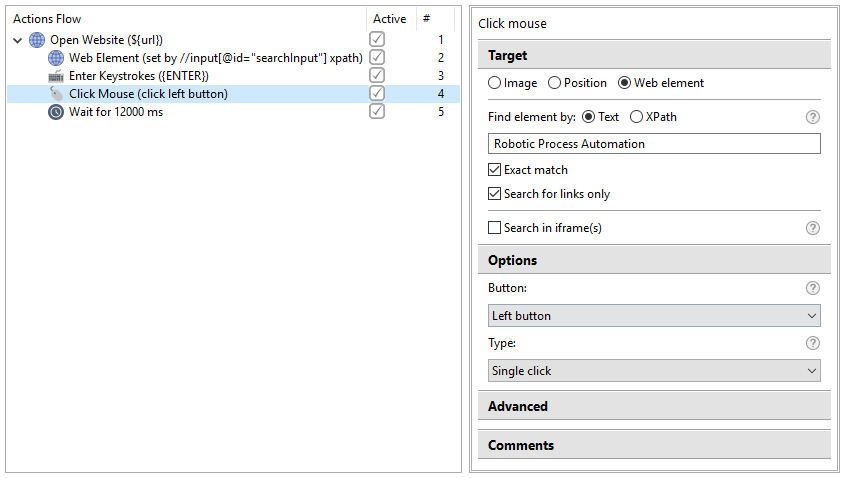
Find web element by its text
If you are not eager to create or find an XPath for your bot to click on a web element, now you can use a text search instead. So with this new capability of RPA Express Recorder you can simply provide a text, which the element should contain, and the Bot finds and clicks on this element. For more details, see here
New OCR license
A new type of OCR license has been implemented. Now the free OCR license allows processing 1,000 pages.
Bug fixes
Control Tower
- After re-installing RPA Express, the Publish To Control Tower option does not work for the recordings that have been published with the previous version.
Known issues
WorkSpace
- WorkSpace sometimes is not accessible upon re-installing RPA Express due to incorrect uninstall of the previous version. The solution is to uninstall RPA Express and delete the RPA Express working folder manually, if it has not been completely removed.
Excel actions
- Set Range fails: Set Range action fails when copying a large amount of data (currently, limitation is 65,535 characters).