
Sunbird 1.1.9
note
Available from January 12, 2018.
Sunbird 1.1.9 contains improvement of Recorder performance, redesigned tray menu and update the OCR license.
New features and improvements
Recorder
General performance improvement to make Recorder's playback faster, especially for the Actions which are not addressed to the Robot, such as Loops, Text, Files and Folders.
New OCR License
A new type of OCR license has been implemented with extended validity period. Now, the OCR license is valid for 3 months, so you do not have to re-install RPA Express each month to use recordings with OCR actions.
Tray menu
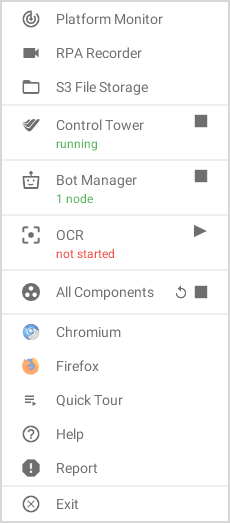
Taking into consideration feedback and suggestions from RPA Express users, the RPA Express tray menu has been redesigned accordingly to make it more informative and improve User Experience. Now, using the tray menu a user can open the portable browsers (Firefox and Chromium), which come with the RPA Express package, to work with their built-in plugins, for example for getting Xpath in Firefox Portable.
Control Tower, Platform Monitor and S3 File Storage from the tray menu now open in the default browser.
Bug fixes
Recorder
- Recorder's Welcome screen opens correctly.
Known issues
WorkSpace
- WorkSpace sometimes is not accessible upon re-installing RPA Express due to incorrect uninstall of the previous version. The solution is to uninstall RPA Express and delete the RPA Express working folder manually, if it has not been completely removed.
Control Tower
- After re-installing RPA Express, the Publish To Control Tower option does not work for the recordings that have been published already with the previous version. The workaround is as follows. First, use the Publish As new Business Process option to deploy such recordings to Control Tower. After that, the Publish To Control Tower option will work correctly.
Excel actions
- Set Range fails when copying a large amount of data (currently, limitation is 65,535 characters).