
Sunbird 1.1.4
note
Available since August 3, 2017.
Sunbird 1.1.4 is an update to the previous version, although it enables new capabilities in the Recorder for Excel actions.
caution
If you are an RPA Express user already, you should update to this version to continue using OCR as the previous license expired on August 1, 2017.
New features and improvements
Platform improvements
Setup
When uninstalling RPA Express, only the folders created during setup are deleted. It prevents from accidental deletion of the items, which do not belong to RPA Express.
Recorder
Excel actions
The new capability for the Excel Actions is available in this release:
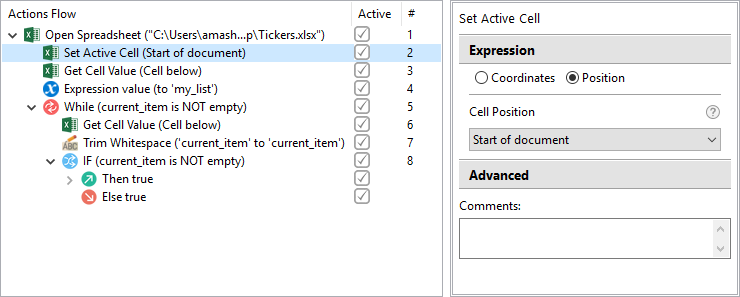
- Set Active Cell -- the action defines which cell in the spreadsheet gets active for the further manipulations.
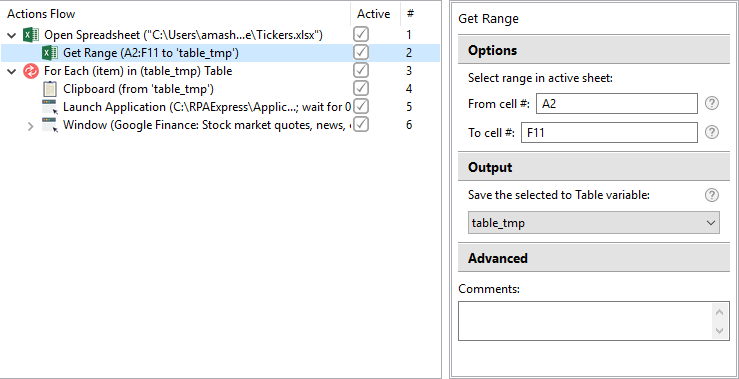
- Get Range can be used to select a predefined range of cells in the spreadsheet and save it to a Recorder variable.
Bug fixes
Recorder
- OCR Action - When changing left/top values of the anchor area the selection moves out of the image.
Control Tower
- While running the recording in Control Tower the image threshold is skipped and the script doesn't work correctly.
Known issues
- Recorder is unable to capture keystrokes in the Command Prompt. As a workaround, you can paste commands to the Command Prompt from the clipboard and send the Enter keystroke from the Enter Keystroke action.
- In Recorder mouse Scroll Up sometimes scrolls down and vice versa.
- The Auto-detect window Action cannot switch to the application windows after the Window maximize Action. The workaround is as follows. As the application window opens, switch to another window first, then move the focus to the application.
- Switch to window does not work with Cortana.
- Files, whose names contain spaces, can not be used in the Excel actions.
Text actions
- Change case issues:
- Sentence case does not work, if the text contains '!' or '?'.
- When changing to the Sentence case, the first letter of the sentence is capitalized, but the other letters still keep the initial case.
- When changing to the Capitalize Each Word, the first letter of the word is capitalized, but the other letters still keep the initial case.