
Sunbird 1.1.7
note
Available from October 25, 2017.
Sunbird 1.1.7 offers a new set of actions to work with files and folders enabling capabilities to create, copy, move files and folders, add content and set encoding for files; check existence of files and folders and define what to do with the existing files and folders. New action for Excel allows to set a range of data in a spreadsheet from a Table variable.
In addition the releases fixes the issues with Conditions, Web Actions in Chromium Portable, Variables Actions and Groovy code generation, reported for the previous versions of RPA Express.
caution
If you are an RPA Express user already, you should update to this version to continue using OCR as the previous license is valid till November 2017.
New features and improvements
File and Folder
A new set of actions is a capability enabling general manipulations with files and folders in a recording, such as creating a folder under the path specified or a file with a specific content in a defined location, or copy/move a folder or a file to the location specified. The actions are executed in the background, so a file manager is not necessary to perform these actions as the execution process is invisible.
The main benefits of the Files and Folders actions are increased reliability as you manage your files and folders in a safe and error-prone way, speed of execution as numerous objects are handled at once, variables support enabling re-use of recording with different input data and conflict resolution with a possibility to replace or keep an existing file or folder, or terminate the process, regional or special character support to write, save and display all characters properly with the help of the file encoding set.
Create File or Folder
The action allows to create a file or a folder at a desired destination. The files created with the action are of the Text type (for example, TXT, CSV, HTML, XML, JS, etc.).
Optionally, you can write a content to a file to be created and define file's encoding.
If such file or folder is already existing, you can choose whether to keep the original file, overwrite it with the new one or terminate the process with the error.
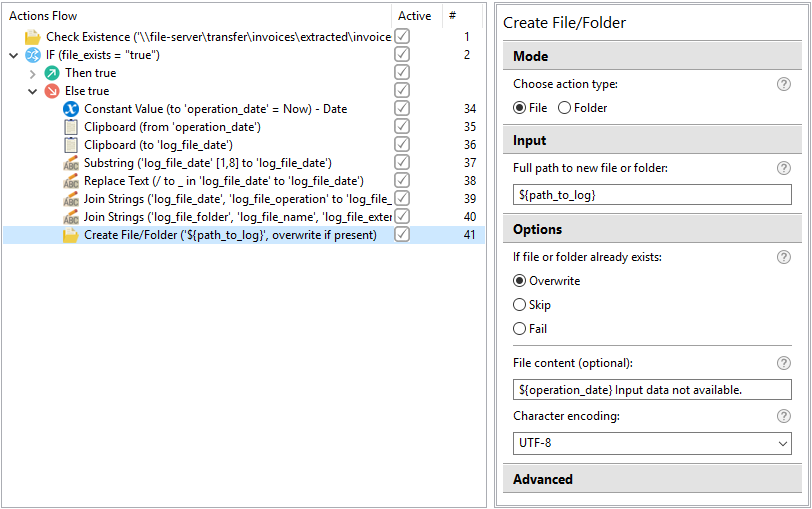
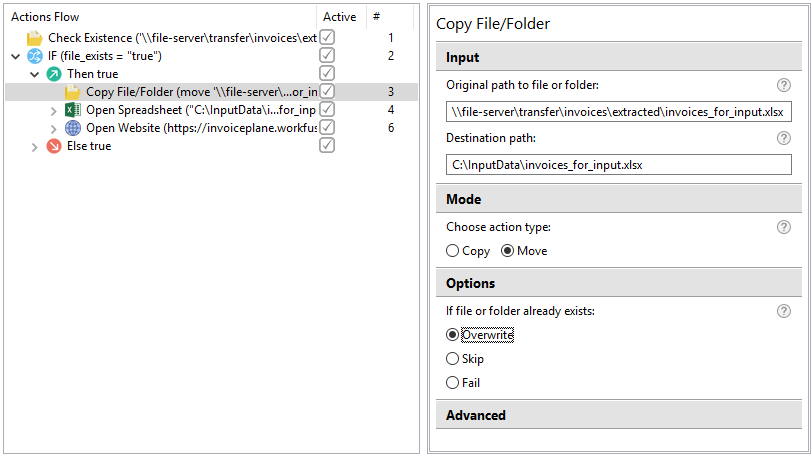
Copy/Move
This action is intended to copy or move a folder, including its entire content, or a single file to a location defined as a destination path.
If such file or folder is already existing, you can choose whether to keep the original file, overwrite it with the new one or terminate the process with the error.
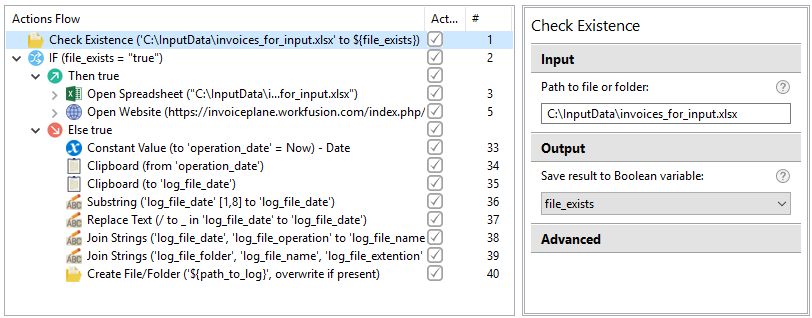
Check Existence
This action allows you to check, if a file or a folder you are going to process already exists in order to avoid possible errors while attempting to manage such objects.
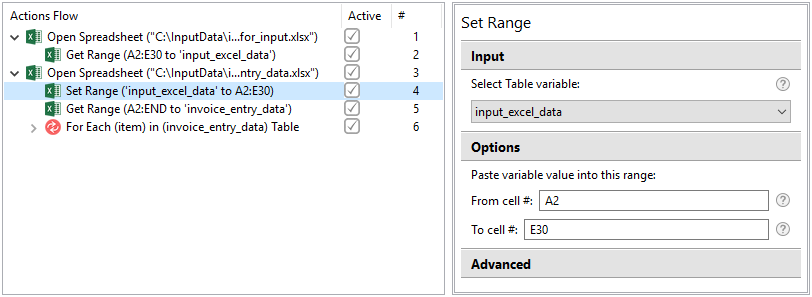
Set Range Excel action
The action allows to insert values from a Table variable to a range defined in an active sheet.
With the Set Range action a user can copy data between spreadsheets without opening a spreadsheet processor, but using the Excel actions and do it in the background to minimize chances to interfere execution of a recording when processing data from spreadsheets.
Bug fixes
Recorder
- [Excel]: can not get column/row from certain documents.
- [Web]: Web actions don't work in Chromium Portable.
- [Keystrokes]: 'Ctrl + \' combination fails.
- [Conditions]: "Is empty" check fails in "If" condition.
- [Variables]: The Constant Value action handles a Boolean value (true of false) incorrectly when populating it to a string variable.
- [Variables]: The Constant Value action doesn't work for the second time after list or table item set.
- [Text]: A List variable can't be used in the Join Strings action.
- [Export]: Groovy code generation fails on the For Each action.
Known issues
WorkSpace
- WorkSpace sometimes is not accessible upon re-installing RPA Express due to incorrect uninstall of the previous version. The solution is to uninstall RPA Express and delete the RPA Express working folder manually, if it has not been completely removed.
Control Tower
- After re-installing RPA Express, the Publish To Control Tower option does not work for the recordings that have been published already with the previous version. The workaround is as follows. First, use the Publish As new Business Process option to deploy such recordings to Control Tower. After that, the Publish To Control Tower option will work correctly.
- The "Account Payable" sample project cannot be run correctly in the new version of Control Tower.
Keystroke capturing
- Recorder is unable to capture keystrokes in the Command Prompt. The workaround is as follows. You can paste commands to the Command Prompt from the clipboard and send the Enter keystroke from the Enter Keystroke action.
Text actions
- Change case issues: sentence case does not work, if the text contains '!' or '?'.