
Sunbird 1.1.6
note
Available since October 2, 2017.
Sunbird 1.1.6 is a maintenance release to fix the issues with the Excel, Loops, Keystrokes and OCR actions, reported for the previous versions of RPA Express, and contains a few improvements of the entire platform and components, for example, updated Control Tower and improved algorithm for switching between windows.
caution
If you are an RPA Express user already, you should update to this version to continue using OCR as the previous license is valid till October 2017.
New features and improvements
Control Tower
Control Tower has been upgraded to the 8.4 version to enhance User Experience with the new Business Processes List, including Business Processes overview and filters.
Redesigned business processes list
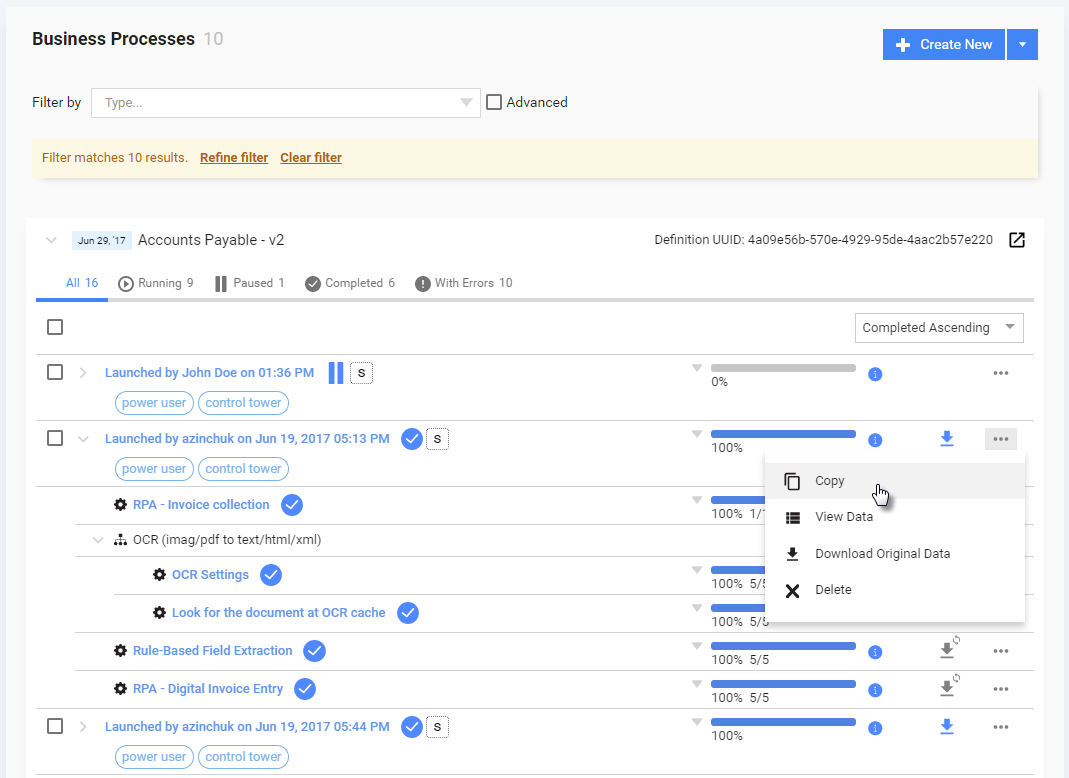
Now **Business process instances are grouped in a compact hierarchical view **with streamlined filters and access to bulk actions, making it quick to deploy automation. This was one of the most requested updates from our customers.
This feature provides the following advantages:
- Compact hierarchical view, especially for processes with a lot of launches.
- Bulk actions for process instances, saving a lot of time, for example, if you need to delete or restart a few process instances (Runs) at once.
- Quick overview and actions for process steps (progress, statuses, snapshots, events).
- One-click status filters with a focus on required actions (With errors, With messages, Running, Paused, Completed, etc.).
Fast filters
Improved filters allow you to quickly navigate to priority Business Processes and objects on a single page. This allows for sorting and filtering bigger amounts of data as well as easily saving and re-using different filters.
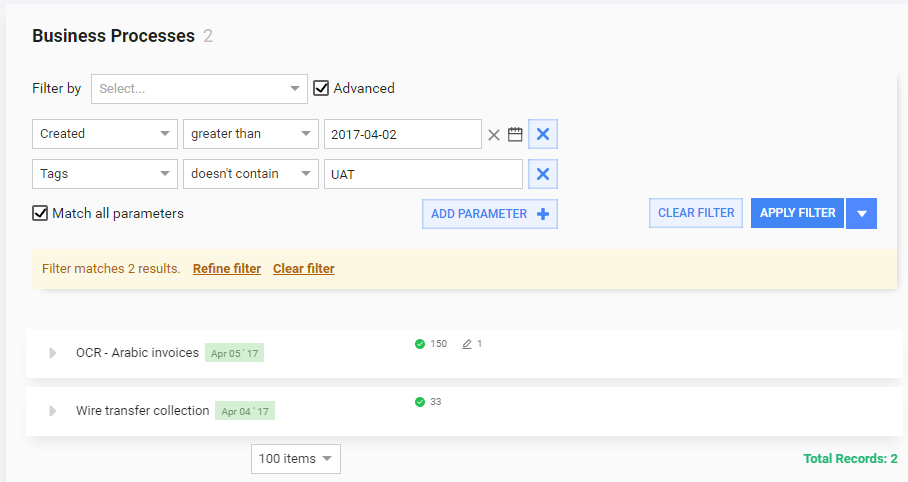
Users will leverage the following capabilities with new filters:
- Filter state - shows how many records were filtered. With this option, you will always know the exact number of existing items, even when they are not shown. For example, you can see 30 processes out of 55 (25 are not shown because they do not match filter).
- Clear and Refine filter with one click. Even new users will understand how to clear or edit existing filters.
Recorder
Switch to windows
The algorithm for switching between windows has been improved to speed up the process and increase the reliability of the procedure.
Enter Keystrokes
The entered text in the Enter Keystrokes actions are automatically wrapped to enable auto-escaping in the Bot task or RPA script, so the user should not do it manually.
Bug fixes
Recorder
- Loops do not work in the Excel actions. The fix eliminates the issue with processing the spreadsheet items with the For Each or While actions.
- If the same image is used in several actions, the anchor area cannot be adjusted for each step.
- The Auto-detect window action cannot switch to the application windows after the Window maximize Action.
- Error handling is unable to process opening of a spreadsheet with the Excel action.
- Excel actions are skipped, if they are enclosed into other actions. So the Excel actions can be nested into other actions without limitations.
- Recorder fails to process a text containing the $ character, for example, such text cannot be copied from a Recorder variable to the clipboard.
- Code generation fails, when the number of repetition in the Repeat Action is set to '0'.
- Multi line comments are not supported in the actions.
Known issues
Control Tower
- The "Account Payable" sample project cannot be run correctly in the new version of Control Tower.
Keystroke capturing
- Recorder is unable to capture keystrokes in the Command Prompt. The workaround is as follows. You can paste commands to the Command Prompt from the clipboard and send the Enter keystroke from the Enter Keystroke action.
Text actions
- Change case issues: sentence case does not work, if the text contains '!' or '?'.