Import Business Process schedules with Asset Bundle
In an Asset Bundle, Business Process (BP) scheduler configurations are located in the bp-scheduler folder as shown below. For the complete Asset Bundle structure, refer to the guide.
├── business-process
│   └── smoke-test.zip
├── bp-scheduler
│   └── scheduler1.json
└── meta-info.json
Configuration parameters
The asterisk (*) marks required parameters.
Each BP scheduler configuration is a JSON file containing the following parameters:
uuid* is the scheduler UUID. The maximum length is 36 characters.If the target environment has a scheduler with the same UUID, this existing scheduler is updated to match the imported configuration. Otherwise, a new scheduler is created.
name* is the scheduler name. The maximum length is 256 characters.businessProcessPackageName* is the the name of the BP package to which the scheduler pertains. The linked package must be in the same Asset Bundle.descriptioncontains the scheduler description. The maximum length is 255 characters.tagsare labels to identify a started BP. The maximum length is 200 characters.cronExpression* specifies when the scheduler will be executed.maximumProcessingCountdefines the number of retries for failed steps.dataOriginspecifies from where the associated BP data originates.When you import a scheduler with an Asset Bundle, the only supported value is
EMPTY. The setting means the BP will start with one record without input data. If no value is set for the paramater, it defaults toEMPTY.streamingValueandstreamingValueTypeset the minimum completion requirements for streaming: the number of tasks or percentage of process records that need to be completed before going to the next BP step.For
streamingValueType, possible values areTasksorPercents. In thestreamingValueparameter, you specify the exact numeric value for the completion criterion instreamingValueType.uploadResultsTypedetermines if the BP results should be saved to a Data Store. Use one of the following values:APPENDto copy the results from all BPs to a single Data Store. The Data Store name format is [BP name].CREATEto copy the results from each individual BP to a separate Data Store. The Data Store name format is [mm-dd-YYYY hg-mm-ss]-[BP-name].
slaRequirementsets the SLA configuration. You can use the parameter if transaction tracking is enabled for the scheduled BP. Contains the following two fields:typeis the SLA type. You can set it toTIMEorVOLUME. ChooseTIMEto specify that the cycle time should be less than X seconds per transaction. UseVOLUMEto define that the number of transactions per day that should be more than X.valueis the number of seconds or transactions, depending on whether you setTIMEorVOLUMEastypeaccordingly.
The firstSchedulePoint and lastSchedulePoint parameters on the scheduler UI page are ignored during Asset Bundle import.
For Asset Bundle import instructions, refer to the following topics:
Configuration examples
When importing a scheduler configuration with an Asset Bundle, pay attention to the following important considerations:
For successful scheduler import, an Asset Bundle must contain the Business Process package to which the scheduler refers to by the
businessProcessPackageNamefield.The
dataOriginfield must have theEMPTYvalue as only this data origin is supported for Asset Bundle import.Scheduler import doesn’t modify its status. So, if an imported scheduler already exists on the target environment with the PAUSED status, the same status will remain valid after the import is completed successfully.
Simple configuration
The Asset Bundle should also contain the business-process/smoke_test_bp.zip file corresponding to the linked Business Process.
{
  "uuid": "4032db8c-f8fe-4ddb-acdd-0ea8b3aa9bb7",
  "name": "simple 2",
  "cronExpression": "0 * * * * ?",
  "businessProcessPackageName": "smoke_test_bp.zip"
}
Advanced configuration
The Asset Bundle should also contain the business-process/smoke_test_bp.zip file corresponding to the linked Business Process.
{
  "uuid": "4032db8c-f8fe-4ddb-acdd-0ea8b3aa9bb7",
  "businessProcessPackageName": "smoke_test_bp.zip",
  "name": "test scheduler",
  "description": "demo",
  "tags": "",
  "cronExpression": "0 0 * * * ?",
  "campaignDataSourceId": null,
  "useDataSource": false,
  "maximumProcessingCount": "1",
  "dataOrigin": "EMPTY",
  "streamingValue": 1,
  "streamingValueType": "Tasks",
  "uploadResultsType": "APPEND",
  "slaRequirement": {
    "type": "TIME",
    "value": 1
  }
}
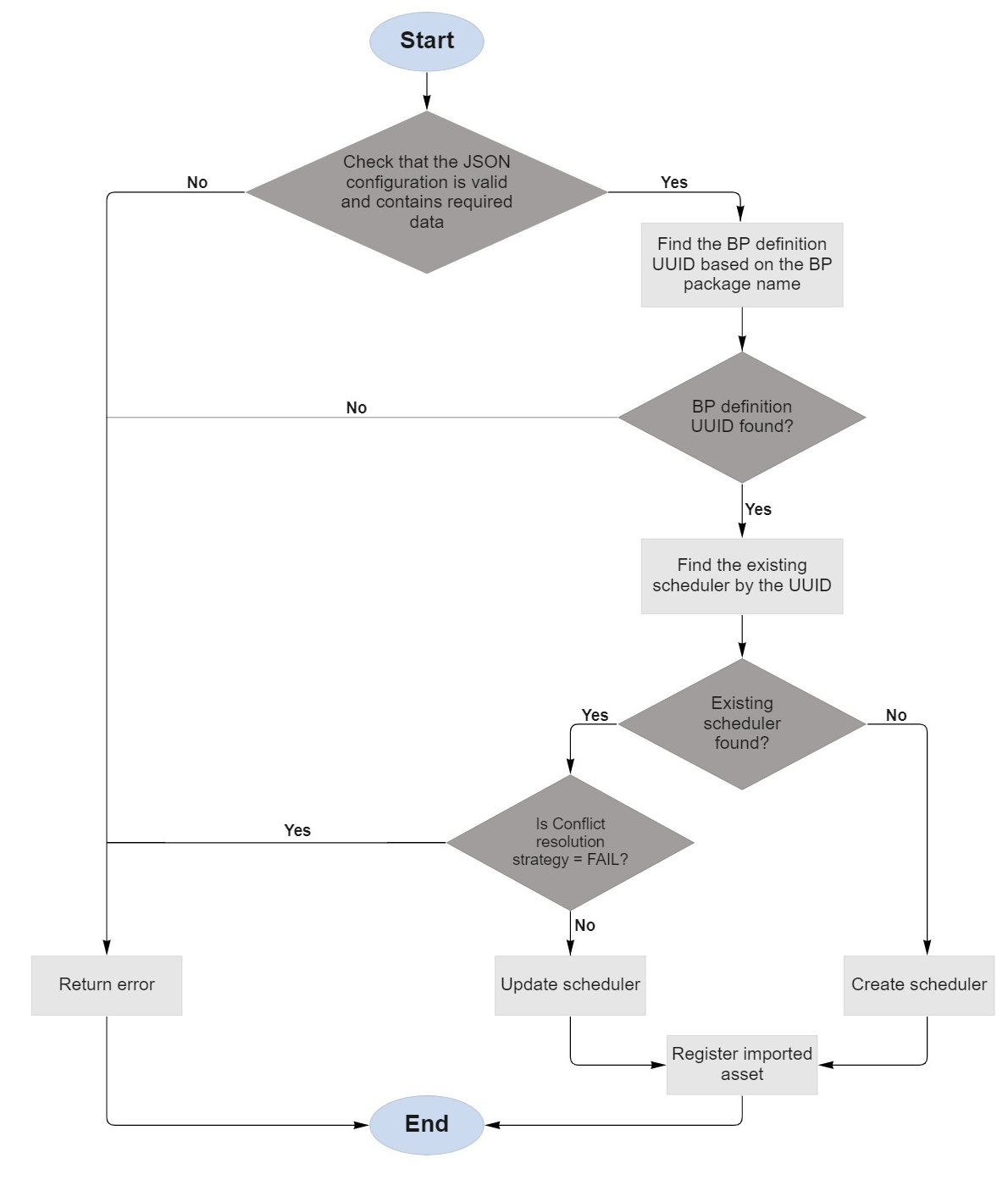
Import diagram
The following diagram illustrates the import of a scheduler configuration: