Customize IE and non-IE Manual Tasks
The instruction contains customization samples for legacy Manual Task designs in some of the most typical scenarios. There're two groups of samples described for the following groups of Manual Tasks:
- IE specific: corresponding to Manual Tasks with Information Extraction (IE) answers
- Non-IE specific: corresponding to Manual Tasks with answers other than information extraction ones
The described customizations are valid for the WorkFusion platform v.10.2+. You can also try using them for earlier versions with certain changes.
To use a sample, you can choose one of the following methods:
- Add the customization code in Code Editor when creating a Manual Task. For that, go to Control Tower > Manual Tasks > Create > Select Operation > Design > Code Editor.
- Import and create a template with the Macro type and include it with one line in Code Editor. To do that, go to Control Tower > Advanced > Templates.
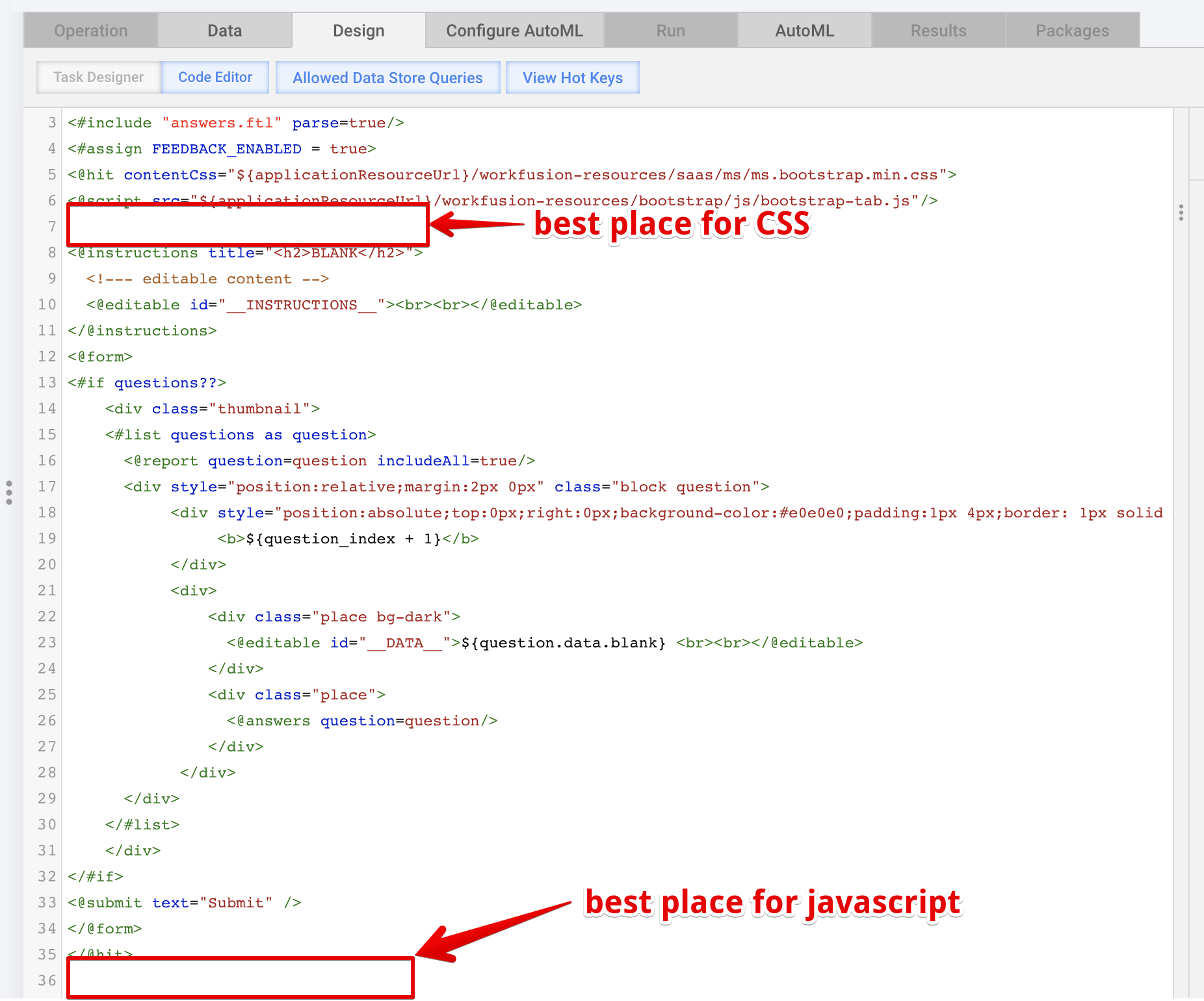
It is recommended to add the JavaScript code at the end of the Code Editor section but the CSS code—at its beginning.
IE specific
Override or extend validation for particular field
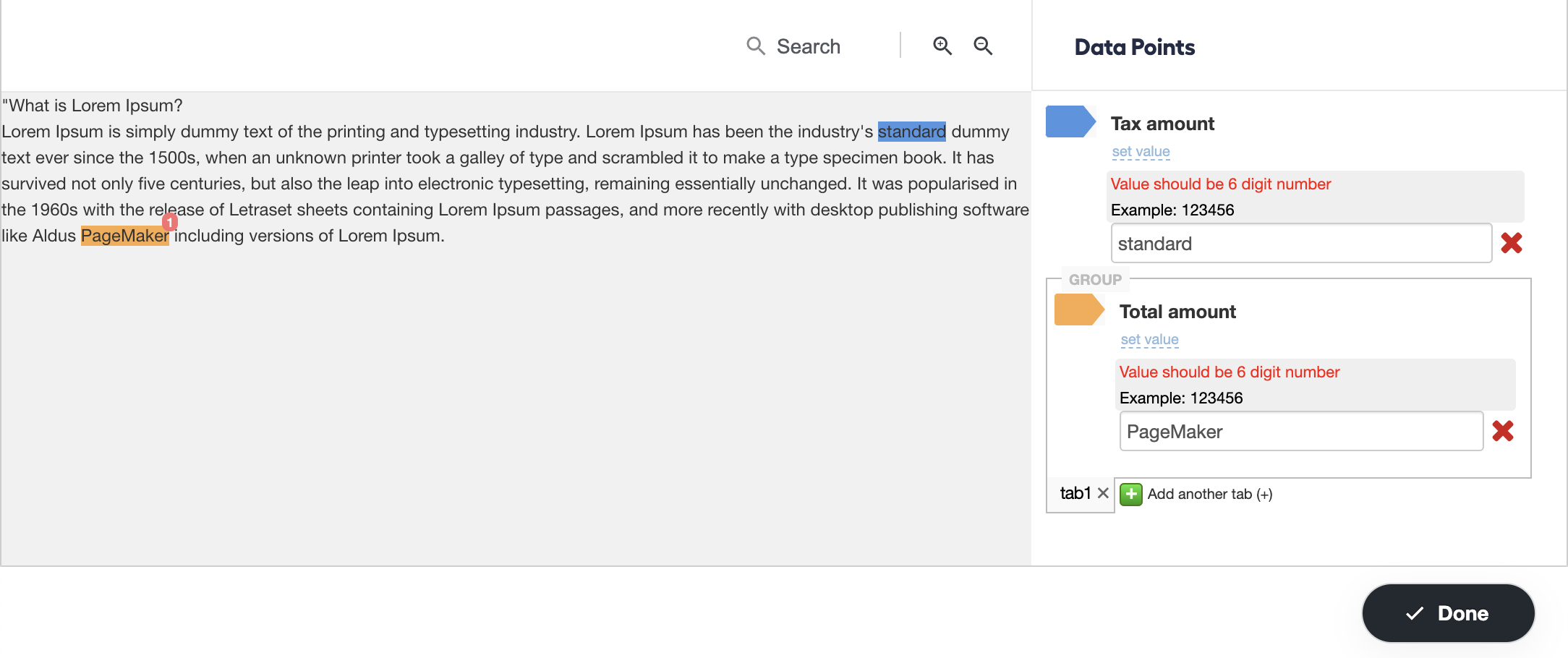
The sample allows overriding or extending (regex) validation for a specific field or a field within a Group of fields or Line items. For example, you can implement six-digit validation for answers with the tax_amount and total_amount codes.
View sample code
<script type="text/javascript">
    $(function() {
        var applyCustomValidator = function(controller) {
            controller.answerWrapper.$warning.find(".sub-ie-warning-selected").text("Value should be 6 digit number");
            controller.answerWrapper.$warning.find(".sub-ie-warning-selected-text").remove();
            controller.answerWrapper.$warning.find(".sub-ie-warning-selected").append("<span style='display: block;color: #000;'>Example: 123456</span>");

            controller.answerWrapper.validateInputs = function() {
                var isValid = /^\d{6}$/.test(this.$answerInput.val());
                if (isValid) {
                    this.$warning.hide();
                    return true;
                } else {
                    this.$warning.show();
                    return false;
                }
            };

            controller.converter.validate = function(str) {
                return /^\d{6}$/.test(str);
            };
        }

        Application.subscribe(Events.Restore.ON_RESTORE_TAGGED_TEXT_COMPLETE, function() {
            Answers.getTaggingControllersByTag('tax_amount').forEach(function(controller) {
                applyCustomValidator(controller);
            });
            Answers.getTaggingControllersByTag('total_amount').forEach(function(controller) {
                applyCustomValidator(controller);
            });
        });

        Application.subscribe(Events.Groups.ON_NEW_TABS_INIT_ANSWER_UTILS, function(event) {
            var controllers = event.get(AnswerUtils.E_CONTROLLERS_TO_INIT);
            controllers.forEach(function (controller) {
                if (controller.getAnswerCode() === 'tax_amount') {
                    applyCustomValidator(controller);
                }
                if (controller.getAnswerCode() === 'total_amount') {
                    applyCustomValidator(controller);
                }
            });
        }, this);
    });
</script>
Handle tabs in Groups and Line items dynamically
The sample enables to add, remove, and validate answers in Groups and Line items.
View sample code
<script type="text/javascript">
    $(function() {
        // add/validate answers
        Application.subscribe(Events.Groups.ON_NEW_TABS_INIT_ANSWER_UTILS, function(event) {
            // get controllers from tab
            var controllers = event.get(AnswerUtils.E_CONTROLLERS_TO_INIT);
            // validation for answers will be called automatically. If you need your custom validation look at previous example
        }, this);

        // remove
        Application.subscribe(Events.Groups.ON_TABS_REMOVE, function(event) {
            // at this moment all controllers are cleared. Only removed tab number available
            var removedTabNumber = event.get(AnswerGroupManager.E_TAB_NUMBERS);
        }, this);
    });
</script>
Normalize field value
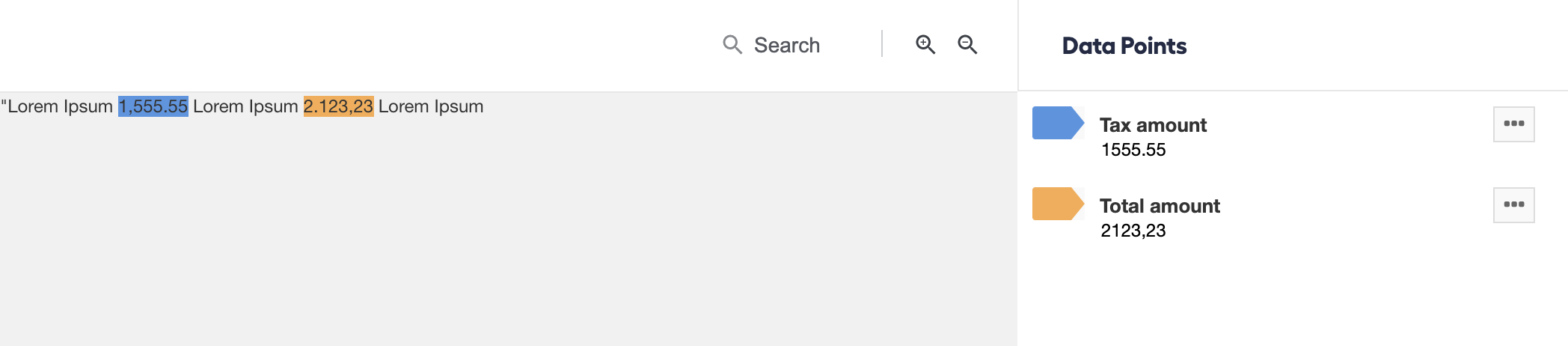
The sample allows you to remove a dot or a comma within specified fields.
View sample code
<script type="text/javascript">
    $(function() {
        var REGEX_BEGIN_OR_END_PUNCTUATION = /^([^a-zA-Z0-9]+)|([^a-zA-Z0-9]+)$/g;
        var REGEX_SPACE = /\s+/g;
        var REGEX_AMOUNT_WITH_SEPARATOR_COMMA = /\d{1,2},(?:\d{3},)*\d{3}\.\d{1,2}|\d{1,3},(?:\d{4},)*\d{4}\.\d{1,2}|\d{1,2},(?:\d{3},)*\d{3}/g;
        var REGEX_AMOUNT_WITH_SEPARATOR_DOT = /(\d{1,2}\.(?:\d{3}\.)*\d{3},\d{1,2})|(\d{1,3}\.(?:\d{4}\.)*\d{4},\d{1,2})|(\d{1,2}\.(?:\d{3}\.)*\d{3})/g
        var REGEX_COMMA = /,/g
        var REGEX_DOT = /\./g

        function normalizeValue(controller) {
            var answerCode = controller.getAnswerCode();
            if (answerCode === 'invoice_number') {
                controller.converter.convert = function(str) {
                    return str.replace(REGEX_BEGIN_OR_END_PUNCTUATION, '');
                }
            } else if (answerCode === 'vendor_name') {
                controller.converter.convert = function(str) {
                    return str.replace(REGEX_SPACE, ' ');
                }
            } else if (answerCode === 'vendor_address_line') {
                controller.converter.convert = function(str) {
                    return str.replace(REGEX_BEGIN_OR_END_PUNCTUATION, '').replace(REGEX_SPACE, ' ');
                }
            }else if (answerCode === 'vendor_city') {
                controller.converter.convert = function(str) {
                    return str.replace(REGEX_BEGIN_OR_END_PUNCTUATION, '');
                }
            } else if (answerCode === 'vendor_state') {
                controller.converter.convert = function(str) {
                    return str.replace(REGEX_BEGIN_OR_END_PUNCTUATION, '');
                }
            } else if (answerCode ===  'vendor_postal_code') {
                controller.converter.convert = function(str) {
                    return str.replace(REGEX_BEGIN_OR_END_PUNCTUATION, '');
                }
            } else if (answerCode === 'tax_amount' || answerCode === 'total_amount') {
                controller.converter.convert = function(str) {
                    var text = str.replace(REGEX_SPACE, '');
                    if (text.match(REGEX_AMOUNT_WITH_SEPARATOR_COMMA)) {
                        text = text.replace(REGEX_COMMA, '');
                    } else if (text.match(REGEX_AMOUNT_WITH_SEPARATOR_DOT)) {
                        text = text.replace(REGEX_DOT, '');
                    }
                    return text;
                }
            }
        }

        Application.subscribe(Events.Restore.ON_RESTORE_TAGGED_TEXT_COMPLETE, function() {
            Answers.getActiveControllers().forEach(function(controller) {
                normalizeValue(controller);
            })
        });

        Application.subscribe(Events.Groups.ON_NEW_TABS_INIT_ANSWER_UTILS, function(event) {
            var controllers = event.get(AnswerUtils.E_CONTROLLERS_TO_INIT);
            controllers.forEach(function (controller) {
                normalizeValue(controller);
            });
        }, this);
    });
</script>
Auto-restore fields in case of no extraction
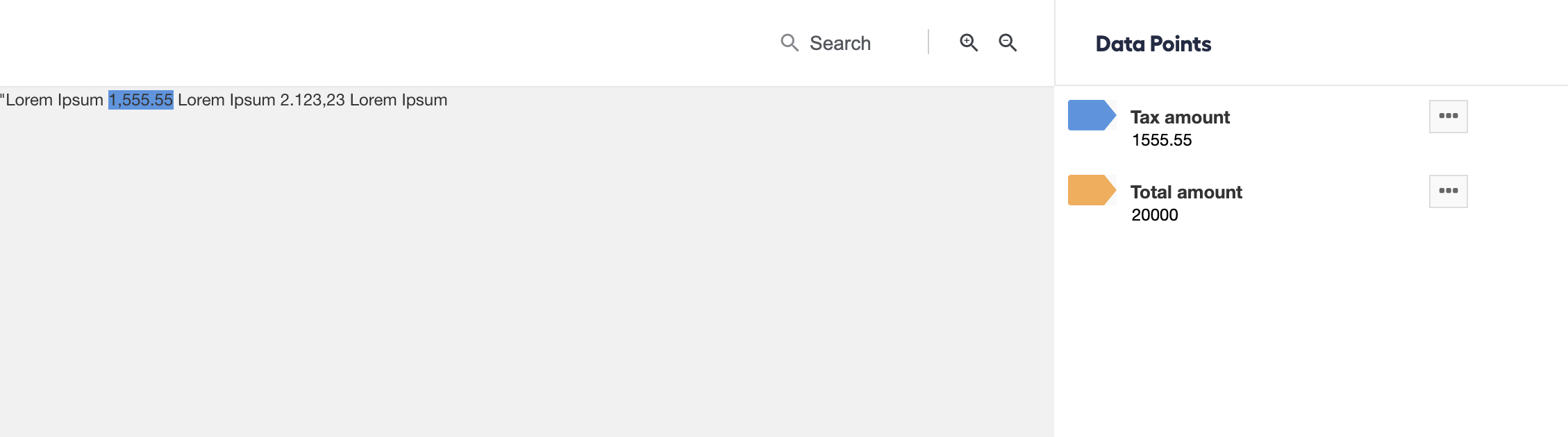
The code samples can make auto-restoring of the fields work if there is no extraction (for example, meta-tags).
Add
meta-manual-answertags at the end of your tagged XML.<meta-manual-answer data-code="ANSWER_CODE" data-value="VALUE"></meta-manual-answer>Add the additional attribute
tabnumberfor the Line item answer or the group answer.<meta-manual-answer data-code="ANSWER_CODE" data-value="VALUE" tabnumber="TAB_NUMBER"></meta-manual-answer>
In the screenshot below, you can see Total amount restored on the Answers panel without a tag in the original text.
Generate summary page
Follow the instructions below to generate a summary page out of the template-based verification results.
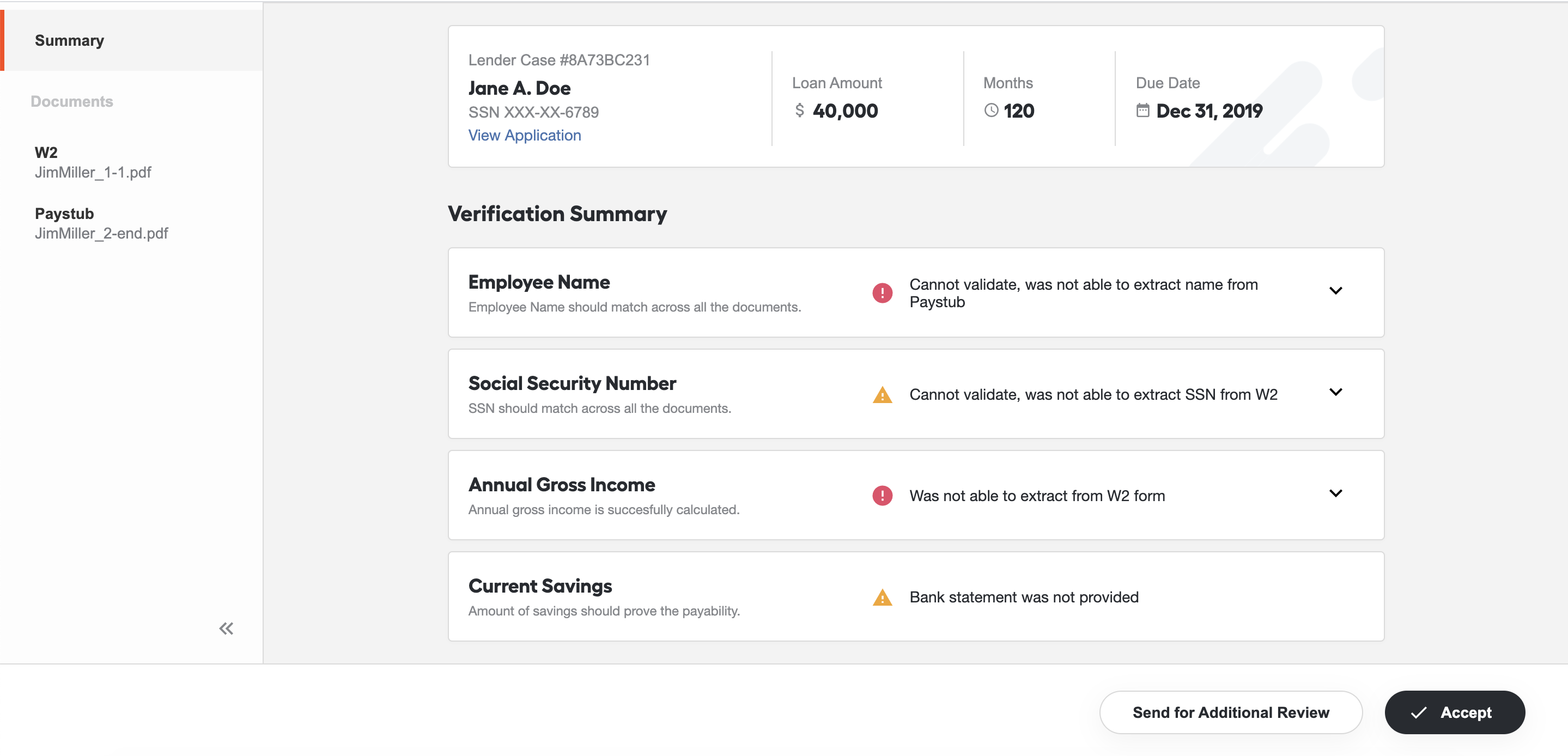
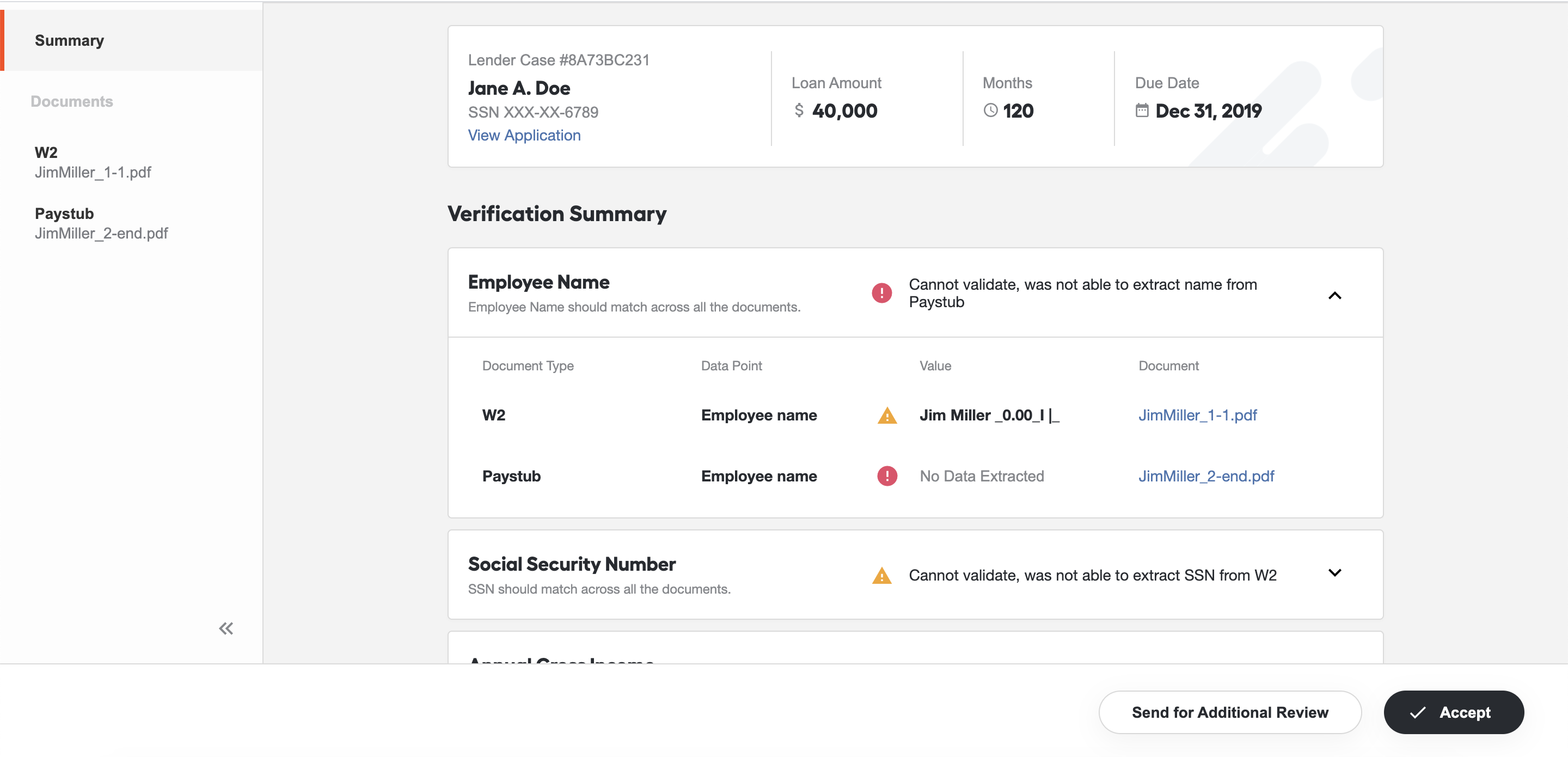
To configure a summary page, do as follows:
Go to Advanced > Templates.
Create a template of the Macro type. Name it
voi-use-cases-verification.jsand, in the code section, insert the following code:View verification configuration code
<script type="text/javascript">
var DOC_TYPE_MAP = {
PAYSTUB: 'Paystub',
W2FORM: 'W2',
BANK_STATEMENT: 'Bank Statement',
}
var STATUSES = {
OK: 'ok',
WARNING: 'warning',
FAILED: 'failed',
}
var VALIDATION_CONFIGURATION = {
title: 'Verification Summary',
rules: [
{
title: 'Employee Name',
description: 'Employee Name should match across all the documents.',
answers: [
{
code: 'employee_name',
title: 'Employee name',
categories: ['W2FORM', 'PAYSTUB', 'BANK_STATEMENT'],
},
],
validator: function (docs, answers, meta) {
const employeeName = meta.employeeName;
const content = [];
const generalStatus = {
status: STATUSES.OK,
value: [],
docType: [],
};
for (const doc of docs) {
for (const answer of answers) {
if (answer.categories.includes(doc.doc_type)) {
const value = doc.doc_extracted_fields && doc.doc_extracted_fields[answer.code];
let status = STATUSES.OK;
if (value) {
status = value === employeeName ? STATUSES.OK : STATUSES.WARNING;
if (generalStatus.status === STATUSES.OK) {
if (status === STATUSES.WARNING) {
generalStatus.status = STATUSES.WARNING;
generalStatus.docType = [DOC_TYPE_MAP[doc.doc_type]];
generalStatus.value = [value];
} else {
generalStatus.docType.push(DOC_TYPE_MAP[doc.doc_type]);
generalStatus.value.push(value);
}
} else if (generalStatus.status === STATUSES.WARNING) {
if (status === STATUSES.WARNING) {
generalStatus.docType.push(DOC_TYPE_MAP[doc.doc_type]);
generalStatus.value.push(value);
}
}
} else {
status = STATUSES.FAILED;
if (generalStatus.status === STATUSES.FAILED) {
generalStatus.docType.push(DOC_TYPE_MAP[doc.doc_type]);
} else {
generalStatus.status = STATUSES.FAILED;
generalStatus.docType = [DOC_TYPE_MAP[doc.doc_type]];
generalStatus.value = [];
}
}
const line = {
docType: DOC_TYPE_MAP[doc.doc_type],
dp: answer.title,
value: value,
status: status,
doc: {
name: doc.doc_name,
docId: doc.doc_id,
},
};
content.push(line);
}
}
}
let message = '';
if (generalStatus.status === STATUSES.OK) {
message = 'Found a match <strong>' + employeeName + '</strong> on ' + generalStatus.docType.join(', ');
} else if (generalStatus.status === STATUSES.WARNING) {
message = 'Mismatch: expected <strong>' + employeeName + '</strong>, but found ' + generalStatus.value.join(', ');
} else if (generalStatus.status === STATUSES.FAILED) {
message = 'Cannot validate, was not able to extract name from ' + generalStatus.docType.join(', ');
}
return {
message: message,
status: generalStatus.status,
content: content,
}
},
},
{
title: 'Social Security Number',
description: 'SSN should match across all the documents.',
answers: [
{
code: 'ssn',
title: 'SSN',
categories: ['W2FORM', 'PAYSTUB'],
},
],
validator: function (docs, answers, meta) {
const answer = answers[0];
const employeeSSN = meta.SSN;
const docTypes = {
w2: 'W2FORM',
paystub: 'PAYSTUB',
}
const w2Doc = docs.filter(doc => doc.doc_type === docTypes.w2)[0];
const paystubDoc = docs.filter(doc => doc.doc_type === docTypes.paystub)[0];
const content = [];
const generalStatus = {
status: STATUSES.OK,
docType: [],
};
const validate = (doc) => {
const value = doc.doc_extracted_fields && doc.doc_extracted_fields[answer.code];
let status = STATUSES.OK;
if (value) {
status = value.endsWith(employeeSSN.substring(employeeSSN.length - 4)) ? STATUSES.OK : STATUSES.FAILED;
if (generalStatus.status === STATUSES.OK) {
if (status === STATUSES.FAILED) {
generalStatus.status = STATUSES.FAILED;
generalStatus.docType = [DOC_TYPE_MAP[doc.doc_type]];
} else {
generalStatus.docType.push(DOC_TYPE_MAP[doc.doc_type]);
}
} else if (generalStatus.status === STATUSES.WARNING) {
if (status === STATUSES.FAILED) {
generalStatus.status = STATUSES.FAILED;
generalStatus.docType = [DOC_TYPE_MAP[doc.doc_type]];
}
} else if (generalStatus.status === STATUSES.FAILED) {
if (status === STATUSES.FAILED) {
generalStatus.docType.push(DOC_TYPE_MAP[doc.doc_type]);
}
}
} else {
status = STATUSES.WARNING;
if (generalStatus.status === STATUSES.OK) {
generalStatus.status = STATUSES.WARNING;
generalStatus.docType = [DOC_TYPE_MAP[doc.doc_type]];
} else if (generalStatus.status === STATUSES.WARNING) {
generalStatus.docType.push(DOC_TYPE_MAP[doc.doc_type]);
}
}
const line = {
docType: DOC_TYPE_MAP[doc.doc_type],
dp: answer.title,
value: value,
status: status,
doc: {
name: doc.doc_name,
docId: doc.doc_id,
},
};
content.push(line);
}
if (w2Doc) {
validate(w2Doc);
} else if (paystubDoc) {
validate(paystubDoc);
}
let message = '';
if (generalStatus.status === STATUSES.OK) {
message = 'SSN is matching with ' + generalStatus.docType.join(', ');
} else if (generalStatus.status === STATUSES.WARNING) {
message = 'Cannot validate, was not able to extract SSN from ' + generalStatus.docType.join(', ');
} else if (generalStatus.status === STATUSES.FAILED) {
message = 'SSN is not matching with ' + generalStatus.docType.join(', ');
}
return {
message: message,
status: generalStatus.status,
content: content,
}
},
},
{
title: 'Annual Gross Income',
description: 'Annual gross income is succesfully calculated.',
answers: [
{
code: 'ytd_amount',
title: 'YTD Gross Pay Amount',
categories: ['PAYSTUB'],
type: 'amount',
},
{
code: 'pay_date',
title: 'Pay Date',
categories: ['PAYSTUB'],
type: 'date',
},
{
code: 'soc_sec_wages',
title: 'Social Security wages',
categories: ['W2FORM'],
},
],
validator: function (docs, answers) {
const docTypes = {
w2: 'W2FORM',
paystub: 'PAYSTUB',
}
const w2Doc = docs.filter(doc => doc.doc_type === docTypes.w2)[0];
const paystubDoc = docs.filter(doc => doc.doc_type === docTypes.paystub)[0];
const w2Answer = answers.filter(answer => answer.categories[0] === docTypes.w2)[0];
const amountAnswer = answers.filter(answer => answer.categories[0] === docTypes.paystub && answer.type === 'amount')[0];
const dateAnswer = answers.filter(answer => answer.categories[0] === docTypes.paystub && answer.type === 'date')[0];
const content = [];
const generalStatus = {
status: STATUSES.OK,
docType: '',
value: '',
incomeValue: '',
answers: [],
date: '',
};
if (w2Doc) {
const value = w2Doc.doc_extracted_fields && w2Doc.doc_extracted_fields[w2Answer.code];
let status = STATUSES.OK;
if (value) {
generalStatus.value = value;
} else {
generalStatus.status = STATUSES.FAILED;
status = STATUSES.FAILED;
}
generalStatus.docType = DOC_TYPE_MAP[w2Doc.doc_type];
const line = {
docType: DOC_TYPE_MAP[w2Doc.doc_type],
dp: w2Answer.title,
value: value,
status: status,
doc: {
name: w2Doc.doc_name,
docId: w2Doc.doc_id,
},
};
content.push(line);
} else if (paystubDoc) {
const amount = paystubDoc.doc_extracted_fields && paystubDoc.doc_extracted_fields[amountAnswer.code];
const date = paystubDoc.doc_extracted_fields && paystubDoc.doc_extracted_fields[dateAnswer.code];
const lineAmount = {
docType: DOC_TYPE_MAP[paystubDoc.doc_type],
dp: amountAnswer.title,
value: amount,
status: !!amount ? STATUSES.OK : STATUSES.FAILED,
doc: {
name: paystubDoc.doc_name,
docId: paystubDoc.doc_id,
},
};
content.push(lineAmount);
const lineDate = {
docType: DOC_TYPE_MAP[paystubDoc.doc_type],
dp: dateAnswer.title,
value: date,
status: !!date ? STATUSES.OK : STATUSES.FAILED,
doc: {
name: paystubDoc.doc_name,
docId: paystubDoc.doc_id,
},
};
content.push(lineDate);
if (amount && date) {
// get month from american date format
const dateObj = new Date(date);
const monthName = dateObj.getMonthName();
const month = dateObj.getMonth() + 1;
const year = dateObj.getFullYear();
let annualGrossIncome = ((parseFloat(amount.toString().replace(/,/g, '')) / month) * 12).toFixed(2);
const parts = annualGrossIncome.toString().split(".");
parts[0] = parts[0].replace(/\B(?=(\d{3})+(?!\d))/g, ",");
annualGrossIncome = parts.join(".");
generalStatus.value = annualGrossIncome;
generalStatus.incomeValue = amount;
generalStatus.date = {
monthName: monthName,
year: year,
};
} else {
generalStatus.status = STATUSES.FAILED;
if (!amount) {
generalStatus.answers.push(amountAnswer.title);
}
if (!date) {
generalStatus.answers.push(dateAnswer.title);
}
}
generalStatus.docType = DOC_TYPE_MAP[paystubDoc.doc_type];
}
let message = '';
if (generalStatus.status === STATUSES.OK) {
if (w2Doc && generalStatus.docType === DOC_TYPE_MAP[w2Doc.doc_type]) {
message = '$' + generalStatus.value + ' based on ' + generalStatus.docType + ' form';
} else {
message = 'Estimated amount — $' + generalStatus.value + '<div style="font-size:12px;color:#85888C;">Based on ' + amountAnswer.title + ' $' + generalStatus.incomeValue + ' by ' + generalStatus.date.monthName + ' ' + generalStatus.date.year + '</div>';
}
} else if (generalStatus.status === STATUSES.FAILED) {
if (w2Doc && generalStatus.docType === DOC_TYPE_MAP[w2Doc.doc_type]) {
message = 'Was not able to extract from ' + generalStatus.docType + ' form';
} else {
const qty = generalStatus.answers.length > 1 ? 'are' : 'is';
message = 'Cannot calculate amount, <strong>' + generalStatus.answers.join(', ') + '</strong> ' + qty + ' not available';
}
}
return {
message: message,
status: generalStatus.status,
content: content,
}
},
},
{
title: 'Current Savings',
description: 'Amount of savings should prove the payability.',
answers: [
{
code: 'account_balance',
title: 'Account Balance',
category: 'BANK_STATEMENT',
}
],
validator: function (docs, answers) {
const answer = answers[0];
const doc = docs.filter(doc => doc.doc_type === answer.category)[0];
const content = [];
const generalStatus = {
status: STATUSES.OK,
value: '',
};
if (doc) {
const value = doc.doc_extracted_fields && doc.doc_extracted_fields[answer.code];
let status = STATUSES.OK;
if (value) {
generalStatus.value = value;
} else {
status = STATUSES.FAILED;
generalStatus.status = STATUSES.FAILED;
}
const line = {
docType: DOC_TYPE_MAP[doc.doc_type],
dp: answer.title,
value: value,
status: status,
doc: {
name: doc.doc_name,
docId: doc.doc_id,
},
};
content.push(line);
} else {
generalStatus.status = STATUSES.WARNING;
}
let message = '';
if (generalStatus.status === STATUSES.OK) {
message = 'Amount is $' + generalStatus.value + ' based on bank statement';
} else if (generalStatus.status === STATUSES.WARNING) {
message = 'Bank statement was not provided';
} else if (generalStatus.status === STATUSES.FAILED) {
message = 'Amount is not available';
}
return {
message: message,
status: generalStatus.status,
content: content,
}
},
},
],
};
function generateSummary(docs, meta) {
const summaryData = {
title: VALIDATION_CONFIGURATION.title,
content: [],
};
for (const rule of VALIDATION_CONFIGURATION.rules) {
const validationResults = rule.validator(docs, rule.answers, meta);
const dataItem = {
title: rule.title,
status: validationResults.status,
statusText: validationResults.message,
description: rule.description,
content: validationResults.content,
};
summaryData.content.push(dataItem);
}
return summaryData;
}
</script>Save the template.
When designing a Manual Task, switch to the Code Editor mode and add
<#include "voi-use-cases-verification.js" parse=false/>. Save the Manual Task.
The output format for the summary page looks as follows.
View summary page data format
summaryData = {
    // title - Summary page title
    title: String,
    content: [
        {
            // title - validation rule title
            title: String,
            // status - validation rule status, one of constant value: 'ok', 'warning', 'failed'
            status: String,
            // statusText - validation rule message
            statusText: String or html with inline styles,
            // description - validation rule description
            description: String,
            // array of objects with data for data points
            content: [
                {
                    // docType - document type
                    docType: String,
                    // dp - data point title
                    dp: String,
                    // value - data point value
                    value: String or Number,
                    // status - data point status, one of constant value: 'ok', 'warning', 'failed'
                    status: String,
                    doc: {
                        // name - document name
                        name: String,
                        // docId - document id
                        docId: String,
                    },
                }
            ],
        }
    ]
}
View Verification of Income as an example. Mind that you might need access to the Git repository.
Use two and more tables per task IE line item
IE: works only for multi-document IE Manual Tasks with one table per document.
The sample allows using two and more tables per IE Line item:
- Go to Advanced > Templates.
- Import the ie-multi-doc-multi-line-item.js.xml template and import it to Control Tower.
- When desining a Manual Task, switch to the Code Editor mode and add the following line at the end of the code section:
<#include "ie-multi-doc-multi-line-item.js" parse=false/>
Non-IE specific
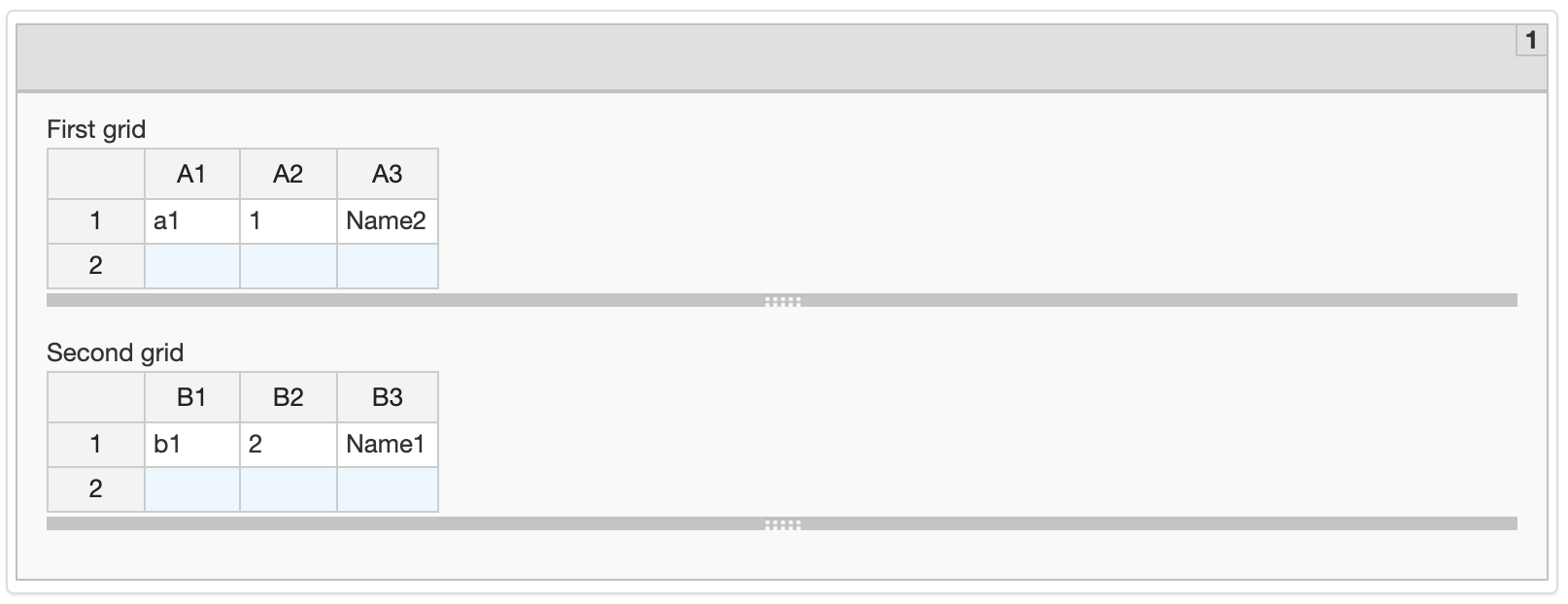
Use 2+ tables per Grid Answer
- Go to Advanced > Templates.
- Download the
multi-grid.js.xmltemplate and import it to Control Tower. - When desining a Manual Task, switch to the Code Editor mode and add the following line at the end of the code section:
<#include "multi-grid.js" parse=false/>
This is what the result should look like:
Add custom handler for Submit button
The code sample allows adding a custom handler for the Submit button.
View sample code
<script type="text/javascript">
    $(function(){
        var submitButton = $('.submit-btn')[0];
        if (submitButton) {
            var originalSubmitAction = submitButton.onclick;
            submitButton.onclick = function() {
                // some custom logic
                originalSubmitAction.apply(this, arguments);
            };
        }
    })
</script>
Show and hide fields based on checkbox, radio-button, and dropdown value
To show or hide particular fields based on the checkbox, radio-button, and dropdown value, use CSS rules.
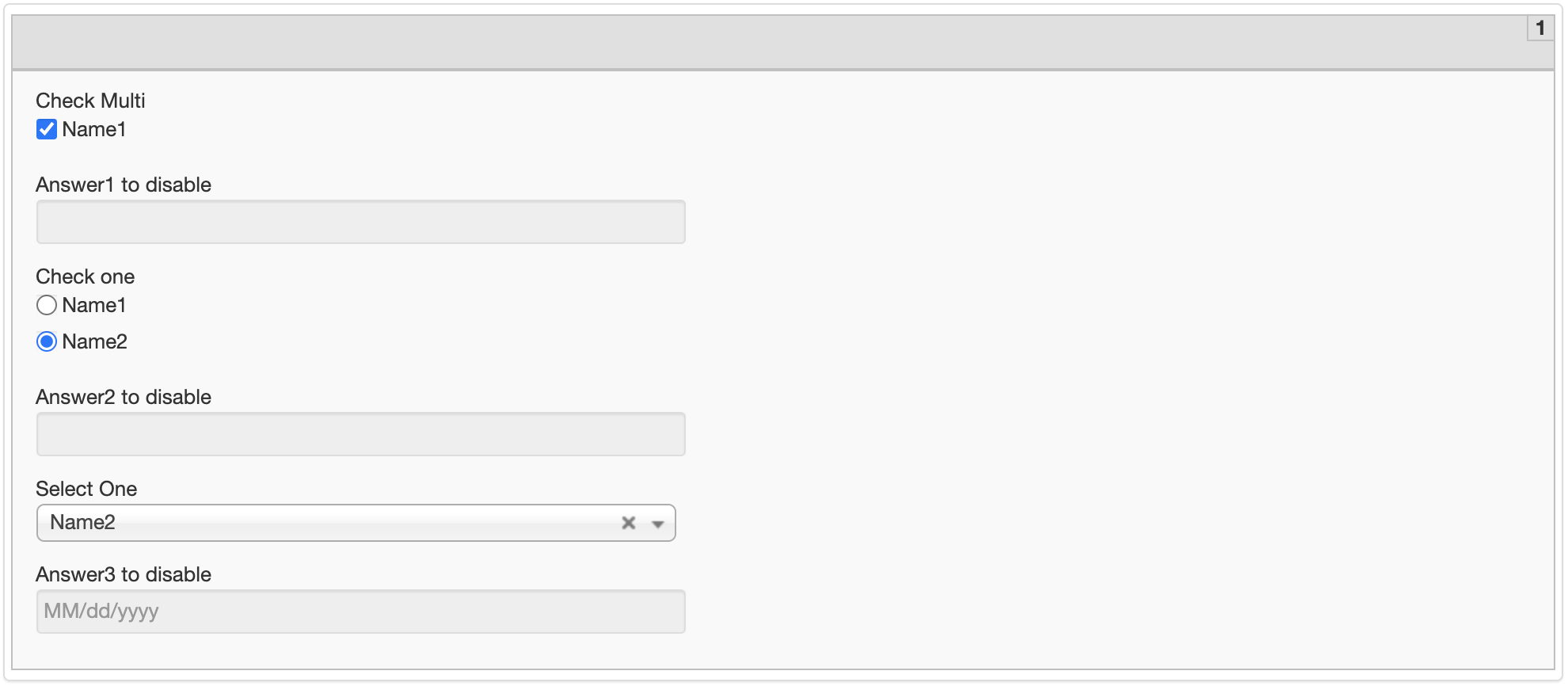
Disable fields based on checkbox, radio-button, and dropdown value
The sample allows disabling some fields depending on a checkbox, radio-button, and dropdown value. As a prerequisite, add a unique class name for all controlled fields and for the controlling field.
View sample code
<script type="text/javascript">
    $(function(){
        // example with Check Multi answer
        $('.check-multi input[type="checkbox"]').on('change', function(e) {
            // find answer input based on added class name
            var $fieldToDisable = $('.answer1 .answerInput');
            // if checked then disable other field
            if (e.target.checked) {
                $fieldToDisable.prop('disabled', true);
            } else {
                $fieldToDisable.prop('disabled', false);
            }
        });

        // example with Check One answer
        $('.check-one input[type="radio"]').on('change', function(e) {
            // find answer input based on added class name
            var $fieldToDisable = $('.answer2 .answerInput');
            // if your specific value equal current choice then disable other field
            if (e.target.value === 'value2') {
                $fieldToDisable.prop('disabled', true);
            } else {
                $fieldToDisable.prop('disabled', false);
            }
        });

        // example with Select One answer
        $('.select-one select').on('change', function(e) {
            // find answer input based on added class name
            var $fieldToDisable = $('.answer3 .answerInput');
            // if your specific value equal current choice then disable other field
            if (e.target.value === 'value2') {
                $fieldToDisable.prop('disabled', true);
            } else {
                $fieldToDisable.prop('disabled', false);
            }
        });
    });
</script>
Download the Manual Task package example.
Change fields layout
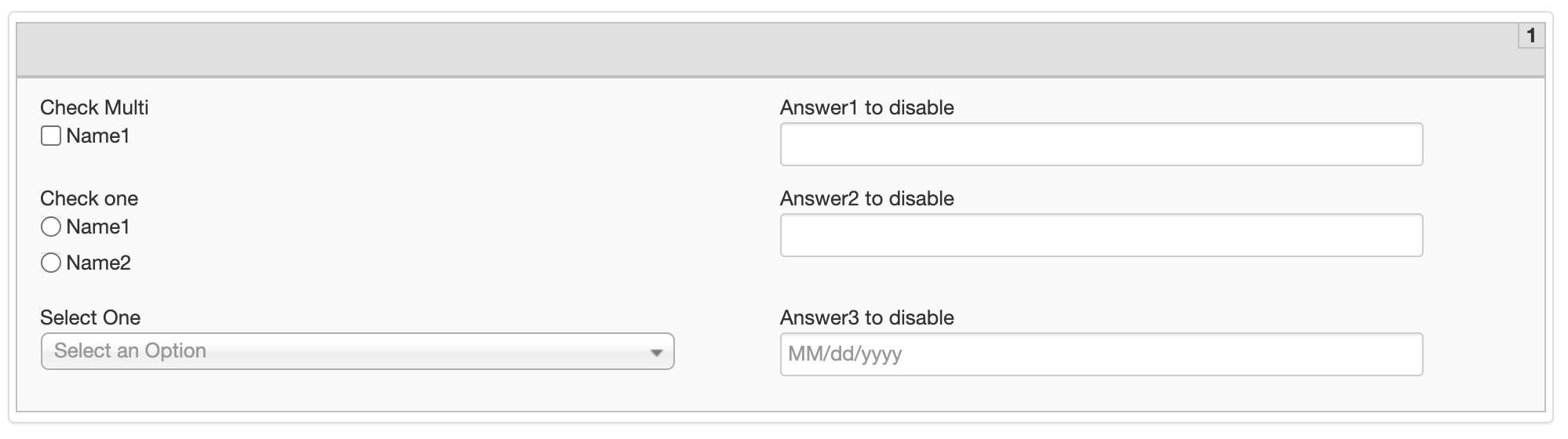
Two-column layout
The code sample enables you to change the layout to two columns.
View sample code
<style type="text/css">
/* 2 column */
.shadow-block {
    display: flex;
    flex-wrap: wrap;
}
.cc-decorate {
    flex-basis: 50%;
}
/* 2 column end */
</style>
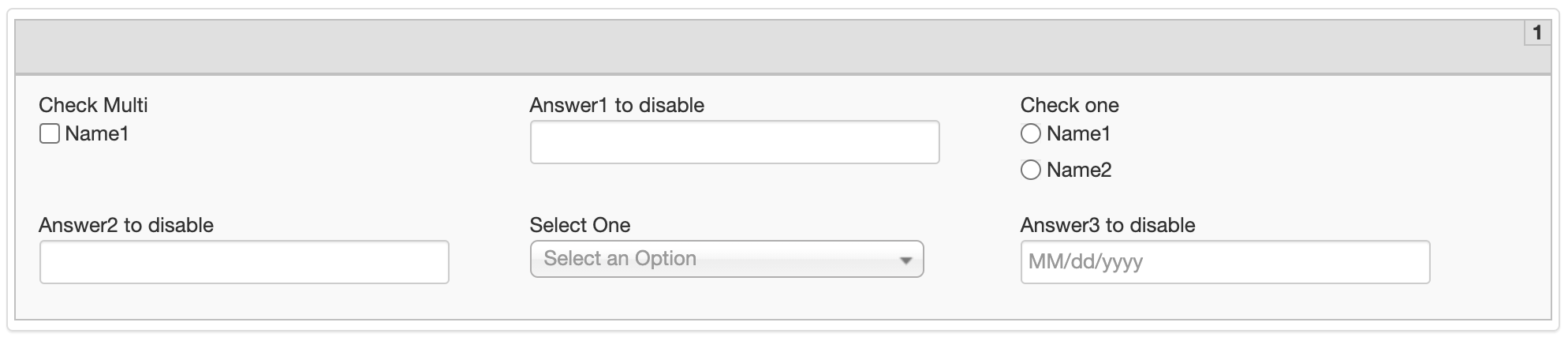
Three-column layout
The code sample enables you to change the layout to three columns.
View sample code
<style type="text/css">
/* 3 column */
.shadow-block {
    display: flex;
    flex-wrap: wrap;
}
.cc-decorate {
    flex-basis: 33%;
}
/* in 3 column change field width (subequent examples are for text, select fields) */
/* for text fields */
input.text {
    width: 250px;
}
/* for select one fields */
.chzn-container {
    width: 250px !important;
}
/* 3 column end */
</style>
Add additional buttons
The code sample allows validating a six-digit number. As a prerequisite, add a unique class name for the field.

View sample code
<style type="text/css">
    .number-val-btn {
        margin: 0 15px;
    }
    .number-val-message {
        display: inline-block;
        padding: 1px 5px;
    }
</style>

<script type="text/javascript">
    $(function(){
        // find answer input based on added class name
        var $fieldToValidate = $('.number-val-field .answerInput');
        // add button near the field
        var $validationBtn = $('<a href="#" class="btn number-val-btn">Validate</a>');
        $fieldToValidate.after($validationBtn);
        $validationBtn.on('click', function() {
            // here, different solutions can be implemented, including third-party api
            $('.number-val-message').remove();
            var valid = /^\d{6}$/.test($fieldToValidate.val());
            if (valid) {
                $validationBtn.after('<span class="number-val-message correctAnswer">Value valid!</span>');
            } else {
                $validationBtn.after('<span class="number-val-message errorAnswer">Invalid! Valid example: 123456</span>');
            }
        })
    });
</script>
Download the Manual Task package example.
Highlight fields in color conditionally
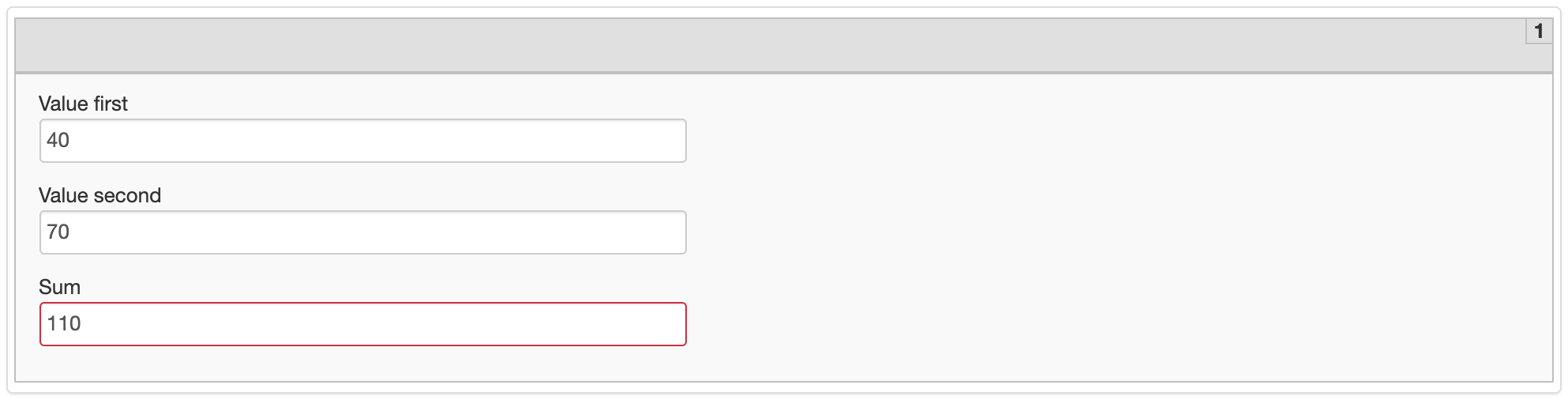
The code sample enables to highlight fields in color.
In the figure below, the Sum field is filled in automatically based on the sum of the other two fields. The validation condition is as follows: if the sum is more than 100, the field is highlighted in red, otherwise—in green.
As a prepequisite, add a unique class name for all fields.
View sample code
<style type="text/css">
    .sum-error {
        border-color: #dc143c;
    }
    .sum-valid {
        border-color: #009813;
    }
</style>

<script type="text/javascript">
    $(function() {
        // find answer input based on added class name
        var $field1 = $('.field1 .answerInput');
        var $field2 = $('.field2 .answerInput');
        var $sumField = $('.field3 .answerInput');
        var value1;
        var value2;
        var sumErrorClass = 'sum-error';
        var sumValidClass = 'sum-valid';

        $field1.on('change', function(e) {
            $sumField.removeClass(sumErrorClass + ' ' + sumValidClass);
            var currentValue = e.target.value;
            if (currentValue !== '') {
                value1 = currentValue;
            }
            if (value1 !== undefined && value2 !== undefined) {
                validateSum();
            }
        });
        $field2.on('change', function(e) {
            $sumField.removeClass(sumErrorClass + ' ' + sumValidClass);
            var currentValue = e.target.value;
            if (currentValue !== '') {
                value2 = currentValue;
            }
            if (value1 !== undefined && value2 !== undefined) {
                validateSum();
            }
        });

        function validateSum() {
            var sumValue = parseFloat(value1) + parseFloat(value2);
            if (sumValue > 100) {
                $sumField.val(sumValue).addClass(sumErrorClass);
            } else {
                $sumField.val(sumValue).addClass(sumValidClass);
            }
        }
    });
</script>
Download the Manual Task package example.
Navigate via tabulation
Navigation via tabulation works for simple form fields.
For IE, view Invoice Data Entry Use Case. Mind that when using the solution, you need numerous changes in the code. You might also need access to the Git repository.