
Basic concepts for Business Process implementation
The article details a general sequence of steps to deliver an automation as a Business Process (BP) and gives tips on what to take into consideration while designing it.
Step-by-step implementation flow
The basic BP implementation flow is as illustrated and described below:
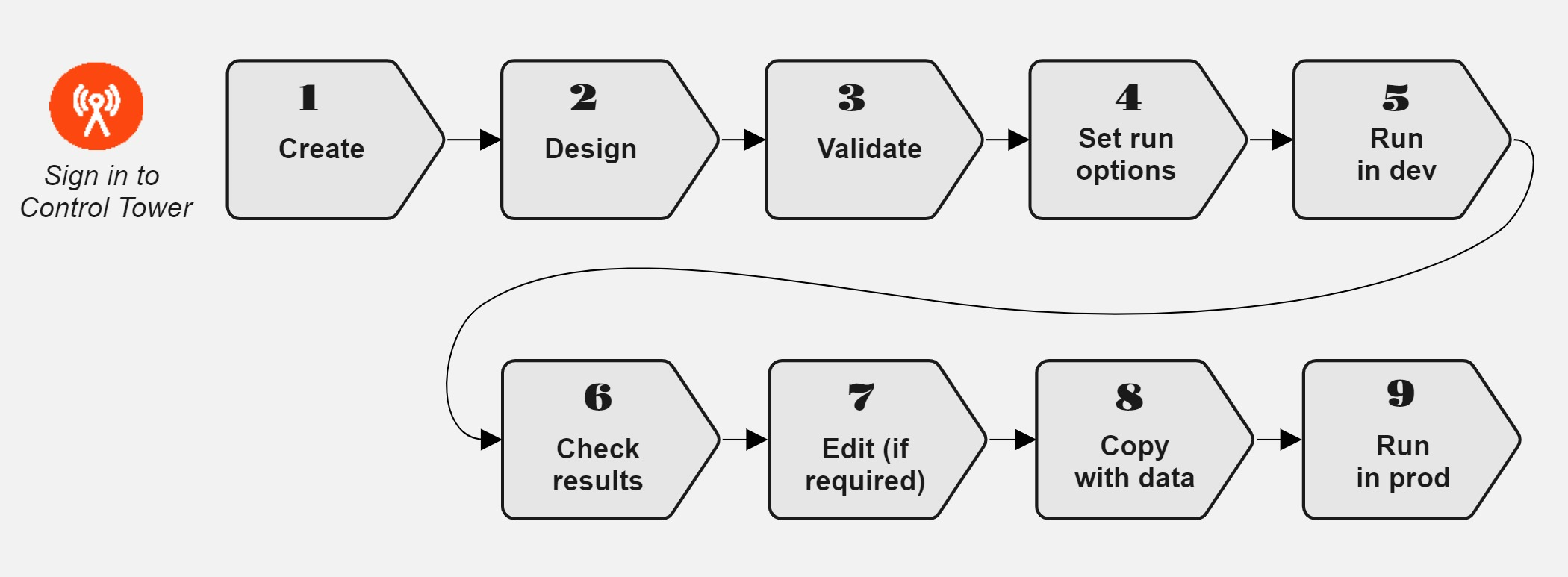
Create a Business Process in accordance with the instruction. Any BP you have created appears in the BP list.
Set up a design for the BP, accounting for the implementation tips below and the instructions in the Design Business Process section.
Make sure the designed BP is valid using the instruction.
Configure the options to run the BP as detailed in the instruction.
Test-run the BP in the development production. For instructions, refer to the Run Business Process topic.
Monitor the BP progress and then check the BP results.
If required, edit the BP settings as described in Set run options. or change its design. Also, you can repair the BP and trace errors via logs. For details, refer to the View Business Process logs topic.
To rerun the BP, copy it with data as described in the instruction.
Run the BP in production. For more information, refer to the Run Business Process topic.
Implementation tips
Define workflow
To identify the flow of work through a designed Business Process, begin with clarifying the following:
How many tasks make up the process?
Is the input data for one task determined by the output data from another?
Is there a moderation step involved in the process?
If yes, who is responsible for the moderation?
What happens to the NOT approved work: returned to the same worker, a different worker, or to an expert?
Determine tasks to include
To understand whether you need to include Manual Tasks or Bot Task, consider the following:
Bot Tasks are best suited for scraping, manipulating data, finding information with a permanent location, such as in forms, standard PDF files, SEC or at .org websites.
The output of one task can become the input for a subsequent one, so you need to know what the output of each task looks like.
Identify the Business Process threshold or streaming—whether an entire task has to be finished before the data moves on.
Use only tested and valid tasks: from Use Cases or the already available ones. Read also Validate Business Process to get to know the basic rules of creating a valid BP.
Monitor BP execution
To make sure the BP implementation is up to requirements, do as follows:
Watch the Business Process progress on the Workflow diagram.
Check the Summary page, BP output data, and worker statistics. For details, refer to the View Business Process results.
Pause or stop the BP if some issues occur. For troubleshooting tips, refer to Getting started with Intelligent Automation Cloud support.