
Searching for Tasks
A Task is a web-form with questions that you need to answer and submit. Workers accept Tasks, begin working, submit an answer, and collect a reward for completing.
Task Group is a set of Tasks with the same parameters (Reward, Qualifications, Time Allotted, etc.) and questions. Tasks in a Task Group vary only by the input data. For example:
- Task Group: Find organization official website
- Task 1: Find the official website for the American Red Cross
- Task 2: Find the official website for the UNICEF
Task Groups are joined into Sub-Categories, and Sub-Categories (Video Tagging, Identify Number of People from Image) are joined into Categories (Media Tagging, Translation, Information Extraction).
Searching
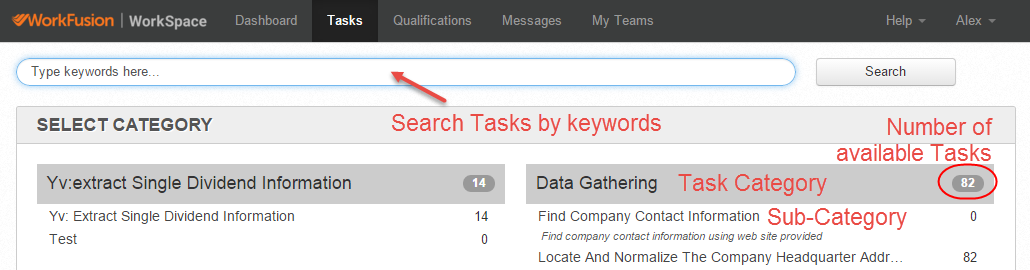
Navigate to the Tasks in the top menu. You can start searching Tasks by doing one of the following actions:
Type the keywords (for example, Classification, Translation, Information Extraction) in the search field, click the Search button, and review the results.
Or click Task categories or sub-categories that fit your skills and interests.
The number next to Category name shows the amount of Tasks available for you in this Category.
You will see the list of Task Groups. Expand the Task Group by clicking its name or by clicking the Expand all link.
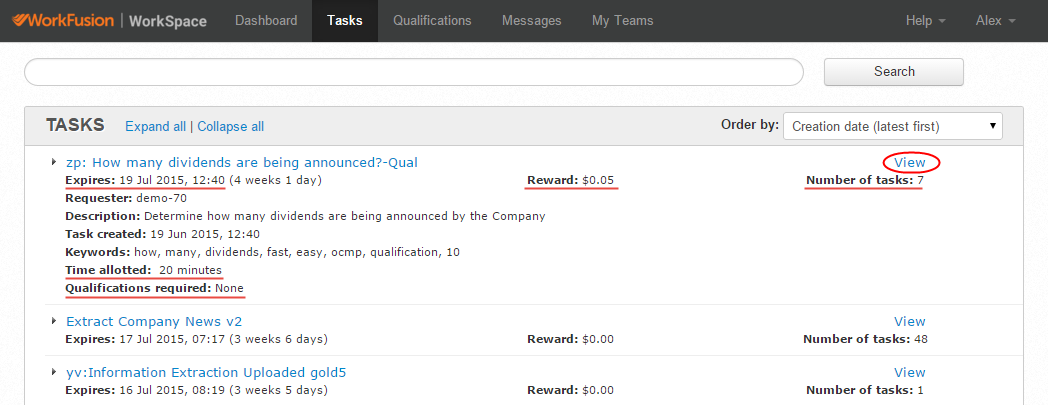
If the Task Group Description, Time Allotted, Reward, and other parameters are suitable for you, click the View link in the right corner.
If you haven't found available Tasks, try to obtain different Qualifications. Workers with Qualifications can access the bigger number of Tasks with higher reward.